


Computer Help from your Friendly How-To Geek... a collection of tips and tricks for the iPad.
Via Caroline Bucky-Beaver

 Your new post is loading...
 Scoop.it! Computer Help from your Friendly How-To Geek... a collection of tips and tricks for the iPad. Via Caroline Bucky-Beaver No comment yet.
Sign up to comment
Scoop.it!
This guide is designed for teachers just beginning with using the iPhone, iPod touch and/or iPad with students. It covers basics of the hardware and software - but also gives direction on how to de... Via Caroline Bucky-Beaver
Scoop.it!

Apple Inc.’s next iPad, expected to go on sale in March, will sport a high-definition screen, run a faster processor and work with next-generation wireless networks, according to three people familiar with the product.
Scoop.it!

A word of advice: Don’t begin with the tools. Begin with a strategy — a social media game plan. Think of this as a multi-step process: Listen, learn, engage, act and measure. Listening is only the first step — you need to take action on what you discover. (Socialbrite can help you with an integrated approach to social media.)
Via Carlos Blé, ABroaderView
Scoop.it!

IAC-owned video site Vimeo is going mobile in a big way, with the release of apps for Android, the Kindle Fire and Windows Phone marketplaces. Those new apps are designed to let users upload, share and view videos on their mobile devices. Via J Lynn Lock, ABroaderView
Scoop.it!
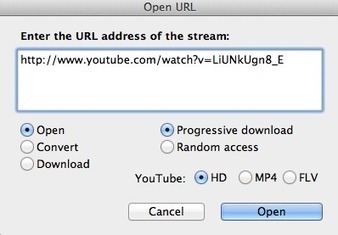
"Have you ever tried to download a YouTube clip? If you Google “how to download YouTube videos” then you’re faced with an overwhelming number of links and options that often don’t work or look to be some type of scam.
Enter MPEG Streamclip (made in Italy by Stefano Cinque).
It’s very simple to do. First, find your YouTube clip of choice and copy the URL.
Then go under File: Open URL: - You’ll then get a dialog box where you can paste the YouTube URL:
Open will open the YouTube clip in the MPEG Streamclip window where you can then do just about anything with the clip...
Download is my favorite option and it will do just that: download the YouTube clip to your hard drive in the format you want...
Fast and easy. If you notice there’s even a radio button for HD. Leave that checked and you’ll get an HD version of the clip if it is available."
Uncovered by PlanetMitch
Full tutorial with screenshots: http://provideocoalition.com/index.php/ssimmons/story/did_you_know_mpeg_streamclip_could_convert_you_tube_videos/
Download MPEG Streamclip (Mac and Win) here: http://www.squared5.com/
(Curated by Robin Good) Via Robin Good, J Lynn Lock, ABroaderView
Scoop.it!
Amit Agarwal has a scoop on the next upcoming version of the YouTube video player. He writes:
"The next version of YouTube video player will have one very useful feature – you can hover your mouse to any point in the video, without actually moving the playhead, and the YouTube player will show you an image thumbnail of the video frame at the position.
Thus you can easily get a visual gist of the whole video while the clip is still buffering.
I recorded a screencast video and that should give you a better idea of this new feature."
Read the full story: http://labnol.org/?p=20708  Via Robin Good, ABroaderView
Scoop.it!

Capture anything you see on your PC screen! SnapIt is convenient for bloggers who capture and crop images for ther posts, for tech writers who need to describe menus and interfaces of applications, web designers and those who work with graphics every day. Software is for sale.
Scoop.it!

Edmodo.com is a private online social platform for teachers and students to share ideas, files, events and assignments. Built on a microblogging model, the site allows teachers the ability to handle a good deal of class activity online. Teachers can send out assignments, receive completed assignments and assign grades using the online platform. In addition, they can maintain a class calendar, store and share files, have a public (RSS) stream, and conduct polls. Teachers can also use the site to send text (SMS) alerts to students.
Via Steve Dembo Via Steve dembo
Scoop.it!

Conceptboard goes beyond the idea of online whiteboards and adds realtime collaboration, document sharing, visual feedback, task management, live meetings and more.
Scoop.it!

The wide-ranging Federal Trade Commission investigation into Google’s potential anti-competitive practices has been expanded to include its Google+ social networking service, according to a Bloomberg report citing “people familiar with the situation.”...
Scoop.it!

What would you use to send a very important document? Perhaps you could just send it using a regular email program, but maybe you should consider using Doocuments. This cloud computing tool allows users to take existing documents and add a layer with new features. These features include an expiration date, access certification, watermarks, and a feature that will only allow certain pages to be printed. This version is compatible with all operating systems.
Scoop.it!

Videos for students to learn from. Organized. Educational videos in a giant directory. Free educational videos for K-12 students. Thousands of hand-picked K-12 videos, teacher reviewed, independently rated, titled, and described. |
Scoop.it!
Getting Started: Classroom Ideas for learning with the iPad - Resource booklet for schools. Housed on Scribd Via Caroline Bucky-Beaver
Scoop.it!

You can gain an insight into ideas, content and events that would otherwise pass you by, and you can also engage in great conversations with people all over the globe who share similar interests, passions, problems and experiences. It's all a question of finding people, resources and sites that you can learn from. But how to do it, when you are in danger of being lost in a tsunami of web content? Well, there is a growing range of useful social media tools you can use to track down what you need. Such tools can help you to build your PLN into something that is powerful. The possibilities are endless, but let me share just five ways I have personally used:
Scoop.it!

Robin Good: Slidestaxx is a web-based service which allows anyone to easily create a shareable and embeddable visual slide-show by selecting and bringing together existing images, video clips, web sites and other content already available online.
My take: I like the idea of being able to produce presentations that contain properly "credited" third party content, but it would be even better to have these functionality integrated in your existing favorite presentation tool rather than elsewhere.
I think that this curation-presentation format suffers from the natural constraints of how we look at presentations. One slide at a time. I think that any curated-format benefits from providing the possibility to see both the detail and the larger picture and in this case I feel that the ability to see the presentation, also as an album, woud greatly benefit the value and benefits of this tool.
The service is free to use.
See a few examples: http://www.slidestaxx.com/about-slidestaxx Find out more: http://www.slidestaxx.com/
(Reviewed by Robin Good) Via Robin Good, Frédéric DEBAILLEUL, Ana Rodera, Kim Flintoff, michel verstrepen
Scoop.it!
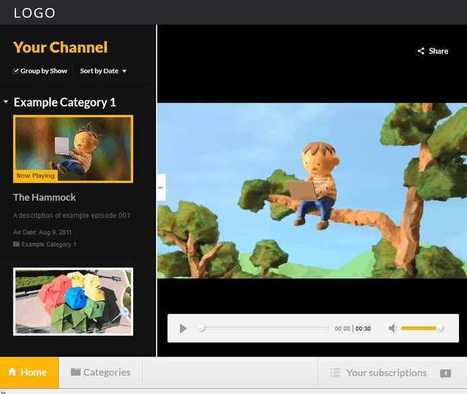
Perhaps Google isn't all bad these days! A new open source HTML5 video player is yours for the download. As well as being a good showcase app it is also practically useful. It is the architectural core of the new 60 Minutes and RedBull.tv apps available in the Chrome Web Store.
As well as being a basic video player, the app allows the user to add their own content, be it a single episode or a playlist. A Category page also allows the user to build up a catalog of things they would like to watch. The user interface is fairly polished and you can try it out at The Video Player Sample.
The key features of the app are (according to the Google Code Blog): - A beautiful video watching experience, including a full screen view - Ability to subscribe to shows, watch episodes, create play lists - Support for multiple video formats depending on what the user’s browser supports (including WebM, Ogg, MP4, and even a Flash fallback) - A Categories page with an overview of the different shows/categories available in the app - Notifications of new episodes (when the app is installed via the Chrome Web Store) - Built in support for sharing to Google+, Twitter and Facebook - To ensure easy customization, all source files, including the Photoshop PSD’s, are included Via Nicolas Weil, ABroaderView
Scoop.it!

Maybe you're not a Twitter-vixen, posting 200 tweets a day about all the cool places you've been and all the cool things you're doing. Maybe you're not yet a Facebook poster with 1000 friends who a... Via ABroaderView
Scoop.it!

Are you thinking of using Google+? Via Tina Cook, ABroaderView
Scoop.it!

Have you ever felt troubled when trying to add a stunning custom tab to your page but don’t know how? Since last year, I had found several that works great in providing sub-tabs and some with fan gate options. Today, it’s all about templates and widgets! Wouldn’t it be great if you can add one of these facebook applications together with some from 23+ Facebook Page applications to improve fans engagement? After all, it’s all about trial and error. Let’s head right to the facebook apps: 7 Killer Tab Customizers for Facebook Pages Via Tom George, ABroaderView
Scoop.it!

Camtica enables you to create professional screen recordings, presentations, tutorials and more. You can record any desktop activity with voice, webcam and animated mouse clicks. The resulting video can be saved in various formats including AVI and WMV. Software is for sale.
Scoop.it!

Everloop revolutionizes the way kids under 13 interact online. Our mission is to provide an online social platform where kids can safely be kids as long and as much as possible. Everloop has created a unique, age-appropriate social media experience for kids with customized micro-networks or “loops” that safely connect tween-relevant content, services, applications and experiences. Everloop’s state-of-the-art privacy protection and monitoring technology (patent pending) guards young users against bullying, predators, bad language and sharing of personal information. We partner with leading innovators to provide tween-focused entertainment as well as top-shelf educational activities.
Scoop.it!

For Educators and Parents For pre-K through Middle School: We serve as your roadmap to iPhone, iPad and iPod apps so that you know which ones have educational value that supports student learning. Are you looking for ways to enhance classroom learning for the whole classroom? Are you focused on how to provide extra learning support for an individual student, whether in the classroom or at home? At Mind Leap you will be able to find the education apps you need for whatever purpose, and you will understand the educational value of the apps you are considering.
Scoop.it!

If you're sharing your own video, you probably don't need anything extra, but when you share other people's videos, sometimes you want to tweak the video—start it at a certain point, ignore more boring parts of the video, or just add notes to the video to get your point across. YouTube doesn't let you do this, but free service EmbedPlus adds these and some other pretty neat features to YouTube embeds.
Scoop.it!

Shwup is now known as muvee Cloud. Lets you create an album of videos and images from an event, say, a conference or a party. Invite others who were at the same event to upload their photos and videos then edits them together into your own slideshow (called a "muvee"). Easy to use; has a nice polished look. Free for educators and students. |






