


Social media resources like Google Plus offer a great opportunity for growth in education through collaborative work, communication, and camaraderie.

 Your new post is loading...
 Scoop.it! Social media resources like Google Plus offer a great opportunity for growth in education through collaborative work, communication, and camaraderie. No comment yet.
Sign up to comment
Scoop.it!

By Chris McConnell
"More recently I’ve discovered some great new tools to read and share my favorite content which I’ve included here in this list. Whether you are a person who just likes to stay on top of the latest news, a blogger like me who needs a way to organize the vast amount of information that comes my way or a person who just enjoys sharing what they find with others you’ll love this list. Tech-savvy readers may know of some of these tools already but I’m guessing there’s plenty of new sites and services here for you to discover."
Scoop.it!

By Greg Swanson
"I have yet to find the perfect Digital Portfolio app (for iOS devices) that I think I would use exclusively in a Visual Arts class. Some apps can be used as graphic portfolios or as beautiful sketchbooks, others are great at sharing. Not all of the apps available are great at all of these things. I have spent a heap of time trying to find one and would be more than happy for someone to send me the name of one they are using successfully. Having said that the following are apps that I would consider using;"
Scoop.it!

From
cel

From the website
"Celly makes texting at school educational. Celly is a platform of toolsthat enhances school communicationCreate cells, instant mobile networks that connect your schoolMembers can join a cell by texting or logging in to the webClick on the following scenarios to learn about how schools are using Celly"
Use for: Study Groups Teams & Clubs Field Trips Clickers & Polling Reminders & Alerts Interactive Walls Outreach & Feedback Notes News & Information
Via Eric Sheninger
Scoop.it!

A superb storyboading site where users click and drag items onto the screen. A great tool for a class just being introduced to storyboarding. http://ictmagic.wikispaces.com/English Via Yael Even-Levy, PhD (Second Life: JoelleYalin)
Scoop.it!

Author identified only as Glenn W.
"Publishing student projects online in visually stimulating formats is now easier than ever. There are tons of tools available that you and your kids can use to get stuff out there.
"The following web 2.0 tools are some of my favorites for showcasing student projects. The list includes two different kinds of sites. The first type requires that kids create work using a desktop tool such as Word, Keynote or Pages and then the site converts that work into online content. The second lets kids doing the actual creating online." Via Yael Even-Levy, PhD (Second Life: JoelleYalin)
Scoop.it!

By Abhijit Kadle
"We’ve shared some of our thinking on mobile learning through blogs posts in the recent past and thought it worthwhile to collect the information into a single booklet for you. This eBook called ‘Mobile Learning – A Quick Start Guide’ can help you understand when to use, how to design, develop and implement mLearning in a way that works for your organization. It gives suggestions on strategy, illustrates a planning framework, lists the tools and approaches available. Ultimately, it will help you design and implement an mLearning strategy that works for your organization and delivers results."
Scoop.it!

Presented by Gail Palumbo, Thursday May 17 at 4 pm EDT. To log into the webinar, go to
Scoop.it!

A 45-minute video tutorial on how to search EBSCOhost, perhaps the largest and most frequently used online subscription database. The website includes a link to handouts that accompany the video.
EBSCO is recommended by my university library as one of the best sources to search for education resources.
Material has been prepared y the Minnesota Office of Higher Education and the University of Minnesota Libraries. -JL
Scoop.it!

By Tasha Bergson-Michelson
"Based on how Google ranks search results, typing in a question will be more likely to bring back pages with a question for a title. In many of our everyday searches this is an easy way to find question and answer sites when we want them, but Q&A sites are not necessarily authoritativesources for school work. So I have students write down their questions and teach them how to mark them up to create queries, the first step being to identify the significant words.
"Explaining how to distinguish the important words has sometimes proven challenging with younger students. Recently, however, fellow Googler AJ Kimbembe observed that the mark-up process reminded him of rebuses. You might remember these puzzles from childhood, where select words in a narrative are replaced with pictures. We started playing with the idea, and realized this could be a great lesson for students in identifying the best search terms."
Scoop.it!
In today's world of near-ubiquitous connectivity, in which ordinary people have almost instantaneous access to unlimited stores of information and the ability to interact with anyone, anywhere, anytime, what does it mean to be an effective citizen? What skills and knowledge do our students need to participate fully in a world transformed by technology? What role should our schools play in developing effective digital citizens? Via Nik Peachey
Scoop.it!

Project-based Learning engages students in projects that allow them to construct their own knowledge and develop authentic products while dealing with real-world issues. In order to challenge students on this level, it is helpful to frame their work with an authentic task. Via Nik Peachey, Jim Lerman
Scoop.it!

By Joyce Valenza
"Recently I’ve been exploring the options for slide-casting and screen-casting...
"I’d like to begin to archive and more broadly share professional development. I’d like to offer teachers easy ways to present and archive instruction. To offer students new strategies for presentation and for archiving their work. To help me rehearse and archive my own formal presentations. And I am planning to do a little online adjuncting in the fall.
"And, as more schools and more individual teachers adopt the Flipped Classroom model, we will be looking for options to present content, lecture, and video as homework, so we can devote class time to more interactive and engaging collaborative learning strategies." |
Scoop.it!
"Donald wanders into a magical land where the beauty of the laws of mathematics unfold before him."
When I was a school AV coordinator early in my career, this was one of the most popular films for teachers to show their classes (back in the days of 16 mm movie projectors). -JL Via Nicola Taylor, FLTechDev
Scoop.it!
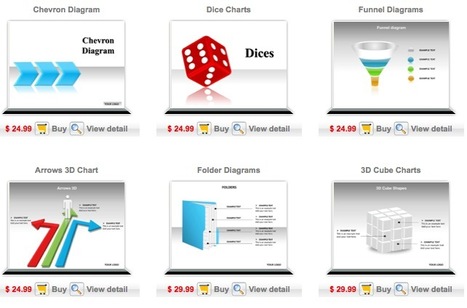
Robin Good: If you are looking for professionally-looking templates for POwerPoint, I suggest you to give a look to the dedicated search engine section on Slideworld: http://www.slideworld.com/ppt_templates/powerpoint-templates.aspx
Here you can find a wide variety of professionally designed PowerPoint templates / slides that can be purchased online and then edited and personalized on your computer.
More info: http://www.slideworld.com/
(Thanks to Baiba Svenca for having uncovered this) Via Robin Good, Pedro Ramalho 
Jeff Domansky's curator insight,
June 29, 2013 8:39 PM
Great marketing, PR, content marketing and speaking resource
Scoop.it!

A selection of ten of the best Pinterest apps, hacks and tips that will help you get even more out of the service, or use it for even more fun! Via Dr. Susan Bainbridge
Scoop.it!

How to integrate Gamestar Mechanic into the classroom: There is so much to learn from digital games. As a player, students learn to think strategically, persist through failure and experience epic wins that can translate to what they do and are willing to try out in real life. As a designer students learn systems thinking, creative problem solving, digital art and aesthetics, and storytelling and writing. Students love being able to bring their creations and ideas to life in the form of a game. Gamestar Mechanic could be the key to unlocking the storytelling genius in your reluctant writers. Via Consultants-E, Yael Even-Levy, PhD (Second Life: JoelleYalin)
Scoop.it!

Nice visualization of the 2001 version of Bloom's Taxonomy - Cognitive Domain. Don't forget he also talked about the Affective and Psychmotor Domains. Cognition is not all there is. -JL Via Yael Even-Levy, PhD (Second Life: JoelleYalin)
Scoop.it!

...I like to place printed QR codes in a dozen or so locations in the room. Those QR codes are linked to my slides and digital handouts. Via Yael Even-Levy, PhD (Second Life: JoelleYalin)
Scoop.it!

From the website - April 12, 2012
"So you’ve got one or a few iPads that you want to use in the classroom. You could visit the Apple App Store’s education section and peruse the many offerings… do some Google searches to figure out what’s good… or just use this print-friendly image below to get started! Following on the heels of our wildly popular Twitter Spectrum, we wanted to build an ‘iPad Spectrum’ for all our wonderful readers out there. This image can be easily shared, downloaded, and printed. Just click here to download the PDF version. Want this and even more? Look for our upcoming mini-issue in the Edudemic Magazine iPad app next week!" Via Yael Even-Levy, PhD (Second Life: JoelleYalin)
Scoop.it!

From the website
Free technology tools for teachers to use. Make web pages, send reminders to parents and students, collaborate and track goals easily.
Scoop.it!

JSTOR is one of the larger online databases for academics. This 6-minute video provides several ways to search for articles and other items in JSTOR, including Advanced Search. -JL
Scoop.it!

Studying and researching online is becoming an ever more important element of our digital skill set. I spend a lot of time reading online and skimming through numerous articles from journals and blogs, so I'm always keen to find useful tools which can assist me or my students in this and make the process more efficient. One tool which I have just discovered and which I hope will help with this process is Cruxbot. Via Nik Peachey
Scoop.it!

To teach responsibly in a digital age, we have to respect what our tools can do to help us learn together -- and what tools alone cannot do. We need to be prepared to adapt them to our specific needs as teachers and learners. We need tools that are as open as possible, that are designed to encourage students to participate and not simply consume. And we need to support teachers who are also learning how to use new tools for the most innovative, imaginative, interactive teaching. Via Nik Peachey, Jim Lerman
Scoop.it!

"Almost a million images of New York and its municipal operations have been made public for the first time on the internet.
"The city's Department of Records officially announced the debut of the photo database.
"Culled from the Municipal Archives collection of more than 2.2 million images going back to the mid-1800s, the 870,000 photographs feature all manner of city oversight -- from stately ports and bridges to grisly gangland killings."
GREAT SOURCE OF WRITING PROMPTS -JL |






