Into the Driver's Seat
486.8K views | +6 today
Into the Driver's Seat
Building learners' independence through thoughtful technology use
Curated by Jim Lerman
Your new post is loading...
Rescooped by Jim Lerman from :: The 4th Era ::
May 1, 2012 1:05 PM
Scoop.it!

Brewster Kahle | Custom Schooling: Affordable One-to-One Education

From the website


"Motivated by the limitations of both public and private schools to meet the needs of his son, Internet Archive founder Brewster Kahle and his wife embarked on a mission to create an educational experience customized to their son. Inspired by their results, Kahle set out to determine if this model of customized education could scale beyond those who could afford it. He shares his surprising findings in this Big Ideas Fest presentation. You can read more about the Custom Schooling experiment on his blog: http://brewster.kahle.org/2011/04/28/custom-schools-with-class-size-of-1-to-4/"

No comment yet.
Rescooped by Jim Lerman from Online Collaboration Tools
April 30, 2012 10:34 PM
Scoop.it!

How To Record a Google Hangout Session (from a Mac)

How To Record a Google Hangout Session (from a Mac) | Into the Driver's Seat | Scoop.it

Robin Good: Here's is a good and well illustrated step-by-step tutorial on how you can record a full Google Hangout video collaboration session (from a Mac).


Useful. Illustrated. 8/10


Full step-by-step tutorial: http://www.tildee.com/5owhfh ;


Via Robin Good
No comment yet.
Scooped by Jim Lerman
April 30, 2012 7:57 PM
Scoop.it!

Northeast Ohio schools welcome electronic devices to promote learning | Cleveland Plain Dealer

Northeast Ohio schools welcome electronic devices to promote learning | Cleveland Plain Dealer | Into the Driver's Seat | Scoop.it

By Ellen Kleinerman

Summary by SmartBrief on EdTech


"Students in some Ohio school districts now are allowed to bring their own electronic devices to school. Once banned from classrooms, such devices as cellphones, iPods, iPad tablet computers and e-readers are now seen by many educators as valuable classroom resources. Students use the devices to scan homework assignments, take notes and record data, receive texts from teachers, watch teacher-created podcasts and more."

No comment yet.
Scooped by Jim Lerman
April 30, 2012 12:01 AM
Scoop.it!

How To Create a Free iPhone Ringtone Using iTunes

How To Create a Free iPhone Ringtone Using iTunes | Into the Driver's Seat | Scoop.it

Want to make an iPhone ringtone with your own music? Just follow the step-by-step instructions below.Make sure to start out with songs that are mp3s or are otherwise DRM-free.

No comment yet.
Scooped by Jim Lerman
April 29, 2012 11:05 PM
Scoop.it!

Ipadschools - VGA Output Apps

Ipadschools - VGA Output Apps | Into the Driver's Seat | Scoop.it

Great list of apps that work with the iPad's VGA out connection to increase the iPad's functionality for presentations. -JL

No comment yet.
Rescooped by Jim Lerman from Just iPadding Along
April 29, 2012 10:57 PM
Scoop.it!

Benningtontraining - ipads

Benningtontraining - ipads | Into the Driver's Seat | Scoop.it

Extensive tutorial resources for iPads. -JL


Via Karen Stadler
No comment yet.
Scooped by Jim Lerman
April 29, 2012 10:48 PM
Scoop.it!

Ultimate guide to iCloud | iMore

Ultimate guide to iCloud | iMore | Into the Driver's Seat | Scoop.it

By Renee Ritchie


"Everything you need to know about setting up, backing up, restoring, and updating your iPhone, iPod touch, and iPad, and managing your iTunes apps, books, music, TV shows, movies, Match, and Photo Stream in the cloud iCloud...


"With iCloud, you no longer need to plug your iPhone, iPod touch, or iPad into iTunes on your Mac or Windows PC to set it up for the first time, to keep it backed up, or to upgrade the software. Now you can do all of that, and more, faster and more easily, over-the-air (OTA) on your local Wi-Fi network. Because routine tasks, like backups, happen automatically, you don’t have to worry about forgetting them and then finding out you don’t have one when you need it most."

No comment yet.
Scooped by Jim Lerman
April 29, 2012 10:40 PM
Scoop.it!

HelloFax Turns Google Drive Into a Fax Machine

HelloFax Turns Google Drive Into a Fax Machine | Into the Driver's Seat | Scoop.it

By Emily Price


"HelloFax got one step closer to its goal of eliminating the fax machine this week. The service has been integrated into Google Drive.


"HelloFax’s Google Drive integration allows you to fax any document from Google Drive, as well as receive faxes from others in a special HelloFax folder within the drive."

No comment yet.
Rescooped by Jim Lerman from Digital Presentations in Education
April 29, 2012 10:27 PM
Scoop.it!

Do it before everyone else does: Create presentation slides with iPad drawing app Paper

Do it before everyone else does: Create presentation slides with iPad drawing app Paper | Into the Driver's Seat | Scoop.it
iPad drawing and painting app Paper isn't short on praise. It's received a great response since it launched a few short weeks ago, having been downloaded over 1.5 million times in its ...

Via Baiba Svenca
No comment yet.
Rescooped by Jim Lerman from Digital Presentations in Education
April 29, 2012 9:42 PM
Scoop.it!

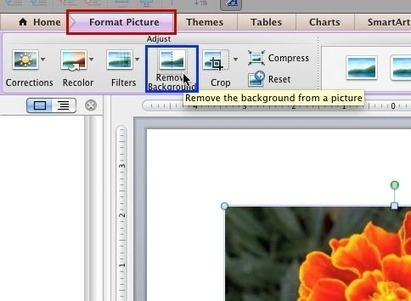
Remove Background from Pictures in PowerPoint 2011 for Mac

Remove Background from Pictures in PowerPoint 2011 for Mac | Into the Driver's Seat | Scoop.it
Learn how to remove parts of your picture to make a transparent background in PowerPoint 2011.

Via Baiba Svenca
No comment yet.
Rescooped by Jim Lerman from Digital Presentations in Education
April 29, 2012 9:35 PM
Scoop.it!

Slideworld - PowerPoint Search Engine

Slideworld - PowerPoint Search Engine | Into the Driver's Seat | Scoop.it

Slideworld is a renowned ppt search engine which has massive collection of PowerPoint templates and PowerPoint presentations. Slideworld’s PowerPoint templates are very unique and attractive. PowerPoint template can be edited and could be customized easily...


Via Baiba Svenca
No comment yet.
Scooped by Jim Lerman
April 29, 2012 6:07 PM
Scoop.it!

10 Tools to help English Students to be Autonomous

By Russell Stannard


"This site contains details of 10 greattools we can use to develop autonomy in our English learners. It includes descriptions, linksand step by step videos that go right through and show you how to use the tools in great detail."

No comment yet.
Scooped by Jim Lerman
April 29, 2012 2:30 AM
Scoop.it!

5 Minute Classroom Tech Tutorials | Ed Tech Moment

5 Minute Classroom Tech Tutorials | Ed Tech Moment | Into the Driver's Seat | Scoop.it

Ed Tech Moment gives classroom teachers easy-to-follow tutorials to integrate technology into the classroom.


Bill and Tim are working classroom teachers and know how precious teachers' time is--each episode takes just 5 minutes.

No comment yet.
Rescooped by Jim Lerman from mlearn
May 1, 2012 8:29 AM
Scoop.it!

OnLive Desktop: An iPad Based Technology for the Classroom | Higher Education Teaching and Learning Portal

OnLive Desktop: An iPad Based Technology for the Classroom | Higher Education Teaching and Learning Portal | Into the Driver's Seat | Scoop.it

This article presents a review of the iPad application “OnLive Desktop” and discusses its potential classroom benefits.


Via Donna Clark, michel verstrepen
No comment yet.
Scooped by Jim Lerman
April 30, 2012 8:04 PM
Scoop.it!

Miami-Dade to launch new video game-themed magnet - Schools - MiamiHerald.com

Miami-Dade to launch new video game-themed magnet - Schools - MiamiHerald.com | Into the Driver's Seat | Scoop.it

By Laura Isensee


"At the iTech Academy at Miami Springs Senior High, students can learn how to design and program video games. Educators say that coaches students to solve problems and also prepares them to work in growing industry.


"It will be the first video game-themed magnet for the nation’s fourth-largest school district. The twin focus on design and coding ties into state and national efforts to promote science, technology, engineering and math, or STEM."


No comment yet.
Scooped by Jim Lerman
April 30, 2012 12:11 AM
Scoop.it!

The Graphics Fairy - Crafts: How to Find the Original Source of an Image on Pinterest

The Graphics Fairy - Crafts: How to Find the Original Source of an Image on Pinterest | Into the Driver's Seat | Scoop.it

Author identified only as Karen


"This is a neat little trick that my son taught me. I'm sure some of you probably already know about this, but in case you didn't I think you will find it to be super handy, particularly if you are a Pinterest user! More than a few times, I've clicked on a Pinterest Pin, in order to find the instructions to an awesome Craft Tutorial, only to find that the Pin went somewhere other than the original source. If that happens to you, this is how you can find it."

No comment yet.
Rescooped by Jim Lerman from Learning on the Go
April 29, 2012 11:50 PM
Scoop.it!

Screenbird - Free screencasting

Screenbird - Free screencasting | Into the Driver's Seat | Scoop.it

Screenbird. Free Simple, Sharable Screen Recording. No Downloading Executables. Works through Java in your browser.


Key features of free version:

YouTube integration

Short Links

30min Videos

Play on any device

Record screen or just a part

Record Audio

Account Video Limit: 150min

Video Expiration: 6 months

Users Per Account: 1


New app. Looks very good. -JL


Via AdinaSullivan
No comment yet.
Scooped by Jim Lerman
April 29, 2012 11:01 PM
Scoop.it!

iPad Creative - iPad Creative Blog - 5 ways to start creating wonderful content with your new iPad

iPad Creative - iPad Creative Blog - 5 ways to start creating wonderful content with your new iPad | Into the Driver's Seat | Scoop.it

From the website


"So you've browsed your favourite web sites, installed Real Racing 2 HD, got up to speed on your favourite social networks and messed around with Photo Booth - what's next? If you only ever use your new iPad for consuming content, you're missing out on some of the most satisfying aspects of the iPad experience - creating content.


"Here we list 5 creative things you can do with your iPad along with links to help you to explore each area in more detail."

No comment yet.
Rescooped by Jim Lerman from Learning With ICT @ CBC
April 29, 2012 10:55 PM
Scoop.it!

13 Ways To Use iMovie In The Classroom

13 Ways To Use iMovie In The Classroom | Into the Driver's Seat | Scoop.it

From the website


"Is there an app for that? Well, chances are there are dozens of apps for anything you want to do, but sometimes you find one app that is robust enough to have multiples uses for you and your students. For me, iMovie is that app. I find myself using it for everything from slow motion videography to documentation, to presentations and everything in-between."


Via Jason Dargent
No comment yet.
Scooped by Jim Lerman
April 29, 2012 10:44 PM
Scoop.it!

6 Tips to Free Up Tons of Storage Space on iPad, iPhone, and iPod Touch | OSX Daily

6 Tips to Free Up Tons of Storage Space on iPad, iPhone, and iPod Touch | OSX Daily | Into the Driver's Seat | Scoop.it

"Are you feeling the pinch of the limited storage capacity on an iPad, iPhone, or iPod touch? If you are running low on space, check out these tricks to greatly ease any potential storage squeeze you may be experiencing with your iOS gear."

No comment yet.
Rescooped by Jim Lerman from New Web 2.0 tools for education
April 29, 2012 10:32 PM
Scoop.it!

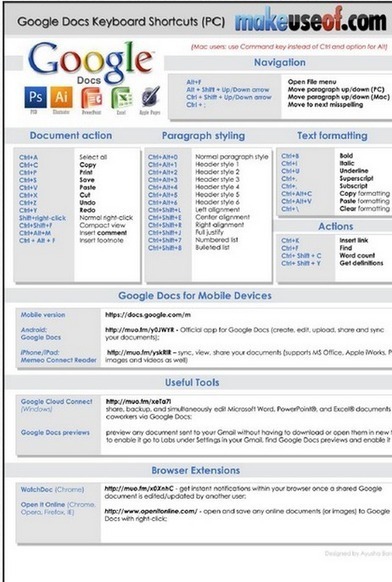
A Set of Great Tips about Google Docs

A Set of Great Tips about Google Docs | Into the Driver's Seat | Scoop.it

Cheatsheet that features " handy keyboard shortcuts, web browser addons aimed at Google Docs users and a number of useful third-party sites that add additional features to Google Docs."


Via Kathleen Cercone
No comment yet.
Rescooped by Jim Lerman from Digital Presentations in Education
April 29, 2012 9:44 PM
Scoop.it!

Grovo: How to Use Prezi Effectively

Grovo: How to Use Prezi Effectively | Into the Driver's Seat | Scoop.it

Excellent video tutorials for creating presentations online.


Prezi is a free, cloud-based presentation site. With Prezi, you can make presentations that capture your audience's attention with different media and presentation styles online. Learn to use Prezi effectively with Grovo’s video tutorials, conceptual lessons, expert interviews...


Via Baiba Svenca
No comment yet.
Rescooped by Jim Lerman from Digital Presentations in Education
April 29, 2012 9:39 PM
Scoop.it!

Free Screen Capture - ScreenHunter

Free Screen Capture - ScreenHunter | Into the Driver's Seat | Scoop.it

An award-winning screen capture solution to capture your screen, print and edit.
Also with auto-scroll web pages, auto-capture, webcam and video screen capture.


Via Baiba Svenca
No comment yet.
Rescooped by Jim Lerman from Digital Presentations in Education
April 29, 2012 9:31 PM
Scoop.it!

Ten Tips to Create Useful and Beautiful Visualizations

Learn how to create useful and beautiful data visualizations by following these 10 straightforward tips.

Via Baiba Svenca
No comment yet.
Scooped by Jim Lerman
April 29, 2012 2:35 AM
Scoop.it!

Infinite Thinking Machine

Infinite Thinking Machine | Into the Driver's Seat | Scoop.it
What is the Infinite Thinking Machine?


First launched in 2006, the Infinite Thinking Machine (ITM) is a high-energy Internet TV show directly targeted at K-12 educators, parents and students. Our goal is to inspire creativity and innovation in education.


New episodes are released fortnightly (Google it!) during the school year. The show features a classroom teacher as its host, engaging educators as "Field Trip" correspondents and amazing innovators as guests. Innovative approaches to education are showcased, and the teachers, administrators and students behind them are celebrated. Special segments like 'HackEd' address deeper topics head-on, challenging conventional edu-thinking. Currently in its second season, the ITM depends on a mix of funding from its producing organization, education partners and corporate sponsors.
No comment yet.