Your new post is loading...

|
Scooped by
Jim Lerman
July 15, 2012 7:42 PM
|
By Richard Byrne "YouTube can be a great place to find educational videos to use in your classroom. But YouTube isn't the only place where you can find good educational video content. These services will allow you to organize playlists from multiple video sharing services. Please note that if YouTube is blocked in your school, the only tool in this list that will provide a work around for you is Miro. Click here for a list of alternatives to YouTube."
|
|
Scooped by
Jim Lerman
July 15, 2012 7:32 PM
|
By Patti Grayson "Skype became a new and exciting way to learn in my classroom this year. It began with Mystery Skype. Since our 4th grade Social Studies curriculum focuses on states and regions, I was excited to learn about this fun activity. Our class would receive a Skype call, but the caller’s location was a mystery. We took turns asking questions and sharing clues about geography, climate, history, attractions, and famous people before guessing the location of our mystery caller! With students on netbooks, asking questions, providing answers, writing information on the board, and manning the maps, all hands were on deck and engaged as we learned about states across the U.S."
|
|
Scooped by
Jim Lerman
July 15, 2012 7:17 PM
|
By Steve Kinney "...deploying iPads at any kind of scale is just short of maddening. While the process of tapping around to install one app on one iPad isn’t too bad, installing a dozen apps on hundreds iPads isn’t a particularly appealing way to spend a month. If you are going to deploy iPads at scale, you need a strategy. You need a battle plan. In addition, you will also need to stay hydrated. I don’t think I’ve discovered the silver bullet, but I’ll share some of my experiences with you in order to, hopefully, shorten the learning curve."
|
|
Scooped by
Jim Lerman
July 15, 2012 2:14 PM
|
By Brian Kuhn "I really like how this work will use technology to make learning more visible for families. One of the frustrations for parents (my wife and I raised three boys) is feeling like they are in the dark about their kids learning. Report cards are a mere snapshot of what students know at certain points. But with this digital approach, parents will see (pictures, video, text), hear (audio), and experience (video) evidence of their kids learning. They will hopefully be able to comment and provide feedback online, creating a dialogue about their kids learning."
|
|
Scooped by
Jim Lerman
July 14, 2012 12:27 AM
|
By Dave Guymon "The versatility of an iPad for education is endless. I am no expert, nor even a veteran in curating apps for the classroom, but I am off to a great start for this next school year. Here is how I have discovered using an iPad in the classroom. No, I'm not referring to a 1:1 iPad scenario. I am talking about a 1:30 situation."
|
|
Scooped by
Jim Lerman
July 14, 2012 12:14 AM
|
By Susan Lucille Davis "These questions, for me, go straight to the heart of the ePortfolio debate. If a student does not learn to curate and make sense of his or her own life, then when will that student gain the necessary skills of sorting, evaluating, designing, and processing his or her own content that will ultimately lead to self-determination and agency?"
|
|
Rescooped by
Jim Lerman
from teaching with technology
July 13, 2012 7:57 PM
|
"Have you ever been on the road and wish you could scan a document? Or in a meeting and needed to share a hard copy document? However, your scanner was back in your office… Today, I want to show you an easy solution."
Via John Evans, Digital Maverick, Louise Robinson-Lay
|
|
Rescooped by
Jim Lerman
from Personal Learning Network
July 13, 2012 7:11 PM
|
By Richard Byrne "Creating videos used to require that you own expensive equipment and software. Fortunately, that is no longer the case. In fact, now there are many tools you can use to create videos online. Here is a collection of some of my favorite tools for creating videos online."
Via Elena Elliniadou
|
|
Scooped by
Jim Lerman
July 13, 2012 6:41 PM
|
By Phillip Jones Summary by SmartBrief on EdTech "A North Carolina school saw a significant increase in students' standardized test scores following an initiative begun earlier this year in which every student at the school received an iPad tablet computer. Students reported feeling energized and excited to go to school and learn after receiving the devices, leased through grants"
"Personalized Learning Toolkits: Designing New Pathways for Every Learner", our ISTE 2012 presentation, has been posted. Learn how new pathways can be designed for every learner with personal learner profiles, personalized learning paths and digital backpacks to create the ultimate classroom.
Via Kathleen McClaskey
Biggerplate is the largest source of free mind maps offering a mind map library with hundreds of free templates for Mindjet MindManager, iMindMap, Xmind and MindGenius maps.
Via Baiba Svenca
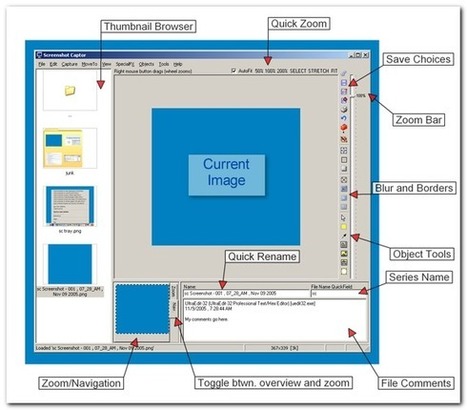
Screenshot Captor is a best-in-class tool for grabbing, manipulating, annotating, and sharing screenshots. It's different from other screenshot utilities in several notable ways...
Via Baiba Svenca
|
|
Rescooped by
Jim Lerman
from :: The 4th Era ::
July 11, 2012 3:59 PM
|
You can video conference, screen share, and chat. People can dial in by phone, or use their computer camera and microphone. We even record your meetings for later playback!
Via Baiba Svenca, Jim Lerman
|
|
|
Scooped by
Jim Lerman
July 15, 2012 7:37 PM
|
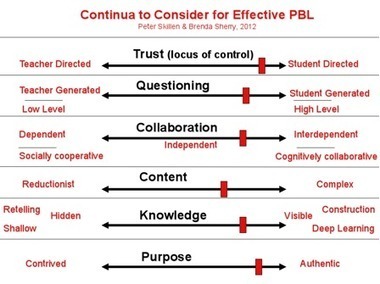
By Peter Skillen "I have created this diagram, enhanced by the critical eye of Brenda Sherry, which may be useful as you consider what is important to you and to your students. "We like to think with the frame of continua rather than dichotomies simply because things are rarely on or off, black or white, ones or zeroes! Flipping from one end to the other may not be the best solution for you! You may choose to slide more in one direction as suits your experience, the student’s experience, the purpose, type of project, and so on."
|
|
Scooped by
Jim Lerman
July 15, 2012 7:23 PM
|
By Lisa Nielsen "Only someone like Jeff Pulver could bring together the most brilliant future of education visionaries in one intimate gathering. Not only does he bring them together, but he is also inviting educators far and wide to come see, hear, question, and even talk with them and it only costs $1.40!!! "This conference provides a unique opportunity for educators to come together in a relatively intimate setting to listen to a day packed with the visionaries that are usually reserved for the stages at conferences internationally that require you to fork over some big bucks. "At the 140edu you have the chance to listen to numerous speakers give you their best 14.0 minutes of what education can and should be. Speakers leave time for questions and you can catch your favorites before or after their talk in the schmooze room where you can also help yourself to coffee and snacks."
|
|
Scooped by
Jim Lerman
July 15, 2012 2:11 PM
|
By Brian Kuhn "Sharing with others what we’ve learned is rewarding. Others are able to benefit from what we’ve discovered and we feel good about helping others with their learning. The saying “it is better to give than to receive” really is true isn’t it. I think the “movement” to document student learning provides a powerful way to share and reflect on learning. In my work in my District I have the privilege of visiting classrooms and documenting and sharing the learning teachers and their students are experiencing."
|
|
Rescooped by
Jim Lerman
from Scriveners' Trappings
July 15, 2012 1:37 AM
|
from the website "inklewriter is a free tool designed to allow anyone to write and publish interactive stories. It’s perfect for writers who want to try out interactivity, but also for teachers and students looking to mix computer skills and creative writing. "The inklewriter lets you write as you play, branching the story with choices, and then linking those stories back together again. It keeps track of which paths you’ve finished, and which still need to be written. There’s no set-up, no programming, no drawing diagrams. Just start writing and see where it takes you. Oh, and it’s free to use. And once written, you can share your stories with whomever you like."
|
|
Scooped by
Jim Lerman
July 14, 2012 12:22 AM
|
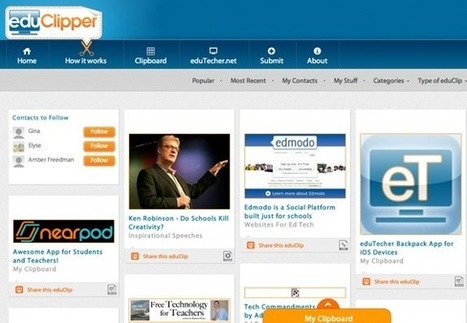
Audrey Watters on Adam Bellows' new web service, eduClipper: "Long before “curation” became an edu buzzword, Bellow has been pulling together lists of Web tools for educators on his eduTecher site – a rich resource with links, ratings, comments, and ideas about how these tools could be used in the classroom. An award-winning, former high school teacher and district tech trainer, Bellow has made a career out of thinking and speaking and teaching smartly about sharing Web resources among teachers. "That makes it ever-the-more interesting, I think, that Bellow has built a tool that puts this resource-gathering and sharing capability into the hands of teachers themselves." Lots of good ideas and links here regarding sharing of many types of digital resources. -JL
|
|
Rescooped by
Jim Lerman
from teaching with technology
July 13, 2012 8:05 PM
|
By Daniels Mekss Excellent collection of free tools for developing charts and diagrams. Mekss has gone out of the way to gather a very powerful set of free tools. This is definitely worth checking out. -JL
Via lharvey, Louise Robinson-Lay
|
|
Rescooped by
Jim Lerman
from Eclectic Technology
July 13, 2012 7:20 PM
|
"Voice Recognition software has made impressive gains in recent years. With the advent of handheld touch screen devices, it is making its way into everyday life for a growing number of people. Moreover, voice recognition is rapidly becoming more accurate. This is great news for individuals who struggle with writing!" This post provides options for iOS, Androic, Mac/PC/Linux (all via a browser) and PC (online or off line). The focus is on the use of speech recognition for writing. This list of tools helps to provide options for many students who struggle with writing or keyboarding...think of Universal Design for Learning as you consider using them."
Via Beth Dichter
|
|
Scooped by
Jim Lerman
July 13, 2012 6:54 PM
|
Learn more about our Information Literacy learning tools, designed specifically for elementary school, middle school and high school students and teachers.
|
|
Scooped by
Jim Lerman
July 13, 2012 11:28 AM
|
Send emails to custom list from Google spreadsheet via Google Apps Script
Posted by Bill Campbell on Google+ Yesterday 11:26 AM - Public "Yet Another Mail Merge Google Apps script
"Yet Another Mail Merge" is a Google Apps script by +Romain Vialard that makes it easy to send out custom Gmail messages to a group by using a Google spreadsheet to provide the custom information and email addresses. While I've seen other solutions for mail merged emailing, this script is notable because you can compose your message and save it as a draft in Gmail to use for the merge. I spent a few minutes testing version 19 of the Yet Another Mail Merge, and it seems to work great. The ability to pull in the names and email address from your Google Contacts groups seems a very useful feature, which was recently added. Another feature, which is nice but I had to figure out by trial and error, is that when you send the message, a column headed "Merge Status" is created and that column controls if messages are sent on subsequent merges. As the message for each recipient is sent, "Done" is automatically put in the column for each recipient and a comment is inserted into the cell with the date and time the message was sent. However, if you go to send a second message using the same spreadsheet, the message is not sent to anyone who already has "Done" listed. If you clear the "Done", then the recipient will get a message the next time you do a merge and the date/time stamp will be updated in the comment. While this is a useful feature, it took me a few minutes to figure out why no one received a message the second time I tried to do a merge using the same spreadsheet as it is either not documented on the script's help page or in the code, or I missed the explanation. As for enhancing the script, I'd love to see the ability to pull in addresses from Google Groups as that would be really useful on Apps for Ed domains like the one at my school where we have shared groups for each grade of students. I'm not an Apps Script programmer, but it looks possible using the Group class (https://developers.google.com/apps-script/class_group) although the email address of the group might need to be typed in for maximum flexibility as trying to populate a drop down with Groups might not work. Thanks to +Romain Vialard for sharing this!"
|
|
Rescooped by
Jim Lerman
from Web 2.0 OER
July 12, 2012 12:06 AM
|
A web 2.0 guide on selected content Creation Tools by ProfDrAmin in How-To Guides/Manuals, web 2.0, and mohamed amin embi...
Via Mohamed Amin Embi
With the help of this screen magnifying software, the presenters can zoom in and highlight any section of the screen for making it clear to the viewers.
Via Baiba Svenca
Appafolio is the revolutionary service that allows anyone to create custom photo and video portfolios and presentations on iPhone and iPad...
Via Baiba Svenca
|