


Some people love making fun of teleprompters and those who use them. But these tools can be quite helpful in improving your public speaking skills.
Via Naomi Harm, Lynnette Van Dyke

 Your new post is loading...
 Scoop.it! Some people love making fun of teleprompters and those who use them. But these tools can be quite helpful in improving your public speaking skills. Via Naomi Harm, Lynnette Van Dyke No comment yet.
Sign up to comment
Scoop.it!
This presentation gives an overview of apps that can be used in the classroom to develop creative learning projects. Via CGagliolo, Lynnette Van Dyke
Scoop.it!

By David Pogue
"Nobody ever raved about Google’s mapping app for phones until they saw how hard it was for Apple to come up with a rival. In my Times column today, I wrote about the challenges Apple has faced in replacing its iPhone GPS/mapping app, substituting its own data sources for Google’s. I noted that the new app is beautiful and will be really terrific someday — once it does a better job of incorporating all of its various data sources."
Scoop.it!

Here is a link to a curated list of jobs I maintain as a service for the graduate students in the UW-Stout E-Learning and Online Teaching Graduate Certificate Program. I update this list (almost) daily.
Scoop.it!

By David Truss
"I’ll be talking about Inquiry Learning and our new Inquiry Hub school, (more on the school here and here). However, the Inquiry Hub has deconstructed the school day, getting rid of class blocks and it also provides online blended learning opportunities that most schools simply could not duplicate. That said, much of what we are doing can be done in any classroom. So here are seven key aspects we are exploring at the Inquiry Hub that can help transform any classroom into a more engaging, and student-empowered learning space."
Scoop.it!
By Riachard Byrne
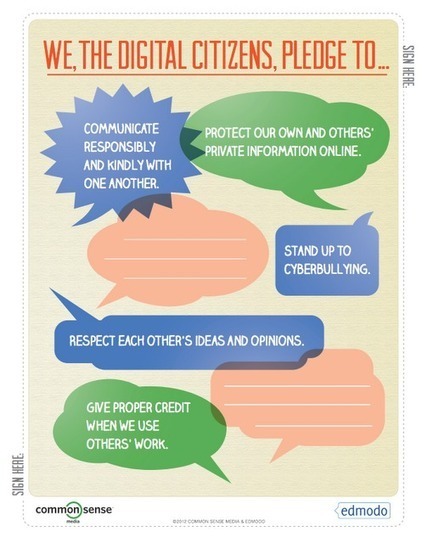
"You can download the digital citizenship starter kit from this Edmodo page without registering or signing into Edmodo. Even though the kit clearly has a secondary purpose of getting teachers and students to sign-up for Edmodo, it is still a nice little resource for an introductory lesson on digital citizenship."
Scoop.it!

By Richard Byrne
"Historical Thinking Matters is site that every teacher of U.S. History should bookmark. Through the investigations students not only learn about the four events in the series, they also develop skills in analyzing primary sources. And ff you want to create your own historical thinking investigations, Historical Thinking Matters provides a good model to follow. "
Scoop.it!

By Richard Byrne
"Haiku Deck is an iPad app that all students and teachers should have installed on their iPads. Haiku Deck enables anyone to create beautiful slide presentations. It's so easy to use that when I was describing the app to someone last week I said it was like "Animoto for slide decks." Like other slide presentation apps Haiku provides templates for creating your presentation. But there are some significant differences between Haiku Deck and other presentation apps.
"There are two features of Haiku Deck that stand out. First, Haiku Deck intentionally limits how much text that you can put on each of your slides. Second, Haiku Deck helps you find Creative Commons licensed images for your presentations. When you type a word or words on your slides you can have Haiku Deck search for images for you. The images that Haiku Deck serves up are large enough to completely fill your slide. You can also upload your own images from your iPad or import images from Instagram and Facebook."
Scoop.it!

From the website
"Blogs and Twitter aren’t the only social tools out there that can help you keep up with the latest and greatest developments in educational technology. Pinterest is rapidly becoming a favorite tool of educators all over the nation, and many have amassed some pretty great collections of edtech-related pins that teachers and students alike can use to explore new ways to learn, share, teach, and grow. While it would be nearly impossible to highlight every edtech pinboard out there, we’ve shared some of the boards we think stand out among the crowd here. Many are maintained by major educational websites, key figures in edtech, and well-known bloggers, but others were created by teachers just like you who simply want to share resources and tips with others in education."
Scoop.it!

From the website
"It can be hard to keep up with the ever-growing list of free educational sites out there, much less distinguish which ones will best meet your needs and help you learn skills you really need without shelling out big bucks. New sites are always being launched and even those that have been on the scene for a while sometimes don’t garner enough attention to make it onto your radar, often getting overshadowed by more high-profile sites. As a result, even those who are in the ed tech loop can miss out on some seriously helpful free learning sites. Here we highlight just a few of these under-the-radar free learning sites, that run the gamut from providing full degree programs to simple job-skill training tools, offering a little something for every kind of learner."
Scoop.it!

By Eric Sheninger
Very descriptive writeup of a creative way to use Twitter in a 9th grade English class. Don't miss the link to the rubric.-JL
"The other day I began conducting formal observations of my teachers. My second observation of the day took me to an English class. During the opening moments of the 9th grade English class I was pleasantly surprised when the teacher quickly reviewed the summer choice reading assignment that was due in a few days. She used social media, specifically Twitter, to increase student engagement as well as relevancy and meaning....
"The teacher also included an example of an actual tweet from a current student as well as a detailed rubric providing students with the performance requirements on how they would be assessed. The rubric stressed creativity, original thought, and in-depth knowledge of characters all in 140 characters or less. There was even a note encouraging creativity, but reminding students about digital responsibility."
Scoop.it!

By Terri Eichholtz
"I found Mission: DS106 through Lisa Johnson (techchef4u) on her Scoop It site for Web 2.0 Tool and Resources. I love this bank of different types of assignments using digital media. It’s probably a little high level for my elementary students, but I think it would be great for upper middle school and high school. There is even a “remix” option to add a little twist to each assignment!
"One example of an assignment is called “Movie Trailer Mashup”: ”Take your favorite movie trailer and mash it up with a different trailer to completely change the meaning of the original trailer. For example, if you have a funny movie trailer, give it the sound of a terrifying movie; or vice versa. You may need to clip the audio or the visual, use imovie and audacity to cut the clips to give you what you need. Good luck!” You should visit the site here to see the hilarious example that is given and the subsequent completed assignments!"
Scoop.it!

From the website
"Learn everything you could hope to learn about Google’s browser. It’s all outlined in “Browsing at Warp Speed: Your Guide to Chrome!”. This free manual, from author Lachlan Roy, covers the basics of using Google Chrome and also outlines more than a few advanced tricks.
"We’re four years on now, and Chrome is better than ever. Other browsers have improved too, but Chrome is still arguably the best web browser out there for… well… browsing!
"If you want to learn everything about using Chrome–from the basics to advanced tips and tricks, download this manual now."
password is makeuseof |
Scoop.it!
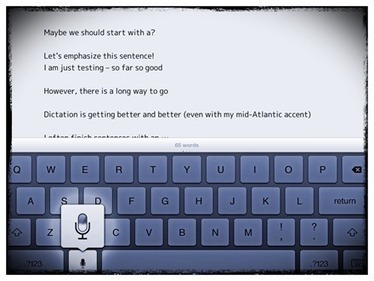
Voice Dictation, or just Dictation as Apple calls it, is one of my favorite features of iOS on the iPad. Voice Dictation, or just Dictation as Apple calls it, is one of my favorite features of iOS on the iPad. As I’ve mentioned recently here, I use it more and more and it just keeps getting better. Though Siri may draw more attention, I think dictation is the far more useful feature right now. If you haven’t tried out dictation on the iPad you really should give it a go. It can be much faster than typing at times. Here are a few little tips and some common commands you can use to get even more out of dictation: Speak slowly and clearly: I know this sounds obvious, but it’s an easy one to forget. I find that when I speak too quickly or run my words Via Cyndi Danner-Kuhn, Lynnette Van Dyke
Scoop.it!

Description by Internet Scout Project
"Picisto is a great way to modify, edit and create wonderful photo collages. Visitors can choose a layout, add text and shapes, and even buy prints of their creations if they so desire. First-time users may wish to check out the Create Collage link to get a feel for how the application works. This version is compatible with all operating systems."
Scoop.it!

"TIME's annual salute to sites and services that keep you entertained and informed, save you time and money — and maybe even change your life."
It's not the Webbys, but Time's tech lists are always interesting and yield an interesting crop of new places to visit and use. -JL
Scoop.it!

By Stephen Downes
"The following list was inspired by eLearn Magazine Editor-in-Chief Lisa Neal's blog post "Ten Things You Can Do in Ten Minutes To Be a More Successful e-learning Professional." We'd like to offer the "Web 2.0 Edition" of Lisa's list: "
What great suggestions! -JL
Scoop.it!

By Julia Lawrence
"Jon Kitna’s days are very different now since he retired from the NFL after a 15-year-career as a quarterback. That doesn’t, however, mean that they’re any less tough. Merely a month after announcing that he was leaving the world of professional sports, Kitna signed up to become an algebra teacher and the football coach at his alma mater: Lincoln High School in Tacoma, Washington."
Scoop.it!

Posted by Jeff Dunn
"The following links are perfect for bookmarking and referring back to if you’re looking to enhance your understanding of the world of education. These links are chosen and maintained by Gutman Library Research Services staff at Harvard GSE."
Scoop.it!

By Melanie Pinola
"iOS: Want to become more familiar with Apple's new iOS 6 or the iPhone? Apple has recently published a 153-page manual that can teach you the ins and outs of both. The guidebook is available for free on iTunes.
"iOS 6 comes with over 200 new features for iPhones, iPads, and iPod touches. While we've highlighted the best new features in iOS 6 and even ten secret ones, this eBook is a useful manual to virtually thumb through when you have some down time."
Scoop.it!
Complete guide to using Pinterest for educators. First part is a lot of history and statistics, but then it gets down to very clear how-tos. -JL
Scoop.it!
By Terry Heick
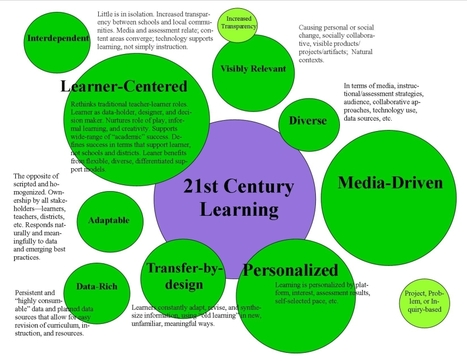
"Some educators seek out the ideal of a 21st century learning environment constantly, while others prefer that we lose the phrase altogether, insisting that learning hasn’t changed, and good learning looks the same whether it’s the 12th or 21st century. A "t TeachThought, we tend towards the tech-infused model, but do spend time exploring the limits and challenges of technology, the impact of rapid technology change, and carefully considering important questions before diving in head-first.
"The following take on 21st century learning developed by TeachThought is notable here because of the absence of technology. There is very little about iPads, social media, 1:10 laptops, or other tech-implementation. In that way, it is closer to the “classic” approach to “good learning” than it is the full-on digital fare we often explore.
"The size of the circles on the map are intended to convey priority."
Scoop.it!

By Terry Heick
"Blended Learning is not so much an innovation as it is a natural by-product of the digital domain creeping into physical boundaries. As digital and social media become more and more prevalent in the life of learners, it was only a matter of time before learning became “blended” by necessity.
"That said, there’s a bit more to Blended and “Hybrid” Learning than throwing in a little digital learning.
"6 Types of Blended Learning Face-to-face Driver Rotation Flex Online Lab Self-Blend Online Driver"
Scoop.it!

By Sarah Jackson
"Last week we announced a new partnership with Edmodo, the popular social network for teachers and students. We’ve created the Digital Citizenship Starter Kit, a set of student activities for the Edmodo platform based on our free K-12 curriculum, Digital Literacy and Citizenship in a Connected Culture.
"The activities are designed to make it easier for teachers to introduce digital citizenship concepts like Internet safety, identity, privacy, and cyberbullying using Edmodo’s secure platform and communication and sharing tools."
Scoop.it!

By Terri Eichholtz
"Some of you may already be familiar with Codecademy, which offers free on-line courses in programming and web-site authoring. Now, the site is offering a free after-school program that it states can be used with students as young as 7. During the first semester, the students learn how to build a website. The second semester teaches how to build an adventure game with JavaScript.
"According to Codeacademy, even teachers who have little experience with programming can facilitate the after-school club. There is a free, downloadable curriculum, and Codecademy also provides a mailed kit to the first 250 teachers to sign up, which includes stickers and “other stuff for your club”. |





