


By Doug Keely
Educators from John Stanford International School in Seattle, Washington, have provided these resources and tools for teaching global competence.

 Your new post is loading...
 Scoop.it! By Doug Keely
Educators from John Stanford International School in Seattle, Washington, have provided these resources and tools for teaching global competence.

No comment yet.
Sign up to comment
Scoop.it!

By David Pogue
"The new BlackBerry Z10 is lovely, fast and efficient, bristling with fresh and useful ideas.
"And here’s the shocker — it’s complete. The iPhone, Android and Windows Phone all entered life missing important features. Not this one; BlackBerry couldn’t risk building a lifeboat with leaks. So it’s all here: a well-stocked app store, a music and movie store, Mac and Windows software for loading files, speech recognition, turn-by-turn navigation, parental controls, copy and paste, Find My Phone (with remote-control lock and erase) and on and on.
"The hardware is all here, too. The BlackBerry’s 4.2-inch screen is even sharper than the iPhone’s vaunted Retina display (356 pixels per inch versus 326). Both front and back cameras can film in high definition (1080p back, 720p front)."
Jim Lerman's insight:
And a follow-up article by Pogue titled "10 More Things to Love About the BalckBerry" is here: http://pogue.blogs.nytimes.com/2013/01/31/more-things-to-love-about-the-blackberry-10/?nl=technology&emc=edit_ct_20130131
Scoop.it!

By Heather Hiles Summary by SmartBrief on EdTech
"Blogger Heather Hiles, who has 15 years of experience in education, in this post suggests five tips for using online portfolio platforms in K-12 and college classrooms. Hiles suggests that more tech-savvy students help guide their peers, and that lessons teach students to find and organize data, become engaged in activities and help students see the "bigger picture" behind their work. Hiles also suggests tips to help educators pick an online portfolio platform"
Scoop.it!

Posted by Jeff Dunn
"It’s like a cross between Chatroulette and Quora with a sprinkling of Skype. A new app called ‘Questions – Ask and Answer’ lets you record a video of yourself asking a question … then wait for video replies to that question. Simple enough, right? You could use this app as a way to digital pen pals or, better yet, video-based pen pals with students from all over the world. However, it’s more about cultivating the best answer and less about social networking. In any case, the app is worth checking out and is quite fun to toy around with.
"You open up the app and can choose to ask or answer a question. Let’s say you have a burning question that Google or Facebook’s new Graph Search just can’t accurately answer. For example, you could ask something like ‘what do classrooms look like in New Zealand?’ After recording your 10-second video question, you upload and wait. While you wait, feel free to answer other questions asked by others."
Scoop.it!
On Thursday, 24 January, 2013 at 12:30 (GMT+1) in Davos (Switzerland) at the Morosani Schweizerhof Hotel the Victor Pinchuk Foundation held its 6th Davos Philanthropic Roundtable "RevolutiOnline.edu - Online Education Changing the World" on the occasion of the Annual Meeting of the World Economic Forum.
Scoop.it!

Kevin Buran teaches 6th and 8th grade science to students at Carmel Middle School. Via Eduware, Inc. , John Evans, WebTeachers, Pippa Davies @PippaDavies

Louise Robinson-Lay's curator insight,
January 29, 2013 2:53 PM
Evernote is a useful tool for teachers and this case study helps to show why and how it can be used. 
Adam Lenaarts's curator insight,
January 30, 2013 6:32 PM
Great case study! I would also like to apply more of Evernote in my classroom and was plannign to get started next year...it is so tempting to give it a try allready, but my experience tells me to make sure I am a bit in controll. 
Alfredo Corell's curator insight,
February 1, 2013 3:43 PM
Fabulous post by Kevin Buran he teaches 6th and 8th grade science to students at Carmel Middle School.
Scoop.it!

An in-depth conversation on lesson planning for a High School ELA class. Using a popular text, watch as Mr. Hanify discusses his lesson planning for reading and writing, identifying main ideas and developing arguments. Via Pippa Davies @PippaDavies , Jim Lerman
Scoop.it!

A List of The Best Free Digital Storytelling Tools for Teachers ~ Educational Technology and Mobile Learning http://t.co/xrDuDaJm Via Pippa Davies @PippaDavies , Jim Lerman

Jeeyoung Min's curator insight,
September 23, 2013 2:02 AM
Powerful digital multimedia tools make a classroom much more dynamic.
Scoop.it!
Office Timeline is a free timeline maker PowerPoint add-in that allows you to easily create and share beautiful timelines, gantt charts, and project schedules. Via Louise Robinson-Lay
Louise Robinson-Lay's curator insight,
January 14, 2013 5:03 PM
A great way to place timelines onto your PowerPoints. free download.
Scoop.it!

This is an amazing collaborative whiteboard where multiple users can edit a multimedia board in real time. The site allows you to signup and sign in using a Google account and you can access and add your files and media on your Google Docs/Drive area making this a fabulous companion to schools using Google Apps for education. You can write by typing or you can write in 'freehand' so you can use your interactive whiteboard to write and archive the lesson to use or refer to later. Via Louise Robinson-Lay

IMA-EDU.GR's curator insight,
January 15, 2013 5:56 PM
υτό είναι ένα καταπληκτικό συνεργασίας πίνακα, όπου πολλοί χρήστες μπορούν να επεξεργαστούν μια πλακέτα πολυμέσων σε πραγματικό χρόνο. Η ιστοσελίδα σας δίνει τη δυνατότητα να εγγραφείτε και να συνδεθείτε χρησιμοποιώντας ένα λογαριασμό Google και μπορείτε να έχετε πρόσβαση και να προσθέσετε αρχεία πολυμέσων σας και στο Google Docs σας / περιοχή κίνησης καθιστώντας το μια υπέροχη συντροφιά στα σχολεία χρησιμοποιώντας το Google Apps για την εκπαίδευση. Μπορείτε να γράψετε με πληκτρολόγηση ή μπορείτε να γράψετε στο «ελεύθερο» ώστε να μπορείτε να χρησιμοποιήσετε τον διαδραστικό σας πίνακα να γράφει και να αρχειοθετήσετε το μάθημα να χρησιμοποιήσει ή να αναφερθώ αργότερα.http://ictmagic.wikispaces.com/ICT+% 26 + + Εργαλεία Web
Louise Robinson-Lay's curator insight,
January 17, 2013 3:54 PM
Fantastic online collaborative board.
Scoop.it!

New science on its corrosive, traumatizing effects.
By Jennifer Senior
"In the past couple of decades, studies across the social sciences have been designed around this new orientation. It has long been known, for instance, that male earning potential correlates rather bluntly with height. But it was only in 2004 that a trio of economists thought to burrow a little deeper and discovered, based on a sample of thousands of white men in the U.S. and Britain, that it wasn’t adult height that seemed to affect their subjects’ wages; it was their height at 16. (In other words, two white men measuring five-foot-eleven can have very different earning potential in the same profession, all other demographic markers being equal, just because one of them was shorter at 16.) Eight years later, Deborah Carr, a sociologist at Rutgers, observed something similar about adults of a normal weight: They are far more likely to have higher self-esteem if they were a normal weight, rather than overweight or obese, in late adolescence (Carr was using sample data that tracked weight at age 21, but she notes that heavy 21-year-olds were also likely to be heavy in high school). Robert Crosnoe, a University of Texas sociologist, will be publishing a monograph with a colleague this year that shows attractiveness in high school has lingering effects, too, even fifteen years later. “It predicted a greater likelihood of marrying,” says Crosnoe, “better earning potential, better mental health.” This finding reminds me of something a friend was told years ago by Frances Lear, head of the eponymous, now defunct magazine for women: “The difference between you and me is that I knew in high school I was beautiful.”
Jim Lerman's insight:
Quite an interesting and well-written article...and it certainly feels, from personal experience, to be quite accurate.
Scoop.it!

Tim Scholze's curator insight,
January 3, 2013 10:15 PM
This may have potential if it's not just used as a way to try and keep kids attention so they don't mess around during a video. 
Alex Briscese's curator insight,
January 4, 2013 9:50 AM
Alcuni consigli su come utilizzare correttamente Youtube con le annotazioni interattive per creare video didattici e sfruttare al meglio il sito di video sharing per e-learning 
Dean Mantz's curator insight,
January 28, 2013 10:32 AM
Insightful share regarding methods of using YouTube for interactive classroom lessons. |
Scoop.it!

By Tim Brown
"A few months ago education expert Sandy Speicher was kind enough to share her thoughts with me on the question: What's different when you look at the world of education through the lens of design?
"Today I’m proud to share the newly relaunched Design Thinking for Educators toolkit. This toolkit supports teachers in using design thinking tools to become agents of change in their classrooms, schools, and communities by designing more effective curriculum, spaces, tools, and systems. Created in partnership with educators, the toolkit includes real-world classroom experiences and an accompanying workbook to help teachers determine which challenges to address.

ALTO's curator insight,
February 3, 2013 2:17 PM
Am wondering if this is equally useful for University level - can't see why not so far? 
Will Stewart's curator insight,
February 4, 2013 4:22 AM
A useful toolkit in helping teachers design their courses.
Scoop.it!

From the website
"Get the most out of Pinterest. Whether you’ve begun using this fast-growing social network or have only heard of it, “Your Guide To Pinterest” will quickly show you how to get the most out of this occasionally overlooked virtual pinboard."
Jim Lerman's insight:
Free download
Scoop.it!

By Dan Meyer
" Alan November, in a workshop with teachers in Hong Kong where I found myself kind of randomly today: Give your students two sites that offer two competing versions of the truth. Have them determine which one is true.Assign one student each day the role of official researcher. Henceforth, whenever a question arises, the researcher answers it, not the teacher. Students eventually start asking more researchable questions more often.Come into class with your own research question. Tell the class you need someone on the planet who knows more than you do about it. Have them find that person.I like the list. How adaptable are these items to a mathematics classroom?"
Scoop.it!
From the website
""Often, the smallest moments can turn into the biggest opportunities," says Nirvan Mullick, filmmaker and Creative Director of the Imagination Foundation. Nirvan discusses his viral short film "Caine's Arcade" and how a little boy's imagination transformed a moment of creativity into a global movemen."
Jim Lerman's insight:
This video was posted on Jan. 28, 2013 and is from the Big Ideas Fest held in Half Moon Bay, CA in early Decemer 2012. In it, Mullick, the filmmaker who produced the now totally overwhelming "Caine's Arcade" film a little over a year ago, recounts what has happened since he met Caine. It is just totally beautiful and inspiring.
As of today, "Caine's Arcade" has 3.6 million hits on You Tube. The sequal, "Caine's Arcade 2" has 1.1 million.

Cris Crissman's curator insight,
January 29, 2013 5:49 PM
Perfect inspiration for a creative activism project! Is there a story you know that needs to be told?
Scoop.it!
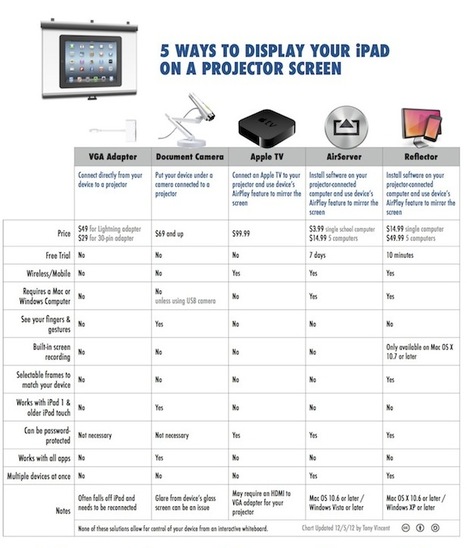
Teachers really want to the ability to display their iPad or their students' iPads on a projector ... Via Felix Jacomino

Janet Ilko's curator insight,
January 1, 2013 2:18 PM
Going to try one of these when I go back next week!
Scoop.it!
No matter what happens, there will always be a demand for data visualization tools. Data on its own can be pretty boring and brightening it up with images and other visual tools, it can make normally inaccessible information much easier to digest. (Editor’s Note: It’s also great for information reading literacy, and the new Common Core demand for multimedia “texts.”)
There are a number of fantastic tools out there that will present your data in an accessible manner. All of the tools listed below are free and chances are you’ve used one or two of the tools mentioned before. Via Lauren Moss
Scoop.it!

From
deoracle

Engaging students is a challenge whether teaching online or face-to-face. In online classes that tend to be text-heavy, this task can be especially difficult. One way to overcome this hurdle is to design project-based learning (PBL) assignments. Via Pippa Davies @PippaDavies
Scoop.it!

By Jamie Forshey
"Yearbooks, storybooks, calendars, cards and stationary… Mixbook, a powerful suite of completely customizable digital storytelling tools, has got all of this and more! Believe it or not, this “cool tool” was originally designed as a scrapbooking site, but as it turns out, Mixbookis a great way to engage students in the classroom as well! So, forget about those traditional written reports and handmade books! Instead inspire students to write interesting and colorful e-books that can be created individually or collaboratively with a real-world tool that will keep them coming back for more!
Mixbooks can be shared with others via an online link or by embedding the finished product on a web site, wiki and/or blog. Want to see what your photo book looks like in real life? No problem! Mixbooks can also be printed and purchased so you can show off your keepsake forever! But the educational benefits don’t stop here. That’s right! Apply for an educator’s account and receive a discount on every order!
Scoop.it!

There are not an abundance of apps for the iPad that really encourage a worthwhile level of collaboration between students or between students and teachers. There are several that would allow stude... Via Sam Gliksman, Louise Robinson-Lay
Louise Robinson-Lay's curator insight,
January 17, 2013 3:54 PM
Some great collaborative tools here. 
Sally Tilley's curator insight,
January 22, 2013 3:36 PM
Looking forward to testing 'ask3' app for flipped classroom practice
Scoop.it!

Jim Lerman's insight:
Numerous links to useful websites for online research, arrayed in categories. Each link is described briefly. Nice job.

Ana Cristina Pratas's curator insight,
January 20, 2013 1:46 PM
I'd like to thank @suifaijohnmak from whom I learnt about this site in his excellent blog posting "Reseach Tools"
Scoop.it!

Below, you will find a link to a table I’ve made that puts information about these sources into an “at a glance” format. You’ll be able to easily reference what the tool is, what it does, and how it could be used in the classroom. You will also get access to links for the actual websites so that you can sign up and start creating! Before you do that, though, I’ve also got links to some examples on the final page for your perusal. (Keep in mind that these are just samples, not Pulitzer or Golden Apple material.) It is my hope that my own hours of time narrowing the field of free web tools will help others in their teaching, and help some new surfers to get up on that wave. Try to learn and implement one new thing this year… even that is a huge accomplishment. Come on in, the water’s fine! At the live session, you even get me to come around, assist you, and personally answer your questions about how these contraptions work… Via Baiba Svenca, Jenny Pesina, Heiko Idensen, Jim Lerman

's comment August 3, 2012 10:33 AM
May I also add Present.Me that allows you to attach a video of yourself presenting to your powerpoint presentation. I use it to send to my class when I cannot be there for their lessons. Genuis.

Baiba Svenca's comment,
August 3, 2012 12:01 PM
I agree Charlotte! Present.me is awesome, I use it too. And Prezi, and many more tools.... But that was the author's choice. I like the annotations and tips very much!
|






