


Learn how to embed videos, mp3 music, Flash videos (both swf and flv), pictures, fonts, spreadsheets, charts, maps and everything else into your blog or website. (Thanks, @labnol!
Via Heath Sawyer

 Your new post is loading...
 Scoop.it! Learn how to embed videos, mp3 music, Flash videos (both swf and flv), pictures, fonts, spreadsheets, charts, maps and everything else into your blog or website. (Thanks, @labnol! Via Heath Sawyer 
No comment yet.
Sign up to comment
Scoop.it!

By Andrew Tarantola
"While most tablets have a shelf life longer than six months (*cough* iPad 3 *cough*), they all grow obsolete eventually. When the march of technology sends your slate to the junk drawer don't just sell it off. Recycle it into a high-powered specialist device."
Scoop.it!

Lecturing with an iPad by Perry Samson with iBooks.
In an attempt to give students more opportunities to interact with me I've created an iPad app that allows student response to instructor questions, note-taking, student questions to the instructor and even allows students to indicate when they're confused. All is stored to the cloud an can be accessed via web apps as well. Via Kim Flintoff
Jim Lerman's insight:
hmmm. Is this progress?
Scoop.it!

Learning with 'e's: Theories for the digital age: The digital natives discourse Is learning in the 21st Century significantly different to learning in previous years? One of the more controversial theories of the digital age is the claim that technology is changing (or rewiring) our brains (Greenfield, 2009) whilst some also claim that prolonged use of the Web is detrimental to human intellectual development (Carr, 2010). It could be argued that these theories stem back to the seminal claim of Marshall McLuhan (1964) that ‘we shape our tools and thereafter, our tools shape us.’ This belief was also the basis for the in Digital Natives and Immigrants theory (Prensky, 2001), a persistent discourse that has greatly influenced the thinking of educators in recent years. A significant body of work has arisen around the Digital Natives and Immigrants theory, including descriptions of younger students as ‘the Net Generation’ (Tapscott, 1998), ‘Screenagers’ (Rushkoff, 1996), ‘Born Digital’ (Palfrey and Gasser, 2008), ‘Millennials’ (Oblinger, 2003), and ‘Homo Zappiens’ (Veen and Vrakking, 2006). The latter theory suggests that younger students learn differently, through searching rather than through absorbing, through externalising rather than through internalising information, are better at multitasking, and see no separation between playing and learning (Veen & Vrakking, 2006). Read original here: http://steve-wheeler.blogspot.fr/2012/10/theories-for-digital-age-digital.html ; Via Evelyn Izquierdo
Scoop.it!

bContext is an app that actively transforms the way ideas are shared by enlivening static documents with audio, writing, and drawing capabilities. The app makes it easy for anyone (i.e. designers, architects, consultants, teachers, bloggers, journalists etc.) to add visual and verbal elements to transform complex ideas into engaging communications. Via Baiba Svenca, Heiko Idensen, michel verstrepen
Jim Lerman's insight:
I spent a lot of time checking this app out. It seems to be a really excellent way to create presentations on an iPad and deliver them using a variety of methods -- including screencasting directly from the iPad to any type of device (TV, computer, phone, or other iPads).The demos show uses in dealthcare, education, business, and PR/advertsing. The pricing model is a bit steep for schools, but maybe with enough pressure they will modify that. Looks like an app that offers a great deal of functionality. Do give it a try. Comment please.

Baiba Svenca's curator insight,
February 11, 2013 4:26 PM
Great app for creating and presenting content using iPad. The app is free to download and use. Get the app here https://itunes.apple.com/us/app/bcontext/id515971580?mt=8
Scoop.it!

By Med Kharbach
"Posters are great educational tools to use with your students. Their importance stems from the fact that they present information, facts, and data not only in a visually attractive way but also using a multi-modal system that combines signs, images, charts..........and texts. They are probably like infographics except that they are smaller and neater.
Scoop.it!
Jim Lerman's insight:
By John Brownlee
"Penultimate for iPad has today received its first major update since it was acquired by Evernote back in May 2012. In addition to Evernote syncing, the app offers a number of nifty new features, the most impressive of which is handwriting search — which uses handwriting recognition technology to allow you to find notes you’ve written by hand. And if that wasn’t enough, the app is now completely free." Read more at http://www.cultofmac.com/213611/penultimate-4-is-here-with-evernote-syncing-handwriting-search-and-its-now-free/#b1MVj74aPjuTuxjQ.99

Louise Robinson-Lay's curator insight,
February 12, 2013 4:08 AM
With clever app designs the ipad really is a do all device.
Scoop.it!

From the webstie
"Maintaining a Mac is a lot easier than a PC but it still requires some work. After a few years of use, your hard drive space starts to shrink and finding the right files to delete isn’t always obvious.
"MacPaw is releasing a new app to help people free up more space on their Macs. It’s called CleanMyMac 2 and it will dive deep into your harddrive to clean out all the crap you don’t need.
"CleanMyMac 2 helps you find more space for the things you love, so you don’t have to put your new photos or videos on an external harddrive. Once you install the app, it scans your harddrive and a few seconds later it will give you a summary of everything you can toss in the trash. We took it for a test run last night and found it very easy to use, and it had a nice interface.
"Unlike some other apps, it will also tell you which system files you can throw away, like caches, logs, archives, and a bevy of other options. However, Apple wouldn’t approve it for the Mac App Store because Cupertino doesn’t like that it cleans up system files that most apps never touch. MacPaw says it’s totally safe, and they have a good reputation, so I wouldn’t worry too much about it."
Scoop.it!

Excerpted from Official Website: "Delve is a smart, social news reader for professionals and organizations. We cut through the noise to get you the news that matters to your industry. You share and archive articles and insights on a private, secure network."
Here is an excerpt from review article on BetaKit: "Social newsreaders like Flipboard, Zite, and Pulse have traditionally been aimed at the average reader, and while they have topics like business and technology, they don’t focus specifically on professionals and enterprises looking to stay informed on industry news. Delve, a New York City-based startup that combines an editorial team with news aggregation, is trying to solve this problem with its social newsreader for professionals.
After signing up and choosing their topics of interests, Delve users receive a curated list of articles based on their sector, and what leading commentators are saying about these topics. From there they can participate in discussions with their colleagues using the forum feature, and recommend content to others on their team. Users get a daily roundup of the news and the discussions surrounding it via email.
Individuals and teams with up to nine users can use Delve for free, and the company is working with 15 pilot enterprise clients, and will charge companies on a per-seat basis after the test run.
The company plans on releasing a mobile app in about a month, which should help it compete with mobile-first newsreaders like iPhone apps Circa and Summly, tablet readers like Flipboard, and others like Prismatic that have a strong mobile presence. Delve doesn’t just compete with social readers though, it competes with the traditional ways employees share articles and discuss news, namely email, social networks, and industry newsletters. In terms of other newsreaders directed at teams, its strongest competition is Flud.it...."
Read full review article on BetaKit:
Check out it: http://delvenews.com
Via Giuseppe Mauriello

Cathryn Brimhall's curator insight,
February 10, 2013 3:09 AM
Need to curate a topic with colleagues ?
Scoop.it!

Converting bookmarks to slideshows A new way of organizing, sharing, and presenting web content...
Jim Lerman's insight:
Based in the Diigo platform...an update of the Diigo slide function. Nicely done!
Scoop.it!

... Talking about the importance of innovation, I have two awesome resources to share with you in this regard. One is a short video that talks about the difference between innovative and non-innovative teacher and the second is an innovation mindmap. http://www.scoop.it/t/classemapping Via Lucas Gruez, michel verstrepen

Wegwijs bvba's comment,
February 10, 2013 1:40 PM
Maak een mindmap om een beeld te krijgen op innovatie
Scoop.it!
By Darren Kuropatwa
"Slides to support an active learning workshop for student teachers at Brandon University. 16 January 2013.

Jim Lerman's curator insight,
February 9, 2013 7:46 PM
Not only is the content of this slide deck excellent, but the presentation itself is organized most effectively as well. People who fill their powerpoints with words should take note of this. |
Scoop.it!


Teresa Maia's curator insight,
February 10, 2013 10:08 AM
Uma miríade de possibilidades para explorar...
Scoop.it!

From the website
"It’s an age-old saying, “Give a man a fish, and feed him for a day. Teach a man to fish, and feed him for a lifetime.”
"What separates good teachers from the excellent ones? The excellent ones are handing out fishing poles; creating a culture in the classroom of independence and self-reliance. These students don’t just recite facts or regurgitate information- they have learned how to learn. They know that if the answer isn’t in front of them, they have the tools to do the investigation and research.
"So how do you cultivate a culture of “I can…” in your classroom?"
Jim Lerman's insight:
Self-direction and purposeful use of ed tech go hand in hand.
Scoop.it!

From the website
"Join us for a three-part webcast series and learn how to bring the power of iPad to your classroom. Watch as educators show you how to build customised courses full of dynamic, interactive content you can share with your students."
28 February: Getting to Know iTunes U Register now 7 March: Creating Courses with iTunes U Course Manager Register now 14 March: Creating Learning Materials for Your Courses
Scoop.it!

5 Tips From Successful Online Students | Edudemic In the age of MOOCs, degrees which give you the option to take some classes ‘distance’, and other programs that are all-online, many people are considering the pros and cons of taking classes on the internet. If you’ve never taken a class online before, the concept might seem too good to be true – no worrying about getting to class on time, being called on to speak about a topic you’re not really comfortable with, or sitting in an uncomfortable chair for way too long. Read original here: http://edudemic.com/2012/10/5-tips-from-successful-online-students/ ; Via Evelyn Izquierdo, Jim Lerman
Scoop.it!

Abstract of the research study upon which this infographic is based (title of study is in the lower left-hand corner of the graphic):
"Recent randomized experiments have found that seemingly “small” social-psychological interventions in education—that is, brief exercises that target students’ thoughts, feelings, and beliefs in and about school—can lead to large gains in student achievement and sharply reduce achievement gaps even months and years later. These interventions do not teach students academic content but instead target students’ psychology, such as their beliefs that they have the potential to improve their intelligence or that they belong and are valued in school. When social-psychological interventions have lasting effects, it can seem surprising and even “magical,” leading people either to think of them as quick fixes to complicated problems or to consider them unworthy of serious consideration. The present article discourages both responses. It reviews the theoretical basis of several prominent social-psychological interventions and emphasizes that they have lasting effects because they target students’ subjective experiences in school, because they use persuasive yet stealthy methods for conveying psychological ideas, and because they tap into recursive processes present in educational environments. By understanding psychological interventions as powerful but context-dependent tools, educational researchers will be better equipped to take them to scale. This review concludes by discussing challenges to scaling psychological interventions and how these challenges may be overcome."
via Powerful Learning Practice
Scoop.it!

Text 2 Mind Map is one of the most popular mind mapping tools on the web. It converts your text lists into beautiful mind maps Via Sarah McElrath
Scoop.it!

By Killian Bell
"Penultimate for iPad has today received its first major update since it was acquired by Evernote back in May 2012. In addition to Evernote syncing, the app offers a number of nifty new features, the most impressive of which is handwriting search — which uses handwriting recognition technology to allow you to find notes you’ve written by hand. And if that wasn’t enough, the app is now completely free." Read more at http://www.cultofmac.com/213611/penultimate-4-is-here-with-evernote-syncing-handwriting-search-and-its-now-free/#b1MVj74aPjuTuxjQ.99
Scoop.it!

Robin Good's curator insight,
February 8, 2013 4:06 AM
Rabbit is a new downloadable software app (for Mac only now) that allows you to instant message, video conference with multiple parties and to screencast and share in real-time any music, video clip or app.
But the best way to describe it is a cool and very modern implementation of instant messaging. Source: MacRumors Features: http://www.rabb.it/features.html Help: http://help.rabb.it/rabbit More info / Sign-up for Beta: http://rabb.it 
Andreas Wåhlström's curator insight,
February 18, 2013 3:23 PM
Underbart Mac - program! Revolutionerande?
Scoop.it!
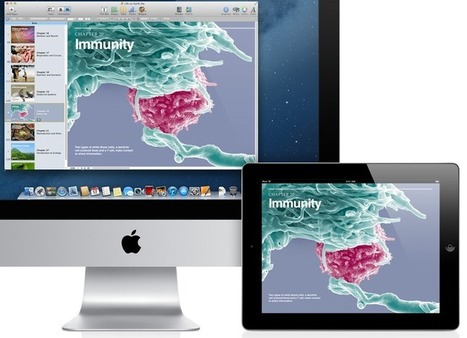
Ready to take the plunge and start using iTunes U in the classroom? It's not as scary as you think - and many aren't yet using the tool! ... If you would like additional support building your course, please visit our website at iPadPD.com we have a wide variety of resources and tutorials that will assist you in the process of building your course. Another great resource you could use would be this awesome iTunes U course developed by our friends at The de Ferrers Academy on how to build an iTunes U course:
Creating iTunes U CoursesThis course is full of video demonstrations covering each step of the process of building a course. Download this course on your iPad and you get the added benefit of seeing what it’s like to learn through an iTunes U course.
With iTunes U, it’s easy to create your own custom courses for the iPad and teach them in your classroom. And the iTunes U app puts all the materials you create for your course— syllabus, videos, apps, iBooks, class assignments, and more—all in one place. Right in the app, your students can play videos or audio lectures, read iBooks, and view presentations. They can also see a list of course assignments, then check them off as they’re completed. One of the best features is that they can take notes within iBooks and on videos and they are all organized in one location within the course. It’s also nice that the course can continue to be changed after it’s been published. Any time you create a new post, students receive a push notification informing them of the change. ...
Fred SitkinsElementary School PrincipalBoyne City, MIwww.ipadpd.com
Via Heiko Idensen
Scoop.it!

The easiest to use photo collage maker! Many beautiful designs to choose from. Completely online, so no downloads required. Via Ken Peterson
Scoop.it!

“So many times we encourage students to be creative, but we don’t always provide an explanation nor assessment. I think it is important to provide a definition. You can see that Dictionary.com defines creativity as ‘the ability to transcend traditional ideas, rules, patterns, relationships, or the like, and to create meaningful new ideas, forms, methods, interpretations, etc.; originality, progressiveness, or imagination: the need for creativity in modern industry; creativity in the performing arts’.” Via Beth Dichter

Beth Dichter's curator insight,
February 9, 2013 7:28 PM
This is the last in a series of posts on Creativity in the Classroom, with a focus on websites that help promote creativity. Included in this post are: * Arts Edge, a wonderful source from the Kennedy Arts Center that "offers free, standards-based teaching materials for use in and out of the classroom. It also offers professional development resources, student materials, and guidelines for arts-based instruction and assessment." * Exploratorium - "a twenty-first-century learning laboratory, an eye-opening, always-changing, playful place to explore and tinker" * Google Lit Trips - a great way to explore literature and Google Earth * Odyssey of the Mind - "an international educational program that provides creative problem-solving opportunities for students from kindergarten through college." * Diffen - a website that allows you to compare anything An additional ten websites are listed that provide a range of online learning opportunities that help promote creativity!
Scoop.it!

Posed by Jeff Dunn
"Google is working on an online course solution. Same story with Khan Academy, Coursera, Udacity, and … you? If you run a website that uses WordPress, you can now easily (relatively) build your very own online school. The new WordPress plugin from WooThemes (a popular WordPress premium theme provider) lets you start up your own online school with ease. It’s as simple as installing a WordPress plugin. The actual content and other school-y stuff is, of course, up to you. But the technical stuff is taken care of by this new plugin."
|






