Here are another roughly 6,000 words of design facts, figures, and information contained in an article of only 600 words. In other words, this article is bigger on the inside than it is on the outside.
Alas, it’s still too small to contain all the well-designed infographics about graphic design, web design, photography, freelancing, and, of course, infographic design.
Each thumbnail links to the full-sized graphic on its original Website. For your convenience we’ve made each of those links pop open in a new tab or window. To return here, simply close that tab or window.
"The WordTalk plugin works with Microsoft Word to create a audio version of text documents. The plugin speaks the text of the document and highlights it along the way. It also contains a talking dictionary so that users can decide which word spelling is most appropriate. One of the intended audiences for this device is children who might be having trouble with reading and writing. This version is compatible with all computers running Microsoft Word. "
Based at the University of Richmond, the Digital Scholarship Lab develops "innovative digital humanities projects that contribute to research and teaching at and beyond the University of Richmond." On the website, visitors can learn about ongoing projects, publications, and the Lab's team of dedicated professionals. The Projects section is quite remarkable, as it contains seven unique projects, including Visualizing Emancipation, Hidden Patterns of the Civil War, and Mining the Dispatch. This last project is fantastic, exploring "the dramatic and often traumatic changes in the social and political life of Civil War Richmond" through the articles of the Richmond Daily Dispatch. There are also several Mini-Projects, which include a meditati on on Pac-Man and the fascinating Americans in Paris. The Publications and Presentations area includes links to presentations given by staff members, along with commentaries and the like. The site is rounded out by the News area and an About area which provides details on the staff"
"Education is simultaneously the most noble and hubristic of all endeavors. This may all reek of sensationalism, but watch anyone at play, honing a craft, lost in a book, or engaged in a digital simulation and you’ll see a completely different person—one there physically, but far removed in spirit.
In a better place.
"Causing this in a classroom is possible, but is as often the result of good fortune than good planning. The best substitutes that can masquerade as curiosity are dutiful compliance and engagement. Neither of these are curiosity, which has among its sources a strong sense of volition, accountability, and curiosity."
We're hoping to save you some time by personally trying out these free video editing tools in hopes of making your life and projects a bit more magical.
" The following cheat sheet is from Techno Streak and it touches on keyboard shortcuts, how to do the critical things you should know about, and more. It’s worth knowing about and skimming in case you’ve been curious about diving into that ‘other’ social network known as Google+."
By Eric Williams, Supt. of York County Schools, PA
"Over a year ago, my colleagues and I in the York County School Division in Virginia began looking for tools and platforms to help support students as creators of digital content. Although our teachers and students extensively use Discovery Education resources, when we started our search we did not know that Discovery Education already planned additional steps to support students as creators of digital content.
"Our participation in the Digital Promise League of Innovative Schools led to a partnership between our school division and Discovery Education focused on students as creators of digital content."
Today, Electronic Arts announced that it is currently developing SimCityEDU, an online educational game based on the latest reboot of the company's popular SimCity franchise.
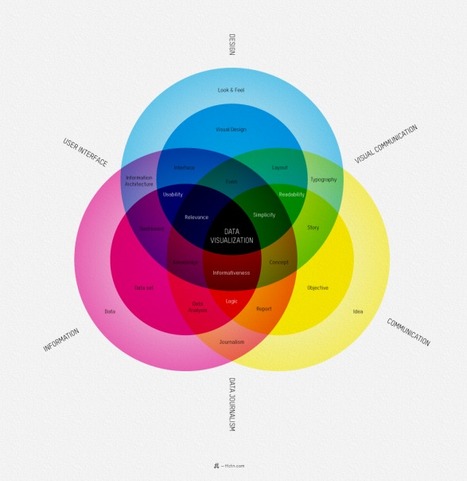
People who create infographics do their work partly because they believe infographics are a great way to communicate information.
Since the people in this field also need to communicate information about their work, it was inevitable that infographics about infographics would eventually be created. Here are 11 of those meta infographics.
This could be quite interesting to use across the curriculum and in ways that require higher cognitives than remembering. Why not use it for literary expressions or political cartoons or the arts for deeper understanding? It can be so much more than rote quizzing!
Un servizio gratuito che consente di realizzare in modo molto semplice una presentazione costituita da immagini e registrazione vocale a commento delle immagini. Si tratta di un webware semplice da utilizzare in ambito didattico e che può essere utilizzato dal docente e/o dagli studenti per creare storie (storytelling) o presentazioni
Narrable enables users to create short narrated slideshows. Start by uploading the pictures that you want to talk about. You can then record a narration for each picture via your computer's microphone or by uploading an audio recording that is stored on your computer. Narrable projects can be shared via email, Facebook, or by embedding them into a blog or wiki.
"For those with scanned documents that would be more useful in editable form, Online OCR offers a free, high-quality solution. Users can simply upload an image (JPG, JPEG, BMP, TIFF, GIF, and non-editable PDF are all accepted), then choose the language and preferred output format. At the free level, the service will convert 14 images per hour, but those who are satisfied with the service and require more frequent conversion may purchase a membership"
Fun, fast and without uploads, downloads or legal issues. Work with videos from YouTube and Vine, tracks from SoundCloud or animated GIFs from Tumblr, Loopcam and Imgur directly in your browser!
"At its core, Google+ Hangouts is simply a souped-up version of video chat. But when it comes to education, it’s so much more than that. It becomes a vehicle for learning, sharing, collaboration, and ideas. Whether you’re an educator discussing learning practices, or a first-grade classroom speaking with an astronaut, Hangouts have seemingly endless possibilities. These are our 50 favorite ways for schools to use Google Plus Hangouts. How do you plan to use this cool tool?"
"Getting the hang of a new language is tough. As someone attempting to re-learn French, I can say this without absolute certainty. Lucky for students like myself, technology is a huge help. It makes it easier to hear a native speaker ‘pronounce’ something for you. It lets you Skype with people in the country whose language you’re attempting to master. (Okay ‘master’ is a charitable word. How about ‘learn’ for now.)
"When you’re talking about language learning here in the U.S., you’re talking about ESL most of the time. When you’re talking about technology, you’re talking iPad. So, why not feature a few iPad apps for ESL students that I have tried out and find to be quite useful? The below list is hopefully going to help you tackle English or could be used to simply brush up on your grammar or vocabulary. In any case, language learning is a lot more fun on the iPad – so why not try these out?"
"Karen Cator, Director of the Office of Educational Technology at the U.S. Department of Education, stresses the importance of creating the conditions for participatory learning, including the adoption of evolved digital-age teaching, in order to widen access, equity and opportunity."
To get content containing either thought or leadership enter:
To get content containing both thought and leadership enter:
To get content containing the expression thought leadership enter:
You can enter several keywords and you can refine them whenever you want. Our suggestion engine uses more signals but entering a few keywords here will rapidly give you great content to curate.


 Your new post is loading...