Via Yehuda Peled

 Your new post is loading...
 Scoop.it! 
No comment yet.
Sign up to comment
Scoop.it!

Presentation boredom can be a significant barrier to academic communication. Ned Potter provides guidance on the strengths and weaknesses of Prezi as a fresh approach to the PowerPoint doldrums. Pr... Via Ana Cristina Pratas
Scoop.it!
Jim Lerman's insight:
Always an important document to read.

Esther Casey's curator insight,
June 7, 2013 4:13 AM
Find out which technology trends the experts consider to be on the near, mid and far term horizons for education. Keep this report handy for longer term planning. 
pru's curator insight,
June 7, 2013 8:52 PM
To all involved in this edition. Plenty to follow up on in here.
Scoop.it!
Scoop.it!
Summary by SmartBrief on EdTech
"Students and teachers at three high-tech schools were selected by the White House to take place in a virtual chat about technology in schools. The "show and tell" event took place via a Google+ Hangout session for the Science Leadership Academy in Philadelphia, Chappell Elementary School in Green Bay, Wis., and Loris Elementary School in Loris, S.C."

Jim Lerman's curator insight,
June 7, 2013 9:11 PM
Hearty congratulations to everyone involved! Great visibility for people working hard to advance student learning with seamless tech integration.
Scoop.it!

By Pernille Ripp Summary by SmartBrief on EdTech
"Blogging has become an important part of instruction in Pernille Ripp's fifth-grade classroom -- connecting students with the outside world and offering authentic learning opportunities. For teachers looking to start student blogs, Ripp suggests in this blog post that, among other things, they consider why they are interested in blogging, select a platform, get necessary permissions, address safety, and consider the differences between blogging and writing"
Scoop.it!

You probably know there are jillions of cool web 2.0 sites to use for classroom projects, but you may not know where to start. To put your mind at ease and get your students exploring the possibilities of web 2.0, try these seven sites sometime this year.
Jim Lerman's insight:
A good list of some very creative and engaging tools
Scoop.it!

By David Kapuler\
"A huge factor for schools in dealing with students and working online is CIPA/COPPA compliance. This is to ensure student safety as well as monitor and filter their online behavior. As Web 2.0 becomes more popular and educational technology online sites replace desktop software, this has become more of an issue. A lot of subscription-based or ed tech sites require a student email address to create an account which can become a BIG issue when dealing with CIPA compliance, because a majority of students to not have a school email account. Here are 20 Web 2.0 sites that do not require a student email address to create an account. This list is in alphabetical order."
Scoop.it!

From the website
Free webinar - Thursday, June 13, 1 PM Eastern, 10 AM Pacific
"Join us for an intriguing live-video hour of advice and perspectives from two of the top experts and thought leaders in the corporate video field, Michael Kolowich of KnowledgeVision and Stu Siegal of VideoLink. Register for this webinar to learn about these topics:
-The six steps in the video production continuum -What the must-have components are for a video strategy -How to triage your video projects into three manageable types -How to match production techniques to the type of project -Best practices on creative concept development for corporate video -Successful planning for distribution and discovery -How to define and measure ROI
Jim Lerman's insight:
This looks like it will be quite an informative webinar for those moving into vieo gaming and video-based learning.
Scoop.it!
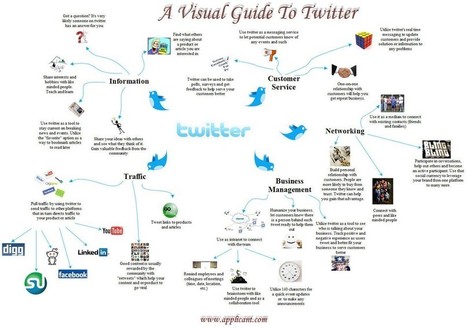
This infographic provides a visual guide and a brief synopsis of different uses for Twitter. It includes information about how Twitter can be used as a tool for information, customer service, networking, business management and website management. Via Lauren Moss, Kim Flintoff
Scoop.it!

By David Nagel
"Microsoft is launching a new service that lets students crowdsource funding for their next computer for school. As part of the offering, Microsoft is chipping in on the price and providing students with free software.
"Targeted toward graduating high school seniors and college students, the service, called Chip In, is something like a registry, providing a selection of laptops, desktops, and all-in-one systems that students can register to purchase. Students create a profile for themselves, then publish (through Facebook) their call for contributions from family members and friends. Microsoft is contributing 10 percent of the purchase price.
"Once the funding level is reached, the computer is shipped out to the student. In addition to the computer, Microsoft is providing students with a four-year subscription to Office 365 to the first 10,000 students whose computers are funded by Sept. 1. The Office 365 applications can be downloaded to up to two devices. The service also provides an additional 20 GB of SkyDrive storage and 60 Skype "world minutes."
"The only requirements other than a Facebook account is a valid .edu e-mail address or some other proof of enrollment in an accredited institution.
Scoop.it!

By Christopher Pappas
"Chunking refers to the strategy of making a more efficient use of our short-term memory byorganizing and grouping various pieces of information together. When information is chunked into groups, the brain can process them easier and faster, because our working memory can hold a limited amount of data at the same time. So, chunking is useful when we try to memorize something complex, such as a 14digit number for example, or large pieces of information, like a course’s content, since the smaller pieces are easier to retain and recall.
"Even though chunking is a strategic concept, instructors shouldn’t forget that it does have its limitations. The more complex the concepts the brain attempts to absorb, the less our working memory will retain. If the working memory is full, the new information will just vanish. However, this doesn’t mean that you should just cut the length of the e-Learning course. It takes a more effective technique to make the process work, and it’s by structuring the e-Learning course’s content in a progressive way. This constitutes a challenge for e-Learning and consequently for the instructional designer.
"Thus, before the creation of an e-Learning course, the Instructional Designer should ask himself a number of questions. What are the e-Learning course’s limits? How much and what exactly should appear on screen? What kind of strategies can I use to group information? All these questions fall into the concept of chunking and there are various strategies to successfully implement it and enhance the student’s learning potential."
Jim Lerman's insight:
While these concepts are essential for elearning, they are just as important to consider for f2f learning as well. Excellent instructional design spans all modes of delivery.
|
Scoop.it!

11 sample BYOT policies to help a school or district create their own. Via David Miller, Star Lesson

David Miller's curator insight,
June 6, 2013 8:04 AM
Includes a very useful list of schools and their BYOT Policies ...
Scoop.it!

If you use rubrics to grade student work you have to try ForAllRubrics! Once you set up your class list, this website allows users to import rubrics they've already made, or easily create new ones.... Via John Evans

Brian Romero Smith's comment,
July 19, 2013 12:09 AM
Awesome! Definitely an asset to the iPad classroom.
Scoop.it!

Won Ho's curator insight,
January 14, 2017 7:58 PM
Use OKMIndmap to do this:)
OKMIndmap을 사용하면 창의적 교육을 할 수 있습니다^^ 
jokin uzkudun's curator insight,
March 10, 2020 2:59 PM
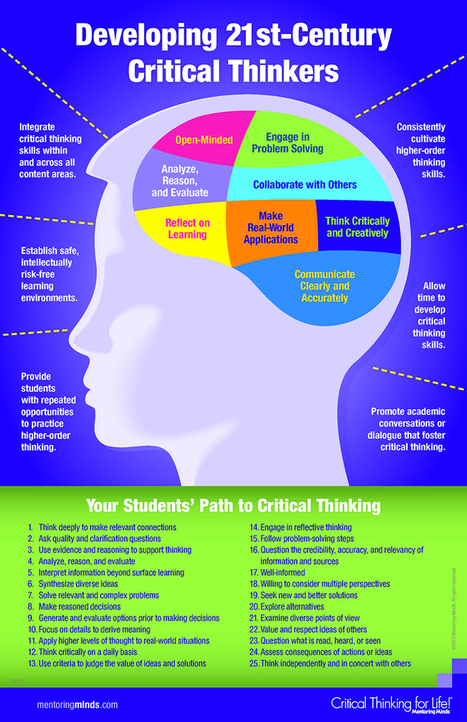
Good advice to promote critical thinking among your students
Scoop.it!
Jim Lerman's insight:
Summary by Internet Scout Project
"Created as part of the Mathematical Association of America's (MAA) outreach efforts, MathDL Mathematical Communication is "a developing collection of resources for engaging students in writing and speaking about mathematics, whether for the purpose of learning mathematics or of learning to communicate as mathematicians." The site contains materials on giving successful math presentations, talking about math to a diverse audience, and also communicating effectively with teammates working on a math project. Visitors shouldn't miss the Resources for Presentations: Handouts & Links area. Here they can find how-to-guides such as "Preparing a Poster Presentation" and "How to Give an Effective Math Talk." Also, visitors are encouraged to submit their own resources for possible inclusion on the site. The site is rounded out by a nice primer titled "Introduction to Teaching Math Communication."
Scoop.it!

Maker Faire showcases the amazing work of all kinds and ages of makers—anyone who is embracing the do-it-yourself (or do-it-together) spirit and wants to share their accomplishments with an appreciative audience When: September 21 & 22, 201Where: New York Hall of Science
Jim Lerman's curator insight,
June 7, 2013 12:31 PM
This is an incredible event. They are now accepting applications from exhibitors. Entries close July 28
Scoop.it!

By Bridget McCrea
"Ready to bring collaboration into your classroom? Here are eight free apps and tools you can use to get students working -- and learning -- together, in and out of the classroom. (Note that while some of the app developments may charge for "premium" versions of these products, all of the following apps are free to use at a basic level)."
Jim Lerman's insight:
Each tool is described by a paragraph. Most are new to me but seem to offer considerable functionality.
Scoop.it!

From
casel

by Joseoh Zins and Maurice Elias
Jim Lerman's insight:
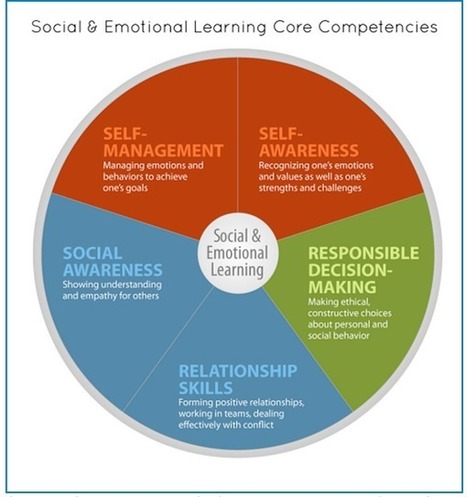
Excellent intro to the field. Includes list of best programs.
Scoop.it!

By Laura Turner
"This is a continuing series on Web2.0 and other web-based tools for educators. This information is specific to math educators, but there is some crossover into science. Math educators will find a large number of useable interactive companion web sites for the teaching of math concepts and skills."
Jim Lerman's insight:
A curted list of 43 web 2.0 tools, most with a brief description
Scoop.it!

Ana Cristina Pratas's curator insight,
June 2, 2013 1:27 AM
"In a world where people’s jobs will not be given to them, each individual will need to look deeply and understand what she or he is good at, how she or he can contribute to multiple efforts and navigate multiple roles and identities as a part of different communities."
Scoop.it!

Free download, registration required
From the website
"Engagement is a critical element of learning. If we can get people to pay attention to what we’ve developed or what we’re saying and engage with us, the content, and each other, learning follows.
"Gaining and maintaining engagement in the physical classroom seems straightforward: If learners look bored or inattentive, we adjust our training style on the fly or call on people to recapture their attention. But in eLearning, especially self-paced eLearning, driving engagement requires much more planning, monitoring, and, most of all, creativity.
"So how do we drive engagement in eLearning and mLearning? Interactivities can help, but only if we design those interactivities effectively. Learners also need engaging content, an engaging (or at least not frustrating) interface, engaging media and visual design, and maybe a game here and there. In this eBook, experts provide 68 tips for making sure your learners are fully engaged, in areas including:
Creating engaging content Creating an engaging interface Using interactivities to drive engagement Using media and visual design effectively Using games for learning Measuring engagement and learning"
|