


Into the Driver's Seat
486.8K views |
+0 today
Building learners' independence through thoughtful technology use
Curated by
Jim Lerman
 Your new post is loading...
 Scoop.it! 
"As a creative practitioner, you're probably familiar with twitter as a key social media platform for marketing your projects to today’s internet-savvy audiences.But did you know it’s also a great storytelling tool
"But did you know it’s also a great storytelling tool?
"Fiona Milburn, from Transmedia NZ, gives us five examples from storytellers who have embraced twitter as either a standalone story platform or as part of a wider story world." 
Scoop.it!

By Lisa Nielsen
"Google SMS provided a great way for students to learn right from their phones. Sadly, now they are gone. Google's decision to streamline their services, unfortunately leaves behind so many of our students who don't have access to the internet. Fortunately, in the world of Web 2.0 once one service is out, another one or two gems are usually standing by in the wings to replace it. In this case, there are a couple services that may provide even more value to learners and like Google SMS they are free and easy to use.
Scoop.it!

"Making Learning Connected (#clmooc) is a collaborative, knowledge-building and sharing experience open to anyone who’s interested in making, creativity and learning. As we design and then engage in “makes” that tap into our personal (and professional) interests, share what we’ve done with the Making Learning Connected community, learn from each others’ experiences, and reflect on our own growth, we’ll be agents in the recursive creation and re-creation of this experience known as a Massively Open Online Collaboration (MOOC). Throughout the MOOC, we’ll engage with and employ Connected Learning principles as they relate to making and learning.
"All are welcome to engage at whatever level and to whatever extent makes sense. Making Learning Connected includes pathways – for making, for connecting, for sharing – that allow for greater and lesser degrees of independence and guidance. Follow a linear thread through the six weeks of this MOOC or dip a toe in at one place or another, to create a unique path. For more information, visit the Making Learning Connected FAQs."
Jim Lerman's insight:
Starts June 15 and runs for 6 weeks. Of course it's free.
Scoop.it!

By Stephen Anderson
"I get asked all the time one of three questions:
Scoop.it!

By Ryann Warlick
"Social Media can be daunting and addicting. Someone can spend hours following Twitter feeds, catching up with friends on Facebook, and planning projects on Pinterest. However, this infographic by Pardot shows how you can efficiently get all of the above done, and still produce work that others will want to follow.
"Some of the tips included publishing using one site, and having it set up to publish to other sites. For instance, if you publish a tweet, it will also post to Facebook. You can also schedule tweets to publish later in the day. So if you have a brilliant thought at 2 am, you can set it to publish at 2pm, or during another peak time. Also, use google plus to see how people are reaching your site. If they are using google search, pinterest, or another site that has linked something to yours."
Scoop.it!

THURSDAY, JUNE 13, 2013, 3:00-4:00 PM ET ; FREE
Are you a forward-thinking educator interested in starting an innovative K-12 next generation learning program or moving your current program to the next level? If you are, you have probably been looking for that resource to help you start the planning and designing process. Well, look no further. In this iNACOL Special Edition Webinar, participants will be introduced to RETHINK: Planning and Designing for K-12 Next Generation Learning, a toolkit created by Next Generation Learning Challenges (NGLC) and iNACOL to guide district, charter, and school leaders as they conceptualize, design, and develop a next generation model school. This toolkit can help you and your team understand next generation learning and the need for change; gain a working knowledge of the planning and change management processes; plan and design a framework for next generation learning; and understand how to ensure quality and continuous improvement for your design. This flexible and dynamic resource offers links to existing communities who are currently planning for and/or implementing next generation learning. It also offers an overview of critical topics, each of which includes an introduction, a set of guiding questions, and resources and tools centered on the topic that you and your team will need to tackle while planning and designing your program. So, what are you waiting for? Join in the webinar to learn more and give your students the powerful learning opportunities they’ve been waiting for!
Speakers: Dave Edwards, Quality Assurance Director, iNACOL
To download the toolkit, go to:
Scoop.it!

Kaiba Gionfriddo now breathes on his own, thanks to doctors trying the medical equivalent of a "Hail Mary" pass.
Scoop.it!

posted by Jeff Dunn
"Below are a handful of the courses designed for teachers in particular. Most are taught by Adam Webster, a teacher just outside London who has implemented BYOD and more than his fair share of other technology. He’s passing along his knowledge to you in an effort to help out. Whether you find it useful or not is up to you but it’s free and we made it as easy to use as possible. Plus when you finish you can get a printable certificate of completion! How fun is that?
"Now, on with the learning. Here are some of the courses that you should check out and take at your own pace:"
Scoop.it!

Excerpted from review article on TechCrunch:
Via Giuseppe Mauriello, Jim Lerman

Alejandro Tortolini's curator insight,
June 6, 2013 10:55 AM
EduClipper: para hacer curaduría de contenidos educativos. 
Bart van Maanen's curator insight,
June 10, 2013 6:30 AM
Zo te zien een prachtige manier om op een Pinterest-achtige manier online info en content te verzamelen voor in de klas. Iedere leerling kan er aan bijdragen en notities toevoegen via een bookmark app in Chrome. De originele link / vindplaats wordt tegelijk opgeslagen. Nice.
Scoop.it!

By Andrew Hacker and Claudia Dreifus
"Are new standards really leveling the playing field? Or is the game prearranged so that many, if not most, of the players will fail?"
"It is the uniformity of the exams and the skills ostensibly linked to them that appeal to the Core’s supporters, like Education Secretary Arne Duncan and Bill and Melinda Gates. They believe that tougher standards, and eventually higher standardized test scores, will make America more competitive in the global brain race. “If we’ve encouraged anything from Washington, it’s for states to set a high bar for what students should know to be able to do to compete in today’s global economy,” Mr. Duncan wrote to us in an e-mail.
"But will national, ramped-up standards produce more successful students? Or will they result in unintended consequences for our educational system?"
Scoop.it!
A quick demonstration of how you can use Google Forms to create a self grading assessment. Teachers can use this technique to differentiate their learning pr... Via Les Howard, Susan Golab
Scoop.it!

By Steve Boller
"Lots people want to get started with game based learning, gamification and serious games in their training. We’ve been curating game related content for over a year and a half while conducting our own research and case studies. Here are 100 articles related to games and learning. Some of them are research-based, while others just offer an interesting perspective to spark discussion. Take what you need and share this with a colleague."

Debra Walker's curator insight,
March 11, 2014 4:47 PM
I have recently been working with organizations on how the introduction of gamification into their training and development strategy plans for employee skill development. The interesting thing as well is the application of the concepts to both hard and soft skills, that allow for returning to the results in the future as well as updating of skills as the individual progresses. 
Valeria&Giorgia's curator insight,
March 13, 2014 8:43 AM
Ci sono moltissimi games finalizzati all'apprendimento, da quelli che stimolano la discussione, a quelli basati sulla ricerca. |
Scoop.it!

by Katrina Schwartz
"Disruptive students can be a big challenge for teachers in charge of a room full of 30 students. There isn’t always time to get to the bottom of student behavior and in a large class those students can derail learning for everyone. But what if there was a way to help kids stop acting out and show more empathy for classmates and teachers?
"A group of Harvard education researchers have developed a virtual simulation for “walking in another person’s shoes” to help students relate to one another better. It’s part of a project calledSocial Aspects of Immersive Learning (SAIL) funded by the National Science Foundation. “The ability to accurately read people is really important to make compromises,” said Elisabeth Hahn, a doctoral candidate at the Harvard School of Education in a recent edWeb webinar."
Scoop.it!

Wednesday, June 19, 2013 11:00:00 AM EDT - 12:00:00 PM EDT - Free
Motivation, clear objectives, critical thinking about consequences, and instant and abundant feedback are all elements of the best learning experiences. These are also elements of the best games. There is momentum behind games in education, including a large number of teachers who are using games like Minecraft and Civilizaton or gamifying their classroom to teach core concepts and develop 21st century skills. Attend this webinar to learn more about games and game techniques can be used in education. -Explore the elements that make games good learning experiences -Look at how off-the-shelf educational games can be used in the curriculum -Learn how teachers are turning their classroom into a Multiplayer Classroom with storytelling and gamification Register Now
Jim Lerman's insight:
This webinar was so popular it is being given a second time.
Scoop.it!

By Lisa Nielsen
"If you're an innovative educator, by now, you have probably tried Google Hangouts which let you conduct a video conference with up to ten people / locations FOR FREE! This by itself has terrific potential for teaching and learning tool.

Randy Bauer's comment,
June 13, 2013 1:08 AM
We are on the forefront of a new frontier in education.
Scoop.it!

From the website
"What started as a simple way to update friends about daily life has grown into a powerful tool for business, communication, and education. While many campuses are just picking up on the educational rewards possible with Twitter, there is still plenty of room to create new and exciting ways to use Twitter on campus. The following tips will help you know just how to get started using Twitter in academia, teach you etiquette, offer strategies and benefits, provide suggestions for specific ways to use Twitter, list tools to use with Twitter, and more."
Scoop.it!

By Richard Byrne
"Recordium is a new iPad and iPhone for creating audio recordings. At first glance the app reminded me Sound Cloud. Like Sound Cloud, Recordium can be used to quickly create a spoken note or to record someone playing an instrument. Recordium can be used to trim the end or beginning of a recording. You can also snip out a middle portion of a recording and save it as a separate recording or trash it. Where Recordium gets interesting is in the annotation features. The app allows you to highlight and tag portions of your recordings. Your tags can even include pictures. Completed recordings can be shared to a number of services including Google Drive and Evernote."
Scoop.it!

"Our monthly online teacher camps provide teachers and instructional designers the tools and the training to turn your class into a living game, or just a very cool place to learn! Start at any point, facilitated topics change monthly. After it’s over, you’ll have a teacher dashboard and can invite your students to play their way through the curriculum. You choose which asynchronous quests and synchronous events you’d like to participate in (any or all), work at your own pace, fully facilitated by our Guild Officers. Each month, we begin new camps that last three weeks, you get to play throughout the year. Check out our camp calendar.
-Annual fee – $245, includes year-round access to all teacher camps -Professional development credits available separately from Boise State University"
Scoop.it!

by Lisa Nielsen Summary by SmartBrief on EdTech
"Educator and administrator Lisa Nielsen in this blog post offers six social media outlets -- ranging from Facebook to Pinterest -- that offer opportunities for individual teachers and school communities to foster two-way communication with parents when face-to-face interaction can be difficult. "Not only is the use of social media good classroom practice, but in places that have quality reviews (an assessment and evaluation system for schools), engaging parents with social media will help schools shine," she writes."

alanna padua's curator insight,
September 27, 2015 4:10 AM
Using digital information as a way to connect a school community, parents and teachers
Scoop.it!

At St. John Elementary School, grade 8 teachers Tracy Bain, Elisha Horbay and Alexandra Battista said they took their chances when they decided to adopt an inquiry based approach and flip their thr... Via Lori DiMarco
Scoop.it!

by Steven Anderson
"How can teachers and schools help? As with most things, education is key. Understanding where kids are in today's Digital Society can be a helpful first step. PBS did a masterful job capturing teen voices in their series, Digital_Nation. You can hear from teens themselves, parents and other experts as they discuss what it means to be a Connected Kid.

Mrs. Amstutz's curator insight,
October 29, 2013 12:15 PM
Good introductions to topics to consider about being a responsible digital citizen.
Scoop.it!

Excerpt from review article by VentureBeat:
Via Giuseppe Mauriello
Jim Lerman's insight:
This could be a really big deal; certainly one immediately sees a strong alternative to PowerPoint. But just imagine using a voice-to-print app (such as Dragon) which turns speech to text. Drop the text into this app and you are esentially dictating a slide deck. That's really something.

Jim Doyle's curator insight,
June 10, 2013 8:32 PM
Amazon launches Storyteller to turn scripts into storyboards -- automagically

vgpascal's curator insight,
June 11, 2013 1:49 AM
Du synopsis au storyboard en passant par studio.amazon.com/storyteller
Scoop.it!
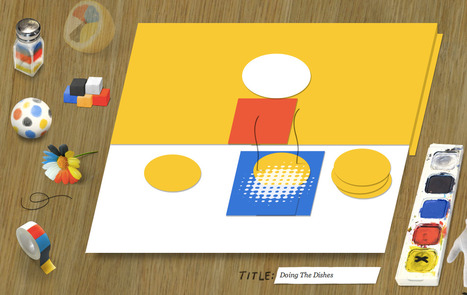
An abstract-expressionist tool to create and share your own artwork.
Jim Lerman's insight:
Very fun tool...great for making art and wasting time. Clever too.
Scoop.it!
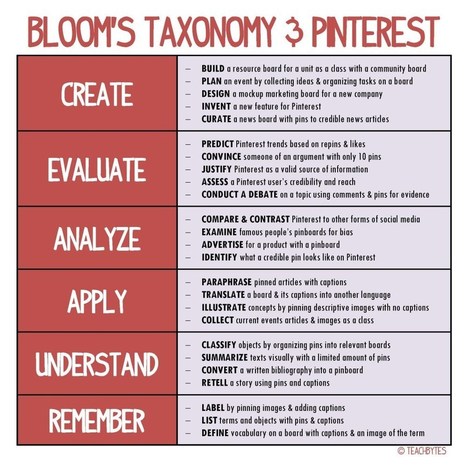
Recently, I've been spending quite a bit of my time researching how to use Pinterest in the classroom in a way that is meaningful and relevant. I've posted a couple of articles about Pinterest befo... Via Beth Dichter, Maritza Pérez Hdez , Becky Mowat

Ricard Garcia's curator insight,
June 11, 2013 4:23 AM
Pinterest is a vast source of possibilities for the classroom... here's a good article with different ways to make the best of it. 
AlGonzalezinfo's curator insight,
June 21, 2013 6:56 AM
This is a great example of how to use the Infographic format to educate and share knowledge with others. It make sense that a teacher would do it. Fantastic! 
Audrey's curator insight,
March 8, 2014 5:38 PM
Once you start using these two learning strategies teaching becomes a real pleasure as students will be teaching the topics. In addition they will be able to give evaluative and analytical commentary. Audrey for www.homeschoolsource.co.uk .
This certainly works for psychology at www.hotmoodle.com
|






