Your new post is loading...

|
Scooped by
Jim Lerman
June 27, 2013 12:48 AM
|
by Laura Brown "Being a content curator is all about displaying information. We don’t create the content, we display it. We share it – and people read it. But, first you have to display it. There are several skills involved in displaying content. Here are some thoughts for you to consider when creating and curating a Scoop.it topic."
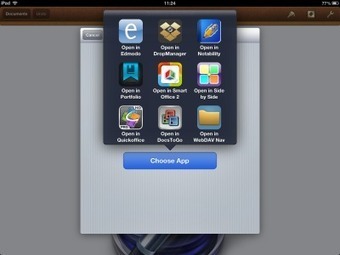
The world of iPad workflow just got a whole lot easier. After months of ‘work arounds’ involving screenshots, Dropbox and pre-tablet technology, the latest Edmodo update has changed the...
Via John Pearce, Jenny Smith, Heiko Idensen
by Jennie Magiera "In a previous post from December, I wrote about how I was (sadly) switching from Edmodo (my long-time LMS love) to Schoology. Of the 25 schools I support, 33 classes of students are using a Learning Management System. Since my December revelation, 26 have switched to Schoology and the remainder stayed with Edmodo. I myself maintained both an Edmodo group and started a Schoology course for the twice-weekly after school Student Innovation Team I lead. This, combined with the 33 classes, was a great way for me to learn more about the differences between the two platforms. I've learned a lot, and wanted to share it with you! Below is a quick overview of what we've learned when it comes to Edmodo vs. Schoology."
Via Sam Gliksman, Heiko Idensen
The 5 E's is an instructional model based on the constructivist approach to learning, which says that learners build or construct new ideas on top of their old ideas. The 5 E's can be used with students of all ages, including adults. Each of the 5 E's describes a phase of learning, and each phase begins with the letter "E": Engage, Explore, Explain, Elaborate, and Evaluate. The 5 E's allows students and teachers to experience common activities, to use and build on prior knowledge and experience, to construct meaning, and to continually assess their understanding of a concept. Engage: This phase of the 5 E's starts the process. An "engage" activity should do the following: Make connections between past and present learning experiences Anticipate activities and focus students' thinking on the learning outcomes of current activities. Students should become mentally engaged in the concept, process, or skill to be learned. Explore: This phase of the 5 E's provides students with a common base of experiences. They identify and develop concepts, processes, and skills. During this phase, students actively explore their environment or manipulate materials. Explain: This phase of the 5 E's helps students explain the concepts they have been exploring. They have opportunities to verbalize their conceptual understanding or to demonstrate new skills or behaviors. This phase also provides opportunities for teachers to introduce formal terms, definitions, and explanations for concepts, processes, skills, or behaviors. Elaborate: This phase of the 5 E's extends students' conceptual understanding and allows them to practice skills and behaviors. Through new experiences, the learners develop deeper and broader understanding of major concepts, obtain more information about areas of interest, and refine their skills. Evaluate: This phase of the 5 E's encourages learners to assess their understanding and abilities and lets teachers evaluate students' understanding of key concepts and skill development. ... http://www.aea267.k12.ia.us/science/files/BSCS_5E_Instructional_Model.pdf ... http://www.voyagesthroughtime.org/curriculum/instructional.html
Via Heiko Idensen
23 Feb 2011, 5,506 views What do you think of this resource? Please click here to complete a quick survey. Discussions are an important component of many forms of online student interaction. For students to benefit from an online discussion, it is important for teachers to generate relevant topics, effectively moderate student activity and participate regularly. This episode will highlight several strategies to help you manage online discussions more effectively, and make them more beneficial for your students. **** Download the PDF (8 pages):
http://online.cofa.unsw.edu.au/sites/default/files/episode-pdf/Discussions_LTTO.pdf
Via Heiko Idensen
|
|
Scooped by
Jim Lerman
June 26, 2013 3:35 PM
|
by Kaylene Hong Summary by Education Dive "Apple is furthering its education push with iOS 7 for the iPhone and iPad, adding several new features the company says “make it easier for institutions to put devices in the hands of students. ”Through the new app store's Volume Purchase Program, institutions can buy app licenses and use mobile device management software to push those licenses through to students, faculty and staff, and Apple will also provide a way for schools to obtain verifiable parental consent for personal Apple IDs belonging to students under the age of 13. "Also among key features, VPP will now support Mac apps and books, MDMprotocol gives teachers control to lock iOS devices into a specific app and manage apps wirelessly, and Apple TV can be enrolled in MDM, allowing students and teachers to mirror a device's screen on a specific big screen with greater ease." [Editor's note: Apple has set up an iOS 7 Education page detailing the OS upgrade's relevant features.]
|
|
Rescooped by
Jim Lerman
from Differentiation Strategies
June 26, 2013 12:28 AM
|
by Med Kharbach "Icebreakers are " discussion questions or activities used to help participants relax and ease into a group meeting or learning situation" (Dover, 2004). Icebreakers are very important in the learning-teaching process that takes place within the classroom. They can help in creating and maintaining a healthy and successful learning environment for students and are also the best warm-ups to get students engaged in a learning task."
Via Dr. Tom D'Amico (@TDOttawa) , kathymcdonough
|
|
Scooped by
Jim Lerman
June 25, 2013 6:06 PM
|
posted by sgschallenge "Serious Games Showcase & Challenge 2012 Best Game Mobile winner, DragonBox+ by WeWantToKnow AS, was given a 5 out of 5 Best rating by the online magazine graphite, which focuses on digital learning products. Graphite rates products on three learning dimensions: engagement, pedagogy and support. Graphite is a free service from Common Sense Media that helps teachers find, understand, and share the best digital learning products available."
|
|
Scooped by
Jim Lerman
June 25, 2013 4:07 PM
|
Description by Netted "If you feel that picking up where you left off can be like picking up after a mess, get Cupcloud, a program that saves your whole work environment with one click.
"Cupcloud is a free service for Apple and Windows that saves your workflow and can replicate it anywhere, anytime – even on another computer.
"Here’s how it works: When you leave a project you want to resume later, simply open Cupcloud and save – or “cup” – what you’re doing. When you come back, hit “uncup” and the program will reopen every document, file, browser window and tab you were using.
"And you can save as many cups as you want (for now – soon they’ll switch to 30 cups at a time), which means you can have a cup for work, a cup for watching sports, a cup for making music – the list goes on."
|
|
Rescooped by
Jim Lerman
from Eclectic Collection
June 24, 2013 7:33 PM
|
Whether you are looking to switch careers and become a full-time programmer, want to try to build a website or app on the side, or are just looking to round out your skill set, learning to code has certainly been something a lot of people have started to do lately. And while being a programmer might not be for everyone, there is a lot to be said about gaining a better, more educated view of how all those pixels get moved around all those screens.
Via Elsebeth Hurup
|
|
Rescooped by
Jim Lerman
from Tools for Teachers & Learners
June 24, 2013 2:45 PM
|
Narrable is an online storytelling platform that combines your important photos with the voices that bring them to life. The Narrable iOS app includes a lightweight camera to capture memories as they happen and a built-in audio recorder to preserve the voices behind the memory. After you have uploaded your content, log in at narrable.com to view, edit and share your story.
Via Nik Peachey
|
|
Rescooped by
Jim Lerman
from Learning & Technology News
June 24, 2013 2:40 PM
|
The New Media Consortium, the Consortium for School Networking (CoSN), and the International Society for Technology in Education (ISTE), with the support of HP, produced the NMC Horizon Report > 2013 K-12 Edition. This fifth edition in the annual K-12 series of the NMC Horizon Project examines emerging technologies for their potential impact on and use in teaching, learning, and creative inquiry within the environment of pre-college education. Six emerging technologies are identified across three adoption horizons over the next one to five years, as well as key trends and challenges expected to continue over the same period, giving educators, school administrators, and practitioners a valuable guide for strategic technology planning.
Via Nik Peachey
|
|
Rescooped by
Jim Lerman
from :: The 4th Era ::
June 24, 2013 2:34 PM
|
by Fast Company staff "HERE'S HOW THE BUSIEST CONNECTORS--MIGHTYBELL FOUNDER GINA BIANCHINI, HOOTSUITE CEO RYAN HOLMES, REDDIT COFOUNDER ALEXIS OHANIAN, IVANKA TRUMP, AND MORE--GIVE THEMSELVES A BREAK."
|
Edmodo is a free and secure social learning platform for teachers and students to collaborate and connect in the 24/7 classroom. The design and functionality of Edmodo is similar to Facebook, but the focus is on teaching and learning within a protected environment. Students don't even need an email account to sign up.
Teachers and students can extend the learning by posting messages, holding online discussions, picking up work and turning it in. Edmodo supports a variety of multimedia to provide students with flexible learning paths including links, images, video and interactive graphics created withThingLink.
http://www.thinglink.com/
Perhaps an engaging assignment for students would be to publish an interactive graphic to be explored prior to class. This type of assignment can provide students with background knowledge, front load the learning and level the playing field to prepare students for success in class
Via Heiko Idensen
|
|
Rescooped by
Jim Lerman
from Scriveners' Trappings
June 27, 2013 12:38 AM
|
To help students develop their writing skills I’ve created two additional groups for my classes which we call “iBlog” and “What Do You Think?” In iBlog, one student is chosen weekly and they are given the opportunity to blog about their personal interests. Besides having to use complete sentences and demonstrate the correct use of punctuation and spelling, they are required to include pictures and links to websites, articles and/or videos related to their specified interest.In “What Do You Think?”, students are required to respond to high interest articles with their opinions, and provide additional digital resources that piggy back upon previous responses. All posts are reviewed and critiqued on our interactive white board. Advice for Teachers New to Edmodo I would suggest that any new teacher interested in giving Edmodo a try should go straight to Edmodo.com and watch the introductory video as well any available tutorial videos in the Edmodo Help Center or at YouTube. Also, seek out fellow Edmodo users at your school for a more hands on approach and join Edmodo Communities to learn about the creative ways in which tech savvy teachers are integrating this amazing educational tool! It’s easy, fun and safe to use for students and teachers alike.
Via Heiko Idensen, Jim Lerman
This guide will give you the ins and outs of Edmodo. It is to be used as more of a reference manual than anything else, but it covers A LOT of material. Read, enjoy, learn, and share.
Via Heiko Idensen
The "Assessing Online Facilitation" instrument (AOF) is for online course facilitators to objectively evaluate their facilitation for strengths and areas for improvement. Facilitators may choose to offer the AOF to others to guide a peer evaluation of their performance in the online classroom. The AOF recognizes the different roles of an online facilitator, as outlined by Berge (1995), Hootstein (2002), and others. Pedagogical: Guiding student learning with a focus on concepts, principles, and skills. Social: Creating a welcoming online community in which learning is promoted. Managerial: Handling organizational, procedural, and administrative tasks. Technical: Assisting participants to become comfortable with the technologies used to deliver the course. There are many criteria that influence student satisfaction and learning in any course, including online courses. Recent publications have included criteria specific to online courses. The Project Team identified criteria from many sources and categorized them in the framework of the four roles of an online facilitator.
Via Heiko Idensen
|
|
Rescooped by
Jim Lerman
from :: The 4th Era ::
June 27, 2013 12:21 AM
|
Facilitating Online is a course intended for training educators as online facilitators of fully online and mixed mode courses. The Centre for Educational Technology (CET) produced a Course Leader’s Guide as an Open Educational Resource to assist educators and trainers who wish to implement a course on online facilitation within their institution or across several institutions. The course manual was written by Tony Carr, Shaheeda Jaffer and Jeanne Smuts and was published online and in print in early 2009.
The guide contains the course model, week-by-week learning activities, general guidance to the course leader on how to implement and customise the course and specific guidelines on each learning activity. The latest version of the course manual includes several minor corrections and is dedicated to the memory of our co-author Jeanne Smuts who died on 28th July 2009.
See Facilitating Online: A guide for course leaders for the latest pdf version of the course manual http://www.cet.uct.ac.za/files/file/FacilitationOnlineWeb.pdf as well the specimen course site. https://vula.uct.ac.za/portal/site/1d19c50c-0963-4b1d-bdc7-73ca46a72dd1 The book is also available in print form at no charge. To request copies of the printed book please contact Shirley Rix at shirley.rix@uct.ac.za.
Via Heiko Idensen, Jim Lerman
|
|
Scooped by
Jim Lerman
June 26, 2013 9:35 AM
|
from the website "The primary methodology in use is the challenge — a carefully crafted problem to solve which connects the curriculum to its real-world application. Challenges can be highly complex or quite simple, may take minutes or weeks to complete, and are driven by the state, local, or national subject area curricula as well as by the formative assessment gained via ongoing student reflection. Elementary students may grapple with the problem of selecting the largest apple to present to the principal following a field trip, secondary students might be seeking alternative energy transportation options for the district or creating a new grammar text using only a small set of short stories and newspaper articles. The exact challenges are as diverse as the teachers who create them and the students for whom they are created. But all share three components: -The students engage -The students exhibit their learning -The students debrief their learning Download sample challenges below (Word format)."
|
|
Rescooped by
Jim Lerman
from :: The 4th Era ::
June 26, 2013 12:21 AM
|
|
|
Rescooped by
Jim Lerman
from :: The 4th Era ::
June 25, 2013 5:54 PM
|
This June 2013 issue of the Virtual Education Journal features articles on Digital Storytelling and announces the 2013 VEJ Reader's Choice Awards. Prepare to devour every morsel and VEJ - Out Of This World!
|
|
Scooped by
Jim Lerman
June 25, 2013 4:03 PM
|
"This desktop app pulls all your favorite news items, blogs, and magazine articles into one distraction-free reader" Via Netted
|
|
Rescooped by
Jim Lerman
from Eclectic Collection
June 24, 2013 7:24 PM
|
"What’s the secret to avoiding art messes? How can you make your room orderly without emptying out Office Depot? Here are 100 teacher tips for creating a beautiful, organized environment, from no-mess glitter shakers to one-minute dance party transitions."
Via Elsebeth Hurup
|
|
Rescooped by
Jim Lerman
from Tools for Teachers & Learners
June 24, 2013 2:44 PM
|
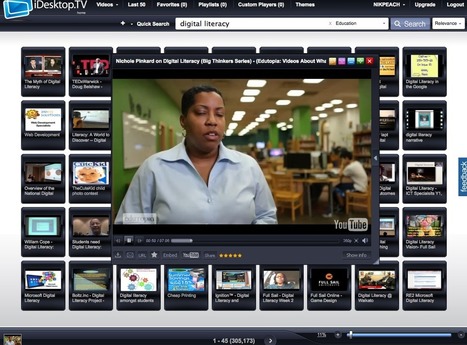
iDesktop.tv provides a really useful and user friendly service for anyone who wants to use video clips from sources like YouTube, but doesn't want their students looking around at anything unsuitable, or for anyone who has ever found a really useful clip, only to go back later and find it has moved or been removed.
Via Nik Peachey
|
|
Rescooped by
Jim Lerman
from Learning & Technology News
June 24, 2013 2:38 PM
|
More than 100 teachers from across Europe participated in the SMILE (Social Media in Learning and Education) action and undertook a pedagogical journey to explore jointly the challenges and opportunities involved when using social media in learning and education.
The outcomes of the project, funded by a Digital Citizenship Research Grant from Facebook, are now published in a digital handbook. You can find pedagogical materials and resources from the learning laboratory with many valuable reflections and suggestions on some critical aspects of the use of social media as regards school policies, pedagogical principles, professional development, responsible use and challenges to adoption.
Via Nik Peachey
|