


Into the Driver's Seat
486.8K views |
+0 today
Filter by date
Tags
Building learners' independence through thoughtful technology use
Curated by
Jim Lerman
 Your new post is loading...
 Scoop.it! 
by Barry Schwartz
"In the chart below, I’ve documented how each of the 14 RSS readers I’ve evaluated line up. The top readers listed in the chart happen to be more popular, followed by other feed readers sorted by alphabetical order. The readers include Feedly, Digg Reader, Newsblur, AOL Reader, BazQux, Feedbin, Feeder, FeedReader, FeedWrangler, G2Reader, InoReader, NetNewsWire, Ridly and The Old Reader. All of these are Web based RSS readers with the exception of NetNewsWire."
Jim Lerman's insight:
I still like The Old Reader, but Digg Reader just came out in the last few days. Have to check that out.
Scoop.it!

Blog author Elizabeth M. Peterson Guest Post by Amy Mitchell
"My Third Grade class learned the multiplication tables this year and as a way to extend this learning, they learned how to draw multiplication fact stars. These stars are quite intricate and call upon the students to be exact in their work or as referred to in the Common Core State Math Standards, “precision”. I have found that these stars provide a new motivator for learning multiplication facts – if a student misses a math fact or does not do one correctly, their star will not be produced in the way the student hopes it will. I have witnessed my most reluctant students persevere and try again and again to perfect their creations. I have used the visual arts in my classroom in the development of these stars and we have also created these stars as a whole class using string so that a kinesthetic component is involved as well.
"The arts are more than just window dressing and making the classroom look pretty. There are powerful learning objectives and messages behind each artistic activity that is done. This is the place where it is acceptable for students to take risks, think outside the box and try something new that they didn’t think they could do before. It is an opportunity for students to make their thinking visible and appreciated by their peers in all new ways. It breaks down barriers between students. Even those students who are most challenged by academic expectations become truly a part of the classroom experience alongside their peers."
Scoop.it!

by Richard Byrne
"Last year Donna Baumbach created a Google Slides presentation titled 26+ Ways to Use ThingLink In the Classroom. Yesterday, I received an email from Donna in which she shared the updated version of that presentation. The presentation now contains more than 65 tips and ideas for using ThingLink in the classroom. The presentation is open to contributions from others. If you have ideas to add to the presentation, you can do so here. Big thanks to Donna for creating and sharing this excellent resource about one of my favorite web tools. By the way, ThingLink is now available as an iPad app too."
Find Baumbach's updated slide deck here:
Scoop.it!
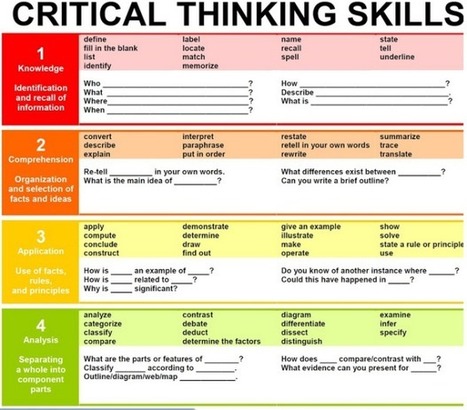
Here is a guide to critical thinking skills complete with four (count 'em, 4!) steps accompanied by fill-in-the-blank questions designed to pique your interest and illustrate how each step works. Via Tim Boileau
Jim Lerman's insight:
Does this do the trick? I wonder...
Scoop.it!

An online teaching project is launched by a teacher new to education technology and online teaching. After a successful year, these are her self-reflections. Via TeachingEnglish
Scoop.it!

by Jamie Forshey
"Because I’m a huge fan of integrating visuals into all content areas across the K-12 curriculum, I have already shared a Writing Prompts with a Visual Twist post—one that describes how images can spark an interest in writing and/or generate an interesting discussion. But then I got to thinking… Why not locate a few web tools that allow teachers and/or students to create their very own quote graphics? Well, fast forward to this morning when I began my search for a simple classroom resource to get the job done.
"Of course, my search resulted in locating more than enough options, but after several hours of experimenting the winner is—ReciteThis! So, why was this web tool my choice? Well, for starters—it’s free, super easy to use and contains a variety of nifty templates to bring your words of wisdom to life. 42 of them to be exact! Another useful feature includes a built-in quote gallery in which users can locate a saying in one of 20 categories. Simply double click on the desired message, and it’s automatically inserted into the workspace. Yeah, it’s really that cool!"
Scoop.it!

by Jennifer Carey
"If you are not familiar with Evernote, now is the time. Evernote is a free web tool and application that helps you to organize your notes, emails, images, and, well…. everything. It’s hard to describe, but this 50-second video highlights some of the key features and abilities.
'Evernote can be a great application for teachers, both to keep yourself coordinated and to facilitate student learning. I want to highlight a few ways that I have employed Evernote not only to make my life a little easier as a teacher, but to help my students and my classroom stay more focused and organized.
'First, if you need to familiarize yourself with a quick tutorial, try out the “Getting Started Guide For Teachers.” This will help you with the basics of setting up an account, creating notes, and syncing across platforms. Trust me, it’s very easy and you’ll be up and running in just a few minutes. If you are already a more advanced user, then make sure that you set aside some time to browse their blog and YouTube channel for more advanced tips and tricks!" 
Rick Burkhardt's curator insight,
July 2, 2013 10:56 PM
Evernote is a great app that I use to write my blog. I can get to it on my iPad, iPhone, and laptop....it goes where I go!
Scoop.it!
Jim Lerman's insight:
Nice graphic
Scoop.it!

A number of people have asked me how to use the Grafio App, so I made a screencast. I hope you find it useful!
Via Rebecca Penina Simon
Jim Lerman's insight:
A wonderful idea mapping app for use on the iPad. Great video demonstration of its functionality. Certainly worth 10 minutes to look at. 
Pierre Mongin 's curator insight,
June 27, 2013 2:57 AM
une application ipad trés intuitive ,version gratuite Lite déjà performante
Scoop.it!

Yesterday I created an interactive image to demonstrate how easy it is to engage in collaborative leaving with ThingLink. If you explore the live image, you will discover the Padlet online board that is being used to assemble collaborator's thoughts. I've pulled some of the ideas together and have been adding them to the ThingLink to define the song through multimedia. Now I am digging deeper to connect standards and design a student driven learning experience. Via Susan Oxnevad
Scoop.it!

Brief descriptions and links to 10 top websites that address use of iPads in education, hand-picked by Jennie Magiera. |
Scoop.it!

According to some of the very happy customers who contributed to the app's four-and-a-half-star review in the Mac App Store, Pixelmator ($14.99, Mac) is such a fine image editor that it rivals even Elements as the market ... Via Jon Samuelson
Scoop.it!

Mind mapping is a great way to brainstorm, make a plan, or turn ideas into the steps needed to make it real. Thankfully, there are great tools out there to help you build mind maps, organize them, and save them for later.
Scoop.it!

From
oedb

by Ellyssa Kroski
"Whether you’re a technologist, educator, or librarian, if you want to keep up with the latest in cutting-edge technology news, here are 30 Twitter accounts that will keep you in-the-know"
Scoop.it!

by Wesley Fryer
"These are my notes from Jennie Magiera and Autumn Laidler‘s ISTE 2013 breakout session, “Social Media in the Classroom: Amplifying our Students.” Subscribe to Autumn’s blog, “Science in the City,” and Jennie’s blog, “Teaching Like It’s 2999.” I’m audio recording this session to podcast later, MY THOUGHTS AND COMMENTS ARE IN ALL CAPS."
Jim Lerman's insight:
Fryer takes excellent notes and this session offers a great deal of information on using social media in the classroom.
Scoop.it!

Khadim's comment,
June 28, 2013 8:54 AM
You can even 'Run' the flows to get interactive help within any website or web applications.

JudyGressel's curator insight,
June 29, 2013 9:07 AM
Embed step by step tutorials on library pathfinders.
Scoop.it!

Recently, Linda Ross from Online Universities emailed me about a great infographic on Pinterest they published on their blog. After checking it out, I thought what better way to start this Thursday... Via Kathleen Cercone
Scoop.it!

GwynethJones's curator insight,
March 21, 2013 8:39 PM
iPad Primer -A Pretty Awesome COMIC tutorial by @bcteacher #MACUL2013 | 
Megan Hall's curator insight,
June 9, 2013 4:54 PM
great resource for our teachers with the iPad rollout next year
Scoop.it!

by Jamie Forshey
"From surveys to quizzes to exit tickets, I love utilizing Google forms in my classroom. In fact, they are some my most favorite items in my Google Drive account. Well, it looks like things just got better for form fanatics like me! Earlier this week Google shared some more tech love with its announcement that forms can now be generated in a printer friendly format.
"Yep, it’s true! In comparison to the old method of printing forms, each question in the new layout now makes it pretty simple for individuals—students, colleagues, parents—to complete when printed on paper."
Scoop.it!

Excerpted from review article by The Next Web:
Via Giuseppe Mauriello
Scoop.it!
Jim Lerman's insight:
Examples and resources related to Challenge Based Learning.
Scoop.it!

by Jennie Magiera
"... I decided to give Schoology - another web-based LMS - another try. I had experimented with this site when it first came out - just a few months after Edmodo's release - but found it confusing to use and too expensive (they originally charged for some features that were free on Edmodo). However on this most recent go-around, I noticed that not only are all the features I need free, but also found that there are more features than Edmodo. I've been experimenting using it with some groups of students and sharing it with the teachers whom I coach. Today I was working with colleague Linsey Rose, and found that Schoology may just be the answer to many of my iPad needs! Below are some brief findings:" |








by Dr. Donna Baumbach and Dr. Judy Lee
"Finding the Right Tool" is part of a much larger wiki site that focuses on a great many tools. This particular page gathers collections of sites and apps that have been organized
By Task
By Product
By Cognitive Level
By Learning Style
By Instructional Strategy
By Stage of Inquiry
By NETS*S
By Category
By Types of Learning
By Curriculum Area
By Teaching Style
The wiki is quite clearly a labor of love for authors Baumbach and Lee (who focus their work mostly for librarians). Readers are invited to contribute their own recommendations.