



These seven great audio and video tools for teachers and students can make your classroom and curriculum a whole lot more vivid and engaging.
Via Beth Dichter, Mike Keevers, taccle3

 Your new post is loading...
 Scoop.it! These seven great audio and video tools for teachers and students can make your classroom and curriculum a whole lot more vivid and engaging. Via Beth Dichter, Mike Keevers, taccle3
Scoop.it!

"My grade one students each have their own blogs that are digital portfolios of their progress from the first week of school until the last one. On those blogs, they post writing, images, video and other artifacts that show what they have been learning. I’ve written (there is an entire chapter in my book) and talked before about digital portfolios, why we use them and how I use them for assessment.
Recently, someone asked me about how I provide for choice in our portfolios. What a great question! Choice should an important part of digital portfolios, and I give my students as much choice as I can as soon as I can." Via John Evans, Lorelie Lenaour
Scoop.it!

By Samantha Kotey
"Now that more and more classrooms are becoming digital it seems there’s a market for note taking apps over writing long hand. While there is some practical value to handwritten notes, like being able to use the margins and free space to jot down anything that seems helpful, many students now are proficient or extremely proficient when it comes to typing skills and may even be faster note taking through an app than through long hand. Students are living their lives through computers and tablets, so it only makes sense to eliminate the bulk of paper notebooks from their backpacks in favor of their multipurpose tablet. These 5 note taking apps go above and beyond the default notepad and make retaining information from the classroom both fun and extremely organized."

Jim Lerman's curator insight,
July 8, 2013 4:52 PM
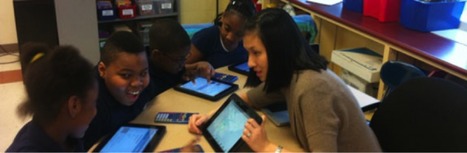
I found this on Facebook somehow.
How many ways can we put this image to good use?
Scoop.it!
From
dmlhub

A Few Moments with Jennie Magiera
"As Digital Learning Coordinator for the Academy for Urban School Leadership, Jennie Magierauses innovative technologies to construct relevant and engaging learning experiences for students across 25 Chicago Public Schools. Magiera specializes in 1-to-1-technology innovation and has documented success in increasing differentiation and improving assessment practices in AUSL classrooms. In 2012, Magiera, who is also a Google Certified Teacher and an Apple Distinguished Educator, was awarded Chicago Public Schools’ Tech Innovator of the Year award. This past May, Magiera was one of three educators chosen to speak with Secretary of Education Arne Duncan at the Reimagining Learning Summit in Washington D.C. about redefining schools through the effective use of digital technologies. We caught up with Magiera to discuss the power of digital technologies in transforming classrooms as well as the diverse professional learning communities that are emerging for educators in a participatory age."
Scoop.it!

Nancy White's curator insight,
July 10, 2013 10:39 AM
Beautifully illustrates that if we want students to be creative, we need to give them choice - and freedom to use their imaginations!
Scoop.it!
by Alice Keeler
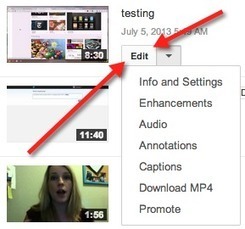
"More and more I am loving my chromebook. It is super light weight, boots in 8 seconds. Most of what I do is web based anyway. I use a lot of Google Docs so the chromebook suits my needs for so many things. At $249 for the samsung series 3, it is a fantastic deal. Sure there are things the chromebook does not do, for example I can not install things. Every device has pluses and minuses, for $249… I am not going to complain.
"One complaint I have seen from people is that you can not screencast on a chromebook. Sure, I wish I had snagit or camtasia for the chromebook, but the fact that I can not use those or other screencasting tools does not mean I can not screencast. Try using a Google Hangout on Air (GHO). If you have never used a GHO, this is a video conferencing tool that is pretty darn cool. It allows you to video conference with colleagues, screenshare, share documents, collaboratively watch YouTube videos and wear a digital mustache. A Google Hangout on Air broadcasts your hangout to YouTube and saves the recording to your YouTube account."
Scoop.it!

by Chloe Trogden
"The iPad isn’t just a great tool for reading your e-books or surfing the web while you’re waiting for your plane. It is a powerful and sophisticated piece of technology that can help teachers connect with students and facilitate learning in the classroom.
"There are hundreds, if not thousands, of great apps that can help you to teach lessons with the iPad, and there are many other ways the iPad can serve as a useful tool."
Scoop.it!

by Robtheidealist
"Earlier this week, a group of educators in MN who opposed Teach for America’s (TFA) efforts to partner with the U of MN posted a letter summarizing their critiques of the program. They, and many others, represent a burgeoning resistance movement to TFA that is comprised of community members, educators, and former TFA members all united against TFA’s brand of “education reform”. In fact, July 11-14th there will be an education summit in Chicago that will include a session titled “Organizing Resistance to Teach for America and its Role in Privatization”.
"The resistance has even extended into politics. In May 2013, the governor of MN vetoed a bill provision that would have given TFA $1.5 million over two years. In his letter to the legislature, he justified his veto on the basis that (1) TFA has financial assets in excess of $350 million dollars and don’t need this state grant, (2) “No competitive grant program was established; no other applications were solicited; and no objective review was made by an independent panel of experts”.
"I decided to write about TFA because I recently got into a huge fight with a few of my college friends over the program. I went to Carleton College, a fairly prestigious institution, and one of the “elite” feeder-schools into TFA, so I have a fair share of peers that are TFA members. I posted some criticisms of TFA, and some of my peers were incensed. So, I want to take this time to break down what TFA really is, and why I and many others oppose this type of “education reform”.
"For a detailed review of how TFA was founded and the organization’s mission, please read Andrew Hartman’s article for Jacobin Magazine: Teach for America: The Hidden Curriculum of Liberal Do-Gooders."
Scoop.it!

"Years ago I stumbled on Wallwisher, a virtual post-it note board. I liked the concept, but the backgrounds were garish and hard to look at for long. Months ago, I received notification via email that Wallwisher had undergone a transformation and was nowPadlet.
"In the middle of finals, I was procrastinating and decided to explore Padlet. I am thrilled I did! I created my first “wall” in seconds and love the new backgrounds, easy sharing and ability to upload images. I decided to use it for a professional development training. I asked participants to post a little bio at the start of the training. It was a hit!"
Scoop.it!

Digital citizenship is important to understand for today's students, staff, and teachers. Microsoft has just unveiled a free curriculum that gives great tips and ideas on teaching digital citizenship and creative content.
Scoop.it!

by Mike Lee
"You may know Joan Young from her prolific tweets as @flourishingkids on Twitter. Did you know she is also quite a technology impresario in her 4th grade classroom and once won an education hackathon for Best Mobile App for the project Schoolhouse Beats?
"If you have ever wondered what software Joan uses in her classroom, here it is! It’s quite a diverse collection, from the free audio creator Audacity to the creativity platform Glogster EDU to the research engine instaGrok. She shares more details on how she uses this technology her blog. Too bad she doesn’t share how in the world she finds time for all of this. We suspect she must have built a secret time machine at another hackathon somewhere…" |
Scoop.it!

Now that the Common Core State Standards established their rule over the future of education, any company capable of producing an educational product wants to link it with the Standards. Sifting through the resources becomes... Via Elke Höfler
Scoop.it!
From
www
8 Educational Apps To Create Digital Portfolios (RT @MoodleMcKean: 8 Educational Apps To Create Digital Portfolios http://t.co/ipfBQ0GVtf #edtech #edchat #elearning #ipaded #eportfolio #mlearning)... Via Kate Coleman, Lee Ballantyne, kathymcdonough, Lorelie Lenaour
Scoop.it!

Scoot & Doodle announced today the launch of its Ambassador Program, designed to gather key insights from educators, helping mold products that are relevant and valuable for today’s learning environments. Scoot & Doodle’s real-time social creativity platform enables students and classmates to get creative together face-to-face, practicing critical 21st century learning and innovation skills. Via AvatarGeneration
Scoop.it!

From
blog
"Welcome to the Summer of Making & Connecting. In celebration, the National Writing Project's Educator Innovator and The Mozilla Foundation are throwing a party — and you're invited. With the support of the MacArthur Foundation and together with an extraordinary set of partners committed to advancing creative and connected learning, we have gathered a set of opportunities to appeal to the educator innovator in each of us. Be a maker, learn new skills, connect with other educator innovators, and have fun!"
Scoop.it!

From
edreach
by Daniel Rezak
"One thing we know, is that so many people are doing iPad 1:1 pilots. While we know there are other device pilots going on right now, we wanted to create a series that would be focused on doing amazing things with one specific ecosystem. In this case- iPad. Also- we want to show off the power of Google Hangouts as a PD device.
We’re working directly with Haiku Deck, MentorMob, Google, TechSmith, Subtext, and FlipBoard to create a series of workshops that will give you great ideas to use with students, and for managing your classroom. We’ve also found some of the most talented educators to run these.
"Why pay for PD? EdReach is bringing your school district some of the best PD right to your desktop or screen. Use the hashtag #EdReach on Twitter and G+ while enjoying this PD, and connect to educators everywhere!
Jim Lerman's insight:
Free PD for iPads and computers dealing with some very powerful apps and services. This looks like it will be an excellent series of events.
Scoop.it!

by Steve Lai
"In my ongoing effort to manage storage on my iDevices, I wanted to share with you guys a neat feature, once again, that Dropbox offers (I wrote a similar post a few months back).
"For those of us who enjoy taking photos and videos with our devices, we know that they will take up a lot of storage. This can pose a problem, especially if one only has 16GB of storage. Instead of using iCloud or Photostream to back up your photos (I avoid ever connecting my devices to iTunes), Dropbox presents a great solution.
"Backing up photos is extremely important, in case we ever lose or break our devices."
Scoop.it!

by Justin Baeder
"My friend Nicholas Provenzano, The Nerdy Teacher, uses Evernote to organize all of his teaching materials and student work.
"I use Evernote as a giant dumping ground for anything I might need to refer to in the future, such as CYA emails, teacher observations, meeting notes, photos of whiteboards, and anything else I might want to save. I don’t organize anything; I just search when I need to find something.
"Nicholas organizes his notebooks meticulously, with several nested notebooks for each class, and shared notebooks for each student. I just dump everything in, and don’t even bother to process my “inbox” in Evernote."
"Either way you use it, Evernote is amazing. (Nick taught a workshop on Evernote a while back if you’re interested.)"
Scoop.it!

by Shannon Dauphin
"Project-based learning is becoming increasingly popular as teachers look for a way to make lessons stick in the minds of their students. According to Edutopia, studies have shown that students who use project-based learning remember the material much longer and have healthier attitudes toward education.
"Project-based learning is based on the idea that students learn best by tackling and solving real world problems. Students are much more engaged with the subject matter and look to the teacher as more of a coach who guides them through their own reflections and ideas. Project-based learning often involves students working in pairs or groups, thus facilitating a deeper understanding of cooperation and communication in solving problems. "Ready to try project-based learning in your classroom? These tried-and-true resources are sure to get you on the right track."
Scoop.it!

by Catlin Tucker
"At the end of each school year, I ask my students to select several different writing assignments produced throughout the year and edit those pieces to reflect their current ability. My hope is that they will see and appreciate their own growth and development as writers in the process. These portfolios took the form of binders, until this year...
"The portfolios created were visually interesting and, overall, the content was impressive. I love that this assignment combined writing, editing, revising and reflecting with a digital media component. For teachers stressed about transitioning the Common Core, this project simultaneously addresses almost every writing standard! Below are a few of my favorite digital portfolios created this year. Just click on any of the images below to visit these student created websites!"
Jim Lerman's insight:
Quite a thorough discussion of one teacher's journey of the first year of implementing end-of-year web-based student portfolios. Lots of valuable insights.
Scoop.it!

by Kashmir Hill
"So this post is for you, guy with no iPad password, and for you, girl who stays signed into Gmail on her boyfriend’s computer, and for you, person walking down the street having a loud conversation on your mobile phone about your recent doctor’s diagnosis of that rash thing you have. These are the really, really simple things you should be doing to keep casual intruders from invading your privacy."
Jim Lerman's insight:
Good advice here. |





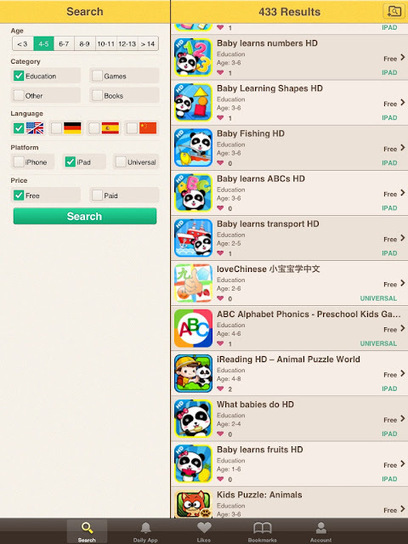




This post provides some great audio and video tools that you might consider using with students. We know that students are engaged when multimedia comes into the classroom...and what better way to engage them than to have them become creators through the use of multimedia.
Learn about tools such as:
* Matterhorn, a free tool that "enables teachers to create recordings of lectures and classes." Are you thinking of flipping your class? If so you should check out this tool.
* Jing - another free tool that allows you to capture what is happening on the screen of your computer and then share it with others. How about having students demonstrate ways to solve math problems, and post them online?
* Splicd - Is that YouTube video too long? Determine which section you want and grab that specific section. Save it to your hard drive and you ready to go...without taking time to fast foward to the necessary section.
* UJam - Another free tool this one allows you to create and remix music and film.
Three more tools are listed in the post so click through to check them out!
Some nice resources here and I'm curious to try a couple.