What are the kinds of a tools a 21st century teacher should be expected to master? Here are 9.
Via Heather Peretz

 Your new post is loading...
 Scoop.it! What are the kinds of a tools a 21st century teacher should be expected to master? Here are 9. Via Heather Peretz 
No comment yet.
Sign up to comment
Scoop.it!

The Google in Education California Summit is a global users summit only 15 minutes from Google Headquarters in Silicon Valley on July 13 & 14, 2013.
Jim Lerman's insight:
Resource links provided by many of the presenters at the just completed Google in Education California Summit. Another goldmine.
Scoop.it!

by Karl Lindgren-Streicher "If This Then That (IFTTT) is a web service that links various disparate accounts - email, social media, storage, etc - and allows you to create automated actions if a defined event occurs. That is the worst description of IFTTT ever. Whatever. The front page of the IFTTT site says 'put the internet to work for you.' That's a way better description.
Jim Lerman's insight:
Brilliant
Scoop.it!

A list of apps from Wesley Freyer's great iPad Media Camps. Excellent for those in the beginning stages of introducing iPads into their teaching.
Jim Lerman's insight:
IMO, Freyer consistently ranks are one of the greatest sharers of useful information to tech enthusiast educators.
Scoop.it!

by Klint Finley
"Videogames are a waste of time. Well, not always. Sometimes they can teach you stuff, like honest-to-goodness computer programming skills.
"The trick is to make these educational games as interesting and enjoyable as the shoot-em-up variety, and that’s not always easy. But researchers at North Carolina State University want to help. Dr. Kristy Boyer and Fernando Rodríguez are studying the way youngsters respond to a 3-D game that teaches programming, hoping to discover the secrets of building games that are not only educational but enjoyable.
"Boyer and Rodriguez are building a new programming-happy game they call ENGAGE. It’s a bit like a game developed by another group of researchers at the University of California, San Diego, calledCodeSpells, but Boyer and Rodriguez take a different tack, as described in a paper presented at the International Conference on Artificial Intelligence in Education in Memphis, Tennessee last week.
"Instead of teaching a particular programming language like CodeSpells, which teaches Java, ENGAGEaims to teach “big ideas” in computer science, such as how to use abstractions to hide unimportant details and emphasize important ones or how to apply algorithms a wide range of problems."
Via Jackie Gerstein
Scoop.it!

"This deceptively simple application allows users to capture and share six-second video clips–rather than pure gif animations–through social media. This short window might sound like a detriment to some, but is actually what makes Vine such a powerful creative tool: Users must consider how they will capture, edit and share content in a way that conveys their intended messages. The results can be stunning, and in the right hands, surprisingly effective means of communication.
"This is precisely some teachers have adopted Vine as an educational tool, especially in the PBL classroom."
Via Powerful Learning Practice
Scoop.it!
Teach Informational Texts Alongside The Literature You Love | Caitlin Tucker, Honors English Teacher
by Caitlin Tucker
"The Common Core places new emphasis on the importance of reading and analyzing complex nonfiction and informational texts. This has many English teachers feeling like their literature is under attack, but students fall in love with stories. We don’t need to lose our stories in our transition to the Common Core.
"Each week, I do “story time” with my high school students. They sit on the floor and I read them a children’s story. At the beginning of the year, they think I am nuts. In fact, one students said in his evaluation of the class, “I think story time was the most enjoyable [class routine]. At the beginning of the year I thought it was really weird that we were doing it when we were students in high school, but now I’m really happy that we do it because its a great way to end the class after a long day.” Another student gushed, ”I LOVED story time, it made me feel like I was back in Kindergarten, it was always something I looked forward to at the end of the class!”
"Clearly, students of all ages love stories. There is nothing in the Common Core that says we have to lose our stories. What has been interesting for me is to change my approach to teaching literature. Now, I ground the stories we read into real world events and issues so students see those connections more visibly. This is a great way to pull in those complex nonfiction pieces and use them to deepen our students understanding of the novels, plays and poetry they read in English."

Sandra Carswell's curator insight,
July 19, 2013 10:21 AM
Must share with your teachers, especially secondary!
Scoop.it!

Why use this Learning Center Approach- well many elementary teachers ask what they can do with only a handful of devices in their classrooms. Similarly, we often discussed the role of Interactive White Boards in a class that should be more student-centric. By taking this center approach, teachers can put the technology in the hands of their students, differentiate their instruction, and create multiple opportunities for learning. Via Andrea Zeitz
Scoop.it!

It’s about time you give some love to Google+, a social media platform set to attract more people not only because of its new dressed up interface, but also by the recent features added.
Google+ is obviously betting big on photos as it launches its ability to “auto awesome” images uploaded to it. Its mobile app came through with its refreshing updates as well. All in all, it has been a very active month for Google+ and the new wave of features is projected to increase its social networking share. Now here’s an infographic ready to turn anyone who’s willing to make the jump an instant Google+ savvy user. Via Lauren Moss, Rob Furman, Jim Lerman

's comment July 16, 2013 10:15 PM
There are lots of topics you can find here at Scoop it that explain and show all there is to know about Google +... Holler if you need any help... Just do a search for Google Plus here via Scoop It

Jesse Garboden's curator insight,
July 17, 2013 9:19 PM
Google+ has Communites, they are better organized than Facebook groups.
Scoop.it!

We built Mural.ly to fully unleash the imagination of teams of visual people and we know that most of creative teams are already using Evernote to collect and organize their ideas and inspiration... Via Baiba Svenca

Monica Goddard's comment,
July 20, 2013 11:04 PM
I really like using Evernote. I have it on my phone, laptop and IPAD. Mural.ly would make it even better.

Steve Vaitl's curator insight,
July 22, 2013 6:49 PM
Looks like an easy way to take your Evernote notebooks to a nice visual level. 
Berta Solé's comment,
July 26, 2013 4:10 AM
Yo también tengo que entrar en el uso de Evernote junto con Mural.ly.
Scoop.it!

by Miguel Guhlin
"For apps that won't allow you to copy from the Camera Roll--like AlbumFX Lite--you can have students email the product directly to Evernote, GoogleDrive via GoFileDrop Freemium, or--if you're not worried about FERPA issues--as DougPete points out in this comment, use dropittome to send it to Dropbox.
Scoop.it!

by Matt Kish
Project 2 – Collaborative Writing with Google Docs Goal: To create a collaborative writing document Apps: Google Drive Optional Resources: If you like to prepare before starting, check out some of these resources. If you’re someone who likes to just jump in, skip this and start working! Google Drive information from Google Google Drive app for iPad information Video tutorial about Google Drive Google Docs in Plain English (an old resource, but worth a watch)
Scoop.it!

"Making a mind map should be a spontaneous pre-writing activity. Students start with a topic at the centre and then generate a web of ideas from that, developing and relating these ideas as their mind makes associations.
"Mind maps work well as their visual design enables students to see the relationship between ideas, and encourages them to group certain ideas together as they proceed. Mind maps work especially well when created in groups, since the discussion this engenders aids the production of ideas, and makes the task livelier and more enjoyable." Via HighPoint IELTS Prep
|
Scoop.it!
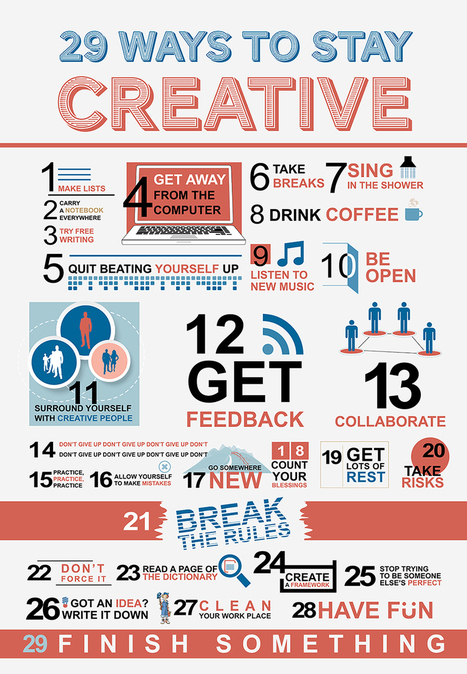
Inspirational infographics submission by 'islam.abudaoud' on Creattica - 29 Ways to Stay Creative (Infographic) Via Ana Cristina Pratas
Scoop.it!

These are participants' notes from nearly every session at the week-long Discovery Euducators Network Summer Institute held at the University of Vermon from July 14-19, 2013. There are many gems buried here.
Scoop.it!

by Anibal Pacheco
"If you are an Educator looking to use Twitter in the classroom you might have noticed most tweets include a #Hashtag.
"The use of the # sign with a word attached to it makes up one. Hashtags trace their history to IRC (Internet Relay Chat) networks where they are used to label groups and topics. When Twitter came into the social media scene users quickly adopted hashtags as a way to group Twitter messages based on a particular subject or topic. The question now is how do you use them to engage students in the classroom. The first thing you need to do is create a hashtag identifying your subject, project, workshop or any other event you want to track.
"I would recommend you search hashtag directory services like tagdef.com, twubs.comand hashtags.org to see if somebody is using the one you want. This is crucial because you do not want to start using a hashtag or host a Twitter Chat only to find out somebody halfway across the world has already been using it for months. Twitter does not have formal rules about hashtag ownership, but as a matter of netiquette it is prudent to first check. You could be reported for spam, or worst blocked due to using someone else’s hashtag."
Via Shelly Terrell
Scoop.it!
"All Caine Monroy wanted was for some people to come and play in his homemade arcade. What he got has become so much more. Via a short film posted on the internet just a few short months ago, Caine Monroy has become an internet sensation. Nirvan Mullick is an award-winning filmmaker and digital strategist, whose short film CAINE'S ARCADE has taken the internet by storm and launched a worldwide movement. The story of Caine and Nirvan is a wonderful example of human connection and what amazing things can happen when people join together to help someone fulfill a dream." Via Powerful Learning Practice
Jim Lerman's insight:
See the original "Caine's Arcade" video here:

Mayra.Loves.Books's curator insight,
July 20, 2013 10:07 AM
In all the negative "news" I read on the internet, finally I am glad to find something that restores hope. This is so inspiring.
Scoop.it!

President Barack Obama surprised reporters in the White House briefing room Friday, delivering remarks on the case involving the death of Trayvon Martin.

Jim Lerman's curator insight,
July 20, 2013 1:47 AM
I find Mr. Obama shows his greatest strengths when addressing imatters related to race.
Scoop.it!

by Joshua Lockhart
"Regardless of what you have been told, there is no such thing as a “do-it-all” camera. If there was a “do-it-all” camera, competition in the industry would suffer, seedy patents would be made, one company would monopolize everything, prices would skyrocket, their profits would fail, and eventually, we would no longer have cameras at all. At least that’s how I see it. It would suck.
"With that said, this is precisely why different cameras exist, so from now on, I would recommend thinking of cameras as different tools. While all screwdrivers are tools, not all tools are screwdrivers. Make sense?
"We at MakeUseOf know that purchasing a camera is a big deal, so we want to help. Below are just a few things to take into consideration before dropping loads of cash on something you will be using for quite a while."
Scoop.it!

The Digital Rocking Chair's curator insight,
July 18, 2013 2:25 AM
Michelle Lhooq: 'The increased predominance of mobile devices—not to mention our clingy dependence on them—has sparked a boom of ambitious apps for phones and tablets that are case studies for storytelling in the “digital age.”'
Scoop.it!

by Garr Reynolds
"Here are several video presentations and interviews which look at different ideas about education and schooling." Via Andrea Zeitz
Jim Lerman's insight:
Excellent selections. You could probably use one of these for a first day of school faculty meeting.
Scoop.it!

by Miguel Guhlin
"Over the last year, I've had the opportunity to work with lots of different iPad apps. I've spent lots of money (about $200) on all the different paid apps, as well as some that I managed to pick up thanks to just in time notifications via AppsForFree app (free itself)."
Jim Lerman's insight:
Everyone's got their favorites. Guhlin is a major power user, be sure to check his out.
Scoop.it!

by Matt Kish
Project 1 – Creating a digital story with Book Creator Goal: Create a digital story integrating text and images using Book Creator.
Apps: I focus on Book Creator. Another popular app is Story Buddy.
Optional Resources: If you like to prepare before starting, check out some of these resources. If you’re someone who likes to just jump in, skip this and start working! Read the Getting Started Tutorial in Book Creator (you’ll see it when you open the Book Creator app Check out the Book Creator Help site Watch a Book Creator Tutorial on Youtube here or here
Scoop.it!

by Matt Kish
Project 3 – Teaching with Explain Everything "In this project I’ll actually be focusing on the students doing the teaching. There are a number of apps out there that allow students to do a screen-capture or screencast, that is, allowing them to create a video of their iPad screen while doing some action. There are lots of applications to do this, but one thing I am aiming to do more of this year is allowing students to show their thinking by doing a screencast.
"If you can imagine walking around a math class and asking every student to explain their thinking behind a math problem, that might be quite hard to accomplish in one period. But, to have each kid solve a problem on their iPad while they talk through it not only allows you to see their thinking at a later time, it also gives the student the chance to rehearse and practice their thinking through oral language. Through the explanation they are cementing their understanding and uncovering uncertainties."
|