Your new post is loading...

|
Scooped by
Jim Lerman
October 6, 2013 3:30 AM
|
by Vicki Davis
QR Codes in the Classroom
"For the classroom teacher, they are valuable for three reasons: - They can save us time.
- They can save paper.
- They provide a link to mobile devices that help students do their homework and follow along.
"Back in March, we discussed QR codes in our Lesson in Simple Augmented Reality. We used them extensively in our eighth grade portfolios this year and it has cut assessment time in half. Many of you have asked that this post be written to help you on your journey.
This Post
"This blog post is divided into three parts. First, you have to be ready to use QR Codes, then you have to teach the students. Finally, we learn seven ways QR codes are being used in the classroom RIGHT NOW."
|
|
Rescooped by
Jim Lerman
from The Academy of Nod
October 6, 2013 2:42 AM
|
|
|
Rescooped by
Jim Lerman
from Technology Advances
October 4, 2013 10:35 PM
|
"Tablets are on their way to becoming a standard part of school curriculum, with more and more iPads finding their way into classrooms. With this growing trend in mind, Apple has updated its education site to outline the various benefits of using its slates to teach valuable academic lessons.
"Apple promises “Something for every lesson and learner” with their iPad, as the tablet now has roughly 40,000 education-based applications."
Via Chris Carter, Lynnette Van Dyke
|
|
Scooped by
Jim Lerman
October 4, 2013 4:56 PM
|
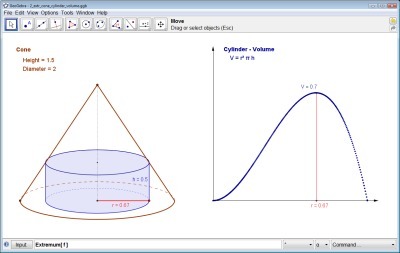
description by Internet Scout Project
"If you're a mathematics educator, you'll find the GeoGebra site to be a perfect addition to your stable of online resources. On the top of the homepage, visitors can look through sections that include About, Download, Community, and Materials. Most visitors will want to download the GeoGebra application as it is the primary way to utilize the 4,400 learning activities offered on the site. After completing the download of this free, interactive geometry, algebra, statistics, and calculus software, click on over to the Featured Materials area. Here visitors can look over the newest materials, check out the Best Worksheets, and wander through the popular tags. Mathematics educators have contributed many of the items here, and a small sample includes "The 11 Patterns of the Cube" and "Introduction to Linear Equations." Finally, visitors can also use the Community area to ask questions and share resources"
|
|
Scooped by
Jim Lerman
October 4, 2013 4:24 PM
|
by Sam Glicksman
29 apps, briefly described, hand-picked by Glicksman; who is the author of iPad in Education for Dummies.
|
|
Scooped by
Jim Lerman
October 4, 2013 4:18 PM
|
|
|
Rescooped by
Jim Lerman
from iPads in EdTech
October 4, 2013 4:14 PM
|
Apple's iPads are designed to be easy to use, but many owners are not getting the best out of the tablet – here are some hidden features that may transform the way you use your iPad.
Via Chris Carter
|
|
Scooped by
Jim Lerman
October 4, 2013 2:44 PM
|
posted by Jeff Dunn
"There is a new study out this morning that ranks the status of teachers in various countries. It’s called the “Global Teacher Status Index” and is published by the Varkey GEMS Foundation. The 2013 study aims to showcase where teachers are, what they’re doing, and where they’re going. I’ve been reading through the report (download it here) over the past few days and it’s quite interesting."
Not everyone is warming up to the idea of Google Chromebooks, but the education market seems to be. Chromebooks are used in 22 percent of U.S. K-12 school districts said Google’s Caesar Sengupta, vice president of product management for Chromebooks, speaking to Business Insider on Wednesday.
We knew that some school districts were adopting Chromebooks — it’s been a recent recurring topic on our Chrome Show podcast — but more than one in five school districts taking the Chrome OS plunge is more than I expected. And I’ve been using a Chromebook full time for nearly 1.5 years.
The rising adoption makes sense though for a number of reasons. For starters, most Chromebooks are lower in price that traditional laptops or computers: You can find a few models for under $200, for example. They’re also easy to manage and deploy through the Chrome Admin console.
Of course, Windows machines can be managed through Microsoft’s tools as well, but having done that in a past life — I used to flash images, manage and deploy laptops to a mobile sales force in the thousands — it’s more of a complicated process than managing Chrome devices. Chromebooks are inherently more simple: A Linux kernel and the Chrome browser are the bulk of the software.
Click headline to read more--
Via Chuck Sherwood, Former Senior Associate, TeleDimensions, Inc
|
|
Scooped by
Jim Lerman
October 4, 2013 12:02 AM
|
Because it's hard to know where to begin to share, I decided to base my framework on the ideas of the work of Sheryl Nussbaum-Beach and Lani Ritter Hall, the authors of The Connected Educator, Learning and Leading in a Digital Age and some of the...
|
|
Rescooped by
Jim Lerman
from Corridor of learning
October 3, 2013 8:49 AM
|
WP5 output site: curriculum
Jim Lerman's insight: Quite a comprehensive package of materials for studying and analyzing digital literacy. An excellent contribution to the field.
Via Alastair Creelman
|
|
Scooped by
Jim Lerman
October 2, 2013 11:44 PM
|
Steal these ideas! We invited anyone who has ever blogged for The Learning Network to post an example of “connected teaching” or “connected learning.” Read their wonderful responses, then tell us how you’d answer the...
|
|
|
Scooped by
Jim Lerman
October 6, 2013 3:07 AM
|
"For students who dread writing class, a blank page can look a lot like a ten-foot monolith; an imposing, empty slate towering over their homework list. Visual storytelling is one way to break students out of writer’s block, and storyboarding apps are a pre-packaged strategy you can use to bring images to the narrative. Whether your students are afraid of writing or you’re simply looking for a way to break up a brainstorming session, these 10 storyboarding apps for iOS and Android devices can help inspire–and organize–students of any age. "The best part might be the flexibility of these apps. While they can be used for strict storyboarding in the creation of fiction, they can also be used for other tasks, including documenting project-based learning, sharing assignments, or capturing research notes."
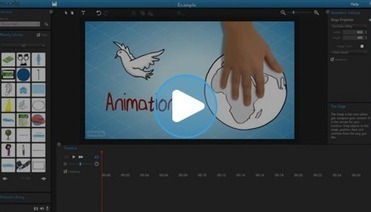
Moovly is an online tool that allows you to create animated videos, tutorials, explainers, presentations, infographics, video clips, display ads or e-cards.
Via Amélie Silvert
|
|
Scooped by
Jim Lerman
October 4, 2013 5:06 PM
|
by Beth Holland
"As I wrote in Three Approaches for Getting Content to Elementary Students' iPads - No Email, No Problem, a major challenge of working with iPad is actually working with iPad. Unlike a computer, iPad does not function as well in a shared environment because of the challenges of workflow - getting content on and off of the devices. The lack of email, coupled with the Terms of Service that preclude those under the age of 13 from having a cloud storage account, further complicate the problem. In my first post, I outlined three potential approaches for distributing content to students without using email or logins. However the next challenge is to get the work that students create back OFF of iPad. "
|
|
Scooped by
Jim Lerman
October 4, 2013 4:51 PM
|
by robinson Meyer
"Two researchers, Mark Graham and Stefano De Stabbata, at the Oxford Internet Institute have depicted the world’s “Internet empires” in a map, below. The map shows each nation’s most popular website, with the size of nations altered to reflect the number of Internet users there.
"The map makes for a brief, informative look at how geographic—and universal—certain web tastes and habits are".
|
|
Rescooped by
Jim Lerman
from iPads in EdTech
October 4, 2013 4:20 PM
|
Check out these four must-have apps to help you and your students utilize mobile technologies to get organized in the classroom.
Via Chris Carter
|
|
Rescooped by
Jim Lerman
from iPads in EdTech
October 4, 2013 4:14 PM
|
Not every school has the resources necessary to take their students on an airplane . . . or spaceship. The iPad can bring the world to your students' fingertips in ways never before possible. Many na
Via Chris Carter
|
|
Rescooped by
Jim Lerman
from iPads in EdTech
October 4, 2013 4:09 PM
|
How to lock iPAD / iPhone screen so kids stay within the app?
Via Chris Carter
|
|
Rescooped by
Jim Lerman
from :: The 4th Era ::
October 4, 2013 2:36 PM
|
"Teachers TV content is now available on TES in agreement with the Department for Education. TES has brought back all 3,500 Teachers TV programmes which are available for teachers to use for free, though all content is protected by Crown Copyright. Teachers TV was a government funded TV and online video service that operated until April 2011. Teachers TV supported the professional development of anyone working in school, enabling them to widen their skills, develop their practice, and connect with others in the field. Teachers TV supplied professional development videos and resources by going inside classrooms and into schools to help save time with practical tips, lesson ideas and classroom resources."
Jim Lerman's insight: Teachers TV flourished in the UK from 2005 to 2011. During that time Teachers TV published 3500 videos on teachers and teaching that were accessed by more than half the teachers in the UK and hundreds of thousands more from around the world. All of the Teachers TV videos are available through the TES website.
The Teaching Channel in the US, launched in 2011, was directly inspired by Teachers TV.
|
|
Rescooped by
Jim Lerman
from Technology in Today's Classroom
October 4, 2013 12:03 AM
|
Sometimes the most challenging aspect of creating a video project is finding background music that enhances the message. Well, thanks to a new feature just released by YouTube, that task has become easier! That’s right! Why conduct endless searches for the perfect song to compliment your video when you can now access the YouTube Audio Library, a collection of 150 royalty-free songs that users can download as an mp3, remix and/or reuse in any video project—even if it’s not going to be uploaded to the YouTube service. Pretty cool, eh?
Via Jamie Forshey
|
|
Rescooped by
Jim Lerman
from Corridor of learning
October 3, 2013 11:44 PM
|
Innovations in education provide teachers with plenty of inspiring ideas, but how can teachers effectively implement these ideas in the classroom? The Edukata Learning Activity Design Toolkit sets out a step-by-step design process for teachers to effectively adapt new practices to suit their specific needs.
Via Alastair Creelman
|
|
Rescooped by
Jim Lerman
from Top iPad Apps & Tools
October 3, 2013 8:45 AM
|
Language is a wonderful thing. It is the common thread that binds entire societies, allowing ease of communication and understanding. Finding yourself in a situation where you are unable to adequately communicate, on the other hand, is extremely frustrating. Whether you are travelling abroad or seeking to learn a new language, the more tools you have at your disposal the better.
Via AvatarGeneration
|