Apps that Support and Enhance the Value of Twitter as a PD Tool Rita Zeinstejer GCT 2008 Rosario, Argentina
Presentation made in the Fall of 2013

 Your new post is loading...
 Scoop.it! Apps that Support and Enhance the Value of Twitter as a PD Tool Rita Zeinstejer GCT 2008 Rosario, Argentina Presentation made in the Fall of 2013 
No comment yet.
Sign up to comment
Scoop.it!

by Katie Christie and Angela Sutherland "The purpose of this site is for students to demonstrate understanding of the 6th grade Common Core Standards and the NGSS through the presentation, organization and reflection on their work. (ie. a mosaic of work) (Writing in History/Social Studies and Science/Technical Subjects) is not included. Social Studies standards are omitted due to non-development." Jim Lerman's insight This is a wonderful job of creating a wiki-type (or Google Site) template for students to document their CCSS performance, portfolio style. Obviously this can be adapted to many levels and subject areas. Quite useful for a competency-based approach to documentation of mastery.
Scoop.it!

by Med Kharbach "Chrome is the browser of choice I have been using for two years now and though from time to time it acts up but I still prefer it over other browsers particularly Firefox and Internet Explorer. I like Chrome browser for a variety of reasons but today I will only cite the reasons related to us as teachers and educators."
Scoop.it!

How to Access & Use the Undo & Redo Buttons on iPad Much like OS X and Windows on the desktop, iOS on the iPad has an “Undo” and “Redo” option. Undo does just what it sounds like, it undoes the last text based action. For example, if you typed out a sentence but decided it wasn’t what you wanted to say, you could hit “Undo” and it would instantly disappear. Redo is also fairly self explanatory, as it redoes the prior text action that was just undone. For example, if you wanted to restore that sentence you typed out but made disappear with “Undo”, then hitting “Redo” would make it appear again. Via Cyndi Danner-Kuhn
Scoop.it!

by Jesse Virgil "I may not speak for everyone–and judging by a bevy of social media comments I’ve see, I don’t–but I’ve really enjoyed iOS 7 thus far. From the moment the update install finished, I was captivated by an experience that was both new and familiar. Even now, I still find myself unlocking my iPad and iPhone just to play with the new OS. To say iOS 7 is a major change is an understatement, and I know it’s easy to feel lost or confused about how certain functions now work. Also, there’s quite a number of new features to tinker with. "That’s where I come in. I’ve perused iOS 7 in order to compile a list of useful tips and tricks, which I hope will be of great use to you. So, journey forth and discover!"
Scoop.it!

By Sylvia Libow Martinez and Gary Stager "The Maker Movement is a technological and creative revolution underway around the world. Fortunately for educators, the Maker Movement overlaps with the natural inclinations of children and the power of learning by doing. Embracing the lessons of the Maker Movement holds the keys to reanimating the best, but oft-forgotten learner-centered teaching practices. "New tools and technology, such as 3D printing, robotics, microprocessors, wearable computing, e-textiles, “smart” materials, and new programming languages are being invented at an unprecedented pace. The Maker Movement creates affordable — even free — versions of these inventions, and shares tools and ideas online, creating a vibrant, collaborative community of global problem-solvers."
Scoop.it!

By Nikolaos Chatzopoulos "Leap Motion is a brand new and highly promising device. For those who never heard of the Leap Motion controller before, it’s a small piece of hardware, compatible with both, Macs and PC’s, that allows the user to control the device without touching the keyboard, the mouse, or the screen. The pedagogical potential persuaded me to spend the $80, a somewhat steep asking price, and try it in my classroom. In my trials I discovered that the petite device can make an excellent teaching companion, and can complement a teacher’s arsenal of teaching tools. "Given the fact that Leap Motion is a newcomer to the filed of technology, the number of available applications, particularly education-oriented applications, is naturally, low at the moment. However, the few that are available, if used appropriately, can elevate any lesson to a highly enjoyable augmented reality experience, and as such, they can provide unique learning opportunities for all students, especially kinesthetic learners. Furthermore, it appears that the Leap Motion controller has a great potential in the field of special education. Special education students of all ages can benefit greatly from the advantages the small device offers." - See more at: http://www.edudemic.com/leap-motion-in-the-classroom/#sthash.RqidiEXp.dpuf
Scoop.it!

"MyCreate is an iPad app that teachers and students (grades K-12) can use to create stop-motion animations. Taking advantage of the built-in camera in the iPad 2 or 3, students can solely focus on the creative direction of the project -- building scenes, editing the sequences, and overlaying the audio. It was developed based on the same research from Tufts University used to create SAM Animation, iCreate To Educate’s first product. "The goal of iCreate To Educate is to put students at the center of learning by encouraging them to construct and represent knowledge both in physical pictures and models (through crafts), as well as through stop-motion video. As a result, iCreate To Educate pairs myCreate with activity guides and rubrics for teachers, originally developed for the SAM Animation software, for teaching units in science, math and language arts to English language learners. "The activity guides (which are available for free) are not comprehensive but intended to "seed ideas" for hands-on projects, says iCreate To Educate CEO, Melissa Pickering. "The app is available for $4.99 on the App Store and is also available for volume education pricing.

Sandra Carswell's curator insight,
October 8, 2013 10:26 PM
Sounds like it is worth $5 to try it out.
Scoop.it!

The Print YouTube bookmarklet extracts the storyboard frames of a video, stitches them all into one big poster and sends it to your printer. Via Yael Even-Levy, PhD (Second Life: JoelleYalin)
Scoop.it!

via Edudemic Technology and education are pretty intertwined these days and nearly every teacher has a few favorite tech tools that make doing his or her job and connecting with students a l... Via R.Conrath, Ed.D.
Scoop.it!
From
penxy

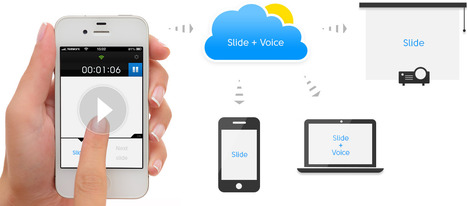
Penxy is the easiest way to control and deliver your presentations from your iPad or iPhone during a real event. You can seamlessly stream your presentations (including your voice) online. Better yet, you can record your presentation so that you can share it with your social networks. Baiba Svenca's insight: Penxy turns your iPad or iPhone into a remote control for your presentations, and it does more than that. You can also record your presentation with your voice comments. It lets you engage your audience in polls during your presentation. Get it free on iTuneshttps://itunes.apple.com/app/id538775895 Via Baiba Svenca
Scoop.it!
Scoop.it!
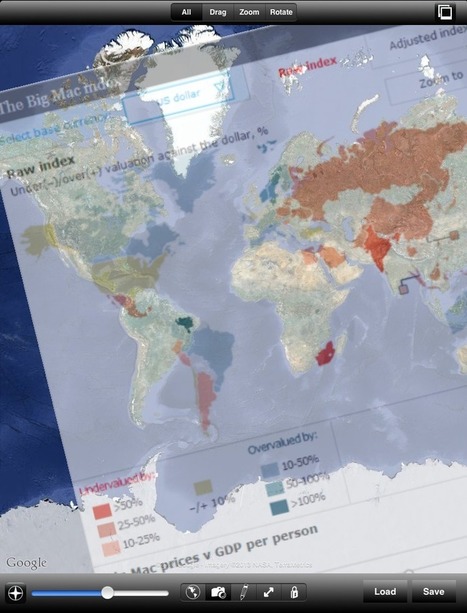
After a year or two of tinkering and experimenting with apps for teaching / learning Geography, I have (finally) compiled this list of what I deem to be the most useful iPad apps for teaching Geogr... Via Mike Busarello's Digital Storybooks

Massiel Barros-Torning's curator insight,
October 9, 2013 3:28 AM
This is a terrific list. Well done! |
Scoop.it!

"With PBL, there is no “either/or” proposition: anything from open-ended, play-based learning to data-driven, research-based instructional environments can all use PBL effectively. "While there are all kinds of great resources necessary to “run” PBL (including those from Edutopia.org), from apps to planning templates and more, the genesis of a great project is the idea itself–the purpose and/or audience of the project itself. Below, we’ve shared dozens of ideas for projects, and we’re going to constantly update the list with new ideas, suggestions from our community, resources, etc. In that way, this page can become the ultimate guide for project-based learning in your classroom. The focus will be on the ideas for the projects themselves, but we’ll also include apps, tools, and other “stuff” you’ll need to effectively realize this approach in your classroom." - See more at: http://www.teachthought.com/learning/a-better-list-of-ideas-for-project-based-learning/#sthash.jFlHEJSP.dpuf
Scoop.it!
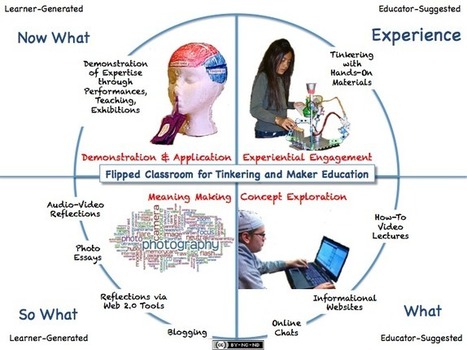
This post describes how The Flipped Classroom: The Full Picture can be used to support maker education and tinkering with the focus being on students acquiring more process-oriented “how-to” skills, skills needed to develop and enhance creativity and innovation. Via JackieGerstein Ed.D., Annette Watson Campbell

Sonia Barreira's comment,
March 2, 2013 6:15 AM
Tenho a impressão que trata-se de um nome novo para uma ideia antiga, sem desqualificar, ao contrário, creio que nomear pode fortalecer o conceito!
Sonia Barreira's comment,
March 2, 2013 6:15 AM
Tenho a impressão que trata-se de um nome novo para uma ideia antiga, sem desqualificar, ao contrário, creio que nomear pode fortalecer o conceito!

Vicki Butler's curator insight,
May 14, 2013 11:54 AM
This links back to a series of blog articles on flipped classroom and different scenarios. Well worth a read or an rss!
Scoop.it!

by Med Kharbach "I do receive several emails from people doing their graduate studies asking for certain recommendations and I do my best to help when I can. I particularly try to provide tips on how to leverage the power of technology for academic and scholarly purposes. Some of these tips are included in the following posts: "Today I am sharing this great digital resource packed full of academic websites. These websites are the best resources available online to those who need to buckle down and finish a Master’s Thesis or Doctoral Dissertation. I invite you to check the top 100 academic websites page to learn more. Please share with your colleagues, they will definitely thank you for it."
Scoop.it!

These math apps for high school relate to the 8 Standards of Mathematical Practices as now required Via Cyndi Danner-Kuhn
Scoop.it!

by Lisa Nielsen "Unlike their parents, today’s students can communicate, collaborate, cooperate, and connect with the world in meaningful ways that were never before possible. It is incumbent upon educators to support students in doing this effectively in order to empower them to do work that will not only lead them to personal success, but is also worthy of the world. "So, how can educators do this? "Here are five ways to help your students get connected:
"Congratulations! Once you’ve supported students in these five ways, you’ve put them on the road to becoming a connected student with a learning network that will assist them in achieving success in areas that are of deep personal interest." - See more at: http://www.techlearning.com/Default.aspx?tabid=67&entryid=6554#sthash.gUNR1GKt.dpuf
Scoop.it!
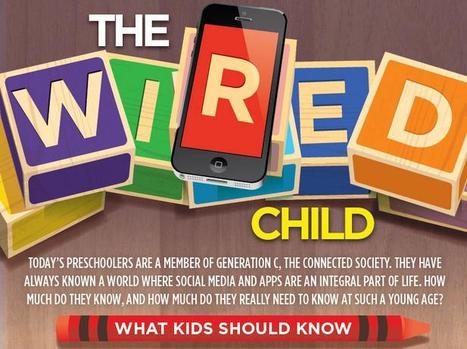
Posted by Kati Lepi "Technology in education isn’t just for older students. There are a ton of resources out there for early childhood educators and their students, and many young children are already able to use the technology available to them. They’re even calling today’s preschoolers “Generation C”, aka the connected generation. "In years past, parents were supposed to prepare their young students for kindergarten so that they would be well equipped to start their formal education. Kids were supposed to know how to count to ten, grip a pencil, identify shapes and colors, and so on. Today, students entering school have a few more items on their must-know list – all related to technology. How much should kids really know when it comes to technology? What is the appropriate amount of device usage for young students? Has device usage increased as much as we think it has over the years? "The handy infographic below takes a look at all of the issues surrounding technology for children. Keep reading to learn more!" - See more at: http://www.edudemic.com/technology-for-children/#sthash.l1krr3Gw.dpuf

Berenice Cano-Aguilar's curator insight,
February 8, 2022 11:07 AM
This interesting infographic shares that important information like suggested screen time by age, healthy use of technology and signs of technology addiction.
Scoop.it!

by Rebecca Hiscott "If you’re a social media novice, hashtags — those short links preceded by the pound sign (#) — may seem confusing and unnecessary. But they are integral to the way we communicate online, and it’s important to know how to use them (even though some people, like Jimmy Fallon and Justin Timberlake, are not the biggest fans). Plus, they can be a lot of fun. "On Twitter, the pound sign (or hash) turns any word or group of words that directly follow it into a searchable link. This allows you to organize content and track discussion topics based on those keywords. So, if you wanted to post about the Breaking Bad finale, you would include#BreakingBad in your tweet to join the conversation. Click on a hashtag to see all the posts that mention the subject in real time. "The hashtag’s widespread use began with Twitter but has extended to other social media platforms. In 2007, developer Chris Messina proposed, in a tweet, that Twitter begin grouping topics using the hash symbol. Twitter initially rejected the idea. But in October 2007, citizen journalists began using the hashtag #SanDiegoFire, at Messina’s suggestion, to tweet updates on a series of forest fires in San Diego. The practice of hashtagging took off; now users and brands employ hashtags to cover serious political events (#Cairo) and entertainment topics (#MileyCyrus) alike."
Scoop.it!

by Mansfield Independent School District "The purpose of this course is to assist teachers in integrating iTunes U and the iPad into their classroom teaching. Although there are other modes of providing resources to students by way of the iPad, this course focuses mainly on the use of iTunes U as the primary delivery method. With that said, even if you don't use iTunes U, this course has many resources to help teachers let technology work for them."
Scoop.it!

John Dalziel's insight: If practitioners are looking for some online mathematics practice activities for their learners, Maths Frame could be useful to them. Via John Dalziel
Scoop.it!

If a free copy of a 10-year-old Adobe Photoshop release wasn't for you—maybe your computer's too good for it, or perhaps you just wanna stick it to the man—don't worry. There are plenty of completely free alternatives; here are ten of the best. Via Luke Allen
Scoop.it!

PowerPoint & Keynote Solutions from Chillibreeze's curator insight,
September 17, 2013 7:19 AM
Learn cool and awesome PowerPoint tricks from 24point0! The film strip effect is especially good when presenting your company or unit profile to customers or stakeholders.
Scoop.it!

"Reaching students emotionally may seem like a red herring, but maybe it’s not. Inspired by Justin Tarte’s recent—and excellent–post on making a difference in the lives of others around you, I immediately thought of the legacy teachers leave in the minds (and hearts) of students. If and how you will be remembered by students may sound like a bit of an ego trip, but the truth of the matter is, if you’re not making any kind of an impression, they’re probably not learning." Beth Dichter's insight: This post provides 18 ways to reach students in your classroom, beginning with curiousity and including model macro behavior and be human. In addition you may watch a five minute video clip from the Dead Poets Society.
Via Beth Dichter

Beth Dichter's curator insight,
October 6, 2013 8:47 PM
This post provides 18 ways to reach students in your classroom, beginning with curiousity and including model macro behavior and be human. In addition you may watch a five minute video clip from the Dead Poets Society. 
Mary Cunningham's curator insight,
October 13, 2013 12:15 PM
Legacy and impact - making connections and developing relationships are important keys to successful teaching and learning. |