


Apple has sent out press invitations for an Oct. 22 media event to be held at theYerba Buena Center for the Arts in San Francisco, Calif.beginning at 10 a.m. PDT. The event will focus on a new wave of iPads and Macs.
Via Jon Samuelson

 Your new post is loading...
 Scoop.it! Apple has sent out press invitations for an Oct. 22 media event to be held at theYerba Buena Center for the Arts in San Francisco, Calif.beginning at 10 a.m. PDT. The event will focus on a new wave of iPads and Macs. Via Jon Samuelson
Scoop.it!

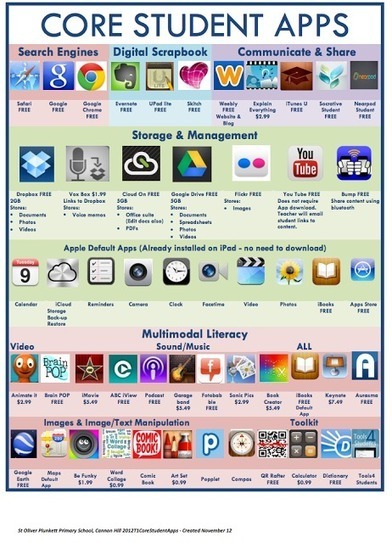
by Med Kharbach "What attracts my attention more than anything else in this program are the two lists of core apps curated for both teachers and students. As soon as I saw the titles included in these lists I knew from my own experience in reviewing educational apps that these could be a very good start for anyone of you out there trying to incorporate iPad in your teaching. Unfortunately the the app names are not hyperlinked which means that you need to google them in order to access them in iTunes store. "Source: Resourcelink. The author of this work is Brisbane Catholic Education" Via John Purificati 
nedimaon's curator insight,
October 15, 2013 12:13 AM
36 Основные Учитель приложения для дознания Обучение с IPADS (36 Основные Учитель приложения для дознания
Scoop.it!

"Educators are flocking to Google+ for news and interaction, and many of them are joining communities in education. Whether you’re interested in educational technology, free online courses, or the future of learning, there’s something out there for you. Check out our list to find some of our favorite up and coming Google+ communities in education."
Scoop.it!

by Maryalene LaPonsie "Teachers across the nation are already tweeting class lesson plans and hosting guest speakers in Google Hangouts. "However, many teachers are looking for more ways to engage their students on social media platforms. Enter a new generation of video apps that make it easy for teachers and students alike to not only communicate in the social media realm but create in it too. "Here are 6 easy apps that you and your students can use to supplement presentations, film multimedia reports and engage with one another at a level not possible in 140 characters."
Scoop.it!

“ It is no mystery that the education world is saturated with technology.”
Via Janine Maitland, Felix Jacomino, Jenny Smith
Scoop.it!

“ From the Ngram Viewer to Google Dart, check out some of these lesser-known Google applications.”
Via Ken Morrison
Scoop.it!

“ An Educators Guide to Podcasting and Broadcasting by @TeacherCast from Jeffrey Bradbury Are you interested in creating podcasts? Are you looking to share your passions with the world? On Sunday Oct...”
Via Tim Boileau
Scoop.it!

“Portfoliobox is a web tool you can use to create your own online portfolio website.”
Via Ana Cristina Pratas
Scoop.it!

Theories of Learning. Connectivism: A new type of learning for the digital age
Via Dr. Susan Bainbridge, Jimun Gimm
Scoop.it!
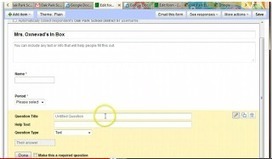
by Med Kharbach "Google Forms is an amazing web tool and as I mentioned yesterday in " 5 Good Web Tools to Create Class Forms and Sheets", Google Form is the tool I use the most when creating forms and quizzes. There are several reasons why I opted for it, first it is automatically integrated with Google Drive which means that anything I create on it is asynchronously saved in my drive account so I don't have to worry about uploading it to any file storage system. Google Form is also pretty easy to use and has a very simple and user-friendly interface so you will be able to find your way around quickly. And now that Google Form starts supporting images and YouTube videos, I am sure I wont be looking further for any other alternative in the near future."
Scoop.it!
Jim Lerman's insight:
by Richard Byrne "Keith Hughes makes fantastic flipped history classroom videos. I've featured lots of his work in the past because it is a great model of what a video lesson should be. Today, Keith released a video in which he explains how he does it and how you can do it too. In I Flip, You Flip, We All FlipKeith Hughes explains the concept behind flipped classrooms, equipment for creating great videos, and how to use iMovie to produce and publish your flipped lessons. If you have any interest in making flipped classroom videos, I highly recommend taking 25 minutes to watch I Flip, You Flip, We All Flip. "
Scoop.it!


Stephane Gaskin PhD, PPCC's curator insight,
February 1, 2014 5:37 PM
Awesome! This is exactly in line with what I try to instill in my students and clients alike. http://www.coachingsgaskin.com/intrinsic-motivation-or-extrinsic-motivation-what-keeps-you-going/ |
Scoop.it!

http://www.youtube.com/watch?v=A0edKgL9EgM&feature=share&list=UUsooa4yRKGN_zEE8iknghZA For educators looking for new ways to introduce ideas to stude Via Cynthia Alvarado 
Cynthia Alvarado's curator insight,
January 4, 2013 10:45 AM
Great examples of short videos that can replace lecture.
Scoop.it!

compiled by Chiew Pang Jim Lerman's insight: A comprehensive guide to hundreds of hashtagged topics, groups, and discussions that started with just Twitter and now extends to Facebook and G+. If you're a hashtag junkie, this is paradise.
Scoop.it!

by Torrey Trust
To complete the e-course, visit each page and:
Jim Lerman's insight: Free course set up in a wiki. Course is quite straightforward and is a great place to start for newcomers. And Torrey is a real person!
Scoop.it!
“ A Framework For Student Motivation In A Blended Classroom”
Via Elizabeth E Charles
Scoop.it!

“ 8 Excellent Math Video Resources for Students ~ Educational Technology and Mobile Learning http://t.co/8m0hn0750c vía @medkh9”
Scoop.it!
“ These web-based applications will have you creating animations in no time.”
Via Dr. Susan Bainbridge
Scoop.it!

This is a common concern of teachers who are new to project-based learning. Things can appear to be going smoothly -- students have been engaged by the project, they've been learning content and skills, they've been busy and meeting deadlines -- but their thinking is not as in-depth and their final products not as polished as they should be. If this is your experience, it's time to ask yourself some questions:
Via Nik Peachey, Star Lesson
Scoop.it!
Scoop.it!

by Lisa Nielsen "It is called Unroll.me. It lets you regain control of your mailbox by combing through it and finding everything that you've subscribed to. Then, you can roll those subscriptions up into one daily digest that gets delivered like a beautiful Pinterest board, unless...you want to unsubscribe which you can do with a simple and easy click, with all your subscriptions in one place in a sortable format. "
Scoop.it!

"The Learning to Teach Online project is a free professional development resource designed to help teachers from any discipline, whether experienced in online teaching or not, to gain a working understanding of successful online teaching pedagogies that they can apply in their own unique teaching situations." Jim Lerman's insight: This is quite a comprehensive collection of videos and additional resource materials that has proven to be quite popular. Produced by a consortium headed by the University of New South Wales, Australia's leading international university. |








Wish I had a million $ To outfit our students/staff w/ newest tech.you too?