"One of my favorite parts of playing SimCity as a teenager was inviting Godzilla and UFOs to unleash chaos on my city.
"Alas, such memorable features are not available in SimCityEDU: Pollution Challenge, an adaptation of SimCity 5 designed specifically for schools and classrooms. Licenses, which range from $3 to $20 per user, are now available through resellers.
"The game was developed by GlassLab, a game studio within the Institute of Play that received $10.3 million from the Gates Foundation and MacArthur Foundation in June 2012. SimCityEDU is the first of six games that GlassLab will develop to “leverage digital games as powerful, data-rich learning and formative assessment environments,” and was built in partnership with Electronic Arts, Educational Testing Service, Pearson, and the Entertainment Software Association."
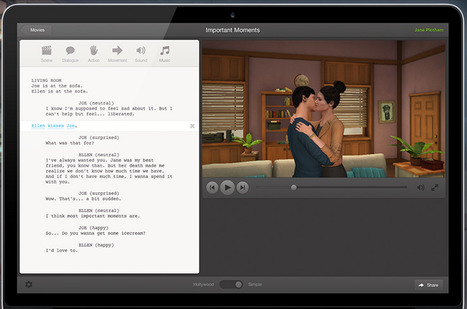
Plotagon is a tool that lets anyone create an animated movie directly from a written screenplay. Write your story, choose actors, environments and music. Press play and your movie is done. It's that simple.
Plotagon is completely free! It is in a beta stage, but you can start using it right now. No ads, no crap.
>Plotagon application for Mac or PC (system requirements).
>Comes with 5 characters and 6 environments.
>Export your movies and share them with the world.
>Expand with characters and environments from the built-in store.
Baiba Svenca's insight:
A cool new software for creating animations based on your script. Students may like it!
It needs downloading - obviously - and I'm not sure I want all this on my computer yet. I'll have to wait until I have a ground-breaking idea for my next online, budget Hollywood movie.
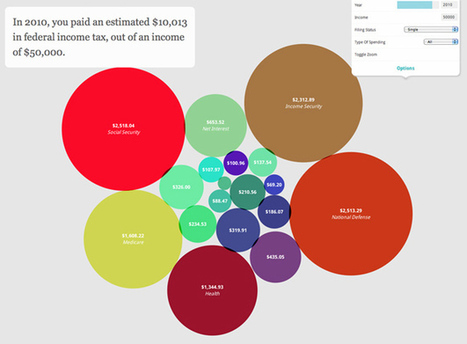
During the past few years the demand regarding Data Info-graphics has increased in volume and demand as well as in clarity. The range of technologies available by which to collect and examine data is constantly on the rise- both in web and desktop applications, which provide several great interfaces. From a technological aspect , such tools have created efficiency based models which have gone onto disrupting existing paradigms of the past. These vary and range from data synthesis to data visualization encompassing every type of data.
Within this scope, such new tools are continually emerging whose main purpose is to- simplify the process within being able to harness data in lending impact and insight generation...
"Tour Builder is a cool web tool that allows users to create narrative stories using text, graphics, pictures, videos and Google Maps.Tour Builder lets you pick the locations right on the map, add in photos, text, and video, and then share your creation. Currently, Tour builder is still in beta version and it requires the Google Earth plugin which is only available for Windows and Mac OS X 10.6+"
After posting about the "10 ways to get your students engaged" here is another good visual I learned about from Mindshift and which outlines different levels of engagement. As I have already...
Teachers change the world by spreading knowledge and making impact on their students. Learn more about how teachers are heroes and how they shape not only our
Teachers change the world by spreading knowledge and making impact on their students. Learn more about how teachers are heroes and how they shape not only our education, but our entire world.
"This week the popular iPad app, Haiku Deck, became available as a web app too. The new web version of Haiku Deck brings all of the awesome features of the iPad app to your web browser. With the web version of Haiku Deck you can create beautiful slideshows and share them on the web.
"Haiku Deck offers a variety of themes and templates to use in your presentations. The best aspects of Haiku Deck are the integrated image search and the automatically resizing text. On each of your slides you can add images of your own or search through Haiku Deck's library of images. As you type text on each slide, the text automatically shrinks to fit in the space allotted. The shrinking text feature is great for encouraging students to minimize the use of text in their slide designs."
"Blended learning has taken off as one of the big trends in education over the past several years. Like flipped classrooms and 1:1 environments, it’s one of the top ways for teachers to leverage the power of technology in the classroom. It’s not a new concept, to be sure. However, there’s a new guide to understanding and implementing what’s being billed as blended learning 2.0.
"There are a few key stages of proper implementation that you should know if you’re looking to start climbing the blended learning tree. Starting from down at the roots is the planning process. It’s about a lot more than just ‘planning’ on buying some iPads. Planning involves creating appropriate blended learning spaces. That means you have a nice place for students to gather and collaborate while using technology. Scroll down to the bottom of the graphic below to get started."
"I have to admit, when I recorded my first video I was so nervous. I was scared that I would have many takes and never get it right. I went in with that mindset and came out more discouraged than ever.
I eventually met Amani Channel as my on camera mentor and he taught me how to be comfortable by giving me some valuable tips and like most things in life, you learn by trial and error."
"The New York Times, Mashable, Wired, and Time magazine among others tout RebelMouse as the best tool for organizing all the social media networks any one individual uses. While also used by publishers or larger organizations, RebelMouse brings the many networks together for one person and creates a presence that fits a teacher’s agenda."
"The search engine only indexes content with either a public domain and / or Creative Commons license, and as such everything within it is available for reuse without any major need for copyright clearance or checking.
All of this is open source. The goal is hopefully to allow people from all over the world (the code is internationalised) to create their own repositories and curate their own open content. The code also has a modularised structure and so can be extended relatively quickly to allow for different tools, new APIs and new features. Hopefully with some more time the site could become almost WordPress like with the ease of usage and so on, so forth.
We've tried to create a topology around the repository, focusing on promoting and encouraging reuse and repurposing. Tied into the repository is a series of APIs and tools which would allow (OAI style) for a series of repositories to talk to each other and share resources to harvest. We've also a second Moodle plugin (https://github.com/solvonauts/moodle-url-reporting-plugin) which allows the repository to visit your Moodle (should you so wish) and see if you've used any resources that we have information on. In doing so, an idea of how popular a resource is (sort of paradata) could be. Paradata could be used to influence search results, or could be displayed as per metadata.
In terms of where we can harvest / index, at present the harvesting code supports RSS (all types), ATOM, OAI (DC), FlickR API, Tumblr API, Youtube API and the Slideshare API. OER publishing seems to have moved to a publish almost everywhere (which I think is a good thing) but it makes indexing these resources properly hard.
A new open search engine tool. It also offers sevearl plugin options to users in different platform. Give it a try to see what are the results come out ;-)
While looking for a better way to start teaching students digital citizenship skills, one teacher decided to make a visual guide herself - and share it!
Google Drive is a lot of things. It's a cloud-based storage service, it's an online office suite, and it's the connective tissue that ties numerous Google services together.
Yeas! A great tool for Google Drive users! There is so to learn with google drive and this resource helps make the tool even more productive for you to use in your classroom.
by edshelf: Reviews & recommendations of tools for education Apple’s iPhone and iPad are by far the more popular mobile devices in today’s classrooms. But there are a lot of great things about Android-powered devices as well....
"This site is meant to provide information, advice, examples of best practices, and inspiration to those using or thinking about using the exciting and challenging learning environments known as "Active Learning Classrooms" (ALCs). While it is based on and geared towards the ALCs at the University of Minnesota, we hope it will serve others as well.
"The new active learning classrooms (ALCs), many of them located in the Science Teaching and Student Services (STSS) building, offer a unique teaching and learning environment. There are a number of positives of working in these ALCs, including increased learning gains and students reporting high satisfaction with the learning environment. However, these spaces can present a number of teaching challenges, including: a room with no front or focal point; noise and other distractions that may impact individuals with certain learning disabilities; and a need for mastery of the technology."
Jim Lerman's insight:
This site reflects what seems to be a growing consensus regarding the optimal configuration for a generic classroom, at the present time.
"Windows/Mac: Screen sharing applications are a dime a dozen these days, but Screenhero takes away some of the hassle by letting both of you control the screen, with your own cursors and keyboard, at the same time.
"Most screen sharing applications require you to pick a "controller" and a "viewer," meaning only one of you can really move the mouse and type text at a time. Screenhero gives you two cursors, and allow both of you to control the app at the same time. Note that when we say "same time" we don't mean you can both type or both focus different windows at the same time—we just mean you don't have to click a button to give the other permission to move."
With Projeqt, your presentations never remain static. Pull in live tweets or blog feeds, insert an interactive map, add audio notes or stream videos. Let your presentations be as dynamic as you are.
“AASL Best Website for Teaching and Learning 2012”
The Best Websites for Teaching and Learning Award honors websites, tools, and resources of exceptional value to inquiry-based teaching and learning as embodied in the AASL's Standards for the 21st-Century Learner. - The American Association of School Librarians
“Winner at SXSWi 2012 Best Educational Resource”
SXSWi is the most distinguished new technology and start-up event in the world with over 25,000 participants from 72 countries. - The SXSW Interactive Awards
"Innovation and the current classroom model most often operate as antagonists. The system is evolving, but not quickly enough to get young people ready for the new world. But I do believe there are a number of ways that teachers can bypass the system and offer students the tools and experiences that spur an innovative mindset. Here are ten ideas:"
"Screen recording an iPad can be difficult given the limitations of the platform. However, by using desktop screencasting software, and inexpensive airplay mirroring applications, you can screen record anything on your iPad for high quality screencasts."
To get content containing either thought or leadership enter:
To get content containing both thought and leadership enter:
To get content containing the expression thought leadership enter:
You can enter several keywords and you can refine them whenever you want. Our suggestion engine uses more signals but entering a few keywords here will rapidly give you great content to curate.


 Your new post is loading...

















Will be interesting to see emerging research data on this flagship repurposing effort