


Justin Talmadge from Snoqualmie Valley School District's excellent blog and slideshow on dos and don't of implementating iPads in a district school setting.

 Your new post is loading...
 Scoop.it! Justin Talmadge from Snoqualmie Valley School District's excellent blog and slideshow on dos and don't of implementating iPads in a district school setting. 
No comment yet.
Sign up to comment
Scoop.it!

From the distrubutors of special ed resources for over 25 years comes iPAd/Pod apps for PCS (Picture Communication Symbol) which include Flash Cards, Word Scramble, Match & Memory and Bingo, helping different people meet different needs. See how they help students learn vocabulary, language, articulation, cognitive and listening skills and more. Ideal for students with Autism, and those learning new symbols for augmentative and alternative communication (AAC).
Scoop.it!

Some helpful tips for IOS 5 upgrading of iPads-especially in a cart stituation
Scoop.it!
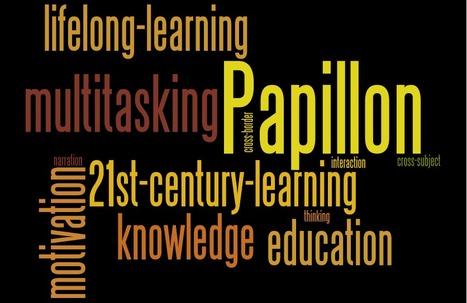
The “Papillon” [“Butterfly”] method is an innovative teaching and learning concept adapted to the 21st century, transferable to all digital texts. By applying the Papillon-method online books are transformed into a huge dynamic ecosystem of knowledge. One can embed multimedia such as photos, videos, and audio files directly into books. Imagine your textbook containing video and audio snippets or interactive games. The approach is a further development of the well known "static" format for eBooks and follows a special architecture.
Scoop.it!

Papillon [Butterfly] is the name and the principle of an educational concept. Butterflies represent metamorphosis and change. Their flutter from flower to flower is a symbol of the central principle: “multiple interlinking” because everything is connected in our global world."
Scoop.it!

The question around how to best implement technology in schools, but more importantly, how we, as educators, share best practices and turn our discussions into action will be ongoing. The key is to continue to be creative and keep carving.
Scoop.it!
Last year, “crazedadman” and his wife reorganized a small bookshelf and recorded the project in an endearing stop motion film. This year, they took things to the next level, spending “sleepless nights moving, stacking, and animating books at Type bookstore in Toronto.” The rest speaks for itself. Music by Grayson Matthews
Scoop.it!

The Longfield Academy for Arts and Sciences is thought to be the first school to offer iPads to all its learners and staff – and, even more unusual, there's no Microsoft. And the decision wasn’t made by Apple-oriented ICT advisers. It was based on consulting the school community – learners, staff and parents. Sets of laptops, netbooks and iPads had been made available to the Longfield community and the response was overwhelming following two packed parent meetings – they wanted iPads.
Scoop.it!

Abbagale Gonzales slightly lifts the corners of her Cupid's-bow lips and looks upward with soft, brown eyes. The 3-year-old's mind is agile but she's trapped in a nearly motionless body, her words seemingly forever lost in an unforgiving tangle of ventilator and tracheotomy tubes made necessary by a disorder called spinal muscular atrophy.
But now technology is helping Abbagale find her voice.
Scoop.it!

David Kapuler's great blog brings you his top 10 favorite sites for finding educational apps-a quest that keeps all of us busy treasure hunting!
Scoop.it!

Well written and informative 5 part series by Brad Flickinger on getting your iPads 'rocking and rolling' in the classroom!
Scoop.it!

Finally! The project I worked on this past summer!
Welcome to ERAC’s mobile apps collection. ERAC teacher evaluators have reviewed almost 200 mobile apps focused for education and for various platforms. Each review contains a product description, pricing information, any social considerations and more. These apps have also been rated out of 5. This rating was based on the content, instructional and technical design.
Scoop.it!

Around the World with 15 Cool Geography Apps Geography seems to me to be one of those subjects that actually lends itself to the type of multimedia multi-sensory experience that is the ipad. Some of the apps in this post allow you produce beautiful infographic style maps using your data, others allow you to explore the ways in which the world is being effected by population. The map of disasters is a hard one to ignore especially in the context of the recent spate of tsunamis and earthquakes.
|
Scoop.it!
The PCS™ Apps can be used just as the traditional PCS™ but now on an iPad, iPhone and iPod Touch, giving you fast access to the powerful Picture Communication Symbols that make your lessons work.
Scoop.it!
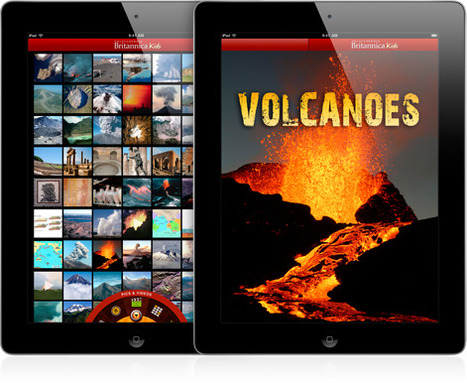
With so many educational apps on the App Store, there’s no limit to the learning possibilities at your fingertips. Take a look at some favorite apps for learning.
Scoop.it!
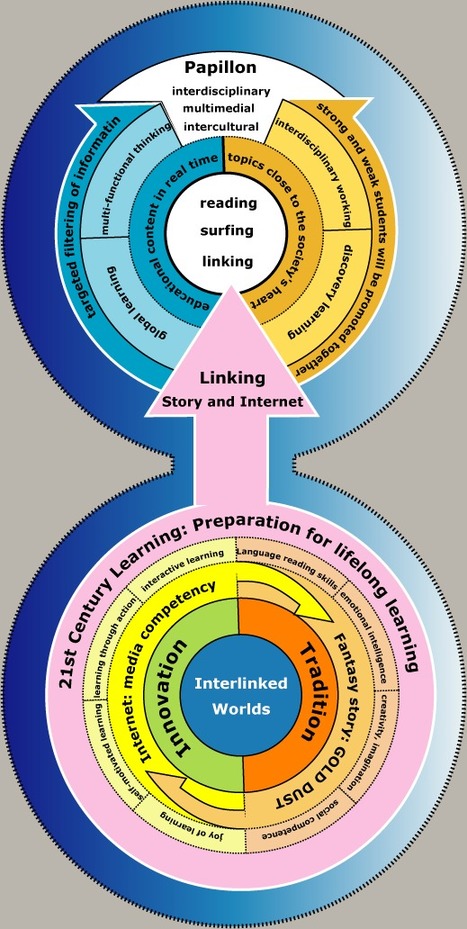
The Papillon Method: The architecture of the concept is based on narration and interaction. The hybrid system combines the advantages of static and dynamic representation of contents and is a merging of imagination and scientific facts [1] and allows a 3-dimensional view on the recommended topical focus.
Scoop.it!

While many predicted it would kill laptops, or lower-priced laptops called netbooks, that hasn’t been the case. Tablets have become a device unto their own, with many using them for leisure activities, like reading, playing games, browsing the web, or watching videos. Tablet has made computing more interactive because of its touch screen. Removing the keyboard has also eliminated a psychological barrier, making the tablet a more personal experience than a so-called personal computer.
Scoop.it!
Want a super easy way to get rid of all the junk on a YouTube page? Oh sure, I know you can use QuietTube. But sometimes, you just need to show the video and don’t want to mess with any other tools. Watch this 17 second video and share this trick with other teachers.
Scoop.it!

Maths is one of the most fundamental skills that any child needs to succeed at school and life in general. Make the learning less of a chore by implementing gaming elements into the learning process. Lots of kids chose to play these games even knowing that they are maths based. That says something about the concept on which these types of games have been developed. See if any might be suitable for your class or perhaps just for one or two struggling students.
Scoop.it!

History is one of those subjects where it is easy to get your students engaged once they have connected with the narrative. Here are a couple of Apps that will help your students jump right into the era that you are studying.
Scoop.it!

From Jonathan Wylie's blog... Necessity is the mother of invention, right? For a while I was annoyed that I could not find a way to create group contacts on the iPad, but I fret no more. After some searching on the web I came across this useful workaround, so I thought I would share it in case you too would like to send an email to multiple people on the iPad, with just the one contact entry. Here’s how to do it.
Scoop.it!
Now I have seen everything!
myIEPmeeting helps parents and guardians effectively participate in their student’s Individualized Education Program (IEP) process. They have developed a simple tools to help:
Scoop.it!

LetterReflex – Overcoming Letter Reversals by BinaryLabs is learning tool by the creators of Dexteria. Letter reversals are to be expected by any young child learning the alphabet, the cause is a lack of directionality. To address directionality, the first concepts that need to be understood are the directions of “right” and “left.” LetterReflex helps children overcome common letter reversals in a game format that is inviting, engaging, interactive and user-friendly.
Scoop.it!

Have you just got a shiny new iPad ? Here’s an easy Getting Started Guide that will help you get the most out of your new favorite tablet. This guide is divided up into short sections covering key topics, so you can dive in and out of them as needed for subjects you are interested in.
Scoop.it!

Curation vs. Aggregation? Curation is such a necessity these days. The overwhelming wave of information we are exposed to is drowning us in facts and opinion. Not only do we need to be curating the information that we are consuming but we need to be insisting that our students have the skills and necessary tools in which to curate their own world.
|




