


Sam Gliksman's thoughtful words on "iPads the tool" -NOT- " iPads the App" (expensive glorified worksheets with coluor and sound)

 Your new post is loading...
 Scoop.it! Sam Gliksman's thoughtful words on "iPads the tool" -NOT- " iPads the App" (expensive glorified worksheets with coluor and sound) 
No comment yet.
Sign up to comment
Scoop.it!

Houghton Mifflin Harcourt (HMH) and Amelia Earhart Middle School in Riverside, California, collaborated in a year long study to determine the impact of the educational math program for the iPad. Read the results!
Scoop.it!

The touch screen interface and intuitive nature of the iPad has been a productive and inclusive way to provide educational experiences for people with Autism. Many schools and organisations use specific iPad apps as effective tools in the educational process but what if you had access to a whole suite of tools. This is exactly what these guys have done at iPad Apps & Resources for Autism. Compiled by a parent, an adult with Autism and an SLP; Shannon Des Roches Rosa, Corina Becker and SLP Jordan Sadler, have collated a monster list of great apps for teaching people with Autism.
Scoop.it!

Two classes from two schools come together to do some collaboration and sharing on of course the iPad! Nice model and activity for students and teachers alaike!
Scoop.it!
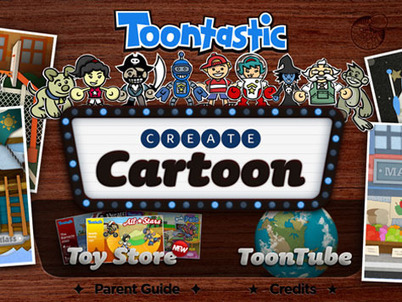
Creating cartoons and animations with Toontastic on the iPad is as easy as putting on a puppet show - simply press the record button and tell your stories through play. Once you’re done, share your cartoons with friends & family around the world.
Scoop.it!

The iPad touch screen allows you to use your fingers to interact in multiple ways.You can single tap, double tap, flick, swipe, drag, press and hold. I will give a brief description of the basic finger movements on the touch screen.
Scoop.it!

Dragon Dictation is an speech-recognition app that allows users to instantly dictate text, emails, tweets, etc on their iPad, up to five times faster than typing on a keyboard.
Scoop.it!

iMovie is an easy to use, touch based, video editing app for iPad. It enables students and teachers to create professional looking movies, incorporating video, photos, music, and sound effects.
Scoop.it!

From the Centre for Learning and Performance Technologies (C4LPT)... Here are the Top 100 Tools for Learning 2011. This, the 5th Annual Survey of Learning Tools, was finalised on 13 November 2011. This year’s list was compiled from the Top 10 Tools lists of 531 learning professionals worldwide – from education, training and workplace learning.
Scoop.it!

From Richard Byrne' Blog come seven tools that students can use to build data visualizations. -Seven tools that students can use to build data visualizations.
Scoop.it!

You may have dozens of apps on your phone and scores of websites bookmarked on your laptop, but that doesn't mean you have all the latest tech tools at your fingertips.
Scoop.it!
Extraordinary story of Carly Fleischmann, a 14-year-old child who has severe form of autism and unable to speak, but she found a way to communicate with the world in a highly efficient manner. Her parents never lost hope. Years of hard work of Carly's family and therapists brought some amazing and completely unexpected result.
|
Scoop.it!

Socrative is marketed as a “student engagment” and “instant assessment” e-clicker device which runs off ANY web browser (on your laptop, smartphone, iPod, iPad, etc). It enables teachers to quickly and easily set up short multiple choice / short-answer / quiz assessment activities, which students respond to using their own devices. Student responses are collated and displayed on the classroom screen.
Scoop.it!

One of my favourite sites now has an app (imagine that)! Great articles with reviews and tips-looking forward to using this one!
Scoop.it!

One of the more common complaints among iPad users is that the keyboard is awkward to use. Apple offers a wireless keyboard solution at the prohibitive price of about $70 plus shipping but you can actually create your own simple iPad keyboard for less than $10.
Scoop.it!

Diigo provides a simple way to bookmark, annotate, and search the hundreds, if not thousands of websites that we bookmark from our Twitter feeds, web searches, and collegial recommendations. It allows users to tag, highlight, and add sticky notes to ANY webpage, and because they are stored in the cloud, they can be accessed on almost any device. And it’s available as an iPad app!
Scoop.it!

Always looking for ways to catogorizes my little dear friends the Apps-here is an idea! Can’t remember what folder you stuffed that iOS app into? If you have a ton of apps on your iPhone or iPad, try rearranging them all by their actions (or by verbs), rather than by the apps category.
Scoop.it!
Dual Browsing is about ease of use. It is not essential or even necessary - it is just convenient. It is convenient for comparing the quality or price of two items. It is great for researching on one side and taking notes on the other. This is an excellent tool for student research tasks full stop. Dual Browsing is one way of multitasking on your iPad that works easily and well. Take a look at this collection of dual browser to find one that is right for you.
Scoop.it!

Created by award winning children’s author Fiona Roberton, Porkchop & Mouse promises to be an interactive book for your iPad that is worthy of your attention and affection. Read the review on this interactive storybook app.
Scoop.it!

How can we keep students focused on schoolwork with all the electronic temptations surrounding them? By engaging the students completely with our lessons, keeping students actively involved in their learning, and reflecting on our practice to avoid blaming the technology or kids’ short attention spans.
Scoop.it!

The best Mobile Apps-Honoring the Best, Not Just the Best Selling. Links also to: -Overall App Awards
Scoop.it!

ClassroomWindow is on a mission to make TEACHERS the new power brokers in K-12 education. Built by a group of friends passionate about education, ClassroomWindow wants to help you make sense of the chaotic world of education technology, textbooks, and tools. The first education directory of its kind, ClassroomWindow features trusted reviews by and for teachers around the globe.
Scoop.it!

The book-The Information Diet- provides a framework for consuming information in a healthy way, by showing you what to look for, what to avoid, and how to be selective. In the process, author Clay Johnson explains the role information has played throughout history, and why following his prescribed diet is essential in today's information age.
Scoop.it!

Edmodo is a private social networking site where teachers, students, and parents can connect, engage and learn; taking learning beyond the classroom walls. Edmodo has advanced privacy settings built in, making it a very safe, secure, (and free) platform for schools. Its’ visual similarity to Facebook makes it extremely user-friendly for teachers and students of all ages; and isn’t blocked in most school systems.
|





