


Rules are great. They provide order to an otherwise chaotic world and help preserve and perpetuate important ideas. If it weren't for rules, and the will

 Your new post is loading...
 Scoop.it! Rules are great. They provide order to an otherwise chaotic world and help preserve and perpetuate important ideas. If it weren't for rules, and the will No comment yet.
Sign up to comment
Scoop.it!

Let’s take a look at sample projects and some of the hottest apps for
Beth Dichter's insight:
This is the final post of three (from Tony Vincent) where it shares tools that allow students to become the teacher as they create and present the final project (as in project-based learning). The first two posts are Crafting Questions That Drive Projects and Investigating Authentic Questions. The post is divided into the sections listed below. * Audience is the Key, where he shares why knowing your audience is important. * Samples Really Help. He discussed why samples help, and reminds us that we can find samples online which the students may learn from. There are also links to quite a few resources in this section. * See These Samples. Yes, he has included samples within the post. You will find six examples of projects for elementary school, middle school and high school! He also has requested that folks share samples from their students so he can share them online. * Cool Tools. This is a very robust section where he provides a lengthy list of tools, and divides it into three sections: Slideshows & Visuals, Audio & Video, and Books & Comics. Many of the tools listed here are free and many run on a variety of platforms. For each tool he lists there is a short description and a list of platforms it runs on. He also provides a link to an infographic he designed called Show What You Know Using Web and Mobile Apps. This shares iPad apps and is a great resource. * Make it Sticky. In this section he discusses what makes a project "sticky" (and the research that supports this). What is a sticky idea? "One that an audience can understand, remember, and retell." This section also includes a video that shares resources for images (as well as a transcript with links). * So Refined. This sections explores how we can set our students up for success. one that an audience can understand, remember, and retell *Assessing It. This section discusses assessment and provides links to websites that provide rubrics and checklists. There is also a video from Edutopia, that looks at how to embed assessments throughout the project. * Getting the Word Out. Students are proud of their product and need to share it. This sections shares resources that allow you to share the work of your students, or better yet, allow students to share their work online. Some examples are provided * Reflect On It. As educators we are often asked to reflect on your work. Provide time for students to do this also. * You Know Better Than Anyone. Remember Project-Based Learning takes time, and lots of juggling. There is some great advice on this here. This post, along with the two earlier posts, provide so many resources for those who may be new to Project-Based Learning, or for those who have been using it and would like additional resources. Have fun exploring all three and share those final projects online for others to view.
Scoop.it!
"My tribute to Curiosity, both the NASA rover and the human desire to discover, featuring words from some of science's greatest minds and LEGO's special edition Mars rover set."
Beth Dichter's insight:
This video, from PBS, explores curiosity. What makes one curious? Listen to a number of people describe why people may be curious. This video is inspiring and may lead some students in your class to think of curiosity and science in a new way. 
María Dolores Díaz Noguera's curator insight,
December 4, 2014 6:20 AM
Explorando ... la curiosidad Como una impor clave..Building Curiosity - YouTube | @scoopit via @BethDichter http://sco.lt/... 
Sally Wyatt's curator insight,
August 3, 2017 8:47 AM
What if curiosity is the most powerful thing you own?
Scoop.it!
As I take a few minutes to reflect on the tools I have been using this year, a few keep coming up as my absolute favorites. Students are asking to see the teacher dashboard, to see their …
Beth Dichter's insight:
Are you considering using blended learning as a component of your classroom? This post suggests three great tools that may help you move forward on this journey. * FrontRow provides differentiated math instruction for K- 8. It works across platforms and provides a pre-test (to place students correctly). Tutorials, videos, suggestions of students in their classroom to help are some of the many features provided. There is a free version and schools/districts may also choose to pay for access to more robust reports. * MobyMax provides access to both ELA and Math for students in Grades K-8. There is a free version as well as a version that costs $99 per classroom (and provides additional tools) as well as a cost for a school. Students earn badges throughout this program. For more information click through to the post. * Skoolbo also provides ELA and Math resources for students in elementary school. They state “our particular favorites are the ones below 8 years of age..” because they see the most improvement in this age group. Currently Skoolbo is providing free registration to schools in the U.S. who register prior to Dec. 31, 2014. These are all great tools and you may find one that meets your needs. Each is aligned to the Common Core standards.
Scoop.it!
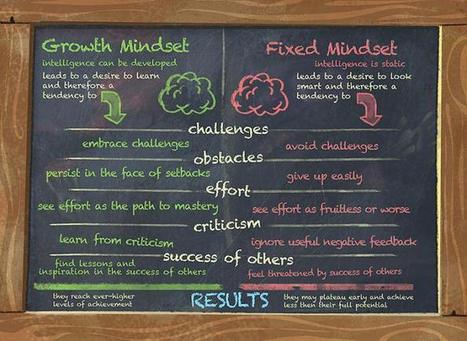
A recent interest of mine has been the Growth Mindset. I have blogged and presented on this topic: The Educator and the Growth Mindset The Educator with a Growth Mindset: A Staff Workshop Growth M...
Beth Dichter's insight:
Jackie Gerstein shares a number of posts she has written that discuss growth mindset as well as an interview with Carol Reiley, who is publishing a book, Making a Splash, which is designed for children to learn more about growth mindsets (as well as parents/teachers). Along with the great image (shown above) that compares growth mindset and fixed mindset there is an interview with Carol Reiley as well as two short video clips. You can also check out her website, GoBrain, to learn more the book and to find a larger version of the visual and information on growth mindset. 
Rocio Watkins's curator insight,
December 3, 2014 1:59 AM
Growth mindset has changed the way I teach, the way I parent my three boys, and the way I face challenging situations and risks. It has given me the resilience I need while in graduate school. Dr. Carol Dweck's book, Growth Mindset, is a paradigm-changing book. I highly recommend it. Thanks for sharing this great visual representation of Growth vs. Fixed Mindsets. 
liz's curator insight,
December 3, 2014 8:24 AM
I have been hearing quite a few ideas...becoming a real "buzz" word! It seems to appear within all forms of dialogue? 
Ness Crouch's curator insight,
February 15, 2016 4:44 AM
This is an interesting article about Growth Mindset in classrooms.This is a good introduction for how it can be used in the classroom.
Scoop.it!
Beth Dichter's insight:
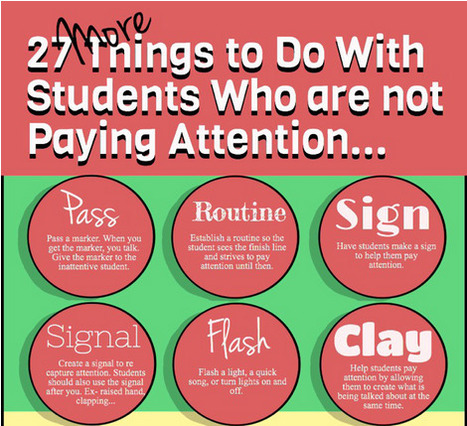
Check out this new infographic from Mia MacMeekin that provides 27 tips on ways you might work with students who are not paying attention. Some of these suggestions may be new to you. Consider sharing this with teachers at your school and beyond!
Scoop.it!

"You try to fake it, but it limps right out of your mouth, barely alive. “What’d you learn in school today?” In a single sentence, all that is wrong with “school.” First, the detachment–you literally have no idea what they’re learning or why. (You leave that up to school, because that’s what school’s for, right?)..."
Beth Dichter's insight:
Although these questions may be geared to parents they would be great students to have students answer at the end of a day, or the end of a lesson. Below are five of the questions provided. When you click through to the post you will find 19 questions proposed by readers of Te@chThought. You might also share this list with parents. * Tell me one chance you took today, and how it ended up. * Tell me three facts, two opinions, and one idea you heard today. * Tell me one fun thing you learned, one useful thing you learned, and one extraordinary thing you learned. * When were you most creative today? * What great question did you ask today?
Scoop.it!

"Edudemic has covered game-based learning and gamification in the classroom on numerous occasions in the past. When learning becomes a game, it’s an enjoyable, effective experience for students and teachers alike. We’ve curated 23 of the best game-based education resources for 2014. If your class hasn’t gotten its game on yet, then now is the time."
Beth Dichter's insight:
Game-based learning...has it come to your classroom yet? This post provides 23 great resources on game-based learning. The material is divided into the following sections: * Understanding game-based learning: Is game-based learning effective, or is it frivolous? Learn more about it with the links provided in this section. * Resources for getting started: Some great introductory resources to help you get started. * Tools you can use: Find hands-on games and gaming ideas in this section. * For teachers who design their own games: Well, you may not be in this place yet, but perhaps down the road. Find hints to help you plan out your games. * Game-based education in the news: Learn more about what is going on from the resources provided here. * Other resources: Additional resources on games and gamification. Students like to play games, and when the "fail" in a game they tend to go back and try it again because they want to win. There are some amazing games available that are free. This post provides a range of resources that may help you make the leap to trying an online game with your students, or designing a game. You may be quite pleased with the outcome.
Scoop.it!
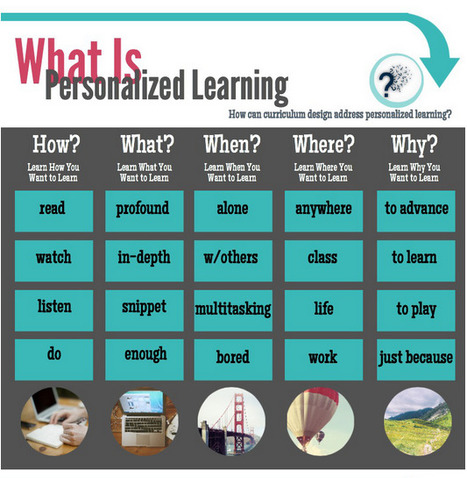
Some of the things we think about when designing personalized learning curriculum. What else do you think about? ~Mia
Beth Dichter's insight:
This infographic, byt Mia MacMeekin, looks at personalized learning and the three areas below. In each area the question is also "How can curriculum design address personalized learning?" What are the three areas? * What is personalized learning * How to personalize learning * Examples of personalized learning In each of these areas she also looks at the How, What, When, Where, and Why, providing key words or phrases that help you dig a little deeper into the subject. Mia MacMeekin has provided an infographic that you could share with others in your building. Today we are asked to personalize curriculum, but support is not always available. This visual will help you better understand some key concepts, and provide you with ideas on how you might move forward. 
Andrew Chiu's curator insight,
December 5, 2014 12:11 AM
A matrix to help consider and design learning resources for more personalised learning.
Scoop.it!
Beth Dichter's insight:
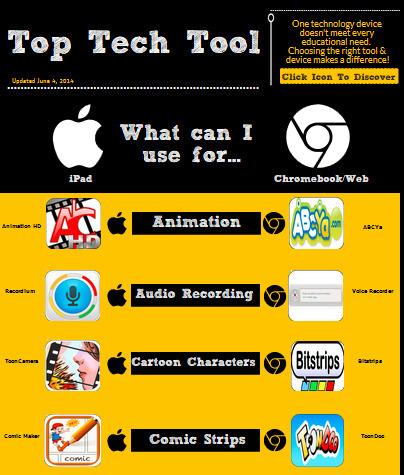
This interactive infographic provides 18 concepts and lists the "best" tool to use with the iPad or with a Chromebook or Laptop (and includes many web based tools). In the center you have the concept, to the left is the iPad app and to the right is one for the Chromebook/Notebook or a web tools. Below are some of the 18 concepts. * Video Collage * Interactive Posters * Show Me What You Know * Talking Images Each of the icons take you to the app/website. You will also find links at the bottom of the infographic. One provides a Google Document that lists all the resources and provide some additional information on the features. The second provides a Google Presentation of the resources. 
CTD Institute's curator insight,
December 4, 2014 9:21 AM
Absolutely indispensable for all using AT in the classroom!
Ness Crouch's curator insight,
September 21, 2015 1:54 AM
A very useful infographic for those teachers wanting to learn more about tools for the classroom. The comparison from Apple to Chrome will allow you to find the tools you need.
Scoop.it!
"Conveying information in a striking, concise way has never been more important, and infographics are the perfect pedagogical tool with which to do so. Below, you’ll find my experience with designing an infographic-friendly classroom research project, explained in a step-by-step process you can implement in your own classroom."
Beth Dichter's insight:
Infographics might be considered the intersection of information, illustration and design. They provide students with the opportunity to share information in a variety of ways. This post shares the story of one teacher and her implementation of a research project which culminated in an infographic. After a brief introduction (which includes an excellent interactive infographic, 13 Reasons Why Your Brain Craves Infographics). Following this introduction there are six components that are shared: * Select an Infographic-Friendly Topic * Begin the Drafting Process by Hand * Choose the Right Templates or Software * Refine Content and Design * Infographic Resources and Tools for Educators * Share and Critique Each section provides additional detail and a number of resources that you will find helpful are included.
Scoop.it!
"Students are hungry for learning that matters. Project based learning has students involved in explaining their answers to real-life questions or challenges. A project's driving question or challenge is so deep that it requires students to create an end product and share their conclusions with others. Instead of traditional projects that come at the end of a unit of study, project-based learning has the project introduced at the beginning of the unit. The project gives students a reason for learning the content and a venue for practicing 21st century skills."
Beth Dichter's insight:
How can we get our students more engaged in the classroom? Teaching them to investigate authentic problems provides them with opportunities to ask questions that will lead to solutions (and failures) but that will also engage them. In this post Tony Vincent shares steps in how to have your students engage in investigating authentic questions. Vincent starts with a section called Driven to Investigate. In this section he discusses driving questions and references a previous article, Crafting Questions that Drive Projects. Additional sections (and there are a total of thirteen) include: * Thinking is Critical * Stick Together or Divide and Conquer * Provide Focus * Provide Staring Points * Can You Believe It? * Experiments, Trial and Error, Data Collection * You Know Better Than Anyone Each section is chock full of resources. This is a great resource to help you launch students into investigating authentic problems. He also notes that he will publish Part 3, Creating Products to Show and Share in the future. I will be looking forward to reading (and in all likelihood sharing) that post once it is published.
Scoop.it!
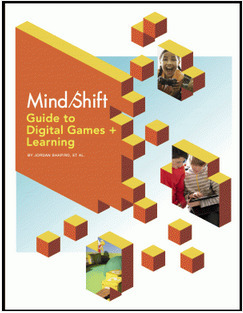
The MindShift Guide to Digital Games and Learning explains key ideas in game-based learning, pedagogy, implementation, and assessment. This guide makes sense of the available research and provides suggestions for practical use.
Beth Dichter's insight:
Mind/Shift has run a series on digital games and learning and has not put together a guide that provides the highlights of this series. Why? To quote from the post... "to create a dynamic, in-depth guide that answers many of the most pressing questions that educators, parents, and life-long learners have raised around using digital games for learning." A few of the topics covered are: * What Research Says About Gaming and Screen Time * How to Start Using Games for Digital Learning * Overcoming Obstacles for Using Digital Games in the Classroom The post provides a more in-depth overview. 
Becky Roehrs's curator insight,
November 19, 2014 8:08 AM
Over 30 pages of ideas of how to pick and use games with your students. |
Scoop.it!
Beth Dichter's insight:
This infographic looks at Bloom's Taxonomy (the original version) and the cognitive dimensions and also looks at the Depth of Knowledge which focuses on the "cognitive demands (thinking process) of instruction, tasks, and/or assessments." In the second visual the Revised Bloom's Taxonomy is in the center and Webb's Depth of Knowledge is the outer circle, providing a visual view of how the two may work together. The infographic is also available to download as a pdf on the website. Common Core tests use Webb's Depth of Knowledge for the four levels, which are designed to increase rigor. This visual may help increase your understanding on how Webb's DOK moves beyond the verbs of Bloom's (which focus on the level of thinking) beyond the "what" to the "how" of thinking (as seen in the levels of DOK). 
Tony Guzman's curator insight,
December 9, 2014 3:05 PM
This infographic combines Bloom's Taxonomy to the Depth of Knowledge model. Anyone using this?
Ness Crouch's curator insight,
March 13, 2016 4:35 AM
This infographic looks at Bloom's Taxonomy (the original version) and the cognitive dimensions and also looks at the Depth of Knowledge which focuses on the "cognitive demands (thinking process) of instruction, tasks, and/or assessments." In the second visual the Revised Bloom's Taxonomy is in the center and Webb's Depth of Knowledge is the outer circle, providing a visual view of how the two may work together. The infographic is also available to download as a pdf on the website. Common Core tests use Webb's Depth of Knowledge for the four levels, which are designed to increase rigor. This visual may help increase your understanding on how Webb's DOK moves beyond the verbs of Bloom's (which focus on the level of thinking) beyond the "what" to the "how" of thinking (as seen in the levels of DOK).
Scoop.it!
http://commoncraft.com The debate on Net Neutrality is about the future of the Internet and the outcomes of this debate could impact every US internet user. ...
Beth Dichter's insight:
There is much talk about Net Neutrality, but chances are that many do not know just what is meant by the term 'net neutrality.' Common Craft provides a great explanation of the term and what it might mean to consumers and producers of online content. This is a discussion that many of our students will have strong opinions on, yet they may not understand the difference between neutrality, and net neutrality. Consider using this video to promote a debate of the pros and cons of net neutrality.
Scoop.it!
Beth Dichter's insight:
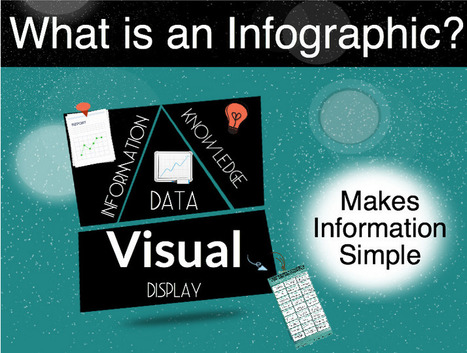
If you have not used infographics with your class this infographic may be what moves you try them with your students. Research tells us that many of our students are visual learners, and great infographics provide information that is accessible. Mia MacMeekin provides an infographic that looks at four areas. * What is an infographic? * Why an infographic? * What are the benefits? * Can it change education The joy of infographics is that students can also create them. Take some time to explore this post, and consider using them in your classroom.
Scoop.it!
Many technologies have promised to revolutionize education, but so far none has. With that in mind, what could revolutionize education? These ideas have been...
Beth Dichter's insight:
What will revolutionize education? This video looks at a history of education, sharing a range of technologies that have emerged, had claims made that this "new technology" would be the game changer, and then 10 years later, a new idea would come along. After discussing a number of these so called game changer Muller discusses what he sees as critical to revolutionize education and also shares research that may come as a surprise, changing the way you view how you may teach in your classroom. This is a video that would be great to watch with colleagues. The video is just over 7 minutes in length and is well worth the time! 
María Luisa Meza's curator insight,
December 9, 2014 11:08 PM
Video para los desafíos de la educación en el curso de docencia en línea. 
Tina Jameson's curator insight,
December 14, 2014 6:48 PM
When so many new technologies promise to transform education - what role is left to the teacher? Why is the teacher still important? This powerful clip effectively presents compelling arguments for the importance of teaching students in a 'social' classroom setting - with reference to 'how' students learn; making the best of all types of tools to aid what goes on 'in the student's head'.
Scoop.it!
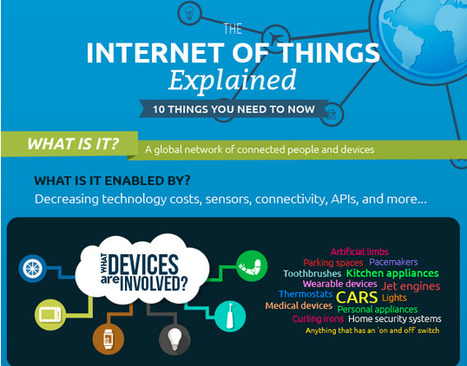
A few months ago I wrote a post called, A Simple Explanation Of The Internet Of Things where I tried to provide some clarity around what this new connected world means for all of us. In the article I mentioned some of the driving forces behind this. "Broadband Internet is become more [...]
Beth Dichter's insight:
Do you know what "the Internet of Things" means? This article and infographic from Forbes explains what this new interconnected world means and how this new interconnected world may impact our future. A portion of the infographic is shown in the image above. Additional information is available in the article as well as a link to a previous article published by the author, A Simple Explanation of the Internet of Things.
Scoop.it!

Most of us know better than to use technology for technology's sake. The Shiny New Tech Syndrome is taking the world by storm, and with the added pressure of finding ways to improve educational outcomes, we try our best not to be tempted..."
Beth Dichter's insight:
There is no question that technology may have a positive impact on education. This post looks at two research studies that support the value of technology in areas such as blended learning, digital fluency, critical thinking, project-based learning and much more. But there is a flip side to this. Consider these two concepts: * Learning from computers * Learning with the technology Take a moment to think how you would define these two concepts. Are they saying the same thing, or are they proposing two different ways of learning? The post discussed these two concepts before listing 15 times you should not use technology. Below is a list of three of the items. Click through to the post to read more. Each is discussed and some include additional links. * When it undermines deep learning * When it decreases interaction * When it reduces the chance of failure You may find that you do not agree with all the items listed, but you will be challenged to think about how you use technology in your classroom, and perhaps find some new ideas that you will implement in the future.
Scoop.it!

Kiddle - search engine for kids with illustrated results and safe search.
Beth Dichter's insight:
Check out this new search engine called Kiddle. It is a visual search engine designed for children. What makes it different? 1. Most search results provide a large thumbnail. This image will help children differentiate some results. 2. The font size. Kiddle uses a large size of Ariel, a font that helps with readability. 3. Sites are filtered and are family friendly. 4. Kiddle is privacy oriented. No data is collected and logs are deleted after 24 hours. If you work with young students, or have young children at home this search engine is worth checking out. 
Janet McQueen's curator insight,
November 29, 2014 10:45 PM
A kid friendly search engine complete with pictures. This would be great for young learners and ELLs.
Scoop.it!

"Killing a learner’s natural curiosity doesn’t happen overnight. It can take as long as 12 years, and in some rare cases even that isn’t long enough. Learning environments focused on standards, assessment, and compliance allow for the implementation of research-based strategies in pursuit of streams of data to prove that learning is happening. Curiosity is nice, but it’s a monumental challenge to measure."
Beth Dichter's insight:
As we work with our students are we "killing a learner's natural curiosity" based on what happens in our classroom? This post looks at 12 ways we may be "killing curiosity" in our classrooms, often based on what we are being told to do with our students. As you read through this think about what you might shift, to allow your students to be more curious.
Scoop.it!

Express your musicality on Incredibox with the fourth version called "Love". Create your mix, record it, share it a lot to make it to the TOP 50! Pump it up and chill ;)
Beth Dichter's insight:
If you have not checked out Incredibox head over to the website and have fun creating an a cappella group with animated beat box singers. This version provides new sounds, and you may still access previous versions. This is a great tool to allow students to create music, and could be used to create a track where students would add words, possibly to teach others in the class about a subject they are learning. . 
רונית יעקב's curator insight,
December 2, 2014 6:58 AM
כולל פרסומות ניתן להורדה כקובץ אודיו נותן קישור בעזרתו ניתן גם לראות את המבצעים
Scoop.it!

Whether you are flipping the classroom or just recording an instructional video, Screencast-O-Matic makes screencasting for educators as simple as possible.
Beth Dichter's insight:
This post is another example of the "Bitesize" PD that Fractus Learning offers. Screencast-O-Matic allows you to create videos a presentation that is on your computer. It is easy to use, and their is both a free version and a premium version. The sections covered in this post are: 1. Instructional walkthroughs 2. Record presentations and slides 3. Flipped lessons 4. Student guides 5. The power of post-processing In addition there is a short video that provides and overview and links and next steps which provides tutorials about Screencast-O-Matic, flipped learning, assessment and more.
Becky Roehrs's curator insight,
November 23, 2014 4:14 PM
The free version doesn't record audio, so use Jing which is free but only records 5 minute videos. Otherwise, pay for Screencast-O-Matic or pay for Snagit (Educator license)..Snagit has lots of features for screenshots and no limits on your video length.
Scoop.it!

"Some call today’s students “digital natives.” Others call them the “distracted generation.” Whichever term you prefer, it’s clear they’re both far more than labels: they capture the core conflict many of us involved in education — educators, parents, and even students — feel about the use of technology in the classroom."
Beth Dichter's insight:
Digital devices are in our classrooms. Some may find this a blessing and others a curse. This post states: "The question is not, “Should we allow digital devices in the classroom?”, it’s “Now that they’re here, how can we prevent digital devices from becoming a distraction?” Seven suggestions are provided. Each is thoughtful and six provides links to additional information. What are the suggestions? * Destroy the Multitasking Myth * Rethink Smartphone Bans * Write How They Read * Use Their Unique Distraction Styles to Spark Learning * Don't Post Everything Online * Create Opportunities for Curiosity Outside the Digital Space * Teach Grit Take the time to explore some of the links. For example, in the Destroying the multitasking myth you might want to view the video The Monkey Business Illusion. In fact, you may want to share this with your students. 
Lúcio Botelho's curator insight,
November 23, 2014 10:15 AM
We have to evolve to use technology in our classrooms
Scoop.it!

"The good news is that more and more often students are presenting at education conferences. The bad news is that they’re doing a poor job and it’s their teacher’s fault. Don’t be a teacher who let’s your students give a bad presentation. Before you have your students present make sure you’ve prepared them with these tips."
Beth Dichter's insight:
Student presentations - we want to give our students the option of presenting, but all too often we see slide shows with lots of text and listen to students read word for word. What can we do to move them beyond this point? This post provides many great ideas,. One section is called WATCH AND ANALYZE. Nielson suggests that you show students a presentation from TEDxYouth. Find one that you think your students would be interested in and have them watch it to find out what works, and what does not. They can come up with strategies based on what they learn. Another section is called KNOW (Don't Read) WHAT YOU ARE GOING TO SAY. Students need to tell the story, not read the slides. Check out this post for additional ideas on how you may help your students learn what works when it comes to presenting information to an audience. |











Some rules are good...others not so. good. This post looks at 18 rules that are often found in classrooms, and suggests that they impede learning and personal development. Several are listed below.
* Every good essay has five paragraphs and a thesis statement.
* Grades reflect how "good" you are at a subject.
* Highlight or underline important points while studying.
* To master a skill, practice each part of it over and over again.
* If you're not good at school, you're not good at learning.
Each of these is discussed in the post and many contain links to additional information. Our understanding of how the brain works is changing dramatically.This post helps to point out some of the new research and may impact how you have students do work in your classroom.