 Your new post is loading...

|
Scooped by
Beth Dichter
October 15, 2012 10:07 PM
|
A free book that looks at iOS6 for the iPad. Jac de Haan states that this is a "bare-bones intro to iPad & iOS 6 for my students – just enough to get comfortable with basic iPad use and get organized." The book is geared to middle and high school students, with a focus on iOS productivity apps and basic troubleshooting. It is available for free in the iTunes store. To go directly to the book in iTunes - https://itunes.apple.com/us/book/student-guide-to-ipads-ios/id570579620?mt=11.
|
|
Scooped by
Beth Dichter
October 15, 2012 9:12 PM
|
Qualcomm's Wireless Reach Initiative aims to conquer the digital divide between those who can afford wireless internet access and those who can't. A look at a Wireless Initiative that is helping students achieve higher test scores. The ability to use SmartPhones is not a given in all school districts, but if their use will help test scores increase and help with the digital divide it may be time for schools to look at this issue again. For more information on Project K-Nect check out http://www.qualcomm.com/about/citizenship/wireless-reach.
|
|
Scooped by
Beth Dichter
October 14, 2012 8:56 PM
|
"MentorMob and LearnZillion have teamed up to create a comprehensive collection of Common Core aligned learning playlists perfect for providing students with easy access to guided learning experiences. Currently there are 327 Common Core aligned playlists ready and available for free on the MentorMob site."
Here are two great tools that may help you find lessons aligned to the Common Core. Two playlists are available in the post.
|
|
Scooped by
Beth Dichter
October 14, 2012 7:55 PM
|
A look at what infographics are, beginning with definitions from three locations as well as one great infographic that provides a short but great definition (and uses lego block)! Additional examples of infographics are provided (including a short vidoe that describes them) as well as the science behind infographics and infographics and education. A list of additional resources is also listed.
|
|
Scooped by
Beth Dichter
October 13, 2012 5:46 AM
|
A different education technology tool for every letter of the alphabet! So many ways to bring technology into learning. A look at 26 tools organized alphabetically. Begin with Audioboo, a program that allows you to record and share audio blogs, and end with Zooblogs, a "safe online publishing tool" with another 24 listed. Although you may know some of these chances are good there will be one or two new ones. Have you heard of Wingclips, Thumbscribe or Studeous? How about NoteMesh, My Maths or Fluxtime? Head over and see if there is a new tool that you may use for yourself or your students.
|
|
Scooped by
Beth Dichter
October 12, 2012 10:00 PM
|
How can the iPad and Project Based Learning (PBL) come together in a classroom? Here is a post that explores how you may use PBL and the iPad in your classroom. There is a great visual that is "laid out in terms of the kind of workflow a learner might encounter in a 21st century, K-20, project-based learning environment."
|
|
Scooped by
Beth Dichter
October 12, 2012 9:41 PM
|
Are you a serial liker? A self-described "guru"? This entertaining infographic breaks down some of the most common forms of the social media obsessed. An interesting infographic that "details 10 of the most common types of social media fiends." Are you a "Constant Checker" or a "Self-Proclaimed Influencer"? Check out this infographic to see if you f ind a personality that you identify with.
|
|
Scooped by
Beth Dichter
October 11, 2012 8:37 PM
|
Failure has been a trending topic on Education Unbound recently, particularly in regards to the disconnect between educational objectives and game-based learning (GBL). We know that many games "depend on players failing multiple times as the primary means of learning how to overcome obstacles." How does this compare to education, where the "notion of failure is bad"? This post by Justin Marquis explores this issue in this first of a two part series. The article includes the following sections: * Teach that Learning is a Process * Make Learning the Goal * Support Second Chances * A Change in Mindset The second part of this article, 'Learning to Learn from Failure', is also available at http://www.onlineuniversities.com/blog/2012/10/learning-learn-failure/. Topics explored include: Learning From Your Mistakes, Embrace Metacognition, Ask for Help, Explore Alternative Paths to Success, and Failing to Learn is the Only Real Failure.
|
|
Scooped by
Beth Dichter
October 11, 2012 7:16 PM
|
Are you looking for open education resources geared to high school students? Check out this post. Links are provided for resources in science and math, comprehensive modular resources, grade-level collections, history, some higher education, as well as some free resources. Many of this have been mentioned at one point or another in this Scoop.it but there are some new ones!
|
|
Scooped by
Beth Dichter
October 10, 2012 10:13 PM
|
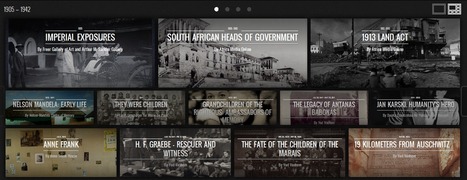
Google continues to expand their offerings, this time with the Google Cultural Institute, with the goal of preserving and promoting culture online. The Institute has just "opened" with 42 exhibits that explore a wide variety of events from 1905 - 2008. The site is "to provide a visually rich and interactive online experience for telling cultural stories in new ways. Discover exhibits by expert curators, find artifacts, view photographs, read original manuscripts, watch videos, and more."
|
|
Scooped by
Beth Dichter
October 10, 2012 9:01 PM
|
RSAnimate has recently released a new animated film. It is taken froma lecture he offered at RSAnimate and discusses The Truth About Dishonesty. Click through to see the video and find other videos that may be of interest to you.
|
|
Scooped by
Beth Dichter
October 9, 2012 9:17 PM
|
"The online educational video game site iCivics, created in 2009 by former Supreme Court Justice Sandra Day O’Connor that features civics curriculum, has partnered with EverFi, an ed-tech company focused on K-12 and higher ed. And through the partnership comes a new initiative Commons – Digital Town Square, offered free to all K-12 schools." According to this post this game will provide an adaptive feature, have "a variety of media including simulations and animations as well as pre and post-assessments and behavioral surveys." It also includes social components, badges and avatars, and they will be meeting some of the Common Core standards. To go directly to this new iniative - Commons - Digital Town Square: http://everfi.com/civic-education.
|
|
Scooped by
Beth Dichter
October 8, 2012 4:03 PM
|
Digital citizenship is important to understand for today's students, staff, and teachers. Microsoft has just unveiled a free curriculum that gives great tips and ideas on teaching digital citizenship and creative content. This looks like a great resource. It is designed for students in Grades 8 - 10, but the site suggests that you may also use it with Grades 6 & 7. There are four units. Each provides student learning objectives. The units are: * Unit One: Creative What? - Exploring the general topics of "intellectual property, creative content and creative rights" with a focus on intellectual property and creative content. * Unit Two: By Rule of Law - A more in-depth look at creative content copyright. * Unit Three: Calling All Digital Citizens - Using social media as the backdrop a look at "how does the prevalence of online media — and its ease of access — change the conversation about those rights?" * Unit Four: Protect Your Work, Respect Your Work - How do you protect your creative work? This unit looks at this issue as well as other "issues related to originality and plagiarism."
|
|
|
Scooped by
Beth Dichter
October 15, 2012 9:48 PM
|
How do we prepare students for 21st century learning? The Common Core Standards call for "more rigor, complex reasoning, problem solving, and critical thinking than traditional learning." How do we teach so that students meet these new standards? What professional development will need to be done so that teachers may provides their students with the necessary skills? As the titleof the article states, "How do we prepare students for compelex futures?" The post looks at a variety of materials that discuss skills and strategies that one might consider. In 2008 Tony Wagner suggested 7 areas that were critical for students to learn: * Problem-solving and critical thinking * Collaboration across networks and leading by influence * Agility and adaptability * Initiative and entrepreneurship * Effective written and oral communication * Accessing and analyzing information * Curiosity and imagination Materials from David Conley regarding "key cognitive strategies", Costa and Kallick and habits of mind, and other dispositions are also discussed. The last section of the post looks at "a new paradigm: on-going, formative, self-assessment."
|
|
Scooped by
Beth Dichter
October 15, 2012 8:27 PM
|
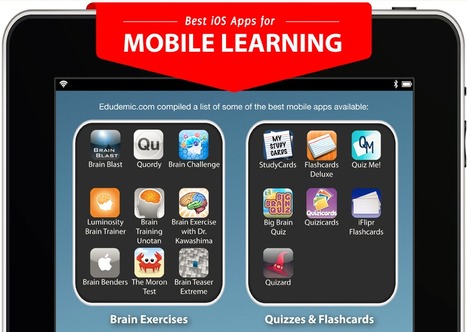
Learning doesn't have to come out of a textbook. Take a look at some of the best mobile apps for iPhone-based education. The list comes from Edudemic.com while the infographic was designed by Online Universities. Find mobile apps for brain exercises, quizzes and flashcards, math, science, geography and history, English and literature, reference materials, art and art history, languages and productivity. To access the complete list of apps go to http://edudemic.com/2012/09/the-100-best-ios-apps-for-mobile-learning/.
|
|
Scooped by
Beth Dichter
October 14, 2012 8:29 PM
|
The College Board earns over half of all its revenues from the courses -- and, in an uncertain environment, students keep being suckered. There have certainly been articles that discuss the Advanced Placement Program that many high schools offer. This article from the Atlantic provides a variety of reasons why some believe that AP tests are a scam. The discussion that follows has comments from teachers, parents, students (and others interested in the topic) and have a range of opinions.
|
|
Scooped by
Beth Dichter
October 13, 2012 5:55 AM
|
We may forget that humor may be used as an incentive for homework. Although this post is geared to homework (and therefore parents) much of it is applicable to the teacher in the classroom. With suggestions of different ways to use humor as well as links to a variety of resources available online there is much fun to be had as you explore this post!
|
|
Scooped by
Beth Dichter
October 12, 2012 10:47 PM
|
Secretary of Education Arne Duncan says every school should replace textbooks with tablets or e-reader devices. What does this mean for your students' learning? This post explores cost analysis and learning considerations. Did you know that South Korea has been using digital textbooks and report that their students have "graduation rates of six to eight percent higher than students with no access." Other studies raise questions about retention with digital access to textbooks. Without question, this is a hot button topic. For more information click through to the post.
|
|
Scooped by
Beth Dichter
October 12, 2012 9:47 PM
|
If you are looking for apps for the iPod, iPhone and iPad that address individuals whom have dyslexia and learning disorders this post will provide you with a list of apps that address "reading, spelling, writing, organizational/study skills, (and )increasing self-confidence in the classroom and workplace." The apps are divided into categories so you may quickly move to the area of interest. Many but not all of the apps are free.
|
|
Scooped by
Beth Dichter
October 12, 2012 9:10 PM
|
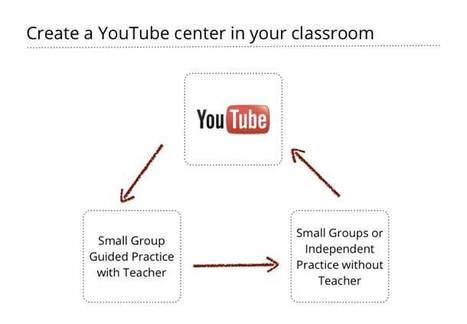
Are you looking for a guide on how you might use YouTube in your classroom. A new guide was published this month which is chock full of advice. Edudemic has also published an article that looks at this guide. This post is from Edudemic to give you a taste of what might be in the future of your classroom. Learn how YouTube might: * "spark lively discussion" * help you organize "video content for easier access" * "archive your work" * "encourage students to dig deeper" * "help both struggling and advanced students" * "review for upcoming exams" * "create a YouTube center in your classoom"
* "add quizzes to videos" * "create interactive video quests" and more. To find the 47 page "YouTube Playbook Guide Education" go to http://storage.googleapis.com/support-kms-prod/SNP_2799330_en_v1.
|
|
Scooped by
Beth Dichter
October 11, 2012 7:41 PM
|
A great set of resources to enable students to discover wonderful works of art online from galleries, art collections and museums around the world. Explore great art sites geared to a wide range of ages. Tate Britain if geared to younger students. They provide "hands-on ways for budding young artists and art critics to explore the collection in innovative and interactive ways." Students may create a masterpiece, animate a masterpiece and "frame and hang" them. There are also interactive games. The Museum of Modern Art (MOMA) allows students to explore their collection online. One great feature "is a convenient set of links provided alongside each piece enabling students to click through to further information on the origins of the painting and other related work. Also discussed in this article are the Guggenheim, the Hermitage and the Uffizi. For more information follow the link to the article.
|
|
Scooped by
Beth Dichter
October 11, 2012 6:45 PM
|
The technology that's infiltrating our bedrooms--TVs, computers and cell phones--may be stopping us from getting a good night's sleep. This infographic looks at how technology is impacting our sleep patterns. The Centers for Disease Control and Prevention says that "not getting enough sleep is a public health epidemic." Did you know that the blue light that is emitted from many cell phones, digital clocks and computers "may disrupt circadian rhythms." To learn how technology is impacting the bedroom click through to the infographic.
|
|
Scooped by
Beth Dichter
October 10, 2012 9:16 PM
|
Many of us are asking this question "Will the new online standardized tests be different?" and this post begins to explore where things stand at this point. There are two state coalitions that are designing the new tests, the Partnership for Assessment of Readiness for College and Careers (PARCC) and the Smarter Balanced Assessment Consortium. For a look at sample questions from both sites and a short discussion on what the "computer enhanced" testing may bring to your classroom click through to the post.
|
|
Scooped by
Beth Dichter
October 10, 2012 8:34 PM
|
On Oct. 6th I posted the first of this two part series that looks at Professional Education Learning Communities. In this post Gorman moves us to take steps in developing our PLC (personal learning community). What do you do? Begin with Step 1 (quoting below): * Start gathering resources...explore communities...find out what is out there! How do we begin this step? Gorman suggests Twitter, and then goes on to describe what Twitter is (or is not) as well as sharing the first steps for those new to Twitter as well as a wide variety of resources. Let's move on to Step 2 (also quoted below): * Explore the educational blogosphere In the past many teachers relied on written materials, such as newsletters, magazines, papers, etc. to provide them with updated information...but today we have the Internet....which gives us blogs. Available 24/7 you can find blogs geared to specific interests (and who knows...perhaps you will begin one). Gorman shares how to search for a blog, locations of lists of award winning blogs, links to blogs he follows and much more to start you on this step of your journey. Onto Step 3: * Discover professional on-line learing communities Looking for communities that discuss "strategies essential to the common core" take the time to read this step where he provides links to ten resources that explore the Common Core from a variety of positions. Step 4 is to conect to students PLN's and Step 5 shares how to discover virtual learning opportunities. Take the time to click through and expand you PLC options!
|
|
Scooped by
Beth Dichter
October 9, 2012 8:04 PM
|
A look at how quickly schools may migrate "to new styles of teaching and the digital classroom." The survey looked at digital textboks, video content, flipped classroom, online assessment, social media and more. The survey was small in number but the numbers are interesting to look at.
|



























Although geared at high school students, this bare-bones intro provides a lot of key information for the novice user.