Your new post is loading...
Beth Dichter's insight:
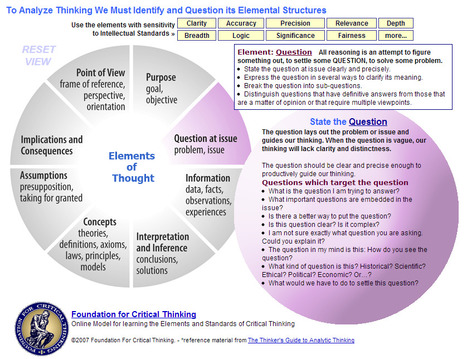
This is a great interactive model of critical thinking. One circle has 8 elements of thought: * Question at issue * Information * Interpretation and influence * Concepts * Assumptions * Implications and Consequences * Point of View As you role over and selelct an element of thought you are hown additional information about the element. For example, if you were to select Point of View you would be prompted to understand your point of view and provided with questions to further your thinking. In addition there are also prompts for intellectual standards to consider. The intellectual standards include: clarity, accuracy, precision, relevance, depth, breadth, logic, significance, and fairness. In each of these area there is a brief definition as well a three additional questions to consider. There is also one choice (more) that provides you with additional standards you might want to consider and suggests that you think of your own.
Beth Dichter's insight:
DuckDuckGo (a search engine that does not track you) has a new guide on how to stop getting tracked in your browser. If you are concerned about ads that follow you or cookies or other items that may be tracking you check out this post. It provides link to a variety of apps that you may want to install and will determine which browser (Firefox, Chrome, Internet Explorer, Safari, Opera) you are using to access the post and tell yo how to tweak setting to minimize tracking. And if you are not sure what tracking is you might want to either check out the DuckDuckGo website and look for under More (lower right hand corner) where you can learn about tracking and filter bubble, or check the TED talk that Eli Pariser did a couple of year ago on filter bubbles (http://www.ted.com/talks/eli_pariser_beware_online_filter_bubbles.html),
Beth Dichter's insight:
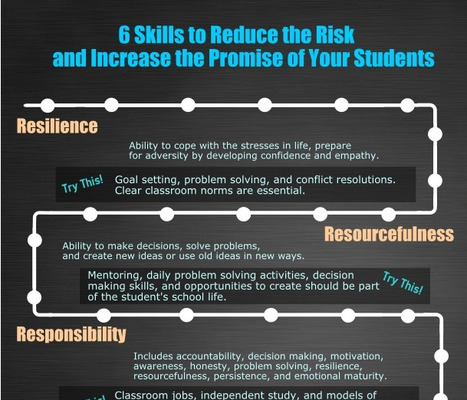
This infographic comes out of a recently published book, 'Reducing the Risk, Increasing the Promise: Strategies for Student Success.' The book explores ways to help "at-risk students achieve success in and out of the classroom." This infographic proivdes six skills that students need to do this: * Resilience * Resourcefulness * Responsibility * Relationships * Respect * Reading The infographic includes some specific details for each of the skills. A great resource that may be shared with students.
So what happens when Google, Amazon, and your local library come up short in your quest for free educational eBooks?
Beth Dichter's insight:
Are you looking for locations to download free eBooks? Here is a list of five that provide a great variety: * The Harvard Classics * Project Gutenberg * Bartleby * OER Commons (also known as Open Educational Resources) * IDCL (the International Digital Children's Library) For more information on these five sites (and hot links to them) click through to the post.
Ken Morrison's curator insight,
January 27, 2013 8:59 PM
This link is worth bookmarking. You can't go wrong with these free resources!
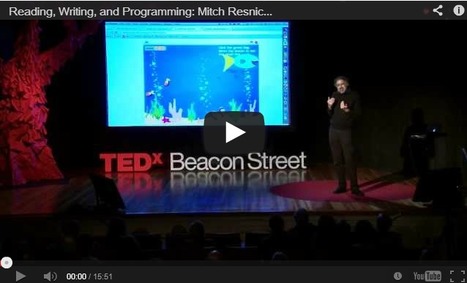
Mitch Resnik, the creator of the super-simple Scratch programming language and head of the Lifelong Kindergarten group at the MIT Media Lab, gave a TEDx talk about the value of coding and computer literacy in early education.
Beth Dichter's insight:
If you have not checked out Scratch, a free programming language from the MIT Media Lab, take the time to listen to this talk by the creator, and then check out the program at the Scratch site, http://scratch.mit.edu/. You may download the program, join an educator's community, check out projects, watch tutorials and much more. One question that is being discussed more and more is if we should teach students programming. We are also told we need to have our students be creators of materials. Scratch may be a program that will help us meet both these goals.
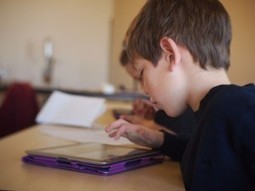
"So the iPad, then. Pop culture’s plaything and #edtech’s darling. It’s an app library, a media consumption device, and a mobile learning tool that makes yesterday’s graphing calculators, smartboards, and laptops look like abacuses. So we buy them then—by the truckloads, in fact. We stamp them as district-owned, give teachers a few PDs that show them some tools and advise them on “district policy,” and then expect miracles. It is unclear exactly how and where we expect those miracles to show up. Student satisfaction surveys? Learner engagement? Test scores?"
Beth Dichter's insight:
This post goes on to explore how to "maximize the impact of the iPad as a learning tool" and states that first we must determine the impact we are looking for. The 10 secrets includes: * Learning has not changed - we still have iPads but we must continue to teach critical thinking, backwards planning, transfer and more. * Find the overlap - The iPad goes beyond the textbook, not only can the iPad access content but it can also access peers and a larger community. * Insist on transfer - and with the Common Core this is a crtical component to consider. Click through to the post to read seven additional suggestions on how to unlock the iPad as a learning tool.
Beth Dichter's insight:
Richard Byrne provides 13 resources for social studies in this post. Some have been mentioned previously in this Scoop.it and others are new. Each one includes a brief description and all are free. They include: * Museum Box - a virtual display of artifacts * Mission U.S. - 2 missions that explore different times in U.S. History * Hip Hughes History - a YouTube channel on both U.S. and World History (the image above is from this site) * The Google Cultural Institute (42 exhibitions online) * History Animated - "animated online tours of notable battles and strategies and the outcomes of each battle in the American Revolution, the War of 1812, the American Civil War, and WWII" and more! Check out the post for additional resources.
Nick Urban's curator insight,
July 16, 2015 3:31 PM
This site offers terrific digital resources specific to the social studies classroom. It offers resources on a variety of social studies topics from world history to American history, and politics. One of the sites that I have used in my classroom is History Animated that allows users to see virtual battlefields and live the action that soldiers would have felt.
"One of the greatest gifts a teacher can give learners is the opportunity to tell their stories, and to establish venues to have those stories witnessed by others. There is a movement among pockets of educators to make education a passion-based process of learning."
Beth Dichter's insight:
Do you believe "that learning should be interest-driven, that learners should create narratives that they find personally motivating, personally relevant, personally interesting using digital media tools to tell their stories"? This post explores this concept, sharing resources and strategies to help make this happen, specifically by the use of videos. For more information click through to the post.
"In our experience working with people and communities around open content, one of the misconceptions we see regularly is that the process of creating open content differs from creating content that is not openly licensed. Fortunately, content is content; and if you have ever created a resource for use in your class, a piece of documentation, a video, a podcast, a blog post, shared a picture online, etc, then you have done the same type of work you will need to do to release openly licensed content."
Beth Dichter's insight:
Are you interested in creating open source content but have questions about what you need to do? This post provides insight that may help you create open content. Sections include: * Defining the scope * Collecting resources * Checking licenses * Finalizing the working outline * Writing and/or curating * Assembling the work * Editing * Publishing * Understanding that open content is only partially about content
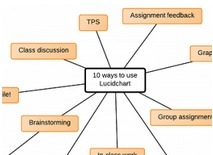
"Lucidchart is the best free learning tool you’ve never heard of. It’s an online diagramming tool that’s easy to use and supported by a for-profit company, so you don’t have to worry about us disappearing once you’ve built your lesson plans around us. Not sure how to use a diagramming program in your classroom? Here are 10 ideas from teachers and professors who are already using Lucidchart."
Beth Dichter's insight:
A great introduction to Lucidchart, a robust online graphic organizer that is free for educators (and their students) and allows students to collaborate on projects. A few of the ideas suggested in the post are below: * Use Lucidchart as an alternative to Think, Pair, Share * Brainstorm with mindmaps (and have students collaborate, having each choose a different color if you want to follow them individually) * Real time feedback on assignments Remember, this is a free tool and the post provides great directions on how to set up your account and request it be upgraded to educational!
Carol Thomson's curator insight,
January 27, 2013 2:59 PM
i hope i can get this working in my classroom and then using it -- sometimes things are blocked!
David Peal's curator insight,
December 26, 2013 11:21 AM
Outstanding tool for making graphic organizers and concept maps, worth the $3 a month.
Today the field trip is not being used as it once was. Stories of my father being taken to the meat packing plant in his small town are old news.
Beth Dichter's insight:
With money tight virtual field trips provide a way for students to have new experiences. This post looks provides information on five trips you might consider. What would it be like to travel to Mars? Learn about geography and cultures through Reach the World. Learn more about these two programs and additional programs by clicking through to the post.
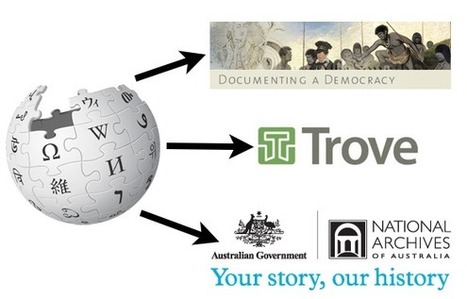
"Wikipedia can often get a bum rap from many in the education community. Sometimes, it’s for good reason, as it can be a VERY overused information source by students AND adults alike...Today I want to reflect on its benefits as a starting reference or secondary (maybe tertiary) source to start of your research, based on how I used it to research my History resource."
Beth Dichter's insight:
Many students choose to use Wikipedia as a primary resource and many teachers tell students they should not use Wikipedia...but what if you require that they confirm all information from other primary resources? Gleeson notes "I believe starting with the much maligned site had several benefits that will transfer over to the students’ use." He discusses four issues that students often face when searching online: * Where do I begin? (Based on my discussions with students most students tell me they use Google, but that does not mean that they look beyond the first page of results, or know how to do searches.) * Key word search - Do your students know how to use key words? Wikipedia may help with this. * Secondary source drives me to primary source - Allow the secondary source to provide some foundation, but confirm with primary sources. * Effective time management for checking sources. Additional information on each point may be found in the post.
ramon gutierrez sanchez's curator insight,
December 18, 2015 11:46 AM
Many students choose to use Wikipedia as a primary resource and many teachers tell students they should not use Wikipedia...but what if you require that they confirm all information from other primary resources? Gleeson notes "I believe starting with the much maligned site had several benefits that will transfer over to the students’ use." He discusses four issues that students often face when searching online: * Where do I begin? (Based on my discussions with students most students tell me they use Google, but that does not mean that they look beyond the first page of results, or know how to do searches.) * Key word search - Do your students know how to use key words? Wikipedia may help with this. * Secondary source drives me to primary source - Allow the secondary source to provide some foundation, but confirm with primary sources. * Effective time management for checking sources. Additional information on each point may be found in the post.
"Popcorn Maker, a tool for enhancing and remixing Web video from Mozilla, holds a lot of potential for educators, according to Linda W. Braun. The library consultant and educator, who created an earlier tutorial on make-your-own infographics, takes the free, browser-based application for a spin in the following screencast."
Beth Dichter's insight:
If you have wanted to learn how to use Popcorn Maker check out this video tutorial. Learn how to use the drag and drop, insert text, images, Google maps and more. Final projects may be shared (that does require that you create a log-in) and embedded in web pages. Braun's final comment is "“For school and public librarians, teachers, and parents who work with kids and teens, there are a lot of possibilities."
Sascha Reimann's curator insight,
January 15, 2013 11:39 AM
Interessant: Videos mit Sprechblasen, Infos oder Twitterfeeds anreichern. |
Beth Dichter's insight:
This is the third in a series exploring creativity in the digital classroom and it focuses on literacy resources in your classroom. Groman makes a note that the Common Core includes the following statements: * “Prepare for and participate effectively in a range of conversations and collaborations with diverse partners …” * “Use technology, including the Internet, to produce and publish writing and to interact and collaborate with others …” The use of digital resources and digital tools will help meet these goals and this post provides information on the following tools: * Kidblog * Classchatter * Wikispace for Education * Weebly * Wikipedia * ePubBud * Meet me at the Corner * Edmodo or My Big Campus Have fun exploring!
"The role of librarians in modern schools is more crucial than ever. In an age of dynamic information and media streams, librarians are uniquely positioned to guide students in research and storytelling tools."
Beth Dichter's insight:
This post provide a look at the many literacies that we are responsible for teaching, and although it i geared towards librarians the concepts apply to teachers across the disciplines. Today we no longer define literacy as reading and writing. The types of literacy continue to grow and include (but are not limited to) visual, information, technological, scientific, critical, mathematical...the list goes on. If you are looking for a short list of benefits of using technology tools, a look at how storytelling and research help students learn, or more information in the area of the new literacies in general check out this post.
Rashmi Moghe's comment,
June 16, 2013 11:21 PM
Hall, Mercer and Russac, Patricia A.(2013). Librarians, technology and the new literacies. The ASIDE blog _Innovation Design In_underneath everything is information. Retrieved from http://theasideblog.blogspot.com/2013/01/librarians-technology-and-new-literacies.html
Librarians are poised to be on the front lines in delivering instruction and resources to help in understanding various literacies. They often know whole school curriculum and have the capacity to enrich daily lessons and educational units. When librarians shape information in well-conceived, visual ways, students can become motivated, self-directed learners who create their own content and publish their own work.
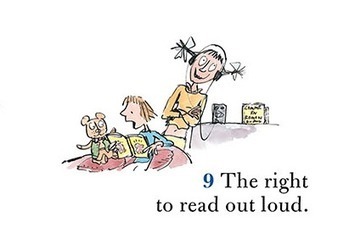
What are your rights as a reader? First off, you have the right NOT to read. You also have the right to read out loud and the right to skip parts.
Beth Dichter's insight:
An interesting infographic that looks at the rights of a reader. This comes from a book published in 2006 and the author 'discusses his experiences teaching in what he calls “challenging” schools.' The image is also available as a pdf if you click through to the site.
Beth Dichter's insight:
What makes a teacher a great teacher, a successful teacher, one whom is able to reach the students? This post explores 25 things teachers might try and each is explained in some detail. A few of the things are listed below but click through to the article for additional information and ideas! * Successful educators have clear objectives. * Successful educators are able to live without immediate feedback. * Successful educators know when to listen to students and when to ignore them. * Successful educators welcome change in the classroom. * Successful educators are comfortable with the unknown.
Pedro Barbosa's curator insight,
January 26, 2013 4:27 AM
Pedro Barbosa | www.pbarbosa.com | www.harvardtrends.com
Sandra V. Barbosa's curator insight,
January 26, 2013 9:26 PM
Se você perguntar a um aluno o que o torna bem sucedido na escola, provavelmente você não ouvirá sobre de algum livro fantástico novo ou série de palestras . Muito provavelmente você vai ouvir algo como: "Foi tudo o Sr. Jones. Ele simplesmente nunca desistiu de mim. "
Beth Dichter's insight:
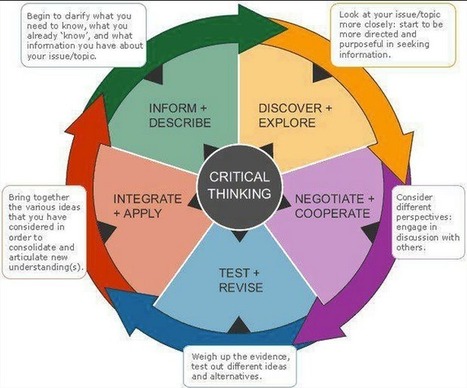
Check out this concept map about critical thinking...and consider sharing it with students to help them better understand the processes involved.
Tracy Shaw's curator insight,
January 24, 2013 1:46 PM
Thinking maps can be such a great resource when you're designing lessons - visual reinforcements!
I hope you enjoyed the past post and welcome you to a series of posts of series dedicated to Creativity in digital classroom. I have some reflection, ideas, and some amazing resources to share. ...
Beth Dichter's insight:
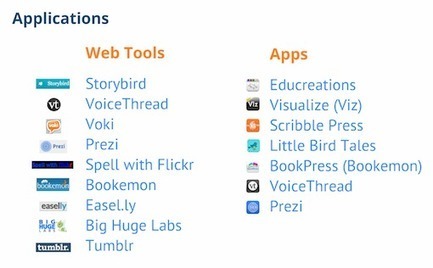
Once again Michael Gorman has put together a great list of Web 2.0 tools that you might want to use in your classroom. In this post he provided information on 15 tools, and each tool has a variety of resources, ranging from tutorials to blog postings that discuss the tool to ways you might use the tool in your classroom and much more. A few of the tools mentioned include: * Glogster * Voki * Storybird * Answer Garden Check the post to learn more about these plus 11 additional tools!
douglas brassard's curator insight,
March 11, 2015 10:54 AM
This scoop is good because it shows the creativity in the digital classroom.
alena sanchez's curator insight,
March 12, 2015 12:05 PM
This gives you reflection on the things you have been working on, scoop it is a very easy way to find things that you need
Beth Dichter's insight:
If you have not heard of ProCon.org this is a great introduction through the eyes of students in middle school, high school, and college. Student created videos discuss the value of using ProCon when researching a wide variety of controversial subjects. To quote their mission statement: "Promoting critical thinking, education, and informed citizenship by presenting controversial issues in a straightforward, nonpartisan, primarily pro-con format." The statement continues "We accomplish our mission by researching issues that we feel are controversial and important, and we work to present them in a balanced, comprehensive, straightforward, and primarily pro-con format at no charge on our websites." To go directly to the ProCon site (and not the videos):
"Tomorrow marks six weeks since I officially launched my blog devoted to iPad apps for students and teachers...Since I launched the blog I've published 56 posts which is better than one per day. In the slideshow below I've organized 46 of the reviewed apps. The slideshow is organized in the following order: math apps, science apps, social studies apps, language arts apps, video apps, and productivity apps. Not all of the apps in this slideshow are free, but most of them are."
Beth Dichter's insight:
Are you looking for some apps to use with students? Richard Byrne has started a new blog that looks at iPad apps and in this post he provides a review of 46 apps that he has reviewed.
"Maybe you don’t have time to sit down and sift through the latest education blogs for ideas and inspiration. If the thought of trying to carve out more hours in your day leaves you feeling overwhelmed, this list is for you."
Beth Dichter's insight:
Why listen to podcasts? If you have an MP3 player (or smartphone) they are portable. Listen to them as you drive to work, wait for an appointment, cook dinner and more. As the post says ". Podcasts don’t force you to find more time in your day; they give you the opportunity to capitalize on all the dead time that already exists in your day by simply downloading the .mp3 or syncing a podcast to your iTunes account on your smartphone." Click through to see the list of 50 sites that provide podcast in a wide range of subjects!
Social media is trending globally. Check out this infographic to learn about how quickly social media has become prominent around the world.
Beth Dichter's insight:
How much has Internet use grown in the last 10 years? Check out some "jaw-dropping numbers behind social networking's ascent to global dominance" in this infographic. Be prepared to be surprised by some of these numbers!
Roger Grant's comment,
January 18, 2013 12:03 AM
Yes..Actulally the numbers are growing so fast and we are becoming so much dependent on internet
Beth Dichter's insight:
Educational transfer is a key component of teaching. What can we do as teachers to help our students be able to take what they have been taught and apply it in new situations? This post explores this issue with a focus on how to use digital media to enhance the transfer. It discusses recent research that has been published by the National Academies Press, "Education for Life and Work: Developing Transferable Knowledge and Skills in the 21st Century". Learn about the three processes that take place when a student learns a new idea. "Check out (the) awesome chart from National Academies Press that summarizes twelve simple, research-based strategies for multimedia design."
Jean-Sebastien B. Miousse's curator insight,
January 17, 2013 8:21 AM
Use these tricks to develop your methodology and metacognition shall be yours.
"Math can be made meaningful when connected to students’ experiences. With video clips and interactive games from public media students practice math concepts while exploring real world concepts. Learn how to decorate an intricate cake, play the role of the pharmacist, roof a house and more using PBS LearningMedia resources to measure with math."
Beth Dichter's insight:
PBS has great resources, and this post provides links to five math lessons as well as short descriptions and grade levels. Click through to find links to the following lessons: * Using Recipes for Fractions (Lesson Plan and Video) * Re-roofing Your Uncle's House Interactive Game * Cake Designer Video * Area of Circles with Dive Dog Interactive Game * Dunk Tank: Area of Squares and Rectangles (Video and Interactive Games)
Quishawna Henderson's curator insight,
January 23, 2013 9:48 PM
I use this often in my math classroom now. The most difficult task is to make sure that students understand the meaning behind it!
Amy Keathley's curator insight,
February 16, 2014 9:41 PM
This is definitely the direction we need to go - many students have such a hard time connect the math they learn in class to the real world and this is a step in the right direction! |
Your new post is loading...
Beth Dichter's insight:
This is a great interactive model of critical thinking. One circle has 8 elements of thought:
* Purpose
* Question at issue
* Information
* Interpretation and influence
* Concepts
* Assumptions
* Implications and Consequences
* Point of View
As you role over and selelct an element of thought you are hown additional information about the element. For example, if you were to select Point of View you would be prompted to understand your point of view and provided with questions to further your thinking. In addition there are also prompts for intellectual standards to consider. The intellectual standards include: clarity, accuracy, precision, relevance, depth, breadth, logic, significance, and fairness. In each of these area there is a brief definition as well a three additional questions to consider. There is also one choice (more) that provides you with additional standards you might want to consider and suggests that you think of your own.
I'm thinking this is a pretty complicated model given that many of our very best critical thinking is done within the space of a blink! However, it's useful to be able to break it down and explain it for undergraduates for whom universities have great expectations in criticial thinking but don't really explain how they know what it is when they see it. And, sadly, in introductory courses too often professors don't expect critical thinking of their students - sticking too close to recall or lower levels of application thinking for their expectations of student performance.