



Eclectic Technology
230.9K views |
+0 today
Filter by date
Tags
Tech tools that assist all students to be independent learners & teachers to become better teachers
Curated by
Beth Dichter
 Your new post is loading...
 Scoop.it!
Beth Dichter's insight:
If you are looking for great toolkits that "provide digital learning resources and ideas for teachers in specific subject areas" look no further than the Digital Learning Day website. These toolkits are "designed to provide guidance on how technology and digital learning can enhance the educational experience and outcomes for all students." Currently they have toolkits in nine areas: * Bring Your Own Device * Civics * English Language Arts * Expanded Learning * Mathematics * Project Based Learning * Science * Social Studies Great resources are provided and additional toolkits may be added in the future!
Scoop.it!
Time to stop spending all afternoon hunting through the app store. These free education apps sorted by grade level should save you quite a few hours.
Beth Dichter's insight:
Check out this list of 48 free apps, sorted by grade level. Each is rated and suggested grade levels are included, plus the list is hot-linked so you can quickly download them from iTunes. 
Dupree Wesley's curator insight,
May 27, 2015 10:06 PM
A list of some of the most useful apps for education purposes. I have done this and scouring the app store for apps can take hours. This list is extremely useful.
Scoop.it!
"The U.S Department of Education’s Office of Educational Technology (OET) posted a report for public comment: Promoting Grit, Tenacity, and Perseverance: Critical Factors for Success in the 21st Century. The report examines factors that can promote students’ capacity to strive for and succeed at fulfilling long-term and higher-order goals and persist in the face of challenges and setbacks they will encounter throughout schooling and life. The report aims to identify critical themes, questions, conclusions, and recommendations around theory, measurement, and the design of learning environments, with an eye toward identifying potential new roles for technology."
Beth Dichter's insight:
This is a draft report. It does recommend a number of ways tha technology may play a role. Key ideas discussed in the report include (copied from the original post): 1. permit greater sophistication of assessment and adaptation to individual learning needs; 2. integrate different documents, textbook and multimedia materials, devices, and sources of information to provide supports to help students stay organized, manage time, and feel confident; and 3. enable students and teachers to utilize an unprecedented wealth of online and digital resources. This post from Getting Smart includes some additional information and suggests that you check out page 50 of the report where they provide a summary table that "compares types of programs (school readiness, reform models, informal learning, and digital environments) with grade level appropriateness, setting, focus, and evidence." There is also a link to the report which you may download as a pdf.
Scoop.it!

We're hoping to save you some time by personally trying out these free video editing tools in hopes of making your life and projects a bit more magical.
Beth Dichter's insight:
Are you looking for a collaborative project that will engage students? How about having them create videos? This post provides information on five free editing tools, three for the PC and two for the Mac. Along with a description of the tool they also provide an idea for how to use the tool with project based learning (which is not required!). The tools listed are: For the PC: * Windows Movie Maker * Wax * StoryBoard Pro For the Mac: * iMovie (not free for the iPad) * Blender There are screenshots of the first four tools and there is a brief trailer for Blender. 
Carmen Chavez, Ph.D.'s curator insight,
March 17, 2013 4:06 PM
VoiceThread, Wallwisher, Edmodo, ClassDojo, several tools to the entire PBL.
Scoop.it!
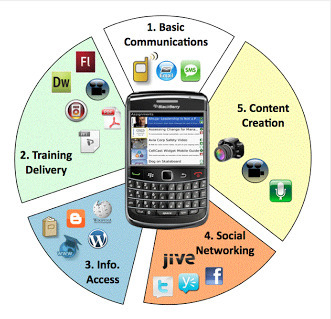
"A new study conducted by TRU provides a body of research which supports the idea that students use cell phones to learn, and also that schools are not acknowledging or supporting them fully, yet... Rather than banning, the study highlights the fact that if we meet children where they are we can leverage their use of mobile devices for powerful learning."
Beth Dichter's insight:
The study was a survey of 1000 students in Grades 6 - 8 and came out with some surprising data. Key findings include: * More than one out of three middle school students report they are using smartphones (39%) and tablets (31%) to do homework. * More than 1 in 4 students (26 %) are using smartphones for their homework, weekly or more. * Hispanic and African American middle school students are using the smartphones for homework more than Caucasian students. Nearly one half of all Hispanic middle school students (49%) report using smartphones for homework. Smartphone use for homework also crosses income levels with nearly one in three (29%) of students from the lowest income households reporting smartphone usage to do their homework assignments. (Note - 25% of students surveyed were from households of $25,000 or less income.) The report has additional key findings as well as areas of significan opportunity, statistics on students interest in STEM, mobile device usage, benefits of mobile devices in the classroom, and the opportunity to increase mobile device usage in the classroom. You may also download a pdf of this report at http://www.thinkfinity.org/servlet/JiveServlet/previewBody/10549-102-2-18289/Research%20on%20Mobile%20Technology.pdf.
Scoop.it!
Beth Dichter's insight:
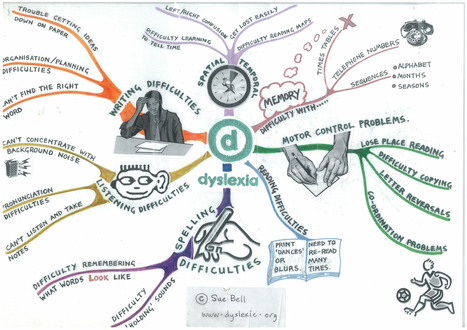
Do you have questions about dyslexia? It is a "language based difficulty that is caused by a defect of some sort in the way the brain processes graphic symbols." This post provides additional information about dyslexia as well as a look at what dyslexia affects, which includes reading difficulties, oral language difficulties, writing difficulties and math difficulties (greater detail in the post). Learn about some of the misconceptions around dyslexia and check out the short video that looks at dyslexia and an additional dyslexia map.
Scoop.it!

"Sketch Star from Miniclip is a fun and free tool for creating animated comics. On Sketch Star students can create draw animations from scratch or use pre-made shapes and characters. Students build their animations frame by frame."
Beth Dichter's insight:
If you are looking for a free tool to create animations you should check out SketchStar. In this review by Richard Byrne shares his insight into the program as well as some suggestions about how you might use it in the classroom. Be aware that students will need an email address to register at the site.
Scoop.it!

How do the arts "“increase students’ college-, career-, and citizenship-readiness in all subjects as well as keep them engaged in school and contribute to their social and emotional health"?
Beth Dichter's insight:
This post looks at what neurologists call executive function and eduation calls higher order thinking. A list of nine "ways to describe some of the executive functions when relating the arts to creativity and the thinking processes" is provided which includes: * Conceptual thinking and transfer of knowledge * Judgmen * Critical analysis * Induction and deduction If you are interested in learning more about how creativity correlates with academic achievement as well as social and emotional success and how it helps to develop skills that support higher order thinking (a hot topic with Common Core) click through to the article.
Scoop.it!
Beth Dichter's insight:
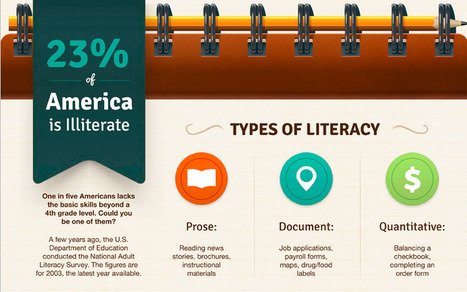
Approximately one in five Americans is illiterate, which is defined as lacking "the basic skills beyond a 4th grade level." This infographic explores this issue in some detail, beginning with definign the types of literacy as: * Prose - reading news, stories, instructional materials * Documents - forms such as job applications, maps, food labels * Quantitave - balancing a checkbook, ordering items From there it goes on to explore American's Literacy Levels (of which there are five). It probably will come as no surprise to learn that 50% of people at Level 1 (the most basic skills) live in poverty, but many other statistics are also found in this infographic. Additonal sections include a closer look at illiteracy, and the consequences of illiteracy. This infographic makes me wonder how many of the children that we see struggling with literacy at school may have other family members who have similar issues.
Scoop.it!

The Exploratorium has just "released Sound Uncovered, its second free iPad app, which the creators showed me during a visit to the unfinished museum. As I explored the app's exhibits, the tablet disappeared in my hands. When you launch this app, you're in the museum, no matter where you are...It takes 40 years of user experience wizardry to build a museum app this amazing."
Beth Dichter's insight:
The Exploratorium now has two free apps for the iPad. The first one released is Color Uncovered and now Sound Uncovered. According to this post "both "buffet-style" collections of short, multi-sensory exhibits. You can select from a table of contents or swipe through like a magazine. The first was Color Uncovered, which uses properties of the tablet's display to demonstrate properties of light. The new app, Sound Uncovered, uses both the speakers and microphones, as well as text and video explanations, to show off some of the surprisingly bizarre properties of sound." I have found many wonderful resources on the Exploratorium website, and suspect that both these apps would be great to have on iPads used in schools.
Scoop.it!
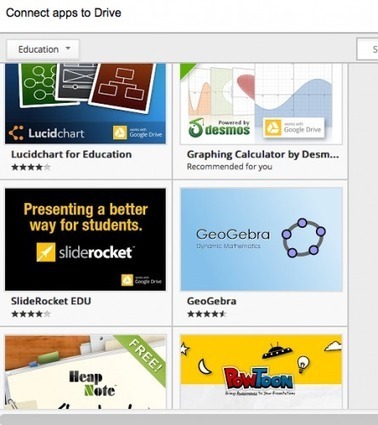
"It’s just a little easier to find your apps these days and to discover and connect to new ones. On Friday Google announced a new feature in its Drive interface. The Create menu now expands to list a lovely variety of third-party Drive-connected apps. These apps may now be conveniently added to your Create menu in a list to the right of the official Google Apps–documents, presentations, spreadsheets, forms, and drawings. You may either search for the apps you want to list or browse for them in a pull-down menu. After you connect them, they are loaded directly from your Drive."
Beth Dichter's insight:
If you are using Google Drive this is welcome news. Once you click on the Create button you click on the Connect More Apps and are taken to the App store where you may search by category (perhaps education and productivity would be on the top of the list for educators). Click on one you want available and it will ask you to Connect...and lickety split it shows up in your Drive interface!
Scoop.it!
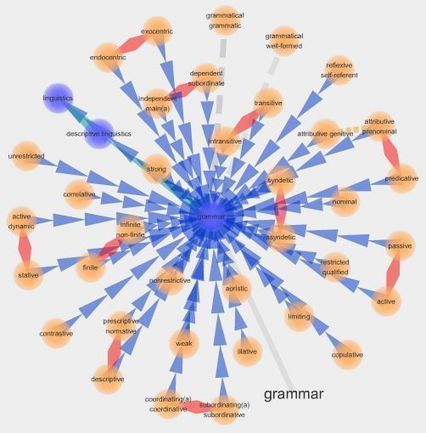
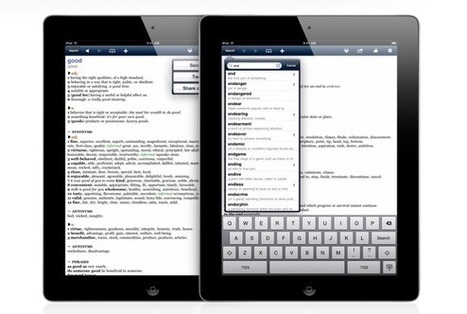
"...explore the expanding genre of interactive multi-media visual dictionaries by looking at two very different options. The first by Merriam-Webster and QA International, the Visual Merriam-Webster; the second is Visuwords."
Beth Dichter's insight:
Along with the visual dictionary by Miriam-Webster and Visuwords (one view seen above) there is also a link to a great site called Vocabahead. Vocabahead provides words lists for students from 6th grade through 11th grade. You can also get the top 300 SAT words and a Master List. What makes this different is that you select a word and a visual screencomes up with an illustration and the definition is read to you. There is also a sentence at the bottom of the screen that provides a sentence so you can hear the word in context. With over 12,000 words chances are you will learn new ones. You can also take quizzes, share word lists, track performance and more! All these tools are free, and Vocabahead also has an apps for Androids and iPhones. |
Scoop.it!
Beth Dichter's insight:
The digital tools listed in this post are focused on vocabulary instruction, a key concern given the Common Core State Standards. Vocabulary comes into play when we look at reading, writing, speaking and listening. Students need to have a broad vocabulary, and we can support this through both direct and indirect instruction. This post provides links to online tools in the areas of: * Reference Tools * Word Clouds * Games and Reviews The post states: Digital tools allows students to: * hear pronunciations; * read words in a variety of authentic examples; * view photos and images related to words; * reinforce word learning through interactive games; * play with and manipulate language; * discover rhyming words; and * collaborate with classmates to create virtual words walls. Consider checking out this post and providing time for students to explore some of these tools in and outside the classroom.

Ness Crouch's curator insight,
March 2, 2013 10:00 PM
Literacy is a keystone of education. Teachers must constantly stay ahead of digital tools to all them to teach students. This list of resources is an excellent way to help stay in front!
Scoop.it!
Beth Dichter's insight:
This amazing spoken word poem was written by Shane Koyczan to "to further explore the profound and lasting impact that bullying can have on an individual." The video was brought to life by "animators and motion artists [whom] brought their unique styles to 20 second segments." For more information visit the To This Day Project website located at http://tothisdayproject.com/ (and the quoted material above comes form the To This Day Project website). From this site you may also watch the video on Vimeo or listen to it (via SoundCloud).
Scoop.it!
Beth Dichter's insight:
The cost of 3D printers is coming down...so perhaps one will make it to your classroom in the future. Check out this infographic to learn how a 3D printer works and how it might be used in education.
Scoop.it!

"We all know that confusion doesn't feel good. Because it seems like an obstacle to learning, we try to arrange educational experiences and training sessions so that learners will encounter as little confusion as possible. But as is so often the case when it comes to learning, our intuitions here are exactly wrong."
Beth Dichter's insight:
So creating confusion is good? Why? It turns out that "brain is a pattern-recognition machine." It wants to find connections between "related events or artifacts." To do this we must allow our brain to experience "that confused, confounded feeling...—for two reasons." For the first reason ask yourself is there only one way to solve a problem, or should one "explore a wide variety of potential explanations"? The second reason is that if we feel confused, not sure of the answer, we are more driven to figure it out. So how can we do this? There are three ways that researchers have "induced confusion" and each is listed with an explanation. The three ways: * Expose yourself to confusing materials. * Withhold the answers from yourself. * Test yourself before you learn. This post provides some great ideas on why confusion is good. You will also find a link to the three research studies mentioned in the article. 
Audrey's comment,
February 19, 2013 3:00 PM
This idea is very Piagetian: An example of confusion would be disequilibrium. It is at this point that you will begin to master something which you found difficult, or was confused about. So at the point of confusion or disequlibrium you must distance yourself from the problem and return to it later. Your brain will have absorbed the material and worked it out. You are now at the stage of equilibrium.
Scoop.it!
Beth Dichter's insight:
Librarians are amazing resources and The Digital Shift is the "home for all technology-related stories and features published by 'Library Journal' and 'School Library Journal'." For Digital Learning Day they published a list of resources that are focused on digital learning, organizing them into the following categories: * Research/Curation * Ebooks/Reading * Common Core * Online Tools * Apps * The Big Picture These posts are written many people, including Richard Byrne (FreeTech4Teachers) and Joyce Valenza (NeverEndingSearch). I have posted a few of this articles here but there are many others that I have found valuable listed in this post. Have fun checking them out and finding new resources!
Scoop.it!
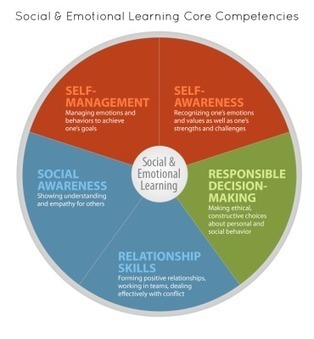
"A lot of talk, press, and focus in this era of learning is on common core standards and 21st century skills and literacies. What is often neglected is the importance of building social emotional skills within the classroom."
Beth Dichter's insight:
This post from Jackie Gerstein has two guiding principles : * Social-Emotional skills and strategies should be addressed and taught in school settings. * Video and online games can promote SEL skills and as such, should be integrated into classroom instruction. Gerstein has divided this article in two sections. The first section looks at Social Emotional Skills in School. The image provides a guide social and emtional core competitencies which include: * Self-management * Self-awareness * Responsible decision making * Relationship skills * Social Awareness The second part of the post looks at the social emotional benefits of gaming. In this well researched post Gerstein provides a look at how gaming increases students self-awareness, allows them to self-manage their emotions to meet goals, promotes social awareness ("to be able to see the world through another person’s eyes"), build relationship skills and make responsible decisions. Each of these sections are described in detail with links provided throughout the post as are links to references. Do you have students in your class that need to grow their social-emotional skills and strategies? If you recognize this need in your classroom take the time to read this article. It may provide you with some new ideas to try in your classroom. 
Nancy Jones's curator insight,
February 17, 2013 10:48 AM
There is a lot to be said for teaching the whole student by making sure these skills are developed and encouraged as an equally important part of 21st century learning. 
Hilda Cáceres's curator insight,
February 20, 2013 1:12 PM
´Destaca que la construcción de habilidades sociales y emocionales asegura mayores resultados académicos y personales 
Dreamcatchers India's curator insight,
February 25, 2013 2:21 AM
Are you interested in designing e-learning and video based games for children and youth in India that impact social emotional learning. Get in touch with us at Dreamcatchers so that we can work together.
The following article outlines the gains from social emotional learning and the use of video games as is being discovered in the West.
Scoop.it!
From Khan Academy to Haiku Deck, there's more than a dozen apps and tools you should give a whirl this year.
Beth Dichter's insight:
This list of 16 apps and tools are the favorite picks from Edudemic. There are a range of suggested apps, ranging from learning basic sign language (Marlee Signs) to free textbooks (Boundless) to Duolingo (learn a foreign language). Many others are listed in this post and some may be new to you! 
SchoolandUniversity's comment,
February 16, 2013 12:13 AM
The Edudemic Magazine year-end special showcases the very best education apps and web tools of the year.
http://www.tinyurl.com/7yge7po
Scoop.it!

"Free, unstructured playtime gives kids a chance to discover their interests and tap into their creativity. It’s a crucial element for building resilience in children, an attribute they’ll need in order to become happy, productive adults."
Beth Dichter's insight:
This post explores what children need to succeed, and begins by defining success as a " child is one who finds something he loves to do, is generous, empathetic and compassionate, committed to repairing the world, shows grit and the ability to collaborate, creativity and can take constructive criticism." Later in the post the 7 C's of Resilience are introduce as a "road map for helping students to find their inner grit" The seven C's are: * Competence * Confidence * Connection * Character * Contribution * Coping * Control Additional information on the 7 C's is in the online as well as a discussion on the discussion of how creativity "plays an integral part of developing these seven skill sets."
Scoop.it!

"Lately, there have been a bunch of buzzwords floating around the education world that all seem to mean the same thing. You’ve probably heard them: problem-based learning, project-based learning and inquiry-based learning. Is there a difference? How will you know which one to do in your classroom?"
Beth Dichter's insight:
Are you looking for a cheat sheet to understand the differences between Problem-Based Learning, Project-Based Learning and Inquiry-Based Learning? This post will lend a hand. Each type of learning is given a definition, example, teaching tip, and where to go to get more information. If you are thinking of trying one of these types of learning and are not clear on which to choose this post may provide some insight to help you make your decision. Click through for more information. 
Brad Reitzel's curator insight,
July 5, 2014 8:43 AM
this is a very insightful article that helps lay out the similarities and differences between project based, inquiry based and problem based learning styles. a good read for anyone looking to try them, and understand the differences between them. 
Ignacio Sáenz de Miera's curator insight,
November 6, 2014 5:03 AM
Muy útil esta referencia para poder orientarse en el campo de las metodologías procesuales. 
Mrs. Reinagel's curator insight,
August 4, 2015 11:32 AM
Are you looking for a cheat sheet to understand the differences between Problem-Based Learning, Project-Based Learning and Inquiry-Based Learning? This post will lend a hand. Each type of learning is given a definition, example, teaching tip, and where to go to get more information. If you are thinking of trying one of these types of learning and are not clear on which to choose this post may provide some insight to help you make your decision. Click through for more information.
Scoop.it!
Beth Dichter's insight:
An infographic that looks at recent studies on textin and how it is impacting students grammar. To learn maore about How this happens and why it matters check out the site.
Scoop.it!

"Ever since the Media Education Lab moved from Temple University to the University of Rhode Island, I was looking for a chance to update the classic media literacy remote control...[which] presents a metaphor for the active and structured approach to the analysis of media and popular culture." The remote control has been re-designed to " a smartphone look while keeping the key questions and core concepts the same.
Beth Dichter's insight:
The "buttons" are the "features" and include: * Reality Check * Private Gain or Public Gain * What's Left Out * Read Between the Lines * Stereotype Alert * Solutions Too Easy * Record/Save for Later If you look at the"the bottom part of the MEL App [you will]... see the different media genres content that can be analyzed." The post notes that you may use this to explore newspapers, TV messages, comics, tablets, radio, books, movies, video games and more. Think of it as a tool to promote media literacy and a guide to structured critical analysis. This is not a real app that you download, but a tool that is very reasonably priced. "One side of the smartphone displays the various "apps" for analyzing a media text and the other side displays the "five critical questions" of media literacy developed by Renee Hobbs." 
Irvin Sierra's curator insight,
November 6, 2014 11:14 PM
This article is in relation to what we are talking about in class because it has to do with popular culture. This new invention that they had made was based on already a device that was use for media literacy. But with all the new technology advancing and growing they decided to make it look more attracting to society by making it look like a smartphone. By making it look like a smartphone more people would be attracted to it since everyone around the world now have smartphone devices. This is not only across the US but across the world . Its spreading so it much likely consider popular culture because everyone would want to have the new thing coming out.
Scoop.it!

"Technology integration can be one of the most challenging topics to find quality research on. The term itself is a broad umbrella for numerous practices that may have little in common with each other. In addition, technology tools change rapidly, and outcomes can vary depending on implementation."
Beth Dichter's insight:
Edutopia has done a review of literature on technology and published five articles that provide an amazing number of resources. Learn about: * Three key elements of successful technology integration * Possible learning outcomes * Recomendations for specific practices and programs by academic subject * Tips for avoiding pitfalls with the adoption of new technologies * An comprehensive annotated bibliography with links to the studies and reports There is a wealth of information to be found in these articles so find the time to dig in. 
Soha Fallata's curator insight,
October 27, 2014 6:47 PM
The term Technology integration covers so many things thus literature on it is difficult to find depending on what tools are used etc |











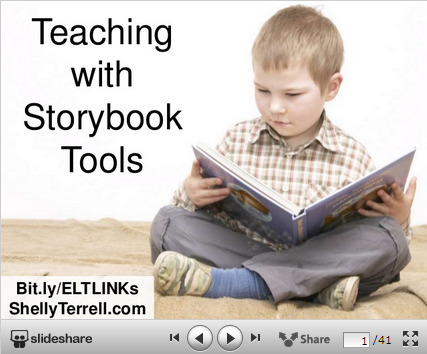
This post from Shelly Terrell focuses on tools and apps to help learners create storybooks.She states "Stories give learners a context for knowledge gained and a way to visualize concepts and ideas. Educators can use storytelling to teach any subject and engage students. In addition, teaching our learners to be great storytellers helps give them confidence because they are allowed to be creative and share a part of themselves."
Seventeen web tools are discussed as well as seven apps. She also provides links to a recent webinar that provides lesson ideas as well as additional tools that help with storytelling.
Storytelling is an art, and they help our learners understnad the world in new and different ways. If you would like your learners to be creating stories using technology this post is worth checking out!