


Let's lay out some of the more confusing technology terms that educators will encounter on a regular basis and see just what is behind each one.

 Your new post is loading...
 Scoop.it! Let's lay out some of the more confusing technology terms that educators will encounter on a regular basis and see just what is behind each one.
Beth Dichter's insight:
There are so many terms used in technology that it is sometimes hard to recall what each of them mean...so here is a post that will help you out. Below are three of the twenty listed. Do you know what each of them means? * Adaptive Learning * GAFE * LMS
Scoop.it!

"Design thinking can seem a bit abstract to teachers. It’s not part of traditional teacher training programs and has only recently entered the teachers’ vernacular. Design thinking is an approach to learning that includes considering real-world problems, research, analysis, conceiving original ideas, lots of experimentation, and sometimes building things by hand. But few schools have the time or wherewithal to integrate these processes into the school day."
Beth Dichter's insight:
Why would we ask students to learn design thinking? Perhaps because the concept of "considering real-world problems, research analysis..." (as quoted above) is called for in the Common Core. Based on my readings it plays hand in hand with the Maker Faire movement that is growing. This post in valuable because it discusses how a school is putting design thinking into practice, providing great tips as you read. And if you are thinking of trying some design thinking yourself you should check out the website Design Thinking for Educators (http://www.designthinkingforeducators.com/) and download their free toolkit which "contains the process and methods of design along with the Designer’s Workbook, adapted specifically for the context of K-12 education." This toolkit has been updated and is now version 2.
Scoop.it!
"SlideTalk is a service where you upload either sets of images, or complete PowerPoint presentations. Once uploaded, SlideTalk adds narration via high quality text to speech that can be customized for pronunciation, reading rate, voice timbre and more. There are at least 17 languages available, and multiple voices are available for most languages. You can even change voices or languages within a presentation."
Beth Dichter's insight:
Have you wanted a tool that would allow you to upload a PowerPoint (or pictures) and type in text, and have it read to you? Well now you can. SlideTalk allows you to upload your slides (or pictures), enter your text and they provide the audio voice over, which is published on YouTube. This post provides an overview by Paul Hamilton as well as 2 PowerPoint slideshows he used from Tar Heel Reader site as well as one from SlideTalk that explains the process. There are many ways one could use this tool.
Scoop.it!
Google today updated its Inside Search site, its homepage for all things search, with a handful of educational and interactive features that explain in layman's terms how Google's Search works.
Beth Dichter's insight:
Have you wondered just how Google performs a search? If so you are in luck because Google has added a new feature on their Inside Search page which walks you through the steps taken when you type in a search term. Some of the statistics provided are amazing. "Did you know the web had over 30 trillion pages, by the way? Or that Google supports over 100 billion searches every month? Or that Google’s index is over 100 million gigabytes?" Much more information is available in this post, or you may go directly to Google Inside Search: http://www.google.com/insidesearch/tipstricks/.
Scoop.it!
"Pose a research question to students and most of them will immediately turn to the Internet. Sadly, many students think the only option is Google...Here I’ll present some free options for research that don’t require a login, along with a few quick tips to aid student searches."
Beth Dichter's insight:
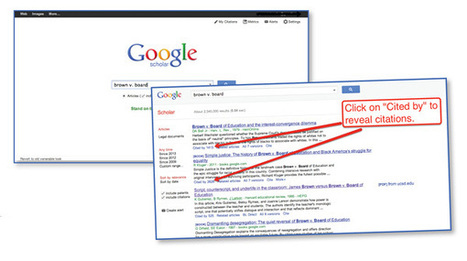
Students often forget that there are search engines beyond Google, and this post discusses a number of them. * RefSeek is focused on academic searches. If students compare searches done in RefSeek compared to Google they will notice a difference in their results. * Yolink (which powers the search engines on some websites including SweetSearch) is available as a browser add-on for Chrome and Safari. The post notes that this "allows students to search within the contents of a webpage, highlight important parts of a page, and send those highlights directly to a Google Doc." * Google Scholar is also discussed. I believe that students need to be aware that there are many great search engines and should be introduced to a variety. Others I like include Carrot2 and DuckDuckGo (which does not track you). 
Lucy Wareham's comment,
April 9, 2013 12:13 AM
I have found that some students are also drawn to inappropriate adverts and links when researching. This search engine would avoid this distraction. Thanks

Kia Sowden's comment,
May 11, 2013 12:48 AM
Hi Malena, Thanks for sharing this resource. I think it would be useful to remove the distraction that students so easily spend their time viewing. I think it would also comply with legislation when it comes to students use of the internet and appropriate sites.

Jenni Atkinson's comment,
May 15, 2013 11:44 PM
Great find.It is so easy to get distracted or off track when searching on the net and I agree with James re: deeper searches.
Scoop.it!

Here are 20 of the most promising new apps, websites and online education technology tools or services every teacher should be using to help improve classroom learning.
Beth Dichter's insight:
If you are looking for some new tools to try this post is worth checking out. Twenty tech tools are included, each with a brief description. Have you heard of DoSomething.org? This site "encourages teens to band together and work for positive social change." How about Hippocampus? The Monterey Institute of Technology and Education provides great multimedia content geared to high school and college. The tools listed cover pre-school to college, but not all are free.
Scoop.it!

"...this year I have been dedicated to using the 21st Century four Cs. The four Cs are a rubric of sorts that help align lessons to more reality-based learning and assessing. As I design a lesson or assessment, I ask myself if what I've designed, or what the students must master, correlates to the important skills of: * Collaboration * Communication * Critical Thinking
Beth Dichter's insight:
This post looks not only at the four Cs but also at four elements that Dr. Carol Tomlinson uses when discussing differentation: * Process * Environment * Content * Product Wolpert-Gawron states "I think about these two lists in a way to ensure that I am hitting as many learners as possible -- with the wall up of rigor necessary to help prepare them for what we can predict they might need for their future." The post goes on to discuss how she uses TED Talks as a way to teach argumentative writing (as required in the Common Core). A quick overview of her projects includes students watching TED Talks, brainstorming advocacy isssues, researching (in small groups), creating a Problem Statement, developing background information, guiding questions and more. This is one teachers take on how to create a deeper learning environment in her classroom, and provides many ideas that you may want to adapt to your classroom. 
Willem Kuypers's curator insight,
May 20, 2015 1:59 AM
Mes objectifs pour l'année académique prochaine : collaboration, communication, pensée critique et créativité.
Scoop.it!

It's difficult to deny the promise that ed-tech holds, but educators must understand technology's limitations and best uses in education.
Beth Dichter's insight:
Is ed-tech working? Perhaps the best answer is "it depends" on many factors, some known and some unknown. When we talk about ed-tech we are talking about tools. For tools to be used effectively teachers must be provided with high quality professional development and support. This post explores the issues of ed-etch tools by looking at how programs in a variety of locations has worked and exploring additional issues including: * Are students experiencing digital overload? * How does Google (let's call it using the Internet since not everyone uses Google) impact your brain and learning? * How can ed-tech tools help build 21st century learning skills? There is much food for thought in this post and I will leave you with a quote from Sylvia Martinez, the president of Generation YES, "The best way to use tech in the classroom is when the technology primarily supports the process of student learning, not the product. Sure, it’s easy to get excited when we find tools that make things easier, but we have to be careful about what’s getting automated. Tools that support deep student creativity may take more time to learn, but in the end, give students access to powerful, creative experiences. The learning that takes place on the journey is the real outcome, and a "push-button" tool deprives the child of that experience." 
Sophie Smith's comment,
March 1, 2013 8:22 PM
That's okay! I found it a great article that will help me keep in mind that technology needs to be used smartly and not necessarily to excess to help students learn to use and explore it.
Sophie Smith's comment,
March 1, 2013 8:22 PM
That's okay! I found it a great article that will help me keep in mind that technology needs to be used smartly and not necessarily to excess to help students learn to use and explore it.

Christina Paxton's curator insight,
June 25, 2014 6:48 AM
Outlines the Pros and Cons of Ed Tech in the classroom. Presents several real-world possibilities for incorporating technology in the classroom.
Scoop.it!

"A new study from Stanford shows that a simple teaching tactic may help close the achievement gap between Latino American students and their white peers...The matter comes down to overcoming the negative effects of “stereotype threat,” a phenomenon that researchers have identified and documented over the last two decades. What they have found – in numerous studies – is that the stress and uncertain sense of belonging that can stem from being a member of a negatively stereotyped group undermines academic performance of minority students as compared with white students."
Beth Dichter's insight:
I rarely quote extensively from posts I have read, but in this case I am going to quote a section that appears in this post. Students completed several structured reflection exercises in their class throughout the year. The tasks were given at critical moments: the beginning of the school year; before tests; and near the holiday season, a period of stress for many people." The post goes on to note that there was a control group and that there were significan differences between the two groups with the Latino students obtaining higher grades and that the effects of this affirmation exercise lasted for three years. I posted an article about this a few weeks ago, but this article (which is actually a reprint of one published in the Stanford Graduate School of Education website) provides a more in-depth look at some of these studies. If you have a large Latino population in your school it is worth your time to check out this article.
Scoop.it!

"This popular resource provides 115 pages of free applications and resources and insights into how educators are using them in today's classrooms! ...provides an introduction and easy access to many of the wonderful free applications and resources available on the Internet for teachers to use in and out of the classroom as part of the instructional and administrative process."
Beth Dichter's insight:
A number of new sections are in this updated eBook, including information on MOOCs, resources for flipped classrooms, teaching with cell/smart phones, iPads, social networking/social media, and much more. If you are a subscriber to their email list you received an email with the link. If you are not a subscriber go this site and sign up (the sign up box is to the right of the post) and you will be able to download a copy.
Scoop.it!
Beth Dichter's insight:
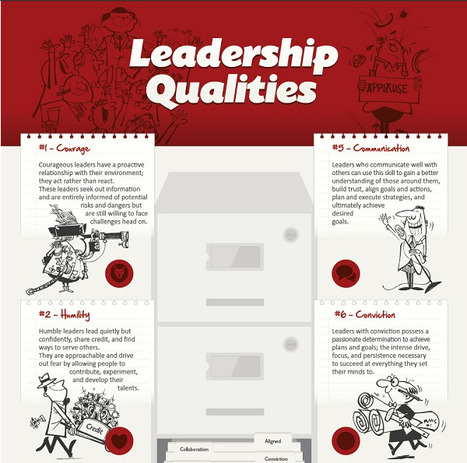
Mark Gleeson takes an infographic that he learned about on Scoop-it and brings the discussion of leadership and leadership building into the classroom, by taking each of the eight leadership qualities in the infographic and discussing them at three levels (quoted below from the post): * Peer Leadership (School Leadership teams/Curriculum leadership teams or individuals) * Teacher-leading-Class and * Student Leadership The eight leadership qualities are: * Courage * Humility * Accountability * Trustworthy * Communication * Conviction * Collaboration * Aligned What made this post valuable to me was his discussion on each of the eight qualities within the framework of the three levels of leadership that are in our schools. You may find yourself asking questions about leadership in your school or district, and wondering how you might use this information within your classroom (or school if you are an adminstrator).

Sophie Colas's comment,
February 25, 2013 7:37 AM
A ces qualités nécessaires, j'ajouterai la maturité, la générosité et la duplicité.
Sophie Colas's curator insight,
February 25, 2013 7:37 AM
A ces qualités nécessaires, j'ajouterai la maturité, la générosité et la duplicité.
Sophie Colas's comment,
February 25, 2013 7:48 AM
Excusez-moi, toutes les qualités contraires à la duplicité : droiture et franchise. Oups
Scoop.it!

Discover niche sites designed for students and educators, and consider how they might augment online learning resources in your classes.
Beth Dichter's insight:
Although this post discusses these sites in relationship to online learners I would suggest that any of whom use the Internet to do research will find a new resource or two that may be helpful. The seven sites discussed are: * StudyBlue.com * Omeka.com * Bamboo DiRT * World Digital Library * DigitalLiteracy.gov * GCFLearnFree.org * Processing.org You will find a short description about what each site provides as well as a link to the site. 
Casey Strachan's comment,
February 23, 2013 1:02 PM
Thanks Beth, I agree, a few great research and information resources!
Casey Strachan's curator insight,
February 23, 2013 1:08 PM
Wether you're a current student, lifelong learner, educator, or if you're a writer or researcher, this article is full of good info. Find online learning resources as well as a few helpful research resources.
Scoop.it!
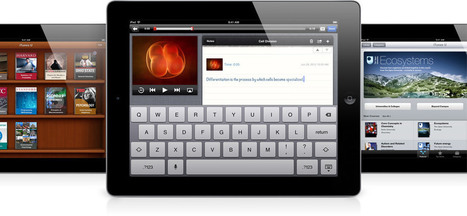
We see iPads in education all over the place. So what are some actual ways iPads are being used in schools that you could learn from?
Beth Dichter's insight:
Are you wondering how other school districts (and colleges) are using iPads? This post provides short descriptions as well as links to a wide variety of ways iPads are being used across the world. Below are four areas found in this post: * Putting students in charge of the learning process * Helping students with disabilities * Closing the digital achievement gap * Re-imagining how newspapers are used in class Each area discussed provides a link for additional information. If you are about to bring iPads into your school, or have a program up and running and are interested in learning what others are doing take the time to read this post. |
Scoop.it!

As you browse online, you may be leaving a digital trail that companies can use to find out more about you. Learn how to clean up your trail and browse clean.
Beth Dichter's insight:
Most of us use the Internet daily but do we really know how much information is being gathered and how much is known about us? This infographic will educate you about an area that is much bigger than many think. Learn about what tracking is, how much is known about you, what information is collected, how you are tracked and why you should be concerned. Does this fact concern you? "There are no limits to what types of information can be collected." Luckily there are some things you may do and the last section of the infographic provides information to help you keep more of your actions private.
Scoop.it!
Beth Dichter's insight:
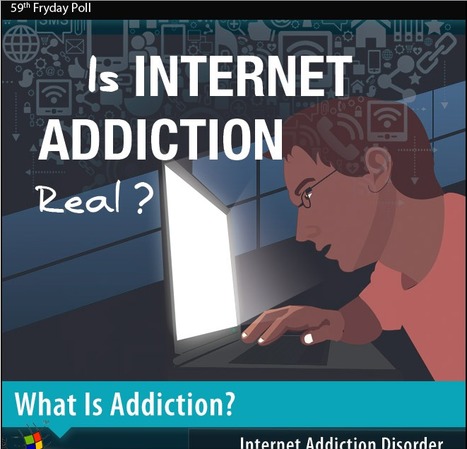
Maps of the World (a great website for maps!) also does weekly polls. This infographic is the 59th Fryday Poll, and it begins with a definition of addiction from the Merrian-Webster Dictionary and then goes on to explore a range topics including: * A Generation of Internet Addicts * Is Internet Addiction a Mental Disorder * Facebook Addiction * Gaming Addiction and much more. A variety of resources were used in creating this infographic (including a survey they offered on their website, Facebook page and through Twitter). The site does provide a link to a text only version and it says that version will provide references, but it was not working when I check it out. 
Wong Wei Sheng's curator insight,
June 24, 2015 3:05 AM
The information provided is relatively clear and sufficient which i will be able to include them in my presentation.
In order for me to include it without plagiarizing or violating copyright law, i need to acknowledge the publisher of the video.
Scoop.it!
Beth Dichter's insight:
Rather than pedagogy this is the Padagogy Wheel,looking at Bloom's Taxonomy related to the iPad. Would you agree with where the apps are placed or do you find that your use of them varies from what is suggested above? 
Allan Carrington's comment,
March 8, 2013 6:29 PM
THE PADAGOGY WHEEL: Thanks Jenny for reposting this. I am the first to agree that some of these apps might be better placed elsewhere on the wheel also there are more than one place for each app and there is constant need for updating as new apps are released. Where I am planning to take this next is develop "app powered learning sequences" i.e. connecting more than one app together to build a learning activity sequence. This will IMHO generate a highly engaging flow of transformational learning .... what do others think?
Also I thought some people might also find my 1.57 min video thought provoking. In it I introduce this wheel and more research I am working on with graduate attributes, Please visit http://tinyurl.com/padwheelvid which will be redirected to YouTube. I am calling the method the CAMERA Method .. "Capabilities and Attributes Mapping for Educational Results inspiring Achievement" ... it's all about the students being all they can be. It is about mapping everything back to graduate attributes, values and capabilities These are more than learning outcomes, they are an attempt to define a graduate. There is also the podcast episode I did with Prof Geoff Scott of the Uni of Western Sydney. He has done years of research into graduate capabilities (aka values or attributes) It is fascinating stuff in the context of Technology Enhanced Learning and Teaching. He has asked the people who give the jobs and catalogued what the respective industries in the market place want in graduates. Duh! Look at the list and ask yourself are they being developed in students from Higher Education or in Education in general ... this is why mapping is so important. Are we equipping graduates to excel and make a difference .... hmmm! Have a look and listen to http://tinyurl.com/alsltblog. "If you exercise these capabilities ... you will be employed!" This sort of stuff makes the "CAMERA method" worth developing. Comments are welcome guys? ... regards Allan. 
Keshena Cooke's curator insight,
January 24, 2014 8:30 PM
For those trying to use technology in the classroom, this is worth a look.
Scoop.it!

Auryn creates "interactive and innovative kids storybook apps for the iPad, iPhone and the Android Platform. The future of storytelling is here!"
Beth Dichter's insight:
Did you know it is National Reading Month? I did not until I read this post. If you have younger learners and access to devices that run iOS (iPad, iPhone) or the Android platform you may download a free book each day of March. The list above provides the name of the book for each day and more information is available on their Facebook page which is located at https://www.facebook.com/aurynapps. 
Catherine Selby's curator insight,
March 3, 2013 12:42 AM
This is a fantastic way to engage students in reading. It allows students to not only read but use modern technology in the form of Ipads, and Smart phones to enhance their education.
Scoop.it!
Beth Dichter's insight:
This report from Pew Internet and American Life looks at how teachers use technology both at home and in their classroom, with a focus on teachers of middle and high school students. The survey was taken by 2,462 teachers who teach either Advanced Placement (AP) courses (1,750) or work with the National Writing Project (NWP) (712 teachers). A few of the finding are listed below. * 92% of these teachers say the internet has a “major impact” on their ability to access content, resources, and materials for their teaching * 73% of AP and NWP teachers saying that they and/or their students use their cell phones in the classroom or to complete assignments * Teachers of low income students, however, are much less likely than teachers of the highest income students to use tablet computers (37% v. 56%) or e-readers (41% v. 55%) in their classrooms and assignments There are many other findings. This report is available online through the Pew website. The link goes to the Summary of the Findings but and you may acccess the full report from this page.
Scoop.it!

"Upon hearing that they will have to read another book students usually roll their eyes and moan in disagreement. So to make the reading process more fun for them we let them chose their own creative assignment."
Beth Dichter's insight:
Change the way your learners create book reports by using your iPads! This post provides 22 suggestions on how learners may demonstrate their knowledge. The post state that "For each of the assignments students will need to make sure that their piece of work shows that: * They have read the book * Thought deeply and reflected on the book * Have understood the assignment Each suggestions also lists the app or apps that would be needed. A few of the suggestions include (quoting from the post): * If a journey was involved, draw a map with explanatory notes of significant places. (Google Earth, Notability, Showme) * Design and make the fronRecord a video interview with a character from your book. Ask at least ten questions that will give the character the opportunity to discuss his/her thoughts and feelings about his/her role in the story. (Reel director, iMovie) Many more great ideas are found in this post!
Scoop.it!

Power Up: Common Sense Media's guide to nearly 100 great apps for kids ages 2-17 who have special needs and learning differences.
Beth Dichter's insight:
Common Sense Media has just released a new guide that provides great resources for students with special needs and learning difficulties. Available to download as a pdf or online you will find six categories split into levels of Beginner, Intermediate and Advanced. The six categories are: * Communication * Social Interaction * Organization * Reading * Mathematics * Motor Skills Each section has an overview, a look at common challenges, common signs, ways to help, what to look for in an app and links to additional resources, and then a page for each level which suggests apps which also has a Power Tip on each page. This is a great resource for students, teachers and parents. To go directly to the pdf use this link: http://www.commonsensemedia.org/sites/default/files/special-needs-full-guide.pdf.
Scoop.it!
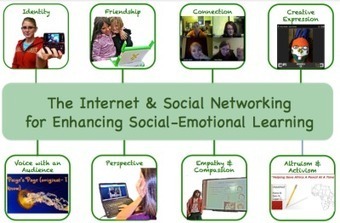
"The news media is filled with horror stories about young people and the Internet, but what is often overlooked and not reported are the benefits that technology, the Internet, and Social media have in building and enhancing social-emotional skills."
Beth Dichter's insight:
Once again Jackie Gerstein has written a post about a topical issue that has great depth in both vision and resources. Some of the quotes from research include: "Engaging in various forms of social media is a routine activity that research has shown to benefit children and adolescents by enhancing communication, social connection, and even technical skills." "Social media sites allow teens to accomplish online many of the tasks that are important to them offline: staying connected with friends and family, making new friends, sharing pictures, and exchanging ideas. Social media participation also can offer adolescents deeper benefits that extend into their view of self, community, and the world," Along with the bibliography she also provides links to other posts she has written on this issue (and links to some posts by others) as well as links to a new website she has created that has activities that use technology to enhance social-emotional skills. 
Randy D. Nichols's curator insight,
February 26, 2013 1:51 PM
As a complement to reading Nicholas Carr? 
Joe T.'s curator insight,
February 26, 2013 2:00 PM
This is an advancement as previous websites of the 1.0 have not helped benefit young people.
Scoop.it!

"Welcome to a continuing series of posts based on the eight essential elements (BIE) that make up Project Based learning. In this post I would like to focus on "significant content. I have ten ideas..."
Beth Dichter's insight:
Gorman begins this post by providing a definition of Project Based Learning that looks at the final project as the "desert." He states "In true Project Based Learning the project uncovers and facilitates the learning of significant content. In PBL there is a balancing of learning that occurs through out the project duration." He discussed PBL in relation to the four C's (Collaboration, Communication, Critical Thinking, and Creativity) noting that often PBL becomes too focused on the four C's. There is also the need to make sure that there is sufficient scaffolding for the learners. To assist in learning how to plan there is list of ten ideas that may be considered in the planning process and the first three are listed below (quoted from the post): * The entry event should show a relationship to the Driving Question promoting a “need to know” of significant content. * The Driving Question should allow students to uncover the curriculum in a student friendly and understandable manner. * The PBL planning sheet for students should line up with significant content in the curricular area being studied and assessed. Gorman has also provided a link to a PBL Planning Reflection Sheet.
Scoop.it!
Beth Dichter's insight:
The Daring Librarian has released a new "comic" that describes how to upload images in a Google Image Search as well as why this information may be important to you. She not only presents the visual (part of which is above) but also provides some additional links, and may introduce you to some new words, such as 'catfishing' (which is not fishing for catfish!). Along with the how to search and why to search she also provides an infographic that provides statistics on Real vs Fake Facebook pages that is an eye-opener.
Scoop.it!

"For many dedicated to re-making our schools as hubs of dynamic innovation and creativity, getting good at math or science or literacy might be better found in techniques like inquiry-based learning, less emphasis on standardized testing, and avoiding the soul-numbing “drill and kill” exercises and worksheets used to instill basic skills. But what if the right drill -- without the kill — actually encourages creativity?"
Beth Dichter's insight:
This post explores this question "does creativity come "after lots and lots of rote learning (also called practice) has built a solid foundation of skills." It also presents the flip side of this issue, noting that aha moments, defined as "breakthroughs [that] come to people who have mastered an area" may not happen to a person who has "mastered something" since "their thinking about it often becomes locked in and it’s difficult for them to break out of this mental straightjacket." And there is a third way to look at this issue, the belief that "a side-by-side combination of rote work and “aha” moments works better for students." This post looks at work by Doug Lemov and Kurt Wooten as well as Daniel Willingham. As educators we are concerned with how to best motivate our students, and this is an issue that impacts us daily. This post may challenge your thinking in a number of areas (and may move you to add some books to your list of summer readings). For more information on this topic click through to the post.
Scoop.it!

"To understand where we’re heading in education and edtech, it’s important to look back at our educational roots. As we searched for some of most memorable moments and discoveries in the history of education, we found there are lots of things that haven’t changed in hundreds of years! The groundwork for clunky, physical textbooks was set by the Ancient Greeks, and in the Middle Ages, the lecture format of teaching emerged."
Beth Dichter's insight:
This is clearly an overview (how could one cover centuries of education in one infographic). The infographic starts with Education in the Ancient World and moves through the Middle Ages, on to the Renaissance, then to Early Education in the U.S., Modern Education in the U.S. and finishes with Where Education Will Be in 20 Years.
Casey Strachan's curator insight,
February 23, 2013 1:18 PM
While their search for some of most memorable moments and discoveries in the history of education, showed a lot of things that haven’t changed in hundreds of years,we bet we'll see some changes soon with incredibly low cost computers, and tablets entering the classrooms ... At least we hope so.... |









Very helpful tool to keep teachers up to date on some technicial words that may come up with using technology in the classroom.