Eclectic Technology
230.9K views | +0 today
Eclectic Technology
Tech tools that assist all students to be independent learners & teachers to become better teachers
Curated by Beth Dichter
Your new post is loading...
Scooped by Beth Dichter
March 16, 2013 10:07 PM
Scoop.it!

6 Reasons to Incorporate “Smithsonian Quests” Into Your Classroom

6 Reasons to Incorporate “Smithsonian Quests” Into Your Classroom | Eclectic Technology | Scoop.it

For some time now, the education community has discussed and explored how to get out of the standardized-testing rut and make learning enjoyable again. Online games and challenges, real-world work, and point systems have been a few of the ideas kicked around by educators and tech-enthusiasts alike. Earlier this school year, a New York Times article highlighted the benefits of using digital badges to enable students, including those writing their college-admission essays, to demonstrate their knowledge and skills.

Beth Dichter's insight:

The Smithsonian has amazing resources that are free and this is just one. This is a new program, designed for students K-12, that is online and awards digital badges. What can your students do?

* Explore the world outside the classroom.

* Do real-world work

* Make connections across the curriculum

* Build 21st century skills

* Foster self-directed learning

* Know the environment is kid-safe

This post provides additional information as well as a video that describes this resource. Currently there are 16 badges (with more to be added). To go directly to the website click this link:

http://smithsonianquests.org/

No comment yet.
Scooped by Beth Dichter
March 15, 2013 9:42 PM
Scoop.it!

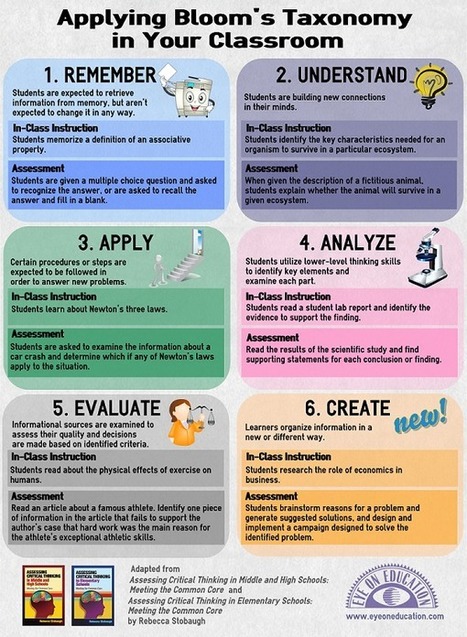
Applying Bloom's Taxonomy in Your Classroom - Infographic

Applying Bloom's Taxonomy in Your Classroom - Infographic | Eclectic Technology | Scoop.it
Beth Dichter's insight:

Check out this infographic that briefly discusses Bloom's taxonomy but takes it a step further by looking at in-class instruction as well as assessment! 

Amanda Rogers's comment, April 20, 2013 1:04 AM
Having this available would cement Blooms into everyday teaching and this application would enable teachers to have it to hand.
Scooped by Beth Dichter
March 14, 2013 7:46 PM
Scoop.it!

How To Prepare Students For 21st Century Survival

How To Prepare Students For 21st Century Survival | Eclectic Technology | Scoop.it

"As educators, we constantly strive to prepare our students for the ‘real world’ that exists around them. We teach them how to read, write, and calculate. Then, of course, there are the less tangible skills we teach; such as how to work in a team, think critically, and be curious about the things they encounter each day.

We want to prepare them to lead productive and successful lives once they leave us and enter into the realm of adulthood. But what lies ahead for our students in the future? Did educators of twenty years ago know that so much of our world would be based on computers and technology now? Could they have known what skills would be needed in the job market today?"

Beth Dichter's insight:

This post focuses on work published by Tony Wagner back in 2010 but the information is still relevant. Wagner interviewed CEOs of 100 major businesses and was able to come up with seven essential skills students should have for the 21st century (and yes, we are in this century). The skills are listed below and more information may be found in this post, which lists the skill and then discusses how to prepare students to meet this skill.

* Critical Thinking and Problem Solving

* Collaboration Across Networks and Leading by Influence

* Agility and Adaptability

* Initiative and Entrepreneurship

* Effective Oral and Written Communication

* Accessing and Analyzing Information

* Curiosity and Imagination

Mohini Lata's curator insight, May 20, 2013 8:34 AM

As technology is becoming powerful and life changing how can we prepare students for the 21st century survival. The seven survival skills purposefully apply in a classroom. This links with Using Mathematical Higher order thinking - Critical Thinking and problem solving prepares students to see problems from different angles and formulate their own solutions. Collaboration encourages students to take on different roles. Agility and Adaptability – be willing to adapt to the changes around them.Initative and Entrepreneurship - always try. Effective Oral and written communication - how to speak confidently and clearly. Accessing and Analyzing Information-

learn the difference between factual information and factual-sounding opinions. Curiosity and Imagination - teach them how to apply them creatively and purposefully. Technology has become an essential and important tool for education, helping teachers with their work and most importantly supporting the students. This also links with brief design technology and the digital technologies strand of the National Technologies Curriculum as students are taught how to use the technologies available to them.


Scooped by Beth Dichter
March 13, 2013 10:25 PM
Scoop.it!

5 Methods for Developing Problem-Solving Skills > Eye On Education

5 Methods for Developing Problem-Solving Skills > Eye On Education | Eclectic Technology | Scoop.it
Beth Dichter's insight:

Check out this infographic that provides five methods for developing problem-solving skills. Try out:

* Brainstorming with a Twist

* Word Association

* Inkblot (Rorschat Test) and this is a bit different than you might expect

* Solute vs Solution

* Gallery Walk

The names above do not do justice to the activity that you would so with your students...so click through to the post to learn more!

No comment yet.
Scooped by Beth Dichter
March 13, 2013 9:33 PM
Scoop.it!

Write Better with Draft - A New Collaborative Writing Tool

Write Better with Draft - A New Collaborative Writing Tool | Eclectic Technology | Scoop.it
Write better with Draft. Easy version control and collaboration to improve your writing.
Beth Dichter's insight:

A new collaborative word processing program is now available...Draft. This is quite a bit different than Google Docs, and has some features that may convince you to give it a test drive. 

When you collaborate on a document are you frustrated that others may make changes to your document, and it is at times difficult to find the original version. Draft has you accept or reject each change that is suggested.

You may also "mark versions" of your work and compare them.

Draft is not as robust as Word (or Google Docs) but it is a simple word processing program that has additional features not mentioned here. As far as I can tell it is free at this point, but there is one feature, called Ask a Professional" where you can send off your document and get help. From what I have read there will be a fee for this. 

No comment yet.
Scooped by Beth Dichter
March 12, 2013 9:34 PM
Scoop.it!

Amplify’s New Tablet Hits the Market | MindShift

Amplify’s New Tablet Hits the Market | MindShift | Eclectic Technology | Scoop.it

"Along with the big release last week of Amplify's tablet, produced by the education arm of media conglomerate News Corp, came details of the product that will vie for a spot in the growing education tablet market."

Beth Dichter's insight:

This post provides a more in-depth look at the new Amplify tablet. Here is a more in-depth descirption:
"It’s 10 inches long, with a hard exterior shell, and is pre-loaded with its own learning software, as well as Google Apps for Education, dictionaries, multimedia lessons, Encyclopedia Britannica, Khan Academy lessons, a graphing calculator. If the company wins rights from publishers, it can also be loaded with electronic textbooks. What’s more, teachers can keep track of students’ progress, as well as have access to classroom management tools that allow them to turn off apps when needed."

But more interesting to me is the questions that come up when you read the impressions of others. Below are two examples:

From TechCruch (quoted):

“While the News Corp. founder’s sudden transformation into an education reform advocate may seem a head-scratcher, the motivation becomes clear when, in Murdoch’s terms, one considers that K-12 education is a $500 billion sector in the U.S. alone — and one that remains relatively untouched by corporations like News Corp.” (Remember that Murdoch is News Corp. founder.)

From Forbes (quoted):

“From my point of view, the problem with News being in this business is that it creates a channel to our youngest, most vulnerable minds for a guy with extreme politics and highly questionable ethics,” Kay wrote. Unlike the transparent profit motives of companies like Apple and Google, News Corp’s motivations should be further questioned, he said.

Additional information may be found in the post.

No comment yet.
Scooped by Beth Dichter
March 11, 2013 7:58 PM
Scoop.it!

Creating Classrooms We Need: 8 Ways Into Inquiry Learning | MindShift

Creating Classrooms We Need: 8 Ways Into Inquiry Learning | MindShift | Eclectic Technology | Scoop.it

"If kids can access information from sources other than school, and if school is no longer the only place where information lives, what, then happens to the role of this institution?"

Beth Dichter's insight:

So how do schools go about guiding "students to find their own learning paths at school"? In this post Diana Laufenberg who taught at the Science Leadership Academy shares her thoughts on how this took place at the Academy. The short list is below with additional information found in the post as well as a TEDtalk video by Laufenberg "How to Learn? From Mistakes."

* Be flexible.

* Foster inquiry be scaffolding curiosity.

* Design architecture for participation.

* Teachers teach kids, not subjects.

* Provide opportunities for experiential learning.

* Embrace failure.

* Don't be boring.

* Foster joy.

Lucy Robertson's curator insight, October 22, 2014 8:26 PM

Inquiry: the best teachers show you where to look, don't tell you what to see. Inquiry learning helps students across all curriculum areas.

Elizabeth Galo's curator insight, August 26, 2015 7:11 AM

A few things about this article stand out, firstly that inquiry is fostered through scaffolding, secondly, that teachers teach kids - not subjects and finally that opportunities are provided for experiential learning.  Scaffolding learning enhances the learning experience for all students, as the amount of scaffolding required can be differentiated.  When teachers let go of their need to teach subjects, or impart knowledge they are free to facilitate a learning process.  There is a great body of research to suggest that students learn best through a hands-on experiential approach.  Providing these opportunities throughout the day challenges teachers to forsake the commonplace and allow for richer, less contrived learning spaces.

Scooped by Beth Dichter
March 10, 2013 1:45 PM
Scoop.it!

How effective is brainstorming at your school? (Infographic/commentary)

How effective is brainstorming at your school? (Infographic/commentary) | Eclectic Technology | Scoop.it
Beth Dichter's insight:

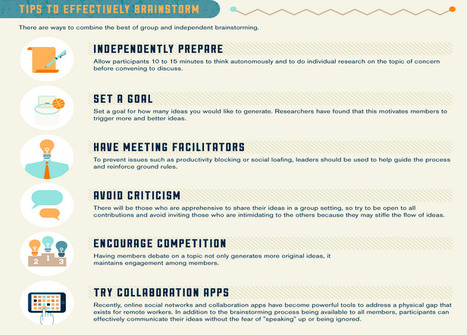
Does group brainstorming work? This post looks at this issue, working from an infographic and selecting key concepts in the infographic and expanding on them. Gleeson begins by discussing "the five biggest problems with Groupthink." The list is below and all are explained in the post. Please note that there the author of the infographic also explains their perception of what each of the phrases below means.

* Social Loafing

* Social Matching

* Production Blocking

* Lack of Attention

* Fear of Criticism or Rejection

Gleeson then provides a list of tips for effective brainstorming (again, this are listed in the infographic with definitions provided). The areas explored here are:

* Independently prepare

* Set a goal

* Have meeting facilitators

* Avoid criticism

* Encourage competition

* Try collaborative apps

In education we often ask our learners to brainstorm. This article and infographic provide some insights that you may not have considered in the past. To go directly to the infographic (in which case you will not see the post by Gleeson)

 https://www.mavenlink.com/community/blogs/713-are-we-brainstorming-the-wrong-way--. 

There are also a number of free collaborative tools that support brainstorming. One of the more robust tools that is free to schools is LucidChart.

No comment yet.
Scooped by Beth Dichter
March 9, 2013 9:41 PM
Scoop.it!

Anxiety Attack: Conquering the Fear of Math – SchoolBook

Anxiety Attack: Conquering the Fear of Math – SchoolBook | Eclectic Technology | Scoop.it
Two professors say we've got to stop sending messages to young children — especially girls — that math is something to fear. Humans are actually hardwired to think mathematically, they say.
Beth Dichter's insight:

At what age to learners experience fear of math? This post notes that "common wisdom" said that it not until sixth grade, but current research "demonstrates that children as young as first grade report math anxiety symptoms" and that the anxiety "affects their ability to learn math."

Learn more about the negative impacts of math anxiety as well as strategies that may be used to help learners.

Laura Jane's curator insight, December 16, 2013 2:03 PM

As Ms. Dichter already stated, this article draws an interesting comparison between our belief that math anxiety doesn't start until sixth grade with the overwhelming reality that we're seeing symptoms of anxiety as early as first grade. This SchoolBook article gives an interesting example, a 7-year-old girl named Zoey, who excels in reading, but struggles in math. The pressure that her parents put on her largely contributes to her anxiousness. The article gives a multitude of ideas for how to combat math anxiety, even beginning as young as first grade. Constantly providing reassurance, demonstrating patience, and exhibiting that it's okay to not get something on the first try are all suggestions that I hope to implement in my own classroom.

Scooped by Beth Dichter
March 8, 2013 10:39 PM
Scoop.it!

5 Resources For Lessons On American History-Learnist

5 Resources For Lessons On American History-Learnist | Eclectic Technology | Scoop.it

"Let’s take a look at American History resources on Learnist. These five featured US history boards allow us to take a look at slices of the nation, from military to political to social history."

Beth Dichter's insight:

Learnist has many great resources and this post shares five that look at various times in American History. Check the list below to see if any are on interest to you (quoted from post):

* The New Deal -  primary source images and posters that can be used to study the CCC, Depression, and New Deal. She also includes articles to provide information about this period.

* American Revolution - an interesting approach to curating the Revolution, choosing material that provides a comparative study between the American and Egyptian revolutions, as well as other learnings about the founding of our nation.

* The Nastiest Campaigns in American History - [a look at] the worst mudslinging in election history.

* American Civil War -  outstanding resource for teaching the American Civil War–there are causes and effects there, as well as links to excellent online resources and documentaries.

* Protest: Music and Movements that Shaped Society - protest in American social history


No comment yet.
Scooped by Beth Dichter
March 7, 2013 6:06 PM
Scoop.it!

Are Your Students Learning Ready? | Teach.com

Are Your Students Learning Ready? | Teach.com | Eclectic Technology | Scoop.it

"College and career ready is a very common theme these days. As with any catch-phrase, many educators are most likely sick of hearing it. The longer you stay in any profession the more at risk you are of hearing new phrases year after year, which may just have the same definitions as the old phrase. They're just new words.

Unfortunately, too many educators have that attitude that what is old is new again. And too many feel that way about technology. They feel it is a passing fad that has no place in schools."

Beth Dichter's insight:

Do you think your students are learning ready? Are the educators in your school putting students first? This post explores these questions. The list below is some of what we as educators may do to encourage students to be learning ready (quoted from post).

* Listen to them -- it sounds easy and it should be. However, sometimes we get so caught up in what needs to be done, that we forget those things are being done to our students

* Encourage Risk-taking -- Encourage students to offer ideas. If they want to add something to a conversation, educators should listen and then encourage them to further their research about it.

* One right answer -- Some questions have one right answer, but many others have different answers which offer different pathways to learning.

For additional ways to encourage students and a more in-depth look at these issues check out the post.

No comment yet.
Scooped by Beth Dichter
March 6, 2013 9:54 PM
Scoop.it!

Technology Integration Professional Development Guide

Technology Integration Professional Development Guide | Eclectic Technology | Scoop.it
Beth Dichter's insight:

Edutopia has published a great guide on Technology Integration. It has six sections:

* Introduction

* Why Integrate Technology?

* What is Tech Integration?

* How to Integrate Technology

* Workshop Activities

* Resources for Tech Integration

This guide includes an amazing number of resources (websites, books videos and more) and was designed to address the National Educational Technology Standards (NETS). Think about using with a group for professional development, or on your own!

Kathleen Gradel's curator insight, July 22, 2013 6:25 PM

Great help!

Rebecca Wilkins's curator insight, July 17, 2015 9:28 PM

This is the first guide I have seen to help define technology integration.

Jason Smith's curator insight, July 18, 2015 11:59 AM

A guide to technology integration, awesome

Scooped by Beth Dichter
March 5, 2013 10:45 PM
Scoop.it!

5 Apps and Sites for Creating Animations

5 Apps and Sites for Creating Animations | Eclectic Technology | Scoop.it
Beth Dichter's insight:

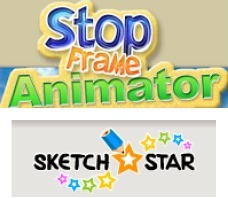
Richard Byrne offers up five aps and sites that students may use to create animations. He provides an overview of:

* Stop Frame Animator

* SketchStar

* Animation Deck (an iPad app available in a lite or paid version)

* Draw Island

* Wideo.co

If you are considering having your students create videos for a project this post will allow you to quickly find a tool or two for them to use...and make sure that you check the tool on the computers in your school. It is not unusual for some of these tools to be blocked by filters.

Carol Thomson's curator insight, March 7, 2013 9:12 AM

always on the look out for animation software.

Scooped by Beth Dichter
March 15, 2013 10:30 PM
Scoop.it!

Welcome to the School of Open, Class of 2013 - Creative Commons

Welcome to the School of Open, Class of 2013 - Creative Commons | Eclectic Technology | Scoop.it
Creative Commons licenses provide a flexible range of protections and freedoms for authors, artists, and educators. Happy Open Education Week! We are happy to announce that the School of Open community has launched its first set of courses...
Beth Dichter's insight:

Are you interested in learning more about US copyright law for educators (and also for those in Australia) or how to find and adapt Creative Common materials for you class? These two classes (and others) are being offered at the School of Open through P2PU. There are also courses that you may take any time. For the courses mentioned above you must register by Sunday, March 17th and they begin next week. The others are available at any time.

Many schools are beginning to look at using open source materials, and if you search this Scoop.it you will find quite a few resources about open source materials, but these are the first classes I have seen that are geared to educators around issues that we should educate ourselves if we are going to be going in the direction of open source. If you have the time consider signing up for one of the classes.

Tracy Shaw's curator insight, March 18, 2013 2:04 PM

Valuable online open courses to help teachers and students! 

Scooped by Beth Dichter
March 14, 2013 10:08 PM
Scoop.it!

For Low-Income Kids, Access to Devices Could Be the Equalizer | MindShift

For Low-Income Kids, Access to Devices Could Be the Equalizer | MindShift | Eclectic Technology | Scoop.it

"No device should ever be hailed as the silver bullet in "saving" education -- nor should it be completely shunned -- but when it comes to the possibility of bridging the digital divide between low-income and high-income students, devices may play a pivotal role.

ccess to the Internet connects kids to all kinds of information — and for low-income students especially, that access has the power to change their social structure by allowing them to become empowered and engaged..."

Beth Dichter's insight:

Would providing students with access to cell phones at school improve their test scores? According to this article the answer is yes. A recent Pew report noted that there are significant differences in students access between higher and lower income schools. A study from QualCom "showed that low-income students’ test scores increased by 30 percent after they were given smartphones to access more information and instruction and to collaborate with their peers." 

What should be done to help decrease this digital divide? Below are suggestions from this post. Additional detail is provided (as are links to additional resources).

* Give students access.

* Give students prompts.

* Provide instructional objectives.

* Make yourself available.

* Invite observers to your mobile enhanced class.

* Inventory the devices.

* Use discretion.

* Use everything you have.

* Reframe productivity.

* Teach process not content.

* Value collaboration.

No comment yet.
Scooped by Beth Dichter
March 14, 2013 7:30 PM
Scoop.it!

SimCityEDU: Using Games for Formative Assessment | MindShift

SimCityEDU: Using Games for Formative Assessment  | MindShift | Eclectic Technology | Scoop.it

"SimCity As game-based learning gains momentum in education circles, teachers increasingly want substantive proof that games are helpful for learning...GlassLab is working with commercial game companies, assessment experts, and those versed in digital classrooms to build SimCityEDU, a downloadable game designed for sixth graders."

Beth Dichter's insight:

When you ask a middle school student what computers are good for they often reply "playing games." SimCity is going to be releasing a SimCity EDU version in the fall of this year. This new version "grew out of research conducted by the MacArthur foundation on how gaming can mirror formative assessments [PDF] – measuring understanding regularly along the learning path, rather than occasionally or at the end of a unit, as is most common. Their research found that games gather data about the player as he or she makes choices within the game, affecting the outcome. In games, players “level-up,” moving on to higher levels when they’ve mastered the necessary skills; similarly teachers scaffold lessons to deepen understanding as a student grasps the easier concepts."

The post also notes that there are those who question if assessment belongs in games. That is a topic that will continued to be debated.

No comment yet.
Scooped by Beth Dichter
March 13, 2013 9:49 PM
Scoop.it!

The 7 Most Powerful Ideas In Learning Available Right Now

The 7 Most Powerful Ideas In Learning Available Right Now | Eclectic Technology | Scoop.it
Beth Dichter's insight:

If you had to come up with the seven most "compelling trends" in education today what would they be? This graphic shows one view of the trends. The ones listed are:

* Digital & Research Literacy 

* Shifts from Standards to Habits

* Game-Based Learning and Gamification

* Connectivism

* Transparency

* Place-Based Education

* Self-Directed Learning and Play

For more information on these check out the original post.

Darren Smith's curator insight, March 14, 2013 12:04 AM

Love this. professional Learning Teams can benefit from this.

Nancy Jones's comment, March 14, 2013 11:53 AM
Love it. Thanks, as always , for sharing all this great stuff:)
Scooped by Beth Dichter
March 12, 2013 10:08 PM
Scoop.it!

Moving Beyond KWL Charts To Assess Prior-Knowledge

Moving Beyond KWL Charts To Assess Prior-Knowledge | Eclectic Technology | Scoop.it

"Recently, a curriculum coordinator at a Montreal IB World school asked me how we might assess students’ prior knowledge without using the standard KWL chart format.

It occurred to me that one of the most powerful means of challenging students to think of what they already know is by using a problematic scenario. Such a scenario is usually a complex, ill-structured situation that embeds within it significant curricular concepts that stimulates inquiry at the beginning of a unit and can be used as one of the summative assessments."

Beth Dichter's insight:

Have you considered moving the KWL Chart into a new realm? This post provides a number of examples about how you can move the chart to be one that addresses inquiry, helping learners become more self-directed. Below is one way to look at what the KWL might stand for...and check out the post for some great examples! (The text below is quoted from the post.)

* K  What do we already know about the problem?  Identify important facts. (Kinds of ingredients? 8 and 24? birthday party? How to multiply and divide?)

* W  What do we need to find out? What are they asking us to do?  What’s the problem to solve?

* H  How will we go about finding out how to make 24 cookies?  What’s our plan?

* L  What are we learning along the way?  At the end of the process?


Darren Smith's curator insight, March 13, 2013 11:36 PM

 Already use aversion of this with my classes KWIRL. The focus is on the I for inquiry, the HOW? of student engagement, R is knowing exactly what the REPORT form is so that you and students can work together to backward map and co-construct rubrics so that they have an enhanced undressing of what the LEARNT.

Delia Esquivel-Pearsons's curator insight, January 31, 2014 2:02 PM

Creative!

Scooped by Beth Dichter
March 11, 2013 9:24 PM
Scoop.it!

Hacking the Classroom: Beyond Design Thinking

Hacking the Classroom: Beyond Design Thinking | Eclectic Technology | Scoop.it

"Design Thinking is a great skill for students to acquire as part of their education.  But it is one process like the problem-solving model or the scientific method. As a step-by-step process, it becomes type of box.  Sometimes we need to go beyond that box; step outside of the box. This post provides an overview of design thinking, the problems with design thinking, and suggestions to hacking the world to go beyond design thinking."

Beth Dichter's insight:

If you are looking for a variety of information on Design Thinking this post is for you. Gestein share many resources including:

* An Introduction to Design Thinking, a Facilitator's Guide with a script, talking points, takeaways, and set-up considerations (available from Scribd)

* A slideshare presentation "Design is hacking how we learn (presented at AIGA Into the Woods 2012)

* links to a variety of articles, including "The d.school's Virtual Crash Course of Design Thinking"

She also discusses some of the problems with Design Thinking, once again providing links several articles. She shares views from people in business who have turned Design Thinking " into a linear, gated, by-the-book methodology that delivered, at best, incremental change and innovation." She expresses concerns that this may also happen in education.

The final section of her post looks at hacking, but with a different flavor than we often read. A number of definitions of hacking are provided and one is below:

"In developing hacking as a skill, an attitude, and/or as an approach to construct and de-construct the world, it is more than just hacking in terms of computer science.  In order to hack the world, we need to tear it apart, deconstruct it and analyze its components parts and how they operate in relation to one another within various systems.  This is a mental, social, emotional, and whenever possible, a physical process."

Challenge yourself to read this post. Chances are you will come away with some new ideas.

Miguel Fuentes González's curator insight, May 24, 2013 11:58 PM

Just for innovation´s fans!!

Melissa Ainsworth's curator insight, June 9, 2013 6:13 AM

This website has useful information for teachers and students about design thinking and interpretation. It looks at many elements of design and how to approach design in relation to technology. This website is helpful to give teachers some stepping stones and guidance as to where to go with design and technology.

Design in Practice's curator insight, August 2, 2014 10:45 AM

Design thinking is an approach to learning that includes considering real-world problems, research, analysis, conceiving original ideas, lots of experimentation, and sometimes building things by hand 

Scooped by Beth Dichter
March 10, 2013 7:59 PM
Scoop.it!

My Middle Schoolers Actually LOVE Our Unit Overview Sheets! | transformED

My Middle Schoolers Actually LOVE Our Unit Overview Sheets! | transformED | Eclectic Technology | Scoop.it

Quoting from the post:

I mean, when was the last time you stumbled across a middle schooler who LOVED -- all caps on purpose -- ANY handout that had to do with school?

But it's true: My students -- who I surveyed last week in an attempt to gather some feedback about the unit overview sheets that my learning team developed together -- really dig the tool that we're using to give them opportunities to reflect on what they're learning. 

Beth Dichter's insight:

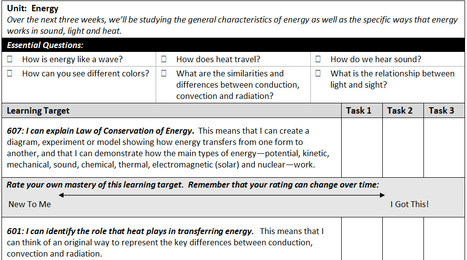
Bill Ferriter suggests a different way to share objectives with students through the use of an Overview Sheet. What is an Overview Sheet. Ferriter states it is a  "one-page handout that includes a list of every objective that students need to master written in student-friendly language.  The handout also includes unit vocabulary and a few essential questions designed to spark thinking and start conversations."

An example of one is provided in the post (which you may download and you see part of in the image) as is a download where he shares students thoughts on self assessments. This may be something you would like to try with your students.

Sue Ann's curator insight, May 29, 2013 4:13 PM

I loved the Unit Overview sheets, and how students rate their mastery of the objectives. 

LeeAnn LaSota's curator insight, July 20, 2014 9:06 PM

This may not be tech, but it fits perfectly for the new interactive text books!

Scooped by Beth Dichter
March 9, 2013 10:22 PM
Scoop.it!

The Gamification of Education?

The Gamification of Education? | Eclectic Technology | Scoop.it
Tablets have a place in the classroom, but are far from a panacea.
Beth Dichter's insight:

This post looks at pros and cons of tablet in general, and introduces a tablet from the News Corporation called Amplify. This tablet is designed for K-12 education and comes pre-loaded. It is considered the first tablet designed for specifically for education.

Along with two videos (both from Amplify) that discuss the tablet the post also brings up some of the issues associated with tablets. For example they mention a recent Pew Research Center Poll that notes (quoted from the post):

"in poorer districts, there is often a serious lack of access to technology. “Teachers whose students are from the lowest income households feel they are at a disadvantage when it comes to using the internet and other digital tools such as cell phones, tablet computers and e-readers to enhance the learning process,”

To learn more about some of the issues associated with using tablets click through to this post. To go directly to the Amplify website for more information on their tablet - http://amplify.com/tablet.

Mary Kate Lavin's curator insight, December 19, 2013 1:01 PM

This article understands the positive effect that Ipads have in the classroom however the author explains two negative effects of using Ipads in the classroom.  Students who come from low income areas and schools may not have the technology and students use the Ipads to play games when they are not in school.  

Scooped by Beth Dichter
March 9, 2013 7:57 PM
Scoop.it!

There’s No Homework in Finland | Online Classes

There’s No Homework in Finland | Online Classes | Eclectic Technology | Scoop.it
Beth Dichter's insight:
Schools in Finland have been in the news quite a bit lately. Why? To quote from the post "one of Finland’s greatest accomplishments to date—its high-achieving education system. Students in Finland have, over the past several years, risen to the top of the academic food-chain, and they’ve become some of the top scholarly performers in the world." This infographic is interesting in that it gives some comparisons of schools in Finland compared to schools in the US (and Canada). For more information click through to the infographic
Sydney Rardin's curator insight, March 18, 2013 2:18 PM

If you take a minute to read this article, it's very interesting to read how Finland has rised to the top.

Scooped by Beth Dichter
March 8, 2013 9:42 PM
Scoop.it!

Is Teaching Media Literacy Important? [POLL]

Is Teaching Media Literacy Important? [POLL] | Eclectic Technology | Scoop.it
How important is it for kids to learn digital media literacy? What makes something on the web trustworthy? Participate in our poll.
Beth Dichter's insight:

This post begins with an amazing number..."The public Internet now houses over 630 million sites" (and that number comes from December 2012 survey). To me that number raises a question - do our learners know how to evaluate websites? Do they have the tools that allow them to determine if a site is 'fact or fiction'? 

This post explores the issue of media literacy with a twist, which is you may choose to participate in a poll, or simply review the data based on responses (and I do not know how long the poll will remain active). 

The poll has a yes or no statement: It is important to teach children how to assess online media credibility. It is followed by four questions:

* Which media source do you trush to provide credible information?

* What makes you trust an online publication the most?

* How important is the credibility in the content you share?

* What kind of content are you most likely to share.

A unique feature of this poll is that you may explore the data through a number of filters: gender, age, income, ethnicity and race.

No comment yet.
Scooped by Beth Dichter
March 7, 2013 5:56 PM
Scoop.it!

Word Clouds: 125 Ways... And Counting... To Use Wordle In The Classroom

Word Clouds: 125  Ways... And Counting... To Use Wordle In The Classroom | Eclectic Technology | Scoop.it
Welcome to a post I always have  fun writing. Last May I attempted finding ways to use Word Clouds (Wordle) in education. When I concluded writing that post I was at 108 possible ways. More than a ...
Beth Dichter's insight:

Mike Gorman returns with 125 ways to use Word Clouds in your classroom. Although focused on Wordle any of the many tools available to create word clouds could be used. Gorman has taken the time to organize these ways into the following categories:

* All Subjects

* Science

* Language Arts

* Social Studies

* Math

* Health and PE and Consumer Sciences

* Art and Music 

* Foreign Languages
* Applied Arts

* Careers

Below are two of the 125 suggestions. The first one is for science.

* Create a simple food chain showing representing each population of animal by word size. In fact create a whole food web of an area or biome. Use advanced number feature.

And this one is for social studies.

* Using statistical information from a place such as CIA World Fact Book create word clouds that illustrate country statistics such as resources, ethnic groups, religions, languages, etc.  You may wish to use advanced number feature to illustrate prominence of each. 

No comment yet.
Scooped by Beth Dichter
March 6, 2013 8:45 PM
Scoop.it!

Skype Announces Free Group Video Calling for Teachers

Skype Announces Free Group Video Calling for Teachers | Eclectic Technology | Scoop.it

"The ability for classrooms to beam in authors, subject experts, and fellow students from around the world has been one of the great advantages afforded by Skype. Commonly used by librarians and other K–12 educators to provide real-time engagement for their students, the service just got better..."

Beth Dichter's insight:

Have you wanted to connect your class to a class in another part of the country. Skype is making that a bit easier with their new policy that will allow educators their Group Video Calling Plan at no cost. This plan allows you to connect with up to 10 parties at no cost. 

If you have not looked at Skype in the Classroom check out this link: https://education.skype.com/. They continue to add great programs that you may access and this new plan is the icing on the cake. Be aware that it may take 48 hours for you to receive a code to make the call, so plan ahead. Allow your class to become part of a larger community through Skype!

No comment yet.