Eclectic Technology
230.9K views | +0 today
Eclectic Technology
Tech tools that assist all students to be independent learners & teachers to become better teachers
Curated by Beth Dichter
Your new post is loading...
Scooped by Beth Dichter
April 11, 2013 10:51 PM
Scoop.it!

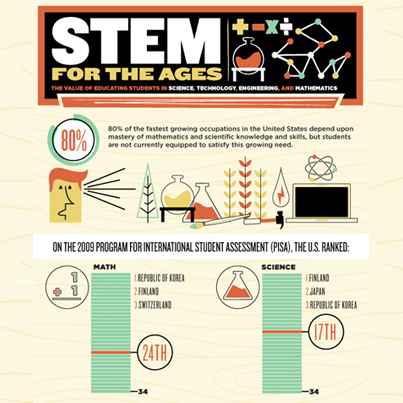
Infographic: The Value of a STEM Education

Infographic: The Value of a STEM Education | Eclectic Technology | Scoop.it

"Knowledge in science, technology, engineering, and math STEM_ canbe a key to a successful future. Here's why a STEM education matters and how you can inspire students to pursue STEM careers.

80 % of the fastest growing occupations in the United States depend on mastery of mathematics and scientific knowledge and skills, but students are not currently equipped to satisfy this growing need." 

Beth Dichter's insight:

A great infographic that looks as the value of a STEM education...for more on the value of educating students in science, technology, engineering and math click through to the post. You may also download the infographic as a pdf. 

Laurie Smith's curator insight, May 17, 2013 3:27 PM

Great infographic about Why STEM matters.. Source:edutopia

Rebecca Wilkins's curator insight, July 31, 2015 10:10 AM

Engineering is the missing piece of STEM.  Rarely do you find a focus on STEM that capitalizes on engineering.

Ellen Dougherty's curator insight, August 1, 2015 11:42 AM

A great infographic that looks as the value of a STEM education...for more on the value of educating students in science, technology, engineering and math click through to the post. You may also download the infographic as a pdf. 

Scooped by Beth Dichter
April 11, 2013 8:47 PM
Scoop.it!

Creativity – the challenge of defining, developing and assessing it

Creativity – the challenge of defining, developing and assessing it | Eclectic Technology | Scoop.it
Beth Dichter's insight:

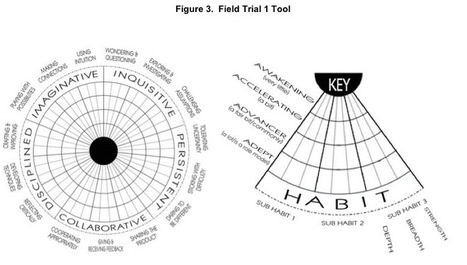
Can you use formative assessments to assess creativity? This post by Mark Gleeson provides a look at an in-depth working paper "Progression in Student Creativity in School: First Steps Towards New Forms of Formative Assessments." 

He states:
"Creativity is defined as one of the four 4Cs of  Learning and Innovation in 21st Century learning. This OECD Creativity working paper is an interesting start in working out how we can define, develop and assess this wide ranging ‘skill’ we call Creativity. On display in the image above is a protype assessment tool developed from much research as outlined in the working paper."

The image below shows that they have created "The Five Dispositions Model" of the creative mind: Inquisitive, Persistent, Imaginative, Collaborative and Disciplined. In addition there are 15 sub-dispositions that are tracked along three dimensions: Strength, Breadth, and Depth. The model has been tested and a link to the pdf is in the post (as is the paper through Scribt). 

As we move towards the Common Core and creativity becomes a component that we should be addressing this paper may provide additional insights into ways to use formative assessments in this area.

No comment yet.
Scooped by Beth Dichter
April 10, 2013 10:25 PM
Scoop.it!

Education game invokes Civilization and others to teach math

Education game invokes Civilization and others to teach math | Eclectic Technology | Scoop.it
The educational technology company uses game concepts to engage students while learning and targeting their weak areas in math.
Beth Dichter's insight:

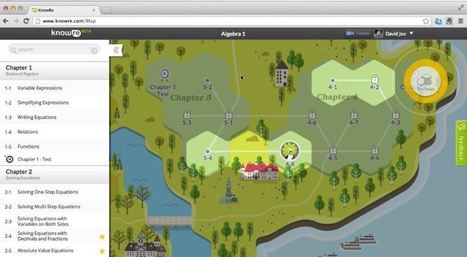
Students often struggle with algebra. KnowRe is providing a free Algebra 1 game (in beta) that helps students review and learn math. This post provides an overview of KnowRe and states it is a "teaching tool that adapts to students on a personal level. It learns how well each person is understanding the concepts and adapts the curriculum based on that information."

You will also find a short video that shows how to use KnowRe and explains the components of the program.

To go directly to the KnowRe website, which bills itself as "Personalized math learning designed to help students succeed" go to https://www.knowre.com/. ;

Zhendan (Max) Wang's curator insight, April 11, 2013 3:05 PM

That's brilliant. if education could be implanted into games. everybody would be so happy to learn. 

Alexis's curator insight, October 3, 2013 10:17 AM

This game understands students on a personal level. It adapts to their needs and teaches math at their speed. Its a great teaching tool and targets a "trouble area" for each student so they can work on their own pace. I could definitely see myself using this in the classroom.

Scooped by Beth Dichter
April 9, 2013 10:01 PM
Scoop.it!

ZAC Browser - a Browser for Children with Autism

Beth Dichter's insight:

Have you heard of the Zac Browser, a free browser that is designed for students with autism. The browser allows learners to access a variety of games, activities, videos, stories and more in a safe environment. The Zac browser website (http://zacbrowser.com/) provides a "pleasant, rewarding and secure experience."

The video above is a tutorial made by a student that discusses the browser.

Scooped by Beth Dichter
April 7, 2013 9:35 AM
Scoop.it!

10 Ways to Use Technology to Teach Writing > Eye On Education

10 Ways to Use Technology to Teach Writing > Eye On Education | Eclectic Technology | Scoop.it

"The Common Core’s Anchor Standard 6 for writing in grades K–12 requires students to “use technology, including the Internet, to produce and publish writing and to interact and collaborate with others”. Here are some ideas for meeting this standard (besides the obvious use of technology—word processing).

Beth Dichter's insight:

What tools are there to help students PRODUCE writing online? Lauren Davis identifies five areas that for producing writing:

* Collaborative tools

* Grammar and language resources

* Fun prompts to get their juices flowing

* Brainstorming and drafting graphic organizers.

* Research tools

What tools are there to help students PUBLISH writing online?
* Magazines

* Online contests

* Class e-newsletter or newspaper

* Book review website

* Class blog or website

There are links to many resources thoughout this post and in many cases specific suggestions are provided for grade levels. If you are not using online tools with your students this post provides great resources to help you begin the process.

No comment yet.
Scooped by Beth Dichter
April 6, 2013 7:00 PM
Scoop.it!

What's the Difference Between "Using Technology" and "Technology Integration"?

What's the Difference Between "Using Technology" and "Technology Integration"? | Eclectic Technology | Scoop.it
Recently, I've been noticing that a lot of instructors are under the impression that they are successfully integrating technology, when in fact they are simply using technology. Although this might...
Beth Dichter's insight:

Take a look at this chart. As you reflect on your use of technology where does it falls? Do your activities fall into the column, using technology, or in the second column, technology integration? Are their changes you think you need to make based on this interpretation?

Rebecca Ferlazzo's curator insight, May 12, 2013 9:27 PM

An important point to remember when we are considering using technology in the classroom. The integration of technology can be a help in the classroom while simply using technology can become a hinderance. So where do we make that distinction? 

James Buchanan's curator insight, June 5, 2013 11:47 PM

This article is about digital technology and how it is used and integrated. Are we truly USING technology when it is not integrated? When we ask for assessment that is presented with powerpoint, for example, we could just as easily ask them to write it in a book or make a poster. Digital technology should be used to facilitate collaboration and build high level thinking skills, that is how learning occurs.


Rebecca Wilkins's curator insight, July 17, 2015 9:18 PM

Technology use is the first step.  Technology integration is the opportunity to combine technology with pedagogy.  Technology infusion is the process of using technology as a tool for learning, thinking, and problem solving.

Scooped by Beth Dichter
April 4, 2013 10:18 PM
Scoop.it!

10 Ways To Support Learning Styles With Concept Mapping

10 Ways To Support Learning Styles With Concept Mapping | Eclectic Technology | Scoop.it

"Engaging your mind takes some effort to identify what you care for and what is the best way to attain what you care for. Do you want students to become better learners? Help them discover what they care for by allowing them to identify and use their own learning style."

Beth Dichter's insight:

Concept maps are a great tool for many learners...and this post provides ten ways you might consider using them in your classroom. The concept maps are divided into three categories: Learn by Seeing, Learn by Doing, and Learn by Hearing. In many cases there is a concept map that shows off the style.

There are many free tools to help create concept maps. A quick look on concept maps in this Scoop.it will provide quite a few results.

Lauren Anderson's curator insight, April 5, 2013 9:46 AM

<3 concept mapping

Tracy Hanson's curator insight, April 5, 2013 3:14 PM

It seems the more people deny there are learning styles the more information surfaces explaining them.

Scooped by Beth Dichter
April 3, 2013 10:02 PM
Scoop.it!

How to Inspire Students to Design, Invent, and Make an Impact | MindShift

How to Inspire Students to Design, Invent, and Make an Impact | MindShift | Eclectic Technology | Scoop.it

"Spark your students’ curiosity in engineering and technology by introducing them to the designers, inventors, and clever thinkers featured in PBS LearningMedia. Use their stories to illustrate various themes of study like the engineering design process and the impact of technology."

Beth Dichter's insight:

PBS provides many resources that help students learn the design process, and this post provides a short description. There are projects for students in grades K-1 up through high school and beyond. Below are names of a few of the projects.

* Designing a Wheelchair for Rugby - use to launch a design project in your classroom

* Scientist Profile: Inventor - have your student meet a teen scientist and see what he invented...and have them design their own invention

* A House for Teddy Bear - Watch young users use problem solving skills and trial and error as they create a house...and try it in your classroom.

An additional three ideas are in the post and more may be found on the PBS website (http://www.pbslearningmedia.org/). You will need to create a log-in.

No comment yet.
Scooped by Beth Dichter
April 2, 2013 9:19 PM
Scoop.it!

How to Create YouTube Photo Slideshows - A Good Alternative to Animoto

How to Create YouTube Photo Slideshows - A Good Alternative to Animoto | Eclectic Technology | Scoop.it

"Animoto is an excellent tool for creating audio slideshows. But there are some limitations to it that some teachers don't like. Most notable of those limitations is the time limit (30 seconds unless you get an Animoto for Education account), lack of space for text, and that students have to remember a username and password to use it. The YouTube slideshow tool provides a tool for creating audio slideshows without those three limitations of Animoto."

Beth Dichter's insight:

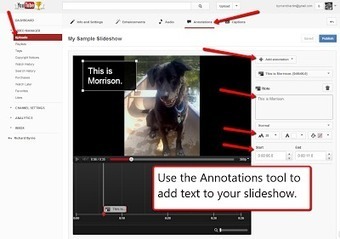
If you are looking for an alternative to Animoto to use with students to create photo slideshows check out YouTubePhoto Slideshows. YouTube allows you to create videos up to 15 minutes in length and you may specify how long a slide is shown. There is also an annotation tool to add text. For those folks whom use Google Apps for Eduation students already have a user name and log-in. Richard Byrne provides directions (with screen shots) to walk you through the process.

Heather Ramsey's curator insight, April 12, 2013 12:52 PM

This page shows how to use YouTube for slideshows so that they are longer and more accessible to students that other sites like Animoto. I had no idea that YouTube had this capability. In my district, YouTube is blocked on campus computers (I'm sure many others can sympathize) so I would need to work around that if I had students using this in a lesson. Recently I began to use SlideRocket to create video lessons so that I can incorporate audio narration and the link is not blocked by the district's web filter. SlideRocket could be used for a slideshow as well, but it takes a lot more customizing than this YouTube method. This blog has a ton of other useful information too. Kudos to the writer!

Scooped by Beth Dichter
April 1, 2013 7:27 PM
Scoop.it!

10 Ways to Teach Innovation | MindShift

10 Ways to Teach Innovation | MindShift | Eclectic Technology | Scoop.it

"One overriding challenge is now coming to the fore in public consciousness: We need to reinvent just about everything. Whether scientific advances, technology breakthroughs, new political and economic structures, environmental solutions, or an updated code of ethics for 21st century life, everything is in flux—and everything demands innovative, out of the box thinking."

Beth Dichter's insight:

What comes to mind when you think of the word innovation? And if we apply innovation in education what are your thoughts? The Common Core informs us that we should be teaching creativity, curiosity, critical thinking, and more. If we look at innovation we meet these criteria. This post provides 10 ideas. Many of the ideas on the post provide links to additional resources.

* Teach concepts, not facts.

* Distinguish concepts from critical information.

* Make skills as important as knowledge.

* Use creativity tools.

No comment yet.
Scooped by Beth Dichter
March 31, 2013 10:01 PM
Scoop.it!

A Good Collection of 13 Digital Citizenship Resources

A Good Collection of 13 Digital Citizenship Resources | Eclectic Technology | Scoop.it

"Jen Deyenberg at Northern Gateway Public Schoolshas created a nice collection of digital citizenship resources for teachers and parents. The collection is organized into sections for elementary school, middle school, and high school. There is a separate tab for parent resources. One of the things that I like about the collection is that understanding copyright has been included as part of digital citizenship."

Beth Dichter's insight:

If you teach digital citizenship in any grade from preK to 12 the site that Richard Byrne discusses is worth checking out. The resources are organized by age (as in elementary, middle years, high school) and there are parent resources as well as resources on copyright and ones for teachers. Each resource is described and with a click you can arrive at the destination!

CurieSPK1's curator insight, April 7, 2013 12:23 AM

It is important for everyone to be aware of the impact Digital Citizenship is making globally.  What a great resource for that purpose!

Scooped by Beth Dichter
March 30, 2013 11:21 PM
Scoop.it!

20 Top Video Explanations to Help Teachers Become Tech Savvy

20 Top Video Explanations to Help Teachers Become Tech Savvy | Eclectic Technology | Scoop.it
Beth Dichter's insight:
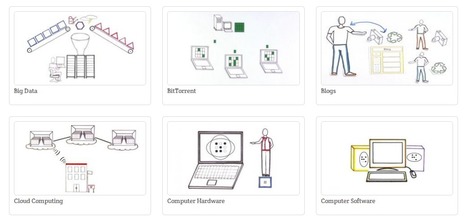
Are you looking for some short (~ 3 minutes) videos that will help you understand concepts in technology. You may not need to look any further than Common Craft Library. To find 20 videos culled by Med Kharbach check out this post. Along with the videos shown in the image above you will find links to 14 additional videos. You might also go to the Common Craft website (http://www.commoncraft.com) but be aware that they have additional videos that require a membership. And...if you are interested in creating your own videos you may want to check out the book that Kharbach mentions in this post, "The Art of Explanation" which shares how to take a complex idea and create a simple video to explain it.
Shradha Kanwar's curator insight, July 13, 2013 4:32 AM

great input!


Rachael Jones's curator insight, October 21, 2013 4:40 AM

Far out this is awesome if you are a teacher (or parent) and lagging behind in your knowledge and understanding of pod casts, crowd sourcing, the "cloud", blogs, torrent dowloads, apps etc

Thought Crane's curator insight, May 24, 2014 10:35 AM

Has explained a few things to me....

Scooped by Beth Dichter
March 29, 2013 11:32 PM
Scoop.it!

12 Principles Of Mobile Learning

12 Principles Of Mobile Learning | Eclectic Technology | Scoop.it
Beth Dichter's insight:

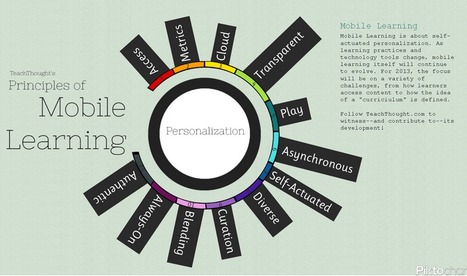
What do you think the principles of mobile learning are? This post provide the following 12. Each of the principles (below) are discussed in the post.Do you agree with them or are there ones you would add (or delete)? Share your thoughts here (or on TeachThought). 

The list:

* Access'

* Metrics

* Cloud

* Transparent

* Play

* Asynchronous

* Self-Actuated

* Diverse

* Curation

* Blending

* Always-On

* Authentic

danahawkins's comment August 8, 2013 10:34 PM
The curation comment is interesting... I think it's fantastic that students are able to gain these skills without the assistance of a teacher, but ultimately if they veer off the path or have been misguided, they will always need a facilitator to not only show students the tools but also give them some best practice ideas.
Viljenka Savli (http://www2.arnes.si/~sopvsavl/)'s curator insight, August 13, 2013 2:13 AM

A new approach to learning and teaching concerns students' selflearning and assessing and of course techer's coaching. More about main principals in this article...

Mary Kate Lavin's curator insight, February 6, 2014 2:39 PM

This describes the 12 principles of mobile learning.  It describes not only how to use technology in classes but also the reasoning behind using it.  

Scooped by Beth Dichter
April 11, 2013 10:27 PM
Scoop.it!

What's your digital footprint? Take this quiz and find out!

What's your digital footprint? Take this quiz and find out! | Eclectic Technology | Scoop.it

"I developed this quiz with members of my personal learning network (found at end of post) to get students thinking about their digital footprint. The quiz was created at the request of high school students I spoke with who thought the creation of a such a quiz could lead to a smart conversation about ways students can update their digital footprint so that it is one that leads to college and career success."

Beth Dichter's insight:

If you work with students in high school (or even college) you might want to have them check out this digital footprint quiz. Students answer 8 questions and score their quiz. There are six possible outcomes:

* Negative Score: Clean up time
* No Score: You’re off the radar 
* 1 - 10 points: You’re a New “Foot” on the Block

* 11 - 15 points: You’re Making Strides
* 16 - 20 points: You’re a Rising star! (or “Digital Weaver”)
* More than 20 points: You’re Web Wise!

More details are available for each description.

Tracy Shaw's curator insight, April 12, 2013 11:48 AM

Reinforcing awareness -------- nothing is private!

Nancy Jones's curator insight, April 14, 2013 12:01 PM

Important tool and topic. Kids just don't "get it"

Maria Hoard's curator insight, June 5, 2022 4:02 PM
Monitoring your digital footprint is just as important as the network you choose to build online.  Your online presence can define you professionally and personally.  What do you want to be known for?  How do you want yourself to be identified?  Digital citizenship starts in schools and having a good self realization of where you are will drive you forward with your students. 
Scooped by Beth Dichter
April 10, 2013 10:42 PM
Scoop.it!

Infographic: 10 Principles for Effective Vocabulary Instruction > Eye On Education

Infographic: 10 Principles for Effective Vocabulary Instruction > Eye On Education | Eclectic Technology | Scoop.it
Beth Dichter's insight:

Are you wondering about the most effective way to teach vocabulary? This infographic provides 10 suggestions on how to best teach vocabulary, as well as 10 things to avoid!

Donna Shattuck's curator insight, August 8, 2013 7:02 AM

Fantastic!

Vocabmonk's curator insight, September 9, 2014 5:44 AM

10 Principles for effective Vocabulary.

Marisa Martinez's curator insight, May 11, 2015 5:44 PM

Education.

Scooped by Beth Dichter
April 9, 2013 10:16 PM
Scoop.it!

Free Technology for Teachers: Ten Good Video Sources for Science Students and Teachers

Free Technology for Teachers: Ten Good Video Sources for Science Students and Teachers | Eclectic Technology | Scoop.it

"One of the great things about teaching today is the wealth of educational videos that are available on the web. No longer do we have to flip through catalogs, order a VHS cassette, wait for it to arrive, and hope that it is as good as the catalog made it sound. Now we can quickly access and screen educational videos. In fact, there is so much available that the challenge is sifting through it all."

Beth Dichter's insight:

Richard Byrne has put together a great list of 10 websites that provide excellent videos for science. Sites include:

* The Spangler Effect from Steve Spangler Science (demonstrations of science experiments)

* Gooru - a website that has been mentioned in this Scoop.it. "Gooru is a service that aims to provide teachers and students with an extensive collection of videos, interactive displays, documents, diagrams, and quizzes for learning about topics in math and science." If you have not taken the opportunity to check out Gooru it is worth your time.

* MIT Tech TV which has thousands of videos.

More information on these sites and seven additional sites is available in the post!

CurieSPK1's curator insight, April 22, 2013 3:39 PM

Very cool info!  Thanks!

Tiffany Dean's curator insight, September 9, 2013 5:32 PM

Free is good!

Scooped by Beth Dichter
April 8, 2013 8:46 PM
Scoop.it!

Morphing into a 21st Century Teacher

Morphing into a 21st Century Teacher | Eclectic Technology | Scoop.it
This is the new buzz world this year in our schools. But, is it really new or is it just integrating the computer lab into the classroom? Or is it doing what some of the best teachers already do? T...
Beth Dichter's insight:

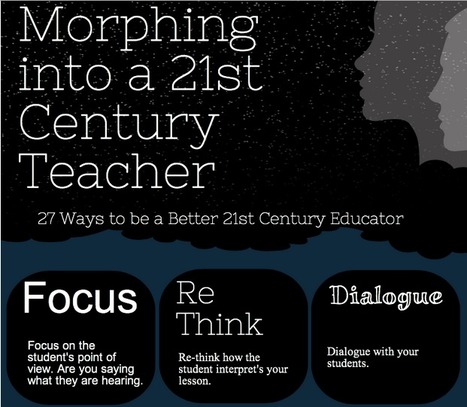
What do we need to do to become a 21st century teacher? This infographic provides "27 ways to become a better 21st century teacher." Each one has a short description.For example:

* Question - Let students question what they are learning.

* Design - Design alternative assessments that use the whole brain.

Twenty-five additional ideas are on this image. Check it out and see if there are some new ones you might want to try.

Keisha Lewis's curator insight, August 24, 2013 9:57 AM

A process I am going through presently.

Scooped by Beth Dichter
April 7, 2013 8:58 AM
Scoop.it!

Getting into the right mindset for better learning

Getting into the right mindset for better learning | Eclectic Technology | Scoop.it

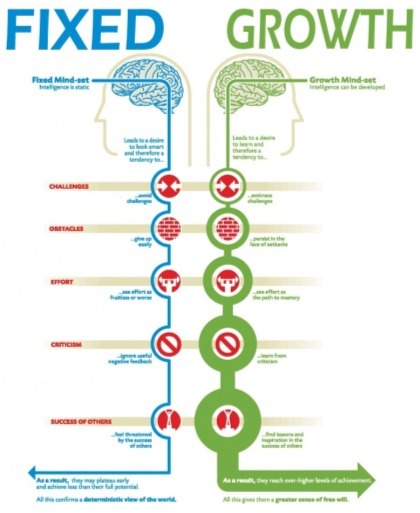
Mark Gleeson once again provides insight into an infographic. This one on fixed vs growth mindset. In this post he states "Originating from Stanford University psychologist/researcher Carol Dweck, its premise (from my initial reflection) is that as learners, we can either improve our intelligence through hard work or that we are born with a skill set and intelligence level that we are stuck with."

Beth Dichter's insight:

What do you think? Do your students come to you with a fixed mindset? Is there future pre-determined by birth? Is intelligence static? Or do you students come in with a growth mindset, with the knowledge that learning takes effort and time, the ability to try and fail, and try again (and again...)? Can intelligence be developed?

Gleeson provides an overview of the two mindsets and explores the infographic and the five categories within in it by asking each as a question. Below is one example...but you will find questins for each category in the post (challenges, obstacles, effort, criticism, success of others).

Quoting from the post:

OBSTACLES: Do we allow our children/ourselves to give up when learning becomes too difficult and stay in a growth- limiting ‘comfort zone’? OR Do we expect our childen/ourselves to persist until we overcome those obstacles and celebrate the achievement of success against all odds?And if you would like to watch a short video that discusses fixed mindset check out this link: http://www.youtube.com/watch?v=OhLJPhxuvGM.

Mary Cunningham's curator insight, April 7, 2013 12:54 PM

This fits really well with the SIM work that has been happening!  It is a nice visual representation of the Dwek work.


Jaimee's curator insight, March 5, 2014 10:06 AM

People/Students do not go for the challenges because they are scared of failure. With failure come consequences fro example low grades. Anyone can say the grade doesn't matter  it is what you learned, however without the grade you can lose out on getting accepted into colleges or fail a class. 


This article is about  about how one can reach success by having a growth mindset.  By gaining and having the drive to gain more knowledge. 

Scooped by Beth Dichter
April 5, 2013 9:09 PM
Scoop.it!

5 Brilliant ‘Design Your Own Game’ Websites for Students

5 Brilliant ‘Design Your Own Game’ Websites for Students | Eclectic Technology | Scoop.it
Five 'design your own game' sites for creative students and learners to take gaming to a deeper level by creating and designing games them self.
Beth Dichter's insight:

What a great idea...have your students design their own games. This post provides information of five websites that allow you to design your own game. Each has some information that may help you decide which you would like to test. The list of five:

* Sploder - "use simple command tools to create intricate games of all kinds, from arcade to platform games, space adventures to physics puzzles"

* Draw4Play - "Ideal for younger students, this game allows the player to create their own pathway for a stick man hero..."

* Isoball3 - "Great for learning about kinetics, this physics game requires students to create the landscape of their own game..."

* Jacksmith - "...great for younger students...is in cartoon form"

* Purpose Games - "...this site allows them to design more academic games, like multiple-choice quizzes, head-to-head ‘knowledge battles’ or map-based geography games."

Gary Harwell's curator insight, April 7, 2013 12:53 PM

Can our students do this?

Lyr Lobo's curator insight, June 23, 2013 11:21 AM

There is a magic today with the wealth of tools that support students and their creativity.  Creation and discovery is a powerful combination for learning.

Anne-Marie Armstrong's comment, June 23, 2013 12:24 PM
Hey Lyr, great to see your scoops. This will be helpful to have your curation on this topic. Thanks.
Scooped by Beth Dichter
April 4, 2013 8:59 PM
Scoop.it!

Nine Things Educators Need to Know About the Brain

Nine Things Educators Need to Know About the Brain | Eclectic Technology | Scoop.it

"The human brain wasn’t designed for industrial education.

It was shaped over millions of years of sequential adaptation in response to ever-changing environmental demands. Over time, brains grew in size and complexity; old structures were conserved and new structures emerged. As we evolved into social beings, our brains became incredibly sensitive to our social worlds."

Beth Dichter's insight:

How much do you know about your brain? This post will help you learn more about it and how understanding the brain will help you with your students. There is a short introduction and the a list of the main ideas is below. Additional information is available in the post as well as a visual image that links to the nine ideas. Links to additional materials are also available.

* The brain is a social organism.

* We have two brains.

* Early learning is powerful.

* Conscious awareness and unconscious processing occur at different speeds, often simultaneously.

* The mind, brain, and body are interwoven.

* The brain has a short attention span and needs repetition and multiple-channel processing for deeper learning to occur.

* Fear and stress impair learning.

* We analyze others but not ourselves: the primacy of projection.

* Learning is enhanced by emphasizing the big picture—and then allowing students to discover the details for themselves.

AAEEBL's curator insight, April 4, 2013 9:53 PM

Good stuff.

Scooped by Beth Dichter
April 3, 2013 9:41 PM
Scoop.it!

How To Unlock Creativity

How To Unlock Creativity | Eclectic Technology | Scoop.it

"Do you know this guy on the left? Of course you do! The man, and in particular that photo, are icons. They represent creativity itself.

Yet Einstein is both an inspiration and an intimidation. His legend, unfortunately, has obscured much his story’s true value. He was, in many ways, unexceptional, but nevertheless managed to see the world differently and led others to do so as well."

Beth Dichter's insight:

Creativity is a word that is often used when we speak about education today. We are told that we need to help our students be creative. The question is how to do this and there have been many articles published about this. 

This post notes that Einstein was not "a good, if unruly, student. He studied physics intensely, worked towards a doctorate and sought out a job as an ordinary physics professor." The important part of that statement is "He studied physics intensely..." 

Many people who we define as creative work intensely in one field, so intense domain knowledge is one key.

Other aspects discussed in this post include the ability to cross domains and persistence.

The final sentence reads "Creativity comes from combining ordinary things in extraordinary ways."

Callie Carling's curator insight, July 30, 2013 10:08 AM

add your insight...

creativity@NIS's curator insight, August 25, 2014 3:40 AM

John: Really love this photo.


Brian: Yup,

Art & Eveil's curator insight, October 6, 2014 12:39 PM

How to unlock Creativity

Scooped by Beth Dichter
April 2, 2013 8:25 PM
Scoop.it!

Why kids must be taught digital manners

Why kids must be taught digital manners | Eclectic Technology | Scoop.it

"It’s a different era. The digital world is molding children in a way that is completely different from their parents. Some may say that it’s always the case as technology, culture, and societal norms change, but this is different. It’s faster. This isn’t just a matter of, “I don’t understand the music you kids listen to these days.” It’s a major shift in the way that kids interact with the rest of the world."

Beth Dichter's insight:

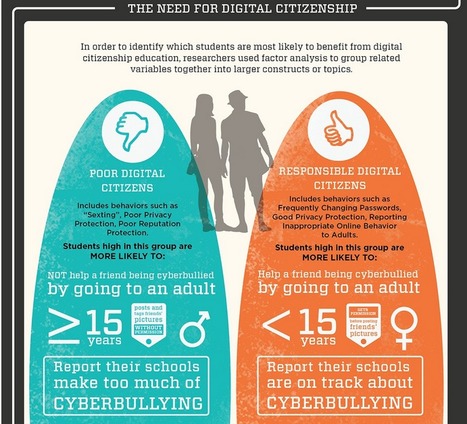
This infographic explores digital citizenship, specifically looking at 5,500 students in the U.S. (80% between the ages of 13 - 15). The survey looked at "digital citizenship, privacy protection, cyberbulllying, and information and communication technology." For more information check out the post.

No comment yet.
Scooped by Beth Dichter
April 1, 2013 6:39 PM
Scoop.it!

Teaching & Learning Visualisations- Essential Mindsets

Teaching & Learning Visualisations- Essential Mindsets | Eclectic Technology | Scoop.it
Beth Dichter's insight:

Ross Parker has posted another infographic that ties into an earlier one (that looked at Style Comparison and was posted in this Scoop.it). This one looks at mindsets and how there are similarities today in the mindsets of teachers and students. He states "The two visualisations below are part of an ongoing attempt to define my views on education, and make these accessible to my students, fellow teachers, parents and leaders."

If you click through to the post you will also see the first infographic and you may download them in a variety of formats.

No comment yet.
Scooped by Beth Dichter
March 30, 2013 11:51 PM
Scoop.it!

The Inside-Out School: A 21st Century Learning Model

The Inside-Out School: A 21st Century Learning Model | Eclectic Technology | Scoop.it
Beth Dichter's insight:

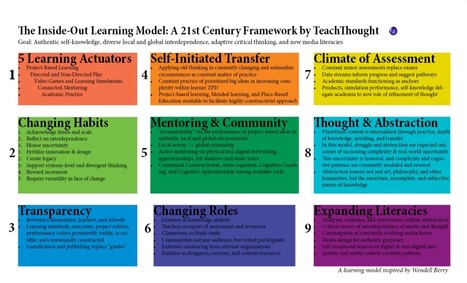
There are many learning models that we may explore, and this one is presented a bit differently than others I have seen. Quoting from the post "The goal of the model is simple enough–not pure academic proficiency, but instead authentic self-knowledge, diverse local and global interdependence, adaptive critical thinking, and adaptive media literacy."

There are nine domains in this model (listed below) and the post provides additional information.

* Five Learning Actuators

* Changing Habits

* Transparency

* Self-Initiated Transfer

* Mentoring and Community

* Changing Roles

* Climate of Assessment

* Thought and Abstraction

* Expanding Literacies

maite collados's curator insight, May 10, 2013 8:56 AM

Las características reflejadas en el esquema y explicadas en el artículo sobre el modelo de enseñanza en el siglo XXI, están íntimamente ligadas  a la tendencia BYOD, como se refleja en el rol que videojuegos, la curación de contenidos, el cambio de papel de "estudiante receptor" a "estudiante creador de conocimiento", implicación en la enseñanza de todos los entornos del estudiante o la actuación del profesor como curador y guía en el conocimiento-aprendizaje de los alumnos.

Pilar Castro's curator insight, May 21, 2013 11:49 AM

Criterios importantes para diseñar nuevos modelos de aprendizaje.

Scooped by Beth Dichter
March 30, 2013 10:50 PM
Scoop.it!

25 Tricks To Improve A Boring Lesson For Improved Student Engagement

25 Tricks To Improve A Boring Lesson For Improved Student Engagement | Eclectic Technology | Scoop.it

"Over the years, I’ve noticed how one question can change the dynamics of any situation. Everything might be moving along quite nicely at the dinner table, everyone’s happy and laughing but one question can send those same smiling faces into a frenzy of shouts and upset. This also holds true in a classroom. Students may be working quietly and the teacher might be content but one question or comment from a student or the teacher can turn that quiet into bubbling sea of chatter."

Beth Dichter's insight:

As teachers we know that there are days when a lesson is just not hitting the spot. This post provides a range of ideas across the curriculum that you might try if this happens..."just quick tricks to step up the beat so that students stay interested."

Five lesson ideas are presented for math, reading, writing, science and social studies, each providing an idea that you may want to incorporate. One example for social studies is below (quoted from the post).

Lesson:  Civil Rights

One of the most important lessons taught to students, this gives them a deeper understanding of right and wrong and why laws exist and need to be enforced. Sometimes students see it as ancient history though. So keep it current as well.

Add Students.

Ask the important question: How have things changed? Have them list it or journal it then expand on that as the lesson continues. They need to understand their relationship to it.

No comment yet.