


"Working on the Internet every day, you start to have certain suspicions about how it affects the way you think and process information. Turns out, there's something to that."

 Your new post is loading...
 Scoop.it! "Working on the Internet every day, you start to have certain suspicions about how it affects the way you think and process information. Turns out, there's something to that."
Beth Dichter's insight:
A short (~4 minutes) is embedded in this post that looks at how the Internet affects our brain. The video is based on the book "The Shallows: What the Internet is Doing to our Brain" and this video presents an overview of the topics in the book. This is a video you may choose to share with students.
Scoop.it!
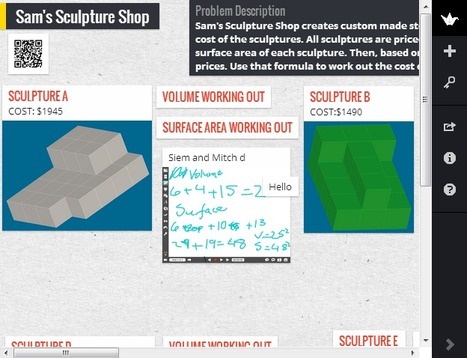
"Padlet has morphed into a full blown online interactive whiteboard, collaboration, presentation, lesson management system with massive possibilities for teaching and learning. Before demonstrating how I have used Padlet in the classroom in ways I couldn’t have in the past, I’ll give you a quick(ish) tutorial in how it works."
Beth Dichter's insight:
Why choose to use Padlet? Aside from the fact that is free, it does not require that register. Gleeson recommends that as a teacher you create an account so that all the "walls" you create are in one place. This post provides detailed instructions on how to create a wall and includes two projects that he has done with his students. If you have not checked out Padlet I suspect you will after you read this post! 
Tom Perran's curator insight,
May 7, 2013 6:15 AM
I like this tool. Very useful and it works with iPhones in the classroom! 
Anne Sturgess's curator insight,
May 7, 2013 5:17 PM
I'm using Padlet in a variety of ways, including gathering teacher and student ideas and for feedback about any shifts in practise related to the work I do as a Facilitator of Professional Learning for teachers.
Scoop.it!
Beth Dichter's insight:
This post provides the infographic that shows 18 myths about education. It also includes short explanations about research on each of the 18 myths (located under the infographic). The editor also noted that some of these topics are "contentious." If you choose to respond to any of them here or on the original post please use civil language.
Scoop.it!
Beth Dichter's insight:
Allow your students to explore the world of energy in this interactive site that covers the following areas: * Energy - What Is It? * Energy Sources Renewable * Types of Energy * Energy Stored and Transfer * Energy Dissipation * My Role in Energy * Energy Quiz Geared to students elementary to middle school students this site requires that students be able to read. There are a number of interactive resources for students to use within the site. 
Maria Zappa Kasapidi's curator insight,
May 5, 2013 1:28 AM
Πόσο πιο όμορφα μπορείς να εξηγήσεις την ενέργεια; Ζήλεψα...
Scoop.it!
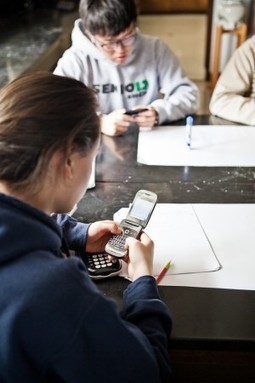
Although the students had been told at the outset that they should “study something important, including homework, an upcoming examination or project, or reading a book for a course,” it wasn’t long before their attention drifted: Students’ “on-task behavior” started declining around the two-minute mark as they began responding to arriving texts or checking their Facebook feeds. By the time the 15 minutes were up, they had spent only about 65 percent of the observation period actually doing their schoolwork.
Beth Dichter's insight:
This post looks at how multi-tasking in impacting student work. Although based on a recent study the post states that there is "a growing body of research focused on a very particular use of technology: media multitaskingwhile learning." The evidence shows "learning is far spottier and shallower than if the work had their full attention. They understand and remember less, and they have greater difficulty transferring their learning to new contexts." After a brief review of a number of studies the post looks at information about the brain and multitasking as well as what might be done to help students prioritize. Links to resources are provided within the article.
Scoop.it!
Find out how your decisions on sharing things online can impact your life in the real world. Learn to think before you click.
Beth Dichter's insight:
This short (under 3 minutes) video created by CommonCraft provides an excellent overview of why students need to "think before" they click. Think abut using this as the 'hook' to begin a conversation about the digital image (footprint, tattoo) that each of us have online and ask your students to think about their image after they watch the video. Are there items that they may want to take down? Do they need to do some work to improve their digital image?
Scoop.it!
From
edudemic

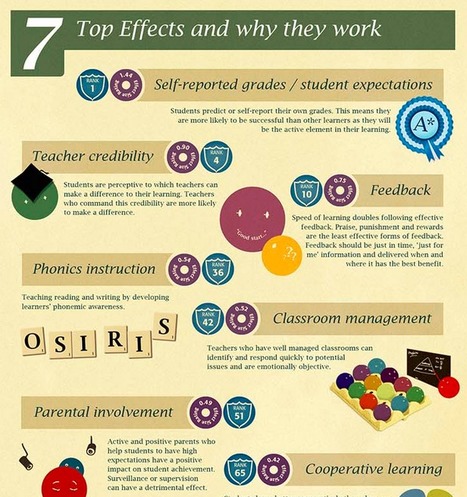
A study is making the rounds that details a few of the best ways to improve student achievement. It also touches on the least useful methods.
Beth Dichter's insight:
How can we best improve student achievement? This infographic states that it has looked at "over 50,000 studies including over 240 million students!" The work was done by one small organization and aside from the infographic it is difficult to determine the studies used. However the findings are worth looking at. The seven areas that are most beneficial are shown in the infographic above (and listed below). Click through to see the infographic and learn more. * Self reported grades/student expectations * Teacher credibility * Feedback * Phonics instruction * Classroom management * Parental involvement * Cooperative learning
Scoop.it!
Tech columnist David Pogue shares 10 simple, clever tips for computer, web, smartphone and camera users. And yes, you may know a few of these already -- but there's probably at least one you don't.
Beth Dichter's insight:
The video is short, about 10 minutes, and you probably will learn at least one or two new tips...and you will probably have a few chuckles too!
Scoop.it!
|

|
Scooped by
Beth Dichter
April 28, 2013 10:07 PM
|
Scoop.it!
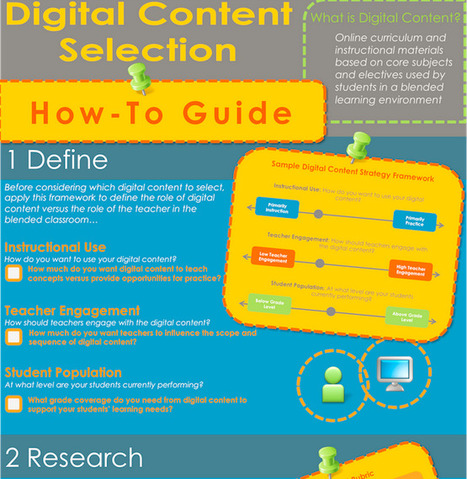
"School leaders often ask us: “How do I select the right content for my blended classroom?” To help answer this question, we’ve developed a “How-to Select Digital Content” info-graphic and guide."
This infographic provides great ideas on how to select contentn for blended classrooms. There are four recommended steps:
1. Define your needs.
2. Research to determine which tools will best meet those needs.
3. Explore the tools that you find or ask vendors to come in and/or demonstrate when possible.
4. Select the tools.
And before final choices are made share the information with faculty. To help with theresearch phase there is a rubric within the infographic.
|
|
Scooped by
Beth Dichter
April 27, 2013 11:54 PM
|
Scoop.it!
Digital Learning Now has released a new infographic on blended learning and the teaching profession. The infographic explores how the teaching profession is in transition, ten benefits of blended learning for teachers, how blended learning may improve teaching conditions and how blended learning increases career opportunities. To go directly to the infographic (which is available as a pdf file) click: http://www.digitallearningnow.com/wp-content/uploads/2013/04/FI-infographic_2013-04-19_FINAL.pdf
|
|
Scooped by
Beth Dichter
April 27, 2013 9:09 PM
|
Scoop.it!
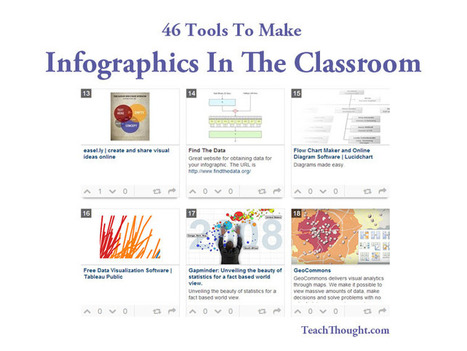
"Infographics are interesting–a mash of (hopefully) easily-consumed visuals (so, symbols, shapes, and images) and added relevant character-based data (so, numbers, words, and brief sentences).
The learning application for them is clear, with many academic standards–including the Common Core standards–requiring teachers to use a variety of media forms, charts, and other data for both information reading as well as general fluency."
The use of infographics seems to be increasing and this post presents 46 tools that you may use to create an infographic, or better yet, have your students create an infographic.
The tools are arranged alphabetically with a link to each as well as a short description. Some have costs involved but others are open source and freely available.

A list and links to the ever increasing number of tools that we can use to create infographics.
|
|
Scooped by
Beth Dichter
April 25, 2013 10:09 PM
|
Scoop.it!

"What exactly is critical thinking? You hear about it all the time as a valuable 21st Century skillthat everyone should have, and one that a good education will help you develop. If it is so important, why aren’t there specific courses, seminars, self-help videos, or even whole schools focused on helping students develop it?"
This is the first of two posts that explore critical thinking. Although geared to higher education many points are applicable to primary and secondary education as we begin the process of teaching our students critical thinking skills.
The post provides an overview on "what is critical thinking" noting that it was not "formally defined until the late 20th century." A summary of the definition is provided as well as the fact that critical thinking involves two components:
* Gathering information
* Making sense of the information
The post then goes on to provide "tips for conducting critical research" (quoted below):
* Cast a wide net/conduct primary research
* Refine your questions
* Track back other sources
For more information on the tips above and on critical thinking click through to the post.
|
|
Scooped by
Beth Dichter
May 7, 2013 11:07 PM
|
Scoop.it!
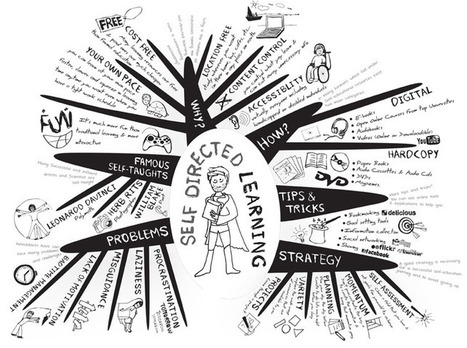
A look at what self-directed learning is, at why people are doing it, tips and tricks. strategies. problems that may arise, how people are doing it and some famous folk whom were self-directed learners.
|
|
Scooped by
Beth Dichter
May 6, 2013 7:26 PM
|
Scoop.it!
This is the first of nine infographics that will look at Gagne’s Nine Events of Learning. This first one looks at how to gain students attention. Additional infographics will cover the "events of learning" listed below. And if you find this of interest if you do a search on Gagne's Nine Events of Learning you will find quite a bit of information.
* Inform learners of objectives
* Stimulate recall of prior learning
* Present the content
* Provide “learning guidance”
* Elicit performance (practice).
* Provide feedback
* Assess performance
* Enhance retention and transfer to the job
Based on Gagne's suggestions for engaging learners.
|
|
Scooped by
Beth Dichter
May 5, 2013 2:47 PM
|
Scoop.it!
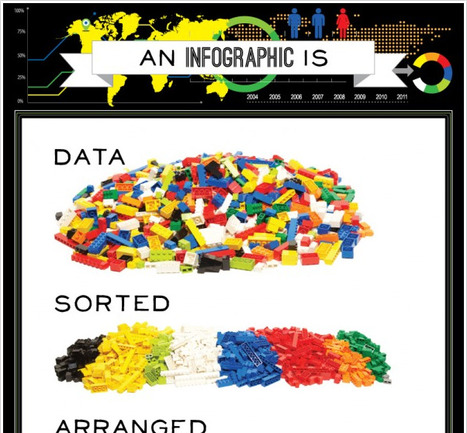
"This is an infographic about what is an infographic. Using Lego blocks and photography we wanted to show that.a good infographic is simple and require and requires little text."
This infographic is great for showing how basic an infographic may be, and to help students understand what goes into creating a graph. The four key concepts, collecting data, sorting data, arranging data and presenting the data visually (so others may understand it) are true when students learn how to make graphs...and most students have played with Legos at some point so there is a quick connection. To see the full infographic click through to Visual.ly.
|
|
Scooped by
Beth Dichter
May 4, 2013 10:05 PM
|
Scoop.it!
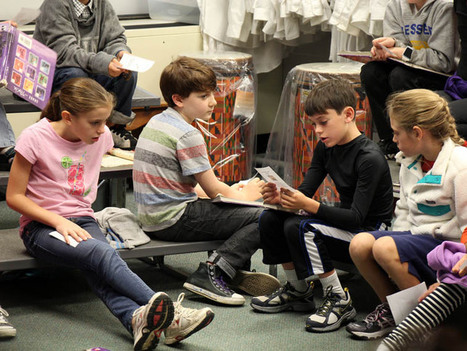
"In psychology, intelligence is not the primary predictor of success. It is the ability to persevere in hardship, persist and learn after failure, and have a resilient spirit in the face of obstacles. Intelligence is a gift that can be developed and nurtured, but continuing on a difficult path when the gratification is far away? That is an invaluable skill for all of us to learn."
Grit seems to be getting a lot of press these days, and this post provides 16 suggestions on what we might do in our classrooms to help students " resilient spirit".
You may already be using some of the ideas provided in the post but there will probably be a few new ones you might like to incorporate. Five ideas are listed below. Click through to the post to read all sixteen (and to see additional information on each).
* Give an assignment that isn't meant to have a perfect ending
* Use educational simulation games
* Offer positive distractors to help during difficult tasks
* Avoid the "all or nothing" disease
|
|
Scooped by
Beth Dichter
May 3, 2013 9:28 PM
|
Scoop.it!

You can use custom timelines in book reports, projects, and just about every other piece of coursework in K-12. These tools will help.
Five timeline tools are discussed in this post. Learn more about:
* Timetoast
* Meograph
* Capzles
* Dipity
* XTimeline
There is a small description of each timeline as well as a screenshot.
|
|
Scooped by
Beth Dichter
May 2, 2013 10:23 PM
|
Scoop.it!

"An infographic of the etymology and cultural origins of the names that made the United States of America."
Check out this infographic that provides a history of the names of the United States. Learn if the origin of the name is from Native Americans, the English, the Spanish or the French. If you are teaching the states this may become a great resource for your classroom.
To access please use this link: http://fonx.org/blog/?p=2830. The other one no longer works.
|
|
Scooped by
Beth Dichter
May 1, 2013 10:03 PM
|
Scoop.it!

Online learning startup Coursera is partnering with several schools of education, as well as other institutions and museums, to bring professional development courses to K-12 teachers online.
Coursera plans to bring MOOC courses to K-12 teachers. The will be partnering with "several schools of education and other institutions and museums, including schools of education at Johns Hopkins University and the University of Virginia, the American Museum of Natural History and the Museum of Modern Art, to bring free professional development courses to teachers via the web."
Coursera is designed with a peer-grading approach.This would allow teachers to receive feedback from other teachers. The courses will be free but there will also be a Signature Track Option that would allow teachers to pay a small fee which will allow them to receive a certificate.The goal is for this to be recognized as continuing education credit.
There is additional information in the post.

These are great courses and I am excited to see what else they will add. Awesome opportunities for teachers.
|
|
Scooped by
Beth Dichter
April 30, 2013 9:55 PM
|
Scoop.it!

"The Internet has made a myriad of material readily available to a vast audience. Along with these seemingly infinite resources has come a lot of confusion about how images and other content published online should be legally recognized, protected or used. As educators, we often struggle in navigating that road."
Our students often go to Google or Bing to find images for their work...but they do not always know how to find images that are open source. This post provides many resources that you might use with students, as well as a story about what may happen if a student uses an image that is under copyright.

Great classroom resource to help find cc images
|
|
Scooped by
Beth Dichter
April 29, 2013 8:14 PM
|
Scoop.it!

School suspensions during freshman year seem to have a lasting effect on students' high school careers—but not in the way they are intended.
This is a pretty amazing infographic that looks at school suspensions of 9th grade stduents and how it impacts them over their high school career. It turnes "a student suspended even once in ninth grade is less likely to graduate from high school compared to his or her peers who never got in trouble." As well as this infographic the article links The Civil Rights Project and "Two first-of-their-kind reports shed light on the growing use of punitive disciplinary measures and provides research-based alternatives." (This 2nd quote if from the Civil Rights Project and can be found at http://civilrightsproject.ucla.edu/news/press-releases/2013-press-releases/out-of-school-and-off-track-reports-detail-disturbing-and-increased-use-of-suspensions.
|
|
Scooped by
Beth Dichter
April 28, 2013 11:58 AM
|
Scoop.it!
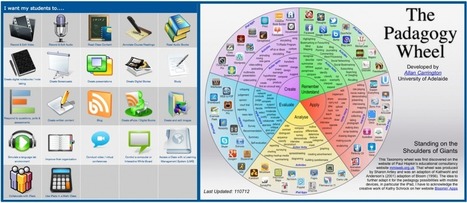
"The two above images are good examples of purposeful thinking about iPad usage in schools.
One, a screenshot of an oft-used tool known as 'iPad As.. by edtechteacher.org', focuses on what the iPad can be used for and provides links to various apps that can be utilised for those functions. It goes without saying that it is a very useful website for schools thinking about iPads. It provides nutshell explanations of a number of apps that relate to each iPad as… category as well as pricing. It’s a good introduction into the functionality of the iPad that counteracts the misconception of iPad as consumption NOT creation tool.
The other, The Padagogy Wheel, is one of many variations on applying Bloom’s Taxonomy of skills to iPad apps. It develops from the general learning action verbs/skills we want our students to acquire to technology based activities that relate to these skills and finally to a selection of apps that can support this development."
The post continues to explore the issues noted above and raises the question of how to blend the best of both options. Gleeson goes on and raises specific areas where he would like others to provide feedback. Three of the seven areas are listed below.
* Examples of apps that help to develop specific skills
* Additional skills that have not been listed
* Examples of good pedagogical practice with apps
Continue to scroll down the post and you will find a table that slows the skills he has come up with and see where it is currently populated. Already there are a number of responses providing additional suggestions.
As Gleeson says this is "a herculean task" and I look forward to seeing the finished product.

This information is helpful when looking at pedagogy and technology.

|
|
Scooped by
Beth Dichter
April 27, 2013 9:45 PM
|
Scoop.it!

"The more our students are online, the more information they will encounter. It is important for them not only be able to access this information, but also to be the best digital citizens that they can be."
Digital citizenship is not always easy for students to understand. This infographic shows us key concepts found in digital citizenship by using key words and then poviding a brief description. This is only a portion of the infographic. The complete one has 27 points of information.
Great resource for digital citizenship curriculum.
|
|
Scooped by
Beth Dichter
April 25, 2013 10:20 PM
|
Scoop.it!

"'Often mistaken, never in doubt." That wry phrase describes us all more than we'd like to admit.'
The psychological study of misconceptions shows that all of us possess many beliefs that are flawed or flat-out wrong—and also that we cling to these fallacies with remarkable tenacity. Although much of this research concerns misguided notions of how the physical world works, the techniques it has produced can be used to correct any sort of deficient understanding."
How do you go about teaching students to correct mistaken beliefs? Studies show that “students ignored correct textual information when it conflicted with their previously held concepts. On measures of free recall and recognition, the students consistently let their incorrect prior knowledge override incoming correct information.”
So what are the three ways to help students correct these mistaken beliefs?
* Highligh the mistaken notion
* Issue an advance alert
* Create a confrontation
Additonal information how to implement these are in the post.

Fascinating and clear perception busting tips! Directed at student learning I think this applies to everyday and everyone. Misguided perceptions can be very destructive. I know I'm going to try these techniques for sure! ;-)









the good and the bad....
Thought provoking book ------ taking time to 'unplug' is really a necessity we need to model for students.