


While there are hundreds of tools and devices available, we have found 10 creative ways to use Google tools and services to help improve learning.

 Your new post is loading...
 Scoop.it! While there are hundreds of tools and devices available, we have found 10 creative ways to use Google tools and services to help improve learning.
Beth Dichter's insight:
Check out 10 tools from Google including: * Voice Comments * Research Tools * WriteSpace * VideoNot.es * Read & Write Plus five more! Many of these tools require that you use Chrome as your browser. Each is described in detail in the post and links are provided.
Scoop.it!
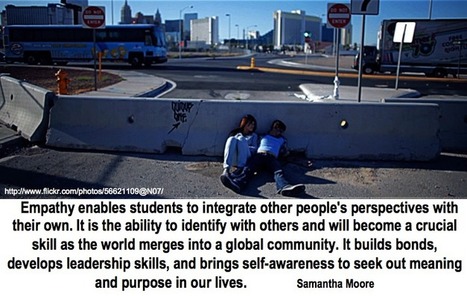
Many have attempted to identify the skills important for a learner today in this era of the 21st century (I know it is an overused phrase). I have an affinity towards the skills identified by Tony...
Beth Dichter's insight:
We hear the words 21st century skills and as educators we know how the Common Core is defining those skills, but what are others saying? This post explores a range of ideas that have been put forth as 21st century skills. * Grit * Resilience * Hope and Optimism * Vision and the Future * Self-Regulation * Empathy and Global Stewardship You will find many great resources in this post.
Scoop.it!

"Most folks are familiar with the most common Google tools. Search, Hangouts, Docs, Mail, Drive all are used by countless folks around the world. In fact this blog is written with Google Blogger. I use Google and live there most days.
Beth Dichter's insight:
This post shares information on six tools that might be of interest to you: * Google Custon Search Engine * Google Keep * Google Mars * Public Data * URL Shortener * Google for Teachers Each tool is hotlinked and a short description is provided as well as some ways you might want to use the tools in your classroom. 
Makaeyla Zachery's curator insight,
October 17, 2014 11:56 AM
Google is the best search engine out there. It helps with an extremely large amount of things 
sajeda omar's curator insight,
March 13, 2015 1:22 PM
this document talks about how the search engine Google is used in many different for example creating this post.it also talks about how Google can be used for multiple reasons for activities in the classroom
Scoop.it!
Framing lessons through the lens of the Universal Design for Learning isn't about more time so much as it is about more strategic thinking, says Elizabeth Stein.
Beth Dichter's insight:
In this post a middle school teacher shares a US history project where Common Core standards are aligned with the three Universal Design for Learning (UDL) Principles. She discusses the process of creating the lesson and states: Within the post she includes the Purpose of the Lesson, the Process, Assessment and a table where she provides the Common Core Standards that were addressed, the lesson activities, and the specific UDL Principles that were addressed. If you are new to UDL here is a short explanation from the post: "The aim of a UDL lesson is to create (1) resourceful, knowledgeable learners through multiple means of representation; (2) strategic, goal-directed learners through multiple means of engagement; and (3) purposeful, motivated learners as a result of multiple means of expression."
Scoop.it!
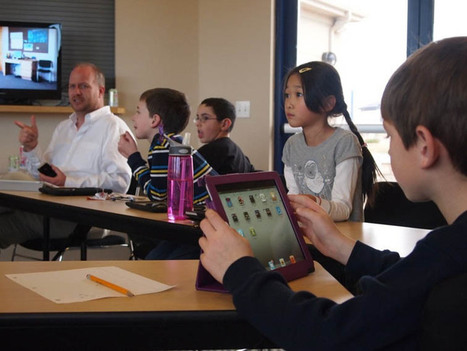
"Continuing to teach in the stretching shadow of technology while only dealing with it through glimpses and gimmick is an awkward arrogance we may be dealing with for some time to come. But while education bickers on about how to best educate children, those children are making powerful moves–sometimes intentionally, sometimes as thoughtless, drifting trends–to fully reinvent the way human beings connect."
Beth Dichter's insight:
When you think of technology do you think of connected learning? Do you consider how you can use the Internet? Have you considered what the word Internet means: "inter, meaning connected, and net, as in network, visualizing multiple connectors and connectees." Many of our students have access to the Internet, and they use that access outside of school. How? They communicate, text messaging, twitter, video and more. This post explores what may happen as more and more students connect using social media. After exploring acces the post moves on to discuss how technology impacts "peer performance" (and assessment). Technology provides tools that allows students to curate and critique performance. The final section explores how this common experience has the potential to impact learners, in "visible and invisible ways." 
Nikolaus Wood's curator insight,
May 24, 2013 12:50 PM
Business in terms of infomation technology is interesting. When education comes into the picture it becomes important to make sure that the product is actually useable for the students and that it can be used in a way that will benifite not only the students but also the teachers.
Scoop.it!

What will the next fifty years bring in the world of social media, mobile, robotics and more? Our fifty year timeline shows you just what could be in store
Beth Dichter's insight:
Technology changes at such a rapid rate that it is tough to look ahead and envision where it will be in five years let alone fifty years...but that is what this infographic does. This timeline focuses on digital and mobile as well as big data, and references are provided for the information. 
Gary Faust's curator insight,
May 22, 2013 10:01 PM
Very interesting. Product development is possible, but the human brain has capabilities that a computer sill not surpass in that time. I doubt we understand the human brain sufficiently at this time to speculate about a computer's comparitive ability. Good ideas for science fiction writers, though.
Scoop.it!
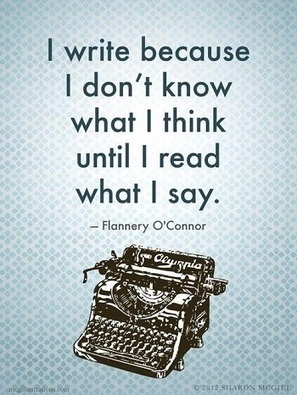
In 2008, Fran Simmons, an English teacher at NewDorpHigh School in New York—at that time one of the lowest-performing secondary institutions in the nation— devised a simple test for her students in an effort to keep district officials from pulling the plug. First, she asked her freshman class to read Of Mice and Men. Then, using information from the novel, she asked them to answer the following prompt in a single sentence: “Although George …” She was looking for a sentence like: Although George worked very hard, he could not attain the American Dream. What Simmons received was alarming in the truest sense of the word. Some students wrote passable sentences, but many could not manage to finish the line. More than a few wrote the following: “Although George and Lenny were friends.”
Beth Dichter's insight:
This in-depth post explores the issue of language impacts our ability to think. After an introduction the post is split into three sections. The first section explores "the psycholingusitic case for writing education." It is noted that the Common Core states that students in grades 6-12 "should demonstrate increasing sophistication in all aspects of language use, from vocabulary and syntax to the development and organization of ideas, and they should address increasingly demanding content and sources.” What follows is a look at language, where we see that the language we learn impacts us in many ways, that some cultures have many words for a word like snow while others do not, that cultures whom have language that have "gendered objects" impacts how people view the objects. The second section explores "Can you teach better math and science be teaching writing?" Information is provided about New Dorp High School (in New York). The school implemented a program that included "writing-to-learn" across the curriculum (except for math) and discovered that major gains in writing were apparent by the second year. The third section "highlights ten features of writing education that can be used to enhance student learning across all subject areas, ultimately resulting in higher academic performance." The first two suggestions are below (all are quoted from the post). 1. Vocabulary Across The Disciplines: Emphasize that the concept of a word may change depending on the context in which it is used. 
Ann Kenady's curator insight,
February 5, 2014 11:23 PM
This article gives compelling evidence that the ability to write effectively is closely linked to the ability to think coherently. The author writes, "Students’ inability to write was contributing to their inability to think, severely impeding intellectual growth across many subjects."
Scoop.it!

From
edudemic

I took a chance and tried using Nearpod in my classroom. What happened next has changed my classroom forever.
Beth Dichter's insight:
A teacher shares their experience with Nearpod, a free app that allows you to "present an interactive lesson on the students’ iPads." Later in the post he states "The excitement, engagement, and of course, every teacher’s favorite word, data proved this app to be useful. I was able to go into the Nearpod website with my log-in credentials (free account) and access all the information gathered during the lesson. I could see the Draw Its each student submitted and create graphs on student responses." There are a number of apps that allow you to share resources. Consider checking out Nearpod if you have not yet tried it.
Scoop.it!
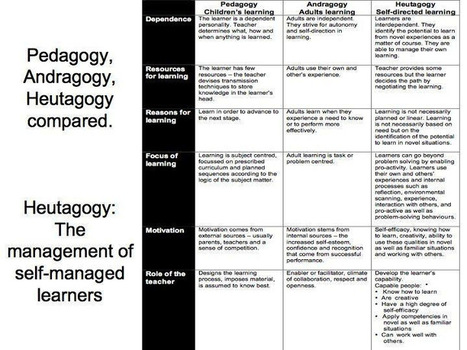
"The evolution of the web from Web 1.0 to Web 2.0 and now to Web 3.0 can be used a metaphor of how education should also be evolving, as a movement based on the evolution from Education 1.0 to Education 3.0."
Beth Dichter's insight:
Jackie Gerstein continues to explore the shift from Web 1.0 to Web 2.0 to Web 3.0 , taking it "one step further" by looking at Pedagogy (related to children's learning), Andragogy (related to adults learning) and Heutagogy (related to self-directed learning). The graphic above shows how she defines these three areas in more detail. She notes that this shift is moving us from a teacher directed classroom which education driven by essentialism or instructivism (Education 1.0) to a constructivist approach, "where the principles of active, experiential, authentic, relevant, socially-networked learning experiences are built into the class or course structure" (Education 2.0) to a more heutalogical approach (Education 3.0). The discussion then looks at how to choose a teaching orientation (and it need not always be the same) and then applies these concepts to mobile learning. Many resources are included in this post such as a table describing Education 1.0, Education 2.0 and Education 3.0; a Google Drive Presentation on PBL in a High School Science Class that uses mobile technologies; a SlideShare that looks at Education 3.0 and the Pedagogy of Mobile Learning (presenting the concepts discussed in the post); and many links to additional resources. 
Peter Evans's comment,
July 19, 2013 2:28 PM
A useful summary table although I'd emphasise that the different 'versions' of education all have their place - v2.0 does not supercede v1.0

Elke Watson's comment,
July 19, 2013 4:49 PM
Thank you. I'm not quite ready myself to do away with teaching professionals or brick and mortal education. I value learning in a group context. I found the second summary table more useful (pedagogy, andragogy, heutagogy)

Veronica Hoyos's curator insight,
March 13, 2014 9:22 PM
We could talk of the evolution from Education 2.0 to education 3.0 after carrying an evaluation on the impact of the Web 2.0 in education
Scoop.it!

Common Core State Standards are calling for more focus on students reading charts and graphics, but new research shows engaging graphics can reduce students' understanding of chart data.
Beth Dichter's insight:
"The common core calls for students to comprehend and connect information from visual elements, including charts, maps, and multimedia, in addition to understanding stories and informational texts." One question that comes up is how do we best teach students how to create and read graphs. This article presents information that "visually appealing graphics" may not be the best way for students to learn. By "visually appealing" they are describing graphs that use symbols, as in stacks of fruits or shoes, to represent the numbers as opposed to a bar graph. Additional detail is provided in the article. Do you teach graphing to students in early elementary school? Reading this post may lead you to change your teaching methods (relative to graphing).
Scoop.it!

"The Common Core Standards, the national academic standards for K-12 schools in the United States, have now been adopted by 47 of the 50 states in the U.S. This makes them the pre-eminent source of what is being taught in the vast majority of public schools in America."
Beth Dichter's insight:
When you read the Common Core Standards the use of technology is embedded in writing, reading (informational) and speaking and listening. This post looks at "four sample standards from elementary, middle, and high school English-Language Arts" and provides a number of ways you might address them. It suggests looking at the "thinking verbs" - publishing, collaboration, evaluation and integration, describing each and sharing how you might bring them into your classroom and address the Common Core Standards. The post also looks at "Takeaways for Teachers". It states "...the takeaway is simple: technology is no longer a feel-good way to develop buzz and honor authenticity, but rather a matter of academic merit and fidelity–which is awesome for several reasons." Four reasons are provided, with the first stating "No longer must progressive educators defend the reasoning behind twitter, YouTube, iPads, or blogging in their classroom." One question this post raises for me is that not all teachers have access to the technology needed on a consistent basis to help their students meet these standars.The Common Core has been adopted but will our students be ready to demonstrate their knowledge in these areas when the time comes.
Scoop.it!

MobyMax is a completely integrated curriculum and teaching system with progress monitoring, goal setting, fluency practice, motivation tools, and much more.
Beth Dichter's insight:
This tool provides an adaptive curriculum for students in Grades K - 8. The curriculum currently covers Math, Language, Vocabulary, and Fact Fluency with plans to add Reading and Writing. Students take placement tests to determine their missing skills and the receive targeted practice, providing differentation for each student. A professional version of the program is also available (for a cost).
Scoop.it!
Beth Dichter's insight:
This post explores what you should not do when implementing the Common Core...such as "expect that a packaged program will be the magic bullet" or "focus only on outcomes and not processes." Each of the 15 points include additional information. Many of us are questioning where we are going with the Common Core and this post may provide some insights into areas that may become dead ends. |
Scoop.it!
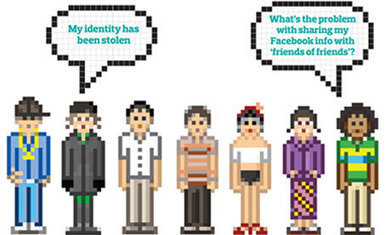
Cybercrime costs Britain £27bn a year, and it could cost you dear too if you don't take basic precautions. James Silver asked experts for their top tips
Beth Dichter's insight:
And what happens in Britain can happen almost anywhere. This post provides twenty tips on how to keep your identity safe. Do you use the same password for multiple sites? Is you pasword a word from the dictionary? How safe is public wifi? Should you have more than one email address?
Scoop.it!
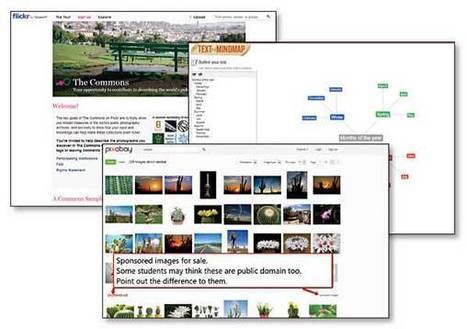
"We’ve all endured “death by PowerPoint.” It’s a painful experience for the audience and probably not all that fun for the presenter either. To help my students deliver effective presentations—free of those deadly bullet points—I have my go-to applications."
Beth Dichter's insight:
Richard Byrne shares alternatives to PowerPoint with a twist. He includes additional tools that help students outline their stories; find high quality images that are public domain and/or Creative Commons; and a variety of web-based presentation tools as well as Haiku Deck, and app for the iPad. In total he shares eight resources providing links to all as well as short descriptions. 
Michael Kleven's curator insight,
May 22, 2013 4:15 PM
This isn't directly related to film production. Still, we all are called upon to make presentations. Some great resources here. Perhaps even helpful for producers, directors, DoP's.
Scoop.it!

Every era demands--and rewards--different skills.
Beth Dichter's insight:
EdSurge had put together a great guide, Teaching Kids to Code, that provides 14 posts that look at coding from a variety of perspectives and a table that lists 40 tools for learning online programming. The table is divided into sections which include learning coding with: * apps * hardware * visual blocks * formal coding language Many of the suggested tools are free. There are many who suggest that all students should learn to code. If you are interested in helping students learn to code or would like to learn about a variety of resources check out this post.

JessikaJake's comment,
May 23, 2013 1:37 AM
I followed the link through to https://www.edsurge.com/n/2013-05-13-heading-off-to-summer-coding-camp and was happy to see that iD Tech Camps was on the list! We love them. Jade went 2 years in a row and learned Flash, C+, Video Editing and more.
Scoop.it!

"This is a listing of 27 sites that legally offer free textbooks and written course material. There is a separate page with links to free audio and video courses. To the best of my knowledge all of the websites listed here offer only content that they are legally entitled to transfer to you. If you find a site listed here that you know illegally offers copyrighted material, please contact me through the site with a link to the infringing content."
Beth Dichter's insight:
If you are looking for sources of free textbooks this post may help you find them. Thre are 14 new sites included in this list. Textbooks are available in many disciplines and grade levels, from elementary school through college. 
Ali Halabi's comment,
August 9, 2013 11:46 AM
If you are looking to sell your TextBooks localy www.textbooklistings.org is super simple. You simply list your textbook for sale in your city for the price that you want. Its free and its a growing community
Scoop.it!
What if Andy Warhol had it wrong, and instead of being famous for 15 minutes, we're only anonymous for that long? In this short talk, Juan Enriquez looks at ...
Beth Dichter's insight:
How far does your digital tattoo extend? This short talk (~6 minutes) provides a great look at how much is known about you online. It will provide you with a look at what might be known about you and touches on mythology to discuss how your data may impact your future. 
Kane Brown's curator insight,
May 19, 2013 8:23 PM
Intersting take on your digital footprint. A good read for those who aspire to be in the public life!
Scoop.it!
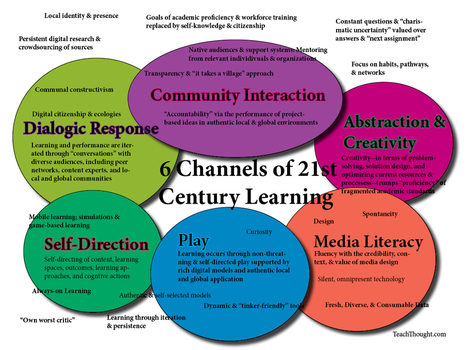
What is 21st century learning, and how do networks and technology function within it?
Beth Dichter's insight:
There are many ways we may look at 21st century learning and this post suggest that there are six channesl of learning. In fact the post notes that there are more than six channels but that "these six are emerging or have always existed as powerful players in how learners make meaning." The image above provides a visual view, and the six key areas are listed below. * Dialogic Response * Community Interaction * Abstraction and Creativity * Media Literacy * Play * Self-Directed Learning Are there other areas you would define as channels of learning? 
Drora Arussy's curator insight,
May 20, 2013 12:38 PM
Wonderful way to put it in perspective. Thank you for sharing the visual. 
Brad Reitzel's curator insight,
August 26, 2014 10:54 AM
Very important components for 21st Century learnings...media literacy should probably be number one in our list!
Scoop.it!

Six fantastic videos for science teachers explaining complex scientific concepts in fun, accessible ways. Perfect for the classroom.
Beth Dichter's insight:
The folks at Fractus Learning have taken a look at videos available at Open Culture and selected six to share (although many more are available). The choices here include: * The Rap Guide to Evolution * The Periodic Table of Chemistry * A Universe from Nothing Videos are a great tool to use with students. Although this post specifically deals with science videos across the disciplines are available at Open Culture (http://www.openculture.com/).
Scoop.it!
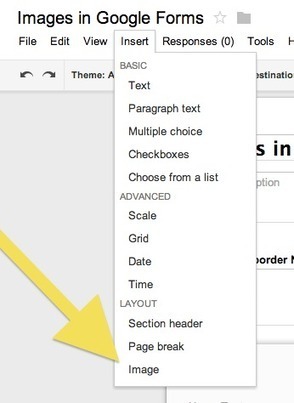
"There is GREAT news!! You can now insert an image into a GOOGLE FORM!!!
Beth Dichter's insight:
Google continues to add features to Google forms. This post shows you how to add images to Google Forms. If you would like to see a video that walks you through the steps please visit the link below from Richard Byrne's blog FreeTech4Teachers at http://www.freetech4teachers.com/2013/05/video-how-to-insert-images-into-google.html.
Scoop.it!
From
www
High school science teacher Tyler DeWitt was ecstatic about a lesson plan on bacteria (how cool!) -- and devastated when his students hated it. The problem was the textbook: it was impossible to understand.
Beth Dichter's insight:
The way one teaches makes a difference, and Tyler DeWitt provides us with a look at one way to teach science...so that the students will be engaged! You might also want to check out his YouTube channel at http://www.youtube.com/user/tdewitt451. 
Shynade Smith's curator insight,
May 29, 2017 4:13 AM
Wonderful video about the importance of keeping children engaged with science, over ensuring that every child has to know every single about a progess. 
Breanna's comment,
June 2, 2017 7:39 AM
I've seen this TED talk before and it really hits the nail on the head for many students in science. Why would anyone want to pursue a career in science if all they get to experience are facts and figures with a bit of experimentation thrown in! I actually based my Literacy and Numeracy assignment on this. The learning experience for students was to develop a creative story based around a pathogen of their choosing. They had to include how the pathogen was spread, what it did to the person who contracted it (symptoms) and how that person was treated. It was aimed at year 9 students within a biology based unit of work. I would love to implement it one day to see how students respond.
Breanna's curator insight,
June 2, 2017 7:41 AM
I've seen this TED talk before and it really hits the nail on the head for many students in science. Why would anyone want to pursue a career in science if all they get to experience are facts and figures with a bit of experimentation thrown in! I actually based my Literacy and Numeracy assignment on this. The learning experience for students was to develop a creative story based around a pathogen of their choosing. They had to include how the pathogen was spread, what it did to the person who contracted it (symptoms) and how that person was treated. It was aimed at year 9 students within a biology based unit of work. I would love to implement it one day to see how students respond.
Scoop.it!

Exclusive timelapse: See climate change, deforestation and urban sprawl unfold as Earth evolves over 30 years.
Beth Dichter's insight:
How did this come to be? The Landsat program. “Two generations, eight satellites and millions of pictures later, the space agency, along with the U.S. Geological Survey (USGS), has accumulated a stunning catalog of images that, when riffled through and stitched together, create a high-definition slide show of our rapidly changing Earth. TIME is proud to host the public unveiling of these images from orbit, which for the first time date all the way back to 1984.” Google has taken these “choppy images” and upgraded them into stunning videos with incredible details (more information on this is at the website). TIME has also created a story that utilizes the videos and text to help understand the story they tell. * Chapter 2 – Extreme Resources * Chapter 3 – Climate Change * Chapter 4 – Urban Explosion It is said that a picture is worth a thousand words, and these moving images tell a story that is often hard to understand. If we are interested in learning more about how we have impacted our planet this is a great resource. 
luiy's curator insight,
May 13, 2013 9:17 AM
TIME and Space | By Jeffrey Kluger
Spacecraft and telescopes are not built by people interested in what’s going on at home. Rockets fly in one direction: up. Telescopes point in one direction: out. Of all the cosmic bodies studied in the long history of astronomy and space travel, the one that got the least attention was the one that ought to matter most to us—Earth. That changed when NASA created the Landsat program, a series of satellites that would perpetually orbit our planet, looking not out but down. Surveillance spacecraft had done that before, of course, but they paid attention only to military or tactical sites. Landsat was a notable exception, built not for spycraft but for public monitoring of how the human species was altering the surface of the planet. Two generations, eight satellites and millions of pictures later, the space agency, along with the U.S. Geological Survey (USGS), has accumulated a stunning catalog of images that, when riffled through and stitched together, create a high-definition slide show of our rapidly changing Earth. TIME is proud to host the public unveiling of these images from orbit, which for the first time date all the way back to 1984. Over here is Dubai, growing from sparse desert metropolis to modern, sprawling megalopolis. Over there are the central-pivot irrigation systems turning the sands of Saudi Arabia into an agricultural breadbasket — a surreal green-on-brown polka-dot pattern in the desert. Elsewhere is the bad news: the high-speed retreat of Mendenhall Glacier in Alaska; the West Virginia Mountains decapitated by the mining industry; the denuded forests of the Amazon, cut to stubble by loggers. 
Tracy Shaw's curator insight,
May 13, 2013 12:07 PM
Incredible images showing not only deforestation, but increase in urban sprawl & vanishing glaciers.
Scoop.it!
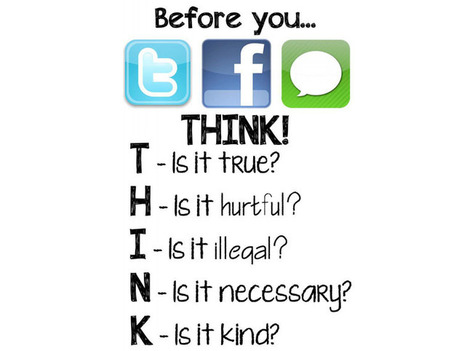
Digital citizenship, as we’ve theorized, has something to do with the “The quality of habits, actions, and consumption patterns that impact the ecology of digital content and communities.”
Beth Dichter's insight:
What is citizenship? What is digital citizenship? Many students struggle to answer these questions. This infographic provides one way to look at digital communication, asking students to THINK before they choose to use Twitter, Facebook or IM.
Scoop.it!

From structure and plot to heroes and characters, your story must have everything in place if it's to connect with the reader. Follow our guide to storytelling success.
Beth Dichter's insight:
If storytelling is part of your curriculum you should check out this infographic (and share it with your students). It provides a quick visual to help recall the seven steps of storytelling, with ideas for each step. The first step, Understand Your Story, is show in the graphic above. The additional steps are (each of which have additional information): * Choose Your Plot * Choose Your Hero * Choose Your Characters * Observe the "Rule of Threes" * Choose Your Media * Observe the Golden Rule (and is not the traditional Golden Rule) |







Learn smart wit Google tools.