Eclectic Technology
230.9K views | +0 today
Eclectic Technology
Tech tools that assist all students to be independent learners & teachers to become better teachers
Curated by Beth Dichter
Your new post is loading...
Scooped by Beth Dichter
June 4, 2013 10:43 PM
Scoop.it!

Developing 21st Century Critical Thinkers | Teaching Strategies | Mentoring Minds

Developing 21st Century Critical Thinkers | Teaching Strategies | Mentoring Minds | Eclectic Technology | Scoop.it

"As we venture into the 21st century, we as a society, are faced with more innovation and challenge than ever before. We now live in an interconnected world, where the Internet and global communications are simultaneously uniting and isolating us as a society. How do we raise critical thinkers to best face the challenges that face our modern society?"

Beth Dichter's insight:

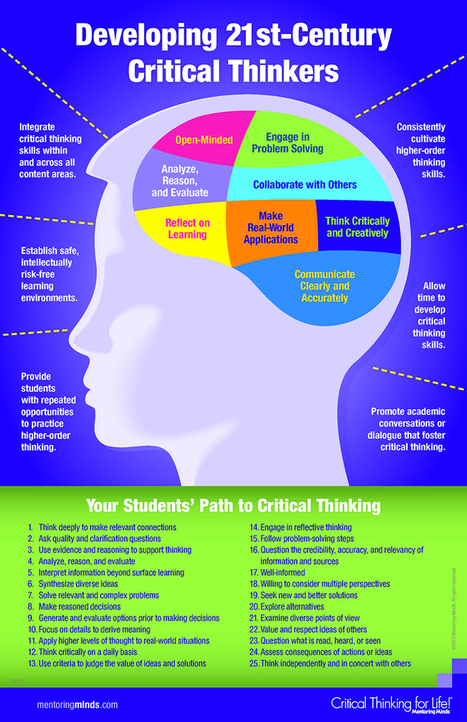
This infographic provides a look at how we may develop 21st century critical thinkers. Using an image of a brain with eight areas that look at skills we need to know how to use,and that correspond with 21st century skills found in the Common Core and the Partnership for 21st Century Skills.

In addition there are six that we as teachers should be doing within our classrooms including:

* Integrate critical thinking skills within and across all content areas

* Establish safe, intellectually risk-free learning environments

* Allow time to develop critical thinking skills.

There is also a section called "Your Students' Path to Critical Thinking" that includes 25 recommendations.

The infographic is also available as a pdf file that you may download in an 11" x 17" version at the website.

Undwear Entrepreneur's curator insight, November 12, 2013 5:06 PM

Adapt, improve your knowledge & skill sets, or become obsolete!

Scooped by Beth Dichter
June 4, 2013 9:58 PM
Scoop.it!

The Busy Teacher's Quick Common Core Guide - Edudemic

The Busy Teacher's Quick Common Core Guide - Edudemic | Eclectic Technology | Scoop.it
Though much of it is focused on the broader ideas of the Core Standards, we thought that a number of the statistics contained in this handy infographic / Common Core guide were interesting.
Beth Dichter's insight:

This infographic not only looks at the broader ideas of the Common Core it also provides a number of statistics, such as the number of students whom will take the Common Core test in the year 2014 to the number of students in the 2007 -2008 school year.

As well as the statistical information you will find a definition of the Common Core standards, how success will be evaluated, what every student needs to know, seven things students may do to get ready, what every teacher needs to know, seven things a teacher should do to get ready as well as a link to a website from McGraw Hill that provides additional resources.

As schools continue to discuss and learn more about the Common Core this infographic provides a nice visual that could be shared with faculty, students and parents.

No comment yet.
Scooped by Beth Dichter
June 3, 2013 10:09 PM
Scoop.it!

How Your Emotions Affect Your Student's Learning

How Your Emotions Affect Your Student's Learning | Eclectic Technology | Scoop.it

"Twenty-five sets of wary eyes are gazing at you. The air in the room is thick with tension, and the owners of the twenty-five pair of eyes are shifting in their seats. Fifty legs become restless and the squeaks of tennis shoes and flats rubbing against the linoleum floor get louder and louder.

Is it time for a big test? Was the classroom scolded? Is it the last day of school, perhaps? No, it is none of the above. They are reacting to the anxiety and negative emotions that you brought into the classroom."

Beth Dichter's insight:

Have you considered how your emotions may impact your students? This post explores this issue, specifically how your emotions may affect your student's learning. 

The post begins with the limbic system, a system that helps us "to communicate, bond, and respond to stimuli." Many factors may impact the limbic system, including stress, and this may shut the system down.

The discussion continues as the post explores how your bad day may impact your students, and also provides suggestions on what you can do to "help keep from spreading those emotional germs."

It is the rare teacher that does not experience a bad day at least once a year...and the suggestions in this post may help alleviate some of the issues that arise from such a day.

No comment yet.
Scooped by Beth Dichter
June 2, 2013 9:56 PM
Scoop.it!

Where Essential Questions Come From

Where Essential Questions Come From | Eclectic Technology | Scoop.it

"What does it mean to read? What does it mean to think? What does it mean to solve problems? What should you be doing in your head when you translate the Spanish? In sum, what is meant to be going on inside that black box called the mind and what is actually going on in their minds? These are our Essential Questions as teachers. It is the continual addressing of these questions that moves us from the ranks of the naïve and ok teachers to skilled professionals. We move from being “teachers” to coaches of learning."

Beth Dichter's insight:

If one goal of essential questions is to get our students to think a question we must ask is how do we go about teaching them do this. This post by Grant Wiggins explores ways to help students learn the necessary skills. Examples are provided and he also shares a book, "When Kids Can’t Read What Teachers Can Do" that provides resources.

No comment yet.
Scooped by Beth Dichter
June 1, 2013 9:15 PM
Scoop.it!

Grit: The Other 21st Century Skills

Grit: The Other 21st Century Skills | Eclectic Technology | Scoop.it

"Due to the interest of my post The Other 21st Skills, I decided to discuss individually each of the skills or dispositions I proposed that are in addition to the seven survival skills as identified by Tony Wagner. This post focuses on grit."

Beth Dichter's insight:

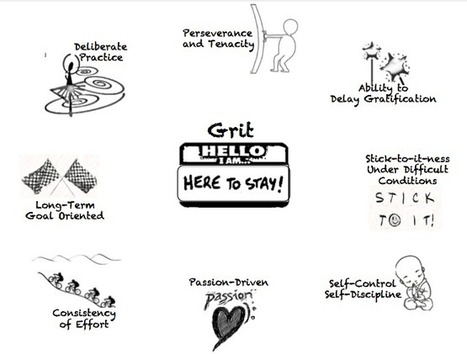
Are you interested in learning more about how grit is a 21st century skill? Jackie Gerstein provides an in-depth look at grit in this post. You will find an image with a great definition, a TED Talk by Angela Duckworth on grit, as well as a link to a quiz that allows you to measure your grit level compared to others, and a list of some of the "characteristics or dispositions of Grit."

Perhaps you are asking yourself how can I work grit into my classroom? 

For example, project based learing, or having students work on independent study projects (think passion-driven) provide opportunities for students to use some of the dispositions discussed, such as tenacity, self-control, self-discipling and long-term goal oriented. 

As always, there is a robust list of additional resources.

Scooped by Beth Dichter
May 31, 2013 9:59 PM
Scoop.it!

Gamification and Instructional Design

Gamification and Instructional Design | Eclectic Technology | Scoop.it
When I sit down and think about designing a new class, Gamification comes to mind. It really is a combination of lots of learning theories delivered a little differently. This is where my mind goes...
Beth Dichter's insight:

Are you considering re-writing some curriculum and incorporating gaming? This infographic provides a great template to help guide you through the process. The six steps are shown in the image above and clicking through to the post will provide additional information on each step. And for those that may be viewing with seeing the image the six steps are below:

* Learning Outcomes

* Big Idea

* Storyboard the Game

* Learning Activities

* Build the Team

* Add Game Dynamics

Boyd Drewelow's curator insight, June 7, 2013 3:39 PM

Gamification

Ryan Cheek's curator insight, August 7, 2013 12:38 PM

I thought that this was a classroom? 

Mina Valai's curator insight, September 15, 2014 2:54 PM

6 easy steps to follow when designing a new class.

Scooped by Beth Dichter
May 30, 2013 8:49 PM
Scoop.it!

Why is the Sky Blue? | Interactive Infographic

Why is the Sky Blue? | Interactive Infographic | Eclectic Technology | Scoop.it

"Some say it's due to the blue oceans.
Some think it's what's in the atmosphere.
Some believe it's because outer space is blue. We uncover the real reason."

Beth Dichter's insight:

A great infographic that explains why the sky is blue... you have to click through to learn why. Do your students understand why the sky is blue? Consider showing them this infographic.

No comment yet.
Scooped by Beth Dichter
May 29, 2013 9:18 PM
Scoop.it!

SAMR + Bloom's + iPad Apps = The Padagogy Wheel v2.0

SAMR + Bloom's + iPad Apps = The Padagogy Wheel v2.0 | Eclectic Technology | Scoop.it
Beth Dichter's insight:

Combine Bloom's Taxonomy with iPad apps and add on the SAMR Model and this is what you get...a new version of the Padagoy Wheel!

Larry Huyser's curator insight, June 4, 2013 11:55 PM

Apps as they relate to Bloom's


Randy D. Nichols's curator insight, June 6, 2013 6:14 PM

hehe.. Pad-ogogy.. get it? like iPad mixed with pedagogy?
At any rate, yet one more Bloom Wheel connected to things digital! 

Cecilia Bullough's curator insight, March 6, 2014 1:18 PM

SAMR & iPad apps

Scooped by Beth Dichter
May 28, 2013 9:39 PM
Scoop.it!

Take notes and navigate videos with VideoNot.es

Take notes and navigate videos with VideoNot.es | Eclectic Technology | Scoop.it

"VideoNot.es is a tool that lets you take notes while watching a video. It’s Google Drive App that works on all browsers and was designed for students and educators. Your notes are saved in Google Drive, so you need a Google account to use VideoNot.es. The tool works on Mac, Windows, and Unix, but it’s not iPad friendly (yet)."

Beth Dichter's insight:

This tool allows you to annotate videos with many browsers and save to your Google Drive. The post explains how to use it and provides a video that gives you a great overview. It also has a list of five ideas on how you might use this in a class, including:

* Creating a video guide for students (or having students create a video guide for upcoming classes)

* The ability to share through Google Drive so you might share notes with students, students might share notes with other students, or students might work collaboratively on projects.

There is also a discussion on how the tool worked in a variety of browsers.

No comment yet.
Scooped by Beth Dichter
May 27, 2013 10:26 PM
Scoop.it!

5 Great Mapping Tools to Use in the Classroom

5 Great Mapping Tools to Use in the Classroom | Eclectic Technology | Scoop.it
Fantastic mapping tools, each with brilliant interactive ways for students to get involved and literally put themselves on the map in new and exciting ways!
Beth Dichter's insight:

The five mapping tools discussed are:

* QuikMap - allows you to doodle on Google maps

* Atlas - add photos and comments to maps

* Mapskip - share stories, pictures, videos and sound recordings about all the places in our lives

* VidMap - add video and audio to maps

* If It Were My Home - allows you to compare living conditions in your country to other countries

All are free and all provide great options for students to explore maps in new dimensions.

Gabrielle's curator insight, May 14, 2017 10:05 PM
Great resources on Digital mapping. All interactive
Scooped by Beth Dichter
May 26, 2013 11:00 PM
Scoop.it!

9 Digital Learning Tools Every 21st Century Teacher Should Be Able To Use

9 Digital Learning Tools Every 21st Century Teacher Should Be Able To Use | Eclectic Technology | Scoop.it

"The 21st century is a time of rapid change, and while the brain may not be changing (much), the tools we use to feed it are.

This puts the 21st century teacher in a critical spot–of mastering constantly evolving technology and digital learning tools–the same tools their students use every day.

So below, we’ve started with 9 such tools, but this is obviously just scratching the surface. This list is not meant to be exhaustive (obviously), or even authoritative (but rather, subjective)."

Beth Dichter's insight:

Each tool listed is described and there is an explanation that discusses why a 21st century teacher should be able to use the tool. Tools include Evernote, RSS or Social Readers, Google+ Community, YouTube, iTunesU, Cloud-Based Word Processors, DropBox, Evernote, Pocket and Zotero. 

Are there tools you think are necessary for teachers to master?

tatiana lopez's curator insight, July 16, 2013 8:25 PM

Every teacher by the 21st Century should be able to use the nine digital learning tools to help educate our students!


RSS OR SOCIAL READERS, DROPBOX, EVERNOTE, GOOGLE+, POCKET, YOUTUBE, ZOTERO, ITUNES U, CLOUD BASED WORD PROCESSORS.....


JoAnn Delaney's curator insight, August 6, 2013 11:50 AM

Do you have these gems in your pirate trasure chest? Arrrr! #tlap #21stedchat

Keisha Lewis's curator insight, August 24, 2013 9:58 AM

Still have a few to catch up on.

Scooped by Beth Dichter
May 25, 2013 8:41 PM
Scoop.it!

Rutgers Beginner's Guide to Research

Rutgers Beginner's Guide to Research | Eclectic Technology | Scoop.it
Beth Dichter's insight:

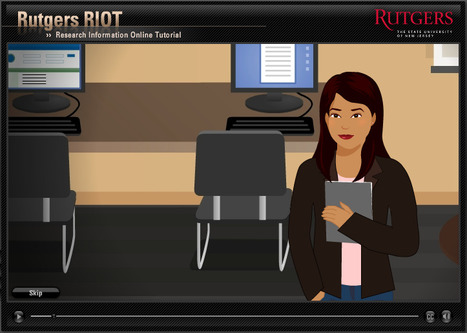
If you are looking for an interactive tool to help your students learn how to do research check out this guide from Rutgers. There are five modules that explore:
* Selecting a Topic

* Finding Sources

* Selecting Keywords

* Identifying Citations

* Evaluating Sources

This resource is best used with upper high school and college students. There is another resource put out by the Kentucky Virtual Library called How To Do Research. This resource is designed for elementary and middle school students. There are six sections in this resrource: Plan, Search for Information, Take Notes, Use the Information, Report, and Evaluate. Each section is interactive. However, the section on Search for Information :  Please note that the Kentucky Virtual Library section is not accessible unless you live in Kentucky and have a user name and password. However, most schools now have access to digital resources and the other parts of this resource are worth checking out.

The link to this is http://www.kyvl.org/kids/homebase.html. It is also available in a flash version.

Anita Vance's curator insight, May 30, 2013 9:54 AM

a visual aid - helpful for upper grades, or as a tutorial.  Any way we can help with examining a topic and planning the search is appreciated.

Peg Becksvoort's curator insight, May 30, 2013 5:29 PM

Look at this from the POV of when and how you will teach research skills. Students need consistent requirements for excellence and accountability.

johanna krijnsen's curator insight, June 6, 2013 3:49 AM

a great tool to teach your students how to research

Scooped by Beth Dichter
May 24, 2013 11:25 PM
Scoop.it!

25 Ways to Institute Passion-Based Learning in the Classroom

25 Ways to Institute Passion-Based Learning in the Classroom | Eclectic Technology | Scoop.it

“When students are motivated to learn, they naturally acquire the skills they need to get the work done.” Sir Ken Robinson

Common sense tells us that students are more likely to learn if they are motivated by and engaged with the curriculum or project at hand. Now, hard science is telling us the same thing.

When students are passionately engaged in their learning - when they are mesmerized by their learning environment or activities – there are myriad responses in their brains making connections and building schema that simply would not occur without that passion or emotion.

Beth Dichter's insight:

Are you looking for some ideas on how to bring passion-based learning into the classroom? This post provides 25 suggestions, and each has a short description. Below are a few to whet your appetite, Click through to the post for more.

* Share your own passions with students.

* Let students share their passions.

* Connect students' passions to real-life scenarios.

* Help connect students to a new subject through an existing passion.
* Let yourself be inspired by other impassioned educators. 

No comment yet.
Scooped by Beth Dichter
June 4, 2013 10:30 PM
Scoop.it!

To Get Students Invested, Involve Them in Decisions Big and Small

To Get Students Invested, Involve Them in Decisions Big and Small | Eclectic Technology | Scoop.it

"When asked why he became a scientist, Nobel Laureate Isidor Rabi attributed his success to his mother. Every day, she would ask him the same question about his school day: “Did you ask a good question today?”

“Asking good questions – made me become a scientist!” Rabi said.

Questions are critical, and how to manage and navigate a good question requires practice. “Coming up with the right question involves vigorously thinking through the problem, investigating it from various angles, turning closed questions into open-ended ones and prioritizing which are the most important questions to get at the heart of the matter...”

Beth Dichter's insight:

How do we as educators, and our students ask the "right questions" and have our students stay on the question (and learn how they can ask pertinent questions)? How do we do this as more technology is embedded in our schools?
This post states that our questions need to be deeper, "to be open ended, elastic and invite multiple interpretations. Learning outcomes based on the question need to be defined and articulated,  and experiences to achieve those outcomes need to be created with student engagement in mind. Engagement alone is not enough. But engagement matched with outcomes around a carefully worded question propels student learning."

With the Common Core using the Depth of Knowledge as guide, the need for students (and teachers) to understand that we need to move students to Level 3 - strategic thinking and Level 4 - extended thinking, the ability to have students learn how to ask deeper questions is critical.

Ante Lauc's comment, June 5, 2013 4:06 AM
Did you ask a good question? How many parents motivate their children with this question?
Scooped by Beth Dichter
June 3, 2013 10:22 PM
Scoop.it!

29 Games Kids Can Play to Try Engineering -FreeTech4Teachers

29 Games Kids Can Play to Try Engineering -FreeTech4Teachers | Eclectic Technology | Scoop.it

"Try Engineering is a site that hosts lesson plans and games designed to get students interested in engineering. The lesson plans, 114 in all, are arranged according age and engineering topic. The lesson plans can be downloaded as PDFs."

Beth Dichter's insight:

This site has great information on engineering, including 29 games that students may play. The majority of games are geared to students in elementary and middle school (although some would work in high school). With STEM becoming a push in many schools it is great to find sites like this that provide a range of resources. 

No comment yet.
Scooped by Beth Dichter
June 2, 2013 10:26 PM
Scoop.it!

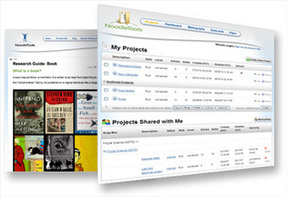
NoodleTools : Show Me Information Literacy Modules

NoodleTools : Show Me Information Literacy Modules | Eclectic Technology | Scoop.it

"NoodleTools has created easy to use modules for the classroom and home.

Use a Show Me© module to enhance your teaching and guide students in information evaluation. What constitutes credible information? How does source type contribute to relevance, authority and point-of-view? How do I evaluate and cite born-digital images and online sources? All modules incorporate common core concepts."

Beth Dichter's insight:

Noodle Tools has a great feature that allows students to learn more about information literacy. They have split this into three sections (quoted from the site):

* Starter - Introduce younger researchers to topics of authorship, source type, and the importance of critical thinking and original work. (Geared to elementary and middle school.)

* Junior - Build information literacy skills in the developing scholar with added support for a variety of source types and digital literacy skills. (Geared to middle-high school.)

* Advanced - Promote research independence through advanced information-evaluation support that covers a broad range of source types. (Geared to high school and college.)

Below are the questions asked in the Junior Tool when students look at a webpage. Each page has one of the questions below with additional questions that explore the concept and images of one or more Web pages for students to reference as they consider the questions.

* What is a Web page?
* What is a Website?

* What is the difference between a Web Project and a Web site?

* How do I evaluate the author?

* How do I evaluate the publisher?

* Is recent information important to my topic?
* How do I fact-check the information? 

* How do I evaluate the credibility of the author's arguement?
* How do I cite a Web page?

* Which URL should I use? 

Tracy Shaw's curator insight, June 3, 2013 7:08 PM

Debbie Abilock's work is always thorough! Love it!

Maria Persson's curator insight, June 12, 2013 11:38 PM

Absolute must resource if you think teaching our students about academic integrity is important - espcially in the wake of the tsunami of information that we are experiencing!  Thanks again Joy Rosario.

Scooped by Beth Dichter
June 1, 2013 9:49 PM
Scoop.it!

What Works in Schools Is Real Work

What Works in Schools Is Real Work | Eclectic Technology | Scoop.it

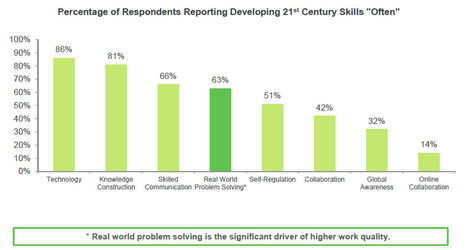
"The best type of curriculum for preparing students for the workforce is one that focuses on real-world problem-solving. It sounds simple, but for the first time, we have clearly established a link between students learning 21st century skills and future work success."

Beth Dichter's insight:

This report is based on a survey done by Gallup for Microsoft Learning and the Pearson Foundation. There are many findings of interest in this report. Three are below (quoted from the report).

* The majority of respondents (59%) reported that they agree or strongly agree that they developed most of the skills they use in their current job outside of school. Only 15% disagree or strongly disagree, indicating they felt that they developed these skills in school.

* Developing 21st century skills in the last year of school is positively correlated with higher perceived work quality later in life. In fact, those who have high 21st century skill development are twice as likely to have higher work quality compared to those who had low 21st century skill development.

* Across the 21st century skills included in this study, real world problem-solving is the significant driver of higher work quality; however, less than two-thirds (63%) of respondents reported developing this skill often in the last year of school and that number drops to less than half (39%) for high school graduates

Is your school providing students with these skills? The survey also noted that 59% of participants reported learning these skills outside the classroom. To go directly to the report: http://www.gallup.com/strategicconsulting/162821/21st-century-skills-workplace.aspx.

Carolyn Williams's curator insight, June 2, 2013 5:58 AM

Working in a corporate industry for twenty three years and seeing the rise of operators, school leavers would benefit from 21st technological studies and how that applies to the workplace.

Larry Davies's curator insight, June 2, 2013 3:34 PM

The link is real, and PBL is the key.

Scooped by Beth Dichter
May 31, 2013 10:31 PM
Scoop.it!

Part 4… 23 Formative Digital Resources … A STEM, PBL, Common Core Series

Part 4… 23 Formative Digital Resources …  A STEM, PBL, Common Core Series | Eclectic Technology | Scoop.it

The fourth in a series of five posts on STEM, PBL and the Common Core. Each has a different focus. The previous three posts are also available on this page.

Beth Dichter's insight:

Formative assessments, formative learning, the two go hand in hand. This post explores 23 resources that can be used in STEM classes and for Project Based Learning, Read the post and find resources that will help look at formative assessments in many areas including:

* Activities

* Simulations

* Games

* Reflections

* Journals

* Peer review

* Videos

* Peer and Teacher interaction

* Readings

* Critical and Creative brainstorming and thinking

Ante Lauc's curator insight, June 1, 2013 4:43 AM

I prefer love and freedom and look everything through these criterias.

Scooped by Beth Dichter
May 30, 2013 10:25 PM
Scoop.it!

iPad Trial in Education - Kingston Grammar School

iPad Trial in Education - Kingston Grammar School | Eclectic Technology | Scoop.it
Beth Dichter's insight:

The Kingston Grammar School began an iPad Trial in Sept. 2012. Their ICT Director, Matt Brittland, designed evaluations of the process and has just published a detailed report. Links to the following items are available from this website.

* iPad Report (2012-2013 - full report)

* iPad Trial: Launching to Heads of Departments (presentation)

* iPad Launch to all Staff - Inset: How it Worked (Resources Included)

* How to Evaluate iPad Use in Education

* Lots of iPad Video Tutorials

The final report provides graphs of evaluations from teachers and students. If your school is considering bringing in iPads take the time to review these materials. 

Tamsyn Smith's curator insight, June 5, 2013 9:40 AM

Loads of links to what Matt Britland did at his school with iPads

Scooped by Beth Dichter
May 30, 2013 7:19 PM
Scoop.it!

From Technology Integration to Learning… by Design

From Technology Integration to Learning… by Design | Eclectic Technology | Scoop.it
Beth Dichter's insight:

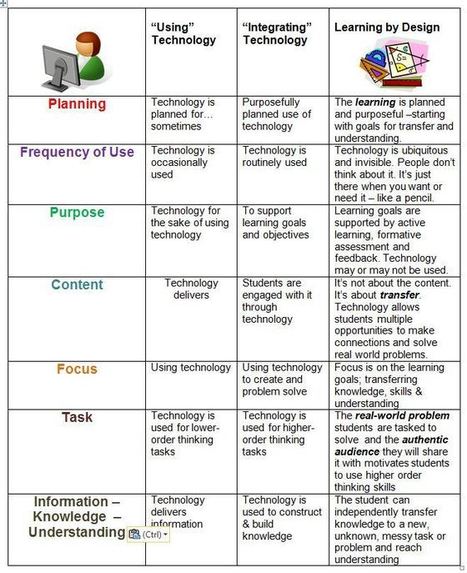
Check out this chart that looks at the progression of :"using technology" to "integrating technology" to "learning by design" (think Wiggins and McTighe). 

The chart looks at seven areas: Planning, Frequency of Use, Purpose, Content, Focus, Task, and Information-Knowledge-Understanding.

Consider how you use technology in your practice and see where you fall on the chart. Are there areas that you would like to shift?

Dean Mantz's curator insight, January 1, 2014 2:09 PM

This is a well developed table addressing the integration of technology into classroom instruction all while basing pedagogy via the Learning By Design framework. 

Rebecca Wilkins's curator insight, July 17, 2015 9:22 PM

This is a nice marriage of technology integration and UbD.

Jennifer McGuff's curator insight, August 1, 2015 5:56 PM

Really like this graphic of technology integration and learning by design.

Scooped by Beth Dichter
May 29, 2013 8:51 PM
Scoop.it!

8 Steps To Great Digital Storytelling - Edudemic

8 Steps To Great Digital Storytelling - Edudemic | Eclectic Technology | Scoop.it

"Stories bring us together, encourage us to understand and empathize, and help us to communicate. Long before paper and books were common and affordable, information passed from generation to generation through this oral tradition of storytelling. Consider Digital Storytelling as the 21st Century version of the age-old art of storytelling with a twist: digital tools now make it possible for anyone to create a story and share it with the world."

Beth Dichter's insight:

This post not only provides eight steps to help you create digital stories, it provides resources for every step along the way. 

After a brief look at why digital stories the post provides six ideas of what makes a great digital story. They "are personal, begin with a story/script, are concise, use readily available source materials, include universal story elements and involve collaboration at multiple levels."

It continues by providing a detailed look at each step which include ideas of ways to work with students in each step plus there links to many resources throughout the post.

Digital storytelling is a great tool to use with the Common Core standards, and this post will provide you with great ideas and resources!

silvermanmc's curator insight, May 30, 2013 7:12 PM

Storys are a key part of any instructional design, and in other areas of professional development as well.

Charmaine Thaner's curator insight, June 10, 2013 7:20 PM

My son who happens to have Down syndrome LOVES being a public speaker at education conferences.  I think the digital storytelling would be a great addition to his talks about inclusive education!

Susan Wegmann's curator insight, June 25, 2013 9:03 AM

Classic help for the process of digital storytelling

Scooped by Beth Dichter
May 28, 2013 9:16 PM
Scoop.it!

How PBS LearningMedia Can Strengthen Students' Media Literacy for Common Core | Edspace

How PBS LearningMedia Can Strengthen Students' Media Literacy for Common Core | Edspace | Eclectic Technology | Scoop.it

"PBS LearningMedia, a free destination for instant access to tens of thousands of classroom-ready, digital public media resources including videos, games, audio clips, photos, and lesson plans, provides core subject area resources. Included in this resource library are resources that address media literacy skills underlying the basic tenants of Common Core State Standards."

Beth Dichter's insight:

The Common Core standards state: 

"To be ready for college, workforce training, and life in a technological society, students need the ability to gather, comprehend, evaluate, synthesize, and report on information and ideas, to conduct original research in order to answer questions or solve problems, and to analyze and create a high volume and extensive range of print and nonprint texts in media forms old and new."

This post shares a few of the many resources available at PBS LearningMedia (at no cost). The focus here is on strengthening media literacy. Clicking through to PBS will provide you with access to over 30,000 resources.

No comment yet.
Scooped by Beth Dichter
May 27, 2013 9:54 PM
Scoop.it!

5 Steps Needed To Master The Common Core (Infographic)

5 Steps Needed To Master The Common Core (Infographic) | Eclectic Technology | Scoop.it

Steps to mastering the Common Core presented in an infographic that provides a lighter viewpoint. The gist of what we need to know:

* Learn – Knowing the path in front of you is half the journey

* Reflect – Ninjas continually focus on their strengths as well as opportunities for improvement

* Leap – Immerse yourself in the CCSS by integrating the language of the standards into your classroom

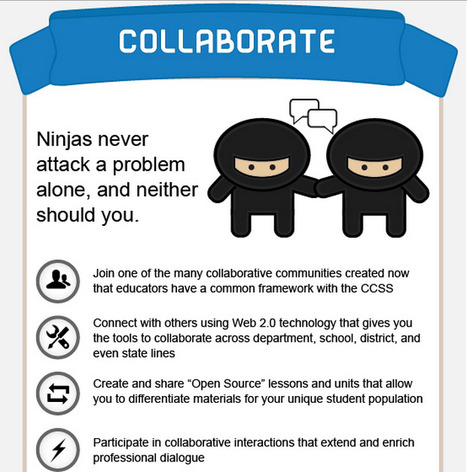
* Collaborate – Ninjas never attack a problem alone, and neither should you

* Execute – Use your new educational arsenal to fulfill your destiny as a Core Ninja.

To see the infographic click through to the post.

Beth Dichter's insight:

Check out the five degrees to becoming anexpert on the Common Core in this infographic!

No comment yet.
Scooped by Beth Dichter
May 26, 2013 10:51 PM
Scoop.it!

Storytelling the Stillmotion Way: Part 2

Storytelling the Stillmotion Way: Part 2 | Eclectic Technology | Scoop.it
Learn how to use research to develop keywords to guide the pre-production process in part two of our storytelling workshop series with Stillmotion.
Beth Dichter's insight:

This is the second video of four that describe how to "write" a story that you will be filming. From this page you will be able to find the first of the four and links to the additional two. 
The first video discusses the need to understand the four P's:

* People: Who is in the story?

* Place: Where does the story take place?
* Plot: What is the conflict and the journey?

* Purpose: Why should anyone care about this?

The second video discusses the need to do research and to find keywords that relate to People, Place and Plot. 

The third video moves on to the final preparation work that needs to be done before filming.

The fourth video brings it together and provides a link to worksheets that you can download and use.

If you are introducing storytelling to your students, or doing it yourself for the first time these videos provide a background that will help make your project successful.

No comment yet.
Scooped by Beth Dichter
May 24, 2013 11:51 PM
Scoop.it!

Free Technology for Teachers: Every Stock Photo - A Search Engine for Free Images

Free Technology for Teachers: Every Stock Photo - A Search Engine for Free Images | Eclectic Technology | Scoop.it

"The next time that you need to find some high resolution images for a slideshow skip the Google Image search and head over to Every Stock Photo. Every Stock Photo is a search engine for public domain and Creative Commons licensed pictures. When you search on Every Stock Photo it pulls images from dozens of sources across the web."

Beth Dichter's insight:

Check out this site the next time you need to find pictures for multi-media presentations. It only searches for images in the public domain (and that are Creative Common licensed). Please note that the photos at their website are free to use but they also provide access to photos from Fotolia which may require some payment.

Sue Alexander's curator insight, May 25, 2013 10:05 PM

What a wonderful source of images plus built in lesson in digital citizenship. I love having to opportunity to discuss both attribution and resolution during an image search. 

Natassa Dourvetaki's comment, May 26, 2013 8:32 AM
Definitely it's worth spending some time across this site!