


Every opera you’ve ever heard, every painting you’ve ever admired is reducible to chemical signaling in the composer’s or artist’s brain.

 Your new post is loading...
 Scoop.it! Every opera you’ve ever heard, every painting you’ve ever admired is reducible to chemical signaling in the composer’s or artist’s brain. No comment yet.
Sign up to comment
Scoop.it!

not a tutorial, this tool shows what you are creating as you code
Beth Dichter's insight:
Are you interested in learning coding? Thimble helps you create web pages. You type html on the left side and see your work appear (or not) on the right side. In other words "you get instant feedback." There have many questions online recently about the need for students to learn how to code. This tool provides students with the option of learning through exploring. It may not work for all students. For those who would prefer tutorials there are some provided at the end of the post.
Scoop.it!

"OpenEd contains the largest catalog of educational videos aligned to Common Core and other standards. Choose a standard group (Math, Language Arts, Next Gen Science) followed by a category. Then pick a standard and you will see resources for it. You can optionally filter by selected grades (K to 12). If you want to search for resources by keyword instead of a standard, click on the "Search By Keyword" tab above. You can also create courses on OpenEd by registering for an account."
Beth Dichter's insight:
OpenEd is a new source of materials that was founded "with the goal of enabling teachers to have access to the best educational resources (videos, games, and exercises) for their students, especially for finding the right resources for Common Core standards." It is easy to search by grade level and standard, quickly drilling down to the one you need. If you are looking for videos to use with students this may become one of your "go to" sites!
Scoop.it!

FREE Visual Literacy Teacher Resources from the creators of World Literacy Day… Spellodrome
Beth Dichter's insight:
Check out these great Visual Literacy Teacher Resources that will help you teach visual litearcy skills to your students. There are four downloads available, for ages 4 - 7, 8 - 10, 11 - 13 and 14 - 18. Each is 3 pages long and provides three images. Each image incorporates four learning tasks with a teaching note for each as well as a Ready to Learn section and a Follow Up Action. A portion of the first page of the download for ages 4 - 7 is shown above.
Scoop.it!
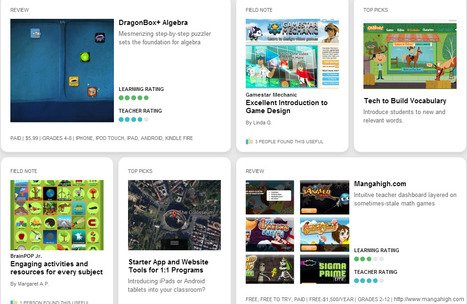
"There are no limits to what a great educator can achieve when they have the right tools. Graphite, a free service from Common Sense Media, helps teachers find, understand, and share the best digital learning products available."
Beth Dichter's insight:
Graphite has just been launched by Common Sense Media. If you have not used resources from Common Sense Media it is worth your time to check the site out. They are an ad free site with a focus on education. This new website will help you find digital learning products that have been rated by "professional educators – early childhood development experts, doctorates in education, and teachers with hands-on classroom chops." What will you find at this site? Information about websites, games and apps, with ratings "based on our detailed rubric that scores each product on 15 dimensions. Plus, we tag each product for subjects, skills, and grade band and map them to Common Core and other state standards." You can become a member for free and have access not only to Graphite, but also to many other great resources! 
Elena Keating's curator insight,
August 15, 2013 4:41 PM
Here is a site for those few sleepless night I may experience. I can trawl through and see what I could adopt
Scoop.it!
Beth Dichter's insight:
From Noodle Tools, an infographic that teaches you how to look carefully at photos and ask questions to determine if it has been altered. The infographic also walks you through the steps to take to cite an image using MLA Advanced. 
Nancy Jones's curator insight,
June 24, 2013 9:09 AM
ThisTheirs is a great visual tool for the classroom to help guide students as they use images more frequently in their work. 
Tracy Shaw's curator insight,
June 24, 2013 4:08 PM
Noodle Tools - great tutorials for students and teachers! Thoughtful, thorough work everytime.
Scoop.it!
From
vimeo

------- Cardiff Design Festival AWARD W|INNER // The Best of Welsh Design awards talented designers and design thinkers across Wales------- A viral video, explaining…
Beth Dichter's insight:
A video that helps students learn about online safety.
Scoop.it!

"In the Digital Classroom, teachers have many opportunities to design flexible and engaging student-driven learning experiences that allow them to create. Adopting this style of teaching and learning can be overwhelming, especially when being expected to embrace new technology and also implement the Common Core Standards at the same time."
Beth Dichter's insight:
If you are looking for some apps that help address Common Core Standards this post will help you out. Below are the apps listed with a short description of how you might use them...but more information is available when you click through to the post. * Popplet + Common Core Mastery - Have students write a script that address content and Common Core standards * ThingLink Mobile - Take an image and tag it with video and text and share * Pixntell - Select your images, add narration and a video will be created which you may share...special effects also available * Educreations - An app that turns your iPad into a recordable whiteboard. Have students create tutorials, presentations and more * ShowMe - Another app that allows you to record voice while using your iPad as a whiteboard Students love to create, and these apps are tools that allow students to be creative and address Common Core standards.
Scoop.it!
Beth Dichter's insight:
If you are looking for ways to use ThingLink with your students you should check out this slideshow available on Google Drive. It provides 66 (and growing) ways to use ThingLink in the classroom. Some of the suggestions are geared to teachers, and others are student oriented. ThingLink is free to educators. If students do not have an email they share a way you may add students to your account. They have recently put out an app (free) for the iPhone and iPad.
Scoop.it!

"...well-run organizations employ technology as a way to improve their performance...Far too often, school leaders fail to consider how technology might dramatically improve teaching and learning, and schools frequently acquire digital devices without discrete learning goals and ultimately use these devices in ways that fail to adequately serve students, schools, or taxpayers."
Beth Dichter's insight:
This report, published by the Center for American Progress, looks "at the issue of how students used technology and the return that educators were getting on their technology investment." The data comes from the National Assessment of Educational Progress, or NAEP, also known as the National Report Card, and is considered "one of the richest sources of national student survey data" A few of the findings are listed below as are the sections included in the article. By clicking through you will find additional information on each of the findings and much more. You may also download the report as a pdf. * Students often use technology for basic skills. * Students from disadvantaged backgrounds are less likely to have access to more rigorous STEM-learning opportunities. Additional sections include: technology's potential, technology's tough questions, the growing digital divide, fulfilling the promise, recommendations and conclusions.
Scoop.it!
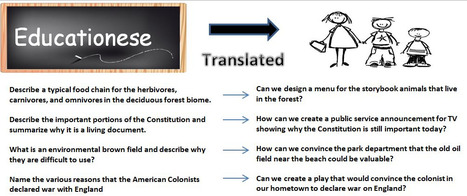
"I really like Driving Questions. In fact, I like them so much more then Essential Questions. You might ask why? I think it just might be my affection for the revised Bloom’s Taxonomy. You may remember that in the revision the different levels were changed into action."
Beth Dichter's insight:
In this post Gorman explains why he likes driving questions and how they differ from essential questions. He states "they allow students to work together in the amazing process of divergent thinking." Gorman also notes that it is difficult to create good driving questions (and one might say the same can be true with essential questions). The image above looks at questions asked in "educationese" and how one might translate that to a driving question. In addition he provides links to quite a few resources that include: * A resource that looks at concepts of the driving question * A variety of resources on Project Based Learning, including how to craft a driving question (which also includes a video) * Practice with driving questions
Scoop.it!
Beth Dichter's insight:
Newsela is a free website that provides news for students. It is geared to students in grades 4 - 12 and will help students build close reading and critical thinking skills in non-fiction reading comprehension. Each article has a quiz (aligned to Common Core) allowing you to quickly see if your students are on track. And last there are great teacher tools. You may assign articles, review student quizzes and track Common Core mastery. 
Jackie Keith's curator insight,
June 19, 2013 8:31 AM
Students can use it without registering by clicking "No Thanks" and can select different Lexile versions of the same article. 
Chrissy Z's curator insight,
September 22, 2017 12:47 PM
Reading comprehension for students who are English Learners
Scoop.it!
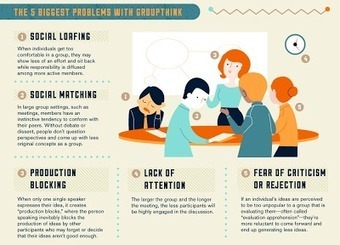
"Brainstorming, for example, which has been practiced for decades in every boardroom and classroom across America, has been shown almost never to work. Brainstorming relies on the conceit that any idea is a good idea, and that feedback is the same as criticism which kills spontaneity. Both of these notions are completely false, and taken as the underpinnings of creativity, they yield surprisingly few and alarmingly thin suggestions in response to any group-think exercise."
Beth Dichter's insight:
So does brainstorming work? Check out the 2 minute video that looks at this issue (embedded in the post) as well as many other great resources including: * An infographic "Move Beyond Brainstorming" that provides suggestions for more effective group work and discusses the concept of "lateral thinking". * A second infographic "Are We Brainstorming the Wrong Way?" that looks at ways to generate ideas through interpersonal learning. * And one final infographic from Mindjet 'Between Minds" that provides "an ongoing taxonomy of team dynamics" by comparing the left brain and right brain.
Jackie Keith's curator insight,
June 18, 2013 10:26 AM
The SCAMPER technique can help. http://www.brainstorming.co.uk/tutorials/scampertutorial.html |
Scoop.it!
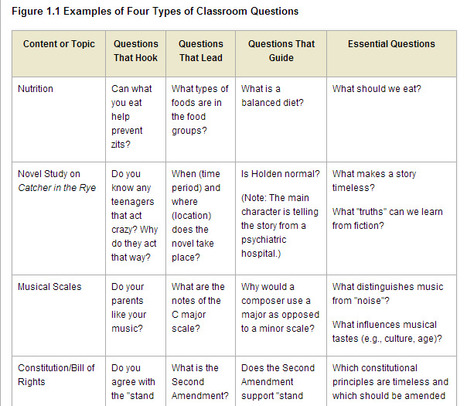
"Teachers regularly pose questions to their students, but the purpose and form of these questions can vary widely. This book is about a particular kind of question—one we call "essential." So, what makes a question "essential"? Let us begin by engaging you in a bit of inquiry using the following concept-attainment exercise to examine the characteristics of an essential question. The exercise has three parts, as explained in the next several paragraphs."
Beth Dichter's insight:
Wiggins and McTighe have a new book out, "Essential Questions: Opening Doors to Student Understanding." ASCD has Chapter 1 available on their website at no cost. This chapter explores "What Makes an Essential Question." Learn more about: * Look through essential questions based on subject area including history social studies, mathematics, language arts, science, arts, and world language * Learn the seven defining characteristics of essential questions This first chapter is rich in content and will help you in understanding the value of essential questions and how to create them for your class. As we move into Common Core this is a critical area that will help guide our classes and it is a great resource to have at our fingertips. 
EduClick_España's comment,
June 27, 2013 9:13 AM
as an assessment addict, i just love this post;) Thank you so much and congrats!

Louise Robinson-Lay's comment,
June 27, 2013 5:47 PM
Thanks for your comment. It is a useful article :)
EduClick_España's curator insight,
December 8, 2014 12:09 PM
"Teachers regularly pose questions to their students, but the purpose and form of these questions can vary widely. This book is about a particular kind of question—one we call "essential." So, what makes a question "essential"? Let us begin by engaging you in a bit of inquiry using the following concept-attainment exercise to examine the characteristics of an essential question. The exercise has three parts, as explained in the next several paragraphs."
Scoop.it!
Beth Dichter's insight:
Have you considered using songs as a way to teach your students, specifically protest songs that have helped shape history? This site has brought together a wide variety of protests songs and has them searchable in the following categories: * Anti-apartheid * Anti-war * Civil rights * Anti-poverty * Women's Rights * Other Once you choose a song you will be taken to a page that has the history of the original song (album, writer, year, artist, producer) as well as the lyrics, a short history of the song, a history of the song, a video, and possibly art. This site asks that you share your voice!
Scoop.it!
Beth Dichter's insight:
The 10 iPad projects included in this post are from a presentation at ISTE 2013. Some of you may know of TCEA (Texas Computer Education Association) for their detailed list of iPad apps. This post will provide you with 7 projects for students in elementary school, using a variety of iPad apps. Some of the projects listed are: * Research and Explore, Create & Publish a Media Rich Text * Create a Digital Puppet Show to Retell a Story * Create Visual Illustration of Fractions There are also four additional projects including: * Build a QR Talking Museum You can also view the presentation presented at ISTE (pdf download). And if you have not seen the great spreadsheet of iPad apps mentioned above click on this link: http://www.tcea.org/ipad. 
Simon Vasey's curator insight,
June 26, 2013 9:47 AM
Some great ideas here with a connection to Bloom's Taxonomy. Always good.
Scoop.it!

I have been blogging for over three years now. I use my blog to: document my thoughts about educational technology and my journey as a connected teacher share educational resources, lesson plans,...
Beth Dichter's insight:
Silvia Langwitch raised an excellent question in this blog post. "How will I find out, if only English speakers read my thoughts, only the ones who feel comfortable in written English will respond?" The image above is also available in Spanich and German. The post includes a number of questions and invites others to respond in their native language...leading to a global conversation and helping us connect, collaborate and communicate!
Scoop.it!
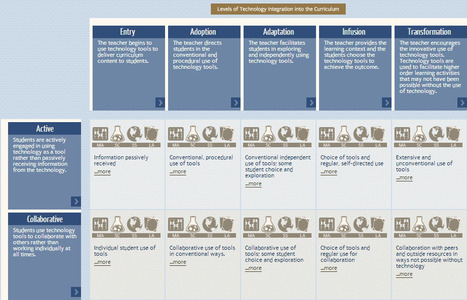
"The Technology Integration Matrix (TIM) illustrates how teachers can use technology to enhance learning for K-12 students. The TIM incorporates five interdependent characteristics of meaningful learning environments: active, constructive, goal directed (i.e., reflective), authentic, and collaborative (Jonassen, Howland, Moore, & Marra, 2003). The TIM associates five levels of technology integration (i.e., entry, adoption, adaptation, infusion, and transformation) with each of the five characteristics of meaningful learning environments. Together, the five levels of technology integration and the five characteristics of meaningful learning environments create a matrix of 25 cells..."
Beth Dichter's insight:
This Tech Integration Mix is provided by the Florida Department of Education. It was recently updated (2011) and provides a variety of resources. Along with the five levels of tech integration and the five characteristics of meaningful learning environments you will find videos that demonstrate technology being used in math, science, social studies and ELA in various levels. Additional resources are also available including a digital tools index for each tool used. 
Mark Ayton's curator insight,
June 25, 2013 5:39 AM
This is an amazing resource. It lays out a matrix of 5 tech use levels against 5 activity types and provides video case studies in each matrix block for Maths, Science, Social Studies and Lauguage Arts. That's 100 easily accessed short video case studies! Although aimed at American K12 teachers the examples cover an amazing array of tools and techniques that will readily transfer to UK FE and Skills. 
Nick Nebelsky's curator insight,
June 26, 2013 12:30 PM
Finally a structure to build a curriculum around.... 
Dana Lott's curator insight,
July 2, 2013 3:42 PM
I saw the author of this philosophy and rubric as ISTE in Denver a few years back. Really great thoughts! Thanks, Jenn!
Scoop.it!
Jimmy Thompson, the quiet student in the front row, is smoothing his hair back nervously with his left hand. His right hand is tapping his pencil, eraser-side down, on the desk rhythmically...His fidgeting is causing other students’ attention waning from the test, and instead being focused on him. Hoping to help ease his frustration, you walk to his desk, bend down slightly, and whisper: “Are you ok? Do you need help with anything?” He looks up at you, defeated, and says the words no teacher wants to hear: “I’m just too dumb for this.” (quoted from source)
Beth Dichter's insight:
How many times has a student in your classroom said something like Jimmy in the description above? What did you do to help him/her understand that each of us have different strengths and weaknesses? Were able to say words that would motivate him/her? This post explores these questions and much more. The sections include: * What do you do? * What Do You Know? * It is all Relative! * The Bell Curve * Inherited Smarts * Disparity of IQ * On Being Smart vs Intelligent * So, Back to Jimmy This post may provide opportunities for you to reflect on how you might change or shift ways you deal with some students. You may also be interested in searching this Scoop.it for information on fixed mindset and growth mindset, concepts explored by Carol Dweck.
Scoop.it!

"Over the last month I've shown the picture that you see to the left during a number of presentations and workshops. I've used the picture to model using pictures to spark students' minds at the beginning of lessons on search strategies. This is a strategy that I've developed by borrowing ideas from Daniel Russell's Search ReSearch activities and Dan Meyer's strategy of using videos and pictures to prompt students to ask math questions."
Beth Dichter's insight:
Richard Byrne shares how he uses images to help students (and teachers) learn search strategies. He suggests using Creative Common-licensed images from Flickr or Fotopedia as many are tagged with locations. He also shares some of the questions that often come up with this picture. Using images to teach search strategies may help those students whom are more visual learners. 
Kimberly House's curator insight,
July 28, 2013 9:39 AM
Great idea for getting curiousity going and engaging students in what can be a dry topic: search strategies!
Scoop.it!
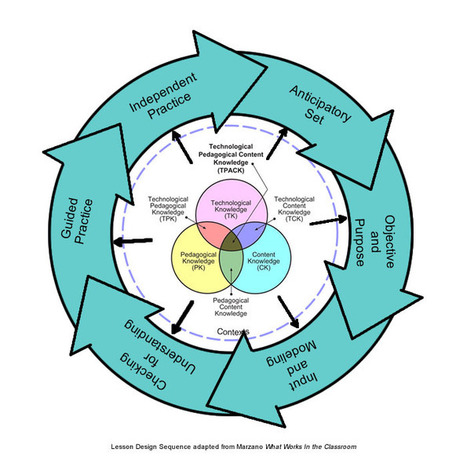
"The basic lesson design sequence for Direct Instruction--established by Madeline Hunter--includes 6 fundamental steps: 1. Anticipatory Set; 2. Objective & Purpose; 3. Input & Modeling; 4. Checking for Understanding; 5. Guided Practice; and 6. Independent Practice."
Beth Dichter's insight:
What if you merge the six steps for Direct Instruction from Madeline Hunter with the TPCK Model? The image above shows how the two might work together. The TPCK Model looks at Technological Knowledge (TK), Content Knowledge (CK), Pedagogical Knowledge (PK), Technological Content Knowledge (TCK), Technological Pedagogical Knowledge (TPK) and last but not least, Technological Pedagogical Content Knowledge (TPCK). This post suggests that components of the Direct Instruction Model relate to the TPCK Model and using both will assist us in designing curriculum. If the TPCK Model is new to you the links below is one the resources that I find valuable. 
Roberto Ivan Ramirez's curator insight,
July 16, 2013 8:06 PM
En el modelo TPACK se agrega una serie de fases metodológicas que de alguna manera puede enriquecer y complementar la creación de proyectos colaborativos académicos, sin embargo esto tiene que pilotearse para observar y monitorear su nivel y grado de efectividad en el caso que esto se intente enfoacar a través de entornos personales de aprendizaje y posteriormente con la ampliación de redes personales de aprendizaje, es parte de lo que intento llevar a cabo con los cursos que implementé: comprobar si efectivamente o no se pueden concretar experiencias tecno pedagógicas significativas y pertienentes a nivel universitario, o con docentes y alumnos de escuelas secundarias, aun no tengo esos datos para compartirlos, pero esperemos relizarlo más adelante. Por lo pronto sigamos tejiendo las conexiones y los nodos con las herramientas y personas invitadas y las que se puedan sumar. 
Deborah Chad's curator insight,
August 31, 2013 5:57 PM
Not so sure I agree with this at first glance- but need to explore it more- design theory seems to change often
Scoop.it!
I'm an evangelist.
Beth Dichter's insight:
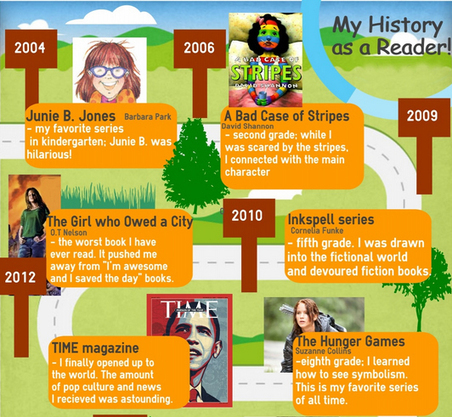
What would happen if you asked your students' to reflect on their reading history...and then have them create an infographic that helps them dig a bit deeper and share what they have learned? According to this teacher the finished product is pretty amazing! She began with an article from the NYTimes "What's Your Reading History? Reflecting on the Self as Reader". Then she had students explore infographics and critique them as a group. The students then explored a number of websites that allow you to create infographics (and links are provided to them) and students chose one to work with. The post provides links to a number of infographics made by the students. And the link to the article at the NYTimes is http://learning.blogs.nytimes.com/2010/03/04/whats-your-reading-history-reflecting-on-the-self-as-reader/?_r=0.
Scoop.it!

More than 1600 federal teaching and learning resources organized by subject: art, history, language arts, math, science, and others -- from FREE, the website that makes federal teaching and learning resources easy to find.
Beth Dichter's insight:
This site organizes many of the free reosurces available through various federal agencies. Subjects covered include Art and Music, Health and Phys Ed., Language Arts, Math, Science, World Studies, U.S. History Topics, and U.S. Time Periods. Resources include lesson plans, animations, primary documents, photos and videos.
Scoop.it!
Beth Dichter's insight:
Along with the poster show above, Top Ten iPad Management Tips and Tricks four additional posters are shown in this post. * Rules for the iPad * iPad Acceptable Use Policy * iPad Rules * iPad Tips If you will be using iPads with students these posters will provide information that is also easy to share with parents and guardians.
Scoop.it!
Beth Dichter's insight:
What if instead of giving homework to our students we asked them to come up with ideas? This chart provides a variety of alternative ways to look at homework. The post describes this as "Rather than simply a list of alternatives to homework, it instead contextualizes the need for work at home (or, “homework”). It does this by taking typical classroom situations–the introduction of new material, demonstrating a procedure, etc.), and offering alternatives to traditional homework assignments." Consider asking your students what they would suggest doing instead of homework. What might you be able to add to these suggestions?
Nancy Jones's curator insight,
June 19, 2013 9:40 AM
Love this! 21st century learning isn't as much about technology as it is thinking .allowing choices and options like this not only allow students choices but the opportunity for deeper thinking. 
Laura Jane's curator insight,
December 16, 2013 12:17 AM
I stole this from Jamie, and couldn't agree more! What a great [and practical] resource to have as we go into the final semester of our internships. This chart is chock full of ideas for creating more authentic and less monotonous homework for students. It focuses on reinforcing, and not memorizing.
These strategies could work for all grade levels, to different extents. This again addresses the quality vs quantity debate. One of my favorite examples is to reinforce a skill that has been taught. It suggests that, instead of asking students to solve 10 word probelms to prove that they know a skill, to have them work in groups to solve, model, and present one deeper thinking word probelm.
This allows students to work in harmony to formulate their ideas, and is a more productive approach to learning. Although some cognitive struggle is good, too much leads to frustration and defeat. Allowing students to work together helps them to actively participate in student-centered learning, and they can better understand what they've learned. I will definitely be printing this chart to put in my lesson planning binder. |












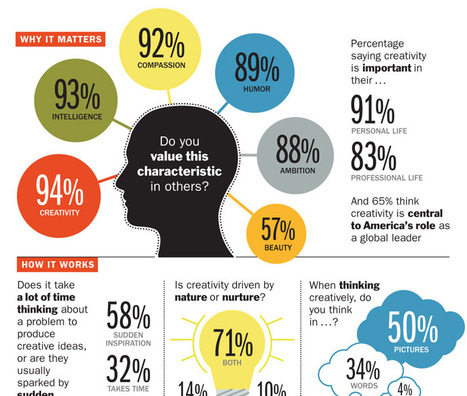
"America grew not just because of its industrial base but also thanks to its inventors and thinkers: Thomas Edison, Jonas Salk, Steve Jobs. Our future lies that way too. Working with the Motion Picture Association of America and Microsoft, TIME polled Americans about creativity in the workplace, schools and government. Does the U.S. still have the juice to be a global leader in innovation? Is our creativity being harnessed at work?"
This infographic shares results of this survey. Do you think American is the world leader in creativity? Do you think creativity is supported in schools or at work? If you would like to see the questions there is a slideshow located at http://business.time.com/2013/04/26/the-time-creativity-poll/