Eclectic Technology
230.9K views | +0 today
Eclectic Technology
Tech tools that assist all students to be independent learners & teachers to become better teachers
Curated by Beth Dichter
Your new post is loading...
Scooped by Beth Dichter
July 26, 2013 10:03 PM
Scoop.it!

5 Tools for Reading Digital Text

5 Tools for Reading Digital Text | Eclectic Technology | Scoop.it

"With text no longer relegated exclusively to the pages between the cover of a book or a magazine, the shift from paper to digital texts has brought on a whole new form of literacy. This upheaval in how we read brings with it new opportunities for learning as well as new challenges.

Experts refer to this phenomenon as transliteracy. In a study published in the peer-reviewed journal First Monday, Dr. Sue Thomas and colleagues defined transliteracy as 'the ability to read, write and interact across a range of platforms, tools and media from signing and orality through handwriting, print, TV, radio and film, to digital social networks'."

Beth Dichter's insight:

When we think about reading today and the diverse platforms for reading we should be thinking of transliteracy. As schools gear up for Common Core assessments we need to be more aware of the fact that our students are reading (and writing) across many platform. There is also the knowledge that when reading online students may be clicking on hyperlinks that lead to other resources and begin to get lost.

Learn about some great tools that may be used to help students stay more focused and organized. This post lists five tools, providing explanations for each of them. The tools discussed are:

* Instapaper

* GoodReader

* Skitch

* Diigo

* Readablity

faith ward's curator insight, February 24, 2015 11:40 AM

Great link to research article about  a study published in the peer-reviewed journal First Monday. Dr. Sue Thomas and colleagues defined transliteracy as “the ability to read, write and interact across a range of platforms, tools and media from signing and orality through handwriting, print, TV, radio and film, to digital social networks." Interesting read.

Scooped by Beth Dichter
July 25, 2013 10:14 PM
Scoop.it!

A Glimpse into the Future of Learning: An Infographic

A Glimpse into the Future of Learning: An Infographic | Eclectic Technology | Scoop.it

"This infographic tells the big story of KnowledgeWorks’ third forecast on the future of learning, Recombinant Education: Regenerating the Future of Learning.  Comprised of twelve key insights with accompanying graphics, it points the way toward a diverse learning ecosystem in which learning adapts to each child instead of each child trying to adapt to school."

Beth Dichter's insight:

You might also want to check out the pdf "Recombinant Education: Regenerating the Future of Learning." The 14 page document states

"This forecast previews five disruptions that will reshape learning over the next decade. Responding to them with creativity rather than fear will be critical to preparing all learners for an uncertain future."

This publication with the infographic provides much food for thought as we education continues to shift into new areas. Use this link to download:

http://knowledgeworks.org/sites/default/files/Forecast3_0_0.pdf

Christina Chavez-Reyes's curator insight, September 18, 2014 2:02 AM

Here's one way in which learning in a knowledge society may happen. Do you see glimmers of this reality emerging? How might it effect what college should be doing for you? Something to think about.

Scooped by Beth Dichter
July 25, 2013 8:41 PM
Scoop.it!

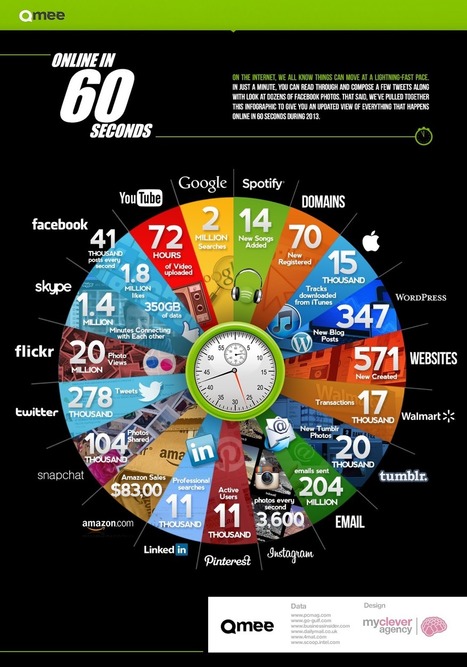
Qmee find out what happens online in 60 seconds

Qmee find out what happens online in 60 seconds | Eclectic Technology | Scoop.it
Beth Dichter's insight:

What happens in one minute on the web? This information is from 2013 according to the post.

Viljenka Savli (http://www2.arnes.si/~sopvsavl/)'s curator insight, April 15, 2014 9:58 AM

This is what life today looks like :). The statistic is incredible and the distances ar

José Antônio Carlos - O Professor Pepe's curator insight, April 15, 2014 11:28 AM

A velocidade de nossos dias em um simples gráfico.

Nicky Mohan's curator insight, April 15, 2014 8:23 PM

All in just 60 seconds

Scooped by Beth Dichter
July 24, 2013 3:10 PM
Scoop.it!

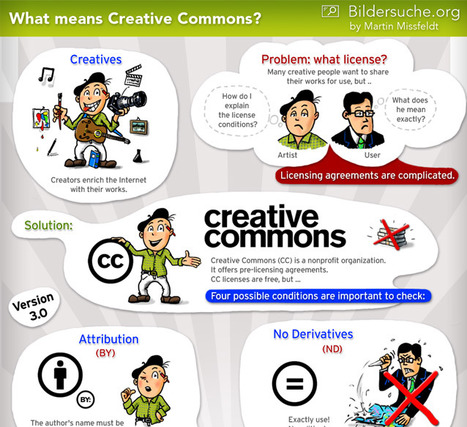
What is Creative Commons Licensing? (Infographic)

What is Creative Commons Licensing? (Infographic) | Eclectic Technology | Scoop.it
The Internet is becoming more and more the focal point of our culture. Spreading plays a significantly role - and it is easy: just a simple mouse click. Cre
Beth Dichter's insight:

This infographic is designed as a comic and explains the ins and outs of using Creative Common images. You might consider using it with students. Originally designed in German this is an English translation by the designer. The infographic designed in German provides an explanation as to how you might read the infographic as a comic, providing short descriptions for each section. You may access the German version at this link: http://www.bildersuche.org/creative-commons-infografik.php and if you use Google translator it will translate the text of the article (but not the infographic).

Dean Mantz's curator insight, July 29, 2013 12:37 AM

As a teacher that strongly believes in visual learning, this is a highly recommended visual to aid in the introduction and understanding of what Creative Commons is and how to use it properly. 

Scooped by Beth Dichter
July 22, 2013 11:16 PM
Scoop.it!

40 Sources for Curated Educational Videos

40 Sources for Curated Educational Videos | Eclectic Technology | Scoop.it
Fortunately, there are some great websites and services that take the guesswork out of finding and sorting educational video content. Here is the most updated list of some of the curated video site...
Beth Dichter's insight:

Finding great videos to use in class may be time consuming. This post provides links to 40 sources for education videos, and best of all, this is a curated list. Each source in the list is a hot link and a brief description is included.

Chances are you will find a few new sites in this lengthy list of websites, as well as ones you may have used in the past!

Noel Angulo's comment, July 23, 2013 8:07 PM
Excelente recomendación, tomo nota. Gracias!
Ra's curator insight, July 24, 2013 4:55 AM

40 sites for video resources

Osman Kurt's curator insight, July 26, 2013 3:55 AM

Eğitim herkesin hakkı. Bu linkte internetten ücretsiz eğitim içeriğine ulaşabileceğiniz 40 güzel internet sitesi bulabilirsiniz. 

Scooped by Beth Dichter
July 22, 2013 10:42 PM
Scoop.it!

The iPad as a Tool for Creation to Strengthen Learning

The iPad as a Tool for Creation to Strengthen Learning | Eclectic Technology | Scoop.it
We don’t want iPads to just become replacements for notebooks and textbooks, we want them to be objects to think with. We want students using them to mess around with the world around them and their courses of study.
Beth Dichter's insight:

This is the third post (in a series of four) by Justin Reich exploring “the future of tablets in education. The first post in this series describes a “Someday/Monday template” stating:

“For technology to make a real difference in student learning, it can’t just be an add-on. On the other hand, teachers need to start somewhere (Monday), and one of the easiest ways for teachers to get experience with emerging tools is to play and experiment in lightweight ways: to use technology as an add-on. Teachers need to imagine a new future—to build towards Someday—and teachers also need new activities and strategies to try out on Monday.” (Quoted from: http://blogs.kqed.org/mindshift/2013/05/the-future-of-tablets-in-education-potential-vs-reality/.)

This third post explores creation, “examining what is possible when we empower students and teachers as innovators with their iPds and other mobile devices.
 Rather than having students use their devices as replacements for netbooks/computers/textbooks allow them to use them to create something new, or using the SAMR model, as tools that provide the ability to redefine, to think. The post shares a number of examples of what is happening in classrooms that have made the shift from Monday to Someday.

This post provides links to the first post, which explores “The Future of Tablets in Education: Potential vs. Reality of Consuming Media” (consumption) and the second which explores “To Get the Most Out of Tablets, Use Smart Curation” (curation).

Kimberly House's curator insight, July 28, 2013 6:16 AM

This couldn't ring more true! The first post in this series talks about how teachers need to go through the iPad as an 'add-on' stage. We've found this to be true at our school and there is so much value in recognising this stage as valid. Getting to the stage where teachers and students use the iPad to create and transform learning takes time. Allowing for this time will help ensure an effective iPad programme. We've also realised that having lead teachers across the school there for support and guidance helps teachers considerably as they move through those early phased in their iPad development.

Scooped by Beth Dichter
July 20, 2013 12:43 PM
Scoop.it!

Copyright & Schools: What Can Educators (& Students) Do

Copyright & Schools: What Can Educators (& Students) Do | Eclectic Technology | Scoop.it
One-stop-shop with guidance for teachers copying and using books, magazines, newspapers, music, film & TV in classrooms - from the CLA, ERA, NLA, CCLI, PPL, PRS, MPLC, PVS
Beth Dichter's insight:

If you find copyright laws confusing check out this post to learn the ins and outs of how you may use various publications in lessons and in extra-curriculuar activities. You will find information in the following areas:

* Photocpy, retype or scan

* Make copies of digital resources

* Watch all or part of a film

* Use TV or radio broadcasts

* Info

* Use music

* Create a multi meida resource

* Share resources with other school

When you click on a category a brief definition will come up as well as more specific topics. Click on one of the topics and another window will come up which will explain how to use them in either a lesson or an extra-curricular activity.

Nancy Jones's curator insight, July 21, 2013 5:36 PM

good one stop shopping site to share with colleagues and students.

Ra's curator insight, July 21, 2013 5:38 PM

UK based site. Easy to use and specific instances covered in detail. 

Kimberly House's curator insight, July 30, 2013 10:29 AM

Helps clear up lots of copyright questions and 'grey' areas.

Scooped by Beth Dichter
July 18, 2013 10:03 PM
Scoop.it!

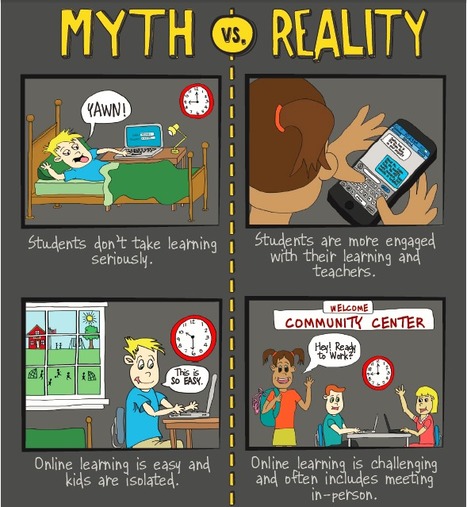
Infographic: Busting Myths About Online Learning

Infographic: Busting Myths About Online Learning | Eclectic Technology | Scoop.it

This infographic “Busting Myths About Online Learning" complements the paper published by Digital Learning now "Online Learning: Myths, Reality & Promise" (scooped earlier this week here).

Beth Dichter's insight:

This is a great visual that looks at the myths and realities of online learning. The sections include:

* A brief description

* Three advantages of online learning

* Myths vs Reality (some of which are shown above)

* Drivers of Online Learning

* Policy

The infographic may be downloaded as a pdf file and you will find links to additional materials as well.

Online learning is becoming more popular and more schools are requiring students to take at least one course online before graduating. It is time that all of us to learn more about online learning and this infographic provides valuable information in a friendly format.

Yasemin Allsop's comment, July 19, 2013 12:30 PM
I just love it!!!
Scooped by Beth Dichter
July 18, 2013 10:38 AM
Scoop.it!

Teaching and Learning with the iPad – a 3 Year Review (Part 3)

Teaching and Learning with the iPad – a 3 Year Review (Part 3) | Eclectic Technology | Scoop.it
Part 3 - Insights and Lessons Learned from the Student’s Perspective This is the third part in the series we've run this week from Franklin Academy Principal
Beth Dichter's insight:

This is the last of a series of three posts that looked at "teaching and learning with an iPad." This post looks at if from a student perspective and discusses three lessons learned (as well as providing data from this 3-year study). The three lessons discussed are:

* Lesson 1: Organization

* Lesson 2: Timely Workflow and Communication

* Lesson 3: Information Access

Access to Part 1 and Part 2 of this series are available at the end of the post. Part 1 look at the lessons learned from the viewpoint of an administrator. The three lessons discusses in this post are:
* Lesson 1: It's About Work Flow & Connectivity, Not Apps

* Lesson 2: Staff Development and Support

* Lesson 3: Be A Model

Part 2 of the series explored the viewpoint from a teachers perspective. The three lessons in this post discussed:

* Lesson 1: Change of Habit

* Lesson 2: Success is in the Support

* Lesson 3: 1:1 iPads Changing Students Performance

For those whom may be pushing out iPads this year or for those using iPads the information in these 3 posts is valuable, esp. since it covers a 3-year period and the perspectives of the 3 key parties involved.

No comment yet.
Scooped by Beth Dichter
July 17, 2013 10:22 PM
Scoop.it!

The SAMR Ladder Through the Lens of 21st Century Skills

The SAMR Ladder Through the Lens of 21st Century Skills | Eclectic Technology | Scoop.it
SAMR is a truly useful tool for helping teachers identify their current comfort zone in order to build expertise in designing efficient and effective student learning experiences. To reach higher l...
Beth Dichter's insight:

If you are considering using the SAMR model (Substitution, Augmentation, Modificaion, Redefinition) you might want to check out this interactive graphic that provides a great visual as well as links to many great resources. Susan Oxnevad notes "The circle at each level targets research, writing and digital citizenship."

Ethel Natalia Revello's curator insight, July 18, 2013 12:53 PM

Really useful to share with teachers. 

Kimberly House's curator insight, July 28, 2013 6:32 AM

Fanstastic interactive graphic to explain the SAMR model. 

Scooped by Beth Dichter
July 16, 2013 10:00 PM
Scoop.it!

Brainy Approaches to Learning | Students at the Center

Brainy Approaches to Learning | Students at the Center | Eclectic Technology | Scoop.it

"We know that each student is unique, but what about each student's brain? This new Students at the Center infographic draws on the research from Mind, Brain, and Education to depict the brain science behind student-centered approaches to learning."

Beth Dichter's insight:

This infographic provides information on current brain science and shares what brain science tells us about how students learn. You may download the infographic as a pdf file and you may also download the report that provides additional detail on their studies.

You may also want to explore this website. Find information on learning theory, what is student-centered learning, why student-centered learning, how to apply student-centered approaches, how to scale up student-centered learning and much more.

Yasemin Allsop's curator insight, July 17, 2013 2:23 PM

What about, the learning processthat drawn by pupils.. thats interesting way of entering their minds...

Lia Goren's comment, July 20, 2013 7:18 PM
I loved it! thank you
Tony Meehan's curator insight, August 2, 2014 1:36 PM

Nice infographic of how the brain works in the context of learning. New technology, new understanding of brain science and psychology can and must lend themselves to the creation of a critical pedagogy which leaves no child left behind.

Scooped by Beth Dichter
July 15, 2013 7:03 AM
Scoop.it!

E-Curriculum... Exploring 24 Free Open Education Resources (OER)

E-Curriculum... Exploring 24 Free Open Education Resources (OER) | Eclectic Technology | Scoop.it

"Everyone is talking about a digital curriculum free of  those hard copy textbooks that have been a part of schooling since the advent of the one room schoolhouse. In this series I will investigate some resources that can open up a world of digital curricula. In this second  post of the series, I’ll examine the idea of Open Education Resources."

Beth Dichter's insight:

Are you ready to move away from textbooks and use Open Education Resources (OER)? This post provides links to 24 sites that provide free resources.

Perhaps you are wondering why schools are choosing to use free curriculum. Michael Gorman provides a list of ten reasons in this post that include:

* Provides  opportunity to make learning more authentic by giving you the ability to localize learning

* Can provide differentiations and allow educator to adapt to their students’ needs

An explanation is provided for each link he provides so you get a sense of what is available, and materials are available for students from elementary school through college. Below are a few of the sites listed.

* SAS Curriculum Pathways - a resource that has been around for a number of years and continues to innovate. The website states “The products make learning more profound and efficient, not simply more entertaining.” 

* Concord Consortium - a website that provides excellent STEM resources with hundreds on interactive, research based activities.

* Vision Learning - Peer reviewed materials for learning science available in English and Spanish that emphasize science as a process (inline with the new Next Generation Science Standards)

* CK12.org - CK12 is now focused on STEM and provides a wide variety of free courses from Arithmatic to Probability to Calculus in the area of math (a total of nine math courses); Life Science, Earth Science, Physical Science, Biology, Chemistry, Physics, Technology, Astronomy and Engineering; a few xourses are available for English and History and there is a new course in Economics. CK12 also provides support through a variety of resources including: studyHELP, FlexMath, Braingenie and I Need a Pencil (SAT prep). One of the older sites they continue to revise courses and materials to meet the needs of todays students.

Check out the complete list by clicking through to the post, and consider not only using these materials but sharing materials you have created in some of the communities provided.


Maruja Romero's curator insight, May 9, 2015 11:17 AM

muchos recursos digitales abiertos y libres 

Scooped by Beth Dichter
July 14, 2013 11:02 AM
Scoop.it!

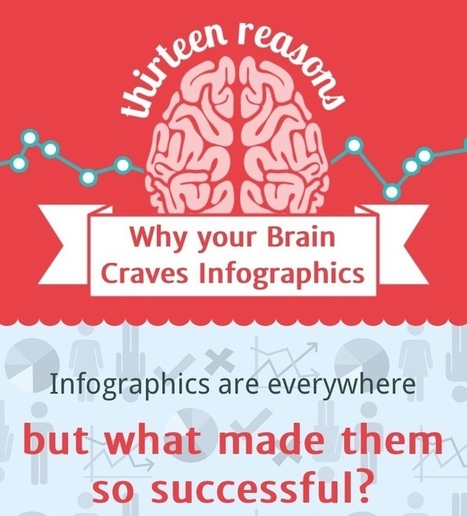
Why we need more visual texts in our teaching and learning

Why we need more visual texts in our teaching and learning | Eclectic Technology | Scoop.it

"Found this fantastic infographic touting the success of infographics. Reading it (or more correctly, viewing it) immediately focused my thoughts on the use of visual texts in classrooms today...Unlike other infographics I link to on Mr G Online, I’m not going to discuss the specific points presented – that would be contradictory to the message of the infographic. I’ll let you get your own meaning from it. However, I am going to reflect on how it made me consider the use of visual texts in education."

Beth Dichter's insight:

Mark Gleason provides reflection on this interactive infographic (click through to the infographic in the link provided in his post) and his insight will help people in the field of education reflect on their use of visual texts and why we should consider using them more often.

Gleason states "Literacy Education has been dominated by the written word, and to a lesser extent, spoken word in the form schooling has taken over the 100-200 years of formal education as we know it."

Based on information in this infographic he states "If 70% of our sensory receptors are in our eyes, then why do we persist in TALKING so much as teachers?"... an excellent question for us to ponder.

He continues to explore this area in a variety of areas that are found in education.

I posted a link to this infographic in mid-June and this post made me go back to the infographic and look at it again. Consider sharing the infographic and this post with faculty in your school. Reflect on how much you use visuals in your classroom. Ask yourself  "Am I meeting the needs of my students? Do I provide visuals as well as written and oral instruction? Would a visual make this easier for my students to understand?
Based on your answers to these questions (and others raised by Gleason) will this change how you work with students in your classroom? Share your thoughts below, or in the post at Geason's website.

Nancy Jones's curator insight, July 15, 2013 1:50 PM
 

As a visual learner myself, I love onto graphics, beginning with the dAiley ones posted NBC USA Today since its inception. 

Caleb Yap's curator insight, July 17, 2013 11:30 PM

really? more of these non-classical pedagogical methods?

Audrey's curator insight, August 29, 2013 2:53 PM

You can absorb the visual faster and make sense of it in a holistic way; particularly if you spend time engaging with the information from different physical points of view. The information is embedded in the memory because the individual is encouraged to project their own meaning.  Having been directed to view educational materials, the learner can them be asked questions to test their understanding. 


Visual learning is necessary from a young age and is what home school sources learning is all about.  

Scooped by Beth Dichter
July 25, 2013 10:28 PM
Scoop.it!

RADCAB - Steps for Online Information Evaluation

RADCAB - Steps for Online Information Evaluation | Eclectic Technology | Scoop.it
Beth Dichter's insight:

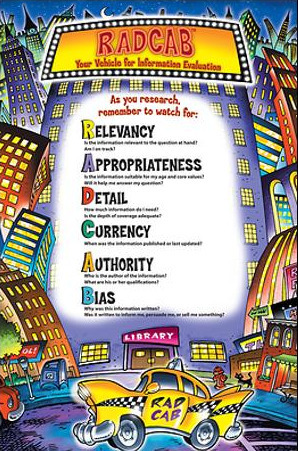
There are many resources to help students learn to evaluate websites. This one uses the RADCAB as "A mnemonic acronym for information evaluation." Not only is the poster (see image above) available in an elementary version (as shown) and a middle/high school version (there is a cost). You will also find a page for each letter in RADCAB that provides additional questions and strategies as you go through the RADCAB process which is:

* Relevancy

* Appropriateness

* Detail

* Currency

* Authority

* Bias

Gary Faust's curator insight, July 27, 2013 12:19 PM

These guidelines are particularly helpful in evaluating "science" sources. So much that isa presented as "science" is biased and may be more appropriately categorized as "political science".

Carol Thomson's curator insight, July 30, 2013 5:12 AM

Clear and easy to understand.

Alejandro Ibañez Bonilla's curator insight, January 9, 2014 9:32 AM

Pasos para evaluar la información en línea...

Scooped by Beth Dichter
July 25, 2013 9:47 PM
Scoop.it!

34 Learning Games for Students From edshelf

34 Learning Games for Students From edshelf | Eclectic Technology | Scoop.it
A collection of web-based educational learning games for students, such as Minecraft, Sumdog, BrainNook, PowerMyLearning, DimensionU, etc.
Beth Dichter's insight:

Edshelf is a great resource to find collections of all sorts of things...including this collection of web-based educational learning games. Find 34 learning games that will help students from elementary school through high school across many subject areas.

Yasemin Allsop's curator insight, July 26, 2013 4:25 AM

Good selection!

Julie Degasperi's curator insight, July 27, 2013 3:40 AM

Education

Scooped by Beth Dichter
July 24, 2013 5:02 PM
Scoop.it!

Two Video Guides to Website Evaluation

Two Video Guides to Website Evaluation | Eclectic Technology | Scoop.it
Beth Dichter's insight:

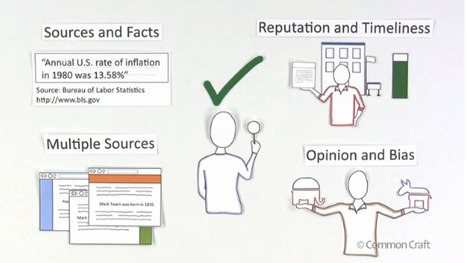
Richard Byrne shares two excellent videos in this post that will help students (and teachers) become more aware about what to look for when evaluating websites. The first video is from Common Craft. The second one he located on YouTube and was creataed in Xtranormal. Both provide provide accurate information and will engage students.

Miep Carstensen's curator insight, July 25, 2013 6:56 PM

aids to digital literacy

Dean Mantz's curator insight, July 29, 2013 12:33 AM

I would like to add to Beth Dicther's share, via Richard Byrne's Free Technology 4 Teachers, that website evaluation skills should be a necessity for any student and educator regardless of online or face-to-face. 

johanna krijnsen's curator insight, December 4, 2013 1:57 PM

website evaluation

Scooped by Beth Dichter
July 23, 2013 8:12 PM
Scoop.it!

The 10 Free Tech Tools Your Class Should Be Using -- THE Journal

The 10 Free Tech Tools Your Class Should Be Using -- THE Journal | Eclectic Technology | Scoop.it
Know about iTalc? Bubbl.us? Ribbon Hero? You should! Discover the latest in free software that's making a splash in classrooms.
Beth Dichter's insight:

Here are ten free tech tools you may want to check out for your classroom. They range from iTalc,which is a free lab management system, allowing you to see what students are viewing and limit access to sites to Storytelling Aice, a program that allows students to learn to program to Ribbon Hero 2, put out by Microsoft this is a game that helps you learn to navigate the ribbon. An additional seven tools are also shared.

Jennifer Kleiner's curator insight, March 3, 2015 12:53 PM

Bubbl.us made this list and I think it can be a great educational tool! Mind mapping helps learners to organize information more clearly, and clearly organized content is essential to retaining  information. There are other interesting tools here as well.

Scooped by Beth Dichter
July 22, 2013 11:04 PM
Scoop.it!

iPad uPad wePad; Going 1-1 at St Oliver Plunkett

iPad uPad wePad; Going 1-1 at St Oliver Plunkett | Eclectic Technology | Scoop.it
A few weeks ago I was fortunate enough to be invited to St Oliver Plunkett to be a part of their 1-1 iPad rollout to the very excited Year 6 class. Led by their fabulous teacher librarian, Ann-Mari...
Beth Dichter's insight:

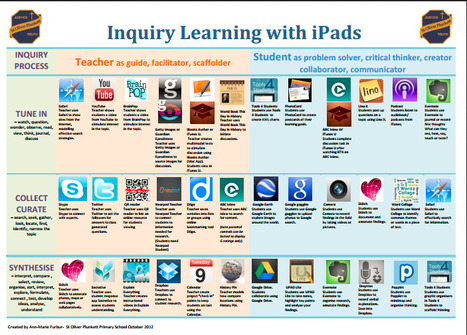
This post provides access to three pdf files that look at the iPad apps that one school with a 1:1 iPad rollout loaded on iPads for teachers, students and one that looks at inquiry learning on the iPad (image above for this one). Choosing which apps to include in a 1:1 rollout is not always easy to determine due to the wide range of apps available, so looking at what others have done is often helpful.

Amy Stahura's curator insight, July 24, 2013 10:38 AM

Love the Bootcamp idea!

Neil O'Sullivan's curator insight, July 25, 2013 5:21 AM

Excelletn blog for teachers.

Kimberly House's curator insight, July 28, 2013 6:17 AM

Great list of Apps for both teachers and students from a school implementing a 1:1. This is one of the hardest steps: determining which apps will be part of plan. There are some good suggestions here.

Scooped by Beth Dichter
July 21, 2013 11:57 PM
Scoop.it!

Glenda's Assistive Tech Information & more: Reading with Older Students

Glenda's Assistive Tech Information & more: Reading with Older Students | Eclectic Technology | Scoop.it

"Do you read aloud to your students? Is there ever a time when students are too old to be read to? Many teachers are firm believers in reading aloud -- even at the upper grade levels."

Beth Dichter's insight:

This post describes why it is valuable to read to older students as well as a wide variety of resources. There are many reasons to continue to read to older students (and not just those students whom have access to assistive technology). A few of those reasons are below.

* "Reading aloud to children helps them develop and improve literacy skills -- reading, writing, speaking, and listening..."

* "...children listen on a higher level than they read, listening to other readers stimulates growth and understanding of vocabulary and language patterns."

Resources are available in two categories:

* Beyond Instruction that includes a link to a post of Audio books and publications, Information on optical character recognition,Text-to-speech and Variable speed tape recorders

Sites to explore includes links to about 10 websites. Some are free and some will cost.

Adrianna Castelo's curator insight, February 19, 2014 11:13 PM

I thought that this was quite interesting because you never early think to read to students as they get older. It has always been pretty routine that when you learn how to read you do it yourself.For myself, having something read out loud to me is not the best. I never pay attention when it's being read aloud only when I read it for myself. However, it could be beneficial to other students who really do have learning disabilities without them knowing. 

Scooped by Beth Dichter
July 19, 2013 2:14 PM
Scoop.it!

Bloom’s Taxonomy Paint Palette

Bloom’s Taxonomy Paint Palette | Eclectic Technology | Scoop.it

"An article I read this week had me thinking about Bloom’s Taxonomy and what learning really is.  It led to me coming up with a new graphic for Bloom’s Taxonomy, this one a Paint Palette.  I like thinking about Bloom’s in the form of an artist paint palette because each color has equal importance.  For an artist, the greatest beauty comes in the mixing of colors.  Using a multitude of shades and blends on a canvas.  I think the same can be said of learning."

Beth Dichter's insight:

This is a work in progress based on student work at Anastasis Academy. We know that we would like our students to be able to demonstrate their understanding in a variety of ways, but often they find one way and that becomes the only way (from their perspective). In this post Kelly Tenkely describes her experiences with students at Anastasis Academy and how this experience has led her to create this paint palette that will contain two additional components.

Along with this palette you will find a painting that provides "students ideas for different outcomes and evidences of learning" and a component that is still a work in progress, that will "an app and website catalog organized by the same colors so that students can be introduced to the many options they have for the different types of learning and producing." You can see the page with apps in this post that are specific to Create and additional pages with apps will be posted in the future.

Sue Alexander's curator insight, July 21, 2013 9:40 PM

An excellent analogy, and a visual my students will surely relate to in the Art Room. I think this will be helpful as they plan and reflect upon their own learning goals.

Jessica Rebstock's curator insight, July 22, 2013 11:55 AM

I appreciate that this view of Bloom's Taxonomy is less linear. Every course needs a different blend of Bloom's learning levels.

Scooped by Beth Dichter
July 18, 2013 9:33 PM
Scoop.it!

Before Reading or Watching Videos, Students Should Experiment First

Before Reading or Watching Videos, Students Should Experiment First | Eclectic Technology | Scoop.it
A new Stanford study shows that students learn better when first exploring an unfamiliar idea or concept on their own, rather than reading a text or watching a video first.
Beth Dichter's insight:

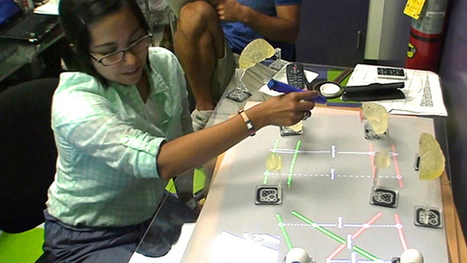
What is the best way to flip a classroom? Perhaps it is not showing videos first, but allowing the student to experiment first and then watch videos or read material. This study shows that students experimented first had substantial improvement in performance.

This study used a specific "new interactive tabletop learning environment, called BrainExplorer, which was developed by Stanford GSE researchers to enhance neuroscience instruction." Based on the use of this environment students did better exploring first. The experiment is described and data is shared in this article and it shows that the group who experimented first had a significant improvement in their final score.

There is an explanation as to why they chose the field of neuroscience as their goal (quoted from post below):

“Part of our goal,” the researchers write, “is to create low-cost, easy-to-scale educational platforms based on open source, free software and off-the-shelf building blocks such as web cameras and infrared pens so that our system can be easily and cheaply deployed in classrooms.”

The article also notes that this 'many educational researchers and cognitive scientists have been asserting for many years: the “exploration first” model is a better way to learn.'

Ra's curator insight, July 21, 2013 5:43 PM

Implications for fabric tech in relation to systems. Trial and error as the lead in. Provide basic skill set and try to evolve the understanding of the systems and processes required to achieve identified outcomes. 

Scooped by Beth Dichter
July 18, 2013 10:20 AM
Scoop.it!

Should I Post this Image? Great Flow Chart Leads to Answer

Should I Post this Image? Great Flow Chart Leads to Answer | Eclectic Technology | Scoop.it
So. A few weeks ago, Chelsea discussed a super polarizing topic on her blog: photo credits. And although I've always been a bit of a hippie that likes
Beth Dichter's insight:

Students (and adults) often struggle with providing credit of images. For those students whom like flow charts this graphic may be the tool they are looking for. Beginning with the question "Should I post this image?" you answer questions to determine if it may be posted, or if you might receive "an upleasant email" or a "super nasty email" as a result of a post. The post provides a link to the image on Flickr where you may download it in a number of formats.

Ra's curator insight, July 21, 2013 5:48 PM

Taking the credit where credit is due challenge to a specific level. Good reminders for how to trace source. Implications for infringment. 

Kimberly House's curator insight, July 28, 2013 6:27 AM

Great infographic for students to help with that every present question, 'Should I post this image?' Downloadable in a variety of sizes. 

Scooped by Beth Dichter
July 17, 2013 10:14 PM
Scoop.it!

Innovations in Education - Teachable Moments for Digital Citizenship

Innovations in Education - Teachable Moments for Digital Citizenship | Eclectic Technology | Scoop.it

"In preparing for professional development on the topic of Digital Citizenship ...I have been searching for a resource to share on the importance of modeling these skills...I know that teaching in isolation is not usually as effective as taking advantage of teachable moments – when students are actually online and pursuing a learning task to reinforce appropriate behavior, safety, and application of skills."

Beth Dichter's insight:

This infographic was designed by Nancy White using Piktograph when she was not able to find what she was looking for. Have you considered using
"teachable moments" for demonstrating digital citizenship? She provides many great ideas to help you do so.

Caleb Yap's curator insight, July 17, 2013 11:21 PM

interesting for 21st century skills and whatnot


Kimberly House's curator insight, July 28, 2013 6:37 AM

A good infographic for teachers as they integrate technology. Modelling digital citizenship authentically through teachable moments!

Scooped by Beth Dichter
July 15, 2013 11:35 AM
Scoop.it!

An App Wonderwheel for Students on the Autism Spectrum

An App Wonderwheel for Students on the Autism Spectrum | Eclectic Technology | Scoop.it

The Autisum Transition Handbook was created by grants from the Pennsylvania Department of Education and the Delaware Department of Education "to assist individuals with autism spectrum disorders and their families by providing access to the most current and comprehensive information on the transition to adulthood."

Beth Dichter's insight:

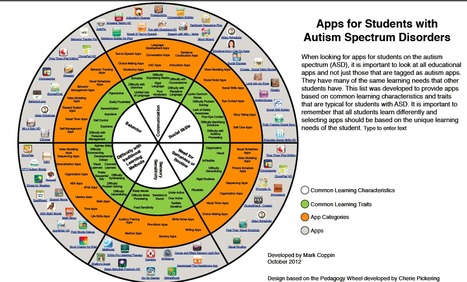
This app wonderwheel is developed for students on the autism spectrum by an Apple educator Mark Coppin whom is also the Director of Assistive Technology at the Anne Carlsen Center. The wheel is split into six sections that define common learning expectations. Each of the sections then shows common learning traits, followed by app categories and then the apps (each of which is hot linked at the website). The six categories are:

* Behavior

* Communication

* Social Skills

* Need for Sameness or Routine

* Sensory Sensitivity

* Difficulty with Traditional Learning Methods

The link you to the chapter that discusses Assistive Technology. To go directly to the App Wonderwheel use this link http://www.autismhandbook.org/images/4/4c/Appwheel.pdf.

It is often difficult to know which apps to choose when we work with students. This resource may help you determine some apps to investigate for students on the autism spectrum. 

Scooped by Beth Dichter
July 14, 2013 8:43 PM
Scoop.it!

Animations on Internet Safety and Climate Change

Animations on Internet Safety and Climate Change | Eclectic Technology | Scoop.it
Beth Dichter's insight:

Planet Nutshell tells stories through animation. Their website provides access to videos in three areas:

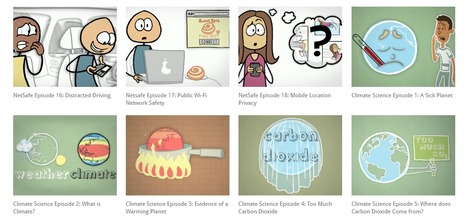
* Climate Change - a series of 11 videos that explore issues in climate change including What is Climate, Too Much Carbon Dioxide and How the World can Tackle Climate Change. In addition to the series there is also a list of resources used to create the series.

* NetSafe is a series of videos that explore issues that students may experience online. The videos are divided into grade levels. There are four videos for Grade K - 3 that explore What is the Internet?, What is Personal Information?, Tell an Adult, and Be Kind Online. For Grades 4 - 6 you will find five videos including " Cyberbullies are No Fun!, Understanding Online "Friends", and Posting Pictures Online. Five videos are available for Grades 7 - 12 including How to Stop Cyberbullying, Protect Your Personal Information and Say No to "Sexting".  Several other videos cover Distracted Driving, Public WiFi Network Safety and Mobile Location Privacy. These videos also allow you to download the transcript.

* A third category is Borrow Wisely that discusses FAFSA, Student Loans, and Financial Aid.

It appears that they continue to create videos for education (as well as businesses).

Susie Robinson Cochran's curator insight, July 27, 2013 8:28 AM

Great animated explanations

Kat Zimmermann's curator insight, July 23, 2014 10:18 AM

The name really says it all. Different internet tools are introduced in a wait for it...NUTSHELL. The tabs offer other basic introductions to other topics as well.