A weekly show where knowledge junkies get their fix of trivia-tastic information. This week, Hank Green discusses 50 common science misconceptions about topi...
Your new post is loading...
A weekly show where knowledge junkies get their fix of trivia-tastic information. This week, Hank Green discusses 50 common science misconceptions about topi... No comment yet.
Sign up to comment
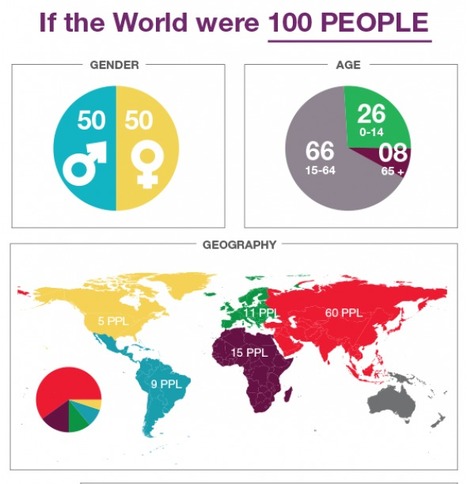
"A couple of days ago I read an article by Ryann Warlickabout an infographic displaying the world as 100 people. I've seen infographics like this before and you probably have too. Ryann used the infographic as the basis for helping students think about identifying people that they can help. I encourage you to read the short article."
Beth Dichter's insight:
Richard Byrne provides three infographics that look at how one might view the world as 100 people. Why choose three infographics? We have many different learners in our classrooms and what works for one may not work for another...thus three infographics. You might use them to launch a discussion on how we perceive information or use them when teaching students about infographics and have them consider which they find best illustrates the information and discuss why it does.
Quoted from post:
Beth Dichter's insight:
The need to differentiate instruction is an element that all teachers must address. This post provides information on ten sites that will help you differenting instruction. Each site has a brief description which includes the subject areas addressed. You will find information for differentation in the areas of math, reading, science, language arts and more. Three of the sites are listed below. Please check the post for seven more. * BrainNook - " A wonderful site/apps for Math and Language Arts that generates detailed common-core aligned reports allowing educators to set assignments targeting students weak areas or areas for improvement." * Infuse Learning - " A terrific site/app that enables educators to create an educational environment tailored to meet the different needs of their students. Also, IL has seamless integration w/ BYOD and mobile learning." * ZooWhiz - "A fantastic site aligned to educational curriculums in a wide variety of subjects (Math, Grammar, Vocab, etc.). ZW offers details progress reports that helps assess students learning needs."
"When Stanford Professor Lee Shulman was first enmeshed in the research that led to Board certification of teachers by NBPTS, I asked him – in a hotel bathroom, of all places – what interesting findings were turning up about great teachers as compared to the rest. He replied: 'Well, you might not find this such a big deal, but a big indicator is the degree to which a teacher accurately describes what happens in her classroom.'"
Beth Dichter's insight:
In this post Grant Wiggins shares his experience as a teacher. Specifically he lets us know that he discovered his "blind spots" when watching videos of his teaching and and noticing behavior that had gone unnoticed. He states "a surprisingly high number of teachers...are guilty of noticing only what they expect and wish to see and hear rather than what is really there to see and hear." After a bit more discussion Wiggins shares eleven teaching strategies for spotting blindspots in your classroom. A few are listed below. Additional information is available for the ones listed as well as eight strategies that are not posted below. * Look beyond the obvious. * Don't get caught watching. * Assess formatively every few seconds.
Kelly Blair's comment,
August 8, 2013 8:52 AM
An excellent summary of effective teaching and learning strategies .
Readwritelearnwell's curator insight,
August 17, 2013 5:27 PM
Focuses on effective assessment for learning.
Michael Marinkovic's curator insight,
June 11, 2017 8:10 AM
I taught a lesson on blind spots, highlighting the blind spot that we have physically due to our optic nerve, as well as the spiritual blind spot that we have at times. The eye is a fantastic organ and yet the mind can be deceived very easily. When this concept is applied to teaching, a highly effective teacher needs to be aware of the blind spots in his or her classroom.
Self-evaluation is key, as is keeping your eyes “off the ball,” as the article suggests. We need to train ourselves to look past the obvious, the routine assessments that we use formally and informally to gauge student understanding. The article offers several strategies that a teacher could purposefully adopt in the classroom schedule that will ensure a more realistic view of concept comprehension.
Beth Dichter's insight:
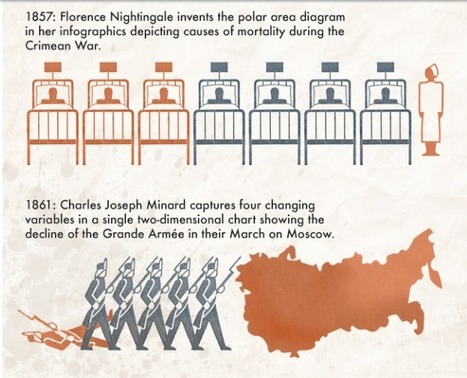
If you were to ask your students when infographics were first created what do you think their answer would be? What would your answer be? This infographic looks at "a timeline of timelines and infographics" and the result may surprise your students. It would be a good to use as an introduction to infographics along with the one that was put out using Legos to answer the question "What is an infographic?" located at
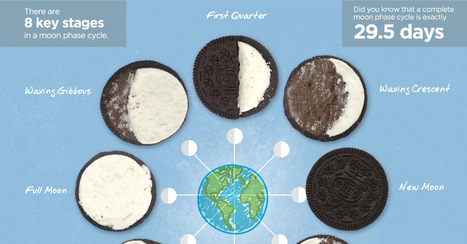
Moon Phases are dependant on the Moon's relative position to the Sun and Earth. To find out more about the Moon Phase Cycle, read this friendly infographic below!
Beth Dichter's insight:
If your students are struggling on learning the moon phase cycle this infographic may help...someone must have had fun eating the filling to create this infographic! You might also challenge your students to find a typo in the infographic.
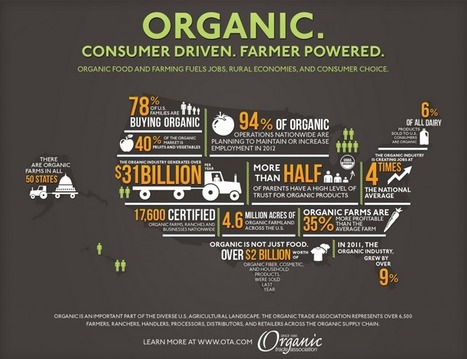
"As we head into the throws of the summer and the coming onslaught of fresh produce from local growers hitting the markets, we thought it might be helpful to provide a little information literacy into the world of organic foods. We’ve long taught our students to read the nutrition labels...but now that organic food has become mainstream in supermarket chains, it makes sense to educate our students about organics as well."
Beth Dichter's insight:
This post provides a wide variety of resources that will help you teach students about the difference between organic and non-organic foods. It is pretty amazing to see that 78% of families purchase organic foods (data is from the Organic Trade Association). This post discusses the need to for students to become "information literate" in terms of organic foods, yet our students need to become "information literate" in many areas. The wide variety of materials provides sufficient information in this area, and may help students learn that a wide variety of information is necessary to become literate in other areas.
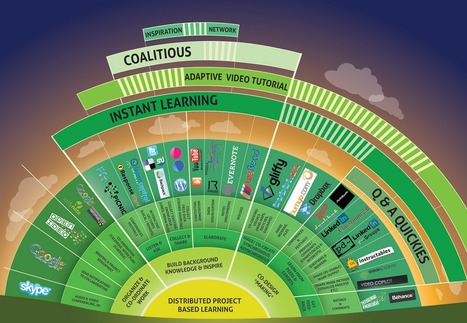
In an effort to help those teachers out, Katie and I found a fabulous new visual diagram that's all about which apps and tools go with the different parts of distributed project-based learning.
Beth Dichter's insight:
This infographic looks at Project Based Learning (PBL) and divides it into three main sections: * Organize and co-ordinate work * Build background knowledge & inspire * Co-design *making* The second and third areas are then decided to more clearly deliniate the areas each covers. The last final two sections provide more specific concepts of what it required and also one or more suggestions of tech tools that will assist the process. There are additional groupings as shown in the infographic above. More and more teachers are engaging in some form of PBL and this visual may serve as a great base to help create a strong foundation and provide ideas of technology tools that might assist in the process.
JennaMRyan's curator insight,
November 27, 2013 3:04 PM
http://www.edudemic.com/a-detailed-visual-guide-to-distributed-project-based-learning/
I really like this resources because it shows where students are getting information for their projects. The projects are learned through resources that are distributed across many different fields, websites, and search engines. This allows students to engage in many different types of content curation sites. Google and skype are a few examples of resources. The visual is broken up into instant learning and coalitious segments showing how some sites are good for overlapping purposes. This is an interesting view of PBL sources.
Beth Dichter's insight:
This post looks at 20 learning principles that teachers should know. Five are listed below. When you click through to the post you fill find additional information on each of the 20 principles. * Students learn differently * Make it relevant * Failure is a fabulous teacher * Brief and organized "bites" * Feedback: Not just what, but when This is great information as a new school year approaches in many areas!
Beth Dichter's insight:
This infographic looks at assessments, providing an overview of the educational asessment landscape. The sections cover: * An overview of assessment * Assessment measurement * Assessment types * Question types * Delivery methods * Scoring methods * The evolution of assessment Please note that this infographic was pubished by McGraw Hill Education/CTB.
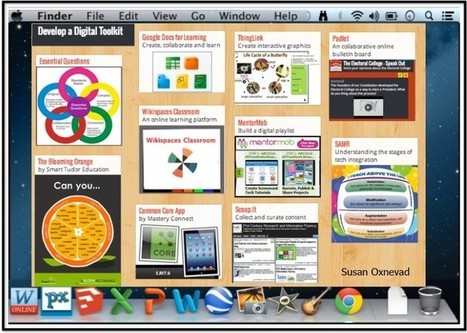
Here are three ways for teachers to prepare to design learning experiences that encourage higher order thinking through the use of technology as a tool for learning.
Beth Dichter's insight:
We know students love to use technology, so how about using technology as a tool to encourage higher order thinking? This post explores three ways you might choose to do this. * Develop a digital tool kit. Go out and find some great tools that will help students use higher order thinking skills. Given them a test drive first, and then create a digital playlist and some digital guides to help students learn how to use them. * Design flexible learning experiences. "Grab your toolkit, embrace Essential Questions, then build lessons around them." And for information on Essential Questions you may want to check out Chapter 1 of the book "Essential Questions: Opening Doors to Student Understanding from ASCD at http://www.ascd.org/publications/books/109004/chapters/What-Makes-a-Question-Essential¢.aspx. * Get out of the way and let students create.
"Literacy is changing. It really is. Even in my grade one classroom as the students begin to learn their letters and sounds, as they start to put those letters and sounds together into words, and as they take their first hesitant steps to read and write —literacy is changing. The change in our classroom was subtle at first. When my students began writing the word we with two i’s, I smiled and talked about the more traditional spelling of the word. When students came to school with a clear understanding of what it meant to get to the next level or to have several lives, I took notice of the new vocabulary they had."
Beth Dichter's insight:
Putting young students together with technology creates a win-win situation in this classroom. Learn how one teacher has her students writing in blogs to share their work, using twitter, learning vocabulary (such as pingback) and much more. This post is complete with a video where students provide definitions of words and share how they use technology in their classroom.
It's rare for a detailed guide to be made available for free and be actually up to date. This printable guide to the Apple iPad is both of those things.
Beth Dichter's insight:
Here is a great guide to the iPad. You can download it as a pdf and print it back-to-back. The guide provides information on the iPad hardware, buttons, software, gestures, the home screen, the on-screen keyboard, cutting and pasting and networking your iPad. |
Beth Dichter's insight:
This interactive ThingLink provides links to ten websites that are great tools to use in your classroom. Many of the links provide ideas for ways to use the tool with your students. Tools include: * Wikispaces Classroom * Padlet * MentorMob * SAMR
Sue Alexander's comment,
August 11, 2013 10:54 PM
Another great Scoop, Beth! I've learned so much from your topics this summer. Thanks!
Sue Alexander's curator insight,
August 11, 2013 10:58 PM
Fun interactive format, and the tools are good ones to explore.
Beth Dichter's insight:
As technology moves along words that were once part of the lexicon may become endangered as new technology takes over. How many students know what a floppy disk is or have 'dialed' a phone? This infographic has looked at vocabulary and places words in the following categories: * Endangered words * Words with updated meanings * Social media and messaging * Tech terminology of the future Check out the poster and see if you agree or disagree with the choices. What would your students think? Are there words they would add or delete? This could become a fun activity and perhaps you could create your own infographic.
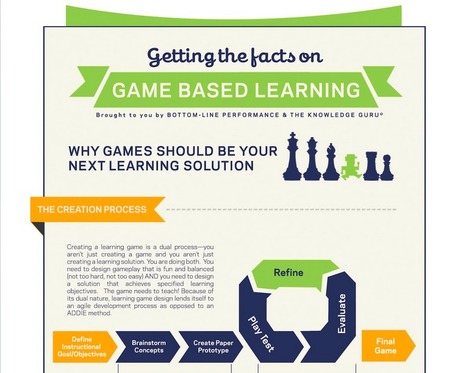
The Knowledge Guru team knows how effective serious games and game based learning are, that's why we've developed an entire learning game engine focused on making game based learning easier to impleme...
Beth Dichter's insight:
This infographic shares why games should become a part of your classroom. Sections include: * It Really Works - providing data from a number of studies that show significant increases in grades after using game based learning. * 3 Great Reasons to Use Games (check out the reasons on the post!) * But Why Do Games Work which looks at essential elements required for learning and shares how each of these elements may be matched in game based learning * The Role of Game Playing Unlike many infographics this one provides links to sources which are easy to read. Are you interested in learning more about game based learning? If so, check out this post.
Florence HENCKE's comment,
August 9, 2013 3:10 AM
Thank you for this infographic and the sources you used, the importance of having fun while learning seems to increase in education. Good news !
Ines Evaristo's curator insight,
August 21, 2013 6:53 PM
Una buena infografía que resume estudios con resultados del efecto de los videojuegos en el aprendizaje de la educacion superior, cosa que no habia visto mucho. Además, el inicio es bastante claro, hacer un videojuego "serio" o educativo es doble reto: lograr los objetivos de aprendizaje propuestos y diseñar un gameplay igualmente divertido, motivador, estimulante... es la diferencia entre un videojuego educativo de un juego didactico.
Taryn Coxall's curator insight,
October 8, 2013 10:24 PM
This article gives great insight into the upcoming phenominon of "Game Based Learning".Although i have never seen it in my practises, after reading abit about it, i believe game based learning is something i would incoperate into my own classroom. Game Based learning provides a stimulating and engaging way of learning for children on a wide range of educational areas and topics. It is proven through this approach to learning students aremore likely to become motivated to learn, become increasingly engage and excel in their learning. great resource which has iven me great insight.
"In a world where knowledge is readily available on every Internet-connected device, what you know matters far less than what you can do with what you know."
Beth Dichter's insight:
How should we be preparing todays students for their future jobs? This post recommends that colleges need to be "adding the value and teaching the skills that matter most in the marketplace." The post looks at the difference between innovation and creativity, where innovative teaching is taking place, and then provides a list of 25 ways to create your own classroom of innovators. Three of the suggestions are below. Each has additional details in the post (and there are 22 more for you to check out). * Urge students to imagine the skills – not the job title – they want. * Promote creativity * Build intrinsic motivation At all levels of schooling we need to teach our students skills that they will need in the future...the job market is changing so rapidly that we have a difficult time imagining what the future jobs will be. Is it possible for each of us to begin to plant the seeds of creativity and innovation in our students (at all levels) to help them prepare for their future?
Kimberly House's curator insight,
August 11, 2013 7:21 AM
Fantastic list at the bottom of this article about how to foster a classroom of innovators.
Why shouldn't the smartest people in the world want to go into education? One reason that comes to mind: maybe they just don't know much about how education--and for that matter, how quickly education technology has been evolving.
Beth Dichter's insight:
This EdSurge Guide has 10 sections, with a "big question" for each of them and a number of resources for each. Check out the list of topics below and click through to learn more about any of the 10 areas. * What are the influentical ideas behind "edtech"? * How can you be part of the edtech community? * Does the profit motive belong in education? * How do you find and evaluate edtech products? * Can technology help prepare better teachers? * Where does 'Making' or project-based learning fit into edtech? * How should we measure student "success"? * Who owns the data? There are three to six excellent resources listed under each question. Many great resources will be found in this post!
Let's talk about the power of visual communication and the age of infographics. Here's why infographics are so appealing and popular.
Beth Dichter's insight:
The statistics in this video appear to be accurate to me based on an infographic that was published earlier this year. You can find the infographic with commentary by Mark Gleeson on this Scoop.it (search infographic and look for July 2013) or you can go directly to his post for more information at http://mgleeson.edublogs.org/2013/07/14/2760/.
Ruedi Grob's curator insight,
August 2, 2013 6:22 AM
Visuelle Reize sollten vermehrt und besser genutzt werden!
Sue Alexander's curator insight,
August 3, 2013 11:09 PM
Great information about the power of visual communication. Artists since the dawn of man have known and used this power; technology raises the bar.
Kimberly House's curator insight,
August 11, 2013 7:30 AM
Tap into the power of visual learning! I love infographics and I'm happy that they are becoming more and more plentiful and easier to find.
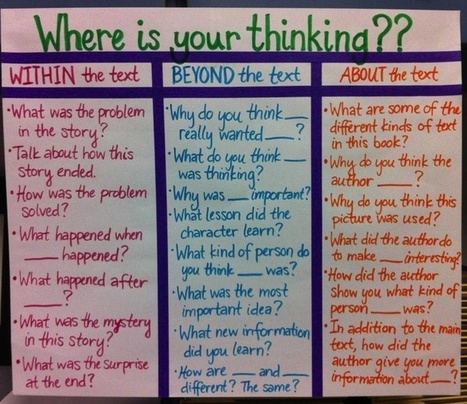
"The Common Core Standards represent a shift in the traditional instruction of English-Language Arts in the average American public school K-12 classroom. While there are several differences in the new standards, one of the most interesting (in addition to the expectation of technology integration) is the trend from literary to non-fiction texts."
Beth Dichter's insight:
This could be used as a great anchor chart for students to see when when reading text and preparing to respond to the text. Although the title says 20 questions I count 21 questions on this visual, questions that are require critical thinking skills, questions that may be used with a variety of texts (as required by Common Core). The questions are in three categories (information below quoted from the article): * Within the text - summaries, sequence of events, conflict/resolution, etc * Beyond the text - Inferencing, implicit ideas, evaluation, etc. * About the text - Author purpose, author style, characterization, etc. The post also relates the areas to Bloom's Taxonomy. You might also look at the question relative to Depth of Knowledge.
"Imagine a world where digital learning platforms help adult learners succeed through college completion; where a network of schools offers international-quality education, affordable tuition, and serves hundreds of thousands of children in economically disadvantaged countries; where we engage parents in understanding national trends and topics in education; where a comprehensive learning environment seamlessly connects the classroom with the opportunities of the digital world for young students; and where system-level solutions help more students gain access to college."
Beth Dichter's insight:
What are the key elements of design thinking? * Defining the problem * Creating/considering multiple options * Refining selected directions * Executing best plan of action Teaching students design thinking "empowers students to realize that they can create their own futures by borrowing frameworks from other areas, which allows them to design their own participation and experiences." This post provides links to 45 design thinking resources. If you are thinking of using design thinking in your classroom this year, or if you already use it you will find many great resources on this list.
Design in Practice's curator insight,
August 2, 2014 10:46 AM
In education, design thinking empowers students to realize that they can create their own futures by borrowing frameworks from other areas, which allows them to design their own participation and experiences.
Beth Dichter's insight:
Additional categories include: * Curriculum Mapping * Lesson Planning * Learner Choice * Student Support * Classroom Management Each category has four tips. Four tips (each from a different category) are below. To see the full infographic click through to the post. * Technology is a means, not an end * Bloom’s Taxonomy (or related learning taxonomies) is/are used to move students from basic to complex thinking daily * Rigor is omnipresent, from bell ringers and quizzes to accountable talk and assessments * There are exemplar models immediately accessible to students of all important work and activities
Debbie Goodis's curator insight,
October 19, 2013 11:16 AM
Can these posters be purchased and printed?
Everyone is talking about a digital curriculum free of those hard copy textbooks that have been a part of schooling since the advent of the one room schoolhouse. In this series I will investigate ...
Beth Dichter's insight:
More and more sites provide access to e-curriculum. Here is a list from Michael Gorman that explores the following sites: * Diigo, a site that allows you to store bookmarks, tag them and more. * Livebinders - think of a 3-ring binder but online and you get the idea. * My Big Campus - a safe social learning platform for students. There is a paid version and a freemium version. * Scoop.it - a great tool for curation. * Pinterest - many great educational resources can be found. * Educlipper - this tool is similar to Pinterest but designed for educators. There is much more information on each of these tools in this post and well worth the read. Have fun exploring!
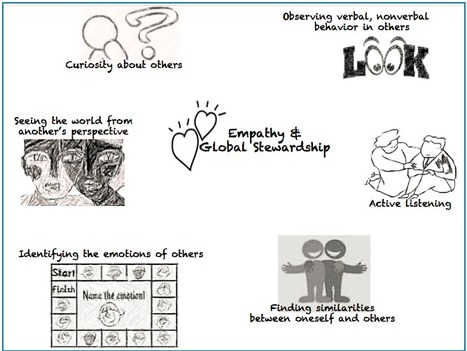
Quoted from post: Empathy has always been valued as an important skill to possess as a human being, so what makes it a 21st century skill? I was recently asked by Steve Hargadon during a short video interview, “Is global education important? If so, why?” My response was, “Given that we are now living in a hyper-connected world, we can no longer plead that we don’t what is going on in other parts of the world..."
Beth Dichter's insight:
Jackie Gerstein continues to share her thoughts on the other 21st century skills students need discussing empathy and global stewardship. After sharing her reason for combining empathy and global stewardship Gerstein somes of the characteristics or dispositions related to empathy (see image above). You will also find a video from National Geographic, Perspectives = Empathy; a video from RSA, The Six Habits of Highly Empathic People; a list developed by the state of Washington ( specifically "a think tank for education for sustainable communities") that provides " characteristics that define folks who are equipped for sustainable futures"; a look at a connection beweeen empathy and design thinking, a look at a connection between empathy and grit as 21st century skills, and many resources for educators. Gerstein has provided a post that will make you think about empathy and global stewardship as well as resources that may help you work with these concepts in your classroom this year.
Kimberly House's curator insight,
July 30, 2013 10:39 AM
I'm so glad to see these 'other' 21st Century Skills coming out in focus.
Playing an action video game “can virtually eliminate” the gender difference in a basic capacity researchers call spatial attention, while at the same time reducing the gender difference in the ability to mentally rotate objects, a higher-level...
Beth Dichter's insight:
If you have wondered why spatial skills matter this post states "The ability to mentally manipulate shapes and otherwise understand how the three-dimensional world works turns out to be an important predictor of creative and scholarly achievements, according to research published this month in the journal Psychological Science." Why is this important? It turns out that spatial skills at the age of 13 turn out to predict "the likelihood that the individual would develop new knowledge and produce innovation in science, technology, engineering and mathematics, the domains collectively known as STEM." For more information on this as well as links to additional resources check out this post.
mtmeme's curator insight,
July 28, 2013 11:17 AM
Spatial skill practice in a game environment - wonder if it would also be beneficial in rehab for stroke or neurological disorders. |
Your new post is loading...
How well do you know science? How about misconceptions in science that many believe are true? This video will help you (and your students) discover 50 misconceptions in science. If you use it with a class you may want to spread it out over a few days and allow time of discussion!