Eclectic Technology
230.9K views | +0 today
Eclectic Technology
Tech tools that assist all students to be independent learners & teachers to become better teachers
Curated by Beth Dichter
Your new post is loading...
Scooped by Beth Dichter
September 3, 2013 10:39 PM
Scoop.it!

How Can We Make Homework Smarter?

How Can We Make Homework Smarter? | Eclectic Technology | Scoop.it

"Do American students have too much homework, or too little? We often hear passionate arguments for either side, but I believe that we ought to be asking a different question altogether. What should matter to parents and educators is this: How effectively do children’s after-school assignments advance learning?"

Do American students have too much homework, or too little? We often hear passionate arguments for either side, but I believe that we ought to be asking a different question altogether. What should matter to parents and educators is this: How effectively do children’s after-school assignments advance learning?

Beth Dichter's insight:

Homework - where do you stand on this issue? This post by Annie Murphy Paul provides information that looks at current research on the brain and a new field called "Mind, Brain and Education, that is devoted to understanding and improving the ways in which children absorb, retain and apply knowledge"

The post discusses specific ways that homework may be designed to help learners. These include spaced repetition, essentially exposing students to the same information over a longer period of time; retrieval practice, using a test to reinforce what a student knows; and interleaving, mixing "up different kinds of situations or problems to be practiced, instead of grouping them by type."

You will find more information on this research as well as evidence that points to pretty significant increases in students grades when utilizing these methods. Well worth a read as we enter a new school year and have to look at the issue of homework yet again.

No comment yet.
Scooped by Beth Dichter
September 2, 2013 9:33 PM
Scoop.it!

Creating a Character Traits Thesaurus

Creating a Character Traits Thesaurus | Eclectic Technology | Scoop.it
Because my students need to have a larger repertoire of "Character Traits" to choose from when describing characters in the books we read, we are creating a Visual Thesaurus of traits using Tagul. ...
Beth Dichter's insight:

This lesson plan is a great way to incorporate a range of technology into a lesson. In this case Paul Solarz (the teacher) realized that students needed to learn to use a thesaurus, and chose to have them focus on traits, as they are a key component of literature. After providing lists of character traits to the students he taught them how to use Tagel (to create the word clouds) and thesaurus.com (free online). Click through to the website to read the full post. You will also find a link to the many word clouds that were created by his students) for some of the features included within it.

If you have students whom are ELL you may want to check out wordsift.com. It uses visual thesaurus (slightly different than thesaurus.com) and has other resources that help many learners, including images that are associated with specific words, the ability to create a workspace and pull in words and images, and lists of words (such as ELA, science, math, history) so students may learn which words are important in different subjects. WordSift does not allow you to make word clouds as do the many other word cloud tools but is a valuable tool to learn to use.

Mark McMahon's curator insight, September 5, 2013 1:15 PM

really takes the wind out of a Jane Austen novel.

Lauren Thorncraft's curator insight, May 26, 2014 4:47 AM

This resource is a terrific educational and interactive website relevant to the English Syllabus for Stage 2 learners, and links to outcome; 

WRITING AND REPRESENTING 2

OUTCOME

A student:
› identifies and uses language forms and features in their own writing appropriate to a range of purposes, audiences and contexts EN2-7B.


The site explain's a lesson idea that could be used to increase student's vocabulary on how to describe character traits/characteristics when composing a writing passage or story. It allows student's to broaden their vocabulary repertoire, and gain skills to be able to compose and present well-structured and coherent texts, that include descriptive and interesting character's. 


This site can be used following a lesson that has just explained what traits/characteristics are (such as my IWB resource). The site encourages student's to choose a word from the 'characteristic list' (such as the one on my IWB resource). Then determine its common antonym with help from the thesaurus and create a word cloud for it using the synonyms that were listed on thesaurus.com. Additionally, the site displays a link ‘tagul.com’ which is an ICT resource which allows student’s to create ‘word clouds’. Another great tool to introduce to student’s to assist with expanding vocabulary. 


Overall, this is a great resource that will provide an opportunity for students to learn about characteristics, and accumulate a diverse repertoire of new vocabulary and hopefully assist with writing well-structured and coherent texts.

Scooped by Beth Dichter
September 1, 2013 8:09 PM
Scoop.it!

A Learning Journey - Who is in Charge?

A Learning Journey - Who is in Charge? | Eclectic Technology | Scoop.it
Every student has a learning journey, but who is in charge of that journey? When you think about a great teacher, what comes to mind? A teacher who cares, excites, motivates and inspires? What abou...
Beth Dichter's insight:

What makes a great teacher? This post explores this question providing some insightful ideas from a variety of writings as well as two additional images that you may want to print out and share with teachers in your school.

Below are some questions you may want to consider.

* Should students be supported in risk taking, know that the end product may not be successful?

* As teachers should be be driving the train, or allowing students to share the role as conductor?

* Should students be problem solvers or should they be problem finders?

There is much food for thought in this post and you may be rethinking your teaching this year after you read it.

No comment yet.
Scooped by Beth Dichter
August 31, 2013 11:10 PM
Scoop.it!

Making A Change - The First Amendment & the Civil Rights Movement

Making A Change - The First Amendment & the Civil Rights Movement | Eclectic Technology | Scoop.it

"This learning module explores how the First Amendment shaped the civil rights movement. Delve into hundreds of historical newspapers, videos, photographs and more to find out how the five freedoms empowered people fighting for change — and those fighting against it. Individuals young and old, black and white, male and female, rich and poor became part of this movement. Some of their efforts succeeded; some failed. But everyone involved shared the belief that their voices and actions, supported by the First Amendment, had the power to change the nation."

Beth Dichter's insight:

Newseum has just released a new moduel that explores the First Amendment and the Civil Rights Movement. You will find:

* An interactive timeline featuring videos, photographs and front pages from a variety of historical newspapers

* A media map, allowing you to compare the front page of newspapers from across the country

* Multimedia panels looking at contemporary civil rights issues

* Standards designed lesson plans

This website will help students historical thinking, media literacy and civic engagement. Students may also submit their work for display in the Digital Classroom.

diane gusa's curator insight, August 31, 2013 11:51 PM

Thank you for sharing


Scooped by Beth Dichter
August 29, 2013 9:07 PM
Scoop.it!

10 Best Sources Of Free Curriculum For Teachers

10 Best Sources Of Free Curriculum For Teachers | Eclectic Technology | Scoop.it

It is a blessing for busy educators that online sources for free curriculum are about as numerous as online weight loss advertisements. The Federal Registry for Educational Excellence, for example, is a great resource — so great that it offers over 2,000 online teaching resources for arts and music education, over 11,000 on U.S. history topics and more than 62,000 relating to science. If you happen to have the time to browse these listings, you are both lucky and quite extraordinary.

Beth Dichter's insight:

But what teacher has the time to browse through all these resources? This post provides links to 10 resources that also have great free curriculum. Click through to the post to find hot links to:

* Community Classroom - Film based lessons and activities (high school and older students)

* Activate Instruction - Resources for students in grades 6 - 12

* Apps with Curriculum - Free curriculum to accompany apps (that do cost money)

* Lesson Pathways - Resources for K-5 teachers

* Education World - Free curriculum, teacher tools, templates and more

* teAchnology - Thousands of lesson plans plus great resources for teachers

* Media Education Lab - K-12 lessons to build media literacy and critical thinking skills

* iCivics - "...civics and citizenship, culture, economics, geography, government, history and more"

* eGFI - K-12 lesson plans in math and science

* Intel - Free professional development materials plus many great lessons in STEM, engineering and more

More information on all these sites is also available in the post.

Todd Sherman's comment, August 30, 2013 2:57 PM
Have you tried www.curriki.org? They have 50,000 plus repository of free resources.
Carles Vila's comment, August 30, 2013 3:04 PM
Todd, thank you! It looks awseome!
Scooped by Beth Dichter
August 28, 2013 9:47 PM
Scoop.it!

The Real Neuroscience of Creativity

The Real Neuroscience of Creativity | Eclectic Technology | Scoop.it
'The latest findings from the real neuroscience of creativity suggest that the right brain/left brain distinction is not the right one when it comes to understanding how creativity is implemented in the brain.
Beth Dichter's insight:

New research from a number of cognitive scientists "are overturning conventional notions surrounding the neuroscience of creativity." Recent findings is not located in a single region of the brain nor on one side of the brain. Instead various regions of the brain work together.

The post goes on to discuss "Three large-scale brain networks are critical to understanding the neuroscience of creativity across domains." The three networks are:

* The Attentional Control Network

* The Imagination Network

* The Attentional Flexibility Network

It then goes on to discuss the Neuroscience of Creative Cognition. As we gain new understandings of the brain and creativity it may require a paradigm shift....in the meantime this article may spark some new thinking in your brain.

Gary Faust's curator insight, August 30, 2013 8:53 PM

In experience creativity seems to be volitional not physiological, now there is some science to counteract this socially accepted point of view. 

Regis Elo's comment, September 18, 2013 7:01 PM
Sorry again for the delay.thankx for your comments. I add that it seems coherent to agree with both of you Kathy and Louise , inclueing the possibility to care about the individual self-consciousness and empathy as a specific human condition to be eternally unsatisfied WITHOUT SPIRITUALITY?....IT'S BEYOND! i guess
Saberes Sin Fronteras OVS's comment, September 19, 2013 1:18 PM
Thanks for the comments.
Scooped by Beth Dichter
August 27, 2013 9:38 PM
Scoop.it!

26 Questions Every Student Should Be Able To Answer

26 Questions Every Student Should Be Able To Answer | Eclectic Technology | Scoop.it

"These questions are more about the student than you, your classroom, or education. What every student should know starts with themselves and moves outwards to your..."

Beth Dichter's insight:

What might you learn about your students/learners if you were to ask your students to answer these questions? TeachThought suggests that you might use these questions in a number of ways:

* Jigsaw

* Choice (as in let the students choose the questions they answer)

* Personalize (this may work well if you know your students and can ask them to answer questions that would relate to them)

* Use them as a writing prompt

* Team building games

* Big Picture

* Wing it

More information on these is available in the post.

Dean J. Fusto's curator insight, August 27, 2013 10:12 PM

The article provides suggestions on ways to prersent these questions across multiple grade levels. 

davidconover's curator insight, August 30, 2013 7:58 AM

I plan to use this list in my all of my classes.

Scooped by Beth Dichter
August 26, 2013 11:17 PM
Scoop.it!

7 Powerful STEM Resources For Girls - Edudemic

7 Powerful STEM Resources For Girls - Edudemic | Eclectic Technology | Scoop.it

"The statistics surrounding STEM education and jobs in the US are rather staggering to me. The latest that I’ve read indicate that US students are still trailing WAY behind other nations in Science and Math education (US ranks 47th in Math and Science education quality, and 78% of high school graduates don’t meet the standard levels for at least one entry level STEM class). To top it off, there’s a pretty strong gender divide in the STEM subjects: Many fewer girls are interested in even studying these subjects, and they don’t feel at all confident about their skills."

Beth Dichter's insight:

News reports let us know that the number of students studying the STEM subjects needs to rise, and that there is a strong gender divide. What can we do as teachers? How about finding some great websites that look at STEM and are designed for girls. This post provides a look at 7 websites. They are:

* Black Girls Code (for ages 7 - 17)

* DigiGirlz (through Microsoft)
* Center for STEM Education for Girls(transformational opportunities for girls)

* Engineer Girl (National Academy of Engineering)

* The National Girls Collaborative Project (high school and college aged)

* National Center for Women and Information Technology (high school and college)

* Dot Diva (WGBH and for high school girls)

Each site is discussed in the post and links to each are available.

Shannon Collingwood's curator insight, October 26, 2014 2:55 PM

This website gives advice on good organizations for girls interested in a career in a STEM field. 

Scooped by Beth Dichter
August 25, 2013 6:35 PM
Scoop.it!

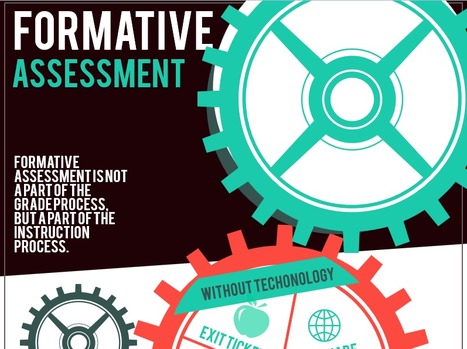
Formative Assessment with & without Tech (infographic)

Formative Assessment with & without Tech (infographic) | Eclectic Technology | Scoop.it
I've had a great time preparing my formative assessment infographic to show ideas for assessment with and without the aide of technology. Do you have ideas for formative assessment? Please share in...
Beth Dichter's insight:

Are you looking for some ideas on how to use technology to do formative assessment? This infographic may provide you with some ideas. Check it out to find 5 suggestions that do not use technology, a couple of ideas for w white board, and many more ideas for using online resources, smartphones and twitter.

Mounds View High School's curator insight, January 15, 2014 2:41 PM

Good ideas to make formative assessment part of the "instructional process".

Scooped by Beth Dichter
August 23, 2013 9:53 PM
Scoop.it!

Let the Students Set the Rules

Let the Students Set the Rules | Eclectic Technology | Scoop.it
Is this a crazy idea? I have found it very effective. I usually spend a substantial amount of time the first class creating rules with the class. It starts the students thinking , bonding, and taki...
Beth Dichter's insight:

What happens when you ask the students to help set the rules for the year? More buy-in, ownership, asking students to think the first day, bonding of the class, responsibility...I am sure you will come up with more. Are you concerned about asking your students to do this? This infographic will provide many suggestions (a total of 27) that will walk you through the process, beginning with "The Why" and then moving to "The How."

Sue Alexander's curator insight, August 24, 2013 9:53 AM

Mia's infographics are amazing resources. This classroom management tool is especially useful for those new to student voice. Here you find a flow-chart of steps to make the rule setting process efficient and the outcome a set of classroom expectations created and owned by the kids.

Kathy Lynch's curator insight, August 24, 2013 5:42 PM

Nit just the why, but the HOW. Thx Beth

KB...Konnected's curator insight, September 16, 2013 3:36 AM

I have found that students will reinforce the rules with each other when they have actively participated in creating them. Just have to make sure that they do it respectfully. This is a win-win for everyone.

Scooped by Beth Dichter
August 23, 2013 9:21 PM
Scoop.it!

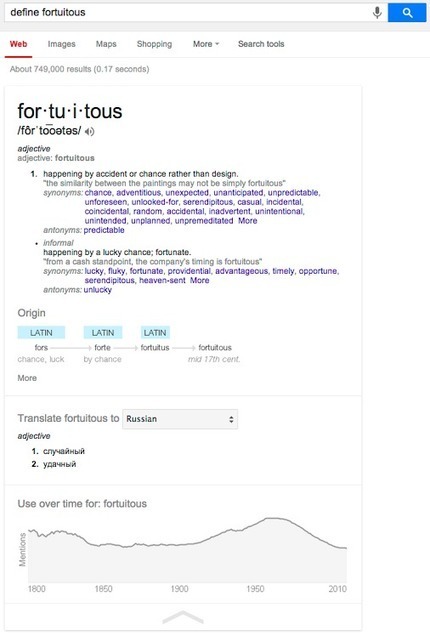
Google – Google+ - You may be familiar with using Google to find definitions,…

Google – Google+ - You may be familiar with using Google to find definitions,… | Eclectic Technology | Scoop.it
You may be familiar with using Google to find definitions, like [define fortuitous]. We've recently updated this feature on google.com on desktop and…
Beth Dichter's insight:

Google has made a major change in their dictionary tool. As well as getting a definition of the word you will find sample sentences, a list of synonyms (and sometimes an antonym or two), a look at the origin of the word, the ability to translate the word into over 60 languages, and more. Students may also click on the synonyms and antonyms and be taken to a new page that defines that word.

No comment yet.
Scooped by Beth Dichter
August 22, 2013 8:22 PM
Scoop.it!

Big History Project-Take your Students on a 13.7 Billion Year Journey

Big History Project-Take your Students on a 13.7 Billion Year Journey | Eclectic Technology | Scoop.it

"Ask the big questions about our Universe, our planet, life and humanity. Explore where we are going in the future and challenge your students to develop the skills and knowledge they need to get there."

Beth Dichter's insight:

The Big History Project is a free, online social studies course for secondary students. The website states that it is:

* 100% open, online curriculum and content; easy to download, print, share

* Ready-made lesson plans, inline teaching guidance and support

* Custom designed content including videos, texts, comics, and animations

* Easily tailored specific state standards and instructional approaches

* Aligned to Common Core ELA standards for 9/10th grade

The course is split into two time periods:

* Section 1: Formations and early life: Theories and evidence of origins of the Universe, planet formation, elements, and life.

* Section 2: Humans: The development of humans, civilizations, and key milestones in our progress.

To access materials you will need to register for the site. If you want some previews of the site you will find a video that discusses how the first part of the course was designed, a video that provides an overview of the 8 major thresholds in the Big History Project, a sample main talk from one unit, a PowerPoint presentation to show to your school or parents, and a Teaching Guide (which you can download at https://course.bighistoryproject.com/media/homepagemedia/CourseGuide.pdf).

No comment yet.
Scooped by Beth Dichter
August 21, 2013 9:26 PM
Scoop.it!

Step-by-Step Guide to Limit Access to Apps on an iDevice

Step-by-Step Guide to Limit Access to Apps on an iDevice | Eclectic Technology | Scoop.it

"If you are lucky enough to have an iPod or iPad in your classroom you know that they can be great motivators for students.  There are tons of apps that teach and reinforce what your students need to learn.  You also know that keeping kids in the app that you want them in is usually not quite so easy!"

Beth Dichter's insight:

If you would like to limit access to a specific app on an iPad, iPhone, iPod or iPadmini check out these step-by-step instructions that have a screen shot for each step (of which there are eight. 

No comment yet.
Scooped by Beth Dichter
September 2, 2013 10:06 PM
Scoop.it!

14 New Kidblog Features You’re Guaranteed to Love! | Kidblog
14 New Kidblog Features You’re Guaranteed to Love! | Kidblog | Eclectic Technology | Scoop.it
"Kidblog is thrilled to announce a massive update! We’ve listened to our users and made the world’s best student-publishing platform even better with a plethora of new features for teachers and students."

Beth Dichter's insight:

Do you want your students to have authentic writing experiences online that they may share with their classmates. Do your students blog? Do you blog? If you are not blogging with your class you should look at Kiddblog, a safe and simple location to set up blogs for your students. Kidblog has come out with 14 new features (based on user feedback). Accounts are free for students and you maintain control over every students' blog. Below are five of the new features.

* Are you a Google Apps school? If so you can sign up through Google and the student name and password will stay the same!

* Private comments - You may now leave a private comment for a student. That's right, no one else will be able to see it.

* "Comment for Me" - "Students now have a comment feed that displays all comments left for them across your entire Kidblog class community."

* Media Uploads - It is now easier to upload photos and videos.

* Student Dashboard - Students now have their own dashboard that provides stats about their posts and more.

An additional nine features are available if you click through to the site.

Yasemin Allsop's curator insight, September 3, 2013 4:04 PM

I love kidblog, so easy to use!

Scooped by Beth Dichter
September 2, 2013 7:26 AM
Scoop.it!

School, Executive Functions, and Technology

School, Executive Functions, and Technology | Eclectic Technology | Scoop.it
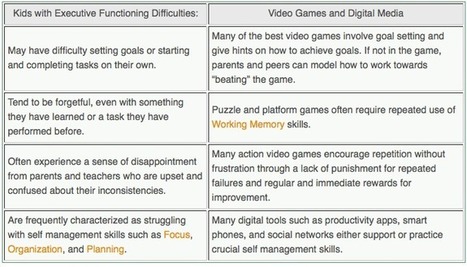
Most educators would agree that a purpose of education is to assist learners in developing life skills which will translate to their lives outside of the school setting.  These include goal setting...
Beth Dichter's insight:

Early in this post Gerstein states:
"Often, though, in schools the following tends to occur surrounding executive functions:

     1. There is an assumption that students possess these skills and 

         abilities.

     2. Students are punished if they fail to practice and use the skills.

As teachers when we think of executive thinking we may think of learners on IEPs or 504s, yet the tools that work well with students on IEPs and 504s also provide great support to our "regular ed students."

So the question of how we can help our learners who struggle with expectations that they may not have learned, such as "be organized" or "stay in your seat" or "raise your hand to speak" may not be understood.

In most schools the teaching of executive functioning skills is not the priority. Yet we do support technology and today technology provides a wide variety of support that is not expensive. This post goes on to share a presentation made by Karen Janowski, a teacher whom works with students with disabilities and knows her "stuff." (You may also be interested in exploring her website UDL Tech Toolkit at http://udltechtoolkit.wikispaces.com/).

As always Gerstein has included additional resources which include a link to the Newton Public Schools Assistive Tech website (and at this site they have a presentation designed for parents on the same subject) as well as a detailed list of tools to assist learners with to do lists/task management, time management, productivity and note taking, organizing, and more. Read through the post and find some tools to suggest to parents and learners that may help the learner be more successful in school this year.

No comment yet.
Scooped by Beth Dichter
September 1, 2013 7:10 PM
Scoop.it!

4 Great Science Videos - What is Evolution? DNA? Natural Selection? A Gene?

4 Great Science Videos - What is Evolution? DNA? Natural Selection? A Gene? | Eclectic Technology | Scoop.it
DNA is easier to understand than you might think. Watch this short 5 min cartoon to learn how DNA works.
Beth Dichter's insight:

Do you teach science? Check out these four animations from StatedClearly.

* What is Evolution? This animation looks at the basics of evolution.

* What is DNA and how does it work? This short (5 minutes) animation discusses how DNA works.

* What exactly is a gene? This animations not only answers the question in the title but also at what a gene looks like, what it codes, and a basic look at Genetically Modified Organisms.

* What is Natural Selection? Before discussing natural selection this video also explains descent with modification and common descent.

More videos are in the works. If you teach science you may want to bookmark this site.

No comment yet.
Scooped by Beth Dichter
August 31, 2013 10:30 PM
Scoop.it!

Educade: Find/create/share lesson plans/ tools: empower your classroom

Educade: Find/create/share lesson plans/ tools: empower your classroom | Eclectic Technology | Scoop.it
Empower your classroom with the best games, apps, and maker kits, including engaging lesson plans aligned to core standards. Explore, connect, & create. Join today!
Beth Dichter's insight:

Educade, a free website, provides lesson plans "standards aligned lesson plans with 21st century teaching tools like games, apps, and maker kits. These are ready to use and effective resources that have been thoroughly vetted by the GameDesk curriculum team comprised of teachers, content specialist, researchers, artists, and developers."

The site is designed for K-12 students, and you may sign up for an account if you would like to create and share your own content. It is easy to search (dropdown menus allow you to search by subject area, grade level, type of tool and platform).

As they say on the site "Start browsing for hundreds of lesson plans and teaching tools right now. It is totally FREE!"

davidconover's curator insight, September 7, 2013 10:29 AM

This is a great resource for teachers to find lesson plans that you can apply immediately in your classroom. 

Scooped by Beth Dichter
August 29, 2013 8:31 PM
Scoop.it!

Infographic: What's Happening to Biodiversity?

Infographic: What's Happening to Biodiversity? | Eclectic Technology | Scoop.it
What's happening to biodiversity? We're losing it.
Beth Dichter's insight:

This infographic, put out by the World Bank, looks at the state of biodiversity today. The sections include:

* Once a Species is Extinct, it is Lost Forever

* Threats to Biodiversity

* Why Biodiversity Matters

* Signs of Hope

Think about using this to help students learn and understand some of the issues related to biodiversity.

Sally Egan's curator insight, September 4, 2013 6:58 PM

A great series of infographics showing the decline in world biodiversity, the factors threatening biodiversity, why bodiversity is imoportant and hope for teh future. Compiled by World Bank it is useful for students in develoing knowledge and understanding of the importance of global biodiversity in topic Ecosystems at Risk.

The Morpho Institute's curator insight, January 28, 2014 9:45 PM

Great infographic for your class discussion on biodiversity

Diane Johnson's curator insight, January 29, 2014 8:17 PM

Biodiversity is the key to a healthy ecosystem. Since there have been at least 6 mass extinctions in Earth's history, we can learn the stress this puts on all parts of the system and how to try to ameliorate the damage.

Scooped by Beth Dichter
August 28, 2013 9:21 PM
Scoop.it!

Quandary - A Free Online Game for Students 8 - 14

Quandary - A Free Online Game for Students 8 - 14 | Eclectic Technology | Scoop.it
Beth Dichter's insight:

Quandary, a free online game for players ages 8 - 14, won the Game of the Year Honors at the 2013 Games for Change Confernce. This game provides players an opportunity to help shape a new society "while learning how to recognize ethical issues and deal with challenging situations in their own lives."

The websites goes on to state "Players develop skills such as critical thinking, perspective-taking and decision-making. Quandary provides a framework for how to approach ethical decision-making without telling players what to think."

Why use Quandary with your students? This game is designed to help students learn skills in:

* Problem solving

* Communication

* Information literacy

* Global awarenes

* Collaboration

* Creative thinking

There is a teachers page available which provides additional resources including a Game Guide, a sample lesson plan, an opinion tracker as well information on how the learning outcomes match to standards in both the Common Core and the Partnership for the 21st Century.

Yasemin Allsop's curator insight, August 29, 2013 2:45 PM

Oh, this is really interesting!

davidconover's curator insight, August 30, 2013 8:04 AM

I look forward to sharing this game with my students. I wonder what their comments will be.

Amélie Silvert's curator insight, August 30, 2013 11:10 AM

Defining moral dilemnas, finding solutions and discussing. Collaborative work. Why not give it a try?

Scooped by Beth Dichter
August 27, 2013 9:07 PM
Scoop.it!

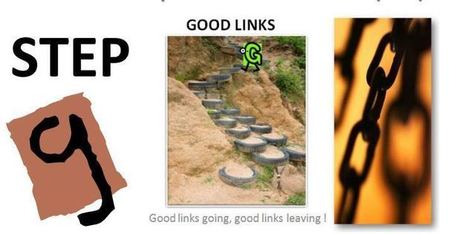
Step G… Seven Steps To Website Evaluation For Students… Good Links

Step G… Seven Steps To Website Evaluation For Students… Good Links | Eclectic Technology | Scoop.it
Welcome to a this seventh in a series that is must read for any  educator wanting to facilitate web page evaluation by students.  It includes a new step in web evaluation information along with a p...
Beth Dichter's insight:

This post is the last of a series that looks at website evaluation. Beginning with the letter A the posts were titled:

* A is for Author

* B is for Bias

* C is for Currency

* D is for Domain Anatomy

* E is for Effectiveness of Purpose

* F is for Facts and Contents

* G is for Good Link

It is not easy for students (or teachers) to learn how to evaluate websites. For each letter you may download a flyer that provides resources for students to use as they learn the process. Michael Gorman states "I believe that web evaluation must be a simple process that can also be applied to memory. Thus the reason for my (A-G) approach. This series is devoted to teaching these skills..."

If you will be working with students this year with website evaluation you may find these handouts valuable. It appears to me that they are written at a middle school level.

No comment yet.
Scooped by Beth Dichter
August 25, 2013 9:15 PM
Scoop.it!

Free Technology for Teachers: Rewordify Helps Students Read Complex Passages

Free Technology for Teachers: Rewordify Helps Students Read Complex Passages | Eclectic Technology | Scoop.it

"Rewordify is a free site that was developed by a special education teacher and former computer programmer for the purpose of helping students read complex passages. At its most basic level Rewordify takes a complex passage and rephrases it in simpler terms."

Beth Dichter's insight:

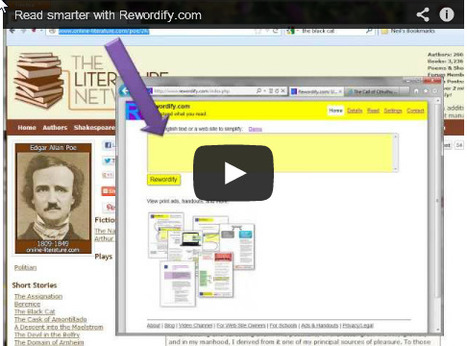
Here is a tool you might want to try with students whom have difficulty reading complex passages. Rewordify rephrases passages (simply cut and paste text into a "yellow box" or type directly into it). Users may select setting so they only see the "easier version" (although they may see the more difficult words as they mouse over the word) or have this option in reverse. You may also enter in a website and have them rewordify the site. There is much additional information on the site including a teacher and student demo. The site is free, and also works on tablet and smartphones. As we move to more informational text and more complex (think Common Core) this site may be quite valuable for many students.

No comment yet.
Scooped by Beth Dichter
August 24, 2013 10:53 PM
Scoop.it!

Why It's Time To Start Teaching Students How To Think - Edudemic

Why It's Time To Start Teaching Students How To Think - Edudemic | Eclectic Technology | Scoop.it
As an elementary teacher, I can’t help but notice that children today want quick answers and do not take the time to think things through.
Beth Dichter's insight:

As teachers how can we help out students learn to think. Their world outside of school is filled with technology that often provides "instant gratification."
This post is split into four sections.
* We must teach our children to think.

* We must not underestimate modeling thinking.

*As we teach students how to think, we must include questioning as an integral part of the thinking process.

* Collaboration contributes greatly to learning.

Teaching students to think should begin at an early age and think-alouds are one tool to use. "Think-alouds are essential if we want our students to know the discourse that must take place in their brains when they are processing information. When students observe others performing an action it predisposes them to that activity on a subconscious level."

Additional information is available in the post.

Carolyn Williams's curator insight, August 26, 2013 4:57 AM

Making it Fun!

Kymberley Pelky's curator insight, August 26, 2013 3:12 PM

In an age where children expect everything to be instant, their responses become the same without taking time to process the information first.

Becky Mowat's comment, August 26, 2013 9:48 PM
Analysis and synthesis take time...and are critical to problem solving, as we all know. How to teach these higher level thinking processes is key to helping students become successful independent learners.
Scooped by Beth Dichter
August 23, 2013 9:36 PM
Scoop.it!

There’s no dishonor in having a disability - Steven Claunch

There’s no dishonor in having a disability - Steven Claunch | Eclectic Technology | Scoop.it
Beth Dichter's insight:

The more times I watch Ted-ED videos the more impressed I am with the quality of the presentations...and the fact that they also supply questions (typically multiple choice and short answers), additional resources and a forum. This particular presentation is an individual sharing their disability, but it also addresses the concepts of fixed mindset and growth mindset, in a way that will engage students. I think it could be used to bring up these two concepts for a great classroom discussion.

No comment yet.
Scooped by Beth Dichter
August 22, 2013 8:48 PM
Scoop.it!

How to Make an Infographic

How to Make an Infographic | Eclectic Technology | Scoop.it
Hello, World! Lots of my friends have been asking me how I make the infographics. I find it very simple. But, I admit that that simple mindset is after hundreds of hours playing with Piktochart. I ...
Beth Dichter's insight:

If you are thinking of creating an infographic using Piktochart you might want to check out this infographic that walks you through the steps by phases which include:

* The Research Phase

* The Design Phase, where you have to select either a Pikto theme or to do it from scratch (and your choice will determine some of the options available)

* Other Exciting Information

This is a great overview/guide that you may want to share with students if they are doing a project that involves creating an infographic.

Dean J. Fusto's comment, September 8, 2013 11:13 AM
Thanks for posting this...I'll try it soon.
Marteana Davidson's comment, September 8, 2013 9:41 PM
I'm going to try this with my production report on hour my facility is used each year!
Piktochart's comment, September 26, 2013 2:15 AM
Hi Kimberly! Thanks for thumbs up!
Also we ask teachers to fill a survey that could help us to improve. Maybe you could find a few minutes to fill it yourself and pass to other teachers who use it? Thanks!
ow.ly/oJahy
Scooped by Beth Dichter
August 22, 2013 7:34 PM
Scoop.it!

Infographic: Kids of the Past vs. Kids of the Internet Generation

Infographic: Kids of the Past vs. Kids of the Internet Generation | Eclectic Technology | Scoop.it
Kids these days... am I right?  The following infographic takes a look at today's kids as compared to the children of the past.  In other words, it's a no-holds-barred face-off: Kids of the Past vs. Kids of the internet Generation!
Beth Dichter's insight:

Check out this infographic to learn how the Kids of the Past compare with the Internet Generation in the following areas:

* Cultural and Social Characteristics
* Technology and Social Media
* Intelligence

Yasemin Allsop's curator insight, August 23, 2013 11:28 AM

Kids of poverty? That would be interesting comparison too..

Viljenka Savli (http://www2.arnes.si/~sopvsavl/)'s curator insight, September 9, 2013 3:47 AM

Can we compare them?...