




There are a slew of free ways to make digital portfolios with students and for students. These are some of our favorites!

 Your new post is loading...
 Scoop.it! There are a slew of free ways to make digital portfolios with students and for students. These are some of our favorites! No comment yet.
Sign up to comment
Scoop.it!

"As the search engine that’s become its own verb, Google’s success is difficult to frame. One of the most telling examples of their gravity in search is how few legitimate competitors they have. (Some would say they have none.)"
Beth Dichter's insight:
When you ask students what search engine they use the answer tends to be Google...and their tendency is to look at the first four or five results (this is from my experience with students). This post provides a look at "innovative ways to use Google search in the classroom...[with] the intended outcome [to be] the students sustained ability to self-direct and manage the search process as the digital universe continues to evolve." What are some of the ideas? Read below and then click through to the post to learn of others. * Locate 3 sources of information that support an idea, and rank them in terms of their credibility. * Have students record immediate but brief think-alouds for why they choose to click on certain search results while skipping others. * Defend or critique the process of Googleing entire questions (versus simply Googleing key words and phrases). Consider picking a number of these ideas and using them with students in your class this year...and share with other teachers in your school. It is not only students whom need to upgrade their search skills.
Scoop.it!

"Are you on a journey to find great PBL ideas? Then you have come to the right place. In fact, you just might want to spend some time here and also continue to come back. The first of my list includes sites that have created data bases of PBL Units. You will find units that you can use, improve, or incorporate as a base."
Beth Dichter's insight:
If you are going to be using Project Based Learning (PBL) in your classroom this year then take the time to check out this post. You will find 45 resources to help you along the way. Sections include: * Databases of PBL Units * Other PBL Idea Generators * Challenges and Competitions Each site is hot linked and there is a short description of what you will find if you click through. This post has put together an amazing number of PBL resources that will provide great resources to help make PBL successful in your classroom! 
Lauren Yachera's curator insight,
February 19, 2014 2:48 PM
Useful links when it comes to coming up with a great PBL for the classroom. This website will be incredibly useful in the future! 
Danielle Howard's comment,
February 20, 2014 7:25 PM
Website that offers links to find PBL ideas. This will be great resource to use when struggling to come up with a project for students' interests.
Scoop.it!
Beth Dichter's insight:
What is an active learner? This video provides one look at what a learner might look like today. In additon to the video there is also a SlideShare that would allow you to show the "video" at a pace that allows discussion, and a number of visual images that also explore the active learner. The visuals include Engaging an Active Learner that shares ways students learn (and do not learn), Open Your Laptop to Page 3, Learning Goes Digital: Electronic Education Moves to Head of the Class and many others. These materials were created by an Agency working for Blackboard (a content management system). Using either the video or a number of the visuals would provide a opportunity for teachers, parents, or other small groups to discuss why education is undergoing a seismic change in many areas.
Scoop.it!

This is one of those blog posts intended to help me shape my own thoughts – and asks you, "How close I am to the real world of teaching and learning?
Beth Dichter's insight:
Today the words personalized learning are often heard when discussing education. How is personalized learning different from individualized learning? Is one "better" than the other? David Warlick provides a great table that compares the two in the following areas: * Definition * Literacy becomes a ... * Teacher's role * Student role * Standards * Outcomes * It's essence The final question he raises is "What do you think?" If you have ideas about this please share them in the comment section...and take a minute to look at the table in the original post.
Scoop.it!

Zombies are a popular genre of entertainment, but who knew they could also make excellent teaching tools? Learn how you can use zombies in your STEM lessons.
Beth Dichter's insight:
Texas Instruments (TI) and The Science & Entertainment Exchange (part of the National Academy of Sciences, or NAS) have created free classroom activities that use "TI-Nspire CX™ handhelds, TI-Nspire™ Teacher and Student Software, and TI-Nspire™ Apps for iPad" with a focus on science and math. The activities explore Hollywood themes like zombies, superheroes, space and forensics, providing students opportunities to solve problems. You can access more information on this program and materials at the website STEM behind Hollywood at http://education.ti.com/en/us/stem-hollywood.
Scoop.it!

"Emphasizing students need to learn proper grammar can sometimes feel like we are talking about 20th century skills because, in this day and age, we seem to focus on STEM, the 4 Cs and 21st century technology skills. I appreciate the importance of all these topics.. but being able to communicate effectively through writing is truly a basic life skill every person in this world needs. Being able to utilize good grammar is absolutely essential..."
Beth Dichter's insight:
NoRedInk has made many changes to their website and if you have not looked at it recently you may want to travel over and check it out. The site is to help students learn writing and grammar skills. Now you can: * Create assignments and quizzes without doing any grading * Target Common Core skills using your students’ interests * Provide students with unlimited help whenever they need it * Track growth using our color-coded heat maps To help students stay engage they "generate questions from each student’s favorite celebrities, hobbies, TV shows, and friends." When it is time for an assessment of student work they will "drag in commas, click words to capitalize them, throw out unwanted punctuation, and edit the text directly" resulting in a more authentic assesment. And as we are asked to personalize instruction this site will help in the areas it covers. To go directly to NoRedInk click on this link: https://www.noredink.com/ 
Jennifer Hurley-Coughlin's curator insight,
September 10, 2013 3:43 PM
We used this site last year a lot and were really hoping for new strands. The kids love the personalization.
Scoop.it!

The Common Core Learning Standards describe the importance of teaching students how to comprehend informational text. They are asked to read closely, make inferences, cite evidence, analyze arguments
Beth Dichter's insight:
There are great websites available for primary source documents and this post looks at six of them. * The National Archives * Docs Teach (a part of the National Archives but geared to teachers organized into periods of history) * Spartacus Educational - a resource for global history * Fordham University - another resource for global history which is organied by periods of history * The Avalon Project - located at Yale this is also geared to global history and includes a database (starting with ancient and midieval documents) as well as links to human rights documents * 'Life Magazine' Photo Archive- through a project with Google and Life you may now search millions of images published in 'Life' by key words or by decades (1860s - 1970s) Additional resources are listed for the iPad (as in free apps) Informational text is an important component of the Common Core. These resources will provide students with the opportunity to look at many great primary source documents, be they text or visual! 
Dr. Robin Yap, JD, PhD's curator insight,
September 10, 2013 10:30 AM
How do you determine your primary sources of information? 
Alicia Luke's curator insight,
September 10, 2013 8:06 PM
Resources for educators trying to find primary sources
Scoop.it!
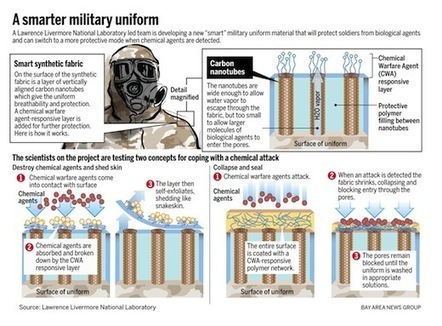
"We’ve only been in school one week, and our students have already been probing about the situation in Syria. It’s dominated their Twitter feeds and topped the news rundown on their carpool radios. We ended up scrapping our lesson on Friday to explore the facts of the Syrian conflict with the students on iPads."
Beth Dichter's insight:
How do we teach about issues like Syria? What can we do to help students understand the issues? ASIDE has created a post that provides visual information to help students understand this difficult issue. Resources include an animated video that looks at the history of this conflict which "is informative and age-appropriate...{offering} complete cultural timeline and an explanation of Bashar al-Assad's reactions to rebel resistance." In addition you will find a map that shows where Syrian refugees are located, an infographic from Al Jazeera that looks at which countries support or oppose military intervention, a graphic that explains different types of chemical weapons, resources from PBS and much more.
Scoop.it!
I know a teacher—a great one, actually—who, in private, refers to his students as “bricks.” As in, “dumb as a brick.” You almost never hear that level of candor among teachers, and not just because every parent’s got a lawyer on retainer.
Beth Dichter's insight:
We know words make a difference and this post explores how our words as a teacher may impact our students, how words we use for students whom are "failing" are described. Ben Orlin asks "So how do teachers frame failure for their students? What words do they use? He continues to explore the words slow, weak, behind, low, struggling and unintelligent, writing about how each "embodies different assumptions about the engines of success, the nature of failure, and how students’ minds operate. Each word is a bite-sized piece of educational ideology." Although he explores this issue through the lens of math the concepts apply across all curriculum. With the Common Core we are being asked to personalize education for our students and to make sure that all hit standards based on grade...a task we know more challenging for some students. If we have a student whom has been labeled at some point in their journey we also have to address the issue of mindset, and help that student move towards a growth mindset. The issue of language, and how we use specific words, is a component of this, and this post highlights some issues in a format that is easy to understand.
Scoop.it!

"Resilience begins with beliefs. If you believe in the capacity of all individuals to demonstrate resilience, you won't give up on them. Your actions, words, and behaviors will project that message and will awaken and foster resilience in your students."
Beth Dichter's insight:
This September the publication "Educational Leadership" is focused on Resilience and Learning. There are many articles available at the ASCD website and this one provides a list of 11 reflections on resilience, available as text only or as the infographic (downloadable as a pdf). Several other items listed in this are below. * Resilience is a process, not a trait. * Everyone, regardless of age or circumstances, has the capacity for resilience. * Resilience isn't just for people from high-risk environments... Each of these has additional detail and an additional 7 are available in the post. 
Jennifer McGuff's curator insight,
August 1, 2015 1:14 PM
I chose this article because it delves into ways to mitigate adversity and develop personal strength.

Erin Ryan's curator insight,
October 19, 2015 8:31 PM
Resilience is believing in what you do and even when it gets so hard and you feel so defeated, you just don’t give up. It is believing that you can rise above and achieve something in the face of disaster, disappointment and struggle. Resilience is needed in education or you will not survive. Each day you spend in school building, you carry the hopes and dreams of your students. You also carry their tragedies and trauma. Why do we do this every day over and over again? Because we are believers. We are resilient and we know we hold the potential to change lives and promote success in all of our students.
Scoop.it!

The teachings of the Dalai Lama are as important as ever when it comes to online learning and online teaching.
Beth Dichter's insight:
This post discusses how big data is impacting education. In the discussion on big data the following question is raised: "How can we make our students (especially those online students) more successful? (In other words, retention, retention, retention.)" As she learned more about big data she wondered what happened to the human side of the equation, "the caring." Although this article looks at online learning the words of the Dalai Lama ring true for all of us as educators. Read through them and see what you think. All words used in the image above were said by the Dalai Lama. My thanks to her for putting together some of his words and bringing them to our attention. 
Shannon CdeBaca's curator insight,
October 18, 2013 12:54 PM
Had to add this as it speaks on several levels and it made me smile.
Scoop.it!
Beth Dichter's insight:
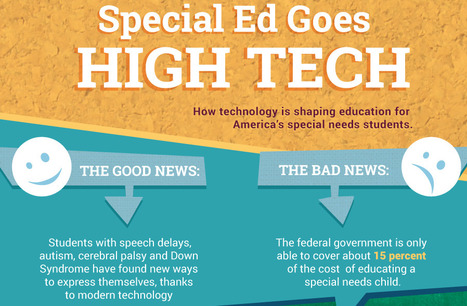
This infographic looks at how technology shaped education for special needs students (in the U.S.). There are many sections in the infographic including: * A Brief History of Children with Special Education Needs * The Percentage of Students by Disability (ages 6 - 17) * Then, Now and the Future * Devices to Help the Hearing Impaired * Devices to Help the Visually Impaired * iPad Apps * Psychological Effects of the new Technologies * References As educators we need to understand the history of Special Education and the needs of our students. This post presents valuable information for teachers across all grade levels and curriculum. 
Shao Lin Lauricella's curator insight,
October 30, 2013 8:26 PM
I find this super helpful. There are many more special needs children today than there were back in the day. Also today there is more use in the technology world and we need to accommodate to both. This is helpful because it teaches teachers who has a special needs students the different technology tools that will help those students specifically. |
Scoop.it!

Just a simple infographic for kiddies to learn about dinosaurs.Fun, interactive learning tool about dinosaurs
Beth Dichter's insight:
Are your students interested in dinosaurs? Here is an infographic that provides information about dinosaurs including: * A definition of dinosaur and paleontology * When did they exist? * Where big were they? * What were there eating habits? * How did they walk? Although this post on Visual.ly did not show the author some searching shows that it was designed by a paleontologist for children between the ages of 7 - 11. You can find his story on this and sections of the infographic at http://ashmitav.wix.com/portfolio#!dinosaurs/cv7u 
Maddison Halliday's curator insight,
October 17, 2014 10:59 PM
This is a great website to learn fun facts about dinosaurs! 
Rhys Hennig's curator insight,
May 4, 2015 5:36 AM
An easy to read infographic with all sorts of interesting facts.
Scoop.it!

So, you want to use that new app, site, web tool, gizmo, or doo-dad in the classroom? That's great! Now what? Using a process to vet, research, and test a new addition to your repertoire is crucial...
Beth Dichter's insight:
Technology changes rapidly and many want to jump on the bandwagon quickly, but before we bring new technology into our classroom we need to learn to use it and determine if it will help move students to a new level. One of my favorite saying is that technology should not be used simply to use technology, but to reinforce, enhance and extend the curriculum. This post provides ten excellent points that we should consider before bringing in the next cool tool that we discover. Four are listed below. * Identify and verify * Do some real research * Write a rationale for use * Build norms and expectations for use Each of the points has additional information. Click through to the post to learn more. 
Rosemary Tyrrell, Ed.D.'s curator insight,
September 17, 2013 2:43 PM
Beth Dichter's insight:
Technology changes rapidly and many want to jump on the bandwagon quickly, but before we bring new technology into our classroom we need to learn to use it and determine if it will help move students to a new level. One of my favorite saying is that technology should not be used simply to use technology, but to reinforce, enhance and extend the curriculum. This post provides ten excellent points that we should consider before bringing in the next cool tool that we discover. Four are listed below. * Identify and verify * Do some real research * Write a rationale for use * Build norms and expectations for use Each of the points has additional information. Click through to the post to learn more.
Scoop.it!
So you want to flip your class? In this how to video I explain the idea behind flipping, some things to think about as you begin and some concrete steps to g...
Beth Dichter's insight:
This video not only provides an explantion of flipping and how to begin this process it also provides great resources (if you click on the Show More button under the description). There you will find links to four "great content curators" (these sites have content across many subject areas) as well as links to educational content creators (more focused on a specific area) and a variety of websites that tend to post daily and you may want to subscribe to. The video also provides you with a "tutorial" of how to create a video if you want to flip your class. Thanks to Keith Hughes and HipHughesHistory to providing this wonderful resource!
Rosemary Tyrrell, Ed.D.'s curator insight,
September 16, 2013 1:01 PM
Beth Dichter's insight:
This video not only provides an explantion of flipping and how to begin this process it also provides great resources (if you click on the Show More button under the description). There you will find links to four "great content curators" (these sites have content across many subject areas) as well as links to educational content creators (more focused on a specific area) and a variety of websites that tend to post daily and you may want to subscribe to. The video also provides you with a "tutorial" of how to create a video if you want to flip your class. Thanks to Keith Hughes and HipHughesHistory to providing this wonderful resource! 
Mike Dilger's curator insight,
October 14, 2013 5:18 AM
Some ideas about flipping. There are various degrees of flipping and you can start small and flip quite successfully, with good results. 
Mary Anne Parrish's curator insight,
July 16, 2014 4:49 PM
This teacher has it going on! Very entertaining and full of fantastic information and tips for the beginning flipper!
Scoop.it!
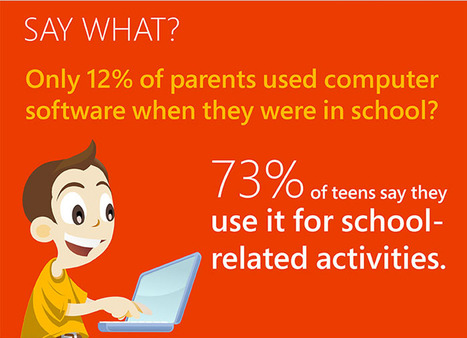
"Parents are famous for their ability to reminisce about days gone by. It always starts the same way, “Back when I was your age, we used to walk 10 miles to school barefoot—in the snow.” Or, “I remember when school lunch cost a nickel.” Thanks to the integration of technology, schools, and classrooms in particular, have changed so dramatically in recent years that some parents might not even recognize them. It’s a classic case of old school versus new school."
Beth Dichter's insight:
This infographic looks at how the integration of technology into schools has made major changes. Learn how many parents used software in school compared to their teenage students; how collaboration has changed; if technology is important to student success (parents view) and much more. If you have an upcoming Open House this might be an infographic that would elicit comments from parents. 
Nancy Jones's curator insight,
September 15, 2013 11:37 AM
Spot on. Although I am still trying to get the hang of printing these out to share with faculty And parents by display ongoing in a public area
Scoop.it!
We're thrilled to launch our next series of animations: This Thing Called Science. This series follows on from Critical Thinking, showing the way we think scientifically by considering skepticism, ...
Beth Dichter's insight:
This is a fabulous series that explore science. Six animated videos are available that show "the way we think scientifically by considering skepticism, testing, blinding, uncertainty ethics and citizen science." By title they are: * This Thing Called Science Part 1: Call me skeptical * This Thing Called Science Part 2: Testing, testing, 1, 2, 3 * This Thing Called Science Part 3: Blinded by Science * This Thing Called Science Part 4: Confidently Uncertain * This Thing Called Science Part 5: Do the Right Thing * This Thing Called Science Part 6: Citizen Science These videos were created by Bridge8, who also put out a great series of videos on Critical Thinking. You can find that series at http://bridge8.wordpress.com/2012/01/30/critical-thinking-animations/ There are also 2 guides available for the Critical Thinking series, a postcard size one and an extended one. I found these on YouTube when I accessed the video Critical Thinking Part 1: A Valuable Argument uploaded by techNyouvids. 
mtmeme's curator insight,
September 13, 2013 9:09 AM
Great series for introduction to scientific concepts and research methods. When we are aware of sources of bias we can devise ways to test for it or eliminate it. 
Hanis's curator insight,
July 22, 2014 3:50 PM
Learn more about Science by first understanding the Scientific Process. These videos above make it much more easier to understand the topic.
Scoop.it!

How do you actually ensure students learn while creating and exploring? Here are four different tips from Shawn McCusker that should keep learning rolling along.
Beth Dichter's insight:
As we move to the Common Core and we look at the Depth of Knowledge that will be required for our students it is clear that the need for our students to create is critical. This post starts with the following sentence: "When was the last time your students said “Wow, that worksheet changed my life”? Can you even remember a similar cookie cutter classroom activity or assignment from your days as a student? Yet they were a popular tool because they were structured and efficient in getting the class to a set finish point." After presenting "the exploding volcano project" the post turns to four strategies. The short hand version is below. Click through to the post for additional information. 1. Start with your specific learning objective. 2. The idea to be expressed comes before the tool used to express it. 3. Make asking "How will this show mastery of the learning objective?" your classroom mantra. 4. Engage in evaluating the PROCESS of creation and not just grading the finished project. There is also an example a learning objective and a project that one student submitted.
Scoop.it!
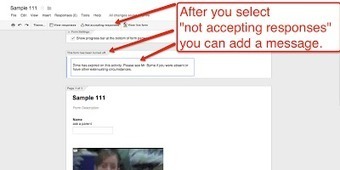
"Not less than ten minutes after I completed my guide to Creating and Grading Quizzes With Google Forms Google released a major update to Google Forms."
Beth Dichter's insight:
Richard Byrne updates his information on creating quizzes by sharing the steps to inserting a video into Google Forms. He states that this will work for people using a personal gmail address but not a Google Apps for Ed account. Google forms provide a way for you to collect data on your students and use it as a form of assessment to help improve your teaching, one of the requirements of Common Core. 
Amélie Silvert's curator insight,
September 10, 2013 11:10 AM
After adding an image, we can at last insert a video. A feature useful for flipped classroom and of course class use. What wonderful news!
Scoop.it!
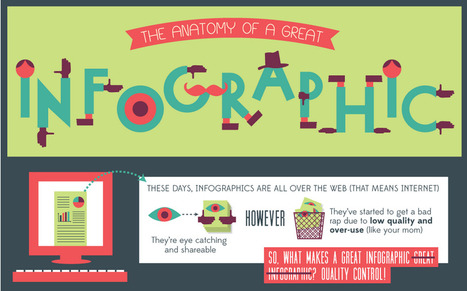
"These days, infographics are all over the web (That means internet). They're eye catching and shareable. However, they've started to get a bad rap due to low quality and over-use. (like your mom) So, what makes a great infographic great infographic? QUALITY CONTROL!"
Beth Dichter's insight:
Are you wondering what your infographic needs to be a great infographic? This post disects an infographic, sharing what is important to include. Sections include: * A brief look at the history of infographics * Does it have all the important parts * Gotta have brains: data and story * Ooo la la visualization * Shareability Additional information as well as links to resources are located under the infographic. If you plan on having students create infographics this year you may want to share this as a tool for discussion as students review infographics and learn to identify great infographics.
Dr. Robin Yap, JD, PhD's curator insight,
September 10, 2013 10:29 AM
What is your takeaway from this? 
Ana C. Robles's comment,
September 12, 2013 9:34 AM
Ideas and elements when creating an info-graph... Good source for designers.
Scoop.it!
Beth Dichter's insight:
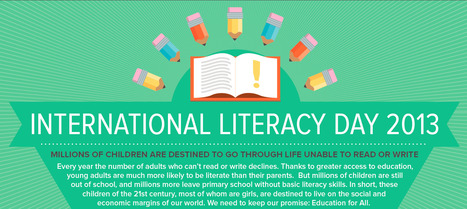
September 8th is International Literacy Day and a number of infographics are available (simply by searching). This infographic was published by UNESCO (United Nations Educational, Scientific and Cultural Organization) and it looks at the rate of literacy across the globe by gender and age (adult being defined as >15), where they live, who will be illiterate in the future, what the future holds for them and raises the question "How can we change their destiny?" Why share this infographic? Would it help our students to know that there are many people in the world who do not have access to school, to the ability to become literate, and to know that due to that their lives will have limitations simply due to this fact? Part of being a citizen today is raising awareness in our students of what happens beyond their school, their home town, the US and what is happening across the world. We celebrate literacy with our children. Perhaps we can also make them aware that others do not share this opportunity and consider what we might do to help them.
Scoop.it!
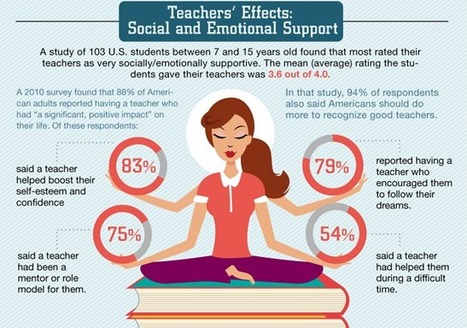
You know that bumper sticker that says, “If you can read this, thank a teacher”? It’s the literal truth. While most of us spend more time thinking about reality TV stars and pro athletes, teachers are among the few people who truly affect our ...
Beth Dichter's insight:
There are days when we ask ourselves why we teach...and this infographic shares lots of reasons for why we teach and how we impact our students...so as a visual to share, or one to look at you when you need some building up. 
Tiziana Iozzi's curator insight,
September 11, 2013 1:37 AM
Un insegnante ha il ruolo di un mentore, è un modello, sa aiutare i ragazzi nelle difficoltà e li incoraggia a seguire i loro sogni... A chi di voi è capitata la fortuna di conoscerne almeno uno/a nella vita? 
Darleana McHenry's curator insight,
September 11, 2013 11:56 PM
I had the opportunity to tell my first grade teacher thank you 5 years ago. She actually had kept my first grade picture all these years. My teachers were great and school was my favorite place and I excelled there. So thanks to all the teachers that I did not get to thank. :-) 
Silvia Nascimento's curator insight,
August 6, 2015 9:22 PM
There are days when we ask ourselves why we teach...and this infographic shares lots of reasons for why we teach and how we impact our students...so as a visual to share, or one to look at you when you need some building up.
Scoop.it!
"The technological solutions are more difficult to implement than would appear at first blush.
Beth Dichter's insight:
What can we do to help students learn and to provide teachers more time to work with students? How can technology play a role in this? To answer these questions the post discusses a book by Daniel Willingham, "Why Don't Students Like School." The authors state that the book can be boiled down to this statement: "Students don’t like school because school isn’t set up to help them learn very well." As the days of the one-room school house shifted due to the Industrial Revolution classes moved from small multi-age groups to larger groups based on age and that has not changed significantly. Differentiation is discussed but it is not always easy to differentiate in a classroom with 25 or more students, and today we are told we must personalize education to meet the needs of each student. One way we may be able to meet this need is with the use of "adaptive learning software." This post continues to explore some of the pros and cons of this. There are some schools that are using adaptive software with success, and Carpe Diem-Meridian, a public school in Indianapolis. Click through to the post to learn more. Would you like to see adaptive software become a part of your school, so that some students would be using software that targets their skills while you work with others in smaller groups?
Scoop.it!

"In the context of learning, intrinsic motivation is motivation that stems not from external factors like grades and status, but rather from genuine interest and ambition. Like altruism, it assumes no reward. But – like altruism – it is difficult to corroborate. Even if Sally, your best student, completes the Extra Credit assignment out of pure enjoyment, it doesn’t mean she isn’t expecting external rewards like approval and attention."
Beth Dichter's insight:
Does intrinsic motivation exist? This post explores this idea, clearly landing in the field of intrinsic motivation. After exploring the concept and discussing how education has changed there is a list of 25 ways we may help students cultivate this trait. A few are listed below but many more are in the post, as is a TEDtalk by Dan Pink. * Rethink reward * Make mastery cool * Make students feel like education is a choice, not a requirement * Make every student feel confident Each of the items has additional information in the post. As you work in your classroom this year you may find yourself using some of the ideas listed in this post with your students. 
Drora Arussy's comment,
September 8, 2013 4:57 PM
Student ownership and buy-in has always been key, thank you for sharing.
|









Have you considered having your students create a digital portfolio? As we move more and more to digital technology the ability to do this becomes easier, and the reasons you might do so seem to increase.A few of the reasons you might consider digital portfolio:
* students are able to see their progress over time;
* it helps you as a teacher be able to track student progress more easily;
* it is easy to share with other teachers as students matriculate;
* they provide a tool for teacher and student to communicate.
One issue that has often stopped folks is how to save these portfolios. This post share four resources that you might consider using to do this: Evernote, Google Sites, WordPress and Edublogs. Each has a short explanation, oftem providing pros and cons.