We're in the middle of a Copyright Infringement epidemic happening on the Internet right now. Copyright is misunderstood and as a result webmasters an
Your new post is loading...
From
visual
We're in the middle of a Copyright Infringement epidemic happening on the Internet right now. Copyright is misunderstood and as a result webmasters an
Beth Dichter's insight:
Check out this infographic to learn five myths and five facts about copyright. Consider mixing them up and asking your students to try to determine truth from fiction. And ask your students to review it before they begin to do research online.
"Character is at least as important as intellect."
Beth Dichter's insight:
Angela Duckworth left the classroom to study grit..." the relentless work ethic of sustaining your commitments toward a long-term goal — impact success." This post not only provides some background to her work it has a short (under 4 minutes) video where she discusses why she chose to research self-control and grit. Duckworth began by studying a group of 8th graders and found " students’ self-discipline scores were far better predictors of their academic performance than their IQ scores." Over time she and a colleague developed a Grit Test. Learn more about her work and find a link to the Grit Test by clicking through to the post (last paragraph).
"There are several benefits in having your students work as a team. Social Learning theory explores these benefits. But, how do you do it? Here are 27 ways to build a team."
Beth Dichter's insight:
Learning to work collaboratively is a skill we often talk about, but how do we build teams in our classrooms? If you are asking yourself this question check out this infographic and learn 27 ways to build a team.
Ashleigh Dawley's curator insight,
September 30, 2013 4:18 PM
Thought this was a great way to get thinkig about teams and different ways to form them. Uses funn interactive and proactive ways to build a team.
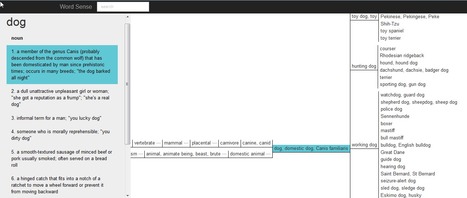
"Word Sense is a neat little service that is one part dictionary and one part thesaurus. When you enter a word into Word Sense it will show you the definition(s) for the word as well as the connections to associated and similar words. You can see any of the definitions of the connected words by simply clicking on them to pop-up a definition."
Beth Dichter's insight:
Check out this new tool (to me) that Richard Byrne posted on his blog. Word Sense provides students with another way to learn and reinforce vocabulary words. Not only does it show definitions of the word as you mouse over and click on other words you will see their devitions. It will also tell you the part of speech (noun, verb, adjective, adverb, etc.). The About section on Word Sense states: Search and explore word meanings and relationshipsInteractive figures connect related wordsFind more specific or less specific synonymsImprove your writing by discovering more descriptive wordsHyponymy and hypernymy exposed - look it up!Host thesaurus parties and use words to make new friends100% recycled wordLearn new words, see words in context, gain a better understanding of vocabulary, find new descriptive words...what do you think your students might do with this site? How might you use it within a lesson?
" "Rigor is a fundamental piece of any learning experience. It is also among the most troublesome due to its relativity. Rigorous for whom? And more importantly, how can you “cause” it? Barbara Blackburn, author of “Rigor is not a 4-Letter Word,” shared 5 “myths” concerning rigor, and they are indicative of the common misconceptions: that difficult, dry, academic, sink-or-swim learning is inherently rigorous. Myth #1: Lots of Homework is a Sign of Rigor
Beth Dichter's insight:
How can we add rigor to lesson plans? For 10 strategies check out this post. Five of the strategies are listed below (with more information about them in the post): * Require students to synthesizing multiple sources * Design tasks with multiple steps that build cognitively * Use divergent perspectives * Use divergent media forms The post also provides a great Rigor Rubric that looks at the four levels (as in Level 1, 2, 3 and 4 as found in the new assessment for Race to the Top) as well as two areas, Curriculum and Instruction. Curriculum is divided into Content, Connections, Perspective and Texts/Materials. Instruction is divided into Delivery by Teacher, Depth and Reflection. Consider sharing this rubric in your school and engaging teachers in a discussion of how we can best provide rigor to our students.
David Baker's curator insight,
September 29, 2013 6:48 PM
10 steps and Myths for Rigor will be a really good conversation at PIE.
"We could not resist using the creativity of Avalaunch Media products with our students. The company has truly designed some fun graphics to help explain social media not just to kids, but also to other educators and parents who are not quite as up to date."
Beth Dichter's insight:
How do we teach students about social media when many believe they know they need to know because they use social media. This post provides 3 resources to help you out. One of them is the interactive infographic on the History of Social Media. This infographic allows you to explore social media over three time periods, beginning with BC - 1800s. Did you know that the first postal service was in 550 BC? The other two resources are Social Meowdia Explained and Social MEDogIA explained. Both provide a humorous look at social media that will engage students. This blog post also provides some great ideas on how to incorporate these resources into future lesson.
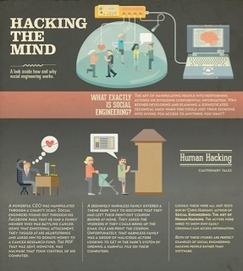
"If you’re like us, the term “social engineering” may not have entered your tool kit for teaching digital citizenship. According to Wikipedia, it is the psychological manipulation to get people to divulge confidential information by building a sense of trust. In the current digital environment, it is used for the purpose of gathering information or access to data via the Internet."
Beth Dichter's insight:
When you think about teaching digital citizenship does the concept of teaching 'social engineering' come up as a topic to discuss? This post suggests that you look at this as a portion of your curriculum. Along with the infographic Hacking the Mind (shown above) there is also an embedded motion graphic, Social Engineering. With students being very active in social media it is important that they also understand social engineering, and these two resources are great tools to bring into your classroom to help them gain that understanding.
Maryalice Leister's curator insight,
September 26, 2013 8:33 AM
This ties in with cyberbullying when you consider the power of social media and how social engineering gives both those with good intentions and those whose purposes are not as golden a platform for control. Read and share!
It used to be that neuroscientists thought smart people were all alike. But now they think that some very smart people retain the ability to learn rapidly, like a child, well into adolescence.
Beth Dichter's insight:
Why do children learn languages more quickly than adults? When does this ability to learn rapidly change? This post looks at recent research, specifically "the interplay between your genetic inheritance and how you learn from the environment" The research focused on how children learn and notes that in childhood "the brain is especially responsive to learning." As we grow into adolescence this "hyperlearning mode" does seem to end, and therefore learning seems to be harder. For additional information please click through to the post.
A look at the good and bad habits of the world's smartest people.
Beth Dichter's insight:
What are the good habits of the world's smartest people and what are their bad habits? This infographic explores these areas. It is divided into a two major sections - the good and the bad, and each is then divided into additional sections. The good includes areas that discuss: * Persistency * Goal Setting * Benefits of being an avid read * Self-disciplined * Thinking about thinking The negative inclues areas that discuss: * Potential addictions (specifically drinking and drugs) * Sleep deprivation * Anxiety The infographic does provide a list of resources. Scroll down to see a clickable list of the links (beneath the infographic).
Carolyn Williams's curator insight,
September 24, 2013 11:28 AM
As part of my service I tackle these habits every day!.
"The idea of Snapchat is simple, delightfully so. Take an image or a video, send it to a friend or paramour. Ten seconds after the receiver opens the file, it self-destructs, and the sender can rest assured that no trace of the message remains. Signed, sealed, delivered, deleted. But that’s not quite true. In December, Buzzfeed reported on a security loophole in the app, which allows one to permanently save a Snapchat file without notifying the sender. The expectation of privacy and impermanence that makes the app irresistible to young users is thus deeply flawed. And yet it remains wildly popular..."
Beth Dichter's insight:
The app Snapchat provides a great way to launch a discussion about digital literacy. The app states that your image will disappear but the reality is somewhat different. This post provides great background material and raises questions that apply to many apps and other tools online. For example, how many of us read the fine print to determine what an app is recording? How many read the Privacy Policy and/or the FAQ? Our learners often believe "if it is online it must be true" and the advertising for Snapchat does not mention this issue. As our learners look towards the future are they truly aware that an image from 3 years ago may make a critical difference in their lives?
flea palmer's curator insight,
September 25, 2013 9:09 AM
You think it's gone forever ...but not necessarily!
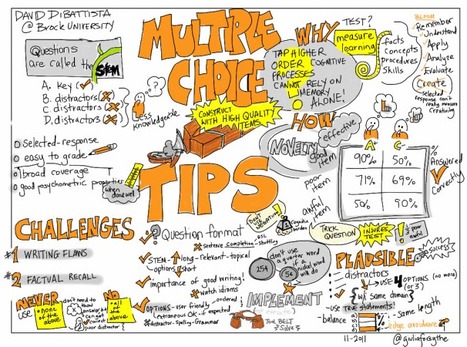
"The handy infographic below is a fun look at making useful and targeted multiple choice questions, and while it is fun to look at, it points out a few important tidbits that struck me as being important to remember whether you’re using technology to assess your students or whether you’re doing it the old fashioned way. Keep reading to learn more."
Beth Dichter's insight:
This post explores multiple choice questions, providing some background information that may help you design better questions for assessment. Did you know that (info below quoted from post): * Questions in a multiple choice assessment are called the “Stem”. * For each question, there is a key answer, and distractors. * The distractors should be plausible answers, true statements (when possible) , and about the same length as the key. Learn more by clicking through to the post!
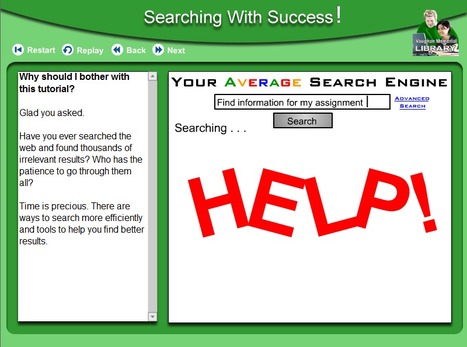
"Vaughn Memorial Library at Acadia University hosts four free animated tutorials designed to teach lessons on web research strategies. The four tutorials are Credible Sources Count, Research It Right, Searching With Success, and You Quote It, You Note It."
Beth Dichter's insight:
Are you looking for some assistance in teaching students about web research strategies. If you are, and if you teach upper elementary or middle school, consider checking out these four interactive tutorials to help students understand: * how to determine credibility of a website; * the process of research, from forming a question through steps taken; * search functions, including some advanced searching techniques; * plagiarism, what it is and how to avoid it Each of the tutorials will take about 10 minutes. If this is a new area for your students this provide a basic understanding.
Maryalice Leister's curator insight,
September 20, 2013 8:43 PM
Research/web searches don't come naturally to young learners and these tutorials form a foundation on which teachers can build. excellent and worth checking out.
Dean Mantz's curator insight,
September 22, 2013 8:29 PM
This is a helpful share from Richard Byrne's site Free Tech 4 Teachers. I encourage all educators to add this resource site to aid in the development/strenthening of student searching skills.
Sue Alexander's curator insight,
September 23, 2013 9:28 AM
just can't have too many tools in our 1:1 toolbox. These are aimed at intermediate and middle grades. Thanks Beth for another helpful Scoop!
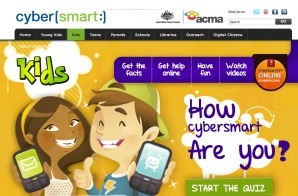
"Internet Safety and Digital Citizenship are important topics ... it is so integral to what our kids do while they are at school. Whether or not you have a 1:1 program, these are topics that shouldn’t be overlooked! Don’t assume that because your students are fairly savvy when it comes to learning technology, that they will automatically pick up on digital literacy...it is essential that parents learn about digital literacy so that they can echo and enforce good technology use at home"
Beth Dichter's insight:
If you are looking for some great resources for elementary and middle school students that look at issues involved in digital literacy this post may be just what you are looking for. The post is divided into five sections: * Online identity * What to do * Digital footprint * Cyber Bullying * Online Privacy Each section has a list of resources split into elementary and middle school as well as a description of the topic area. Also included are resources to assist with Online Discernment (think about how many students tell you that if it is online it must be true!) as well as teacher resources and lesson plans.
David Cook's curator insight,
August 7, 2014 10:26 PM
Looks better for K - 8 teachers than high school (myself). I do like the week plan of 5 days of focus on digital literacy!
Melissa Marshall's curator insight,
October 25, 2014 10:46 AM
This is an excellent collection of resources, split into age groups and a suggested order of activities. It is an American site, but I like how they have picked up on the cybersmart resource put out by the Australian Government. I would add another one to the list: the resources made by CommonSense Media. These are great too, and Prendiville's digital citizenship unit is based on them.
Lamia Saad's curator insight,
March 9, 2021 9:53 PM
It’s great resource including different resources to teach children about online Identity, digital footprint, cyber bullying and online Privacy.These references can be use by parents and teachers.
|
Beth Dichter's insight:
What gets fixed by tech services? What gets fixed by good teaching? How many of these apply to your school?
Christina Paxton's curator insight,
June 25, 2014 6:51 AM
Includes a graphic that outlines proper social use of Ed Tech in the classroom.
"Why do so many students choose Wikipedia when asked to find information on the Internet? I believe the answer is that Wikipedia is like the McDonalds of the Internet, you can always find it and you know what you’re going to get. Quite frankly, I like Wikipedia because it provides students with a starting point for research and I am particularly fond of the way I’ve seen so many students develop their own method of research by using the links at the bottom to find more information."
Beth Dichter's insight:
How do we get students to learn how to effectively and efficiently search the web? This post provides a variety of resources that your students may find helpful. The list is robust and includes: * Google Search Education - This site provides a series of lesson plans that help teach students how to search as well as lessons on Power Searching, A Google A Day Challenge, and live trainings (as well as trainings that have been recorded. * The "Find" Tool which will help students quickly locate key words * Twurdy - search by reading lexile Additional resources are listed (and hot links to all are inclucluded). Please note that Qwiki Reference is no longer available.
Kimberly House's curator insight,
October 3, 2013 2:09 PM
I've just shared this post with our Grade 4-12 teachers. The biggest hurdle we face is keeping teachers up to speed so they can best inform their students. Information Literacy is everyone's responsibility and not only that of the modern librarian or the tech integrators.
Students collaborate in creating a digital citizenship pledge outlining their collective social norms for exploring in and interacting with the ...
Beth Dichter's insight:
Common Sense Media is a great resource for teaching digital citizenship. A day or so ago I scooped a new song they had created on digital citizenship. This poster is a digitial citizenship pledge, one that you may talk about with your student and have each sign...and it has two extra spaces where you may choose to add one or two new rules. If you click through to their website you will also find a lesson plan on this. Common Sense Media does require you to log-in to access all their materials (for download) and they have excellent resources.
In our final post of Infographics Week, a history teacher tells how she used the Gulf oil spill to have students create infographics about the worst disasters in American history.
Beth Dichter's insight:
Have you thought about having students create infographics and held back because you were not sure how to go about doing this type of project? This post provides an in-depth look at one teacher does this type of project. A step-by-step list of what to do is included as well as the three essential questions that students were to address. Although designed for a high school class the step-by-step directions are easy to modify to meet the needs of your students. This was one of a series of posts published by the NY Times. At the end of the post there are links to four additional posts in this series on Teaching With Infographics: Places to Start; Social Studies, History, Economics; Science and Health; and Language Arts, Fine Arts, and Entertainment.
Nalya Ovshieva's curator insight,
September 29, 2013 3:14 AM
Infographics is a new kind of visual literacy. They are a kind of visual summary of information that would take a reader hours to process
David Baker's curator insight,
September 29, 2013 6:40 PM
This was a great project for our teachers last year. We are posting their info graphics outside out Office of Professional Development.
Gayle Kakac's curator insight,
September 30, 2013 8:10 PM
Been loving infographics and looking for a good way to incorporate these. Hoping for an app that would make them easily. We'll see what this has to say...
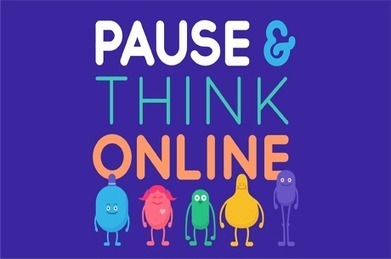
"Something you may not know about us here at Common Sense Media, is that quite a few of us are former classroom teachers! When we develop new materials, we always have our favorite memories to guide us. One thing we remember fondly is being amazed by how music transformed a classroom – kids would jump to their feet, whatever the song, to sing and sway while the teacher subtly wove word play and pattern recognition into the mix."
Beth Dichter's insight:
Here is a new resource to help teach elementary students about digital citizenship. Thanks to Common Sense Media for putting together a song and video with lyrics that teach students that they should "Pause and Think" before they go online. The website states that this song "stresses the connection of safe, respectful, and responsible behavior online and offline." The website provides a the song (downloadable or viewable on YouTube) as well as a file that includes posters that you may post and has each lyric. Common Sense Media also has a poster about digital citizenship for elementary school students. This poster "illustrates how kids can use their heads, hearts, guts, arms, and legs to be a good digital citizen" as does the song. Young children love to sing and need to learn about digital citizenship. Take a few minutes to check out these resources and share with others whom teach the younger grades. You may hear a new song in your school!
elizabeth herrera's curator insight,
October 25, 2014 9:39 PM
This is what we were covering in class.
"The difference between assessment of learning and assessment for learning is a crucial one, in many ways indicative of an important shift in education. Traditionally, tests have told teachers and parents how a student “does,” then offers a very accessible point of data (usually percentage correct and subsequent letter grade) that is reported to parents as a performance indicator."
Beth Dichter's insight:
Does traditional testing work? Or is it time for us to rethink why we assess? This post suggest that we look at why current assessments are based on past tense and consider looking at assessments using the five items in the image above: * Shared learning expectations * Eliciting evidence * Feedback * Self assessment * Peer assessment Why? The author states "This approach to assessment outlines the systematic approach to measuring understanding, including self-assessment and peer-assessment, feedback for learning, and clear communication of performance criteria. These strategies hint at the organic, dynamic, and iterative feel any modern system of assessment should realize." Assessment for learning, assessment that can help the teacher answer the question "What now?" - is this the type of assessment that we would like to bring into our classrooms and schools? What are your thoughts?
Jeffrey Burk's curator insight,
September 30, 2013 9:29 AM
Interesting article on assessment strategies.
Aunty Alice's curator insight,
October 6, 2013 8:40 PM
I have practiced a system that covers four of the 5 key strategies for many years starting at five years of age. I would not teach any other way. With this kind of assessment students after seven years of age can lead parent teacher conferences with ease and confidence. Had a dad in tears once who confessed it was the first time his son had talked meaningfully to him about his learning. Then I was in tears too....
Aunty Alice's curator insight,
November 21, 2013 8:03 PM
A good little diagram but it does not address the issue of how to do it..it requires modelling, first by the teacher, then slowly devolving the responsibility to the learner, and focus on one subject area at a time e.g. Literacy . In my experience it also requires set aside time with each student to assess together, recording what has been discussed so it is not forgotten. I am talking about elementary learners here..
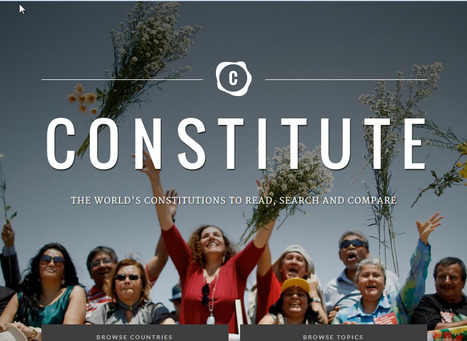
"Google and the Comparative Constitution Project have launched a new site called Constitute. The site hosts the constitutions of 160 countries. You can search the site according to country and or constitutional theme. Searching by constitutional theme is the best aspect of the site. More than 300 themes are outlined on the site. Select a theme then a country and the element of that country's constitute addressing your chosen theme will be highlighted."
Beth Dichter's insight:
This new website provides a tool that will allow students compare constitutions from various countries and find similarities and differences. You will also find tags, over 300 of them, so you may choose to search by a specific tag such as "right to privacy" (found in 156 constitutions) or "right to bear arms" (found in 5 constitutions). This site may be a great resource for history and social studies as courses in government.
Learning how to say no is one of the most useful skills you can develop, especially when it comes to living a more productive and healthy life. Saying no to unnecessary commitments can give you the time you need to recover and rejuvenate.
Beth Dichter's insight:
This post discusses a recent article that was published by the Journal of Consumer Science. The short hand version is that there is a significant difference in saying "I don't" than "I can't." Why? "Your words help to frame your sense of empowerment and control [and the] words that you use create a feedback loop in your brain that impacts your future behaviors." As I read this post I thought about Carol Dweck's work on growth mindset. How can we use this new knowledge to help our students?
Trying to keep things conceptually simple, I see schools needing to make 3 big shifts: From Low-Level Thinking to High-Level Thinking. From an
Beth Dichter's insight:
Scott McLeod share three shifts he believes need to be implemented by schools: * Move from lower-level thinking to higher-level thinking (often called Lower Order Thinking and Higher Order Thinking or LOTS and HOTS) * Move from analog to digital * Move from teacher directed to student directed. In his post he provides a short description of each and asks where you would put your school. This post would be a great tool for a faculty discussion on these issues? Are teachers in your building aware that these discussions are taking place in the field of education? How many teachers might feel threatened by the idea of student-directed learning? There is food for thought in this post.
"As e-readers grow in popularity as convenient alternatives to traditional books, researchers at the Smithsonian have found that convenience may not be their only benefit. The team discovered that when e-readers are set up to display only a few words per line, some people with dyslexia can read more easily, quickly and with greater comprehension."
Beth Dichter's insight:
The end of this press release shares a new website: Read Easy (located at http://readeasy.si.edu/). This website shares links to several articles that share the research ("E-Readers are More Effective than Paper for Some with Dyslexia" and "Shorter Lines Facilitate Reading in Those Who Struggle"). The website also provides a demo of what works and states that the Smithosonian will be offering a "FREE online certification course to support professional reading specialists interested in using mobile e-reader devices to help students with dyslexia in their practice. Certification is only open to professional reading specialists." This course will be available on December 1st. For more information click through to the Read Easy website (link above).
Heather MacDonald's curator insight,
September 23, 2013 11:20 AM
I love these kinds of advances. For those of us who know of people who've struggled with language learning challenges this is a great discovery. Language leaning problems create way too many other personal and social problems for children who then grow to be adults with problems unless they are diagnosed and helped. Way to go Smithsonian researchers!
LS5043-2014's curator insight,
November 6, 2014 6:34 PM
Important evidence re: usefulness of e-readers to underserved library populations.
"I've previously written about research on the importance of “good endings.” It’s a priority for me to end my classes on an upbeat note, but I’ve been thinking lately that I might be able to enhance its benefit to students if I’m a bit more intentional about it with a regular formal closing activity that might take a minute or two. I’ve certainly often done this, but I’m going to try doing it more like 70-80% of the time instead of its present 50%."
Beth Dichter's insight:
What do you use for exit slips? Larry Ferlazzo shares a number of questions he asks his students and suggests that you share yours so he may compile a list and share it on his blog. Below are a few of his questions. Can you come up with more? * Think of one thing you have learned in class that you can apply in another class or another part of your life. What is it, and how can you apply it? * How does something you learned today connect to what you already knew? * How would you teach one thing you learned to your little brother or sister (even if you don’t have one)? * What questions do you still have?
LundTechIntegration's curator insight,
September 22, 2013 11:44 AM
This a great waky to do that AFL at the end of the day.
Deb Eisloeffel's curator insight,
February 14, 2019 10:40 AM
Managers can ask these questions of employees who have just returned from training. It will help them assimilate what they've learned. Ask them to share their responses with the team and everyone learns.
"How important do you think it is for teachers to use educational technologies in the classroom? During this school year, how often do you or your students use [insert type of educational technology] in your classroom? What are the biggest challenges to integrating educational technologies in schools? These were some of the questions asked in a national online survey of teachers and administrators, conducted for Common Sense Media's Graphite by Harris Interactive in May 2013. And here are some of the answers from the survey."
Beth Dichter's insight:
To find the answers to the questions listed above plus many more check out this infographic. A direct link to the infographic is below. |
Your new post is loading...
A good info graphic to remind both students and teachers. It's a good starting point.
I always try to stay away from using other peoples work , but going into the industry an having the internet incorporated in almost every aspect of this career field makes even harder to protect my own work. I might stray away from using copyrighted work but there are people out there that don't have the same morals.