


"Thinking critically is one thing, but being able to teach it can be quite another."

 Your new post is loading...
 Scoop.it! "Thinking critically is one thing, but being able to teach it can be quite another."
Beth Dichter's insight:
How do we teach students to be critical thinkers? How do we train teachers to teach critical thinking? Edutopia has recently published a number of articles focused on 'Critical Thinking: A Path to College and Career.' This link takes you directly to a page where a "Katie Kirkpatrick, dean of instruction at KIPP King Collegiate High School" shares her experience with a training she designed for teachers. From this page you may link to many other areas. Two that you may find helpful are: * Ten Takeaway Tips for Teaching Critical Thinking * Resources and Downloads for Teaching Critical Thinking The Resources and Download area includes lesson plans and rubrics as well as Tools for Critical Thinking.
Scoop.it!

"If you think the “information technology” transformation in schools and workplaces is new to the 21st century, you might want to look back thousands of years. Using technology to learn, play, and develop skills is a continuation of our quest to survive and adapt."
Beth Dichter's insight:
This infographic looks at how "information technology" has tranformed societies over time. See how "learning with technology is a 200,000-year old tradition." This infographic goes back 200,000 years and then moves forward to 164,000 years ago, 130,000 years ago, 90,000 years ago, 12,000 years ago, ending with a current legacy of 28 years ago, when the Smithsonian Science Education Center was established to promote inquiry based science. This is a great infographic to share with students to help promote conversation.
Scoop.it!
Beth Dichter's insight:
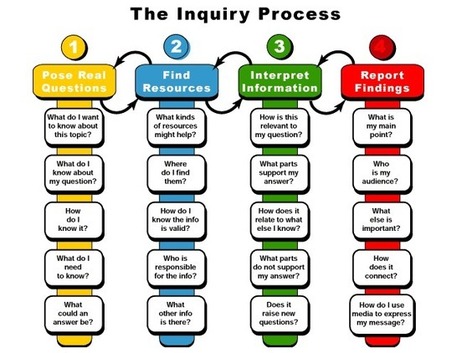
The Inquiry Process requires that students ask questions. This visualization provides five questions in the following four categories. * How do you pose real questions? * How do you find and validate resources? * How to you interpret information? * How do you write your report? From my experience students often struggle with inquiry based learning. In classrooms it is often the teacher asking the question and the students responding. What would happen if you provided your students with a copy of this infographic and used it as a tool to help them scaffold their thinking and better understand what the inquiry process is? 
Peg Gillard's curator insight,
October 27, 2013 9:51 PM
We are so far removed from inquiry based classrooms that curiosity is but a shadow. Students wait to be fed the learning, which isn't true learning if it is fed. True learning comes from asking our own questions and setting out on a quest to unravel the riddle we have created. 
Drora Arussy's curator insight,
October 28, 2013 4:10 PM
wonderful visual for the inquiry process - for educators and to share with students.
Scoop.it!

Explore the Open College's interactive brain map to learn about how your brain functions and ways to improve your learning.
Beth Dichter's insight:
Are you interested in learning more about your brain? This interactive brain map from Open Colleges allows you to rotate it and learn about the many functions of the brain. As you select one of the colored dots additional information will be presented. This is primarily text but there are also some visuals that help you understand key parts of the brains work. 
Mary Cunningham's curator insight,
October 26, 2013 12:22 PM
Brains are fascinating - view this map to learn more! 
Melissa Jenkins 's curator insight,
November 16, 2013 9:11 AM
Especially helpful in science and health classes
Scoop.it!
Beth Dichter's insight:
Sometimes when we think of teaching with technology we get overwhelmed. This slideshow provides some great survival tips like: * Familiarize yourself with the pedagogy and skills needed * Make sure the technology supports the learning Additional resources are included as you walk through the tips. 
Chris Hill's curator insight,
July 5, 2014 3:03 PM
Great tips for integrating tech into the classroom
Scoop.it!

"Most English and social studies teachers no longer view graphic novels as simply "long comic books." The educational benefits of blending illustrations with narratives have been well established. But rarely do books come along that masterfully capture the dynamic, eye-popping power of art and history."
Beth Dichter's insight:
If our students are visual learners are there resources we can use to help make learning more interesting? How about graphic novels? This post explores 'The Gettysburg Address: A Graphic Adaptation stating: An additional history book is discussed and there are links to additional resources on the value of using visuals in subjects areas. If using graphic novels is new concept for you, or if you are interested in learning more about reasons why to bring them to your classroom, this post will be helpful. 
Peter Sampson's curator insight,
October 24, 2013 5:35 PM
Love what well made graphic novels make possible for more visual learners.
Scoop.it!
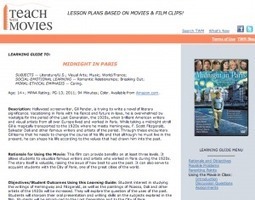
"TeachWithMovies offers access to more than 350 lesson plans and learning guides for movies and films. I’ve long been a big fan of reading and studying movies. I’ve been a fan of this site’s rich curricular materials for many years. I just discovered that I do not need to re-subscribe. The site is now available for free (though it will now host unobtrusive advertising and encourage voluntary donations)."
Beth Dichter's insight:
This site is new to me but it looks like a great resource and Joyce Valenza has an in-depth post that shares many great features. It is easy to search for movies - alphabetically, age, subject and more. The learning guides include "Learning guides include a description, rationale for using the film, student learning objectives, potential problems for using the film, discussion questions, and assignment and assessment ideas, social-emotional learning discussion questions, bridges to reading, web links, selected awards, cast and director information, and bibliographies." Do you use movies in your clasroom or are you interested in using them? If so check out this post. 
Meryl van der Merwe's curator insight,
November 3, 2013 3:12 PM
This is good news!! Movies are a great way to engage the current generation and having this resource free is fantastic.
Scoop.it!
Beth Dichter's insight:
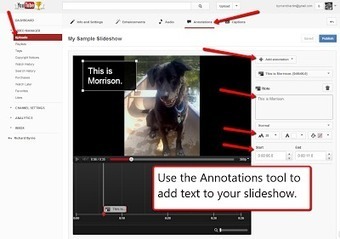
Richard Byrne discusses how to create audio slideshows in YouTube, providing excellent directions as well as screen shots. Why choose YouTube? It is free. You can create slideshows up to fifteen minutes in length. You can choose how long your slides are displayed. You can annotate each slide. And if you are a Google Apps school students may use the same log-in. 
Progressive training's curator insight,
October 22, 2013 10:51 AM
How to Create Audio Slideshows in YouTube
#marketing #presentation 
Irene Ferri's curator insight,
October 23, 2013 4:34 AM
I contenuti multimediali sono il futuro (anche) del copywriting. 
Tanja Elbaz's curator insight,
November 23, 2023 6:04 PM
Scoop.it!
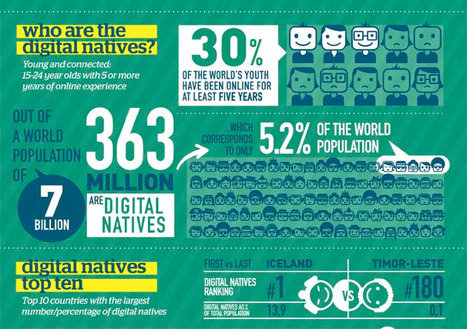
At first, I figured that the results of this study would be pretty obvious. First world countries with large populations and higher birth rates would be at the top of the list.
Beth Dichter's insight:
What do you think? Do you believe the results are obvious? If so, you may be surprised. Learn about the "digital natives" in the following areas: * Who they are * The top ten countries by percentage * The young and connected * Future trends This infographic could be used to begin a discussion with students by asking what they think? What is the age range for a digital native? Which countries have the most digital natives? What does it mean to be young and connected? What do they think the future holds?
Mary Cunningham's curator insight,
October 26, 2013 12:27 PM
What do you know about digital natives?
Scoop.it!

"It’s a simple little prop I use when teaching Digital Citizenship to our pK-12 Aurora Huskies students, but I think it sends a powerful message. I love utilizing props to try to get my point across to students and thought that creating a kit full of props would be a great way to reinforce a very important topic in our schools."
Beth Dichter's insight:
Teaching digital citizenship is not an easy task. This post explores what happens when you create a toolkit of props and use them to help students make connections to online behavior. Below are a couple of examples (quoted from the post): * Padlock. The padlock is to remind students to set strong passwords and to set up passcode locks on all of their digital devices. * Tube of Toothpaste. Imagine the information that you are putting online is like the toothpaste coming out of the tube. Once it is out, it is almost impossible to get it all back in the tube! As you read through the post you will find many more suggestions and you may come up with some of your own ideas as to what should be in the kit. If you do make a comment and share them here. 
Philip Finlay-Bryan's curator insight,
October 19, 2013 8:07 AM
Not just for kids, lessons and reminders for us all 
Pamela Perry King's curator insight,
October 21, 2013 12:12 PM
This is a FANTASTIC IDEA!! So Clever!! 
Melissa Marshall's curator insight,
August 27, 2014 10:34 PM
This is a great idea - a kit of props to help the message sink in! Some of the props used are:
- a padlock: to symbolise keeping data safe - who will you unlock your life and details to? - a tube of toothpaste: like what you post online, once it is out it is almost impossible to out it all back in the tube! - a permanent marker: everything that you put online is permanent—even if you hit the delete button after posting.
Maybe you have a few other suggestions that might be useful to add to a survival toolkit!
Scoop.it!

Investigating the characteristics, challenges and prospects of those coming of age since the Millenial generation.
Beth Dichter's insight:
What do you know about the millenial generation? This infographic provides a wealth of information and some of it may surprise you.
Drora Arussy's curator insight,
October 18, 2013 8:37 AM
These are our students and coworkers - we should know who they are, or who we are, and how we relate to each other across the generations.
Mary Cunningham's curator insight,
October 26, 2013 12:28 PM
Challenge your insight about millenials!
Scoop.it!
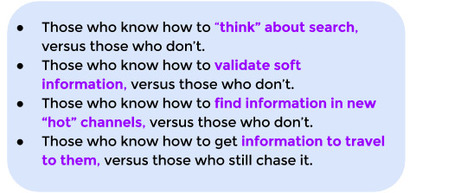
There is a new digital divide on the horizon. It is not based around who has devices and who does not, but instead the new digital divide will be based around students who know how to effectively find and curate information and those who do not.
Beth Dichter's insight:
Learning to search effectively is not easy. This post provides a look at four types of searchers and some crucial teaching skills to teach your students. Do your students know: * How and when to use dashes (or minus signs)? * When to use two periods? * How to do a site search? * How to use country codes? * What a filter bubble is? You will also find a link to Eli Pariser's TedTalk on filter bubbles as well as a short video on finding primary sources.
Pamela Perry King's curator insight,
October 21, 2013 12:09 PM
The Big Six taught me a lot on how we assume kids can skim and scan. We need to take more time to show them how to search. 
johanna krijnsen's curator insight,
December 4, 2013 2:07 PM
do your students know how to search, find and curate information? 
Cindy Gerken Butler's curator insight,
November 11, 2014 2:34 PM
We are a 1:1 school and we have several students who could learn a lot in regards to searching for content on the internet.
Scoop.it!

Increasingly, educators are looking to research about how kids learn to influence teaching practices and tools.
Beth Dichter's insight:
This post looks at five trends that have made their way into the classroom. Learn more about: * Brain-based learning * Game-based learning * Power of perseverance * Questioning homework * Cultivating creativity In each of the five areas there are links to a number of resources. Gather together some of these great resources and share them with others in your school! |
Scoop.it!
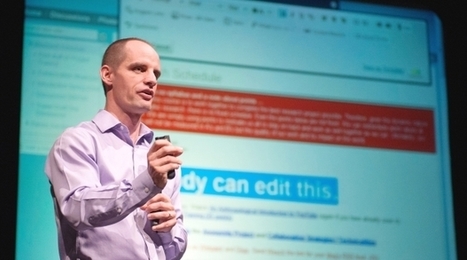
If you’ve ever slowed down long enough to wonder about the effect of our increasing immersion in the world of social media and digital technology, Michael Wesch is the person to ask.
Beth Dichter's insight:
The comment I like best in this interview is the final part of this interview. He states: The question we may want to ask ourselves is how do move our students to have the "sense of wonder and curiuosity"?
Scoop.it!

The number of online learning students is close to 7 million....we'd say now's the time to dispel some of those online learning myths and get at the click into school truth!
Beth Dichter's insight:
What are the myths and facts about online learning? This infographic explores seven areas where there are misperceptions concerning online learning such as: * Can you get a job with an online degree? * Online learning is the "easy way." Each of the myths also has facts that refute the myth. Learn more by clicking through to the post.
Drora Arussy's curator insight,
October 28, 2013 4:06 PM
For all you traditionalists out there - not saying it's the only way to go, but an online degree is really worth something today.
Scoop.it!

Video games engage players in many of the core facets of learning, but at what price?
Beth Dichter's insight:
Why are video games educational? This infographic is chock full of information. Some of the details are below Why Video Games are Educational: * They push players to utilize the zone of proximal development * They are doable yet challenging * The require critical thinking (learn the four phases in the infographic) Epistimic Games (games that make you think in innovative ways * Peacemaker Links between Bloom’s Taxonomy and video games Memory and Attention Stages of Critical Thinking Difficulty with Time Management If you are looking for evidence on the value of video games in education check out this infographic. 
Luis Carlos Peña Gordillo's curator insight,
November 25, 2013 11:54 PM
Infografía de los beneficios de usar videojuegos en la escuela :)
Scoop.it!

"Technology provides teachers with a great way to provide evidence with artifacts of their effective practice. Across the country this has been a priority for schools that are incorporating a teacher evaluation based on the Danielson Framework. The model contains various components organized into the following four domains."
Beth Dichter's insight:
As teachers in many communities in the U.S. are being evaluated using new tools this post provides guidance on how technology may be used in the area of Instruction and an additional three posts are available on the site that address how technology may be used in Planning and Preparation, The Classroom Environment and Professional Responsibilities. All are based on the Danielson Framework (and a link to this is available). Each of the post looks at the domain and contains a Prezi which ideas, resources, videos and more. Consider sharing these resources with faculty at your school.
Mary Cunningham's curator insight,
October 26, 2013 12:33 PM
This blog features prezi switch more details about what effective tech use looks like in practice.
Drora Arussy's curator insight,
October 28, 2013 4:09 PM
Watch the Prezi's and see how to share. However, remember, it is a tool, technology is not the be all an end all, although it is a wonderful tool.
Scoop.it!
Beth Dichter's insight:
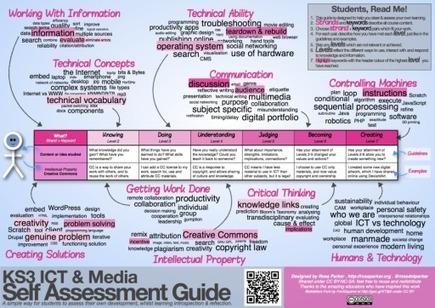
I have posted a number of resources from Ross Parker and this one requires a bit of time to understand…and yes, I think it is worth the time. The directions he provides in the upper right hand corner describe how a student should use this visual, as a tool to “steer & assess your own learning.” Our students need to learn how to self-reflect and this tool has the potential to engage students and assist them in reflecting on their work regarding topics studied in technology. You may download this visual as a png, pdf or pages document on the website. Take some time to check it out and see what you think.
Mary Cunningham's curator insight,
October 26, 2013 12:26 PM
A cool self reflecting tool for ways to steer our learning!
Scoop.it!
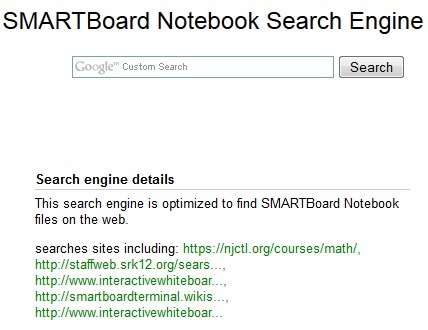
Google Custom Search allows anyone to create his or her own search engine. The benefit of this is that you can create a very subject specific search environment. One such use that I found through The Whiteboard Blog is a SMART Notebook search engine. As you would expect from the name, the SMART Notebook search engine is designed to help you find resources designed for teaching with SMARTBoards.
Beth Dichter's insight:
If you have a SMARTBoard you may want to check out this Google Custom Search Engine that allows you to search only for resources (in this case designed for SMARTBoard). There are many excellent resources available and how you may be able to find them more quickly.
Scoop.it!

Common Core, love it or hate it, if you're teaching in the United States there is a good chance that you'll have to work with it. If that describes you, take a look at these five tools that can help you create lessons aligned to Common Core standards.
Beth Dichter's insight:
Are you looking for tools to help you align your lessons to Common Core standards? Richard Byrne provides five sites you might want to check out for resources and more. Learn more about: * Teaching Objects * Alchemy Smart Binder * Common Curriculum * OpenEd * Mastery Connect Take a few minutes to peruse his post. Each of these sites provides different options to consider.
Scoop.it!
Beth Dichter's insight:
It appears that Twurdy, a search engine that provided lexile scores, no longer exists. Cool Tools for Learning has this new post that provides two alternatives to help students find leveled text, Google Advanced Search provides a search by reading level and Wikipedia is also available in Simple English. More information on these tools is available in the post. Students may also use a tool called Readability-Score.com. Paste in the text and it will give you the Flesch-Kincaid Reading Level as well as Gunning-Fog Score, Coleman-Laiu Index, SMOG Index and Automated Readability Index. For this tool to be useful students would need to understand what they are looking for. Find it at http://www.readability-score.com/
Scoop.it!
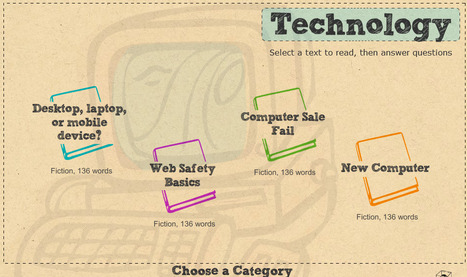
Reading Activity Reading Comprehension - How well do you understand the things you read? Test and improve your reading with our reading comprehension activity! This activity includes 140 texts, each with a set of challenging questions.
Beth Dichter's insight:
If you are looking for online books to help beginner readers or ELL students check out 140 texts available at GCF Learn Free. Each text can be read to the student and there are four questions for each story. If a student answers a question incorrectly they may try again. 
Jessica Janus's curator insight,
October 23, 2014 9:26 PM
I tired this out and I think this is a great tool to integrate within the classroom. Perhaps on Friday when there is some free time.
Scoop.it!
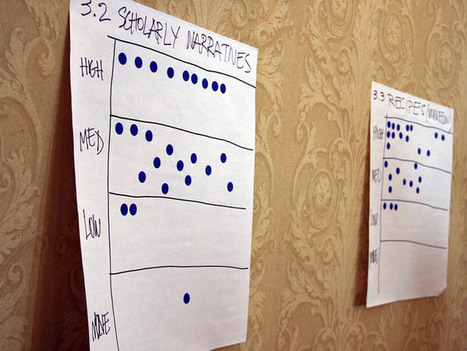
"Education is all about the numbers these days. My personal preference is just the opposite. I have this fantasy where I toss grades in the garbage. In this dream, I let everyone redo things and have conferences to discuss improvement."
Beth Dichter's insight:
As teachers must is expected from us daily and more and more we are asked to do assessments. Many of us think of testing as soon as we hear assessment. This post discusses assessment stating "assessment isn’t always employed correctly. It sometimes gets over, under, or misused. Assessment should work seamlessly into the classroom routine. The traditional test can be intrusive and stressful. True assessment flows into the lessons and gives a constant pulse on student learning." The author then provides links to five Learnist boards that focus on assessment, specifically: * Simple Ways to Monitor Student Progress * Assessment * Exemplar Rubrics for Assessment * Socrative Response Systems * Metryx The first three boards have seven to ten resources. The last two links are on a board that is called 21st Century Assessment - Digital Documentation and additional resources are also found here.
Scoop.it!
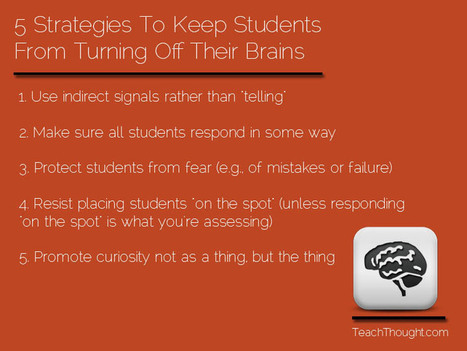
"Dr. Judy Willis–resident brain investigator at Edutopia and TeachThought–is a neurologist turned educator whose work...focuses on the brain–how it works, and how teachers can respond."
Beth Dichter's insight:
This post looks at five strategies to help students keep their brains turned on. You can also watch a video where Dr. Willis discusses "how boredom and fear cause students to literally switch their brains off." Below are two of the five items shared: * Promote curiosity not as a thing, but the thing * Use indirect signals rather than "telling" You might also want to check out the post "Five Learning Strategies That Make Students Curious" located at http://www.teachthought.com/learning/5-learning-strategies-that-make-students-curious/ 
Ra's curator insight,
October 20, 2013 4:33 PM
Familiar ground but good to revisit with student teachers. Link to formative assement for clarity of purpose in planning.
Mary Cunningham's curator insight,
October 20, 2013 10:27 PM
This would be great to use in conjunction with the video from HOW YOUTH LEARN 
Fran Bozarth's curator insight,
October 27, 2014 7:29 PM
The article goes on to elaborate a bit on each of these. Good basics.
Scoop.it!

"Have you ever wondered why you do so well in certain classes or subjects and why you abysmally lousy at others? We all know we all learn differently and we have strengths and weaknesses. But when it comes to studying, there are tips, tricks, dos and don’ts to learn smarter."
Beth Dichter's insight:
This infographic looks at study habits from different learning styles. What works best for visual learners, read-write learners, auditory learners or kinesthetic learners? This infographic provides this information as well as best study habits, tips and tricks for student success, and what to avoid. You might share this with your students. |












you have to read this ...!