


Teaching Shakespeare’s intrigues are not on the serving platter for today, there will be no Titus Andronicus’ baking boys into meat pies. We’re discussing love. Love is hard enough for a fifteen-year old to swallow.

 Your new post is loading...
 Scoop.it! Teaching Shakespeare’s intrigues are not on the serving platter for today, there will be no Titus Andronicus’ baking boys into meat pies. We’re discussing love. Love is hard enough for a fifteen-year old to swallow.
Beth Dichter's insight:
There are many great resources available on Shakespeare and this post provides a wide range of sites that may be of interest. The areas covered include: * Best Shakespeare Sites including a Shakespeare search engine * Shakespeare's Insults * Knowmia demystifies MacBeth * Introducing Younger Students to Shakespeare * Shakespeare's Poems * 10 Unique Shakespeare Adaptations * The Shakespeare Prison Project * Shakespeare for Teens * A PBS Documentary - In Search of Shakespeare You might also want to take a virtual tour of Globe Theater at http://www.shakespearesglobe.com/about-us/virtual-tour
Scoop.it!
Beth Dichter's insight:
YouTube is a great resource...but there are times when you wish you had a list of great channels based on your discipline. InformEd states "we can now sift through thousands of resources while navigating a single repository, the potential for inspiration and growth in the field of education has reached a new height." The criteria that was used to select the channels were "based on views, subscriptions and quality of content." Channels are divided into the following catgories: * General * Physical Science * Engineering & Technology * Mathematics * Politics, History & Current Events * The Arts * Learning a Foreign Language * University Channels 
Armando's curator insight,
November 17, 2013 6:49 AM
197 Educational YouTube Channels You Should Know About

Judy Brown's curator insight,
May 29, 2014 7:32 PM
Autistic kids need to be shown lots of love and need a teacher who will treat them right.
Scoop.it!
Beth Dichter's insight:
PIXELearning offers this visual that discusses why games are good for learning. In the visual you will find information on the following areas: Play, Rewards, Mastery, Engagement and Flow Theory as well as Laws of Learning. 
Ryan McDonough's curator insight,
July 7, 2014 8:19 AM
Self explanatory visual on the benefits of gaming as a means of learning. Outlined are the rewards, mastery, engagement, intensity, exercise, readiness, and competitiveness. These types of graphics need to be displayed in the classroom. There's always parents who are unsure of how gaming qualifies as teaching. Can't they just sit their kid in front of an iPad all day at home? Well, in the appropriate setting, with the right direction and guidance, games are certainly good for learning. Some people just don't know that from experience yet.
Scoop.it!
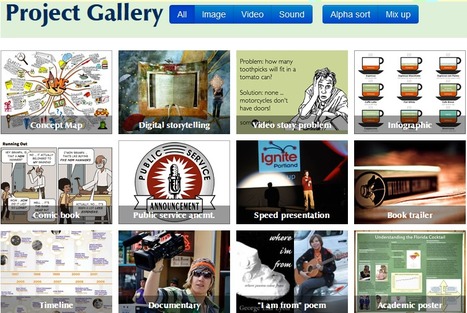
This website helps college teachers develop, deliver, and assess assignments incorporating images, video, and sound.
Beth Dichter's insight:
This website from the University Notre Dame provides great resources to help you embrace media-rich experiences for your students. The site currently has 24 projects which you may explore. Each project includes: * A brief explanation * Samples of projects * Resources to help you learn how to make the projects * Rubrics The projects listed include: video story project, infographics, academic poster, book trailer, geographic map and many more. Although this website was designed for college teachers the resources and ideas are useful for any teacher whom would to incorporate more media-based assignment in their classroom. 
ech08ravo's curator insight,
December 1, 2013 10:50 PM
Fantastic website from Notre Dame helps instructors (and students) design effective media-based assignments. Great examples and how-tos for inspiration. 
Malin Fölster's curator insight,
December 7, 2013 8:37 AM
Wow denna sida var sååå bra. Jag förlorade mig själv på denna sidan idag! :)))
Scoop.it!

"If it seems like your kids are constantly plugged in, tapping away on their iPhones, obsessively gaming and SnapChatting way more than they're actually ... chat-chatting -- well, that's because they are. It's estimated that children ages 8 to 18 spend an average of seven hours a day behind screens; teens send an average of 3,417 text messages each month; and 97 percent of adolescents have at least one electronic device in their bedrooms."
Beth Dichter's insight:
The Huffington Post has published an infograhic that looks at teens and their use of digital devices with an eye towards how it is impacting their health. To learn more about how screentime may impact their bodies check out this infographic.
Scoop.it!

Flipped classroom instruction teaching frees up time for Active Learning: Project Problem Constructivist Experiential Inquiry Based Learning Methods & Mastery Learning
Beth Dichter's insight:
What may happen when you flip the classroom to promote active learning. This post explores a variety of types of active learning. * Experiential Learning * Inquiry Based Learning * Project Based Learning * Problem Based Learning * Constructivism * Mastery Learning Along with descriptions there are links to additional articles and resources. 
Nicoletta Trentinaglia's curator insight,
January 28, 2014 6:46 AM
interesting suggestion on possible learning activities based on FC approach 
Miguel Angel Perez Alvarez's curator insight,
April 8, 2014 11:34 AM
Una metodología que facilita métodos activos del aprendizaje.

Alfredo Corell's curator insight,
April 8, 2014 3:09 PM
The author believes that flipped instruction tools and techniques are the right set of tools in the right package for many educators and classrooms, and more importantly for our students. KELLY WALSH
Scoop.it!

"In every syllabus or curriculum there are a handful of difficult concepts, dry topics or complex processes that can be difficult for students to grasp, and even trickier for them to remember. Whether it’s a particularly complicated mathematical equation, a wordy poem or a tough scientific process, teachers have been coming up with clever methods and workarounds to help them stick in students’ brains for centuries."
Beth Dichter's insight:
Videos are a great way to hook students on a subject...add music and chances are good that students will listen and watch. Here are ten videos in range of areas. Three are described below. * The Presidential Election Process - Learn about the "US presidential election, from primaries to inauguration day, including the importance of media coverage and fundraising!" * Learn the Continents - Help younger students learn “about the different continents, understanding the basic geography behind them and recognizing them on the map.” * Parts of the Cell Rap - An animated rap where "the relevant part of the cell lights up and moves to illustrate the song as it goes along." Additional videos explore quadratic equations, MacBeth, creating a graph from an equation, states and capitals, the element song, and the life and works of Shakespeare. 
Melissa Jenkins 's curator insight,
November 16, 2013 9:00 AM
Finally someone brought the fun back into learning.
Scoop.it!

"The use of technology in the classroom is becoming more mainstream than ever. From using it as a way to gain resources and inspiration for lessons to leveraging the relationships with others in your Professional Learning Network (PLN) to find pen pals for your students..."
Beth Dichter's insight:
This infographic provides 11 ideas that you might want to share with other teachers in your building on ways to use technology. It is a diverse list that could be used with students at many grade levels and it may provide you with some inspiration. If you go to the website you may print it out in color or black and white. Do you have any ideas you would like to share? Feel free to use the comment area to do so. 
Kelly Brenner Smith's curator insight,
June 26, 2014 11:00 AM
Fun ideas for getting kids involved in classroom technology....
Scoop.it!
Beth Dichter's insight:
The graphic (above) provides a nice visual to help understand the difference between project based learning and traditional units with a final project. Where are the differences? Traditional units have lectures, activities, quizzes, a review, an exam the project. With project bases learning you begin with an event plus a rubric and then move through a series of activites that help students reach benchmarks. Project based learning is authentic learning. More information on this can be found in the post.
Melissa Jenkins 's curator insight,
November 16, 2013 9:03 AM
Good visual as to how we should be shifting learning.
Scoop.it!
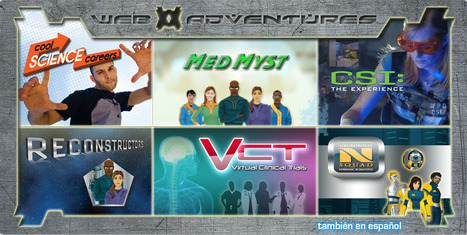
"There are six adventures in the series including the CSI adventure. Each of the adventures is appropriate for middle school or high school use. In each adventure students take on the role of scientist to solve a crime, conduct experiments, and learn about scientific methods and processes."
Beth Dichter's insight:
Richard Byrne shares six science games that are available online through Rice University. The games include: * CSI Adventure - six adventures that allow students to become forensic scientists and solve a crime. * Cool Science Careers - students may explore five STEM-based careers. Students take an interest survey and their adventure will be guided by their interests. * MedMyst - learn about microbiology with a focus on infectious diseases and how they spread. * Reconstructors allows you to "gather evidence and data to solve drug-related cases." (3 games) * Virtual Clinical Trials - become a research scientist and help develope treatments for spinal cord injuries, depression and brain injuries. * N-Squad - "investigate the effects of alcohol on the digestive, circulatory, and nervous systems." These games are geared to middle and high school students and these adventures are also available in Spanish!
Scoop.it!

"Google Books is one of the research tools that Google offers, but a lot of students overlook. Google Books can be a good place for students to look for books and look within books that can help them with their research projects."
Beth Dichter's insight:
Have you checked out Google Books as a tool for research? Richard Byrne provides a great overview of how to have your students use this tool. He also provides a slideshow with directions that include screenshots.
Scoop.it!

Eight brilliant online games that can engage, inspire and equip students with the tools and ambition to approach a whole host of exciting careers and paths.
Beth Dichter's insight:
Check out this post for games for many disciplines. You will find links to and information about the following games. * Pavlov's Dog * Power Up * Lord of the Flies * Cisco Binary Game * The Transistor * Climate Change * Laser Challenge * Immune System Defender 
TopMBA's comment,
December 5, 2013 1:48 PM
Great scoop! You may also enjoy this article: http://www.topmba.com/blog/online-game-offers-scholarship-route-simon-mba-mba-news
TopMBA's comment,
December 5, 2013 1:48 PM
Great scoop! You may also enjoy this article: http://www.topmba.com/blog/online-game-offers-scholarship-route-simon-mba-mba-news
TopMBA's comment,
December 5, 2013 1:48 PM
Great scoop! You may also enjoy this article: http://www.topmba.com/blog/online-game-offers-scholarship-route-simon-mba-mba-news
Scoop.it!
Beth Dichter's insight:
Common Sense Media has just published an infographic and a report that looks at how children ages 8 and under are using media. They did a similar report two years ago so you will see some major shifts in how current technology is being used. Areas covered in the infographic include: * Access to mobile technology * Tech savvy toddlers * Screen time * What kid's are doing with mobile devices * Television time * Digital Divide and more. There continues to be debate over how much screen time is appropriate for young ones. This infographic may provide some information that surprises you. To access the summary or the full report, "Zero to Eight: Children's Media Use in America 2013" |
Scoop.it!
Here's another wonderful, easy to use app that makes it easy for teachers to create content for digital learning or let students create content! In the last
Beth Dichter's insight:
Movenote is a cross platform app that allows you to combine presentations with speech. Working with Google apps, Android, iPads and more you can upload images, video, and documents and create a presentation where you also record your voice. This post includes a short video that explains the program and interviews with a number of teachers whom use this in their classrooms with students.
Scoop.it!
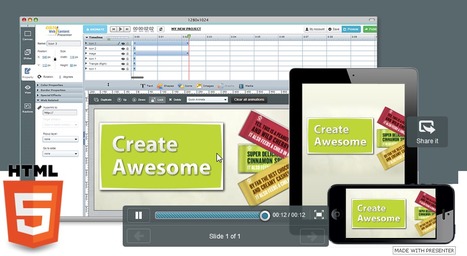
Use Presenter to create free professional interactive HTML5 Presentations, animations, banners, Splash pages and more.
Beth Dichter's insight:
Are you looking for a tool that will allow you to create interactive presentations, animations, infographics, and more? If so check out EWC Presenter. This is a cloud based tool that is easy to use. When you go to the website you will see a number of presentations that others have created. You can also access a number of videos that discuss the various features of Presenter at https://vimeo.com/user15791939/videos Because this tool uses HTML5 any presentations you create should also run on mobile devices. Students could use this tool to animate presentations and infographics and work on them from a computer in any location.
Scoop.it!
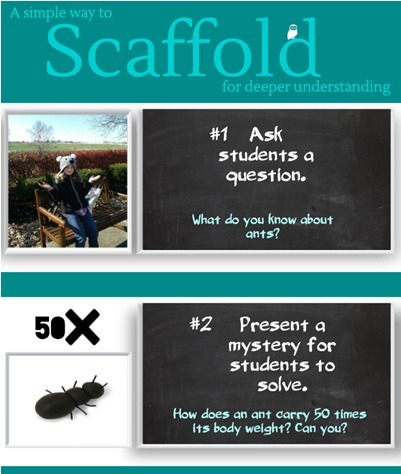
I am teaching a class where I allow the students a set amount of time to draw out what they know about a subject. Today, the students did their pre-class work, then came to class, and we began to d...
Beth Dichter's insight:
Check out this infographic which focuses on scaffolding for deeper understanding. Mia MacMeekin has provided a nine step process. 1. Ask a question. 2. Present a mystery for students to solve. 3. Ask students to draw what they know. 4. Give students ample time to research the mystery. 5. Ask students to draw the mystery and the solution again. 6. Ask students to share their drawings with other students. 7. Ask students to pull their ideas together in one drawing. 8. Teacher patiently asks what if questions. 9. If students needs more information, send them back to step #4, and start over again until the outcome or objective is reached. MacMeekin notes that her students were engaged in the drawing/scaffolding phase of this and reached a deeper understanding than other classes had. It is also important to note that the ant is actually an analogy. To learn more click through to the post. 
Spice Wang's curator insight,
November 15, 2013 6:52 PM
How much time teachers would need this kind of problem-solving based scaffolding activity? When to use Thisbe kind of approach?
Scoop.it!
Beth Dichter's insight:
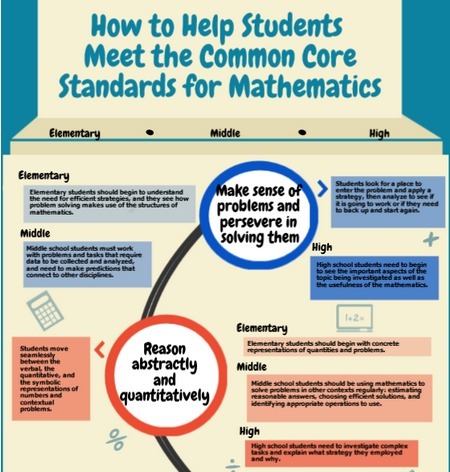
This infographic looks at eight instructional practices that will help students meet Common Core standards and provides a look at how to do this in elementary, middle and high school settings. Check it out and see the recommendations for the following areas: * Make sense of problems and persevere in solving them * Reason abstractly and quantitatively * Construct viable arguments and critique the reasoning of others * Model with mathematics * Use appropriate tools strategically * Attend to precision * Look for and make use of structure * Look for and express regularity in repeated reasoning For more detailed information click through to the infographic. 
Christine Bushong's curator insight,
November 11, 2013 10:27 AM
Beth Dichter's insight:
This infographic looks at eight instructional practices that will help students meet Common Core standards and provides a look at how to do this in elementary, middle and high school settings. Check it out and see the recommendations for the following areas: * Make sense of problems and persevere in solving them * Reason abstractly and quantitatively * Construct viable arguments and critique the reasoning of others * Model with mathematics * Use appropriate tools strategically * Attend to precision * Look for and make use of structure * Look for and express regularity in repeated reasoning For more detailed information click through to the infographic.
Scoop.it!

Literably "allows students to read a text and have it automatically assessed for accuracy and words-per-minute speed. Plus, and this is what was most surprising to me, it also provides a fairly accurate indentification of student errors — in other words, what word they said instead of the word in the text. You’re able to provide the student or parent a link to the recording. And it’s free."
Beth Dichter's insight:
Thanks for Larry Ferlazzo for sharing this website that allows teachers to choose reading and levels for students to read and saves their reading so you can come back and access it via a dashboard. You will need to register and set-up your student list. Ferlazzo also discusses the cons of this. There is value in having one-on-one time with students when they read so you determine if they are "racing through words" or having other issues that may not be apparent through a recording. None the less this may be a great tool for some of your students. Students do have the option of re-recording.
Scoop.it!
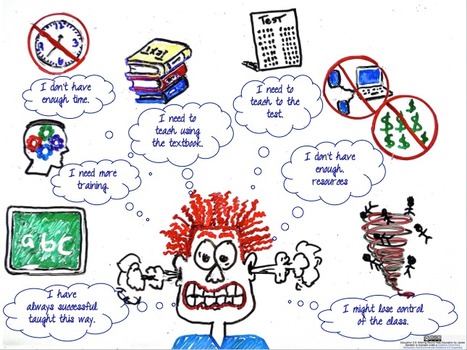
"Educational psychology has focused on the concepts of learned helplessness and more currently growth-fixed mindsets as a way to explain how and why students give up in the classroom setting. These ideas can also be applied to educators in this day of forced standardization, testing, scripted curriculum, and school initiatives."
Beth Dichter's insight:
What happens when a fixed mindset is moved to a growth mindset? Gerstein states a growth mindset leads to "focusing on what can work rather than what is not working. This is not to devalue the obstacles that teachers face. It becomes about noting where change is possible and making some small changes in teaching. Small changes often result in larger, more systemic change." She then goes on to explore teacher agency and provide strategies for teachers to "gain and increase their agency." For education to change teachers must also be open to change, and the strategies are suggestions to help teachers gain their voice and become empowered. 
davidconover's curator insight,
November 8, 2013 10:22 AM
This is a thought provoking article for both teachers and administrators. 
Jaimee's curator insight,
March 5, 2014 10:11 AM
Teachers not just family members can be a part of a students mindset. How they think and what challenges to make can also be in response to how teachers are teaching them.
This article explains in a way how helplessness can be a part of someone not being successful. It explains the initiative that someone must take to be successful in school. 
Xander Norris's curator insight,
March 6, 2014 11:13 AM
This article is talking about how educators are moving from a fixed mindset to a growth mindset, and this has to do with the changes of the curriculum, and forced standardization. This is talking about how success is based on learning, and why some students give up on it.
Scoop.it!
Beth Dichter's insight:
Today when you go into a school there may be computer labs or there may be laptop carts that stay within a classroom or are shared...but in either of these situation there is still a need for rules to help guide students. This infographic provides 10 rules, each with an image and limited text. Consider sharing it with your students digitally (or you may purchase one to hang up in the computer lab/classroom).
Scoop.it!

Bring the world into your classroom through Google+
Beth Dichter's insight:
Put together Google+ and Connected Classrooms and the result is great virtual field trips foryour classroom. Today Google+ and Connected Classroom have launched this new iniative. To learn more head over to Connected Classroom as you have to submit an application to join. Your school will have also have to support Google+. With budget cuts in education this is a great opportunity for students to experience trips to locations that they may never be able to visit in person. 
Ignite Your Audience's curator insight,
November 5, 2013 6:31 PM
Great examples of taking unique spaces and places into your classroom. Ignite Your Audience is very keen to create an experience like this for the Macpherson Homestead in Carnamah, Western Australia. http://www.carnamah.com.au/homestead 
Phil Havlik's curator insight,
November 11, 2013 3:20 PM
Love the ideas this presents. I think Google+ has lots of valuable possibilities, if adoption can be found. Trying to tie it as another Facebook just won't work. They need to find their niche and adopt it. This seems like a great use of their resource.
Scoop.it!

I am thrilled to see so many students creating blog posts and going BEYOND "writing" text made up letters, words, sentences and paragraphs. Being able to "read" and "write" in other media is part o...
Beth Dichter's insight:
Yet there is still the issue that students are citing images without checking to see if they have the correct permissions to do so. Students (and teachers) need to be aware of copyright rules. Using resources like Flickr you will find many pictures but students need to learn how check to see if the image is under Creative Commons and accurately site the source. Langwitch does an excellent job explaining a situtation that she experienced with her students and provides screenshots to help you understand what to look for. Teaching students how to cite resources is teaching our students media literacy. Consider having your students create an image that they could put under Create Commons and have attibuted to them of others were to use it. 
Nancy Jones's curator insight,
November 3, 2013 3:52 PM
I don't know that I, myself, am as through as I could be about this. Thanks
Scoop.it!

"When we hear the word genius, certain people come immediately to mind—Albert Einstein in mathematics, or Warren Buffett in investing—but what exactly sets these people apart? It’s easy to simply shrug and say to ourselves, “Those people are just different. They have something most people don’t, and it’s as simple as that.” But the steps taken to arrive at a place of genius are actually more concrete, and have less to do with innate talent, than you might think. When it comes to cultivating intelligence, mindset is a huge factor..."
Beth Dichter's insight:
Learn about the characteristics of genius in this post as well as five strategies to create a growth mindset in children. Two are listed below: * Perseverance * Praise the process, not the person 
Kathy Lynch's curator insight,
November 5, 2013 9:35 PM
I love this! Help your students discover their inner genius. Thanks Beth
Scoop.it!
Beth Dichter's insight:
What are some of the best ways to stay safe online? Google has been posting one suggestion per day and here they are an an infographic...thirty-one tips to help you stay safe. But that's not all. The post also includes a number of additioal resources. Click through and learn some new ways to protect yourself online.
Scoop.it!

"Sunrise" is the third version of the Beatboxing Flash music game Incredibox. If you like Incredibox don't hesitate to share it! Pump it up and chill!
Beth Dichter's insight:
Incredibox is a great tool for students to explore music.You can select beats, effects, melodies and voices and create music. Students can have fun playing and learning about music. You can also access the previous two versions of Incredibox. Please note, if you have used Incredibox in the past this is a new address.
Melissa Jenkins 's curator insight,
November 16, 2013 9:07 AM
I have used this in my class for years and it gets better and better. It is a good brain break game especially when you are doing something content heavy. We all need a beat break:-) |









Nerd Alert!! :-)
Q1) Even though this website is geared towards teaching Shakespeare, do you think it could be adapted to facilitate your own learning and understanding of him and his works? Why/why not and how?
Q2) Shakespeare is known to be notoriously difficult to learn and is abhorred by students the world over. As such, would you argue that Shakespeare is still relevant in an English curriculum context? This question extends to not only how important his works are but also how engaging or interesting you might find them.