Eclectic Technology
230.9K views | +0 today
Eclectic Technology
Tech tools that assist all students to be independent learners & teachers to become better teachers
Curated by Beth Dichter
Your new post is loading...
Scooped by Beth Dichter
November 28, 2013 9:52 PM
Scoop.it!
Great Maths Teaching Ideas-The First of a Series

Great Maths Teaching Ideas-The First of a Series | Eclectic Technology | Scoop.it
Beth Dichter's insight:

Are you looking for good practice and ideas (and pedagogy) in the area of mathematics? If so check out the first newsletter from Great Math Teaching Ideas which you may download as a pdf from this website. This issue provides a range of links including:

* Diagnostic questions - a website that provides you with questions to help you identify and address key misconceptions

* Visual Patterns - a site that provides you with 116 patterns that your students may work with to help learn how to create equations

* Numberphile - a great site to find math videos

Additional items are in the pdf.

Melissa Marshall's curator insight, November 29, 2013 1:05 AM

Here is a great visual containing some good ideas for lower school classes - along with the websites to check out. If you click on the image and load the webpage, the links become clickable. 

Gemma Schormann's curator insight, December 2, 2013 10:43 PM

I agree! Math really needs to be taught better! 

Scooped by Beth Dichter
November 27, 2013 9:09 AM
Scoop.it!

A Visual Guide to Generation Z

A Visual Guide to Generation Z | Eclectic Technology | Scoop.it
Beth Dichter's insight:

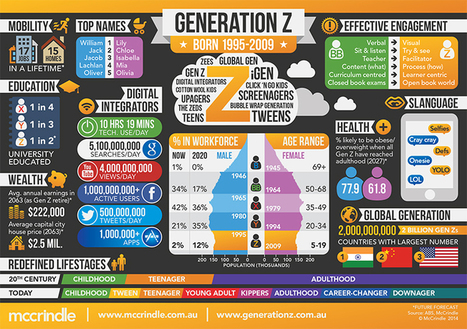
What do you know about Generation Z? This website has much more than the infographic that is shown above. You will find additional details on each of 36 categories that include not only the ones within the infographic such as Effective Engagement, Education, Age Range, and Wealth but also Influencers (which will lead to a table called Generations Define and that compares the Builders (born from 1925-1945) to the Baby Boomers, Gen X, Gen Y and Gen Z); Social Media; Learning Styles; and many more.

Do you work with students whom are Gen Z? If so this infographic has the potential to become a project where students learn more about one area and determine if they agree or disagree with the results found in this research. McCrindle, the company that did this research, is located in Australia and is recognized as a leader in research on Generation X, Generation Y and Generation Z.

Ennio Martignago's curator insight, November 28, 2013 3:37 AM

Generazione Z

Beatriz Montesinos's curator insight, November 28, 2013 5:42 AM

Excelente estudio sociólogico de la Generación Z (niñ@s nacidos entre 1995 y 2009) realizado por la empresa australiana McCrindle.

Gilbert C FAURE's curator insight, November 28, 2013 4:24 PM

for kids

Scooped by Beth Dichter
November 25, 2013 9:48 PM
Scoop.it!

Neuroeducation: 25 Findings Over 25 Years - InformED

Neuroeducation: 25 Findings Over 25 Years - InformED | Eclectic Technology | Scoop.it

"It’s been 25 years since the field of neuroeducation first reared its head in academia...To celebrate the progress of this monumental discipline, we have compiled a list of the 25 most significant findings in neuroscience education over the past 25 years."

Beth Dichter's insight:

What does neurology tell us about education? This post looks at 25 discoveries over the last 25 years. Some may be new to you and remember this is a field that is changing rapidly.

Below are a few of the discoveries that are covered.

* Brain plasticity - "...the brain changes constantly as a result of learning, and remains ‘plastic’ throughout life."

* "The brain’s response to reward is influenced by expectations and uncertainty."

* "Learning involves both focused attention and peripheral attention."

For more information on these discoveries and 22 additional click through to the post. You might want to check out the 3D interactive brain that explores learning strategies. It is located at http://www.opencolleges.edu.au/informed/learning-strategies/

No comment yet.
Scooped by Beth Dichter
November 24, 2013 1:08 PM
Scoop.it!

The Five Levels of Student Engagement (Infographic)

The Five Levels of Student Engagement (Infographic) | Eclectic Technology | Scoop.it
Beth Dichter's insight:

Phillip Schechty is an educator whom has looked at "five ways that students respond or adapt to school-related tasks and activities." This infographic looks provides an overview of the five stages. If you want more information about this please visit the website The Schlechty Center located at http://www.schlechtycenter.org/

malek's curator insight, November 27, 2013 5:40 PM

Any marketer dream!

If only customers behave like students....

Deanna Dahlsad's curator insight, November 27, 2013 5:57 PM

This is an interesting way to look at and evaluate your child's engaement with school as well as your parenting. Are you encouraging "ritual compliance" or real engagement? And, for those of with kids with special needs, the behavior labels in the green boxes might be more helpful in terms of both describing what we see as well as considering in motivating our childen.

Scooped by Beth Dichter
November 23, 2013 9:45 PM
Scoop.it!
Should Student Work Be Public On the Web?

Should Student Work Be Public On the Web? | Eclectic Technology | Scoop.it

"10+ years ago, filters and blocking tools were banning access to most blogs and web publishing services in schools around the world."

Beth Dichter's insight:

But times have changed. Many resources that were blocked in the past are not being used by teachers on a daily basis. This post explores if the same should be true for student work. Is it time to allow student work to be public on the web?

Does an authentic audience improve student writing? Will students try harder if they share their work? These are two of the questions explored in this post. Along with the Pros of Posting Online this post includes the following areas:

* Tips for Allowing Public Posting

* Let Students Know

* Have and Review Guidelines and Rules (including sample guidelines)

* Get Parent Permission (including 18 examples)

* Encourage Sharing and Commenting

* Give Students Freedom

* Be Public Without Fear of the Public

* Don't Stress Over Moderating Everything

What are your thoughts? Do you think that your students would be more engaged if they were allowed to write to a larger audience of their peers and receive feedback from them? There are a number of comments on the original post and you may also learn from these responses.

No comment yet.
Scooped by Beth Dichter
November 21, 2013 10:55 PM
Scoop.it!

GoldieBlox, Rube Goldberg, & Beastie Boys "Princess Machine" (a concert for little girls)

Beth Dichter's insight:

A Rube Goldberg contraption plus girls showing that they too can be engineers!

No comment yet.
Scooped by Beth Dichter
November 19, 2013 10:56 PM
Scoop.it!

14 Web Tools For Teaching Without Student Logins - Edudemic

14 Web Tools For Teaching Without Student Logins - Edudemic | Eclectic Technology | Scoop.it
What happens when you or your students forget your online password? You should start using some of these web tools for teaching without student logins.
Beth Dichter's insight:

Check out this list of 14 websites that students may use without needing a password. The list is split into three areas:

* Collaboration, Assessment and Drawing Tools

* Literacy Tools

* Maths and Map Tools

Each tool is discussed and links are provided. If you have additional tools to share please write a comment and include the link to the tool.

Jamie Culpan's curator insight, November 20, 2013 6:49 AM

Often a problem when learners forget log-on details! Great to have alternatives at the ready!

Max Arias's curator insight, November 20, 2013 9:27 AM

very interesting!!

Catherine Ricoul's curator insight, November 20, 2013 2:21 PM
… voire pour contourner des plateformes verrouillées à double tour…
Scooped by Beth Dichter
November 18, 2013 10:50 PM
Scoop.it!
Instructional Objectives Builder: Online Tool for Writing Objectives

Instructional Objectives Builder: Online Tool for Writing Objectives | Eclectic Technology | Scoop.it
Use this application to build instructional objectives for your courses and training programs.
Beth Dichter's insight:

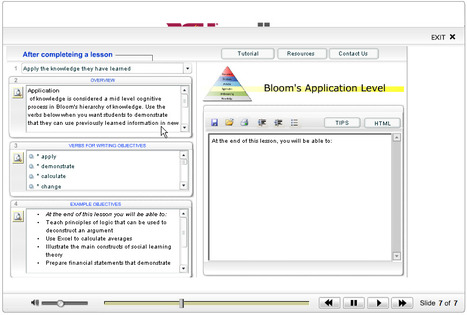
This tool is easy to use and assists you in writing objectives. It is based on Bloom's taxonomy and provides a number of drop down menus that allow you to:

* Select what students will do after completing a lesson

* Provides an overview of the meaning of the level you selected

* Provides a drop down list of verbs that help to clearly define the objective (you choose the one you want to use)

* Provides some sample objectives that use the verb you selected

* Write your own objective, and then copy and paste it into your document or print a copy

The version of Bloom's they have online uses the word synthesis while the new version has removed synthesis and replaces it with creating. I don't believe that this impacts the value of the tool but you should be aware that it may not provide the assistance for that specific category.

Andrew Bennett's comment, October 28, 2014 12:34 AM
Wow, what a great tool! Sometimes the biggest challenge in writing objectives is simply being able to articulate what you want from students. This will be a great resource for that step!
Andrew Bennett's comment, October 28, 2014 12:34 AM
Wow, what a great tool! Sometimes the biggest challenge in writing objectives is simply being able to articulate what you want from students. This will be a great resource for that step!
Zina Alaswad's curator insight, October 16, 2015 7:54 PM

Although I don't appreciate ready-made wizards such as this one. But it could be a good tool to just start with and build upon the objectives produced by this tool.

Scooped by Beth Dichter
November 17, 2013 10:28 PM
Scoop.it!

Brand New Science Passages

Brand New Science Passages | Eclectic Technology | Scoop.it
Beth Dichter's insight:

If you have not had the opportunity to check out ReadWorks.org then you might want to do so. They have just posted 76 science passages for students Grades K - 8 with the goal of teaching reading comprehension. Each passage comes with a quiz. You may read the passages online or you may download a PDF version (that includes a Teacher Guide and Answer. Be aware that "ReadWorks provides research-based units, lessons, and authentic, leveled non-fiction and literary passages directly to educators online, for free, to be shared broadly." You will find many more resources than this new set of science passages.

No comment yet.
Scooped by Beth Dichter
November 16, 2013 10:02 PM
Scoop.it!

NetAppVoice: Kids Can't Compute -- And That's A Problem

NetAppVoice: Kids Can't Compute -- And That's A Problem | Eclectic Technology | Scoop.it
Kids are "digital natives." They grew up using computers, and therefore are more "tech savvy" than older people. Right? No! Well, the first part's right, but the second part is increasingly wrong.
Beth Dichter's insight:

This post looks at how people of different generations approach computers. It raises the question "Why do people think students are computer geniuses?" and states "The most computer-savvy demographic is now probably aged 25–55." 

Is this because the early computers did not have apps and had to learn how to work with a machine and trouble shoot it (and were able to do this on many levels).In other words, you were able to get "under the hood."

What is the impact of this? Read on to learn more and see if you agree with this issue.

Abi Mawhirt's curator insight, November 17, 2013 9:36 AM

Issues with 'digital natives' adapting technology skills for learning, or for anything other than 'me time'. Will 'me time' on our devices change if none of us have research skills and rely on serendipity alone?

Scooped by Beth Dichter
November 15, 2013 10:03 PM
Scoop.it!

Chrome Assistive Technology Toolbox

Chrome Assistive Technology Toolbox | Eclectic Technology | Scoop.it

"As educators we believe that students with vision, hearing, physical, communication, and learning challenges have the same potential to learn as anyone else if the "mechanical" impediments to participation in the classroom are removed or lessened...We have attempted to collect many of the available apps and extensions which we believe could foster alternative forms of access for real learning to occur, with the ultimate hope of extending the definition as to who can be a learner in any particular setting."

Beth Dichter's insight:

Chrome has an amazing number of free apps and extensions that help to provide access to individual whom have 'vision, hearing, physical, communication, and learning challenges.' This website allows you to search for by task, profile or keyword and includes a Google Presentation "Co-opting Chrome to Help Learners." Although these apps may be marketed as geared to assistive technology they are useful for all students.

Teresa Pearl's comment, December 12, 2013 5:40 PM
This allows people to see all the tools available on Chrome. There are a ton of free apps that provide access to all learners. You can use the website to search for by task.
Scooped by Beth Dichter
November 14, 2013 10:30 PM
Scoop.it!

Canva - Create Beautiful Slides, Posters, and Infographics

Canva - Create Beautiful Slides, Posters, and Infographics | Eclectic Technology | Scoop.it

"Canva is a new service that makes it easy to create beautiful slides, flyers, posters, infographics, and photo collages. Creating these graphics on Canva is a drag-and-drop process. Start by selecting a template then dragging and dropping into place background designs, pictures, clip art, and text boxes."

Beth Dichter's insight:

Canva is in beta but their response for an account is usually done within 3 or 4 days. Create slides, flyers, posters, infographics and more and download them or link to the online graphic. You may upload your own images or use from their collection. This looks like a quick and easy way for you or your students to create media for classes or activities that take place in your school.

No comment yet.
Scooped by Beth Dichter
November 13, 2013 7:34 PM
Scoop.it!
Using Bloom's Taxonomy In The 21st Century: 4 Strategies For Teaching

Using Bloom's Taxonomy In The 21st Century: 4 Strategies For Teaching | Eclectic Technology | Scoop.it

"Bloom’s Taxonomy can be a powerful tool to transform teaching and learning.

By design, it focuses attention away from content and instruction, and instead emphasizes the “cognitive events” in the mind of a child. And this is no small change"


Beth Dichter's insight:

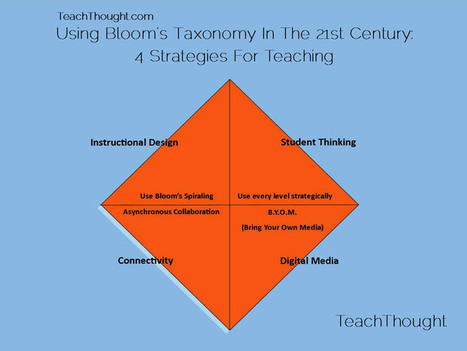
But we are in the 21st century. How should we look at Bloom's today?

This post suggests four strategies to use as we look at the 21st century skills "which include persistent connectivity, dynamic media forms, information-rich (digital and non-digital) environments, and an emphasis on visibility for pretty much everything."

* Use every level

* Use asynchronous collaboration

* Allow students to BYOM

* Use Bloom's spiraling

Additional information on each of these strategies is available in the post.

Melissa Jenkins 's curator insight, November 16, 2013 8:31 AM

Interesting read

Michelle Daniels's curator insight, November 16, 2013 3:20 PM

As I become a better facilitator it is important to find engaging, effective and efficient methods and strategies within the classrooms of our children; as well as for all adults attending brick & mortor or  online colleges. Bloom's Taxonomy is an essential tool!

David Donat's curator insight, August 11, 2015 6:41 PM

Bones orientacions sobre com aplicar la Taxonomia de Bloom  en la pràctica docent (i una interessant lectura recomanada)

Scooped by Beth Dichter
November 28, 2013 9:20 PM
Scoop.it!

How To Help Your Students Embrace Failure through Game-based Learning

How To Help Your Students Embrace Failure through Game-based Learning | Eclectic Technology | Scoop.it

"Whether our students fear the dark, monsters, heights, some other imagined horror, or something more real such as family troubles or bullying, everyone is afraid of something. For students in our schools those fears probably include something that is an inherent part of our society and our educational system – failure."

Beth Dichter's insight:

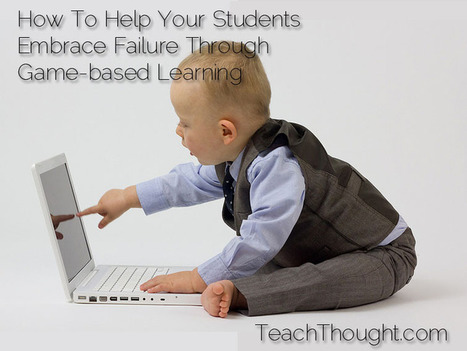
What would happen if you used game-based learning in your classroom and took advantage of the of the fact that students do fail when they play games, providing opportunities for them to understand how they may also fail in class and more on. Three strategies are explored in this post.

* Encourage cooperative play

* Implement structures for active engagement

* Embrace failure as a learning opportunity

In addition to providing detailed explanations of these strategies the post also provides a look at 21 smart games for game-based learning and some as well as links to locations where you may find educationally relevant games.

The Rice Process's curator insight, November 29, 2013 8:59 AM

Interesting inights.

MLC Junior School Hub's curator insight, December 2, 2014 3:28 AM

Everyone is afraid of something. However, we need to encourage our students not to fear failure, but embrace it as a natural part of the learning process.

One area where failure is naturally integrated is games-based learning where progress is built on the concept of experimentation - failure and adaptation.

Scooped by Beth Dichter
November 26, 2013 10:36 PM
Scoop.it!

Projects In Web 3.0: Privacy Is The New Predator

Projects In Web 3.0: Privacy Is The New Predator | Eclectic Technology | Scoop.it

"Student digital privacy is a critical currency, to be safeguarded by schools and pillaged by predators. Interactive, social Web 3.0 resources demand proactive ways to access tech tools and still preserve learners’ anonymity.
In the changing edtech landscape, student safety is taking on new dimensions and new gravity. When every online resource now is interactive and linked to social media, Web 3.0 often requires clever ways to give students access to the learning tools they need and still preserve their innocence."

Beth Dichter's insight:

How do we teach students the concept of privacy? How do we help them understand this concept when so much of their lives are online and open to all?

This post discusses how "privacy is the new predator", providing many resources to help you work with your students.

Have you heard about Facehawk? It is an interactive video that takes information from your Facebook account and creates a hawk that uses "photos and statuses from since your digital life began."

On one hand we tell students that they need to keep their private information private, yet websites ask them to upload their picture. To assist with this issue there is a list of websites that allow students to create avatars.

Additional resources focus on Digital Citizenship and Modern Internet Safety, Web 3.0, and New Media Literacy.

No comment yet.
Scooped by Beth Dichter
November 25, 2013 9:26 PM
Scoop.it!

3 Presentation Tools Teachers Are Now Using - Edudemic

3 Presentation Tools Teachers Are Now Using - Edudemic | Eclectic Technology | Scoop.it
Presentations are more than just Powerpoint or Keynote. While those presentation tools will get the presentation-making job done, there are definitely better options out there.
Beth Dichter's insight:

A look at three presentation tools that you might want to use.

* Haiku Deck is a free app that allows you to create presentations with slick graphics that they provide or you may use your own. They will soon be releasing a web-based app so head over to their site to sign up for it.

* Projeqt is another web-based presentation tool. It has an easy to use interface and you can bring in materials from a range of sources.

* Google Presentation allows for collaboration and much more. Google continues to add features including a range of templates and the ability to easily share.

Which one is right for you? Check them all out and determine which would best meet your needs. Have fun exploring!

No comment yet.
Scooped by Beth Dichter
November 23, 2013 10:19 PM
Scoop.it!

So? So What? What Now? How To Keep The Learning Going

So? So What? What Now? How To Keep The Learning Going | Eclectic Technology | Scoop.it

"...in practice, curriculum maps are almost always not the “living, breathing” documents experts like Heidi Jacobs Hayes promote. They are instead very dead things—lifeless prisons of content to be covered, and boxes to be highlighted...For a curriculum map—or any planned learning experiences—to be vital—and vitally useful—they must be adaptive and circular rather than rigid and linear. ...they must encourage students to continue their pursuit of understanding and self-knowledge."

Beth Dichter's insight:

What can you do to help extend the learning process, to keep it going in your classroom? This post provides "six strategies to help keep the learning going in your classroom." Below are two.

* At the end of an activity, project, lesson, or unit ask simple questions: So? So what? What now? What have you learned? Why is that important? What makes sense to do next in light of this progression?

* Promote self-directed learning using frameworks that teach students to access, evaluate, and use information in real-time, rather than simply “doing assignments.”

Click through to the post to read four more strategies.

Sue J Wilson's curator insight, November 25, 2013 10:32 AM

"...in practice, curriculum maps are almost always not the “living, breathing” documents experts like Heidi Jacobs Hayes promote. They are instead very dead things—lifeless prisons of content to be covered, and boxes to be highlighted...For a curriculum map—or any planned learning experiences—to be vital—and vitally useful—they must be adaptive and circular rather than rigid and linear. ...they must encourage students to continue their pursuit of understanding and self-knowledge."

Roberta Orlando's curator insight, November 26, 2013 9:01 AM

Interesting food for thought...worth reading ;)

Scooped by Beth Dichter
November 22, 2013 7:45 PM
Scoop.it!

Read Aloud - Importance of Reading Aloud

Read Aloud - Importance of Reading Aloud | Eclectic Technology | Scoop.it
Beth Dichter's insight:

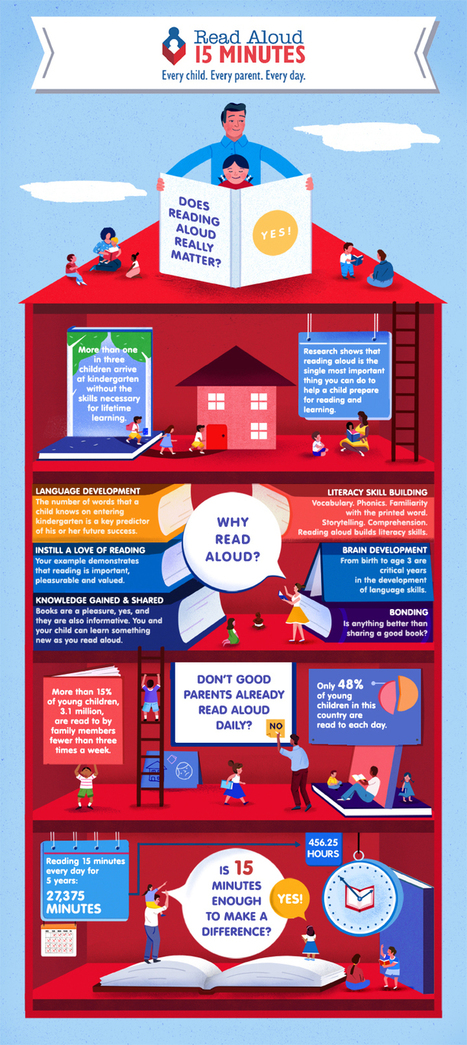
How important it is to read aloud to young ones 15 minutes per day? To get the answer to this question explore the infographic published by ReadAloud, a non -profit organization. Although geared to parents this infographic would be great for teachers to see (and refer to in parent meetings). Perhaps it comes as no surprise that "reading aloud is the single most important thing a parent or caregiver can do to improve a child’s readiness to read and learn" according to this infographic.

Sirenetta Leoni's curator insight, November 23, 2013 6:40 PM

All voice actors should be reading aloud for 15 minutes daily for practice anyway, so if you're not doing this already with your kids, you really need to make the time to do it. It also happens to be a great way to test out and practice dialects and characters; your kids are usually more forgiving than the reviewers on Audible and Amazon.


If your grandchildren, nieces or nephews live far away, there's no reason why you can't Skype-read to them...or spend 15 minutes daily recording a book that you can send them when it's completed.


And if you don't have kids in your life, your local library or school would probably love to have a professional voice actor come in and read to students. Here are tips from the SAG Foundations BookPals for reading aloud: http://bookpals.net/ten-tips-for-reading-aloud/


...and they all lived happily ever after! 

ozziegontang's curator insight, November 25, 2013 10:28 PM

The proof is in the reading.  And making it a daily practice.

Jan Watts's curator insight, November 26, 2013 5:09 PM

We know this, but it bears repeating, and repeating and repeating!!!!

Scooped by Beth Dichter
November 20, 2013 10:47 PM
Scoop.it!

Beyond Minecraft: Games That Inspire Building and Exploration

Beyond Minecraft: Games That Inspire Building and Exploration | Eclectic Technology | Scoop.it

"The success and popularity of Minecraft in and out of classrooms is no surprise. It’s one of the best examples of the potential of learning with games because it embraces exploration, discovery, creation, collaboration, and problem-solving while allowing teachers to shepherd play toward any subject area."

Beth Dichter's insight:

Check out a selection of games that will help students explore, create, collaborate and more. The six games discussed are:

* Garry's Mod - learn physics as you play

* Kerbal Space Program - another physics game

* Sound Shapes - designed for PlayStation this is a "puzzle game set to a rich musical soundscape"

* DIY - Find instructions to build a wide variety of items and a community that will support you

* STENCYL - learn to program using "blocks of code" that you may snap together and create games that may be played on a variety of platforms

* CodeAcademy - learn a variety of programming language for free

Do you think students should learn to code? If you do then some of these games will provide them with this skill as well as others that we know are part of gaming. You may want to try some of these with your students.

Jo Blannin - The Know Tech Teacher's curator insight, November 21, 2013 12:48 AM

Great ways to use game-making in education - I love using MineCraft with the senior primary students. It really brings maths into engineering and science!

Kristina Cook's curator insight, November 21, 2013 10:56 AM

I chose this article because my partner likes minecraft. It relates because it entertains my partner.


Scooped by Beth Dichter
November 19, 2013 10:28 PM
Scoop.it!

A World of Knowledge: 50 Different Views of Education

A World of Knowledge: 50 Different Views of Education | Eclectic Technology | Scoop.it

"Education sprouts in many forms depending on how you look at it. Our views of what it should look like and how it should materialize depend on our value of it and our experience with it...

Take a tour of 50 different views of education that somehow find a similar note:  Education must change."

Beth Dichter's insight:

The views of education are diverse and this post presents 50 views. So what are they? Below are five of the fifty. You may find it necessary to head over to the post to learn just what the name means.

* From the Ground Up (think Sir Ken Robinson)

* Talking Education (think TedEd and YouTube)

* School in the Clouds

* Competency Based Education

* Disrupting Innovation

Click through to learn more about these five plus 45 more. Each entry provides a link for additional information.

Donald Herrera's curator insight, November 19, 2013 10:56 PM

50 Perspectivas Diferentes de la Educación

Max Arias's curator insight, November 20, 2013 1:26 PM

very interesting article to read.

Scooped by Beth Dichter
November 18, 2013 10:28 PM
Scoop.it!

Project Based Learning - The 7 Phase Model & The 7 Essentials

Project Based Learning - The 7 Phase Model & The 7 Essentials | Eclectic Technology | Scoop.it
Beth Dichter's insight:

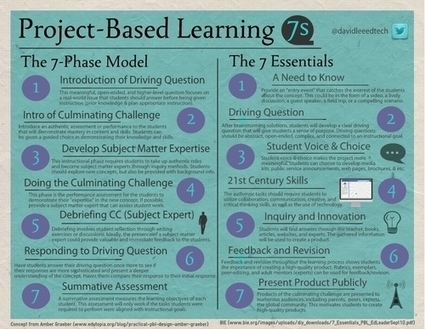
This infographic shows you the 7-Phase Model and the 7 Essentials of Project-Based Learning. The 7 Phase Model information comes from an article published by Edutopia (and is linked to in the post) and The 7 Essentials is based on a PBL GUide: A Resource for Instructors and Program Administrators, published by the National Academy Foundation and the Pearson Foundation. For more information on this topic be sure to check out these two resources.

No comment yet.
Scooped by Beth Dichter
November 17, 2013 6:56 AM
Scoop.it!

Long-click to Find Definitions, Pictures, Videos, and More

Long-click to Find Definitions, Pictures, Videos, and More | Eclectic Technology | Scoop.it

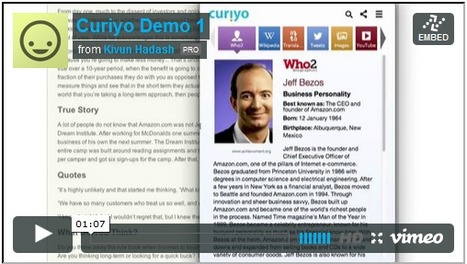
"Curiyo is a browser extension, available for Firefox and Chrome, that makes it easy to quickly find definitions, videos, pictures, and related reference materials for any word you select in your browser. When you're reading an article online and come across a word that you don't recognize or a word that you're just curious about, long-click on it and a pop-up box containing definitions, pictures, videos, and more will appear."

Beth Dichter's insight:

Curiyo looks like a great tool for students but it does require Chrome or Firefox as a browser. Quickly download the app and Curiyo is installed. As you read articles you will find that some items may have dots below them. If you click in these areas information will pop up that provide additional information and this may include information from news sources, Twitter, YouTube, Wordnik and more. You can "long-click" a word which requires you to hold your mouse button down over the word for one second and information will also pop up. By moving off the window that has popped up the information will close. Consider how this might help students researching new topics.

No comment yet.
Scooped by Beth Dichter
November 15, 2013 10:44 PM
Scoop.it!

21 Digital Tools to Build Vocabulary (Infographic)

21 Digital Tools to Build Vocabulary (Infographic) | Eclectic Technology | Scoop.it
I previously published 21 Digital Tools to Build Vocabulary which has been widely read and quite popular with educators.
Beth Dichter's insight:

This infographic provides 21 digital tools that help build vocabulary. It is split into the following sections:

* Reference Tools

* Word Clouds
* Games and Reviews

* Word Walls and More

Why use digital tools?  Here are a few reasons (and there are many more). They allow students to hear spoken words; often words are acccompanied with images, providing a deeper understanding; students may play and manipulate words; and create virtual word walls. We are told to personalize instruction today and digital tools help us do that. Teaching vocabulary is critical and these tools will provide you with resources for a range of students. For more information on the tools you might look at the original post located at http://www.learningunlimitedllc.com/2013/02/20-digital-tools-for-vocabulary/

Audrey's curator insight, November 16, 2013 7:48 AM

This is really great.  It is very helpful for students, particularly those whose first language is not English and are learning subjects in the UK.  

Melissa Jenkins 's curator insight, November 16, 2013 8:33 AM

Time to make use of this. 

Scooped by Beth Dichter
November 14, 2013 10:49 PM
Scoop.it!

The Smithsonian Collection in 3D!

The Smithsonian Collection in 3D! | Eclectic Technology | Scoop.it

"The end of "do not touch": Use the Smithsonian X 3D Explorer to explore and manipulate museum objects like never before. Create and share your own scenes and print highly detailed replica of original Smithsonian collection pieces."

Beth Dichter's insight:

The Smithsonian has launched a new website that allows you to see objects in 3 dimensions. You can " how to navigate, explore and manipulate 3D collection objects." In fact you may download data sets for some of the objects and with a 3D printer create your own copy.

As always education is a key component of the Smithsonian. Visit the Educators page and learn more about the offerings and sign up to receive a free e-book, Abraham Lincoln: The Mind Behind the Mask. You may browse the galleries, browse the tours and view the video gallery. Consider bookmarking this site as the plan is to continue to add materials!

Vicki Hansen's curator insight, November 24, 2013 7:42 PM

Awesome interactive for students.  Hope it continues to expand objects.

Van Duyse Olivier's curator insight, December 1, 2013 6:41 AM

The new digital museum ... Opens opportunity's for digital education

Ness Crouch's curator insight, December 23, 2013 3:13 AM

What a great site for looking at both history and science! Very recommended!

Scooped by Beth Dichter
November 14, 2013 9:56 PM
Scoop.it!

Easily Turn Google Spreadsheets into Online Flashcards

Easily Turn Google Spreadsheets into Online Flashcards | Eclectic Technology | Scoop.it
Beth Dichter's insight:

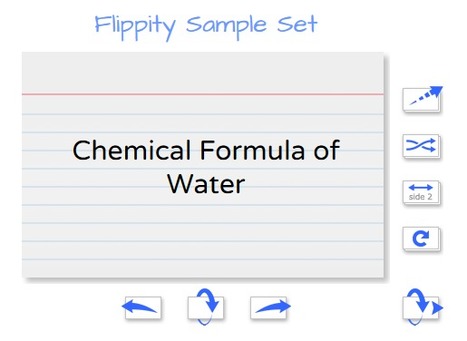
Flippity.net lets you take a Google spreadsheet  and create online flip cards in four easy steps.

1.Copy a Google template into Gmail or your Google apps account; enter your terms and save (following directions)

2. Publish your Flippity set and get a link

3. Paste the link into a specified box and click Go

4. And your online flip cards are published

You may include images as well as text. For more information click through to the site.

No comment yet.