Eclectic Technology
230.9K views | +6 today
Eclectic Technology
Tech tools that assist all students to be independent learners & teachers to become better teachers
Curated by Beth Dichter
Your new post is loading...
Scooped by Beth Dichter
April 9, 2014 10:27 PM
Scoop.it!

The Epic Ebook Guide

The Epic Ebook Guide | Eclectic Technology | Scoop.it
"eBooks are around us. Do you know how to find them? What apps should you use? Do you know how to publish one? This epic eBook guide will help you understand how to download ebooks, use ebookstores, and how to find free and inexpensive ebooks and how to self publish."

Beth Dichter's insight:

Vicki Davis provids an in-depth look at a wide range of resources for ebooks. Find ebook reading apps, how to pick an ebookstore, how to purchase an ebook, five places to find free ebooks (ones that may change day to day),  and ways to download books.

Find detailed descriptions on ten sites that provide free ebooks including:

* Project Gutenberg

* eReaderIQ

* Free Booksy

* BookBub

And last but not least, if you are interested in publishing ebooks you will find seven essential resources for ebook creators.

Davis also provides links to several other posts she has written that have additional resources. 

Nuno Magalhães Ribeiro's curator insight, April 10, 2014 9:38 AM

Os ebooks são um tipo de aplicação multimédia que se impôs nos últimos anos como uma séria alternativa à tecnologia analógica baseada em papel, fruto das muitas vantagens que o suporte digital proporciona para melhorar a experiência da leitura. O Epic Book Guide, descrito neste artigo, é interessante na medida em que ajuda a compreender que apps de leitura de ebooks existem, como as utilizar, para que servem e onde as obter; onde e como descarregar ebooks em vários formatos a partir de sites online; onde encontrar edições gratuitas de livros eletrónicos na Internet e como desenvolver edições de autor em que cada pessoa pode publicar e distribuir um ebook da sua autoria.

Marja Oilinki's curator insight, April 15, 2014 2:42 AM

Talteen! Linkeistä löytyi mm. neuvoja e-kirjan tekemisestä uusilla välineillä. Beta-vaiheessa olevaan Liber.io -sovellukseen lähetin heti liittymispyynnön. Myös MS Officen julkaisutoiminta oli juttu, jota en ollut aiemmin huomannut.

Classi's curator insight, April 15, 2014 5:28 AM

All things relatied to eBooks. Great info.

Scooped by Beth Dichter
April 8, 2014 8:58 PM
Scoop.it!

Visible Thinking Routines: Extend & Deepen Students Understanding

Visible Thinking Routines: Extend & Deepen Students Understanding | Eclectic Technology | Scoop.it
Beth Dichter's insight:

Harvard University has a website on visual thinking that is designed for educators and students. Silvia Tolasano, the author of Langwitches Blog, has taken a number of their routines and created visualizations that would be useful for students, visualizations that you might post on your walls or provide copies of for students to put in their binders. 
There is one twist to a number of these  visualizations...they are specific for blogging. The image above includes two of the visualizations. In the post you will find an additional five routines. You will also find an infographic of all the routines within the post available as an infographic

To go directly to the site at Harvard use this link: http://www.old-pz.gse.harvard.edu/vt/VisibleThinking_html_files/VisibleThinking1.html/. And if you are wondering why you might use visible thinking routines consider this statement from the website on visual thinking (at Harvard): 

"Visible Thinking has a double goal: on the one hand, to cultivate students' thinking skills and dispositions, and, on the other, to deepen content learning."

Melissa Marshall's curator insight, April 8, 2014 9:12 PM

How can students use their iPad to answer these questions? I have founf allowing them to give feedback on assessment performance in Coneqt has been very valuable, as well as using collaborative brainstorm/idea tools like TodaysMeet and Padlet. These questions are part of Harvard's Visible Thinking Framework.

"Visible Thinking has a double goal: on the one hand, to cultivate students' thinking skills and dispositions, and, on the other, to deepen content learning."

Julienne Feeney's curator insight, April 9, 2014 7:21 PM

Complements MYP principles and Learner Profiles beautifully...

Kate JohnsonMcGregor's curator insight, April 12, 2014 1:26 PM

This has so much relevance when teaching students questioning and critical thinking skills. Great tool for developing Inquiry based learning strategies. Also, I love an infographic!

Scooped by Beth Dichter
April 7, 2014 9:12 PM
Scoop.it!

The Power Of Poop: A Whale Story

The Power Of Poop: A Whale Story | Eclectic Technology | Scoop.it
Whales are famous for spouts and blowholes. Turns out there's another whale opening that's just as important, but I'm too polite to mention it.
Beth Dichter's insight:

This post provides a different perspective on the food chain. Written in language that an elementary student will probably understand, and with images that will engage students, the post provides a look at what happens when a person asks a question from a different perspective. After discussing the food chain and looking at it as a pyramid one scientist raises a question:..and that question leads to a new discovery that may impact how we look at the whale and what  the whale has the capacity to do for our oceans. To learn more (and have a laugh) check out the post.

No comment yet.
Scooped by Beth Dichter
April 7, 2014 7:24 PM
Scoop.it!

Teaching Adolescents How to Evaluate the Quality of Online Information

Teaching Adolescents How to Evaluate the Quality of Online Information | Eclectic Technology | Scoop.it
An essential part of online research is the ability to critically evaluate information. This includes the ability to read and evaluate its level of accuracy, reliability and bias. When we recently as
Beth Dichter's insight:

Yet research tells us that middle schoolers:

* "are more concerned with content relevance than with credibility."

*  "rarely attend to source features such as author, venue or publication type to evaluate reliability and author perspective.

* "their judgments are often vague, superficial and lack reasoned justification."

What should we do?

1. Teach the Dimensions of Critical Thinking - Relevance, Accuracy, Bias/Perspective and Reliabilty

2. Model and Practice - Use demonstration lessons to focus on the four dimensions above

3. Prompting - Provide written prompts to help guide students; have them cross-check claims through more than one source

4. Help them become healthy skeptics

More information on these factors may be found in the post.

No comment yet.
Scooped by Beth Dichter
April 6, 2014 1:29 PM
Scoop.it!

A Study of Best Practices for Online Courses based on Marzano

A Study of Best Practices for Online Courses based on Marzano | Eclectic Technology | Scoop.it
Beth Dichter's insight:

Many schools are exploring online instruction as a component of education (including K-12). If you are interested in learning how one organization (edmentum) had the Marzano Research Laboratory review "the impact of strategies on student academic outcomes in an online learning environment." The report explores best practices in three areas:

* Marzano Dimension: Strategies Involving Routine Events - This area covers six best practices, including

  * Communicating course /assignment rules and procedures

  * Allowing students to keep track of their learning progress

* Marzano Dimension: Strategies Enacted on the Spot - This area also discusses six best practices, including:

  * Providing help to understand and practice new knowledge

  * Allowing students to ask questions during online course/assignment

* Marzano Dimension: Strategies Addressing Content - This area has only one practice: 

 * Adding external resources to assignments aligned to local objectives

There is a page devoted to each of the best practices. This information may not be new to you, but if teaching online is new to you there are great suggestions to help you design a course (or teach a course) that will lead to a more successful implementation. 

The link to this file is located at:  http://www.edmentum.com/sites/edmentum.com/files/resource/media/0317-01%20Marzano_eBook.pdf 

No comment yet.
Scooped by Beth Dichter
April 5, 2014 8:17 PM
Scoop.it!

22 Interactive Lessons to Bring Earth Day to Life

22 Interactive Lessons to Bring Earth Day to Life | Eclectic Technology | Scoop.it

"Planning for Earth Day 2014 is well underway around the world. Bring environmental issues to your classroom with resources from PBS LearningMedia. Highlights include an animated video from Loop Scoop using orange juice consumption to teach about biodegradation, a lesson tracking waste in neighborhoods from America Revealed, and a QUEST video transporting viewers to the beginning of the environmental movement."

Beth Dichter's insight:

If you are looking for some great resources to help your students learn more about the environment this list of 22 interactive lessons may be right up your alley. The lesson plans are for students as young as Kindergarten up through Grade 12. All are from PBS and all come with materials to use in conjunction with the interactive activities. PBS does require that you create a user name after you access two items but you may also create and save items in a favorite files for future use.

David Donat's curator insight, April 10, 2014 7:13 AM

Una col·lecció de recursos interactius a l'entorn de l'educació ambiental... preparant el dia de la terra

Scooped by Beth Dichter
April 4, 2014 7:10 PM
Scoop.it!

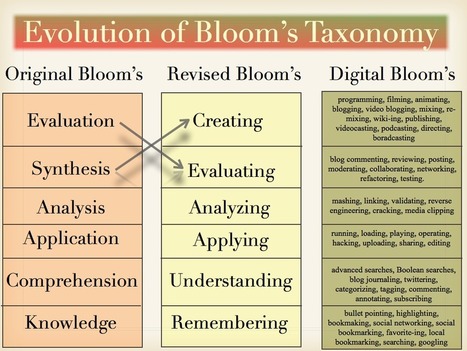
The Evolution of Bloom's Taxonomy: Original to Revised to Digital

The Evolution of Bloom's Taxonomy: Original to Revised to Digital | Eclectic Technology | Scoop.it
Beth Dichter's insight:

Check out three versions of Bloom's Taxonomy in this visualization. It includes the original Bloom's, the revised Bloom's, and adds on the Digital Bloom's, which provides a range of suggestions as to how students may demonstrate each level. This is another visual that you may want to share with other teachers in your school.

Sue Alexander's curator insight, April 5, 2014 5:21 PM

I love the clarity of the digital verbs! I think the specific content of the "doing" might allow for a bit of repositioning in the  chart, but it's certainly a great starting point in analyzing the tasks and output of a lesson.

Scooped by Beth Dichter
April 3, 2014 7:38 PM
Scoop.it!

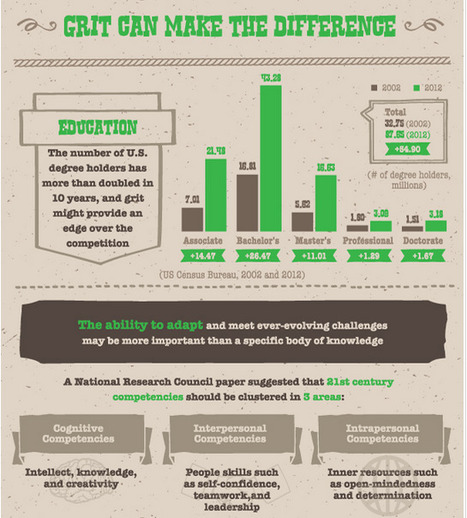
The Importance of Grit: 21st Century Skills in a Modern Economy

The Importance of Grit: 21st Century Skills in a Modern Economy | Eclectic Technology | Scoop.it
What is grit? Learn more about grit and how important it is help you thrive in the 21st century in this infographic.
Beth Dichter's insight:

Check out this infographic that explores just what grit is and why it helps students in school (and all of us inthe 21st century). Sections include:

* What Is Grit

* Why Do We Need It

* Grit Can Make A Difference

* How Can You Get Grit

You will also find a list of references at the end of the infographic.

Daniel Garcia's curator insight, August 21, 2014 1:14 AM

"Just keep swimming!"

Scooped by Beth Dichter
April 2, 2014 9:07 PM
Scoop.it!

50 Ted Talks Every Educator Should Check Out (2014 Edition)

50 Ted Talks Every Educator Should Check Out (2014 Edition) | Eclectic Technology | Scoop.it

"The communication explosion reaches its peak when you explore the endless avenues running through TED Talks. Moreover, the title educator embodies many forms within these talks.

So it’s precisely for this reason that any educator benefits from so many of these talks. Each speaker reveals his or her passion of a view or a subject with the enthusiasm of a first-year teacher."

Beth Dichter's insight:

Every year new TED Talks become available online but it is tough to determine which of the many you want to watch. Here is a list of 50 TED talks that focus on education. Check out a few of the titles below.

* 100,000 Tutors - Peter Norvig

* School Cloud - Sugata Mitra

* Autistic Brothers - Faith Jegede talking about her autistic brothers

* Teaching Design for Change - Emily Pilloton

* What We're Learning from Online Education - Daphne Koller

Click through to the post for additional videos and have fun watching, listening and learning!

Lisa Simmons's curator insight, April 3, 2014 4:11 PM

I love listening to these amazing and inspirational TED Talks!

Scooped by Beth Dichter
April 1, 2014 9:10 PM
Scoop.it!

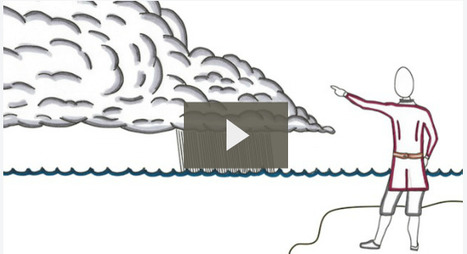
Common Craft Explains Primary and Secondary Sources

Common Craft Explains Primary and Secondary Sources | Eclectic Technology | Scoop.it

"Understanding the differences between primary and secondary sources can be a challenge to some middle school and high school students. "

Beth Dichter's insight:

Help your student learn the differences between primary and seconary sources by sharing this video by Common Craft. What makes primary resources important? When it is better to use secondary resources? How to they interact with each other? This two minute video will provide an overview that will help your students deepen their understanding. 

No comment yet.
Scooped by Beth Dichter
April 1, 2014 7:41 AM
Scoop.it!

How to Search the Invisible Web

How to Search the Invisible Web | Eclectic Technology | Scoop.it
While the pages and media found via simple searches may seem unendingly huge at times, what is submerged and largely unseen – often referred to as the invisible web or deep web – is in fact far, far bigger.
Beth Dichter's insight:

Many students are not aware that there is an "invisible web" that may be searched, one that is not quite so easy to find but has more information than Google provides (which tends to look at the "Surface Web"). According to this post Google has indexed "roughly 200 terabytes" while the size of the Internet is estimated at "5 million terabytes" of information.

The post provides a look at what is not found through Google (or other common search engines) and then shares:
* A list of Open Access Journal Databases (with over 10 databases with descriptions)

* A list of Invisible Search Engines. Quoting from the post "The search engines that deliver results from the invisible web are distinctly different. Narrower in scope, these deep web engines tend to access only a single type of data…deep web searches tend to be more thoughtful in their initial query requirements." Ten search engines are listed and there is a short description for each.

* A list of subject-specific databases in the following areas

     - Art & Design

     - Business

     - Legal & Social Services

     - Science & Technology

     - Healthcare

Although this post is geared to students in college there are resources that may be used by students in middle or high school provided, and as teachers it is important for us to learn more about this "invisible web" and to share it with our students.

No comment yet.
Scooped by Beth Dichter
March 30, 2014 9:20 PM
Scoop.it!

Intelligent Tutoring Systems - Can They Work For You?

Intelligent Tutoring Systems - Can They Work For You? | Eclectic Technology | Scoop.it
Beth Dichter's insight:

We know the role of a tutor, but do we know the role of an intelligent tutoring system? Can it replace the role of a tutor, of an individual whom works with a students, asking questions, analyzing responses and quickly assessing to finetune instruction and feedback?

This post explores this issue, beginning with a history of intelligent machines (which date back to 1924) and moves on to how they work, providing a list of nine items that an "effective intelligent tutoring system" must have including:

1. Enable the student to work to the successful conclusion of problem solving.

2. Minimize working load.

After this discussion the post moves on and explores the benefits and criticisms of intelligent tutoring systesm.

The final section includes a list of fifteen influential programs in this area. Each program listed has a short description. The one program that is definitely free is ASSISTments (located at https://www.assistments.org/). This program was developed by Worcester Polytechnic Institute in collaboration with Carnegie Mellon and it is worth your time to check it ou. There are a number of videos that explain the program (as well as many tutorials if you choose to sign up). 

No comment yet.
Scooped by Beth Dichter
March 29, 2014 8:40 PM
Scoop.it!

Graphicacy - The Key To Visual Thinking In A Differentiated Classroom

Graphicacy - The Key To Visual Thinking In A Differentiated Classroom | Eclectic Technology | Scoop.it

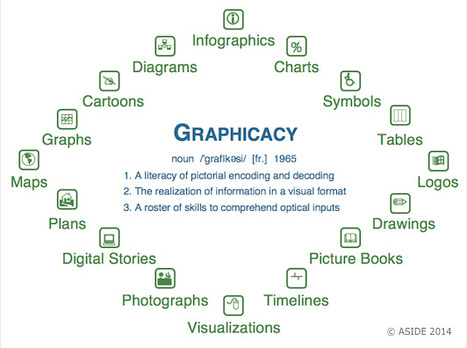
"In the scholastic world's quest to pinpoint new "literacies," one of the most essential skills in a student's toolkit isn't new at all. "Graphicacy" is the vital proficiency with visual inputs that all learners must master in the modern classroom. Graphicacy refers to the encoding and decoding of images, particularly in the close examination of details that construct visual meaning. It stands with literacy, oracy, and numeracy as one of the four indispensable corners of education."

Beth Dichter's insight:

In education we talk about a variety of literacies, and one that comes up more often today is visual literacy, which may also be referred to as graphicacy. This post explores this concept providing a historical perspective as well as links to a number of excellent resources.

There are also many visuals with the post, including the one above that looks at the many forms of graphicacy that we see in our classrooms (and provides a number of definitions). Many of these forms may be created by students using technology.

There is also a short video, To Understand is to Perceive Patterns, that looks at how patterns in nature are repeated.

No comment yet.
Scooped by Beth Dichter
April 9, 2014 10:07 PM
Scoop.it!

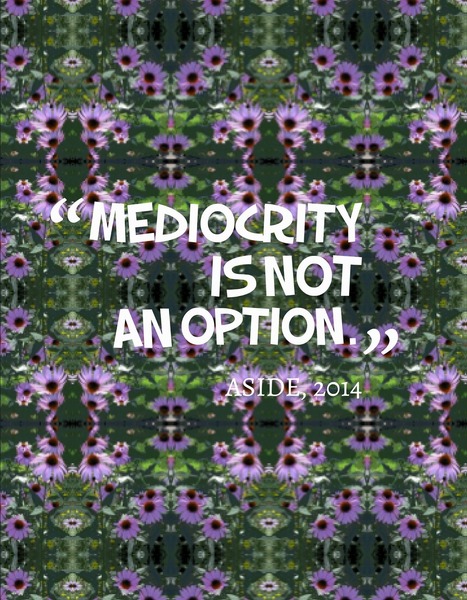
Content and Design: Pushing Learners Beyond Mediocrity

Content and Design: Pushing Learners Beyond Mediocrity | Eclectic Technology | Scoop.it

"In today’s world of fast-paced touch screens, snaps, clicks, and tweets, we increasingly find it difficult to get our learners to see that design and presentation matter. We are not sure if this is the result of the over-scheduled child jumping from one activity to another, or the increasingly shorter attention span to stay with something to make it their absolute best. Now more than ever before, content and design matter in tackling a problem, iterating an idea, building a prototype, or constructing a presentation."

Beth Dichter's insight:

This post explores how students are often satisfied with work that we know does not meet our standards (or their potential). Although we provide clear expectations, detailed rubrics, model the work there are many times that the quality is not what we had hoped for. 

Can teaching design make a difference? Can we work with out students and over time move them so that they will not accept mediocrity as their best work? Starting at a young age can we instill a growth mindset so that students understand that effort is required to learn and to do your best? Can we move away from empty platitudes and provide feedback that is clearly stating what they did and also what is missing? 

How do you deal with these issues in your classes? What has worked for you when you have students who are happy with mediocrity? Share your thoughts.

No comment yet.
Scooped by Beth Dichter
April 8, 2014 8:30 PM
Scoop.it!

Information Overload? 10 Ways You & Your Students Can Deal With It

Information Overload? 10 Ways You & Your Students Can Deal With It | Eclectic Technology | Scoop.it

"If you read the Internet 24 hours a day, 7 days a week, it would take you 57,000 years to reach the end. You could bind the pages in a 10,000-foot-tall book weighing 1.2 billion pounds. Printing it would require half a million liters of ink, which is the volume of fuel it would take to power a 747 jet leaving New York and heading east to Tokyo. It would use enough paper to cover half of Long Island, or twice the number of trees in Central Park. If the Ancient Babylonians had started printing the Internet in 1800 BC, they’d be done right about now!"

Beth Dichter's insight:

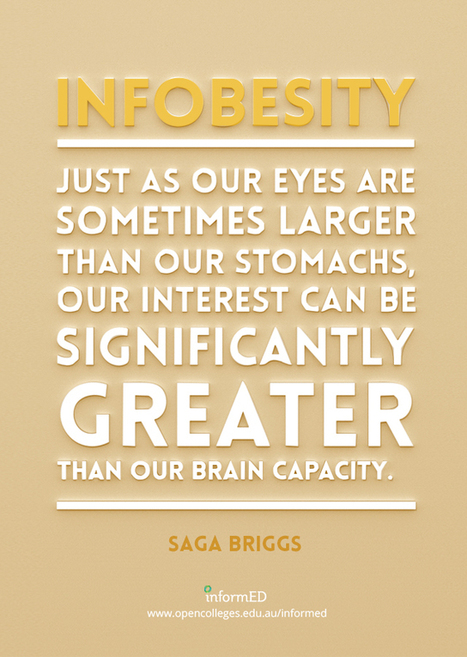
To say there is a massive amount of information that comes our way each day is not an understatement. How we deal with information is a different question. If you are feeling overwhelmed but it, or your students are feeling overwhelmed, then you may want to read this post.

Did you know that researchers say that it is "our inability to organize and process it...without experience cognitive overload." The Internet keeps providing us with "just one more link" so knowing when to stop is difficult. 

After this discussion the post looks at Concerns for Students and Teachers, discussing eleven areas such as:

* Distractedness

* Mobility madness

* Impaired research skills

Each of these areas are described.

The final section looks at Management Techniques, beginning by looking at a number of ways people have attempted to map the Internet before moving on to a list of ten management techniques that may help you (and your students) prevent information overload including:

* Help students understand the structure of the web and the concept of networking

* Hone your research skills and help students hone theirs

* Use activity streams

Additional information on these techniques (and seven more) are in the post. 

Melissa Marshall's curator insight, April 8, 2014 9:15 PM

This is an excellent article if you are suffering Internet fatigue. We are taking in more and more information than our brain can process about so many general things, rather than specialising like we used to. According to the article, the feeling of being digitally overwhelmed comes from "our inability to organise and process it...without experiencing cognitive overload." The Internet keeps providing us with "just one more link" so knowing when to stop is difficult. 

There is a section called 'Concerns for Students' which is quite insightful. 

Scooped by Beth Dichter
April 7, 2014 7:55 PM
Scoop.it!

Thinking Critically - A Student Toolkit

Thinking Critically - A Student Toolkit | Eclectic Technology | Scoop.it

"Understand what critical thinking means and how critical thinkers think. Learn to express yourself clearly and develop a balanced argument."

Beth Dichter's insight:

This site provides a range of materials to help students learn critical thinking skills. The resources include:

* A video that helps guide you on ways to improve your critical thinking skills.

* An infographic (see image above) that helps you visualize the questions to consider asking.

* Top Tips for Critical Thinking - Five tips are provided with additional information under each. 

* An Apply Section which has three questions that students may answer.

* Enhance Your Wellness - learn a few tips that will help your mental and physical health that may allow you to improve your focus and your grades.

There is a lot of excellent information in this post. Although it is geared to college students much of this may be used in upper elementary, middle and high school.

No comment yet.
Scooped by Beth Dichter
April 6, 2014 9:25 PM
Scoop.it!

7 Online Tools for Creating Charts & Diagrams

7 Online Tools for Creating Charts & Diagrams | Eclectic Technology | Scoop.it
Beth Dichter's insight:

Richard Byrne shares seven free tools to help create graphs and charts. Check out the list below and click through to the post for additional information on each tool.

* LucidChart - available free to schools and also as a Google app

* Google Fusion Tables - a spreadsheet app that allows you " to create visualizations of data set comparisons"

* Hohli Online Chart Builders - allows you to create "a variety of charts for online display"

* Infogr.am - " an online tool for creating interactive charts and graphs to use in interactive infographics"

* Better World Flux - this was created for the World Bank and "allows users to create animated visualizations of development data"

* Gapminder - also allows for data visualization and provides a page for educators

* Haiku's Deck Web App - Haiku Deck continues to add new features and now provides the ability to create graphs and charts

As always it pays to check out each tool and determine which you think will best meet the needs of your class (and that may be a choice of more than one).

Laurent Picard's curator insight, April 7, 2014 3:30 AM

Beth Dichter's insight:

Richard Byrne shares seven free tools to help create graphs and charts. Check out the list below and click through to the post for additional information on each tool.

* LucidChart - available free to schools and also as a Google app

* Google Fusion Tables - a spreadsheet app that allows you " to create visualizations of data set comparisons"

* Hohli Online Chart Builders - allows you to create "a variety of charts for online display"

* Infogr.am - " an online tool for creating interactive charts and graphs to use in interactive infographics"

* Better World Flux - this was created for the World Bank and "allows users to create animated visualizations of development data"

* Gapminder - also allows for data visualization and provides a page for educators

* Haiku's Deck Web App - Haiku Deck continues to add new features and now provides the ability to create graphs and charts

As always it pays to check out each tool and determine which you think will best meet the needs of your class (and that may be a choice of more than one).

María Dolores Díaz Noguera's curator insight, April 7, 2014 7:21 AM

7 Online Tools for Creating Charts & Diagrams

Scooped by Beth Dichter
April 6, 2014 8:51 AM
Scoop.it!

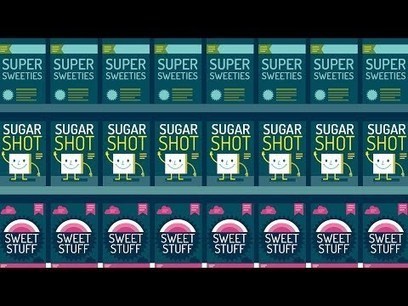
Sugar: Hiding in Plain Sight, a TED-Ed Video

Sugar: Hiding in Plain Sight, a TED-Ed Video | Eclectic Technology | Scoop.it

"While sugar is easy to spot in candy, soft drinks and ice cream, it also hides out in foods you might not expect -- including peanut butter, pasta sauce and even bologna! Robert Lustig decodes confusing labels and sugar's many aliases to help determine just how much of that sweet carbohydrate makes its way into our diets."

Beth Dichter's insight:

How difficult it is to determine how much sugar is in a processed food? Because sugar can be labeled 56 ways. If you do not know all the variations of how sugar can be listed there is no way to determine how much sugar is in the product. 

As always this video includes a Think section with 7 questions, a Digging Deeper section with additional resources, and access to an online forum.

If you are interested in additional TED-Ed videos that explore food and nutrition check out the You Are What You Eat collection at TED-ED at http://ed.ted.com/lessons/sugar-hiding-in-plain-sight-robert-lustig#watch.

No comment yet.
Scooped by Beth Dichter
April 4, 2014 9:21 PM
Scoop.it!

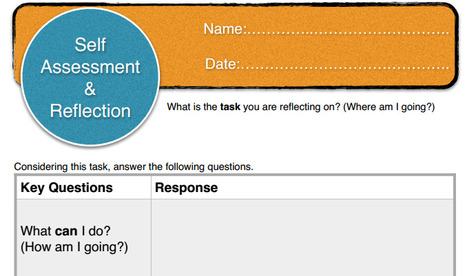
A Tool for Self-Assessment & Reflection

A Tool for Self-Assessment  & Reflection | Eclectic Technology | Scoop.it

"I have been working on a tool for students to do a self assessment/reflection and feedback...The tool is based around the work of Stephen Dinham which is used be DET NSW and New Zealand eductors John Hattie & Helen Timperley."

Beth Dichter's insight:

Andrew Church has created a tool for Self-Assessment and Reflection that asks students to answer 4 questions:

* What can I do? ((How am I going?)

* What can't I do? (How am I going?)

* How does my work compare with others? (How am I going?) 

* What can I do better? (Where do I go next?)

And then students are asked to look ahead with this question:

* What are my next steps? (What actions are you going to take as  a result of your reflections? Who can help me? Where to next?)

You can download two versions of this as a pdf file. One is in portrait mode and one in landscape mode. Church also asks that you provide him with feedback.

Carol Thomson's curator insight, April 6, 2014 3:35 PM

Have been looking for something i can use with students that they understand and dont panic about.

Scooped by Beth Dichter
April 3, 2014 10:22 PM
Scoop.it!

Reflection in the Learning Process, Not As An Add On

Reflection in the Learning Process, Not As An Add On | Eclectic Technology | Scoop.it
Is it personality? Are some people born with it? Can it be learned? I am talking about REFLECTION. At the beginning of the week, I had the opportunity to be part of a workshop during our pre-servic...
Beth Dichter's insight:

As teachers we reflect on our practice. Do we ask students to reflect on their practice? Do we share with them why reflection is important in the learning practice?

This post looks at why reflection should be a part of learning. Learn about four criteria that Dewey considered in his writings on reflection. See two visualizations that explore reflection. The first (shown above) looks at various platforms that might be used to help students reflect (lots of opportunities to use technology here) and the second one expands the KWL chart to a KWHLAQ...which stands for:

* Know - What do I know?

* Want - What do I want to know?

* How - How will I find out?

* Learn - What have I learned?

* Action - What action will I take?

* Questions - What questions do I have.

This second chart provides ideas for the Where and How that are analog and digital.

This post is very comprehensive and has many examples of students reflections that range from Kindegarten through Grade 10. There is much to learn and explore so be prepared to take some time. 

Dr. Helen Teague's curator insight, April 5, 2014 11:41 AM

Sometimes reflection is considered a throw-away or close activity when there are a few extra minutes of classtime leftover. But Reflection is a key component of learning.

Sue Alexander's curator insight, April 5, 2014 5:30 PM

Visualizations rock! I wonder why I think that....?

Ness Crouch's curator insight, August 22, 2014 10:24 PM

Reflection is really important as a part of the learning process. We can't really learn if we don't reflect on what went well or what went wrong.

Scooped by Beth Dichter
April 2, 2014 9:59 PM
Scoop.it!

8 Types of Learning Events You Need to Have in Your Classroom

8 Types of Learning Events You Need to Have in Your Classroom | Eclectic Technology | Scoop.it
A good eLearning course requires the right combination of learning events. But what are these exactly?
Beth Dichter's insight:

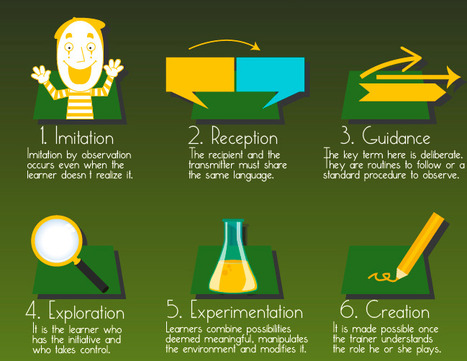
Although this infographic is geared to eLearning courses the same types of learning events should also be found in the classroom that is face2face. 

The eight learning events discussed are:

* Imitation

* Reception

* Guidance

* Exploration

* Experimentation

* Creation

* Self-Reflection

* Debate or Animation


Does your classroom incorporate these learning events? Do you have strengths in some areas asn weaknesses in others? Do your students demonstrate strengths or weaknesses that might suggest different activities? eLearning is something that many forecast as happening in public schools over the next 3 to 5 to 10 years. Considering these eLearning events today may prepare us to be better teachers tomorrow.

june holley's curator insight, April 3, 2014 7:15 AM

Guide for virtual learning of network weavers.

Sue Alexander's curator insight, April 3, 2014 10:23 AM

eLearn or in the classroom, as we look for ways to engage with content, these events give us choices in the type of transfer we expect in a lesson. Valuable resource in my UbD journey.

David Baker's curator insight, April 3, 2014 11:36 AM

The infographic is a good summary but the blog is even better as a description. 

Scooped by Beth Dichter
April 1, 2014 9:35 PM
Scoop.it!

5 Games and Apps That Build Math and English Skills

5 Games and Apps That Build Math and English Skills | Eclectic Technology | Scoop.it
For educators who are interested in using games for learning -- specifically towards developing skills as they relate to the Common Core State Standards -- here are five games students can enjoy and that we’ve found sync with standards.
Beth Dichter's insight:

Five games are discussed in this post. However only two of them are free to use. Each is discussed in the post and you can go directly from the post to the game.

The first two listed below are free. 

* The Sports Network 2 - This game was developed through a grant from the Gates and Hewlett Foundations to meet Next Generation Learning Standards and focuses on Common Core State Stanards in ELA and Literacy. Students become a cable sports show producer and must "make sure the  show’s content is written well and on point.." 

* Prodigy is geared to elementary school and focuses on math. "Kids use math to wield magic and combat monsters as they venture through a fantasy-based world and level up their characters." It is designed to differentiate instruction, is aligned to the Common Core for grades 1 - 5 and is "free forever."

* Dragon Box Algebra 5+ - DragonBox is a program that consistently receives high praise and helps to introduce students to core concepts of algebra, and may be used with children as young as 4. There is also an advanced version of the program for older students.

* Word Raider focuses on vocabulary. Using academic terms and visuals it provides students with practice while having fun.

* DreamBox is "a comprehensive, game-based math curriculum oozing with style and full of well-designed, self-paced games that adapt to students’ abilities.

No comment yet.
Scooped by Beth Dichter
April 1, 2014 8:58 PM
Scoop.it!

Teaching Students How to Research for Understanding with Technology

Teaching Students How to Research for Understanding with Technology | Eclectic Technology | Scoop.it
Searching for information on the Internet can be extremely challenging for our students. This is widely due to the sheer amount of information that is currently available out there. A lot of teache...
Beth Dichter's insight:

You assign students a research project. Many students go to Google, type in a question (without giving much thought), and often become overwhelmed with the amount of information available. Is this a familiar scene?

Think back and make one change, instead of using Google have them use a database? Is that a significant shift?

This post provides a series of steps, taking you through a number of ways you might proceed with a research project and adding in complexity. Scheer begins by explaining a common research project and moves on through a number of areas:

* What is understanding?

* Understanding Searching with Technology

* Stages of Research

* Putting This All Together

* Conclusion

Do you have your students do research projects? Do you find that you are not satisfied with the quality of work being done? This post provides an excellent foundation to help you revamp your process and provide your students with skills that they will use not only in the classroom but also in the future, in both their personal and professional endeavors.

Kate JohnsonMcGregor's curator insight, April 7, 2014 2:20 PM

Re-framing the stages of research to help students manage the volume of information on databases and the internet.

PLAN – Identify what the problem is and the questions that you are going to ask.

STRATEGIZE – The route that you are going to take to search the web for information about your questions.

EVALUATE –  The sources of data that you are  using for credibility, accuracy and currentness.

TRIANGULATE – Compare your sources of data against one other.

Scooped by Beth Dichter
March 30, 2014 9:35 PM
Scoop.it!

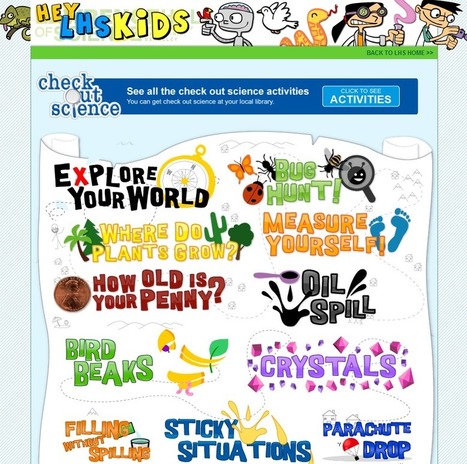
Learning Never Stops: 50 websites that help make learning science fun

Learning Never Stops: 50 websites that help make learning science fun | Eclectic Technology | Scoop.it

"Without a doubt my most popular posts have consistently been science websites. Below, I have combined all the science websites that I have shared so far and have added nine new ones. Whether you have been following my blog, or if this is your first time, I promise you will find many great resources for your students."

Beth Dichter's insight:

There are so many great science resources online that it can be hard to keep track of them. This post provides a list of 50 websites, and each one includes an overview of the site. The websites are geared across the sciences and across many age groups.  You will find resources for:

* Astronomy

* Cell Biology

* Subatomic Particles

* Earth Science

* Geology

* Physics

* Chemistry

* Biology

and many more.

Some may be new to you and quickly become a favorite resource, and others may be old friends. If you teach science or just love science have fun exploring this robust list of resources. 

Sally Tilley's curator insight, April 7, 2014 9:52 PM

What an incredibly well-sourced collation of resources...follow this immediately! Thanks so much for sharing!

Sally Tilley's curator insight, April 7, 2014 9:52 PM

What an incredibly well-sourced collation of resources...follow this immediately! Thanks so much for sharing!

Elizabeth Brookfield's curator insight, April 8, 2014 5:35 AM

Must check a few of these out...

Scooped by Beth Dichter
March 30, 2014 8:17 AM
Scoop.it!

The Strength of Simple Videos

The Strength of Simple Videos | Eclectic Technology | Scoop.it

"Over the last month I've facilitated a handful of workshops on the topic of video creation in the classroom. One of the points that I always try to stress in those workshops is that the focus of most student video projects should be on developing and delivering clear story lines. Yes, it is great if students use slick transitions and special effects, but those don't mean a thing if the video doesn't have a clear purpose (unless that purpose is to demonstrate editing skills)."

Beth Dichter's insight:

How can we keep our students engaged and provide them with opportunities to demonstrate their knowledge and understanding of content? Allow them to create a video!

Richard Byrne's post discusses this option and provides many resources to assist you. He also discusses this as a classroom teacher whom is not teaching video production.

One link will take you to a page Video Projects. This page provides resources that will help you learn:

* Designing and Developing Video Projects which discusses 5 video projects that you might choose to implement.

* Today's Activities which provides a variety of options as to how you might introduce this to your class. He also provides a list of questions to help you plan the project. The sections provided are:

* Planning the Student Video Project

* Assesing the Student Video Project: Pre-Production

* Asessing the Student Video Project: Post-Production

You will then find resources in the following areas (with each one briefly descibed):

* Free Video Creation Tools

* Sound and Music Sources

* Image Sources

* Sharing Videos

The original post also includes two sample videos. One is embedded within the post: Black Death in 90 Seconds, created by a teacher. There is a link to one created by a student, My Name is Michael, whom "explains what life is like living with Autism." 

John Rudkin's curator insight, March 30, 2014 2:36 PM

Great story - its how we drive www.lancashire-regioal.tv (Please take a look, sign up)

Charlie Dare's curator insight, April 2, 2014 8:21 PM
How can we keep our students engaged and provide them with opportunities to demonstrate their knowledge and understanding of content? Allow them to create a video! Richard Byrne's post discusses this option and provides many resources to assist you. He also discusses this as a classroom teacher whom is not teaching video production. One link will take you to a page Video Projects. This page provides resources that will help you learn: * Designing and Developing Video Projects which discusses 5 video projects that you might choose to implement. * Today's Activities which provides a variety of options as to how you might introduce this to your class. He also provides a list of questions to help you plan the project. The sections provided are: * Planning the Student Video Project * Assesing the Student Video Project: Pre-Production * Asessing the Student Video Project: Post-Production You will then find resources in the following areas (with each one briefly descibed): * Free Video Creation Tools * Sound and Music Sources * Image Sources * Sharing Videos The original post also includes two sample videos. One is embedded within the post: Black Death in 90 Seconds, created by a teacher. There is a link to one created by a student, My Name is Michael, whom "explains what life is like living with Autism."