What does it mean to find your voice? Having the courage to speak up? Expressing your opinions more often? Having opinions in the first place? Or is it more than that? “We each have our own fingerprint; we each have our own voice,” says Kylie Minogue, host of The Voice. A hackneyed analogy from a questionable source, perhaps, but somehow it satisfies."
How do we help students find their voice, their speaking voice and their voice in writing? This post provides 50 suggestions and each has a brief explanation. Below are five. Click through to the post to see the entire list.
So easy to move through content rather than allow for thinking about it. A great reminder of the many ways to get it into the mix and increase student engagement. Thx to Beth Dichter
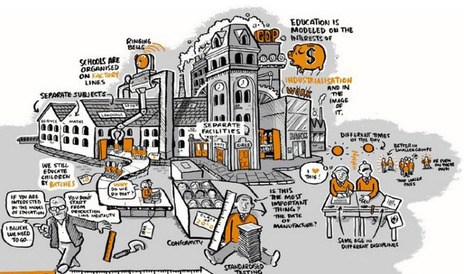
How many times have you heard or read about the school-as-a-factory, how public schools were created to help move children from farm-to-factory? Today this metaphor may be out of place, but conversations around education still revolve around terms that relate to factories. Think of Common Core and how business has been a prime player in the creation of the standards.
This post explores this issue and provides a number of great visuals that help bring the discussion into focus.
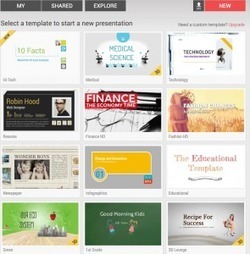
"PowerPoint is robust and Google Presentations is very sweet for collaboration, but some of us simply crave beautiful new design options for our presentations and publications.
Here are four worthy options, and another one about to be born."
Do you like trying new tools, specifically ones designed for presentations and publishing? This post, by Joyce Valenza, explores five tools that will provide a range of options for you to consider.
* Canva allows you to create slides, posters, flyers, presentations, business cards and more. With hundreds of fonts, one million images, photo editing, the ability to collaborate and more you may want to head over to Canva and create an account...and it is free!
* LucidPress comes from the same folks that created LucidChart, and it is free for educators (and your school can also get accounts for students). This is a robust a robust publishing tool that has been getting rave reviews...definitely worth checking out. If you have questions, check out their tutorials.
*emaze is a new tool out in beta. The website states that you can choose a template and quickly create a presentation. Featureinclude the ability to translate text, HTML5 (so it should run on any browser), and multi-device accessible.
*Haiku Deck was originally designed for the iPad but is now has a web based version. The folks who designed this were looking for an application that would allow them to create a "killer pitch deck" and when they could not find one they chose to create one...thus Haiku Deck.
* Powtoon Slidesis due out later this week. Based on a sneak peek you will find lots of slide templates, infographic style that includes animated icons that you can use on graphs and charts, a photoshow style (with over 3 million royalty free photos available), and an animated style. This list does not include all features but it may make you want to head over to Powtoon and check it out!
More information on these tools is available in the post.
Front Row is a math tool to help your students learn and review math related to Common Core standards Grades K - 8. As a teacher you may sign up for free and register your students. Each student will be asked to take a diagnostic quiz in each domain. This allows the program to adjust to each student. It also will read aloud every problem, so students whom may struggle with reading text will be able to work independently. If you are looking for a program that will allow students to review math and allow you to see how they are progressing this is one to check out.
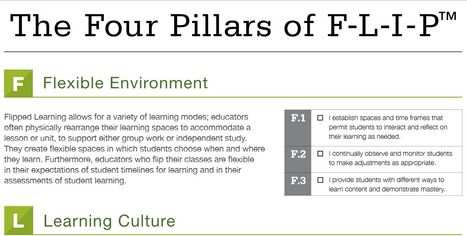
We read about flipped classrooms in the media, but what does that mean? This post will help you understand what the word means. If you believe that it means only “school work at home and homework at school” you will find that there is a much deeper description. You will also find a visual that looks at the four pillars of F-L-I-P:
* F = Flexible Environment
* L = Learning Culture
* I = Intentional Content
* P = Professional Educator
To access a PDF file that provides a detailed description of F-L-I-P plus the visual of the four pillars use this link:
"This morning I received an email from a reader that has been frustrated by the results her students are getting when they search on Google Images. Rather than relying on the filters on Google Images to generate good results for students, give one of these other sources of images a try."
There are times when searching Google images you scratch your head and wonder how the images shown are relevant to the search term. Richard Byrne has come up with eight alternative sites that you may want to share with your students. Three are listed below with brief explanations, but you will find five additional sites and more information in his post!
* Morgue File- This site has 1000s of images as well as lessons on photography imaging and image editing. The images are free for education and commercial use. Make sure to check for attribution for each image as it varies.
* Every Stock Photo - This site is a search engine. It searches for images that are in the public domain or Creative Commons licensed pictures. Search results show as images and when you click through you will find all the necessary information: a larger version, a link to the source and attribution information.
* Pixabayalso provides public domain images (but be aware that the top row of images are from other sources and require payment). You may search by keyboard or spend time browsing. To quickly download create an account. Otherwise you will have to enter a capcha code to download.
I have recently been shocked at the fact that educators don't really see the need for a rubric. They either find them too specific or too vague. But, I am not really sure they are seeing the big pi...
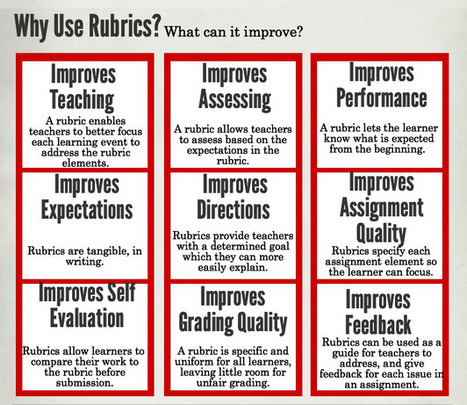
A new infographic from An Ethical Island with a focus on rubrics provides an explanation as well as a section on: * Why Use Rubrics? What can it improve?
* How to Use Rubrics? A guide for teachers.
Rubrics help students understand the expectations. This post provides information that may help you create rubrics that help students improve their ability to meet the requirements.
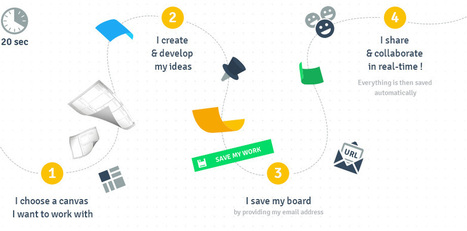
TUZZit is a online collaborative whiteboard that will help you to develop your creativity. It's the perfect tool for visual and design thinking. Through our canvas library learn new visual methodolgies.
TUZZit is a new tool to me and it is free. If you find that many of your students are visual learners take some time to check out this tool. One feature that many may find helpful is the library of "canvases" that provide structure for a wide variety of projects. Most of these are more geared to business but you can also create your own canvas. Other features include inserting images and videos and creating post-it notes. Larry Ferlazzo, who led me to this tool states "In some ways it seems like an Exploratree on steroids." If you are planning on collaborating on a project consider testing this tool with your colleagues.
'Look Up' - A spoken word film for an online generation. 'Look Up' is a lesson taught to us through a love story, in a world where we continue to find ways t...
What happens if we live in a world where communication is digital, and people do not take time to communicate face2face, or to sit in nature and enjoy the sounds of the outdoors? Do you wonder if people are over involved with their cell phones? Consider taking five minutes of your time to watch this video. What are your thoughts?
“We don’t even know if anyone is listening, being alone isn’t a problem let me just emphasise read a book, paint a picture, or do some exercise you’re being productive and present, not reserved and recluse”
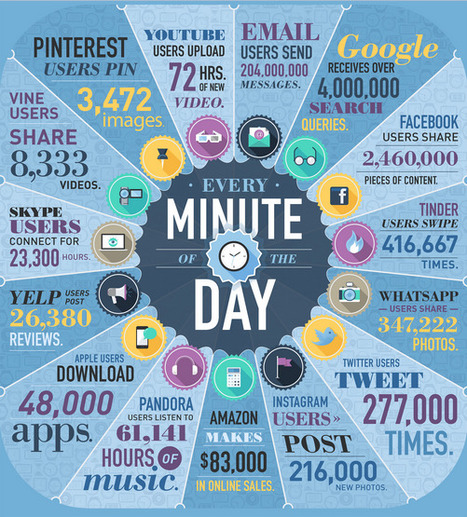
"Sixty seconds seems like an insignificant amount of time, but when you look at it in terms of how much data is created, there’s a whole lot going on. Almost two years ago, we created an infographic to highlight just how much digital data was generated every minute. The numbers were staggering. Recently, we decided …"
Check out this new infographic (published April 23, 2014) and learn what happens in one minute online. You can also see an infographic from a year ago (link in the post) and consider having students compare and contrast the two to find out what has changed.
"Infographics are a visually stunning way to deliver facts and statistics to readers. They have become incredibly popular recently on Pinterest, Twitter, and lots of other social media tools because users are looking for a quick way to get reliable information. Great infographics answer questions that people are interested in answering."
Have you considered having your students create infographics as a way to demonstrate their understanding of a topic? The creation of an infograhic requires that students research a question and analyze the information so the can create a visual presentation. In this post Kerry Gallager shares the process she uses with her students. The shorthand version is below but check out the post for more information as well as some student responses to the project.
* Begin with an essential question
* Provide access to information and data
* Teach the students what makes a great infographic
* Choose a number of infographic creation tools and let the students use the one that works best for them
* Remember, you are the facilitator
* Make sure the students are provided time to finish, polish and publish (which may be done at home if students have access to computers)
"The ultimate goal of teaching is to do just that – teach, not stand up in the front of the room and talk.
But sometimes it’s easier to talk than to teach, as we all know, especially when we need to cover a lot of material in a short amount of time. We hope students will understand...
The problem is, we rely on these tests to measure understanding, and then we move on. Few of us take the time to address weaknesses and misunderstandings after the tests have been graded."
How do you go about checking for understanding? Exit slips may be too late to correct misunderstandings. This post provides 21 suggestions on ways to check for students' understanding. A few of them are listed below. Click through to the post for more information on them as well as additional suggestions.
"Throughout middle school and high school conducting lab experiments was my favorite part of every science class that I took. There was something about the hands-on aspect of science labs that always got me excited about learning."
Spell Up is a new Chrome experiment, a game designed for Chrome that allows you to use your voice to spell words, letter by letter. But be prepared, as you spell words you build a tower, and the higher the tower the more difficult the word. One mistake and your tower falls. If you have Chrome check out this free game. Here is a new way for students to practice their spelling and have fun.
This will also work on your Android and a version is available for the iPad and iPhone but you must type the words. To go directly to Spell Uphttps://spellup.withgoogle.com/
Last week, Texthelp announced that a surprise was coming soon in honor of Teacher Appreciation Week. Today that surprise was revealed - Read&Write for Google is now Free for Teachers!
ReadWrite Gold for Chrome is a great tool...and is once again free for educators! What does it do?
It is a Chome "extension that provides comprehensive reading and writing supports for Google Docs and the Web as well as PDFs, ePubs, and KES files stored in Google Drive." Specific features include:
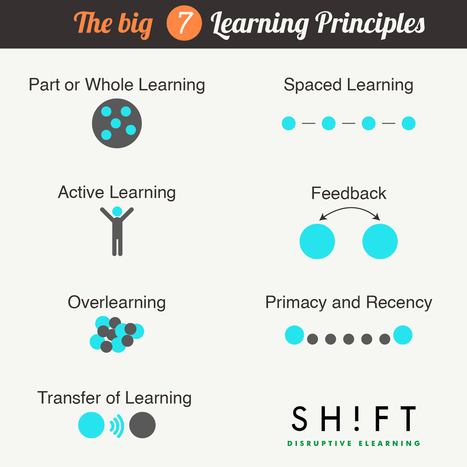
Course design, whether online or in a classroom, requires good learning design and this post provides a great visualization of seven key principles. Along with the visual there is also a description for each of which have at least one link to additional information. If you planning a new course or revising one soon this graphic may assist you in the process.
"As education changes, it depends primarily on internal catalysts for that change. That is, the “things” that change it are on the “inside” of that system itself, most notably data, assessment, PLCs, and running a distant fourth, technology...
At some point, this will change. Eventually the tethers will break and education–in whatever form or forms–will shoot forward like it’s been held back in a slingshot for nearly a century..."
Where is education going? What ideas are taking place now that are "disrupting" it to the point it will change? This post explores this, focusing on the following eight ideas.
1. Connectivity is replacing knowledge.
2. Students are clients.
3. Adaptive software can replace 75% of what a teacher does.
4. YouTube is way, way more engaging than reading and writing.
5. Reading and writing should be social.
6. The disruption of mobile technology will be complete.
7. Parent's don't understand teaching and learning.
8. Universities are decaying.
For more information on each of these click through to the post.
Traditional education focuses on assessment, giving students one chance to get their homework right. Games can provide immediate feedback and teach core prob...
This is the first of a series of videos being produced by ExtraCredit this month that explores why games can create changes in education. This one focuses on homework and how games allow you to fail and try again...and we know that students do try again...and again...and again. The second video in this series is called How Games Can Help People (by giving instantaneous feedback amongst other things). The link to that video is https://www.youtube.com/watch?v=pzmdx7ZL8OM.
I think this video is a good resource because first it starts talking about homework cons, but then it starts giving solutions and ideas about overcoming the fear of doing homework. Also it isn't long and it is not boring so people that see it will learn in a fun way. Last but not least it will give you a lot of ideas and examples you can put in your persuasive essay.
This source is useful cause it gives a reason to make homework a better opportunity to like it. And in the way it gives a why take it out and to still keep it. It also has a lot of star statements. That's what makes it a convincing video.
"Recently I participated in a discussion on 21st century skills where one educator posed the question 'can you teach 21st century skills without technology?'"
Think about the skills that are defined as 21st century skills:
* collaboration
* communication
* critical thinking and problem solving
* creativity and innovation
Are these skills that can be taught without technology? If we look to the past, we would answer yes, they are skills that can be taught without technology.
We are often asked to teach these skills today with technology. What if we introduce these skills with technology, providing students the opportunity to collaborate and learn how to effectively communicate face-to-face, learn about visual cues and more. This post explores how each of these skills may be taught without technology. You can take the information and consider how to them augment the skills with technology to help your students deepen their understanding.
"Technology is obviously an essential element in our instructional toolkit. Knowing how and when and for what purposes to use this technology is much more important than the technology itself...
An important step in the process of effective integration of technology in education is having a pedagogical approach supported by a theoretical framework to ground your technology practices inside the classroom."
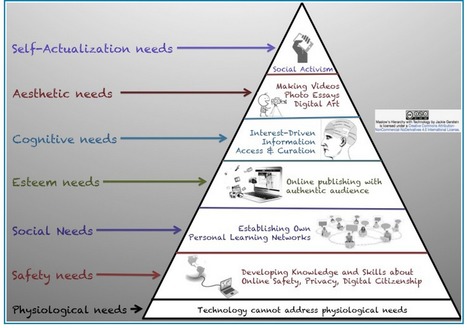
Technology is a tool. When to use, how to use it, why you use...these are some of the questions that each of us must consider. To help us effectively integrate technology it is helpful to have a pedogogical background or framework. This post explores three approaches:
* SAMR Model - Substitution, Augmentation, Modification, and Redefintion
* TPACK - Content Knowledge, Pedagogical Knowledge, Technological Knowledge and the overlapping knowledges that occur: TP Knowledge which helps us understand how to make content more accessible; TC Knowledge which helps us pair or combine appropriate technology to content; and PC Knowledge which allows us to pair pedagogy with content.
* Maslow's Hierarchy of Needs paired with Technology
This article presents a great overview of all three of these pedagogical approaches, and all have been covered in this Scoop.it so if you are looking for additional information do a search here.
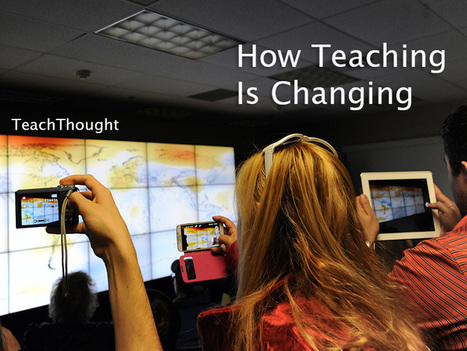
"It’s tempting to say that no matter how much technology pushes on education, every teacher will always need to know iconic teacher practices like assessment, curriculum design, classroom management, and cognitive coaching.
This may end up being true...Below are 15 tasks that are less skill-based. and a bit more conceptual, collectively representing how teaching is changing."
I suspect that every teacher has seen major change over the last few years. This post provides a look at changes that have happened, or are in the process. The first seven provide the change and a look at the old, the new, the difference and a short summary. One example from the post is quoted below.
Personalization
The Old: Administer assessment, evaluate performance, report performance, then–maybe–make crude adjustments the best you can
The New: Identifying, prioritizing, and evaluating data for each student individually–in real time
"Today's learner needs to be savvy about new media. Traditional advertising is direct; we see, hear, or read it. Other than tapping our senses, it does not take advantage of our privacy. Digital advertising is subliminal and unseen. It secretly gathers data to aggregate and push ads to the devices our students use."
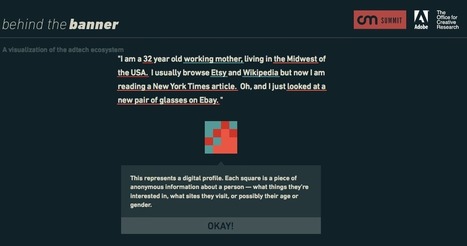
Do you know what goes on behind the scene of a banner, ad or game that appears on your computer screen? Do the learners in your classroom understand the concept of privacy and how much their online activities are being tracked, with information being collected about then? This post looks into these issues and provides two excellent resources to share with students.
The first, Behind the Banner, is a visualization which "provides an interactive view of how the adtech ecosystem collects data based on search patterns." You may find yourself amazed at just how much happens in less than one-quarter of one second!
The second is a shorter video and geared to younger students. The video, What Does the Ad Say?, helps students learn about digital marketing techniques and how they target different groups.
Our learners need to be aware of issues of privacy (or perhaps the lack of privacy) that comes from having an online presence. This post provides resources that will help them become more savvy about what is happening when they are online.
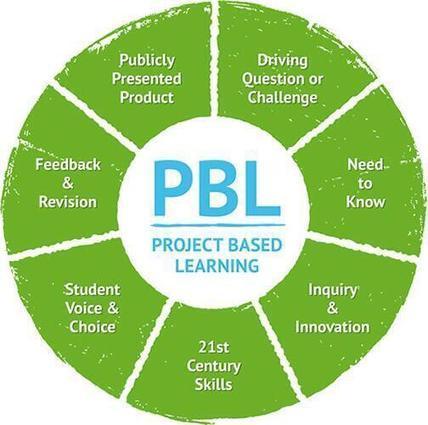
This is a quick view of Project Based Learning that may help your students (or teachers in your school new to PBL) understand the key components:
* Driving question or challenge
* Need to know
* Inquiry and innovation
* 21st century skills
* Student voice and choice
* Feedback and revision
* Publicly presented product
Project Based Learning is a great way for students to engage in authentic learning projects. For more information on Project Based Learning (and lots of great resources) check out the Buck Institute for Learning website located at http://bie.org/
They have been around for over 25 years and recently revamped their website.
By voice, I mean the ability to recognize their own beliefs, practice articulating them in a variety of forms, and then find the confidence — and the platform — to express them."
Technology comes into play in that it provides students with a wide range of options to find and show their voice. This post looks at five areas:
* Writing
* Multimedia
* Speaking
* Performing and/or Direction
* Artistic Expression
Within each area there is a strategy listed, a number of tools suggested in four areas a short look at "terms of success."
Helping students find their voice through technology also provides opportunities for students to be creative and to connect with an authentic audience, helping to build 21st century skills as defined through the Partnership for 21st Century Skills and Common Core.
Beth Dichter's insight:Technology comes into play in that it provides students with a wide range of options to find and show their voice. This post looks at five areas: * Writing * Multimedia * Speaking * Performing and/or Direction * Artistic Expression Within each area there is a strategy listed, a number of tools suggested in four areas a short look at "terms of success." Helping students find their voice through technology also provides opportunities for students to be creative and to connect with an authentic audience, helping to build 21st century skills as defined through the Partnership for 21st Century Skills and Common Core.
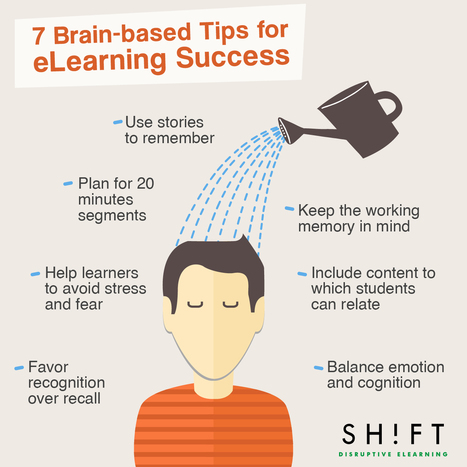
"The brain is constantly on the lookout for ways to improve by obtaining new knowledge and skills, even before birth. Unfortunately, retaining information can be challenging, simply because instructors and course designers do not always use methods that facilitate remembering."
As teachers we are course designers. We design a lesson and if we teach face2face we see immediate feedback while teaching. The same feedback is not as apparent online. One question that is being researched looks at what brain research tells us about designing better lessons, and what applies to eLearning typically applies to what happens in our classroom. This post provides seven tips, with an infographic that show each. Click through to the post to see more detailed information for each tip and to find additional resources.
To get content containing either thought or leadership enter:
To get content containing both thought and leadership enter:
To get content containing the expression thought leadership enter:
You can enter several keywords and you can refine them whenever you want. Our suggestion engine uses more signals but entering a few keywords here will rapidly give you great content to curate.


 Your new post is loading...























So easy to move through content rather than allow for thinking about it. A great reminder of the many ways to get it into the mix and increase student engagement. Thx to Beth Dichter