


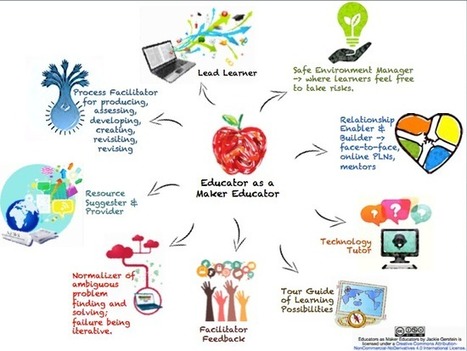
The following materials are being used to present to educators the idea that implementing maker education requires a different mindset, and often different roles and skills of the educator. To acce...

 Your new post is loading...
 Scoop.it! The following materials are being used to present to educators the idea that implementing maker education requires a different mindset, and often different roles and skills of the educator. To acce...
Beth Dichter's insight:
Are you interested in being known as an educator whom is also a maker educator? This post from Jackie Gerstein provides a great visual that looks as many of the roles you might play, including * Process facilitator * Resource suggestion provider * Lead learner * Relationship enabler * Technology tutor This visual is designed in ThingLink and if you click through from the post you will find additional resources in the visual And you might also view a SlideShare where Gerstein provides additional resources.
Scoop.it!

"On SFS Kids students can learn to compose and play music. Your students can jump into any section of SFS Kids and start learning, but it is probably best if they work through the sections in order. Students get started on SFS Kids by listening to samples of different styles of music performed by the symphony."
Beth Dichter's insight:
SFS Kids looks like a great site to help students learn about music. They may listen to a variety of styles, learn about instruments found in an orchestra and then put their hand to composing after completing some lessons, learn the skills of a conductor and more. Richard Byrne states that this site would work well with students in elementary and middle school.
Scoop.it!
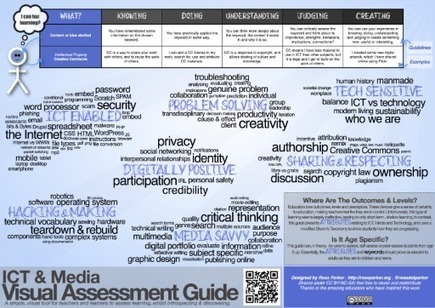
"What started last year as a Self Assessment Guide, has been reworked into a more general tool for assessment. This new guide is suitable for teacher, peer or self assessment and also offers a visual map of what we want students to learn (with highlighting of which concepts are most important). Although still ICT specific, this guide could be adapted to any subject by changing the attributes and keywords."
Beth Dichter's insight:
Check out this revised assessment tool from Ross Parker. In the post he shares his experience with using this for a year and the awareness that the tool was not as functional as he had hoped. In brief, he has made four shifts. 1. Taking a tool designed for self assessment and realizing that the same time used throughout the year gets old quickly. Therefore, it is redesigned to "more general, useful for teachers and peers to use." 2. A shift from strands (high level learning outcomes), to attributes (which allows the tool to be used by students over many years as their knowledge and skills grow). 3. A move away from levels or grades to a focus on ways of learning. 4. Allowing students to determine levels rather than assigning them based on personal view. Last year this tool was well received and this new version brings it up to a new level. Consider using this with students and perhaps have them keep a copy of it asking them to review it later on in the school year. You can download a pdf version of the tool from the website. 
SueFoS's curator insight,
June 1, 2014 8:47 PM
Interesting way to approach self-assessment in vocational areas. Could be adapted easily
Scoop.it!
Beth Dichter's insight:
Check out this infographic that looks at how teens and tweens are using social media. It probably comes as no surprise that they are very active in the use of social media. One statistic they show is * Surveys have found that majority or 81 percent of kids aged 12 to 17 use social media. This figure is higher than the 72 percent of internet users overall. For more information click through to the post. 
LibrarianLand's curator insight,
May 29, 2014 10:24 AM
According to this article there appears to be a difference between what teens and kids younger than teens prefer as far as social media platforms are concerned.
Scoop.it!
Beth Dichter's insight:
Are you looking for apps that will help you with Universal Design for Learning. This pdf provides a wide range of apps divided into the following categories: * Multiple Means of Representation of Information, with subsets in the following categories - Including Students with LD with: Reading Difficulties, Written Output Difficulties, Executive Functioning Difficulties, Physical Difficulties, Vision Impairments, Hearing Impairments, Early Learning and/or Cognitive Delays/Communication Disorders. * Multiple Means of Expression (with the same sub-categories as above) * Multiple Means of Engagement (with the same sub-categories as above) The final page provides an overview of Universal Design for Learning. Each of the icons in the pdf is linked to the Apple store so you may quickly learn more about each app. As our classroom walls continue to expand and the diversity of our students if often widening it is helpful to find apps that help us differentiate instruction and also that meet the goals of UDL.
Scoop.it!
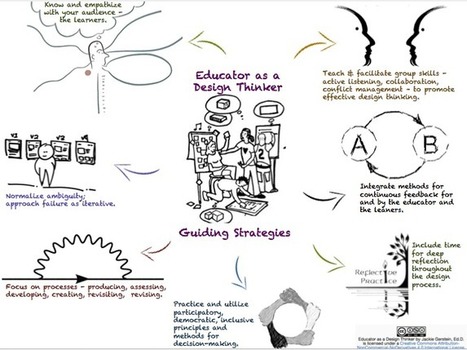
Resources for Educator as a Design Thinker Ideo. (n.d.). Design Thinking for Educators Toolkit - Pfau, P. (2014). Rethinking Education with Design Thinking - Speicher, S. (2013). Design Thinkin...
Beth Dichter's insight:
As an educator do you think of yourself as a design thinker? This visual by Jackie Gerstein shows how you impact your class and focuses on some of the areas we should consider as we design curriculum and work with students in our classrooms. You will also find links to a number of additional resources, including a great toolkit put out by IDEO that is geared to teachers in K-12.
Scoop.it!

"Using the right questions creates powerful, sometimes multiple answers and discussions. Aristotle said that he asked questions in response to other people’s views, while Socrates focused on disciplined questioning to get to the truth of the matter."
Beth Dichter's insight:
Learning to ask good questions is a topic that is often discussed today..but how do we teach students to ask questions, questions that will help them use their higher order thinking skills. This post provides questions you may use with your students to help challenge their thinking. It is split into categories, but many of the questions could be across curriculum areas. The categories listed are: * Logical questions that focus on mathematics and are split into two categories: collaborative questions for the class and self-reliance questions for individual students. * Reasoning questions * Analysis questions * Connections questions * Literary questions * Science and social studies questions. Below are three of the fifty questions. Click through to the post to find which may work with your students. * An analysis question - What patterns might lead you to an alternative answer? * A reasoning question - Why do you think this works? Does it always, why?
Scoop.it!
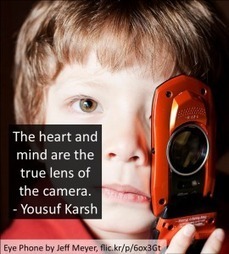
"Most of our students love learning and creating...I was excited to discover the creativity and imagination taking place on Vine, a social network with over 40 million people creating and sharing 6 second videos. We can use this popular free mobile app and social network to engage our students and get them to connect with our subject matter. "
Beth Dichter's insight:
What could your students create in 6 seconds with Vine? More than you might think. This post by Shelly Terrell shares over 22 ideas to help get your students creating Vines as well as information that is key to being successful. One example...did you know that students must be over 17 to have a Vine account? This means that most teachers would have to create a classroom account (and probably check your Acceptable Use Policy and get parents permission). The good news is that you can create an account that would only allow parents and students from your classroom to view the Vines. Many additional resources are shared within the post including a recorded webinar by Turrell and also download her slides. 
niftyjock's curator insight,
May 26, 2014 5:48 PM
For all you Vine aficionados. Lessons using 6 second videos.
Scoop.it!
I"Adobe Voice may be the app we've been waiting for. This effortless video creator may finally fulfill the promise of tablet computing. With a simple, intuitive interface and clean, effective visuals, the Adobe Voice app allows anyone to design animated videos in minutes. It finally turns the iPad into a seamless device for content creation, not just content display or interaction."
Beth Dichter's insight:
Are you interested in having your students create motion graphics (also called video graphics)? Do you have access to iPads? If so, go over to the Apple Store and download Adobe's new app Adobe Voice, and you may find yourself with an easy tool that will provide you and your students the ability to create create videos.
Scoop.it!
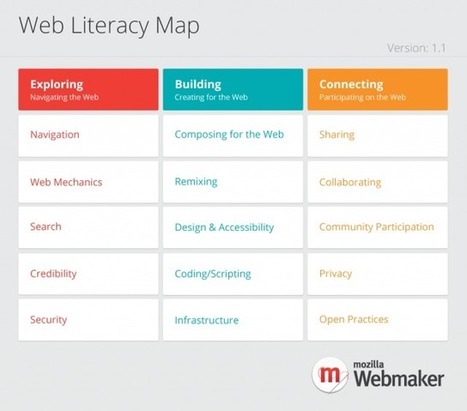
"Mozilla, the non-profit that created Firefox, has created tools and resources to educate and empower people to understand the architecture, culture and citizenship of the web. The effort stems from a framework of skills and competencies–known as the web literacy map that addresses everything from basic web navigation and writing code to understanding the consequences of sharing data online and collaborating with others."
Beth Dichter's insight:
Would you like to become more web literate, to understand the way the web works? This new course from Mozilla and P2PU may be just what you were looking for! Four modules are available and you may sign up for all of them or only one. They cover: * Exploring - Learn about the theoretical framework and teaching methods and become aware of how the web works as an ecosystem. * Building - Develop Open Education Resources for yourself and for others that embed web literacy in your content.. * Facilitating - Learn participatory learning techniques to teach digital and web literacy skills. * Connecting - Make connections - Learn how to build relationships locally and globally to increase your impact. The post by Lisa Nielson provides links to additional materials as well as a link that allows you to sign up.
Scoop.it!

Welcome to a post I always have fun writing. Last year I attempted finding ways to use Word Clouds (Wordle) in education. When I concluded writing that post I was at 108 possible ways. More than a...
Beth Dichter's insight:
Wow...170 ideas on how to use word clouds in your classroom! This post was written with Wordle in mind and references a previous post that shares 12 Valuable Wordle Tips You Must Read. The good news...this post is split into sections. What will you find? See the list below. * All Subjects * Science * English Language Arts * Math * Health and Physical Education and Family and Consumer Science * Art and Music * Foreign Language * Applied Arts * Careers This post provides many ideas on how you might us word clouds as a teacher as well as how your learners may use them.
Scoop.it!
From
ed

The World Wide Web is used every day by millions of people for
Beth Dichter's insight:
Once again TED-Ed hits a home run in explaining a complex concept simply. This video, which looks at the World Wide Web will help students understand the difference between the World Wide Web and the Internet as well as teaching them about how hyperlinks mimic the way our brains learn and much more. As always you will find a quiz, additional resources and an online forum/
LibrarianLand's curator insight,
May 19, 2014 3:37 PM
This is a short, fairly concise video explaining the world wide web. It delineates the difference between the web and the internet and briefly touches on servers, languages and more. Simple and elegant.
Scoop.it!
Games give players agency and teach the core 21st century skills of critical thinking, communication, collaboration, and creativity better than any tradition...
Beth Dichter's insight:
Students love to play games, and games have the potential of teaching 21st century skills. This video discusses why games work and provides a look at a number of games and skills that they teach students. Key to this is the need for the teacher to help the students transfer the knowledge they are learning in the games to other areas. The video is short (under 5 minutes) and may provide you with some new information. |
Scoop.it!
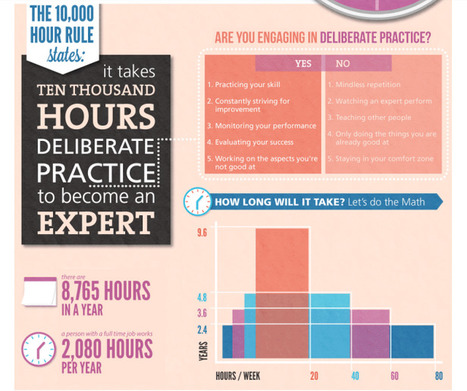
But how many hours is "enough" to achieve expertise status? One take on the subject we (and many others) found interesting was Malcolm Gladwell's in the book Outliers where he popularized the theory that 10,000 hours of dedicated practice in a given field or area of expertise allows a person to become truly "expert".
Beth Dichter's insight:
What does it take to become an expert in a field? This infographic explores this concept, providing a look based on Malcolm Gladwell's book as well as a section called "7 steps to cheat the rule." We know that our students are often looking for the quick fix. They cram for a test, and days later the information is often not recalled quickly. This infographic shows that time and effort are key.
Scoop.it!

"There's a certain class of mistakes that all educators can eliminate with conscious effort, and in this post we outline 11 of them. They range from habit of practice to habits of thought, but all of them have one thing in common: they make your job harder."
Beth Dichter's insight:
Many of these ideas will not surprise you, but there are times when we take the easy route. Three of the suggestions are below. Each is explained in more detail in the post (plus you will find an additional eight suggestions). * Not learning from colleagues. We know strategies change and learning from our colleagues is a great way to refresh our teaching. * Setting low student expectations. How do we get students to do their best work? We need to start with high expectations, creating a culture that expects our students to do their best. * Failing to provide variety in instruction. Sometimes it is tough to come up with new ways to teach but remember variety is the spice of life...and the classroom.
Scoop.it!
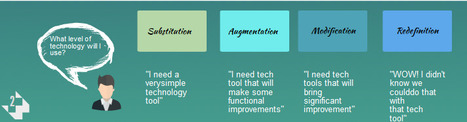
Building lesson plans is an integral part of every teacher’s day. Integrating technology into lessons (that may have previously existed in a totally non-technology infused version) can sometimes be difficult, especially if the task at hand can be easily completed without technology – many of us wonder why bother if we don’t have to. While …
Beth Dichter's insight:
Check out this 4-step guide to creating effective lessons that integrate technology. Step 1 - What level of learning is being addressed? The infographic looks at Bloom's, but you could use other resources as you design your lesson plan. Step 2 - What level of technology will be used? SAMR (as in Substitution, Augmentation, Modification and Redefinition) are shown in the infographic, but there are other ways to look at the level of technology. Step 3 - How should your classroom look? Four choices are provided. Step 4 - How will you evaluate your students? Ten ideas are listed. You may find additional ones that you prefer to use. As an initial framework to consider working with this visual may be a great tool, especially for folks who are still at the beginning phase of integrating technology into lessons.
Scoop.it!
The importance of positive language within how society conceptualizes learning is evident for the growth of student potential and learning.
Beth Dichter's insight:
In education failure is a negative word, but talk with engineers that they will tell you that they learn from failure. In this post there is a quote from Alfie Kohn "Although there are exceptions, the most likely consequence of having failed at something is that a child will come to see himself as lacking competence. And the result of that belief is apt to be more failure." The post continues with a discussion on a study that took place in Finland where faculty in a middle school chose to implement "a final project where each student would produce a concrete artifact to denote their learning." This process discuss the learning journey of their students, which led them to discover that they were often using negative terms to describe students, which led them to discuss assumptions that were being made by them about their students. Click through to the post to learn what was learned and how you might choose to change your language in your classroom. 
Dr. Helen Teague's curator insight,
May 31, 2014 11:18 AM
Beth Dichter's insight: In education failure is a negative word, but talk with engineers that they will tell you that they learn from failure. In this post there is a quote from Alfie Kohn "Although there are exceptions, the most likely consequence of having failed at something is that a child will come to see himself as lacking competence. And the result of that belief is apt to be more failure." The post continues with a discussion on a study that took place in Finland where faculty in a middle school chose to implement "a final project where each student would produce a concrete artifact to denote their learning." This process discuss the learning journey of their students, which led them to discover that they were often using negative terms to describe students, which led them to discuss assumptions that were being made by them about their students. Click through to the post to learn what was learned and how you might choose to change your language in your classroom.
Scoop.it!

From tweets to likes, see how fast data is generated every second on the internet in this interactive visualization.
Beth Dichter's insight:
Check out this interactive visualization and see how quickly data is being generated online. You may want to snap some screen shots and have your students determine how quickly Twitter accounts are created, hours of YouTube videos are uploaded, items are purchased from Amazon and much more. A total of 23 sources are being updated second by second. 
Maryalice Leister's curator insight,
May 28, 2014 2:40 PM
This graphic is an excellent discussion catalyst when talking about how far and fast information travels.
Scoop.it!
"The expanded availability of easy tech tools has empowered educators to rethink homework and daily instruction. Flipping the classroom with teacher-made videos allows students to self-direct their at-home learning. Many of these clips, however, still involve a one-day delivery of information, from teacher to student. Another approach is to allow children to make their own educational videos. They can enlighten their classmates with their creations, and they can teach themselves the material and the skills during the process of production."
Beth Dichter's insight:
Have you considered having students use the Adobe Voice app (iPad) to create materials that others may use to review work? This post shares how one school has done this with 8th grade students and provides 3 videos embedded in the post as well as a link to a page where you can see more student work. The post also discussed "four key proficiencies" that students may demonstrate as they create an Adobe Voice video: * Symbolic and visual metaphor - in choosing images and/or icons and their definitions of words students are demonstrating understanding of figurative meaning. * Narrative - students narrate their story and provide images that seamlessly move from one point to another within the story. * Text- students select key text, highlighting vocabulary. * Design - students learn critical elements necessary to convey content. Elements may include, music, images, voice, color, transitions, layout and more.
Scoop.it!
Beth Dichter's insight:
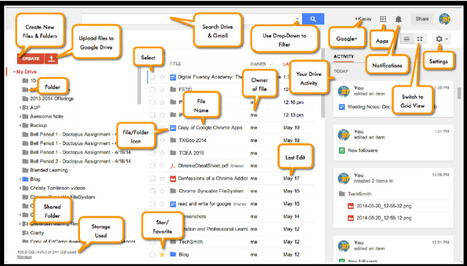
Google Drive continues to add new resources and at times it is confusing for folks to know where to go. This three page document provides you with a great visual of all the components you find when you log-in to Google Drive as well as an additional two pages that share Keyboard short-cuts as well as some other tips. One tip that was new to me is: * Google Drive file types (docs, sheets, slides, etc.) DO NOT count against your Drive storage space. This site will also lead you to a Google document that has this information that you may save in your Google Drive.
Scoop.it!

From
ed
For most of history, scientists weren’t quite sure why our hearts were
Beth Dichter's insight:
Teaching students how the heart works is a difficult task. This TED-Ed video makes it much easier. In less than 5 minutes students (and teachers!) may gain a much better understanding of how the heart works. If you are able to get hearts from pigs or sheep to dissect students will quickly gain a clear understanding of exactly how the heart works. You will also find additional resources, including: a link to the first TEDx talk where a student from Teddington School, a secondary school in England, explains how he learned this by working with Dr. Hui as a mentor, questions (both multiple choice and open reponse), and an online forum.
Scoop.it!

Many teachers have added ‘digital literacy’ as number four on the list of literacies their students should have (or be working towards, in most cases). Reading, writing, and math are now followed by digital literacy. Obviously, depending on the grade level you teach, your students will have different abilities in each of the four areas, …
Beth Dichter's insight:
What are the 8 key elements of digital literacy? According to Doug Belshaw, who works with the Mozilla Foundation and has written his dissertation on digital literacies are: * Cultural * Cognitive * Constructive * Communicative * Confident * Creative * Critical * Civic The post includes short definitions for each and you may watch Belshaw at a TEDx Conference on this topic.
Maryalice Leister's curator insight,
May 24, 2014 9:08 AM
Teachers accept the responsibility for instilling digital literacy in their students of any age. It is not a skill young people should attempt to learn on their own as it is more complicated than it appears.
Scoop.it!
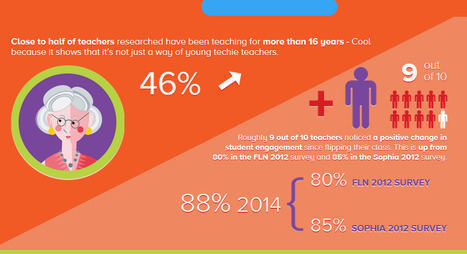
"Flipped learning is a pedagogical approach in which direct instruction moves from the group learning space to the individual learning space, and the resulting group space is transformed into a dynamic, interactive learning environment where the educator guides students as they apply concepts and engage creatively in the subject matter. "
Beth Dichter's insight:
This infographic shares information from a recent survey on flipped classrooms. It also shares information from two previous surveys allowing you to see how rapidly some changes are taking place. Below are two of the details from the infographic. Click through to see the complete infograhic and learn more. * In 2012 73% of teachers recognized the term "Flipped Classroom, in 2014 that is up to 96%. * Close to half the teachers researched have been teaching for more than 16 years - Cool because it shows it is not just the way of young techie teachers. Please note that the data was collected over 10 days in an online survey by Sophia (the website) and the Flipped Learning Network and 2,358 teachers replied.
Scoop.it!
Beth Dichter's insight:
This Technology Integration Matrix from Arizona allows educators to determine their level of technology integration: entry, adoption, adaptation, infusion and transformation with "five interdependent characteristics of meaningful learning environments:active, collaborative, constructive, authentic, and goal directed" creating a matrix. Each cell provides two lesson plans, focusing on two these three grade ranges: K - 4, 5 - 8 or 9 - 12. Although the lesson plans are written for Arizona Common Core Standards are also referenced so others may find valuable information within this matrix. This site takes you to the interactive version that provides the lesson plans. A pdf version is also available at http://www.azk12.org/tim/docs/AZK1031_Matrix_Print.pdf.
Scoop.it!
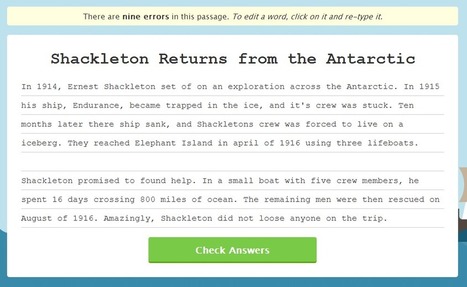
"Quill is a service that provides an updated take on the old writing worksheets that most of us used in elementary school and middle school. The service offers more than just the writing practice activities, but that is its core feature."
Beth Dichter's insight:
Do your students need to practice with grammar and punctuation? Quill provides worksheets for students in Grades 1 - 8 that have spelling and grammar errors. Students have to correct the errors. Quill corrects the papers, showing students what they did correctly, or what needs to be corrected. Create your own classroom, provide students a code to sign-in, and pick your assignments. Students work at their pace and you can view their work through the dashboard. As Richard Byrne states in this post "Having the pre-made activities at your disposal and having the opportunity to quickly see how your students did on each activity will free up some of your time." There is a video that explains the site in more detail, or you may go directly the the website: http://www.quill.org/ |








I'd really like to make the transition in my Library Learning Commons to integrate a makerspace. My goal is to help promote a maker mentality in my school. This is a great resource to introduce the idea to teachers.