



Given we’ll shortly be reaching the centenary of the outbreak of World War One, we compiled this piece to explain the key global events of the...

 Your new post is loading...
 Scoop.it! Given we’ll shortly be reaching the centenary of the outbreak of World War One, we compiled this piece to explain the key global events of the...
Beth Dichter's insight:
If you teach history/social studies this post is right up your alley. The website MadeFromHistory has put together 30 infographics that look at 30 key events in the last 100 years, and they do acknowledge that the have "left out quite a few events" due to space limitations. You can also find sections that focus on World War I, World War II, and Civil Rights as well as a Referenced Blog, which shares a wide variety of topics. For many students, using visuals helps them to recall information more readily. If you teach history from the past 100 years it is worth checking out this website.
Scoop.it!
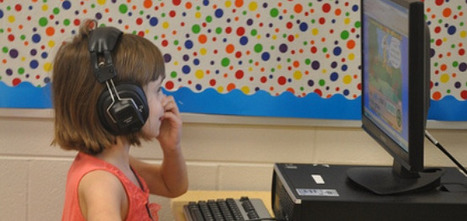
Don't have the budget to travel the world? That doesn't mean students have to miss out!
Beth Dichter's insight:
Do you teach elementary or middle school? Are you looking for experiences for your students that will provide them the opportunity to travel to and learn the planets, the White House, national parks and much more? This post provides links to six websites that provide virtual field trips. The majority of the trips are geared to students from grades 3 - 8, but check them out. You may find that they are great for your class. Consider visiting Colonial Williamsburg, check out Global Trek from Scholastic where you can design a "fake" trip by visiting many places in the world and much more. 
Joan Roberts's curator insight,
July 28, 2014 2:08 PM
This looks like an excellent way to introduce research on different countries.
Scoop.it!
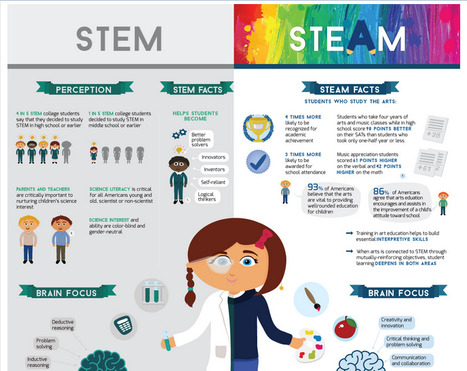
"Science, technology, engineering and mathematics are the center of attention in most US public schools today. The focus on STEM fields was initiated to increase global competitiveness and the project does have its merits. However, it has left the arts languishing far off in the periphery. This is quite unfortunate, as art education is known to improve academic performance."
Beth Dichter's insight:
Have you noticed that STEM has transformed to STEAM? The A stands for art and this infographic looks at how the introduction of art to STEM can make a difference in the academic performance of students. The infographic shares statistics on the perception of STEM and facts about both STEM and the Arts. It looks at how each impact the brain and also statistics about the number of schools with arts (US only) as well looking at US STEM rankings and global arts education. There is a reason that STEM is shifting to STEAM and this infographic provides an overview of some of the reasons this is taking place.
Scoop.it!

Researchers in the fairly new field of music neuroscience are finding that kids who learn to play a musical instrument also develop important skills related to literacy, math and mental focus.
Beth Dichter's insight:
Does learning to play an instrument impact other abilities of students? Based on recent research the answer would be yes. What abilities? "Speech perception, the ability to understand emotions in the voice and the ability to handle multiple tasks simultaneously." We might speak of these as executive functioning skills. One quote from the post: “There are a lot of different brain systems involved in successfully playing even a small musical piece: your auditory system, your motor system, your emotional system, your executive function system; this playing together of these brain regions, almost like in a musical ensemble.” Learn more about how playing an instrument may impact the brain as well how music may change brain plasticity (using the acronym OPERA to describe it) and how literacy might be tested through music. If your school has a music program this post will provide evidence to support the continued funding of the program, and if your school is considering adding music instruction it would also provide support. 
Justin Harrison's curator insight,
November 11, 2018 10:48 PM
This article is a very insightful one. it furthers the proof of music helping the brain in not only adult brains but children as well. It explains that music helps children learn literacy skills as well as boosting their brain development. The resource is reliable because of it being an organization. Although it is not a website for music and audio professionals it supports the use of music to help in the development of children brains.
Scoop.it!

"Metacognition is, put simply, thinking about one’s thinking. More precisely, it refers to the processes used to plan, monitor, and assess one’s understanding and performance. Metacognition includes a critical awareness of a) one’s thinking and learning and b) oneself as a thinker and learner."
Beth Dichter's insight:
How can we work with out students to they learn about their thinking and learn, and view themselves as thinkers and learners? This post provides an overview of metacognition, beginning with studies of young children. Additional research is shared that discusses of metacognative practices and there is an excellent section Putting Metacognition into Practice where a number of resources are provided. Four assignments for explicit instruction are shared (and the brief version is below and quoted from the post): * Preassessments—Encouraging Students to Examine Their Current Thinking * The Muddiest Point—Giving Students Practice in Identifying Confusions * Retrospective Postassessments—Pushing Students to Recognize Conceptual Change * Reflective Journals—Providing a Forum in Which Students Monitor Their Own Thinking This is followed by a section on "recommendations for developing a classroom culture grounded in metacognition." The post offers links to three tables that assist with this. The tables focus on: * Questions for students to ask themselves * Prompts for integrating metacognition * Questions to help faculty metacognitively assess their own teaching The post continues to discuss these topic and provides access to additional tools, resources and examples. It provides a wealth of information and resources about metacognition and the tables of questions and prompts (linked to above) are worth checking out if one of your goals is to help your students understand what it means to be a thinker and learner. 
niftyjock's curator insight,
July 28, 2014 6:26 PM
Being a man, I'm very poor at reflection, but by breaking it into metacognitive practices helped me think about my thinking. 
David Baker's curator insight,
July 29, 2014 6:13 PM
The recommendations for developing a “classroom culture grounded in metacognition” are great teaching insights and this serves as a powerful link to the research. The following excerpt is one nugget."Giving Students License to Identify Confusions within the Classroom Culture: ask students what they find confusing, acknowledge the difficultiesIntegrating Reflection into Credited Course Work: integrate short reflection (oral or written) that ask students what they found challenging or what questions arose during an assignment/exam/projectMetacognitive Modeling by the Instructor for Students: model the thinking processes involved in your field and sought in your course by being explicit about “how you start, how you decide what to do first and then next, how you check your work, how you know when you are done” (p. 118)
To facilitate these activities, she also offers three useful tables: Questions for students to ask themselves as they plan, monitor, and evaluate their thinking within four learning contexts—in class, assignments, quizzes/exams, and the course as a whole (p. 115)Prompts for integrating metacognition into discussions of pairs during clicker activities, assignments, and quiz or exam preparation (p. 117)Question"
Ness Crouch's curator insight,
April 7, 2015 1:19 AM
Metacognition is one of the hardest aspects of student's learning to get from them. Children find it difficult to communicate about their thinking and teacher's find it difficult to teach these skills. This is well worth a read to help develop our own understanding of metacognition.
Scoop.it!
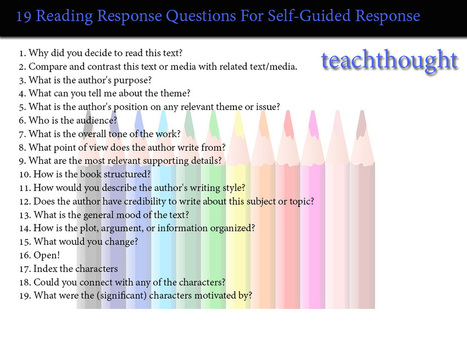
"I was recently going through an old folder of reading reflection prompts and forms, and found a reading log that I called a “Self-Guided Reading Response Log” (whatever that means). It’s a few years old, but I remember using it first as a way for students to get “points” in a reading program we were doing at the time."
Beth Dichter's insight:
Terry Heick shares 19 reading prompts that he has used with students in the past. The list would work with both fiction and non-fiction. In the post he describes how he used the prompts to help students, stating that he expected his students to be able to say "I read this, and know that writing about what I read is important, and I picked these questions to use to guide my writing." The image above includes the prompts. He also has included additional explanations with many of the prompts within the post.
David Baker's curator insight,
July 29, 2014 6:16 PM
Powerful frame for reading in most content areas. Not all are appropriate for each setting but helping to identify type of text and relevant questions might be a great pre-reading classroom activity.
Scoop.it!
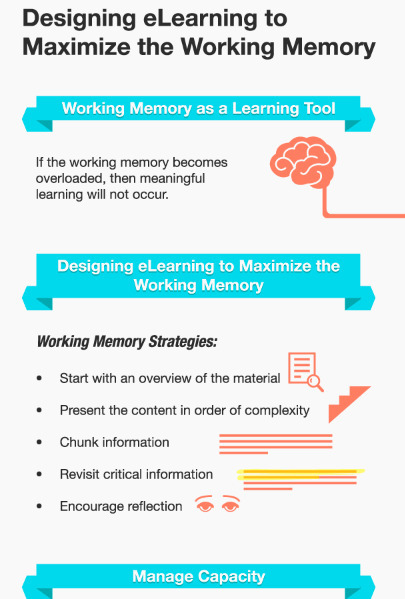
In eLearning, one of the most important brain functions to consider is the working memory, one of the more everyday functions of the brain.
Beth Dichter's insight:
Once again SH!FT has created a post that works for eLearning and the face2face classroom. This post explores ways to maximize working memory, the memory that helps us "to perform efficiently and effectively in our daily lives." Sections include: * Working Memory as a Learning Tool * Designing eLearning to Maximize the Working Memory * Manage Capacity * Effective eLearning Activities Each of these sections includes at least one additional resource. Learn more about each area by clicking through to the post. 
Nancy Jones's curator insight,
July 23, 2014 1:58 PM
I am currently reading The Big Disconnect and find this an interesting connection. I have come to the conclusion that with all this technology and information, we really need to learn more about the brain and how it works to use technology and create learning opportunities that will best serve our students.
Scoop.it!

Summertime is prime time for getting a good read in. Here's a list of eight places where you can download free e-books.
Beth Dichter's insight:
Here is one list with eight places where you can find free e-books. Some are well known, but others may be new to you. The sites are: * Google eBookstore * Project Gutenberg * Open Library * Internet Archive * Book Boon * ManyBooks.net * Free eBooks * LibreVox Each has a brief explanation and there is also an extra feature, a video that shares 5 Facts About Comic Books. Have fun exploring!
Scoop.it!
"In a high-school art room, I watched a student working at an easel. When I asked about her progress, she explained that she was attempting to paint sunflowers in the style of Monet, her favorite artist. She told me she liked how the flowers were looking but said the vase was giving her trouble. She planned to keep reworking it, applying layers of acrylic until she got the play of light just the way she wanted. Then she laughed and said, “You should see what’s underneath! I bet there are three or four versions beneath this one.”"
Beth Dichter's insight:
Working with students and helping them understand their learning process is important. If you are planning on utilizing project based learning then many of the formative assessments you may choose will provide students with an understanding of their learning process. How can you include more formative assessments? The post looks at three areas. * Vary assessment strategies. * Look beyond content mastery. * Facilitate self-assessment. Do you have great formative assessments that you use? Consider sharing one in the comment area.
Scoop.it!
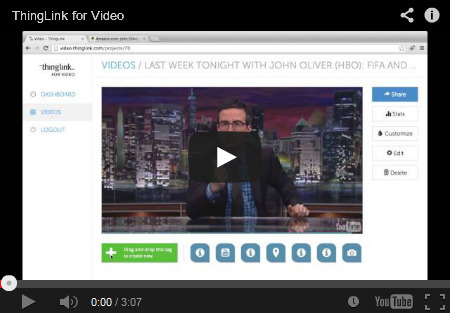
"We take for granted that we can interact with text, but up until recently it’s been a challenge to interact (read/write/talk) with media... Being able to interact with video allows us to personalize video-based instruction, by leading learners to the segment of video we like them to watch, by adding voice-overs, notes, pop-ups, screenshots, maps, references, pauses. It also allows learners to create video with even more depth and features and can the interaction can be used to support media literacy learning."
Beth Dichter's insight:
Joyce Valenza reviews seven options for editing videos: * EDpuzzle is a "a relatively new, free tool for cropping and pausing video, adding voice overlay, audio notes, and embedding quizzes in the form of open ended or multiple choice questions." * Mozilla Popcorn Maker is a "multiple-layer video editor that invites users to remix videos to include pop-ups, text boxes, images, maps (even in streetview), as well as Wikipedia articles that continue to update." * ThingLink for Video "promises the ability to drag and add text-enhanced ThingLink icons, as well as images, and embed widgets." * eduCanon "is an interactive learning platform into which teachers may embed questions and any html object." * TED-Ed Lessons allows you to customize the lesson to meet your goals. * YouTube Video Editor "allows users to easily clip and add text and filters to videos you drag in." * Write-on Video is an iPad app that allows you to "to annotate and animate videos and pictures..." There is additional detail for each of these options in the post. She has also embedded some videos that show how to create a video in the specific site in the post. If you are new to creating vidoeo, or are looking for some new tools that are student friendly check out this post. You should find at least one or two that will meet your needs. 
Rosemary Tyrrell, Ed.D.'s curator insight,
July 22, 2014 9:51 PM
A good overview on the available tools to make video interactive. 
Alfredo Corell's curator insight,
July 23, 2014 7:38 AM

Becky Roehrs's curator insight,
July 23, 2014 10:31 AM
Excellent round-up of tools we have available to update our videos with voiceovers, notes, pop-ups, screenshots, maps, and references!
Scoop.it!
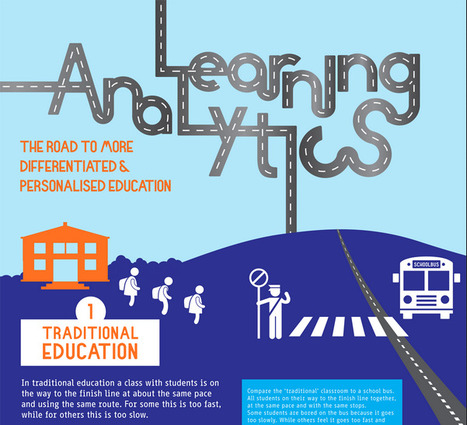
"Learning Analytics is the measurement, collection, analysis and reporting of data about learners and their contexts, for purposes of understanding and optimizing learning and the environments in which it occurs."
Beth Dichter's insight:
This detailed infographic provides an in-depth look at learning analytics. It begins by describing traditional education as a school bus, with the expectation that all students will get to "the finish line together." The infographic then turns to personalized learning, where students would work at their pace and in their way to master material. Analytics play a key role in personalized education. Why? If you use a tool that provides you with the ability to measure, collect, analyze and report data about your students you have the opportunity to adapt curriculum. The infographic shares seven areas that may be considered. From here the infographic moves to the learning analytics cycle which moves to four areas: * Descriptive - What has happened? * Diagnostic - Why has it happened? * Predictive - What will happen? * Prescriptive - What should I do? What comes next? The role of the teacher, which is followed by a What's Next section. There is much to learn about learning analytics in this infographic. You may download the complete infographic from the site. 
miguel a. rodriguez's curator insight,
July 19, 2014 5:24 AM
Interesante infografia de google analytics 
John Lemos Forman's curator insight,
July 20, 2014 10:55 PM
Muita expectativa mas ainda poucos resultados concretos ... De qualquer modo, esta se formando uma percepção de que o modelo educacional vai ser fortemente impactado nos próximos anos
Scoop.it!
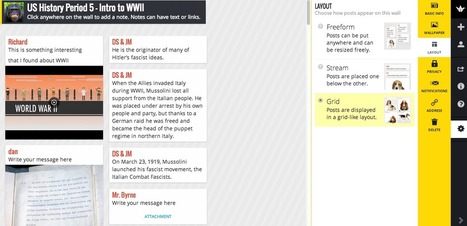
"Today, during the Practical Ed Tech Summer Camp I discovered a new layout option in Padlet. In addition to the free form and stream layouts there is now a grid layout option. Selecting the grid option in the "modify wall" menu will snap your free form notes into a grid."
Beth Dichter's insight:
Padlet has recently added a new layout option and Richard Byrne provides a step-by-step guide on how to use Padet as well as "ideas and directions for using Socrative and TodaysMeet." Padlet has been available for quite a few years (and was first known as Wallwisher) and works on a variety of platforms. It may be used collaboratively and Byrne suggests using it as an exit ticket. Socrative is a student response system and TodaysMeet is a backchannel chat room.
Scoop.it!
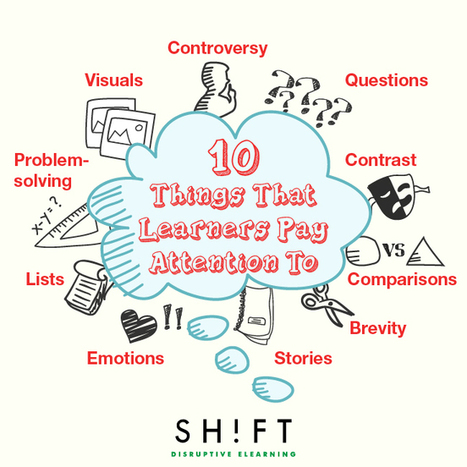
"Even more than other types of education, eLearning must struggle to attract learners' attention: the Internet is full of distractions, and adult learners are both busier and more free to indulge in distractions. Helping students to pay attention is a primary concern of training professionals, so here are some optimal methods to win the attention game in eLearning."
Beth Dichter's insight:
The number of students participating in online courses continues to grow and for those that currently teach with students in their physical classroom, there are shifts towards blended learning, with part of the day online and part of the day with more direct instruction. This post looks at ways to keep students' attention online, but the same components are also important in the face2face classroom. What is it that help students pay attention? * Problem solving * Comparisons * Visuals * Questions * Emotions * Stories * Contrast * Controversy * Brevity * Lists Each of these areas is described in more depth when you click through to the post and in many cases you will find links to additional resources. You may already be using some of these strategies, but try combining two or more to see how students react. Many of the strategies promote authentic learning opportunities, which promote high engagement. All are valuable to understand and to use in the classroom, but it online or face2face. 
Audrey's curator insight,
October 3, 2014 1:26 PM
These are certainly true. Have a look at www.hotmoodle.com

Bernard VULLIERME's curator insight,
October 20, 2014 5:30 AM
Rien de nouveau sous le soleil du bon e:enseignant, mais plus d'exigences … 
clare o'shea's curator insight,
February 5, 2015 1:49 PM
and ask indviduals questions every 2-3 minutes - but always label the behaviour first! so it is a positive experience not a catching out!! |
Scoop.it!

From
ed

"When you listen to music, multiple areas of your brain become engaged and active. But when you actually play an instrument, that activity becomes more like a full-body brain workout. What’s going on? Anita Collins explains the fireworks that go off in musicians’ brains when they play, and examines some of the long-term positive effects of this mental workout."
Beth Dichter's insight:
Music does amazing things in your brain, and playing music creates "a full-body brain workout." This video shares what happens in the brain when it hears music, or when the individual is playing music. The science is showing that the playing of music increases executive functioning skills. Along with a short quiz (that includes multiple choice anc some open response questions) you will also find a number of additional resources that look at the brain as well as how music impacts the brain.
Scoop.it!

I am facilitating an in-service on Growth Mindsets for Educators. I created an infographic, Thinglink, and Slide Presentation of resources that I am sharing below: Thinglink that contains links to...
Beth Dichter's insight:
Do you teach your students about growth mindset? Is this a topic of discussion with other staff in your school? Jackie Gerstein has shared three excellent resources in this post that focuses on growth mindset. She has created an infographic (image above) that looks at fixed mindset and growth mindset, showing how a student may identify based on their mindset. The next step was putting the infographic into ThingLink and creating links to over 15 resources. Here is the link: ThingLink version of the infographic. There is also a slideshow that provides additional resources (although some may be repeated in the ThingLink). The slideshow is split into four sections: * Mindsets * Historical Background * The Educator with a Growth Mindset * Teaching the Growth Mindset to your Learners Since this post is based on a workshop she provided it is a great resource to share with teachers at your school (or other teachers whom you know). Make sure to check out the resources for students. You may find yourself creating a poster to help your students learn more about growth mindset.
David Baker's curator insight,
July 29, 2014 5:32 PM
This will be a valuable tool to share in seminar with my new teachers as we look at their students and how the teacher views their classroom.
Scoop.it!
Widely understood to be essential to success in the workplace and modern life, digital literacy is beginning to emerge as a necessary component of curric
Beth Dichter's insight:
What does it mean to be digitally literate? If you ask teachers, students, parents, administrators, and community members the responses may be very different. This post explores this issue and notes (for the teacher): "Digital literacy isn't about knowing computers inside and out; it's about using technology to change the way you think. If critical thinking skills haven't yet become a part of your students' digital citizenship, it's time to think your teaching strategy." After the introduction, the post is split into two sections: 5 Teaching Practices that Destroy Digital Literacy. One of the practices is "using 'cool' technology to deliver a planned lesson." To learn why click through to the post. The final section is 15 Habits to Cultivate in Your Students. Two are listed below. * Read past the first page of Google results (and my suggestion would be to use some of the many alternative search engines. You may be surprised that many other search engines work better for students). * Train students to react skeptically if they read the phrase 'Research says...' or 'A recent study revealed..." To learn more about the 15 habits check out the post. Do you have ideas that would be helpful to others? If so, please share them. 
Anne-Maree Johnson's curator insight,
July 29, 2014 6:51 PM
What does the term "digitally literate" mean? This article gices some prompts about what digital literacy is- and what it isn't. 
Kristen McDaniel's curator insight,
August 4, 2014 11:15 AM
I really enjoyed this article on "do's" and "don'ts" for empowering students in digital literacy techniques. I think we forget - this is where our students shine. The article points out that today's undergraduates have NEVER known life without the internet. How do we use that to help our students learn more?
Ness Crouch's curator insight,
April 8, 2015 8:37 PM
Digital Literacy is becoming more important in learning. The curriculum today requires teachers to use digital tools. Please read this interesting take on digital literacies.
Scoop.it!
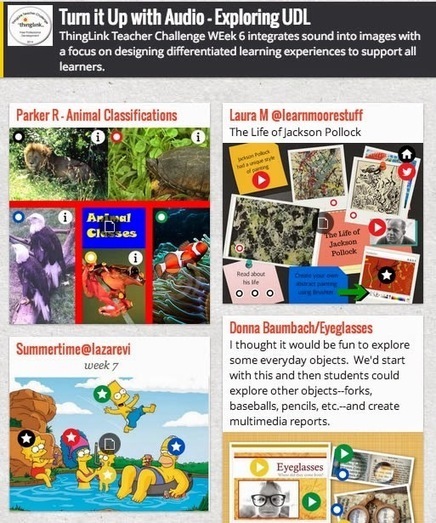
"This weeks ThingLink Teacher Challenged asked participants to focus on audio as they design lessons. We introduced Audioboo as an integrated web based platform and app that easily captures and collects audio for use. The goal of this challenge is to use ThingLink to design a multimedia rich learning experiences to support the diverse needs of all learners."
Beth Dichter's insight:
Are you looking for tools that provide you with the opportunity to create rich, multimedia lessons and that support differentiation? The ThingLink Challenge that has been running this summer had one week that focused on using audio as well as ThingLink (for images and/or video) to design a learning experience. This post from Susan Oxnevad provides great resources. She has embedded a video from CAST that discussed Universal Design for Learning and has links to resources as you watch. Just pause the video and check out the link! You can also check out "Turn it Up with Audioboo on Padlet." This page provides access to a range of ThingLink projects that have audio links. You will need to click on the title of the image, which will take you to a page with a larger view, and on the lower right hand side you should see the word Source (in red) that will take you to the actual ThingLink page.
Scoop.it!

Fluency Tutor is an application for Google Chrome which allows educators to assign reading passages to students via their Google Drive accounts.
Beth Dichter's insight:
If you have Chrome installed on computers at your school consider checking out this app called Fluency Tutor. The website states FluencyTutor "is an easy-to-use, time-saving leveled reading and assessment tool that helps busy teachers support struggling readers. Teachers pick reading passages based on content, lexile level or reading age and share with individual students or groups via Google Drive." Students may access material from home or school and can record passages. Text-to-speech, a dictionary, a picture dictionary and translation tools are also available. The teacher dashboard and the student area for interaction is free. If you want to be able to see analytics, track progress, and more there is a charge of $99 per year (for teachers). Tools such as this are great free resources for many students. You might also want to check out Read&Write for Google.
Scoop.it!
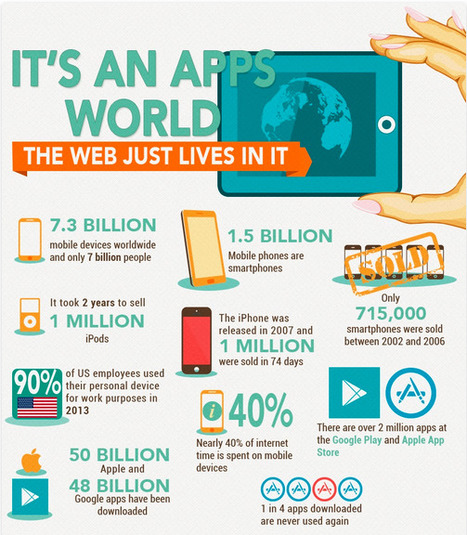
"It’s an apps world, the web just lives in it, that’s according to the infographic, which charts the history of some of the most popular apps in the world."
Beth Dichter's insight:
Are mobile devices taking over? Will apps rule over web tools? This infographic provides lots of information about where things stand in this new mobile world. * Statistics on the mobile devices, including the number of devices worldwide, the number of SmartPhones, time spent on the Internet and much more! * The largest app stores * Messaging apps used worldwide * The most popular apps * Time spent on mobile apps * Most popular app categories * App predictions Plus they include references! 
Nuno Magalhães Ribeiro's curator insight,
July 30, 2014 5:39 AM
As apps mais populares para os 3 grandes sistemas operativos mobile: uma representação gráfica muito interessante da respetiva evolução. vale a pena analisar!
Scoop.it!
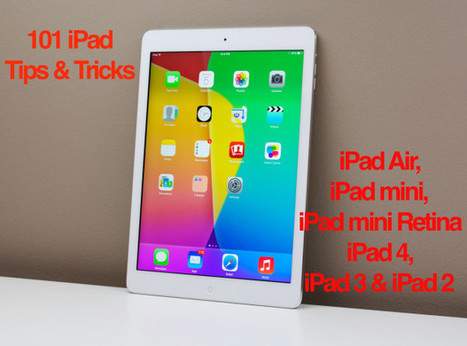
Enjoy 101 iPad tips and tricks. These amazing iPad tips cover setup, new users, entertainment and much more.
Beth Dichter's insight:
Are you looking for a iPad Tips and Tricks? If so, this post will be helpful. The author has organized 101 iPad Tips and Tricks into nine categories. You may skip to a specific category, or move through the entire list. What are the categories? 1. iPad Set-up Tips 2. iPad Tips & Tricks for New Users 3. iPad Keyboard Tips & Tricks 4. iPad Web Browsing Tips 5. iPad Camera & Photo Tips 6. iPad Entertainment Tips 7. iPad Apps & Organization 8. Email and Facetime Tips 9. Bonus Tips & Tricks The post also notes that these tips & tricks will work with all iPads, going back to the iPad 2. However, you will need the most current version of the iPad software. The directions listed are very clear. You will find some screen shots and a few videos. This is a great resource if you are new to the iPad, or if need to review/update your skills. 
Deanna Peluso's curator insight,
July 22, 2014 1:41 PM
A fantastic resource for any new (or exploring) iPad user. Tips and tricks from organization, photos, and keyboards. 
Rocio Watkins's curator insight,
July 22, 2014 2:33 PM
Teachers: let's take advantage of a few weeks of summer left to become iPad pros
David Baker's curator insight,
July 29, 2014 6:17 PM
Great as we go 1:1 with the mini in our middle schools.
Scoop.it!
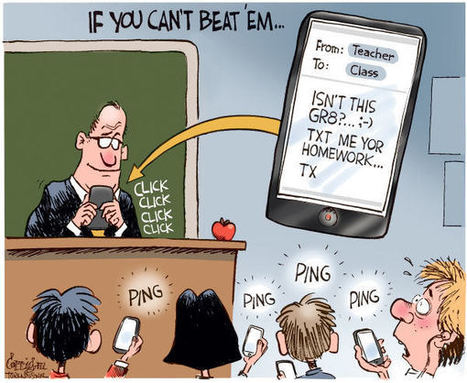
In less than a decade, mobile technology has spread to the furthest corners of the planet. Of the estimated 7 billion people on Earth, 6 billion now have
Beth Dichter's insight:
The use of mobile technology has increased, esp. in locations like Africa, and this is changing the way people learn. It is important to note that the mobile technology that is in used is often less "sophisticated and powerful than cell phones and have fewer features." Yet the tiny screen on the cell phone is a window to the world. This post lists seven people/organizations from around the world who are making a difference. It then goes on to look at what you can do with mobile learning to make a difference. There are 13 suggestions. Three are below. * Encourage the use of apps that work on cell phones and basic phones alike. * Create open, educational resources with a mobile, international audience in mind. * Spend more time explaining content than creating it. Each of the suggestions above are described in more detail as are ten additional suggestions found in the post. 
http://www.scoop.itantonioormachea's curator insight,
January 20, 2015 8:57 AM
Mobiles are expanded all over the world. Young people users are probably who best know mobile properties and how to manage them. I think that cell phone would be an important tool for teachers to communicate with students and they will like it most that traditional methods. Good! 
SMARTERTEACHER's curator insight,
January 20, 2015 1:51 PM
Where will be in 2 years, 5 years 10 years...? 
K_Lynam's curator insight,
January 23, 2015 3:02 PM
I think I'd follow-up on Beth's comments by pointing out that they are comparing "feature phones" and "smartphones" - they are all cell phones. Semantics aside, it is an important distinction, and one that may be overlooked in the assumption that the student has access to a smartphone because they seem so easy to obtain now - a cultural issue or economic one?
Scoop.it!
No matter what subject they teach or what age group their students fall into, all teachers face the same basic challenge: They have to find a way to actively engage students in the learning process. Today’s learners tend to respond best to interactive teaching methods, so many instructors have integrated technology into their lesson plans. …
Beth Dichter's insight:
The five proven ways to engage students are: * Use Responsive Technology - There are many ways to have students respond to questions throughout a class period. One that is free that you may want to check out is Socrative. * Define Objectives - Make sure there are clearly define goals that are written in student-friendly language. And be prepared to make quick changes if the responsive technology shows the need. * Add Context - The post explains this as having a pre-assessment question to help gauge the existing topic knowledge, followed by a question part way through the period to help see the students understanding. At the end of the period a final question (post assessment) would help see if the students are understanding the concept taught. * Keep it Simple - Make sure that your presentation material is simple. Too much information on a slide may be too much for the students to understand. Remember that visuals are critical and classroom discussion will also help students learn new material. * Make it Interactive - With technology it is easier to keep students engaged, but make sure to change things up throughout the lesson. There are many great resources online that help with this, and many have been explored in this Scoop.it. Do you have unique strategies that you use in your classroom? Share them by adding a comment! 
Melissa Marshall's curator insight,
July 21, 2014 3:40 AM
An excellent article: Engage student using these methods. 1. Use Responsive Technology - not just tech for tech's sake, such as writing answers. Use tech that demands a response. 2. Define Objectives - Tell students what they need to be able to do, know, learn, show. And tell them early on, so they get time to practise it before you assess. 3. Add Context - Make it connect with what they know already. Look for prior learning (the old KWL chart is great for this!) 4. Keep it Simple - Your presentation and the way the content is delivered should be simple to access. 5. Make it Interactive - With technology it is easier to keep students engaged, but make sure to change things up throughout the lesson and the term!
Scoop.it!

"Learning how to use image editing software can be difficult and time consuming. And, teaching students how to use it can be even more challenging. Luckily, there are several free, online alternativ..."
Beth Dichter's insight:
Are you looking for a free, online image editor? The Edublogger has come up with three programs that meet 3 criteria: 1. It is free to use. 2. It requires no registration. 3. It provides educators and students with an intuitive, easy-to-learn photo editing tool. Each of the 3 tools is described and there is a list of pros and cons to help you choose. And the three tools are: * Picadilo * Pixlr * Fotor Learning to edit images is a great skill for students to learn. You might have them edit an image and use it with ThingLink allowing your students to create an interactive image for others in the class to use.
Alfredo Corell's curator insight,
July 23, 2014 7:49 AM
To help you and your students create your own amazing images, Edublogger has compiled a list of 3 online photo editors. In order to be on the list, each of these tools must meet these three requirements:
And the tools are: * Picadilo * Pixlr * Fotor
Scoop.it!
Beth Dichter's insight:
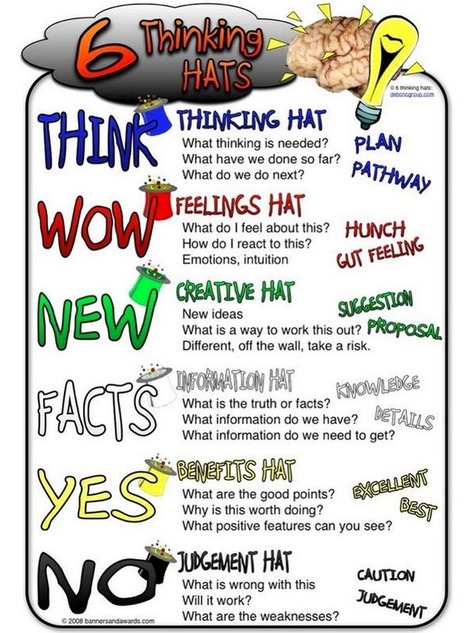
Here is another way to have students think about their thinking. The Six Hats was written by Edward de Bono, and provides one way for students to organize their "thinking and decision making skills." * The white hat is about data and information. Think of it as a neutral position. * The red hat looks at emotions. * The yellow hat had a positive point of view. * The black hat is more cautious. * The green hat is for creative thinking and new ideas. * The blue hat is for thinking about thinking (metacognition). The post includes two additional visuals. Many students might find the process of thinking about what hat they would wear to help them determine the best way to approach specific areas. 
Charmaine Thaner's curator insight,
July 19, 2014 12:49 AM
I think IEP meetings could be more productive if the 6 Thinking Hats approach was used. What do you think? 
Julie Lindsay's curator insight,
July 20, 2014 6:47 PM
A fresh take on the Thinking Hats - a great tool for writing blog reflections and other individual as well as collaborative work.
Scoop.it!

Wonderful quotes about questioning, curiosity, and inquiry from well-known people. Send us any YOU know about, too.
Beth Dichter's insight:
Teaching students how to ask good questions is important. Great quotes about questions may help them learn. This page provides quotes about questioning, quotes from a diverse group, including George Carlin, Frank Llyod Wright, Anne Frank, Oprah Winfrey, Albert Einstein and many more. The images may be saved and you could print them out and use them as small posters in your classroom. Challenge your students to come up with a quote about questioning, curiousity and inquiry and consider making an infographic to share. |







valuable tool for teaching of history. A series of infographics, timelines and a referenced blog which give valuable visual insight into key events from the last century.