Eclectic Technology
230.9K views | +6 today
Eclectic Technology
Tech tools that assist all students to be independent learners & teachers to become better teachers
Curated by Beth Dichter
Your new post is loading...
Scooped by Beth Dichter
August 11, 2014 10:10 PM
Scoop.it!

How To Get Started With Visual Learning In The Classroom

How To Get Started With Visual Learning In The Classroom | Eclectic Technology | Scoop.it
Humans thrive on visual stimuli, and interaction. We don’t want to hear about the latest tablet, or even read an article about it. We want to see it for ourselves. More than that, we want to experience it for ourselves. We want to press all the buttons, test out the apps, and personalize every feature. …
Beth Dichter's insight:

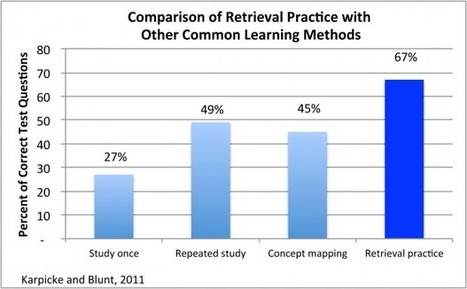
Research tells us that visuals are an important element of learning, and that when visuals are used in classrooms, yet many classrooms are based on text. This post looks at three areas:

* Bringing Active Learning Back to the Classroom - How much of the time are the learners in your class actively participating as compared to passively listening?

* Embracing Visual - Visuals help many learners understand complex subjects. Experts in many fields can look at images and quickly learn complex information. Are you teaching your learners visual skills?

* Retrieving Practice - "By combining visual training with active learning, students can go from novice to expert in far less time than with traditional study methods."

As many of us prepare to return to school embracing visuals and teaching our students how to interpret visuals has the potential to promote better understanding. This post provides some great pointers and you will find a link to the original research.

Gary Harwell's curator insight, August 12, 2014 10:10 PM

Seems like a good idea.

Scooped by Beth Dichter
August 8, 2014 5:53 PM
Scoop.it!

Mosa Mack: Science Detective - Science Mysteries Grades 4 - 8

Mosa Mack: Science Detective - Science Mysteries Grades 4 - 8 | Eclectic Technology | Scoop.it
Mosa Mack Science Detective exposes students to the thrill of learning while teaching critical and scientific thinking skills.
Beth Dichter's insight:

Mosa Mack: Science Detective is a new site that has launched their first science mystery for students in Grades 4 - 8 (although they note students as young as 2nd graders have tested it as have students in high school).

The first mystery, A Growling Stomach, is just over six minutes in length. In addition to the video you will find resources for Band A (Grades 4 and 5) and Band B (Grades 6, 7 and 8). The resources include:

* Class Discussion Guide

* Small Group Discussion Guide/Individual Worksheet

* Vocabulary Cards

* Standards Alignment to Next Generation Science Standards and Common Core Standards

There are also resources for the teacher including:

* Time Codes/Answer Sheets

* Background Information

* FAQ

This is the only video at this point, but they do state that they plan on having more available, with a goal of having "dozens of animated science mysteries" within a few years.

This is inquiry based science where students are asked to use problem-solving techniques. Check out the first video and hope that more show up soon.

'Tatiana Carvajal's curator insight, September 9, 2015 11:11 PM

You as a teacher or your students can learn science with these ICT .  You only need to create your account. Try it !!

Scooped by Beth Dichter
August 7, 2014 10:35 PM
Scoop.it!

ASIDE: Data Visualized: Simple, Quick, And A Range Of Topics

ASIDE: Data Visualized: Simple, Quick, And A Range Of Topics | Eclectic Technology | Scoop.it

"We continually look for resources to use for “mini” lessons or “do nows” to help learners interpret data and draw conclusions through visual analysis.
The Statshot column in the weekend edition of The Wall Street Journal provides just that. David Goldenberg compiles the data, and the graphics are designed by Carl de Torres. The topics run the gamut, including pop culture, finance, technology, and science."

Beth Dichter's insight:

Finding great graphs to use with students is sometimes difficult. The Wall Street Journal may be the place to turn. This post shares examples of 3 graphs published in their  Statshat column.  This appears to be a new feature since the first publication is dated May 9, 2014.

These graphs will be useful for elementary and middle school. If you teach high school you may want to check out "the Numbers blog (which) examines the way numbers are used and abused,” and the topics are equally as diverse as those on Statshot."

Melissa Marshall's curator insight, August 7, 2014 11:58 PM

Here are some great graphical resources found in the WSJ! Obviously some are quite Americanised but there are some great ones you could use for a discussion on statistics, skewed data or how data is used in the media to reinforce a bias. 

Indy Home Vault, LLC's comment, October 1, 2018 10:08 PM
this is so useful article
Scooped by Beth Dichter
August 6, 2014 9:48 PM
Scoop.it!

How We Make Progress

How We Make Progress | Eclectic Technology | Scoop.it
“Slipping back” isn’t a shameful retreat from our goal—it’s part of the process of getting there.
Beth Dichter's insight:

In education we often use metaphors to help our students understand. Are we cognizant of how these metaphors may be interpreted by our students? Is it possible that the metaphors are "setting up false expectations and giving us a misleading impression of what’s going on."

Annie Paul Murphy discusses these ideas in this post. As teachers we are constantly teaching our students strategies, and the strategies are often scaffolded, but that does not mean that the students let go of the old strategies, and only use the new ones. The move back and forth, at times choosing the one that is a known friend rather than the new one.

Our language plays a critical role in our classroom, and this post reminds us that with school beginning soon in the US we must consider how our words may be impacting our students.

No comment yet.
Scooped by Beth Dichter
August 5, 2014 9:09 PM
Scoop.it!

Common Core: Putting Students on Paths to 21st-Century Success

Common Core: Putting Students on Paths to 21st-Century Success | Eclectic Technology | Scoop.it

"This year, while serving as a teacherpreneur with the Center for Teaching Quality, I started to examine our educational landscape and saw many needs involving the new standards...I believe wholeheartedly that they will make students more effective thinkers and learners who are better prepared for life after high school..."

Beth Dichter's insight:

How do you explain to students and parents the Common Core standards? If this question is difficult to answer you should check out this post. There are two tools that you may find helpful.

The image above shows six classroom scenes showing 21st century skills that students are developing on the left side. The right side shows that paths that students may take based on their skills.

There is also a second visual that is designed for teachers. It is an evidence sheet. You may take the sheet and complete two sections. The left side shows what the standards look like in your classroom, and the right side will  allow you to share how the skills will help your students succeed in college and career.

You can download both these tools as pdf files.

Nancy Jones's curator insight, August 6, 2014 11:21 AM

this is a handy visual for teachers to remind themselves that we are learners too!

Scooped by Beth Dichter
August 4, 2014 8:59 PM
Scoop.it!

The nurdles’ quest for ocean domination - Kim Preshoff

The nurdles’ quest for ocean domination - Kim Preshoff | Eclectic Technology | Scoop.it
Nurdles are the tiny, factory-made pellets that form the raw material for every plastic product that we use, from toys to toothbrushes. And while they look pretty harmless on land, they can really wreak havoc on our oceans. Kim Preshoff details the nurdles’quest for ocean domination, shedding light on the particular features that allow these pervasive polluters to persist for entire generations.
Beth Dichter's insight:

Have you ever heard of a nurdle? Do you know how they are impacting the ocean and the potential consequences of them? This TED-Ed video shares the history of nurdles (they date back to the 1900s) and their impact on the ocean, and our lives.

This topic is one that many students would understand and they could develop a plan to educate their community about nurdles and what can be done. There are many resources provided in the Dig Deeper session that would allow students to explore and learn more. If you teach science, or are looking at issues that impact the globe in social studies, or are interested in teaching students about global issues that have a range of impacts this would be a great place to start.

No comment yet.
Scooped by Beth Dichter
August 2, 2014 10:14 PM
Scoop.it!

The 6-step guide to flipping your classroom - Daily Genius

The 6-step guide to flipping your classroom - Daily Genius | Eclectic Technology | Scoop.it
It’s one of the most talked-about trends in education right now. Right behind the iPad and Common Core. Flipping your classroom is a trend that doesn’t seem to be going away any time soon. That’s great, because it offers a lot of advantages for your classroom regardless of your students’ age or what subject matter …
Beth Dichter's insight:

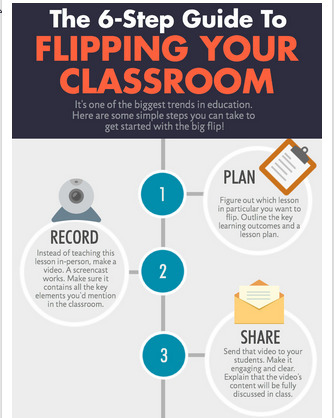
This infographic/visualization provides six steps that show how to flip a classroom. It also makes it clear that after you work through the six steps you must also review what has taken place, revise as necessary and then repeat.

The six steps are:

1. Plan

2. Record

3. Share

4. Change

5. Group

6. Regroup

But to understand what they mean by each of these you should go to the post. Flipping the classroom takes time, but today there are many locations where you can find great videos that will work for you. There are numerous tools available that help you create videos on your own, or take an existing video and add comments, questions, etc., so that it will meet your needs. If you are considering using video as a way to flip your class in the upcoming school year this post also provides links to additional resources that you may find helpful.

Kathy Lynch's curator insight, August 4, 2014 2:18 AM

Thx! Beth Dichter

Randy D. Nichols's curator insight, August 5, 2014 2:00 PM

What the Flip? (A simple explanation of an education trend.)


Keith Hamon's curator insight, November 19, 2014 1:47 PM

This is a sensible approach to flipping your classroom, one lesson at a time.

Scooped by Beth Dichter
August 1, 2014 9:25 PM
Scoop.it!

If You're Designing eLearning for Adults Take Advantage of These 4 Tactics

If You're Designing eLearning for Adults Take Advantage of These 4 Tactics | Eclectic Technology | Scoop.it
Understanding how adults learn, is the first step to crafting an eLearning material adults will actually want to start and finish.
Beth Dichter's insight:

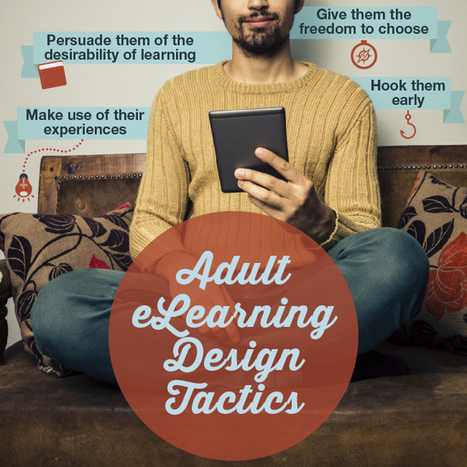
If you are designing an eLearning course for adults are there aspects to consider that are important to the adult learner? This post from SH!FT would say yes. To create courses for adult learners, we must understand how adults learn, their traits and their learning styles.

What is important?

* Hook them Early (and Often)

* Make Use of Their Experiences

* Persuade Adult Learners of the Desirability of Learning Something

* Give Adult Learners the Freedom to Choose

Learn four ways to help hook the adult learner. Find four suggestions on ways to give adult learners more freedom to choose. Click through to the post to learn more.

Avidity Medical Design Consultants, LLC's curator insight, August 2, 2014 10:13 AM

Very insightful article. I especially agree with point #2 and point #4. Point #2 indicates that learners can use past experiences to tap into new ideas. Point #4 indicates that adult learners would like to have the ability to take a more active role in defining their own learning experience. I see an interrelationship between both points because they each describe elements of self-directed learning. The learner is using what they already know to tap into new knowledge (point #2), and then, given the opportunity, they are choosing how, when, and where they acquire the new knowledge (point #4), with consideration given to the knowledge that they have already obtained (point #2). Excellent article, keep up the good work!

Scooped by Beth Dichter
July 31, 2014 9:21 PM
Scoop.it!

Blendspace Joins Wikispaces and TES - Premium Features Now Free!

Blendspace Joins Wikispaces and TES - Premium Features Now Free! | Eclectic Technology | Scoop.it

""Blendspace, formerly known as EdCanvas, is now a part of Wikispaces and TES. The Blendspace service will continue to run as a stand-alone service. The aspect of the merger that has the most immediate impact on teachers is that the premium features of Blendspace will now be free. The premium features allow you to collaborate with other teachers to creation of lessons."

Beth Dichter's insight:

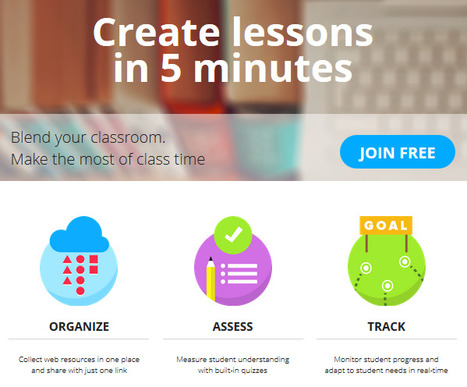
Blendspace is joined Wikispaces and TES and now offers their premium services for free to educators! Why use Blendspace?

* It is easy to organize and share materials.

* The format is visual (which appeals to many learners).

* You pick the topic and you pick the materials: videos, links, images, files, etc.

There are additional features and you may use Blendspace to assess and track student progress. You might consider using Blendspace as a component to introduce blended learning into your class.

This post from Richard Byrne also includes a video that teaches you the basics of Blendspace as well as Flipping and Blending the Classroom.

Gary Harwell's curator insight, August 1, 2014 12:35 AM

That makes sense.


Scooped by Beth Dichter
July 30, 2014 9:17 PM
Scoop.it!

3 Useful Google Docs Add-Ons

3 Useful Google Docs Add-Ons | Eclectic Technology | Scoop.it

"Google Docs Add-Ons are new tools created by 3rd party developers that add functionality to Google Docs. Users can access and search for Add-Ons through the menu bar in any Google Doc or Spreadsheet."

Beth Dichter's insight:

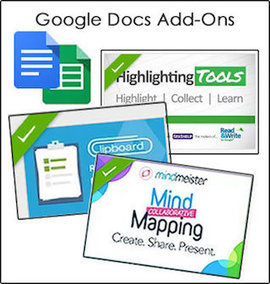
If you use Google Docs and you have not yet checked out the add-ons you might want to look into them. Here are three add-ons suggested by Susan Oxnevad.

* Clipboard by Diigo provides "a sidebar clipboard for managing content." You can copy and paste information onto the clipboard, and move the information into the document as necessary. If you have students using Clipboard by Diigo make sure they also keep track of all their sources.

* Mindmeister is a concept mapping program that will take a bullet point list and create a mindmap.

* Text Help provides highlighting tools.

Additional information on each of these tools is in the post.

Gary Harwell's curator insight, August 1, 2014 2:38 AM

Remember that these are all document by document.

Scooped by Beth Dichter
July 29, 2014 9:51 PM
Scoop.it!

10 Emaciated Terms That Keep Education In A Box

10 Emaciated Terms That Keep Education In A Box | Eclectic Technology | Scoop.it

"Albert Einstein nailed it–'We cannot solve our problems with the same thinking we used when we created them.' That truth will decide whether we develop a 21st-century friendly educational system or continue to tinker at the margins of school."

Beth Dichter's insight:

Do words hold us back? Do they have the potential to keep us in place rather than allowing us to move forward? This post looks at ten words and discusses how each may "influence our behavior and keep us in a box." The ten words are:

1. Lesson

2. Knowledge

3. Rigor

4. Soft Skills

5. High & Low Students

6. 0ff-Task

7. Learning Styles

8. Summer Learning Loss

9. Special Education

10. Brain-Based Learning

Below is an example of how one of these words is explained.

What do you think of when you hear the word off-task? What does research tell us about six-year olds and their ability to focus on one task? The explanation shares that young students who have more time for play also have higher executive functioning skills, yet in the classroom we ask them to sit and to focus one area. In many schools the amount of time for free play and recess has decreased so we can focus on ELA and math.

Learn more about these words and see if you agree with the author. Do you think these words are holding us back?

No comment yet.
Scooped by Beth Dichter
July 28, 2014 10:54 PM
Scoop.it!

Introduction to Google Classroom - Edudemic

Introduction to Google Classroom - Edudemic | Eclectic Technology | Scoop.it
With the recent announcement of Google Classroom, school districts and educators across the country that are currently integrating Google Apps for Education into their classrooms are awaiting the opportunity to gain access to Google’s workflow solution. While there are currently a number of workflow solutions and approaches within Google Drive that classroom teachers can take …
Beth Dichter's insight:

For school that support Google Aps the introduction of Google Classroom may become a great workflow solution for students and teachers. This post provides an introduction to Google Classroom. There is a brief explanation of the features listed below:

* Classroom Setup

* Google Drive Integration

* Student Organization

* Automation

* Due Dates

* Turn in and Return

* Big Picture View

* Communication

There is also a video tutorial of many of the features.

Anne-Maree Johnson's curator insight, July 29, 2014 6:35 PM

Google has just introduced a feature called Google classroom as part of its education suite of apps and programs. Have a look and see what you think.

Scooped by Beth Dichter
July 28, 2014 9:19 PM
Scoop.it!

edshelf - Socially curated directory of education technology

edshelf - Socially curated directory of education technology | Eclectic Technology | Scoop.it
A socially curated directory of websites, mobile apps, desktop programs, and electronic products for teaching and learning.
Beth Dichter's insight:

Edshelf is a great tool for teachers and learners, and it needs help from those who use it, or those who might want to use it in the future. Joyce Valenza, who write NeverEndingSearch, wrote an excellent post that describes the issues that edshelf is confronting, #saveedshelf: a new model. Helping the developers on our team.

It is rare that I advocate for people to support a tool that requires payment, but in this case it is a great tool, and there are some who will choose to support it. This link goes to a Kickstarter campaign that has been started. It includes a video where the founder describes how edshelf started, and unsolicited feedback about the value of this product. If you have used edshelf, or think you would like to in the future, consider making a donation.

Scooped by Beth Dichter
August 9, 2014 8:01 PM
Scoop.it!

Scientists Say Child's Play Helps Build A Better Brain

Scientists Say Child's Play Helps Build A Better Brain | Eclectic Technology | Scoop.it

"When it comes to brain development, time in the classroom may be less important than time on the playground.

'The experience of play changes the connections of the neurons at the front end of your brain,' says , a researcher at the University of Lethbridge in Alberta, Canada. 'And without play experience, those neurons aren't changed,' he says."

Beth Dichter's insight:

Allowing young students free play time is important since it helps set up the prefrontal cortex (where executive functioning is located) to set up neuron pathways that help students to solve problems, make plans and regulate emotions. However, more and more schools are taking time away from recess, to focus on Common Core subjects.

It is critical that this is free play. The post states "No coaches, no umpires, no rule books."

Does your school have a policy about recess? Are students allowed to choose what to do, or are they given choices? This post shares insights that you may want to share with your PTO as well as others whom work in your school.

Nancy Jones's curator insight, August 10, 2014 11:08 AM

Not just young kids, all kids! Studies indicate that the prefrontal cortex isn't fully developed until mid -20's for some. Really confirms the adage, "All work and no play makes Jack a dull boy."

Scooped by Beth Dichter
August 8, 2014 3:53 AM
Scoop.it!

Morphing into a 21st Century Teacher (updated)

Morphing into a 21st Century Teacher (updated) | Eclectic Technology | Scoop.it
Beth Dichter's insight:

Mia MacMeekin provides 27 ways to be a 21st century educator in this infographic. The image above is a small portion of what she provides in the complete infographic.

Click through to see all 27 elements and share your thoughts on this topic. Are there elements that you believe should be included? Do you think that you meet all the elements? Where are your strengths and which areas should you consider upgrading?

Kimberly House's curator insight, August 11, 2014 1:59 PM

I will definitely be using this in the weeks to come. It's a good reminder for teachers.

Scooped by Beth Dichter
August 7, 2014 10:10 PM
Scoop.it!

Replica Edition New York Times Newspaper - Free for K-12

Replica Edition New York Times Newspaper - Free for K-12 | Eclectic Technology | Scoop.it
Beth Dichter's insight:

Did you know that you can get a free digital subscription for the NY Time if you are K-12 classroom (and you must be located in the U.S)? They are currently accepting applications (a pdf that you may download, fill out and return via email with a calendar of your school year also attached).

The subscription provides access to all the daily articles in the NY Times. It is not as robust as the daily paper found online (which is behind a paywall).

What are some of the benefits?
Quoting from the site:

  • Read in newspaper view or article view
  • Easily page through a favorite section with the “Next Article” feature
  • Listen to articles
  • Access with the PressReader app for iPad
  • Read or search 30 days of back issues of The Times — including Saturdays and Sundays
  • Print articles formatted for 8 /2″ x 11″ paper

Head on over to the website and download the pdf so that your classroom may participate in this offer.

No comment yet.
Scooped by Beth Dichter
August 5, 2014 9:47 PM
Scoop.it!

10 Types of Learners You Can Run Into - Online or F2F

10 Types of Learners You Can Run Into - Online or F2F | Eclectic Technology | Scoop.it

"The most challenging aspect of imparting effective online training is targeting the many learners taking the same program. Understanding the different types of learners, summed up in following categories, is beneficial to any designer looking to create personalized eLearning courses."

Beth Dichter's insight:

You may teach online or you may teach face-to-face or perhaps you combine the two, but in all cases the learners we work with have a variety of learning styles. Today we  are told that each student should receive personalized learning opportunities. This post provides a look at ten types of learners you may find in your classroom (on or offline). By understanding the type of learners you will be able to design more effective lessons (and also personalize them to the best of your ability. 

Each type of learner is described in more depth under the visualization.

Tony Guzman's curator insight, August 6, 2014 9:07 AM

Great infographic describing the different types of learners we have in our classrooms.

Anne Pascucci, MPA, CRA's curator insight, August 6, 2014 9:27 AM

Great insights

Scooped by Beth Dichter
August 4, 2014 9:35 PM
Scoop.it!

Establishing A Culture Of “Can” In Your Classroom

Establishing A Culture Of “Can” In Your Classroom | Eclectic Technology | Scoop.it

"The long-term output of any school should be not just proficient students, but enabled learners. An “enabled” learner can grasp macro views, uncover micro details, ask questions, plan for new knowledge and transfer thinking across divergent circumstances. This doesn’t happen by content “knowledge holding,” or even by the fire of enthusiasm, but by setting a tone for learning that suggests possibility, and by creating a culture of can."

Beth Dichter's insight:

One of my favorite videos on growth mindset is Carol Dweck sharing the word yet, specifically where she says that if a student says "I can't do that" she says to tell the student to say "I can't do that yet." To me that is a way to shift the culture of the classroom, where students learn that as time goes on what they are able to do things they could not before.

This post explores this culture of "can", sharing ideas on how you might move your classroom to reach this culture. Three areas are discussed.

1. Use the Gradual Release of Responsibility Model

This is a model that many of us may already use. The post describes it as "show me, help me, let me." In my school we talk about "I do, we do, you do."

2. Intentionally Use the Individual Student as a Culture-Maker

This requires that we find the time as we teach to "honor the contribution of others," specifically our students. Culture does not grow from a top down approach.

3. Diverse — and Authentic — Terms for Success

Creating a classroom that is learner centered, where students also have input to help create authentic learning.

More information on these concepts are in the post.

Nancy Jones's curator insight, August 5, 2014 11:36 AM

Love the ideas here and realize the challenge of the mission. Our kids need to embrace their mistakes as learning opportunities rather than expect immediate mastery and feedback with praise.  i am thinking of making a classroom poster ( or posters) with the Word "YET" in giant letters and use that as our mantra.

Marisol Araya Fonseca's curator insight, August 18, 2014 2:04 PM

Yes!!! Mine is:  You can do it!!!

Scooped by Beth Dichter
August 3, 2014 10:00 PM
Scoop.it!

ePortfolios are AWEsome: The Why, How, and What of Student Digital Portfolios - Tackk

ePortfolios are AWEsome: The Why, How, and What of Student Digital Portfolios - Tackk | Eclectic Technology | Scoop.it
In this session, we will discuss the benefits and purpose of student-created digital portfolios, thoughtfully evaluate considerations for selecting an e-portfolio platform, explore tools for digitally archiving learning artifacts, glean ideas for usi...
Beth Dichter's insight:

This post looks at the use of ePortfolios, focusing on the Why, How and What. Each section includes videos and links to additional resources.

In the Why section you will find:

* A TED Talk

* Six resources that look at the advantages of ePortfolios, their benefits and when to use them, why use an ePortfolio, why ePortfolios matter and more. There are also links to a wide variety of ePortfolios.

* The How section explores planning, platforms and assessments. It also includes a video, as well as links to additional resources.

* The What section explores "what learning artifacts will you include? and "what apps/tools will you use to digitize these artifacts?" Additional resources are also listed here.

If you are considering using ePortfolios this post provides many resources that will help you be successful.

Kimberly House's curator insight, August 11, 2014 1:57 PM

Very thorough guide to using, assessing and making ePortfolios happen. Plenty of tips and suggestions for which apps to use and how to digitise work. Nicely presented and easy to follow. Also does a good job talking about the 'why' of ePortfolios. This is the part I find some of my teachers struggle with.

Ness Crouch's curator insight, April 9, 2015 8:40 PM

ePortfolios are a great way of collecting artefacts digitally. Have you tried this with your students? 

David Bell's curator insight, April 12, 2015 7:26 PM

There are some great links about ePortfolios here. Well worth a look.

Scooped by Beth Dichter
August 1, 2014 9:53 PM
Scoop.it!

Check out 8 posters on best practice for digital devices!

Check out 8 posters on best practice for digital devices! | Eclectic Technology | Scoop.it
Beth Dichter's insight:

As more and more schools move towards a one-to-one classroom, the need for students to understand basic rules and routines around digital devices is critical. Find 8 printable posters that address the following rules.

* Eyes on your own screen

* Keep food and drink away from technology

* Respect the laptop

* Keep your password to yourself

* Think before you print

* Save your work!

* Leave tricky stuff to the experts

* Watch where you click (don't visit unapproved sites)

The visuals will help students understand (and hopefully remember) the rules.

Mauricio Fierro's curator insight, August 2, 2014 10:06 AM
Check out 8 posters on best practice for digital devices!
Scooped by Beth Dichter
August 1, 2014 8:42 PM
Scoop.it!

McKinsey & Company Projects That Common Core Implementation Will Result In Doubling of Dropout Rate

McKinsey & Company Projects That Common Core Implementation Will Result In Doubling of Dropout Rate | Eclectic Technology | Scoop.it
Thanks to Lori Jablonski and Tom Hoffman (I've embedded Lori's tweets below), I learned about a report from the Carnegie Corporation that includes charts created by big-time consultants McKinsey &a...
Beth Dichter's insight:

This report from the Carnegie Corporation predicts that the implementation of Common Core will decrease graduation rates significantly unless "we create small schools and do blended learning." Larry Ferlazzo shares a number of tweets, and also includes a link to the original document from the Carnegie Corporation.

This is information that should be shared, and it is surprising to me that main stream media is not publishing these numbers. We know that many schools (and states) are questioning the speed with which we expect students to meet this new standards, and for many teachers the scores of their students impact their job security. Take the time to read the post, and consider download the pdf of the full report (20 pages). There are many graphics located in the document that provide important statistics.

No comment yet.
Scooped by Beth Dichter
July 31, 2014 8:57 PM
Scoop.it!

Teaching Students Skills to become Better Online Readers

Teaching Students Skills to become Better Online Readers | Eclectic Technology | Scoop.it

Soon after Maryanne Wolf published “Proust and the Squid,” a history of the science and the development of the reading brain from antiquity to the twenty-first century, she began to receive letters from readers. Hundreds of them. While the backgrounds of the writers varied, a theme began to emerge: the more reading moved online, the less students seemed to understand."

Beth Dichter's insight:

The debate about online reading continues? Do students retain more information when they read from books rather than from digital devices? Does reading online present challenges due to distractions? Do students need to be taught skills to become better online readers?

This post explores these issues and many more, providing much food for thought as you read through and learn what research is telling us today. Take the time to explore this article. It may change the way you have students in your classroom work with digital text.

Rosemary Tyrrell, Ed.D.'s curator insight, August 1, 2014 11:44 AM

Interesting article in the New Yorker on another digital controversy. 

Dr. Helen Teague's curator insight, August 3, 2014 9:36 AM
Do students retain more information when they read from books rather than from digital devices? Does reading online present challenges due to distractions? Do students need to be taught skills to become better online readers?
Ruby Day's curator insight, August 3, 2014 5:21 PM

Studies show we are not reading as effectively online as we are with hard copies. This highlights the need for tools to help us read deeper online - e.g annotation type tools. This links to an interesting stuy of year 5 students using collaborative annotation software demonstrating higher performance than the control group's' paper based annotation.

Scooped by Beth Dichter
July 30, 2014 6:02 AM
Scoop.it!

5 Practical Learning Tips Based On How People Do--And Don't--Learn

5 Practical Learning Tips Based On How People Do--And Don't--Learn | Eclectic Technology | Scoop.it

"There has been a large body of work in neuroscience, psychology, and related fields offering more and more insight into how we learn.

Below are five of the top tips from Barbara Oakley, Professor of Engineering at Oakland University, who has faced her own learning challenges (failing middle and high school math and science classes), and has made a study of the latest research on learning. She is also offering a free online course, Learning How to Learn, which starts August 1 on the Coursera platform with co-instructor, Prof. Terrence Sejnowski, a computational neuroscientist at UC San Diego and the Salk Institute."

Beth Dichter's insight:

Are you interested in learning how to learn? This post provides 5 tips that may help you.

1. Get enough sleep to de-toxify your brain

2. Outwit procrastination with the Pomodoro technique

3. Use spaced repetition to remember key facts

4. Use recall rather than re-reading to see whether you’ve learned the content

5. Vary learning/studying environment

Each of these is explained in more detail in the post.

As teachers we are also learners, and it is never too late to become better at learning. Sharing these five tips with our students may help them become better learners. And if this is a topic of interest to you, consider checking out the Coursera course Learning How to Learn that will begin on August 1st.

James J. Goldsmith's curator insight, July 30, 2014 11:27 AM

Five practical and sometimes infrequently used ideas to enhance learning.

Scooped by Beth Dichter
July 29, 2014 9:13 PM
Scoop.it!

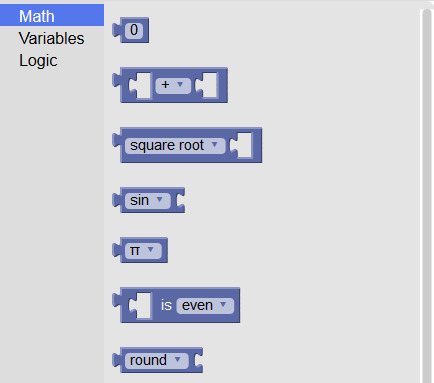
A Block Graphic Calculator

A Block Graphic Calculator | Eclectic Technology | Scoop.it

"Calculators have come a long way since the first ones that could add, subtract, multiply, and divide.  Now, for a modest cost, it’s possible to purchase a graphing calculator.  Or, with your computer, you can put a free one in your browser."

Beth Dichter's insight:

Have you considered a different option? What about a block graphic calculator? This now a common way to teach coding, having students connect blocks together to build code. Blockly has a free online block calculator that provides math (a portion of the options are shown in the image), variables and logic. To the left side of the coding is the graphing calculator.

This type of calculator may help visual learners who may more easily create formulas through the use of blocks. Check it out at Blockly.

Yasemin Allsop's curator insight, July 30, 2014 12:24 PM

This is brilliant !

Scooped by Beth Dichter
July 28, 2014 9:40 PM
Scoop.it!

50 Insane Facts About Plants - Infographic

50 Insane Facts About Plants - Infographic | Eclectic Technology | Scoop.it

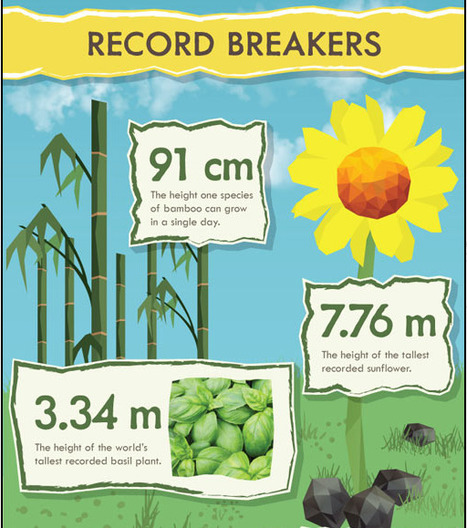
"Plants are all around us - and as well as being pretty to look at, they can also be useful and deadly. We've put together 50 insane facts."

Beth Dichter's insight:

Check out this great infographic that provides "50 insane facts about plants." The image above shows some (but by no means all) of the facts related to record breakers. Other categories on the infographic include:

* Food and Drink

* Plants in History

* Plants Around the World

* Carrion Flowers

* Amazing Plants and Useful Plants

There is also a 2nd infographic that shares the sources used in this one which is located at this link.

This would be a fun infographic to share with students. You might have them try to find facts about plants or other subjects that they could use to create a classroom infographic.

Anne-Maree Johnson's curator insight, July 29, 2014 6:39 PM

fun infographic outlining some facts about plants.

Charlie Dare's curator insight, July 30, 2014 6:33 AM

An interesting piece on background of earths unique and useful plants to mankind in the past ~ 68% of worlds plants endangered ! Caffeine an insect repellent, lots of interesting plant facts with one or two possibilities for growers like mushrooms and dye makers for a possible niche market ~

Georgia's curator insight, July 4, 2018 12:03 PM
This is a pretty awesome infographic about plants and some stunning facts you need to read to believe. Like a bamboo growing 91 cm in a single day! Or the subflower growing to as tall as 7 meters. If you want to nerd out to plant facts read this article.