Eclectic Technology
230.9K views | +6 today
Eclectic Technology
Tech tools that assist all students to be independent learners & teachers to become better teachers
Curated by Beth Dichter
Your new post is loading...
Scooped by Beth Dichter
August 28, 2014 10:23 PM
Scoop.it!

Is Technology Ruining Our Ability to Read Emotions? Study Says Yes

Is Technology Ruining Our Ability to Read Emotions? Study Says Yes | Eclectic Technology | Scoop.it
"We’ve all heard it before, “Kids don’t know grammar anymore because all they do is text,” or “Today’s generation misses everything going on around them because they’re staring at their phones.” But a recent research study by UCLA warns the damage of too much screen time may be even worse than many of us imagined."

Beth Dichter's insight:

How often have you seen students sitting at a table together, but communicating via their cell phones. The eyes are on the screens, not their friends and classmates. 

This post shares that technology is impactint students ability to read emotions. The next question to ask might be c"Can this change?"

The answer appears to be yes. For more information click through to the post.

No comment yet.
Scooped by Beth Dichter
August 27, 2014 9:35 PM
Scoop.it!

Quiz Yourself: How Good Are You at Teaching the Art of Learning?

Quiz Yourself: How Good Are You at Teaching the Art of Learning? | Eclectic Technology | Scoop.it
Test how well you know some of these counterintuitive study tips.
Beth Dichter's insight:

Do you know how your brain learns new information. On August 25, 2014 I posted How Does The Brain Learn Best? Smart Studying Strategies. This post is a follow-up to that post and has five questions. Below is one of the questions with the answers, but to see if you are correct you will need to click through to the post. 

Quoting from the post:

4) Your students each have an important class presentation to make in the coming days, and they need to memorize some material by heart. How much time should they spend studying and how much time practicing from memory?

A. A third of the time reading, two-thirds practicing from memory.
B. 90 percent studying the text — and 10 percent practicing from memory at the end.
C. 50 percent reading, 50 percent practicing.
D. Just read it a few times and sleep on it.

If learning how to learn is something you would like to learn more about, and if you would be willing to participate in a MOOC, Coursera will be offering the course Learning How To Learn again. It will begin on Oct. 3rd, so head over to Coursera to sign up. The course is free (unless you need documentation that you took it, in which case it will cost $49). I am in the final week of the course and would recommend it to you. At some point I will post my final assignment to share.

Gary Harwell's curator insight, August 29, 2014 3:47 AM

Not only do we have to teach English but we have to teach the students how to Learn.

Scooped by Beth Dichter
August 25, 2014 10:41 PM
Scoop.it!

How Does the Brain Learn Best? Smart Studying Strategies

How Does the Brain Learn Best? Smart Studying Strategies | Eclectic Technology | Scoop.it

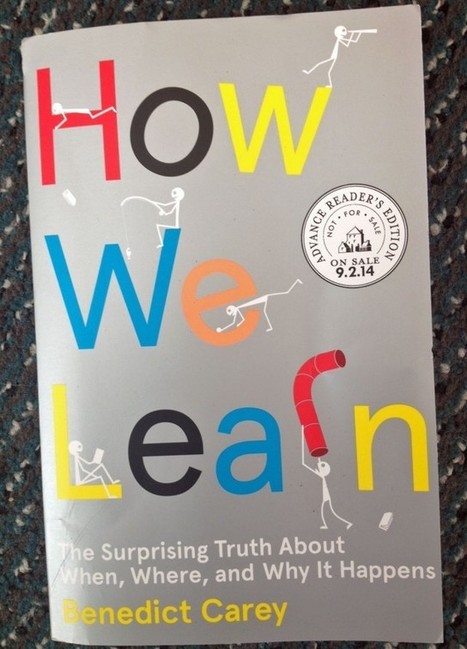
"In his new book, “How We Learn: The Surprising Truth about When, Where, and Why It Happens,” author Benedict Carey informs us that “most of our instincts about learning are misplaced, incomplete, or flat wrong” and “rooted more in superstition than in science.”

Beth Dichter's insight:

How do we learn? This post explores this issue and provides some suggstions on some best practices for studying. 

The author of the post provides three "take-aways" from the book.

* "Forgetting isn't always bad."

* "The brain is a foraging learner."

* "We can be tactical in our learning."

A number of suggestions on best ways to study are also included.

* Rather than cramming study material for a shorter period of time everyday. You will retain more.

* Studying in different locations may be beneficial.

* Taking breaks after intense studying is good. It provides a break for your brain. This is called diffuse learning.

* Rather than rereading material quiz yourself on it to see how much you recall.

Additional suggestions are included in the post and there is more information. 

If this is an area of interest to you Coursera will be running another session of Learning How to Learn, beginning in early October. The course is free unless you want to receive a Certificate. I can vouch for this course as I am currently enrolled and at some point in the near future I will share more information about it. To learn more about the course go to Learning How to Learn. 

No comment yet.
Scooped by Beth Dichter
August 22, 2014 11:08 PM
Scoop.it!

Use Stories in eLearning: 6 Tips to Bring Out Your Inner Storyteller

Use Stories in eLearning: 6 Tips to Bring Out Your Inner Storyteller | Eclectic Technology | Scoop.it

"Stories have captivated us as a species since the dawn of man. Through stories, we have passed on traditions, remembered the past, and carried information across the millennia. 

And it's not just our ancestors who harnessed the power of stories, either. Stories still work to reach people, which is why we see businesses turning to the power of storytelling in branding efforts, marketing campaigns, corporate strategies, and even eLearning courses and business presentations."

Beth Dichter's insight:

How can we engage eLearners? How about using storytelling techniques. Stories engage us and they will also engage students. This post explores this, providing an infographic as well as discussing the power of stories before moving on to explore ways to bring storytelling into eLearning. 

There are six components that are discussed:

1. Know your audience.

2. Use a structure.

3. Appeal to emotions.

4. Intensify the story with visuals.

5. Make the stories relevant to the course.

6. Pay attention to detail.

As always additional resources are linked to in most of the six components with more at the end of the post. The components shared in this post also apply to teaching in a face2fact classroom, or  blended classroom. As you work on new lessons this year consider using these components to help design the lesson.

Gary Harwell's curator insight, August 23, 2014 12:52 PM

Everybody likes a good story.

niftyjock's curator insight, August 24, 2014 6:16 PM

Once upon a time... Narratives are a great way to get information across. 

Jo Blannin - The Know Tech Teacher's curator insight, August 25, 2014 8:00 PM

Do you work with older students? Then you will enjoy this article about storytelling in learning. Great for introducing studnets to the need to structure online presentations as well as traditional, writing tasks.


Reading a good online presentation (from TED maybe) and then asking students to map the presentation to the story outline in this article will reinforce this learning for them.


Let me know if you give this a go - I've done similar activities with videos and story structures in primary schools and the students loved investigating the hidden structure!

Scooped by Beth Dichter
August 20, 2014 11:06 PM
Scoop.it!

Great Back to School Activity for Digital Citizenship

Great Back to School Activity for Digital Citizenship | Eclectic Technology | Scoop.it

"Like it or not, today's students are not just citizens. They are "digital" citizens. This means that educators need to spend time with students on ensuring they know how to be responsible online."

Beth Dichter's insight:

In this post Lisa Neilson shares a great activity to help students learn more about digital citizenship.

There are five steps, which begin with the students thinking about their online reputation and coming up with a sentence that describes it in 140 characters or less.

* Students them would then go to Animoto and create a 30 second video using images that help illustrate their sentence (Steps 2 and 3 in the post).

* Videos would then be uploaded to Padlet.

*Have a movie screening so the students can see others work.

There is much more information in the post and I would urge you to check out the link to the New York City Department of Education Social -  Media page for additional resources.

GwynethJones's curator insight, August 23, 2014 10:18 AM

SWEET! Must to share w/ my teachers!

Jennifer Crutchfield's curator insight, August 23, 2014 10:28 AM

So true that all educators need to do this thanks for sharing @GwenythJones

Scooped by Beth Dichter
August 19, 2014 9:36 PM
Scoop.it!

How to Easily Insert Questions and Quizzes into Videos Using EduCanon

How to Easily Insert Questions and Quizzes into Videos Using EduCanon | Eclectic Technology | Scoop.it

"Have you ever wished you knew how to easily add questions into a video to create lesson content or to help ensure that students are engaging with video content? Well, you can, for free!"

Beth Dichter's insight:

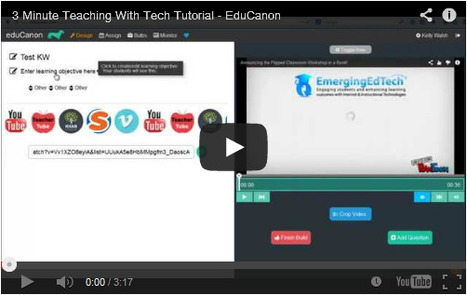
Here is a quick tutorial to teach you how to insert questions into eduCanon. You will need to have a video in mind.
Some additional feature in eduCanon:

* You can crop videos

* You can group videos together for lessons

* You can monitor student progress

"Watch the rest of 3 Minute Teaching with Tech Tutorials on this web page, or by opening this YouTube Playlist."

Gary Harwell's curator insight, August 20, 2014 2:17 AM
Instead of putting on a video and relaxing, why not put in a quiz or some questions.......
Scooped by Beth Dichter
August 18, 2014 9:49 PM
Scoop.it!

Concept Mapping/Graphic Organizers

Concept Mapping/Graphic Organizers | Eclectic Technology | Scoop.it

"Reading Rockets shares that "A concept map is a visual organizer that can enrich students' understanding of a new concept. Using a graphic organizer, students think about the concept in several ways. Most concept map organizers engage students in answering questions such as, "What is it? What is it like? What are some examples?" Concept maps deepen understanding and comprehension." Cast reports: "There is solid evidence for the effectiveness of graphic organizers in facilitating learning." A summary of this finding is that, "When looking across 23 different studies they found a consistent effect on comprehension."


Beth Dichter's insight:

Graphic organizers often help students understand new concepts, and they may help students find misunderstanding or areas of weakness (and strength). This post provides:

* 7 ideas on how to use graphic organizers/concept maps in the classroom

* 5 examples of use in the classroom

* The benefits of graphic organizers

* Concept maps and assistive technology

* Multiple intelligences/learning styles supported

* Sources that provide graphic organizers including a list of online, downloadable, iDevices, Chrome extensions and printables

* A list of websites with additional information

Many great resources are available in this post.

Rosemary Tyrrell, Ed.D.'s curator insight, August 20, 2014 11:41 AM

Some great links in this article to a plethora of resources. 

Sample Student's curator insight, August 20, 2014 8:15 PM

Of great use when making decisions about supporting higher order thinking in assisted learning.

Scooped by Beth Dichter
August 17, 2014 7:07 PM
Scoop.it!

15 Examples of Student-Centered Teaching

15 Examples of Student-Centered Teaching | Eclectic Technology | Scoop.it

Here are "15 examples of teacher-centered learning, and 15 examples of student-centered learning. The text is shown below, but it reads better in the graphic as you can read both side-by-side for comparison’s sake."

Beth Dichter's insight:

Do you wonder what the difference is between student-centered learning and teacher-centered learning? If you do check out this post. They provide a list of 15 examples of each.

Below you will see three sets of examples. The first one is student-centered. The second one is teacher-centered.

1A. Being clear about how to do well in your class

1B. Being clear about how you will promote, measure, and celebrate understanding

2A. Handing students a rubric or scoring guide

2B. Collaborating with students to create the rubric or scoring guide

3A. Helping students master content

3B. Helping students understand what’s worth understanding

Many of the changes are small tweaks, but they will take time and effort. If one of your goals this year is to create a more student-centered learning environment you will find many ideas in this post.

No comment yet.
Scooped by Beth Dichter
August 16, 2014 8:18 PM
Scoop.it!

National Geographic Young Explorer (Student Magazine)

National Geographic Young Explorer (Student Magazine) | Eclectic Technology | Scoop.it
Beth Dichter's insight:

If you work with younger students and you have access to digital devices that access the Internet head over to National Geographic Young Explorer. You will find issues from October 2009 through April 2014. The great thing about these magazines is that the student may have the text read to them, and each word is highlighted as it is read. The site also states that it continues to add new magazines during the school year, so more should be coming soon.

Along with the Listen and Read feature, there are two Teacher Guides for each issue that you may print out. One guide is for Kindergarten and the other is for first grade. The guides include lesson plans, discussion questions, ready-to-copy worksheets and more." There is also a projectable issue available that you may use to present the information to your class as a whole.

This is a great resource to introduce students to science and to informational text (as required by Common Core). For teachers of young students who may not have a science background this website will provide you with a wealth of resources. Have fun sharing this with students and their families.

No comment yet.
Scooped by Beth Dichter
August 15, 2014 9:34 PM
Scoop.it!

Revised Bloom’s Taxonomy – Center for Excellence in Learning and Teaching

Revised Bloom’s Taxonomy – Center for Excellence in Learning and Teaching | Eclectic Technology | Scoop.it
Beth Dichter's insight:

Here is another way to look at Bloom's Taxonomy. The image above is actually interactive. As you mouse over the various colored blocks each will provide information that combines Bloom's cognitive process (which many people in the field of education use daily) and also the knowledge dimension. A short phrase will pop up that can quickly lead to a learning objective.

There is also a table that provides 19 specific cognitive processes based on the cognitive process dimension. A second table provides information on the four knowledge dimensions, with information on the major types and subtypes.

Bloom's Taxonomy is widely used in education and combining these two aspects provides a more robust version of Bloom's work. If you are new to Bloom or you have used his taxonomy, this particular layout may provide you with new information.

Ante Lauc's curator insight, August 16, 2014 1:50 AM

GAU is, as me, in reprocessing and restructuring. I do believe that love and freedom will be created, but we have to be patient.

Rosemary Tyrrell, Ed.D.'s curator insight, August 16, 2014 11:55 AM
This is a useful tool for generating clear student outcomes. 
Ness Crouch's curator insight, September 1, 2014 5:53 AM

This is a really interesting look at Bloom's Revised Taxonomies. It's a fantastic way of integrating the Knowledge Dimension. I love this visual!

Scooped by Beth Dichter
August 14, 2014 7:06 PM
Scoop.it!

Seven Key Takeaways from FIT Teaching

Seven Key Takeaways from FIT Teaching | Eclectic Technology | Scoop.it
Beth Dichter's insight:

Have you heard of FIT Teaching? FIT stands for Framework for Intentional and Targeted Teaching. This post looks at seven key points that came out of a summer institute. For more information on each of the points click through to the post.

* Recognize that wrong answers came from somewhere. Dig deeper to find out where they came from.

* Ask students what they are learning, not what they are doing.

* Separate compliance from competence.

* Automate responses to recurring events.

* Establish the purpose of a lesson. Determine what students should learn and why they should learn it.

* Get kids to produce language, not just hear it. Encourage collaborative work using academic vocabulary.

* Remember that the gradual release of responsibility does not have to be linear.

Some of these points may resonate with you. If one or more do, think about how you will implement it in your classroom this year.

No comment yet.
Scooped by Beth Dichter
August 14, 2014 8:20 AM
Scoop.it!

So Many Fun Ways To Use Blabberize In The Classroom

So Many Fun Ways To Use Blabberize In The Classroom | Eclectic Technology | Scoop.it

"Give any Image a Talking Mouth and Make it an Engaging Learning Opportunity! There are quite a few web 2.0 tools that provide easy and exciting ways to integrate technology in the classroom. One of them is Blabberize, a free online tool that allows you to quickly create talking images, providing some great opportunities to foster student engagement and collaboration."

Beth Dichter's insight:

Have you used Blabberize in your classroom? It is a free tool that allows you to upload an image and then create a talking picture. This post provides may suggestions on how to use it across disciplines as well as a video playlist that will showcase many examples of student work.

Below are a few ideas.

* Research a historical figure and use Blabberize to have them talk about their lives.

* Find a favorite quote from a fictional character and have the character say the quote (and explain it if necessary).

* Think about science and how you could use a talking image to explain an experiment, a change of phase, etc.

* Research an animal and have the animal talk about their habitat, what they eat, etc.

There are many ideas in this post and I suspect you can come up with more. Students need to able to create their own image (or find one that copyright free) and upload the image. It would be best if they wrote out what the image would say and practice it prior to recording using a computer.

The post also discusses how students could collaborate on projects, and notes that if you cannot record with a computer you can record using a phone. Find more information as well as  a link to a video tutorial in the post.

No comment yet.
Scooped by Beth Dichter
August 12, 2014 10:32 PM
Scoop.it!

Assessment, grading and rigor: toward common sense and predictable outcomes on tests

Assessment, grading and rigor: toward common sense and predictable outcomes on tests | Eclectic Technology | Scoop.it
Over the last few months I have worked with a number of high schools and middle schools where the grading and assessment practices simply do not work in a world of standards. The schools are not ma...
Beth Dichter's insight:

As many schools move to Common Core the question of rigor is a key issue. States that have tested with Common Core have seen significant drops in scores. Why? The Common Core tests are more difficult than most local tests.

Grant Wiggins states "to significantly raise local standards of performance seems to mean we have to lower student grades." Most schools do not want to do this (and certainly most parents do not want to see lower grades).

He continues to explore this issue looking at rigor, and noting that rigor is currently defined by 3 elements:

  1. The difficulty of the task or questions
  2. The difficulty of the criteria, as established by rubrics
  3. The level of achievement expected, as set by “anchors” or cut scores.

However, he notes that many schools/districts do not get past #1. Why? "The problem of fair/normed grading!"

Wiggins then goes on to the final section of this post, called "Solution: avoid thoughtless calculations based on false equivalencies."

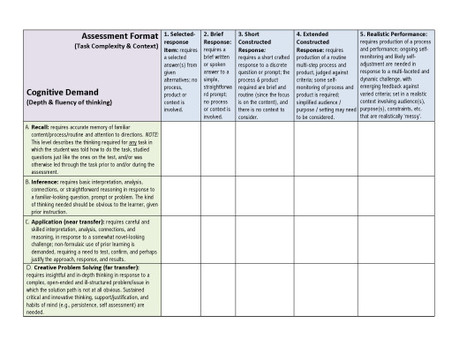
However, there is one more section that provides two helpful pieces of information that may help you create better assessments. It includes Webb's Depth of Knowledge Wheel as well as audit matrix that looks at the Assessment Format (Task Complexity and Context) and Cognitive Demand (Depth and Fluency of Thinking). (See image above).

Additionally, he has included an appendix that has text from Webb for levels 1, 2, 3 and 4 for Math, Reading and Writing.

These are great resources to share with teachers in your district as we move to Common Core.

No comment yet.
Scooped by Beth Dichter
August 27, 2014 10:40 PM
Scoop.it!

Students Get Plenty of Technology Outside of Classrooms. Let’s Leave It There.

Students Get Plenty of Technology Outside of Classrooms. Let’s Leave It There. | Eclectic Technology | Scoop.it
One thousand: That’s approximately the number of instructional hours required of U.S. middle school and high school students each year. Four thousand: That’s approximately the number of hours of digital media content U.S. youths aged 8 to 18 absorb each year. (If you doubt that’s possible, be sure you’re taking...
Beth Dichter's insight:

Annie Paul Murphy writes an intriguing article that looks at what may be happening to students as more and more technology becomes a part of the school day. Check out these two facts.

"One thousand: That’s approximately the number of instructional hours required of U.S. middle school and high school students each year.

Four thousand: That’s approximately the number of hours of digital media content U.S. youths aged 8 to 18 absorb each year." 

Murphy discusses work done by Patricia Greenfield, a developmental psychologist at UCLA. One of her points is that education at school is "formal education" while the time students spend out of school using digital media is "informal education." If this is accurate then would schools be better off having students "read copious amounts of information." 

There is a discussion on how video games build spatial skills and inductive reasoning, and may help "their ability to divide their attention among many things happening at once on the screen" and much more.

This article may make your brain work as you wrap your mind around the information that is shared. If you are looking for an article to discuss with other teachers this might be one to choose. 

No comment yet.
Scooped by Beth Dichter
August 25, 2014 11:02 PM
Scoop.it!

Leap.it - A New Visual Search Engine

Leap.it - A New Visual Search Engine | Eclectic Technology | Scoop.it
Leap.it - a whole new take on search. What are you looking to discover? Try it now!
Beth Dichter's insight:

A new search engine is now available. It is called Leap.it and as the image above shows, it is a more visual search engine than many. You can use the search engine as is, or you can create an account which allows you some additional privledges, including the ability to create a "perspective" where you can bring together a variety of sites in one location.

When reviewing the Terms and Conditions it is clear that students under 13 may not use the app without permission from parents. For more information on this issue take the time to read the Terms and Conditions.

No comment yet.
Scooped by Beth Dichter
August 24, 2014 9:26 PM
Scoop.it!

Bloom's 'Digital' Taxonomy - Printable Reference Table

Bloom's 'Digital' Taxonomy - Printable Reference Table | Eclectic Technology | Scoop.it
This overview shows the progression of Bloom's Digital Taxonomy, how each thinking skill applies in practice, and examples of activities using digital tools.
Beth Dichter's insight:

This version of Bloom's Taxonomy has been extended with a sharing component for Bloom's Digital Taxonomy and is listed in the higher order thinking skills. The functional level of sharing is publicly sharing, publishing and broadcasting.

Along with this printable version of Bloom's Taxonomy you will also find links to five resources. Four of these look at Bloom's (in a variety of ways) and one is a research paper that looks at sustainable innovation in teacher practice.

Randy D. Nichols's curator insight, August 25, 2014 11:12 AM

Remediating Bloom for new literacies.

Dr. Helen Teague's curator insight, August 25, 2014 2:24 PM

This is a wonderful resource with a jpeg link and a description...thank you for scooping it, Beth!

Scooped by Beth Dichter
August 21, 2014 10:50 PM
Scoop.it!

Four Skills to Teach Students In the First Five Days of School

Four Skills to Teach Students In the First Five Days of School | Eclectic Technology | Scoop.it
Alan November explains how he would use the first five days of school to lay the groundwork for a year of learning that goes far beyond the test.
Beth Dichter's insight:

In this post Alan November suggests that there are four skills we should teach our students the first week of school. Before reading on, what do you think are the most important skills to teach those first days of the year? What do you teach that first day? Most of us would probably answer the procedures and policies, and perhaps the rules. That is not November's advice. He suggests that we do the following.

1. Power Researching - Studies continue to tell us that students do not know how to search well. They tend to Google the answer. Creating questions that cannot be googles is not easy, but it is necessary that our students have "high level research skills.."

2. Meaningful contributions - Can your class come up with an idea that will make the world a better place? If they can, and you help make it happen, they will make the world a better place.

3. Ask them about their passions - Would you consider giving students time throughout the year to work on a project that they are passionate about?

4. Build a learning ecology - Our students need to know that we are also learners. What did you learn this summer? Share this with your students. He states "we have to teach students to learn to learn."

There is much more on these 4 skills in the post. Think about trying to do one or more of these this year.

Aris P. Louvris's curator insight, August 25, 2014 7:55 AM

Σε αυτό το post ο αρθογράφος δείχνει ότι υπάρχουν τέσσερις δεξιότητες που θα πρέπει να διδάξουμε στους μαθητές μας την πρώτη εβδομάδα του σχολείου. Πριν το διαβάσετε, ποιες νομίζετε ότι είναι οι πιο σημαντικές δεξιότητες για να διδάξετε αυτές τις πρώτες ημέρες του έτους; Τι διδάσκετε εσείς την πρώτη εβδομάδα; Οι περισσότεροι από εμάς θα απαντήσουμε πιθανότατα τις διαδικασίες και πολιτικές, και ίσως και τους κανόνες. Αντί αυτών ο αρθογράφος προτείνει να κάνουμε τα εξής:
1 Η δύναμη της αναζήτησης - Μελέτες συνεχίζουν να μας υπενθυμίζουν ότι οι μαθητές δεν ξέρουν πώς να ψάξουν καλά. Τείνουν να "γκουκγλάρουν" την απάντηση. Η δημιουργία ερωτήσεων που δεν βρίσκονται στη google δεν είναι εύκολο, αλλά είναι απαραίτητο οι μαθητές μας να έχουν «δεξιότητες υψηλού επιπέδου στην έρευνα ..." 

2 Σημαίνουσες συνεισφορές - Μπορεί η τάξη μας να καταλήξει σε μια ιδέα που θα κάνει τον κόσμο ένα καλύτερο μέρος; Αν μπορούν και σας βοηθήσουν να συμβεί, θα κάνουν όντως τον κόσμο ένα καλύτερο μέρος.
3. Ρωτήστε τους για τα πάθη τους - Θα το σκεφτόσασταν να δίνατε χρόνο σε μαθητές όλο το χρόνο για να εργαστούν σε ένα πρότζεκτ με το οποίο είναι παθιασμένοι;
4. Δομήστε μια "μαθησιακή οικολογία" - Οι μαθητές μας πρέπει να γνωρίζουν ότι κι εμείς είμαστε επίσης "μαθητές". Τι έμαθες αυτό το καλοκαίρι; Μοιραστείτε το με τους μαθητές σας. "Θα πρέπει να διδάξουμε στους μαθητές να μάθουν πώς να μαθαίνουν». 


Υπάρχουν πολύ περισσότερα από αυτές τις 4 δεξιότητες στο άρθρο. Σκεφτείτε προσπαθώντας να κάνετε ένα ή περισσότερα από αυτά φέτος, έτσι για αλλαγή!

Scooped by Beth Dichter
August 20, 2014 10:24 PM
Scoop.it!

Shouldn't Education and Learning Be the Same Thing?

Shouldn't Education and Learning Be the Same Thing? | Eclectic Technology | Scoop.it

"Schooling and institutionalized education have become removed from true, instinctual, and human/humane learning.  Humans have been learning since the beginning of time with major discoveries and innovations historically and currently emerging in spite of school.  This is the biggest problem I have with schools – most are contrived and coercive and do not honor the innate human need and desire to learn, discover, and evolve."

Beth Dichter's insight:

In this post Jackie Gerstein states "to fully understand the purpose of school, the history of its evolution as an institution needs to be understood." After this is discussed she provides refers to an article that discusses "how to bring our schools out of the 20th century."

The next section shares quotes from a wide range of people on schooling. Three are below.

* Education is what remains after one has forgotten what one has learned in school.  Albert Einstein

* Knowledge that is acquired under compulsion obtains no hold on the mind. Plato

* Education is one of the chief obstacles to intelligence and freedom of thought.  Bertrand Russell

She then looks at the messages sent out by our current school system and asks if we are questioning "What is the purpose of school?"

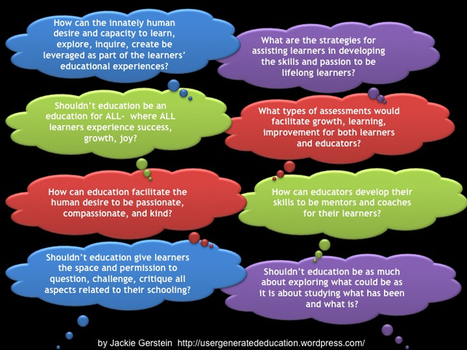
In fact, there are 8 questions that are raised in this post. You can find them in the image above, or you may click through to the post.

Rosemary Tyrrell, Ed.D.'s curator insight, August 22, 2014 10:41 AM

Interesting post which discusses how to pull schools out of the 20th century. 

Rosemary Tyrrell, Ed.D.'s curator insight, August 22, 2014 10:49 AM

Interesting post which discusses how to pull schools out of the 20th century. 

Ian Lowe's curator insight, May 24, 2015 3:55 AM

student at the heart of learning. problem based and context based learning key for this. students will often ask " why are we doing this?" if they can apply the lesson to their life it then becomes obvious why they are learning

Scooped by Beth Dichter
August 19, 2014 6:15 PM
Scoop.it!

The Most Dangerous Phrase In Education

The Most Dangerous Phrase In Education | Eclectic Technology | Scoop.it

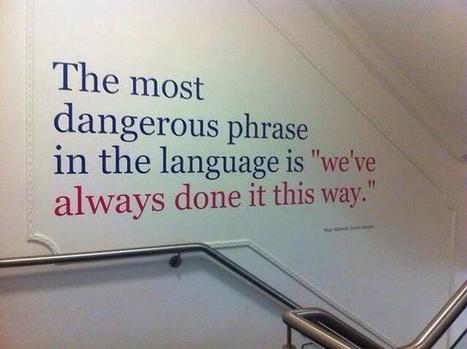
"I was speaking (tweeting) with Mark Barnes tonight, and he mentioned the idea of challenging existing forms and practices. And then someone tweeted the above image–a quote attributed to Rear Admiral Grace Hopper, according to the image source globalnerdy.com–and I was happy and favorited and saved and blogged.

The most dangerous phrase in the language is “we’ve always done it this way.” Which applies to education, too."

Beth Dichter's insight:

How many times have you heard the phrase "We've always done it that way" but you are aware that the way it was done is not working? What if this year you choose to try new ways, such as project-based learning, or allowing students to help write rubrics. Take a few minutes as we enter this new year and decide what you might like to do differently. Make sure to collect the data, but be creative and push the envelope. Miracles may happen!

No comment yet.
Scooped by Beth Dichter
August 17, 2014 9:09 PM
Scoop.it!

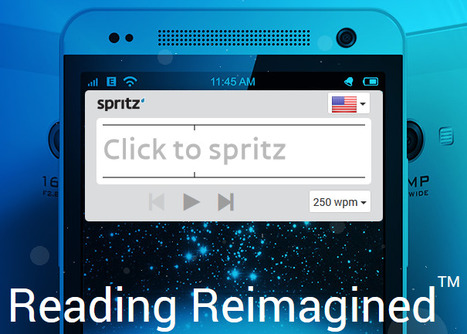
Spritz - An Amazing Reading Tool

Spritz - An Amazing Reading Tool | Eclectic Technology | Scoop.it

"Spritz’s mission is to change the way people read and make communication faster, easier, and more effective."

Beth Dichter's insight:

Spritz is a digital tool that allows you to read one word at a time and you can set the speed. You read the "text one word at a time in our “redicle,” a special visual frame we designed for reading."

Words can be read starting at 100 words per minute up to 1000 words per minute.
Spritz will work English, Spanish, French, German, Russian and Korean. More languages will be added.

This tool is worth looking at because it may help some students who struggle with reading. The text has to be accessible online and does work on many platforms. For more information head over to the website.

Latisha Ford's curator insight, August 18, 2014 3:36 PM
I have already used it and I'm in love!!
Scooped by Beth Dichter
August 16, 2014 8:53 PM
Scoop.it!

Self-Assessment Inspires Learning

Self-Assessment Inspires Learning | Eclectic Technology | Scoop.it

"Self-reflection is self-assessment, and one of the most significant learning tools we can model for our students. Ultimately, we want our children and adolescents to be the self-assessors of their work, dispositions, and goals. Research repeatedly reports that the difference between good teachers and superior teachers is that superior teachers self-reflect."

Beth Dichter's insight:

We ask our students to reflect on their work, but do we ask them to reflect on their social and emotional development? This post from Edutopia looks at the importance of self-reflection in these areas.

The author discusses how the brain is wired to do self-assessment, stating:

'When we teach to a child's or adolescent's brain, we empower that student with the "inner resources" that directly affect his or her ability to pay attention, engage, and create meaningful learning experiences. School culture is simply about relationships, and the brain is relational organ designed to survive, think, and feel.'

She has also uploaded three great documents that you may print out and use with your students. These documents are:

* Self-Assessment Rubric for Social and Emotional Development

* Social and Emotional Development Daily Goals

* Social and Emotional Development Questions for Reflection

Working with social and emotional development as an avenue for self-reflection may be new to you, but to help our students gain this ability to self-assess make create changes in the classroom that lead to students feeling safer.

David Baker's curator insight, August 24, 2014 8:08 PM

The tools to help teachers and students to reflect on their work is impressive. I appreciated the downloadable rubric and questions. I see this as a source text for a graduate seminar. Helping students to develop the ability to self-assess will allow them to grow just as teachers grow and excel from reflection.

Scooped by Beth Dichter
August 16, 2014 7:10 PM
Scoop.it!

Seven Web-based Tools for Delivering Flipped Lessons

Seven Web-based Tools for Delivering Flipped Lessons | Eclectic Technology | Scoop.it

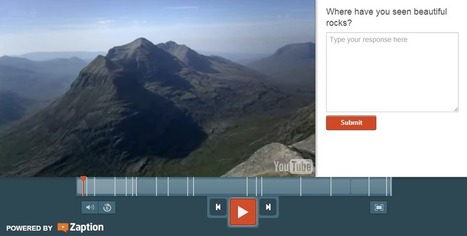
"This fall there will be teachers trying the flipped classroom approach to lessons for the first time. In the right setting the flipped classroom model can work well. My favorite tools for creating flipped lessons include the option to insert questions for students to answer while watching the video instead of waiting until the end to answer a series of questions. I also like tools that provide students with the opportunity to submit questions to their teachers while they are watching videos. These tools offer those options."

Beth Dichter's insight:

The tools covered in this post by Richard Byrne are:

* eduCanon

* Teachem

* VideoNotes

* Blubbr

* Zaption

* EdPuzzle

* Blendspace

You will find a video tutorial both eduCanon and Blendspace. Bryne describes each tool in detail in his post, making it easier for you to choose which ones will meet your needs.

Rosemary Tyrrell, Ed.D.'s curator insight, August 17, 2014 11:31 AM

The tools covered in this post by Richard Byrne are:

* eduCanon

* Teachem

* VideoNotes

* Blubbr

* Zaption

* EdPuzzle

* Blendspace

You will find a video tutorial both eduCanon and Blendspace.Bryne describes each tool in detail in his post, making it easier for you to choose which ones will meet your needs.

Ness Crouch's curator insight, September 1, 2014 5:55 AM

There are a couple of tools here I haven't tried. 

Scooped by Beth Dichter
August 15, 2014 9:14 PM
Scoop.it!

53 Ways to Check for Understanding - from Edutopia

Beth Dichter's insight:

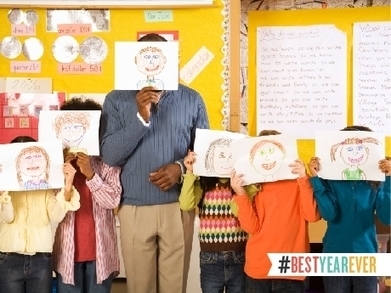
Edutopia is providing great resources using the hashtag #bestyearever. This will take you to a pdf that provides 53 ways to check for understanding. Below are three of the ideas:

* Invent the quiz: Write 10 higher-order text questions related to the content. Pick 2 and answer them in a page.

* Misconception Check: Give a common misconception about a topic, students explain why they agree or disagree with it.

* Muddy Moment: What frustrates you and confuses you about the text? Why?

As many of are just beginning or will shortly begin a new year the 53 ideas may provide you with some new ways to check for understanding. For more information download the pdf and you might also check this this post from Edutopia, Dipsticks: Efficient Ways to Check for Understanding, where the author discusses assessment, with a focus on Alternative Formative Assessment (AFA) strategies, which generated the list found in the pdf.

No comment yet.
Scooped by Beth Dichter
August 14, 2014 4:30 PM
Scoop.it!

Great Google Search Strategies Every Student Can Use - Infographic

Great Google Search Strategies Every Student Can Use - Infographic | Eclectic Technology | Scoop.it

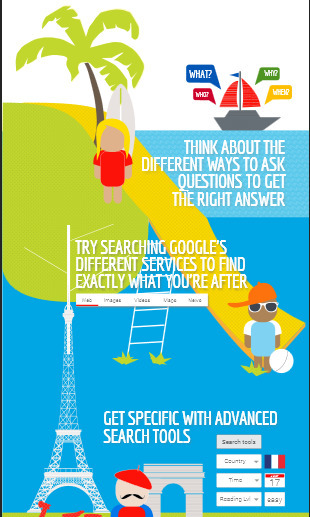
"A couple of years ago I published 10 Google Search Tips All Students Can Use. In that post I included a small PDF to distribute to students. The folks at Canva.com took a look at the post and turned it into a slick infographic for me. You can view the infographic below. Click here to download it from Box.com where I have it hosted."

Beth Dichter's insight:

Canva was kind enough to take a great pdf file that Richard Bryne created on 10 Google Search Tips All Students Can Use and create an infographic. Since we know visuals are important to many learners, take the time to check this out and to share it with your students. Also remember that many search techniques that work with Google also work with other search engines.

No comment yet.
Scooped by Beth Dichter
August 13, 2014 10:11 PM
Scoop.it!

Four Ways to Think About Using ThingLink - Rethinking ThingLink

Four Ways to Think About Using ThingLink - Rethinking ThingLink | Eclectic Technology | Scoop.it

"Thinglink is a powerful tool, and some new uses are making it even more compelling. Beyond creating pictures with links, images, and videos, a “next level” exists that turns ThingLink into a powerful organizer, aggregation tool, and curator."

Beth Dichter's insight:

ThingLink is a great tool for educators, and with their free educator account that allows you to create a classroom your students may also have accounts. This post suggests four ways you might use ThingLink with your students:

1. Student Organizational Tool

2. Digital Portfolios

3. Showcasing Classroom Learning

4. Assignment and Task Organizer

More information is available in the post on these suggestions. If you are new to ThingLink this post may provide you with some new ideas. There are also three ThingLink images that have links embedded in them that you might check out, as well as one image that is by a student. You cannot see the links, but you can see how the students organized their work. If you have not used ThingLink check out their website and create an account. Then have fun playing.

Rebekah Lee's curator insight, August 15, 2014 3:29 AM

A pretty nifty way to insert signposts on a screenshot to display  pop up instructions

W. Bradley Gooderham's curator insight, August 15, 2014 1:45 PM

Whoa, just whoa.   ThingLink is so cool and what a great way to densify creative products and engage a diversity of learning pathways!    I am going to include this in my next resume for sure.

Ness Crouch's curator insight, April 22, 2015 8:17 PM

Thinglink is one of my favourite tools :)