"It’s easy for an eLearner to “zone out” when faced with complex course content, especially with limited existing knowledge of a topic. The instructional design challenge is how to explain complex content easily. Start by considering some premises fundamental to eLearning design."
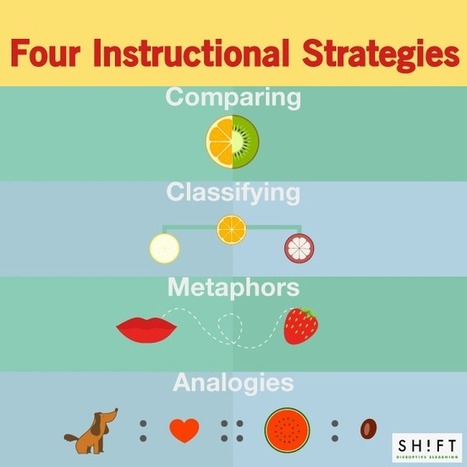
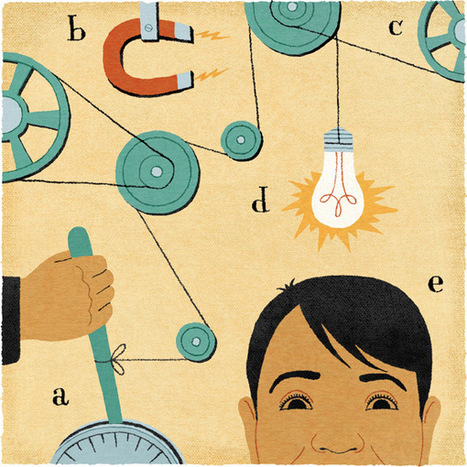
In any course, face2face or online, one of our goals as teachers is to help students move take previous knowledge and extend it to new areas. This post provides four instructional strategies that help students make these shifts:
* Comparing
* Contrasting
* Metaphors
* Analogies
These four strategies are similar in that they require learners to compare at least two items and find similarities and differences.
They provide a "simple technique" that helps students "master complex content."
Additional information is available on each of these strategies, as well as links to additional resources.
En el desarrollo de un curso en línea es importante considerar el formato y el diseño del curso. Cómo se presenta sí afecta la experiencia del estudiante y su posible éxito (o no). Nosotros como profesores debemos facilitar la experiencia de aprender en línea.
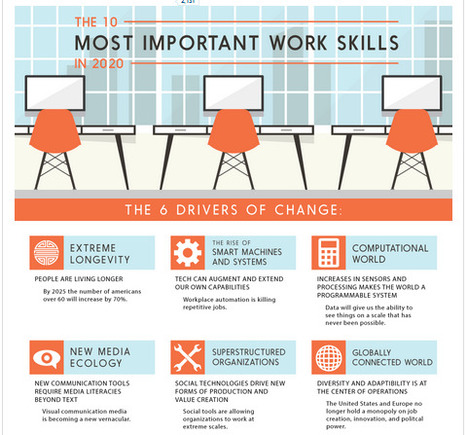
What skills do your students need to have if they are entering the workforce in 2020 or beyond? This infographic provides one view of critically needed skills by providing:
* Six drivers of change (as shown above)
* Ten future work skills
Here are two examples of future work skills provided:
* Computational Thinking
* Design Mindset
Consider sharing this infographic with students and have the students discuss what they think. Do they agree with the drivers of change and the future work skills? Would they want to do some research and create an infographic on a particular component? There are many ideas in this that could lead to a range of projects.
"In order for our learners to see how designing information changes how it is viewed, the students this year placed their visual infographics side-by-side with their linear notes to see the transformation. It was the “ah ha” moment, when they could examine how the delivery of content mattered and how the deliberate choices in font hierarchy, color selection, and placement changed the way others perceived the ideas."
What a difference a visual can make? Check out the projects shown in this post. Compare the linear version (text only) with a visual that has the same information but presented in a completely different way. Which one do you think your students would be able to drawn to?
In this post ASIDE provides a bit of the history of how they have gone about teaching their students to create visuals (also known as infographics).
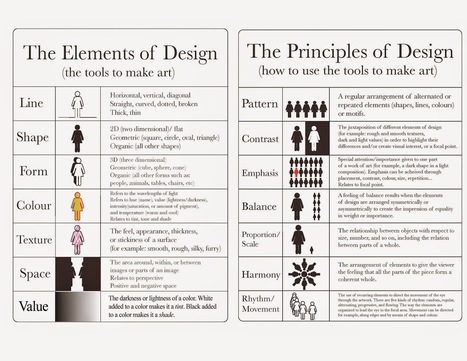
Along with providing the visual and the linear version of three projects they also provide two charts:
* The Elements of Design (the tools to make art)
* The Principles of Design ( how to use the tools to make art)
There are many free tools that help students create visuals. If you have been considering a project that would have your students take part in this type of project this post provides valuable information that will help the project run more smoothly.
"Effective learning is not the outcome of encouraging students to passively consume and regurgitate reams of information verbatim. Rather than allow learners to simply become recipients of study notes and material, teachers need to encourage students to both physically and mentally engage in active learning."
If you are looking for a new resource that may help your students become more engaged in their studies ExamTime may be a new tool to use. This tool allows students to "proactively direct their own learning."
A number of teachers share their views on using ExamTime. One teacher stated "This powerful teaching strategy “generated excellent questioning and analytical skills in students and allowed them to have constant access to resources on a platform they find convenient.”
ExamTime allows students to use build flashcards, mindmaps, quizzes, and to take notes, plus it is free.
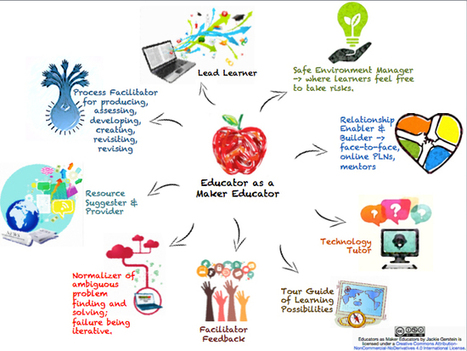
If you are interested in Maker Education this post from Jackie Gerstein is worth checking out. She provides three visuals, all of which are also put in ThingLink, so each has great resources linked to the image.
The three images are:
* Educator as a Maker Educator
* Perfect Storm for Maker Education
* A Making Reflection (designed for students this could be used in a variety of ways)
There is also a slideshareThe Mindset of a Maker Educator that provides links to a range of materials.
"Our world is changing at an unprecedented pace. To prepare our students, lessons must go beyond the "3 R's" and foster 21st century skills. Skills like critical thinking, communication, collaboration and creativity will be essential for students to take on the challenges and opportunities that lie ahead."
If you are aware of the Did You Know videos this one is similar in sharing how quickly our world is changing. Consider sharing this at a faculty meeting or with parents. It is also a great video to share with teachers on a professional development day.
All this is true so where do we start? Children do not start learning when they go to school. They start learning the moment their eyes open. Parents can help their children activate their brains and create fantastic neural networks. All children can encompass all the different styles of learning; Visual:; Auditory; Verbal; Kinaesthetic: -Using touch and taste to explore the information; Logical: a mathematical approach to concepts; Interpersonal -Learning in groups; Intrapersonal - Learning alone. Try some of the early learning from home school resources.
Imagine for a moment that all human beings had the same IQ, but that some of us knew how to tap into it better than others. How would we approach educati
What habits and strategies to skilled learners have that other learners may be missing? And can others learn them? The answer to the second question is yes, that can be learned through practice. As to the first question, some of the habits and strategies are below, but you will need to click through to the post to find the rest of them.
1. Skill learners think about their own learning.
2. Skilled learners ask more questions.
3. Skilled learners make mistakes work for them, not against them.
4. Skilled learners use previous learning to help promote new learning.
Imagine trying to read a sentence when every other word looks like made-up gibberish. It’s exhausting to read the sentence over and over again, trying to put together the meaning. That one troublesome sentence is followed by another… and another… and another… You know it’s not your fault – it’s the text doesn’t make sense. …
Did you know that it is estimated that 1 out of 5 people struggle with dyslexia (and often do not realize it)? This post provides a range of resources that look at dyslexia. The resources are grouped in four areas:
* Understanding Dsylexia
* Identifying Dyslexia
* How to Teach Dyslexic Students
* Personalizing Dyslexia
The resources include videos and articles/posts as well as a link to a great website at Yale. And if you have a student in your class how is dyslexic they might be interested in learning that the following people were also dyslexic: Albert Einstein, Steven Jobs, Walt Disney, Tom Cruise and Steven Spielberg were also dyslexic.
very worthwhile! Did you know that th earliest sign of dyslexia is difficulty telling right from left? and that the kids will blithely interchange hands, not even knowing that they're doing it?
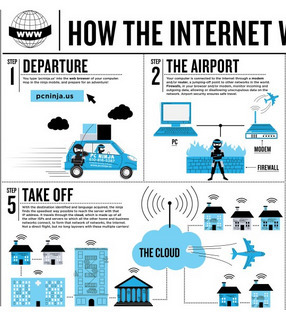
Do you understand how the Internet works? Can you dissect a URL? How much does a terabyte hold? These questions (and several others) are answered in a number of infographics created by Abby Ryan Design and available at this website. If you teach students about these concepts this may help many visual learners in their understanding. The infographics found here are:
* Dissecting a URL
* How the Internet Works
* The Evolution of Computers
* How much does a TB Hold?
* 7 Commandments of Computer Use
* 10 Signs Your Computer has a Virus
* Anatomy of a Ninja
Have fun exploring and sharing these with your students.
"A few years ago, I came across some interesting research by cognitive psychologist Ronald T. Kellogg. He claimed that the mark of an expert writer is not years of practice or a hefty vocabulary, but rather an awareness of one’s audience. This made sense to me, and I wondered if it were true in other disciplines as well."
As teachers many of us recognize the importance of metacognition. This post looks at current research and discusses how the research supports "the role of metacognitive thinking in becoming an expert."
Nine areas are discussed. They include:
* Sciences, which include Mathematics, Computer Programming, Engineering and Medical Sciences
* Arts, which include Fine Arts, Writing and Communication and Music
* Education, which includes Teaching and Learning
Students may not be aware that their answers are incorrect, or that they do not have an understanding of the text they are asked to read. These students need to be taught that metacognition, the 'awareness and understanding of one's thought process' in key to becoming an expert.'
Dozens of free web tools and ideas that can pack a technology integration punch and kick those lessons up a notch Are you tired of delivering the same old
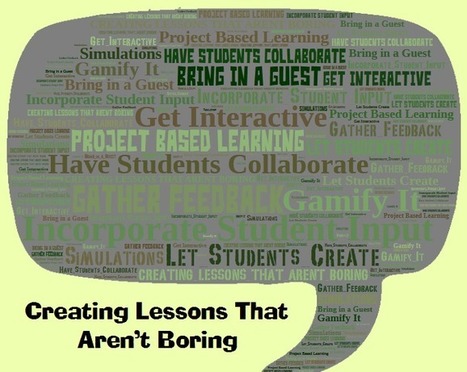
How can we create more engaging lessons? Using technology may provide an assist. and this post shares 8 ways you can leverage technology to help your students learn and to have creative lessons. The areas discussed are:
* Incorporate Student Input and Gather Feedback
* Gamify It
* Let Students Create
* Get Interactive
* Have Students Collaborate
* Project Based Learning
* Simulations
* Bring in a Guest or Two
Each area provides links to a variety of tools and resources.
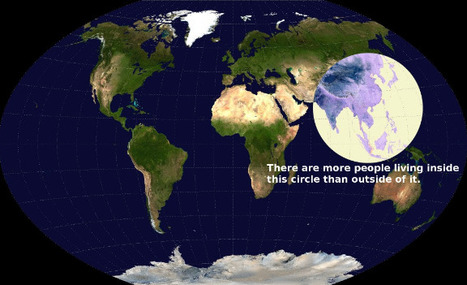
If you are looking for some maps that will have students scratch their heads and consider come concepts in a new light this post will provide you with 22 choices. The one above intrigued me. It shows a map of the world, and has a circle that shows where more people live than the rest of the world. I suspect this image would bring up many questions, and that many would be interdisciplinary. Click through to the post to find many other great maps and charts.
If you are looking for some maps that will have students scratch their heads and consider come concepts in a new light this post will provide you with 22 choices. The one above intrigued me. It shows a map of the world, and has a circle that shows where more people live than the rest of the world. I suspect this image would bring up many questions, and that many would be interdisciplinary. Click through to the post to find many other great maps and charts.
"Financial literacy is about much more than balancing one's (online) checkbook. Financial literacy represents a cross-curricular mindset, a sophisticated understanding of how money, media, and messaging unite in the public sphere."
Can we teach students in elementary and middle school the concepts of financial literacy? With the right resources the answer would be yes.
ASIDE has provided a range of excellent resources in this post. You will find an excellent infographic that covers the Story of Money, beginning with bartering animal hides and teeth as well as shells up to a gold coin minted in Australia in 2011 that weighs (take a breath) 2,231 pounds. (There is a great math problem to be solved.)
A number of videos are also provided. One looks at student debt and one is a TED-Ed video.
There are also additional resources provided.
Financial literacy is an important concept for students to learn, and I would think the earlier they understand the concepts the better off they will be. To learn more click through to the post.
"Is your capacity for learning is fixed or fluid? Can you improve your intelligence and talents through hard work and practice, or are you stuck with the brains you’ve got? Stanford psychologist Carol Dweck says most of us have either a “fixed” or “growth” mindset when it comes to learning. Most of us can get through sixteen years of schooling regardless of which mindset we have, but when it comes to lifelong learning–learning for the sake of learning, without outside pressure–only a growth mindset will cut it."
We want our students to become lifelong learners? To become a lifelong learner it is essential to have a growth mindset. This post begins with a discussion of Carol Dweck's work on growth and fixed mindset, and moves on to provide 25 practices that help to foster lifelong learning. Five of the practices are listed below. There are an additional twenty in the post and each is explained in more depth.
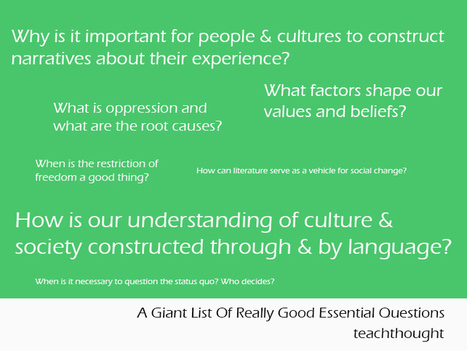
"Essential questions are, ask Grant Wiggins defines, “‘essential’ in the sense of signaling genuine, important and necessarily-ongoing inquiries.” These are grapple-worthy, substantive questions that not only require wrestling with, but are worth wrestling with–that could lead students to some critical insight in a 40/40/40-rule sense of the term."
If you are looking for a long list of essential questions this post may be just what you are looking for. There are over 100 essential questions divided into 20 categories. Some of the categories include:
* Social Justice
* Culture: Values, Beliefs & Rituals
* Constructing Identities
* Heroes and "She-roes"
* Nature in the Balance
* Our View of the World and Ourselves
Have fun exploring this extensive list. Be aware that the focus is Humanities and the Arts. If you find it useful and would like to see more that promote STEM inquiry make sure to leave a message in the comment section at te@chthought.
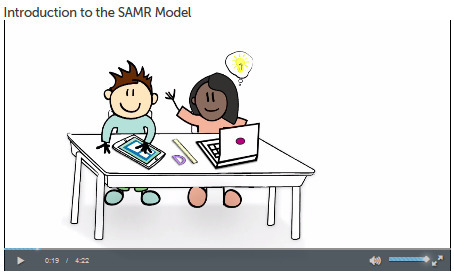
"Dr. Ruben Puentedura developed the SAMR model as a way for teachers to evaluate how they are incorporating technology into their instructional practice. You can use SAMR to reflect upon how you are integrating technology into your classroom."
There are many models one can look to when integrating technology into the curriculum and one that is often spoken about is SAMR. SAMR allows teachers to learn how to move from enhancing curriculum to transforming curriculum.
Think of climbing a ladder.
The bottom rung of the ladder would be substitution.
The second step would be modification.
The third step would be augmentation.
The fourth step would be redefinition.
The video takes an example and shows how it changes as it moves up the ladder.
There are also a number of reflection questions provided that may help you understand how to evaluate each of the areas and move your students to use more high order thinking skills (HOTS) as well as impact student achievement.
There are many videos available that explain SAMR. This one does an excellent job and provides some extra tips...and it in just over 4 minutes in length!
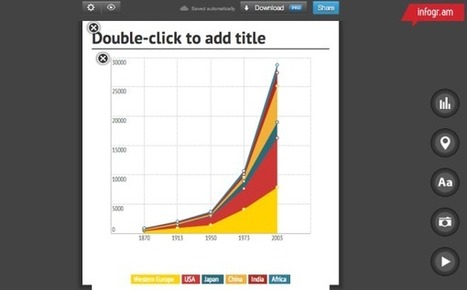
Here is an up-to-date review of five tools that allow you to create infographics. Each tool is described. There is a list of pros and cons for each tool. All have free versions available, and some have more robust versions that cost additional money.
The five tools that are discussed are:
* Visme
* Canva
* Easel.ly
* Piktochart
* Infogr.am
Providing opportunities for students to create infographics allows them to create graphs, use a different style of writing, and have some fun while showing that they understand key concepts and ideas.
If you’re a teacher who grew up in the pre-Internet era, you understand how tech innovation has revamped the educational landscape. Gone are the days of the blackboard and mimeograph. Teachers today carry a heavier (and more complicated) toolbox than ever before. The question is, how efficiently are you using your tools? Inviting Students to
Bringing technology into your classroom can create major shifts, and planning ahead is a good idea. This post shares a guide that has 4 strategies to assist you. The examples provides are for a first grade classroom, but they will provide a foundation for many grade levels.
Strategy 1: Do your homework. This focuses on three areas - lesson planning, legwork and troubleshooting.
Strategy 2: Identify learning goals. This section provides two samples and discusses the value of learning goals.
Strategy 3: Step away from the computer. Keep an eye on your class. You may need to move from 'tech time' to other modes of learning more quickly than planned.
Strategy 4: Capitalize on their desire to explore. Prepare lessons and realize that the students work may lead to questions that provide options for exploring other areas.
There are many helpful ideas in this short guide. With younger students you may want to allow exploration by using a tool such as Symbaloo, where you can create links to websites that you have vetted and allow students the ability to go to new places that you know are safe.
Technology learning is less structured than traditional learning. While it’s important to prepare lessons wisely, there comes a point when you must “let it go” and give in to the human desire for freedom of exploration.
"Not only does project based learning motivate students because it is an authentic use of technology, it facilitates active learning, critical thinking, collaboration, and creativity. Projects begin with a driving question–an open-ended question that sets the stage for the project by creating interest and curiosity."
This post by Tony Vincent provides an in-depth look at how to craft driving questions that promote project based learning. It begins with a discussion of why you would choose to use driving questions and then turns to projects and shares what he believes makes a good project, one that will make a "dent" in the world.
Additional areas explored include:
* What comes first,the driving question or the learning goals?
* Who writes the question?
* The many types of driving questions (and the list includes seven categories) as well as resources that will help you craft a driving question.
* Refining the question
* Outcomes
* Branching questions
There are quite a few examples of driving questions provided as well as links to some additional resources.
If you are planning on having project based learning a component of your classroom this post provides great foundational material to help you create a great driving question.
"This afternoon at the ACTEM conference I presented an update version of my Best of the Web presentation. The slides from that presentation are embedded below."
Richard Byrne has updated his Best of the Web presentation. This version provides over 40 great websites/tools that you may want to check out. You should be able to find more information about each resource on this website also. Below are a few of the tools that may be new to you.
* Kahoot
* Canva
* Lucid Press
* Too Noisy
* JellyCam
There are many more in this post. As you watch the embedded presentation you may click on a link and go directly to the website (which opens in a new window).
"When it comes to successful eLearning design, everybody should agree that there’s no such thing as too much information about how the human brain operates. It’s wired for social learning. Our respective environments actually shape our brains and the rest of our bodies."
SH!FT has published a new post that looks at how one can meet social learning needs in an online environment. The post includes a link to a short video (~3 minutes) that looks at "the application of neuroscience to organizational development."
The six areas are also found in a face2face environment (although there may be students whom do not experience all of them).
To create a more effective eLearning course consider these areas as you design it:
1. Belonging to a group
2. Ability to express
3. Ability to compete
4. Ability to support and be supported by other learners
5. Ability to see what's being learned
6. Excitement about applying learning
More information is available on each of these concepts in the post.
SH!FT has published a new post that looks at how one can meet social learning needs in an online environment. The post includes a link to a short video (~3 minutes) that looks at "the application of neuroscience to organizational development."
The six areas are also found in a face2face environment (although there may be students whom do not experience all of them).
To create a more effective eLearning course consider these areas as you design it:
1. Belonging to a group
2. Ability to express
3. Ability to compete
4. Ability to support and be supported by other learners
5. Ability to see what's being learned
6. Excitement about applying learning
More information is available on each of these concepts in the post.
It makes since that learning is also changing–becoming more entrepreneurial than directly didactic. That is, more learner-centered ... than teacher-controlled."
This post from te@chthought provides an embedded slideshare, Designing Digital Futures. The post pulls out some of the information found within the slideshow. The post looks at
Architecture of Participation: 7 Characteristics of Future Learning which are defined as:
* Collaborating
* Tagging
* Voting
* Networking
* User-Generated Content
* Tools
* Sharing
and also Communal Construction.
Take some time to check out the slideshare. There are many great slides that will make you pause and think about what may be taking place in your classroom.
How do you teach someone to be creative? That is a question that many of are asking ourselves as we work with 21st century learning skills. This infographic provides 40 ways to increase your creativity, and would be great to post in your classroom. You might ask students what they think would work for them, and have them design a poster for your classroom or to share with your school.
"High school history has a tremendous obstacle to learning — getting students enthusiastic about reading difficult texts. When I teach World History to my 9th graders, I have come up with a list of 6 common challenges I face when trying teach reading comprehension. Here’s a glimpse into how I meet these 6 challenges and help my students win!"
Vicki Davis shares her insights in working with students on informational text, specifically in history (but applicable to other subjects).
The infographic located in this posts looks at six challenges that students may face, and provides insights that you may use to meet them with your students.They six challenges are listed below, with additional detail found in the post.
1. Did the student read the text?
2. Did the student comprehend the text?
3. Where does the student struggle?
4. How can you give meaningful feedback to the students?
5. How can you get meaningful data to help your whole class?
6. How do I align this with standards?
Then Davis raises an important question: "So now, how do we meet these challenges and teach nonfiction text, put questions in the text, improve the questions, personalize learning AND align with standards?"
She provides the answer by introducing a website that is new to me, Actively Learn. Davis provides a great review of the site and shares what she sees and pros and cons. There is a freemium version and a paid version, so you may choose to try it out and see how it works.
Reading comprehension is so important. There are so many children who can decode brilliantly but have difficulty with comprehending...an essential part of reading. Good tips.
You will need to click on LogIn (upper right hand corner) and will be given the option of creating a new account.
There are several tools offered to help make life easier for teachers. You will find a Lesson Plan Builder, a Quiz Creator and StoryBoard tools.
You can then create accounts for your students. The site will give them access to your material as well as additional resources. You will find over 700 resources in Spanish.
PBS provides access to many great programs. This site may be useful for projects or specific units.
To get content containing either thought or leadership enter:
To get content containing both thought and leadership enter:
To get content containing the expression thought leadership enter:
You can enter several keywords and you can refine them whenever you want. Our suggestion engine uses more signals but entering a few keywords here will rapidly give you great content to curate.


 Your new post is loading...


































If you are taking the CIS courses or have an online course, i would certainly look into this. Very relatable information and content!
Thx Beth Dichter
En el desarrollo de un curso en línea es importante considerar el formato y el diseño del curso. Cómo se presenta sí afecta la experiencia del estudiante y su posible éxito (o no). Nosotros como profesores debemos facilitar la experiencia de aprender en línea.