



Whether you need to brush up on a skill or dive head first into a new topic, there are many great education apps. Here are six we like.

 Your new post is loading...
 Your new post is loading...
Your new post is loading...
 Scoop.it!
Whether you need to brush up on a skill or dive head first into a new topic, there are many great education apps. Here are six we like. 
No comment yet.
Sign up to comment
Scoop.it!

Creating videos on the iPad has become such a powerful feature that some people have over looked an amazing feature that the recent update to GarageBand brings; 'Jam Session'.
Scoop.it!
From
ht

A professional learning community where educators can collaboratively explore emerging technology is important. This blog is an avenue for our PLC members to network and share their experiences using these tools.
Scoop.it!
Over 650,000 locations in 144 countries worldwide! Quickly and easily find FREE or paid Wi-Fi when you travel with the JiWire Wi-Fi Finder for iPhone and iPod Touch. Download all of the locations offline, so you know how to stay connected when you are on the road. Using the GPS function on your iPhone, the Wi-Fi finder will tell you exactly where the closest Wi-Fi hotspot is, and how to get there.
Scoop.it!

The accessibility of online stores as a platform for apps has opened a new avenue for parents whose children have autism.
Scoop.it!
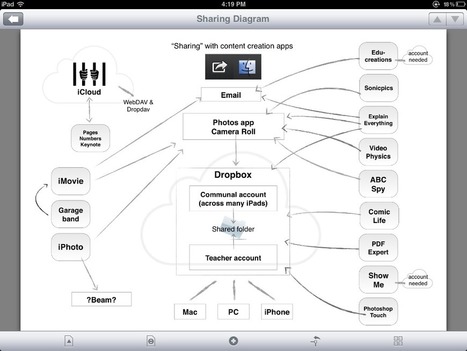
A frequently asked question is “How do I transfer items created on my iPad to other devices?” This leads to the issue of workflows and document management on an iPad.
Scoop.it!

From
qstream
"iPads are a fantastic resource for learning – when used correctly. Unfortunately, in the haste to take advantage of this new tool, the initial enthusiasm of the sales force is often squandered by well-meaning but misguided approaches to learning. The following are the most common missteps we see and some tips on how to avoid them." Via EDTECH@UTRGV
Scoop.it!

A new survey from app marketing firm App Promo revealed that 80 percent of developers are not generating enough revenue with their app to support a standalone business. Via John Evans
Scoop.it!
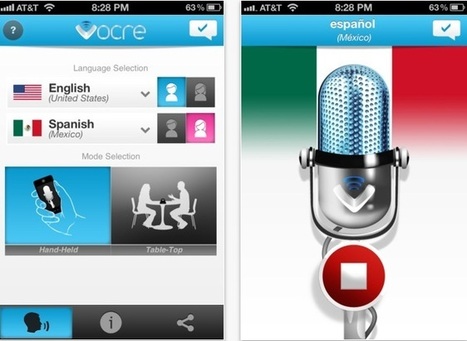
"There are a few translation apps out there that claim to get the job done when it comes to cross language communication issues. Vocre is one such app put out by the folks at mylanguage, and it’s quite impressive. With Vocre, 2 people speaking 2 completely different language."
NOTE: Free for a limited time. Via John Evans
Scoop.it!
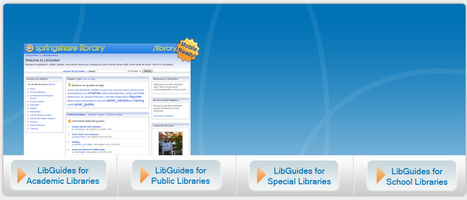
Are your patrons using Google and Wikipedia when doing library research? Introduce them to LibGuides - the librarian created portals to high quality research information. You, the librarian, are the key to successful research. Nobody knows research better! With LibGuides you help patrons find the stuff they need and show them information they didn't even know existed. LibGuides' flexibility and ease of use empowers librarians of any technical skill level to quickly and effortlessly create content-rich, web 2.0 multimedia guides.
Scoop.it!
Features
Scoop.it!
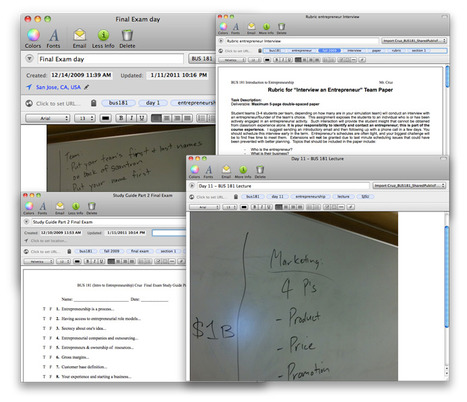
Evernote is a great application for educators. It’s usefulness can range from planning a course to delivering a lesson plan to capturing feedback after class. I experimented with using Evernote while I was teaching courses at San Jose State University. It proved to be an excellent classroom companion. Here are some ways to use Evernote to achieve your teaching goals.
Scoop.it!

An all-in-one solution for the synchronised use of iPads in the classroom. Nearpod has 4 free tools to easily create, engage and assess. Design enriched multimedia presentations and course materials with the Nearpod Content Tool – simply upload a pdf and add interactive features such as quizzes, polls, videos, drawing activities and more. Multimedia content harnesses students’ attention, keeping them focused and minimizing off-task behavior. Push information, questions, and activities to students’ mobile devices using the Nearpod Teacher.
Control students' devices Teachers can see all student activity in real-time via the Nearpod Teacher, identifying problem areas that need further exploration. Check attendance and identify students who log out from Nearpod.
Quickly assess student progress Obtain detailed real-time and post-session reports showing individual and class results.
|
Scoop.it!

Your iPhone’s camera can do more than just take photos. It can also help you record measurements for do-it-yourself projects.
I recently tested two apps – one that lets you record measurements on the photos you snap and another that also taps into your iPhone’s accelerometer to do the measuring for you. Here’s my look at how both these apps measure up.
Scoop.it!
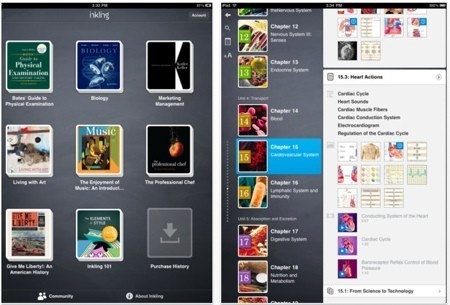
Inkling is an e-book publishing platform that's currently running an app on the App Store, and while Apple has been making an official push for more textbooks in iBooks, Inkling is strengthening its own holdings.
Scoop.it!

As I started a go-to list of the best educational iPad apps for kids, the list got so long, I split up my posts into categories.
Scoop.it!

eSignatures are a secure way for mobile workers to sign important documents. All of the apps in this post require a brief initial setup of your signature in the application.
Scoop.it!

Our goal is for students to use iPads as a tool to support key processes in learning - accessing, organising, processing and publishing information, collaboration, creativity and communication - and for teachers to use them as an environment to facilitate deeper engagement in learning and higher-ordering thinking.
Scoop.it!
Some of the Internet's best resources dedicated exclusively to educational uses of the iPad. They have searched out some excellent free Internet based web sites and resources dedicated to the use of the iPad in the instructional setting. Via Andrea Zeitz
Scoop.it!
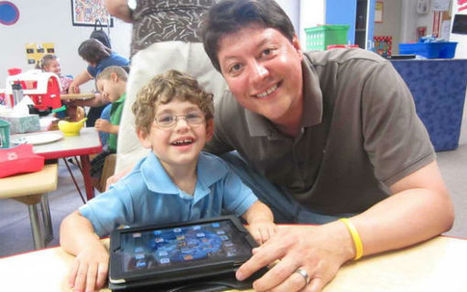
For the community of people living with disabilities, the iPad may have broken even more ground. The iOS device is not only cool, but provides education, therapy and, of course, entertainment. Via Andrea Zeitz, Peter Mellow
Scoop.it!

If you use the iPad's keyboard, here are seven tricks--for entering special characters, ending sentences quickly, splitting the keyboard, and more--that you ought to know about.
Scoop.it!

As mobile devices become more popular, education leaders differ on when and if devices like iPads should be integrated into K-12 curricula.
Scoop.it!
Magnify.net founder and "Curation Nation" author Steven Rosenbaum says associations -- and their members, for that matter -- have a choice: Become trusted content curators or risk becoming irrelevant.
Scoop.it!

Just when I think I know a lot of about Apple's iOS, someone shows me a clever feature, setting, or shortcut I've never seen before. Since Apple doesn't include a printed manual, it's up to us as iPad, iPhone, and iPod touch users to find our own ways of learning these tips. I'd like to share eight links with tips to help us get the most of our iOS devices.
Scoop.it!
Part of the benefit of jumping forward with a 1:1 iPad deployment like we have tried is that we get the opportunity to impart knowledge to other districts looking to do a similar initiative. While that might not seem like a benefit, it actually also means we can make some mistakes because there is not a long history of this type of deployment in the world. Many districts have had 1:1 Laptop projects, which we have benefited from and could easily be applied to this list I’m about to share. However, for the sake of our specific district, and the questions I get from other districts on a daily basis, I’m going to break down the ten things you should NOT do when implementing a 1:1 iPad program.
|





