


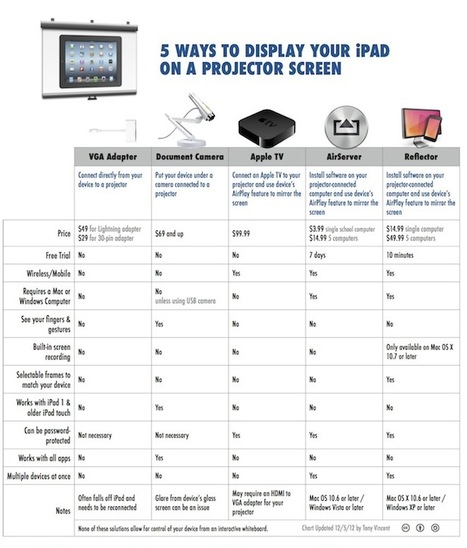

Teachers really want to the ability to display their iPad or their students' iPads on a projector ...

 Your new post is loading...
 Your new post is loading...
Your new post is loading...
 Scoop.it!
Teachers really want to the ability to display their iPad or their students' iPads on a projector ... 
No comment yet.
Sign up to comment
Scoop.it!
This video tutorial shows you how the Storify app works on the iPad. The app is a great tool to create multimedia assignments, projects or as a way to make multimedia mixed source comprehension tasks. Via Nik Peachey, Timo Ilomäki, Sam Gliksman

tammy bailey's curator insight,
December 18, 2012 2:39 PM
Looks like an to use for digital storytelling. 
jspellos's curator insight,
December 31, 2012 10:49 AM
One of my fave social media tools. Great for classroom and businesses.
Scoop.it!

iPads and other portable computing devices are integrating into New Zealand schools.
Scoop.it!
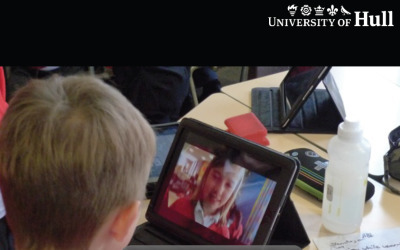
The final report of the iPad Scotland Evaluation undertaken for schools and local authorities in Scotland was released by the Technology Enhanced Learning Group based in the Faculty of Education at...
Personalisation and choice is a thread which weaves its way across this entire report, emphasising how access to an Internet capable device equipped with powerful construction tools, enable learners and teachers to have a far greater degree of agency and choice in how, when and where they undertake learning.
Scoop.it!

Results of the study were mainly positive, showing that iPads were instrumental in encouraging better collaboration and increasing the motivation for learning.
Scoop.it!
Using Airplay and the AppleTV during a Fashion Design tutorial - first steps in mobilizing the Design Studio.
Scoop.it!

Whether an instructor is prepping 4-year-olds for the annual holiday concert or teaching Ph.D. candidates about fluid mechanics, all teachers create classroom materials for their students. Via John Evans
Scoop.it!
Get 3D Brain on the App Store. See screenshots and ratings, and read customer reviews.
Use your touch screen to rotate and zoom around 29 interactive structures. Discover how each brain region functions, what happens when it is injured, and how it is involved in mental illness. Each detailed structure comes with information on functions, disorders, brain damage, case studies, and links to modern research
Scoop.it!

This week, TIME Magazine editor-at-large Harry McCracken interviewed himself as a follow-up to his piece on how he had been using his iPad as his primary computer. During the interview ...
Scoop.it!
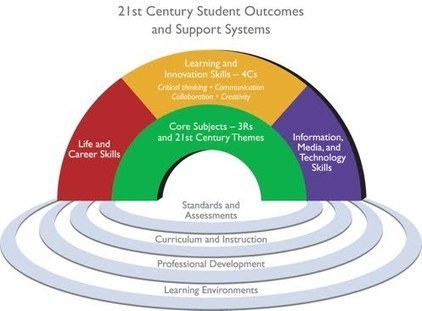
Workshop materials for professional development.
Is the iPad the tool we have been waiting for to facilitate 21st Century skills in our classroom? The jury is still out, but let's explore the ways in which the simplicity and power of the iPad has started to transform teachers and students in school. One thing that's clear is it's not about the apps, it's about the teaching.
Scoop.it!
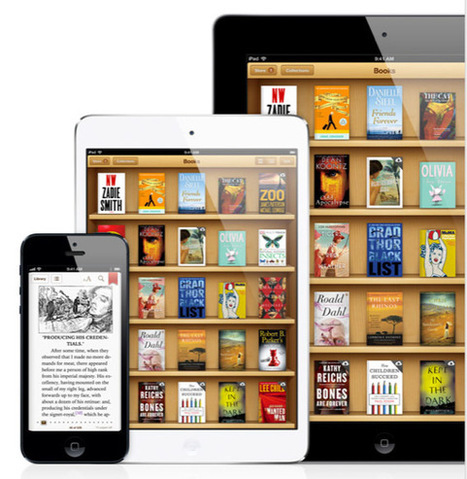
The recently announced iPad mini, along with similar digital tablets like the Kindle Fire and Nexus 7 make for nearly perfect e-reading devices.
Building an e-library is ten times easier than building and maintaining a paper book library.
So after you’ve purchased your iPad, you will want to install at least two e-book reading apps on your device: the iBooks Reader and the Kindle for the iPad. Both are free downloads.
This beginner’s guide recommends apps and features to get you started in building your library. Though the focus on is on the iPad, because it’s the device used for the last two years to build an e-library, the recommendations apply to other devices, including the Amazon Kindle and the Barnes and Nobel Nook. But the iPad offers some extra features that you will eventually find useful over other devices.
Read more here: http://www.makeuseof.com/tag/beginners-guide-setting-ebook-library-ipad/ Via Fe Angela M. Verzosa, Learning Lrnr, Jim Lerman
Scoop.it!

Speculation about Microsoft Office’s arrival on iPad, iPhone and Android has been circulating the web for a while now, but the latest reports suggest that the productivity suite could finally be released on mobile devices early next year.
Scoop.it!

The iPad mini is the first non-Retina display iOS device Apple has introduced since the iPad 2 in the spring of 2011. The iPhone 4, iPhone 4S, and iPhone 5 are all Retina devices, as are the iPod touch 4 and iPod touch 5.
|
Scoop.it!
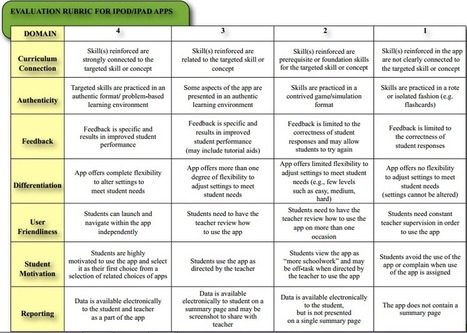
Choosing an apporopriate app is important - but how do you evalute its effectiveness?
This short post provides a useful rubric to help you evaluate the effectiveness of the apps which you get your students to use.
Scoop.it!
A brief overview of how to use the iPad for visual recording/notetaking. Includes things to consider when doing this; how this is different from traditional ... Via Ana Cristina Pratas, John Evans, rob miles, Bmw
Scoop.it!

Leading designers from around the world reveal the best iPad apps for design, creativity, inspiration and organisation.
Scoop.it!
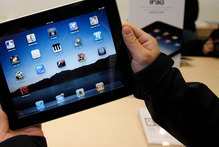
The growing number of children using iPads at preschools has prompted a call for educators to develop clear guidelines on using the devices safely.
Scoop.it!

The "PC Cliff" -- and why small tablets will become the most important tablets for consumers.
Scoop.it!

We’ve all had it happen: while browsing the web, we come across something really interesting. Or someone in our Twitter stream posts a link to an intriguing article. The problem is, we don’t have time to read it just then. But we don’t want to forget about it, and we’d like to have a nicely-formatted version to come back to.
Fortunately, there are services like Instapaper and Pocket (formerly called Read it Later, which Brian first wrote about a few years ago) to help us keep track of those links.
Scoop.it!

This is a great writing tool for creating interactive (branching) stories. Readers can choose different options as the work through the story and find their own route through the materials.
KF: Potentially useful in the development of branching scenarios for case-study and other scenario based work in a variety of disciplines. Via Nik Peachey, callooh, miracletrain 夢想驛站

Martijn Koops's curator insight,
January 5, 2013 6:15 AM
Tool voor het schrijven van branches stories, lezers kunnen keuzes maken in het verhaal en zelf hun route kiezen. Biedt misschien mogelijkheid voor interactivce storytelling achtige spellen? Ik heb het nog niet geprobbeerd moet ik erbij zeggen. 
Lino's curator insight,
January 7, 2013 8:31 AM
inklewriter es una herramienta gratuita diseñada para permitir que cualquiera pueda escribir y publicar historias interactivas. Es perfecto para los escritores que quieran probar la interactividad, pero también para los profesores y estudiantes que buscan combinar conocimientos de informática y escritura creativa.
Permite Exportar a Kindle Puedes incluso, conseguir que tu historia se convierta en Kindle. Lee esta página para saber más! http://www.inklestudios.com/inklewriter/create-an-ebook ;
Y no se ha terminado aún ... inklewriter está siendo constantemente desarrollado y mejorado, y van agregando nuevas características.

Tamra Dollar's curator insight,
July 19, 2013 9:01 PM
I'm going to use this in my creative writing studio this fall. It gives students voice and choice and taps into all elements of the writing process. Engaging and fun!
Scoop.it!
Tablet Learning is Neither Mobile Learning Nor eLearning . Find the difference between Tablet Learning , Mobile Learning & eLearning.
Scoop.it!
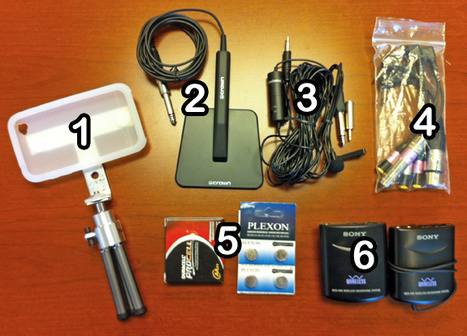
Robin Good: If you are looking forward to find the best tools, apps and hardware gear needed to do quality audio recordings for your iPhone-based video shootings, here is an excellent one.
Jeff Geerling has put together a comprehensive resource guide to external microphones and complementarty tools that can be utilized with most iPhone, iPad and iPod models.
If you are just starting with an effort to do quality audio recordings with your iOS device, you will find a ton of useful tools and resources in this guide.
Recommended. Very useful. Resourceful. 8/10
Video clip comparing audio quality of different microphones: http://youtu.be/yJ06qn0czak ;
Full resource guide: http://www.lifeisaprayer.com/articles/photography/iphone-4-ipad-external-mic-audio-input
Via Robin Good, Anca Toader, Jim Lerman

Samantha's curator insight,
September 11, 2014 2:31 PM
This article talks about what microphones are best to use when recording with the iPhone, iPad, and iPod. The list was put together by Jeff Geerling with the goal of helping people just beginning with audio. This article is very informative and it splits up into categories. Some of the categories are recording for concerts, interviews, and if you need a mobile microphone. The article include a video testing the audio of all the mice listed as well as where to purchase the mic and how much it costs. Overall this was a very informative and creditable article. 
john peterson's curator insight,
May 20, 2016 10:45 PM
a deep show of different microphones and what they do 
Esteban Pagan's curator insight,
November 11, 2018 10:15 PM
This article by Jeff Geerling shows many tools, apps and hardware, resource guide, videos and articles that you can use for quality audio on iPhone, iPad, and iPod.
Scoop.it!

Brian Warmoth interviews Matthew Tevett-Smith about impelementaion of iPads at the University of Richmond. Good stuff! -JL Via Jim Lerman
Scoop.it!

"Now that the iPad line has split into two families, the Mini and the Retina, it might make you wonder where the iPad, as a product, is heading. I've wondered it, too, even going back to the days before the Mini. The third-gen Retina Display iPad was such a complete product that it made me curious: where could iPads go next?" Via John Evans
Scoop.it!

One of the most awesome things about this tech, for me, is the fundamental ways it has infiltrated my teaching style. When I teach, I use my iPad pretty exclusively, from lesson planning to classroom management to grading, and it has done a serious number on the way I think about being a teacher in the dawning age of ubiquitous digital technology. This post offers a brief defense for teaching with tablet technology and hacks for getting the most out of your tablets as an instructor.
|







We regularly use the VGA Adapter and AirServer.. but some other options are available.