Your new post is loading...

|
Scooped by
Giuseppe Mauriello
May 27, 2014 7:56 AM
|
Excerpt from the useful article by Neil Patel and published on his Quick Sprout Blog:
"If you think that an infinite scrolling page is the best design option for your site, but you also want to retain great SEO, then read on. I’m going to show you exactly how you can achieve both of these objectives:
What is an infinite scrolling page?
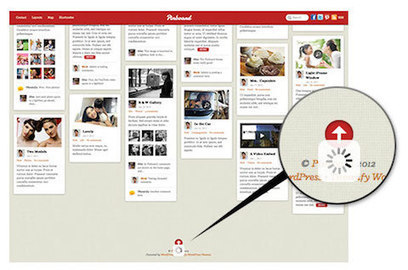
The infinite scroll is exactly what the term describes — a function that allows a user to keep scrolling a page without reaching its end. When you scroll downward, toward the “bottom” of the page, it simply loads more content, providing an ever-growing and seemingly never-ending amount of material.
What are some examples of infinite scrolling pages?
Twitter, Facebook, Pinterest, etc...
For non-social pages: Mashable and others.
What’s the SEO problem with infinite scrolling pages?
In one word, the SEO problem with infinite scroll is JavaScript, which is the most popular way to implement it.
You can be sure that the HTML content in your source code will be indexed by Google, but any subsequent content that is loaded asynchronously via JavaScript will not be indexed.
So, how do you fix it?
Thankfully, there is a way to have crawlable/searchable infinite scroll pages.
The basic idea is this. You have to create an infinite scroll page and a series of other pages that go along with the infinite scroll pages. Thus, you (or your CMS) develop infinite scroll with pagination.
The infinite scroll page is chunked into component pages.
Here’s the exact process:
Step #1: Determine how to divide up your content;
Step #2: Create a URL structure that accommodates infinite scroll;
Step #3: Each page should contain rel=”next” and rel=”prev” within the <head> tag;
Step #4: Use pushState on the infinite scroll page
Step #5: Use SEO best practices on every page.
Conclusion
Infinite scrolling is just one of the many design options that might improve user interaction and retention. However, it is not optimal for every website. It all depends on what you’re trying to accomplish with your specific page..."
Each point is analyzed with detailed information. Read full and informative article here:
http://www.quicksprout.com/2014/05/21/how-to-create-an-seo-friendly-infinite-scrolling-page/
|
|
Scooped by
Giuseppe Mauriello
May 14, 2014 11:01 AM
|
Excerpt from the guest article by Melanie Davis on Convince & Convert Blog by Jay Baer:
"We’re living in the middle of an information explosion, which is preferable to a literal explosion, but still pretty bad if you’re a marketer. The sheer amount of information out there—online, in stores, in our inboxes—makes it extremely challenging to engage with customers and prospects.
Given our information overload, it’s more important than ever to connect with customers and prospects in a real way. To think of them like humans, and to speak to them like humans.
Speaking in human makes people listen, gets you leads, and builds loyalty.
Here’s a couple ways you can start speaking in human.
1. Write the way you talk.
You’re intimately familiar with your company’s offerings. This makes it extremely difficult for you to explain your product to a non-expert—i.e., your customers and potential customers.
This phenomenon is called the "Curse of Knowledge", and studies have found that it’s a real, knotty obstacle to good communication.
So to speak in human, you have to consciously examine your marketing materials for your knowledge bias.
I find it’s helpful to imagine myself having a chat with one of my favoritest clients, mentally explaining our new product and then jot down the “transcript” of the conversation that’s playing in my head.
2. Let people respond naturally.
If you let people respond in a way that’s more natural, they’ll be more excited about talking to you.
Communicate with your audience like you talk to real, live people, and let them talk human back to you. And try to speak in human in everything that you do, which includes login screens, autoresponder emails, contracts, everything.
Everything is marketing, and every touchpoint is a chance to connect with your audience on a real Homo sapiens to Homo sapiens level..."
Read full original article:
http://www.convinceandconvert.com/content-marketing/how-to-speak-like-a-human-and-why-it-matters/
|
|
Scooped by
Giuseppe Mauriello
April 21, 2014 5:51 PM
|
Excerpt from the article by Brian Dean and published on Search Engine Watch:
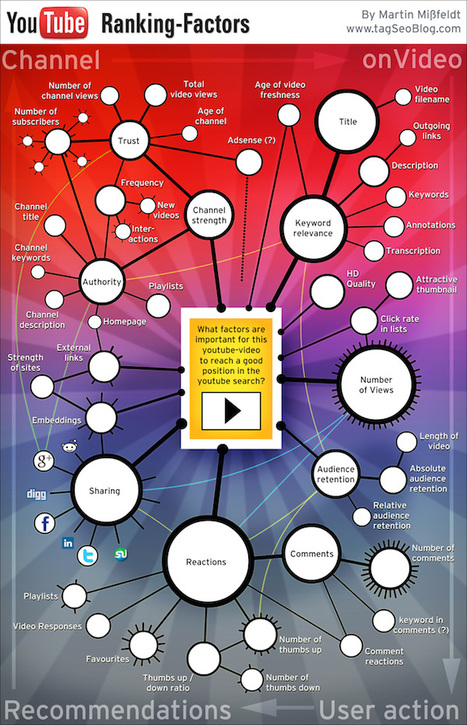
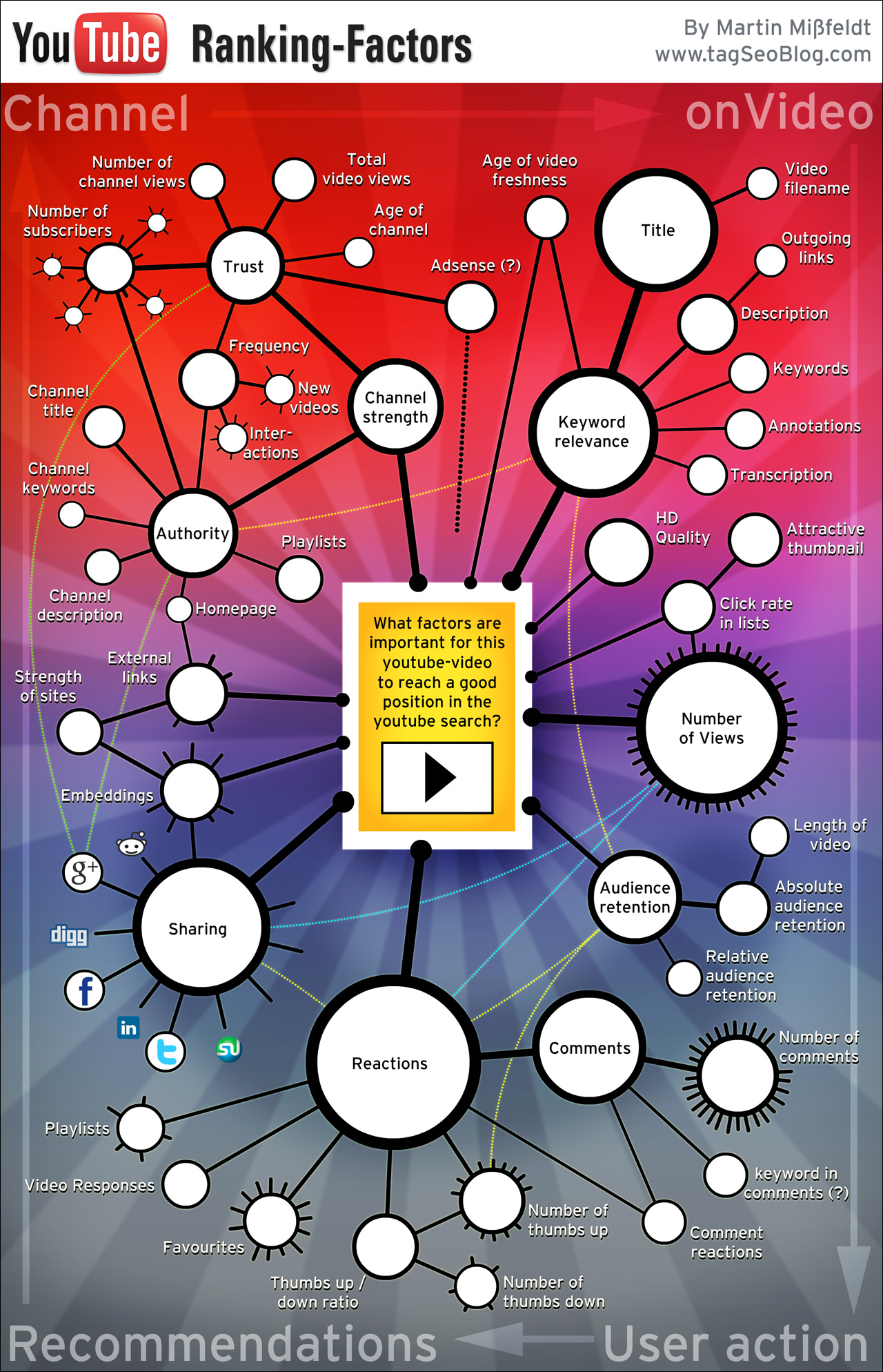
"If you take the time to optimize your videos for SEO, you'll get significantly more traffic than your competitors. It's not nearly as complex as Google's famous 200 ranking signals, but YouTube's algorithm is no joke. It takes dozens of signals into account for ranking videos in YouTube search.
1. Write Super-Long Video Descriptions
The more YouTube knows about your video, the more confidently it can rank it for your target keyword.
But more importantly, YouTube uses keywords in the description to rank you for super-long tail keywords.
Make sure your video descriptions are at least 200 words.
2. Optimize Around "Video Keywords"
Before deciding on a keyword for your video, check to see if there are video results on the first page. If so, that's a keyword you should strongly consider because you can potentially get your video ranked in Google and YouTube.
3. Get More Video Views From Online Communities
Share your video liberally on online communities. This will hook your video up with the type of quality, high-retention views that YouTube likes to see.
4. Encourage Subscribing and Liking
Subscribing and liking are two of the most important user experience signals that YouTube uses.
At the end of your video, give people a strong call to action that encourages them to subscribe.
5. Create Keyword-Rich Playlists
A keyword-rich playlist gives YouTube deeper information about your video's topic. And like we saw with your description, more text-based content=more views.
Once you have 10 videos in your YouTube channel, organize them into tightly themed playlists..."
Read full original article:
http://searchenginewatch.com/article/2340726/5-Advanced-YouTube-SEO-Tactics-to-Drive-More-Traffic-to-Your-Videos-Website
Infographic credit (posted in the article): TAG SEO http://www.tagseoblog.com/images2/youtube-video-seo-ranking-factors-infographic.jpg
|
|
Scooped by
Giuseppe Mauriello
April 11, 2014 1:22 AM
|
Excerpt from the great article by Chris Garrett and published on Copyblogger:
"How do you decide which content should be freely available and which content you ought to charge for?
Of course the answers will differ between different industries, topics, businesses, and writers.
First, we need to decide what your free content should do for you.
What can you achieve with free content?
The reason you are putting together all these free articles, podcasts, videos, and presentations, is that you want to get attention that grows your business.
With that in mind, here are some benefits that free content can provide for you, and the kinds of content that you should share:
- Free content can attract your specific target audience;
- Free content can encourage sharing your ideas;
- Free content can connect you with peers;
- Free content can inform the audience of your value;
- Free content can position you against competitors;
- Free content can answer objections;
- Free content can show proof and results;
- Free content can provide more reasons “why”;
- Free content can give a “free taste” that builds desire for the full meal;
- Free content can tell your story to show people who you are as a person;
- Free content can reward prospects for their attention;
Here’s when you should hoard information
There is a circumstance where your information is worth holding back and providing only to paying customers.
That is when:
1. People really want the information because it has significant value
If the information could...
- Provide a massive transformation in their life or business;
- Make them a great deal of money;
- Save them lots of time;
- Make them more popular;
...then they will be much more willing to invest in your solution.
2. The information is difficult to acquire
Yes, Google has exposed many things for free that had previously been knowledge reserved for the elite few.
But that doesn’t necessarily mean that your prospect can find it, or that the information is even out there and indexed.
Many of the thought leaders and gurus we know are in their positions because they hopped on a shiny new platform or tool and mastered it before anyone else.
Why people buy content
Part of the reason people will pay is because of trust.
It’s a weird psychological factor that people will trust education that they paid for more than something you gave away. The reason is because it has a higher perceived value, and also there is an implied “warranty.”
In addition...
- People will pay for in-depth, step-by-step guidance;
- People will pay for access and tailored advice;
- People will pay for exclusivity;
- People will pay for higher quality and better technology;
- People will pay for experiences;
What you should never give away
It’s difficult to give hard and fast rules, because for each of these ideas someone out there will be the exception.
But in general here is what your free content should not be:
- Free content shouldn’t be too complete;
- Free content shouldn’t give too much of the “how”;
- Free content shouldn’t provide free access;
- Free content shouldn’t involve a high barrier to entry;
- Free content shouldn’t cover advanced topics with many prerequisites;
- Free content shouldn’t require hard work by the reader;
Bottom Line
I don’t believe it is possible to be too helpful or too generous … provided you manage your time and energy, and that people know you are in business.
As mentioned earlier, you can give away everything you know and still there will be people who want to hear it from you, and who will pay you to help them implement it.
So share your best ideas, build your Minimum Viable Audience, and then make offers at the appropriate time.
It works..."
Each point is analyzed with detailed information and external links. Read full, original and interesting article:
http://www.copyblogger.com/sell-or-give/
|
|
Scooped by
Giuseppe Mauriello
March 14, 2014 2:40 PM
|
Excerpt from guest post from the blog "Convince & Convert".
The author of article is Jessica Gioglio, co-author about new book with Ekaterina Walter called The Power of Visual Storytelling.
Here are some highlights:
- We’re Marketing in the Age of Infobesity
With the average consumer attention span now between 2.8-8 seconds, curating snackable pieces of content into a visual story has emerged as a powerful strategy.
As shared through powerful case studies in the book from B2B, B2C companies both large and small, visual storytelling is helping marketers stand above the noise, grow a vibrant and engaged community and drive action.
- Relevancy Has a Deadline
We are at the beginning of a new era in marketing that aligns perfectly with visual storytelling. With the wealth of social data available and real-time listening tools, companies are evolving their strategies to be relevant in the moment with the goal of connecting consumers with the right message at the right time.
- The Consumer Reigns Supreme and Their Attention is the New Commodity
The best storytellers know and play to their audience, whether it’s a dramatic pause, a well-inserted joke, or crafting a perfect tweetable soundbite. Companies need to take the same approach with their social media channels. Visual Storytelling is far more than an attention seeking tactic, it’s a powerful strategy for showcasing the human side of your company..."
Read full, original and interesting article here:
http://www.convinceandconvert.com/social-image-of-the-week/the-power-to-connect-through-visual-storytelling/
"The Power of Visual Storytelling" book is currently available on Amazon here:
http://www.amazon.com/gp/product/007182393X
|
|
Scooped by
Giuseppe Mauriello
March 8, 2014 10:40 AM
|
Excerpt from article by KISSmetrics:
"Our ability to complain is enhanced by technical advances in communication. Tools like 4G networks, Google Glass, and phones that double as cameras ensure we have a continuous stream of ever more effective ways to complain.
But, even today, customer service still is considered to be “revolutionary” and “proactive” if you just respond to customers on Twitter or Facebook.
If you want to make your customers happy, there are tactics you can use.
Here are some ideas you can steal from companies that truly are experts in the field:
1. Show Off Your Customer Support
A few years ago, 37signals (now Basecamp) went public with their customer satisfaction ratings. Customer or not, anyone can go to their Smiley page and check out the ratings their last 100 customers gave them.
2. Be There the Moment Your Customers Think of You
The release of the Kindle Fire HDX was one small step for Amazon and one giant leap for customer service. By allowing consumers to connect to support agents at the click of a button, Amazon redefined “exceptional” customer service in just a matter of minutes.
3. Answer Questions on Video
When Warby Parker discovered how difficult it was to answer complicated questions in just 140 characters, they decided to leverage videos to help customers resolve their issues. Employees got on camera to nuke questions on prescriptions, frames, and even shipping times for glasses.
4. Build Credibility by Publishing Reports
Buffer, the darling in the world of social media software, takes transparency to a whole new level by providing a monthly roundup of their support metrics and customer interactions with their Happiness Heroes.
5. Go the Extra mile: Send Personalized Thank You Notes
Personalized thank you cards like this stand out among the dozens of newsletters we’re bombarded with on a daily basis.
6. Get the CEO Involved in Customer Support
Not only did they listen to her feedback patiently, they also sent her a follow-up email with a promise to turn things around.
7. Hire College Geeks Who have a Knack for Troubleshooting
What does make sense is hiring people who are passionate about the niche your business operates in. They’ll empathize with your customers far better than a service professional with a decade of experience in an entirely different industry.
8. Bring Ideas to Life to Win Hearts and Reap Profits
You don’t need one hundred thousand customers and a fan club to crowdsource ideas. Just setting up a simple, engaging portal and making your customers feel valued will go a long way..."
Each idea is analyzed with more information, examples and external links. Read full original article:
http://blog.kissmetrics.com/customer-service-worth-stealing
|
|
Scooped by
Giuseppe Mauriello
February 22, 2014 6:19 AM
|
Excerpt from the article by KISSmetrics:
"Writing great copy is one of the most useful skills a marketer can develop. After all, copy is a key element of successful internet marketing across the board, from emails with sky-high open rates to blog posts that get shared hundreds or even thousands of times.
Masterful copywriting plays a big part in the difference between a website that converts like crazy and one that simply falls flat, failing to engage potential customers.
This resource guide provides links that will give you a strong foundation for writing great web copy.
Here are the main sections of the article: - E-books, Articles, Infographics, and Guides to Get You Started with Web Copywriting;
- Must-Read Books on Direct Response Marketing and Copywriting;
- Copywriting Courses;
- The Best Websites and Blogs about Copywriting;
- How to Write Amazing Headlines;
- How to Write Phenomenal CTAs (Call to Actions);
- SEO Copywriting – How-To’s, Tips, and Best Practices;
- How to Write E-commerce Copy that Sells;
- Conversion Copywriting and Landing Pages;
These 75 resources should be enough to get you started on your way to becoming a web copy samurai..."
Each section is analyzed with detailed resources and and external links. Read full original article:
http://blog.kissmetrics.com/75-copywriting-resources/
|
|
Scooped by
Giuseppe Mauriello
February 8, 2014 10:27 AM
|
Excerpt from the article by Moz Blog:
"Before you go on the hunt for inspiration all over the Internet and elsewhere, turn to the resources around you and realize that you can create exceptional content with what you already have at hand.
Thinking of content topics doesn't have to be such a long and grueling undertaking. Use the following starting points the next time you need an idea.
Here are the main sections of the article: - Individual achievement;
- Tools;
- Lists;
- Internal resources;
- Industry;
- How-to;
- Company culture;
- Educational series;
- Events;
- Research;
- Theories;
- Higher-level overviews;
- Promotional;
- Seasonal;
- Out of the box.
Whether or not you decide to use these exact ideas, I hope I've given you some directions to explore. Think hard, collaborate with smart team members, and make these your own.
No matter which post topics you choose, remember to infuse these ideas with personality, data, and insights that only you and your brand can offer. Publishing content that provides value no one else can is what truly leads to the traffic, social shares, and links you crave..."
Each section is analyzed with detailed starting points, shining examples and external links. Read full article:
http://moz.com/blog/75-content-starters-for-any-industry
|
|
Scooped by
Giuseppe Mauriello
November 11, 2013 4:45 AM
|
Excerpt from article on Social Media Examiner:
"While most of us aren’t immune to writer’s block, there are ways to work through the block until the words flow again.
Here are 26 tips for overcoming bloggers block (it just is the checklist):
#1: Add Alerts to Find Fresh Content;
#2: Backtrack Your Blog History;
#3: Cultivate Inspiration With Classes;
#4: Determine Deadlines to Make You Accountable;
#5: Engage in Groups on LinkedIn;
#6: Familiarize Yourself With Your Followers’ Preferences;
#7: Gain Inspiration From Sources You Follow;
#8: Hit the Books;
#9: Inspect Infographics;
#10: Jot Down Ideas;
#11: Keep Your Eyes on Your Readers’ Questions;
#12: Learn From Listly;
#13: Mobilize Your Readers;
#14: Note This Post for Later;
#15: Offer Personal Stories;
#16: Practice Consuming Material On-the-Go;
#17: Quote Others;
#18: Refocus in a Coffee House or With Sound Apps;
#19: Set Realistic Goals;
#20: Test-Drive an Idea;
#21: Unplug and Regenerate;
#22: Visit Your Blog’s Description;
#23: Widen Your Horizons;
#24: eXpose Yourself to Research Studies;
#25: YouTube Channel Subscriptions Deliver;
#26: Zap Exhaustion.
Each tip is analyzed with more information, some examples and external links. Read full interesting article here:
http://www.socialmediaexaminer.com/bloggers-block
|
|
Scooped by
Giuseppe Mauriello
October 31, 2013 3:03 AM
|
Excerpt from article on Search Engine Watch:
"Google's official position on webmaster best practices really hasn't changed much over the years. What has changed is the search engine's ability to enforce these guidelines through improved algorithms. The implementation of Panda, Penguin, and Hummingbird has had a profound impact on the SEO landscape.
In order to reach the top of the SERPs and stay there in 2013 and beyond, your website must deserve to be there. It needs to be the best in class. It must offer the best user experience in that niche. Fortunately, there are a number of free tools that can help you achieve that goal.
(Here just is the list).
- Keyword Research:
1. Wordstream
2. Keyword Eye Basic
3. YouTube Keyword Tool
4. Übersuggest
- Content Tools:
5. Anchor Text Over Optimization Tool
6. Convert Word Documents to Clean HTML
7. Copyscape
- Technical Tools:
8. Xenu's Link Sleuth
9. Robots.txt Generator
10. Robots.txt Checker
11. URI Valet
12. Title and Description Optimization Tool
13. Image SEO Tool
14. Schema Creator
15. Google Snippet Preview
16. Structured Data Testing Tool
17. XML Sitemap Generators
18. XML Sitemap Inspector
19. Pingdom Website Speed Tool
20. Fiddler
21. Microsoft Free SEO Toolkit..."
Each tool is analyzed with some information. Read full original article:
http://searchenginewatch.com/article/2303494/21-Best-FREE-SEO-Tools-for-On-Page-Optimization
|
|
Scooped by
Giuseppe Mauriello
October 10, 2013 11:48 AM
|
Excerpt from article on HubSpot:
"Pinterest users spend the most money of users on popular social networks -- nearly double the amount of money spent from Facebook users and triple the amount from Twitter users. This means that there's lots of potential leads and customers just waiting to be engaged and converted who will probably spend a decent amount with you.
Pinterest is actually a fairly simple social media network as far as lead generation goes, because there's really only two ways to generate leads right now. So we'll walk you through both types of lead generation and how you can optimize pins to make the most of those lead generation opportunities.
On Pinterest, there are two types of leads you can generate: direct and indirect. It all boils down to where Pinterest is on the conversion path. Here's the difference between the two:
- Direct Leads: Direct leads are generated through content on Pinterest that links directly back to a landing page on your website. On that landing page, visitors can share their personal information in exchange for an offer.
- Indirect Leads: Indirect leads are generated by using Pinterest on the path to conversion -- but it's not the final destination before someone gets to a landing page.
Unlike other social media platforms, Pinterest really only has a one effective place where you can generate direct or indirect leads: through pins.
How to Optimize Your Pins for Lead Generation:
1) Create a board that your Pinterest audience can -- and will want to -- discover.
2) Create images that Pinterest users naturally notice.
3) Don't use UTM parameters or shortened links in your pin URL.
4) Use your description wisely.
5) Add a hashtag, if relevant.
6) Rinse, repeat.
7) Promote your pins elsewhere.
8) Keep track of your success with a few different tools..."
Each point is anlyzed with more information and external useful links.
Check out full interesting article:
http://blog.hubspot.com/how-to-generate-leads-with-pinterest-ht
|
|
Scooped by
Giuseppe Mauriello
September 26, 2013 1:11 PM
|
Excerpt from the article by Neil Patel on Quick Sprout blog:
"Visitors who come to your site from Google are going to be different from the visitors that come to your site from Twitter.
So, how do you maximize your conversion rates? You will have to create landing pages that are tailored towards each of your marketing campaigns. But before you head off and start creating your first landing page, there are 7 things you need to know:
1. Does your landing page copy match your marketing campaign?
From your paid ads to organic search engine listings, your marketing copy should convey a similar message to the copy on your landing page.
2. Start with a solution:
Every visitor who comes to your landing page has a problem. So, you should tell them how you are going to solve their problem.
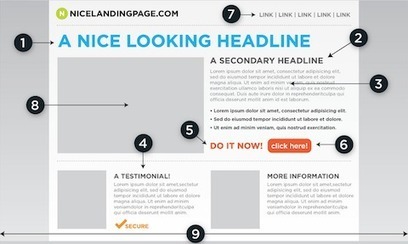
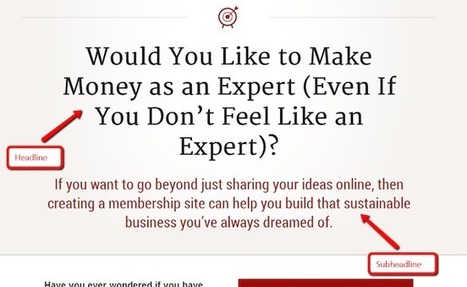
3. Don’t forget your sub heading:
Your headline states your solution, but it won’t be enough to convert visitors into customers. You need to provide a more detailed explanation of your solution through a sub-heading.
You have less than 8 seconds to grab your visitor’s attention before they leave, so you want to make sure your sub-heading is descriptive and short.
4. Who are your customers and what are their use cases?
A lot of visitors never end up purchasing because they aren’t sure if your solution is the right fit for them.
You can solve this by clearly showing who should be using your product or service.
5. The proof is in the pudding:
Always include stats and data to backup your claims.
Yes, you may be selling the best weight loss product out there, but a thousand other companies are making that same claim.
Get testimonials from your customers to back up the statements you are making.
6. Call to actions:
You’ll have to do a lot of A/B testing with this one, but don’t forget to include call to actions. You’ll be surprised how many landing pages forget to add calls to action.
7. Trust elements:
Not everyone is comfortable with making purchases on the web. Sure, Apple and Amazon don’t have issues, but you aren’t them. Your brand isn’t as well known, which is why trust elements are important..."
Each tip is analyzed with more information.
Read full original article here:
http://www.quicksprout.com/2013/09/26/7-things-every-great-landing-page-needs/
|
|
Scooped by
Giuseppe Mauriello
September 12, 2013 10:20 AM
|
Excerpt from article on Copyblogger:
"Landing pages are remarkably powerful conversion and SEO tools that turn traffic into money.
But crafting copy for a landing page is an art that goes beyond writing magnetic headlines and copy that sells.
You need to know what stage of sophistication your market is in before choosing the correct landing page template. Templates help us generate ideas. The stages of sophistication help us choose the right ideas.
In the past, building landing pages meant you had to hire a designer and coder. Not anymore.
Tools like "Premise" (http://getpremise.com) make it so a writer like me can write and publish effective, professional landing pages.
1. Make the promise:
When your ideal customer is not aware of your product or the benefit it offers, then the first stage of sophistication demands you simply make a promise in the headline and in the subheadline you would describe the mechanism.
2. Take your promise to the next level:
As the market begins to be educated about your product, and competitors enter that market...the power of your original promise will begin to fade.
At this stage you need to state your promise even more clearly. Beef up the subheadline (mechanism), too.
3. Lead with mechanism, promise second:
In the third stage of sophistication, we find the consumer weary of your product and others. At this stage the mechanism comes first, and the claim second.
4. Take the mechanism to another level:
It’s time to elaborate and enlarge on the mechanism.
Make it easier, quicker, and better. Solve more of the problem and overcome old limitations.
5. Identify with the consumer:
At this stage the market is glutted.
The field is exhausted, and it is the most difficult stage to profit in. This is where you revive a dead product by shooting directly at the consumer.
You may enter a new market and clean house, only to fall behind when competitors enter and steal market share. The business of successful selling is about constant improvement. Constant change..."
Read full original article:
http://www.copyblogger.com/landing-page-stages/
|
|
|
Scooped by
Giuseppe Mauriello
May 15, 2014 7:17 PM
|
Excerpt from the article on KISSmetrics:
"Your email list is the heart of your marketing strategy. When you write a blog post, the people on your email list will be the first to read it. When you have a webinar, the people on your list will be the first to sign up. And, when you offer a new product, the people on your list will be the first to try it.
This article will show you 67 tools you can use to start growing your email list today. [Here just are the main sections and list of tools].
Popups
Here are 10 popups that will help you collect emails.
1. PopUp Domination - 2. OptinMonster - 3. Hybrid-Connect - 4. Bounce Exchange - 5. Pippity - 6. Ninja Popups - 7. Viral Optins - 8. List Builder - 9. Pop Over Plugin - 10. WordPress Popup.
Unobtrusive Popups
Let’s say you’re still completely against popups.
There are tools that appear in front of your readers without obstructing their view of your content.
11. Unpop - 12. Drip - 13. Slide In - 14. Interrupt - 15. Optin Footer - 16. Hello Bar - 17. Viper Bar - 18. Foobar - 19. Dreamgrow Scroll Triggered Box - 20. Welcome Gate App - 21. Feature Box Plugin.
Additional Apps and Plugins
Besides popups, there are several additional apps and plugins you can use to collect emails from your visitors and grow your list.
22. upPrev - 23. Subscribe to Download for WordPress - 24. Subscribe by Email: A wordPress plugin - 25. Thesis Theme Feature Box - 26. LeadBoxes - 27. Scrolling Side Bar - 28. Subscribers Magnet - 29. Gravity Forms - 30. Comment Redirect - 31. WP-Leads - 32. AWeber Webform Widget - 33. OptinSkin.
Online Contests and Giveaways
Due to their viral nature, having a contest or give away is one of the fastest ways to grow your list and your brand. Here are 4 tools that will allow you to quickly set one up.
34. Rafflecopter - 35. Splurgy - 36. PromoSimple - 37. Giveaway Tools.
Facebook
Email and Facebook go together like peanut butter and chocolate. They’re the perfect match.
Below are a few Facebook tools that will help you grow your email list right from your fan page.
38. ShortStack - 39. Heyo - 40. PageModo - 41. Thunderpenny - 42. WooBox - 43. Vocus - 44. Clickappy - 45. OfferPop - 46. TabSite - 47. Social App Tool - 48. ActionSprout.
Landing Pages and Coming Soon Pages
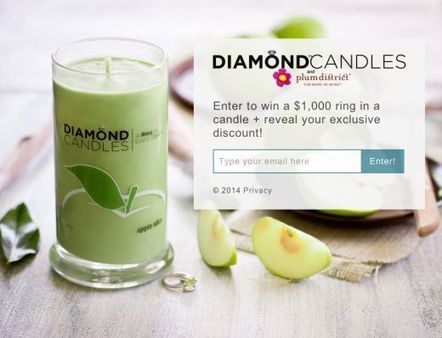
Landing pages are the backbone of any email marketing effort. The tools listed below will help you create professional-looking landing pages without having to write code.
49. OptimizePress - 50. LeadPages - 51. Unbounce - 52. Instapage - 53. Launchrock - 54. Clickthroo - 55. PageWiz - 56. KickoffLabs.
WordPress Landing Page and Coming Soon Plugins
Many of the WordPress plugins mentioned below are free. However, they offer fewer customization options than their stand-alone software cousins.
57. Launcher Theme - 58. My Blue Construction - 59. WPLauncher - 60. Felice Theme - 61. Under Construction - 62. WPChimp Countdown - 63. Launchpad - 64. Ultimate Coming Soon Page - 65. ThemeFuse - 66. WordPress Landing Pages.
And Finally...
67. Newsletter Signup : This plugin allows you to add various ways for your visitors to subscribe to your email list..."
Each tool is analyzed with some information, images and external link of official website.
Read full original article:
http://blog.kissmetrics.com/67-tools-email-list/
|
|
Scooped by
Giuseppe Mauriello
April 23, 2014 1:58 PM
|
Excerpt from the article by Social Media Examiner:
"Here you’ll discover five must-have tools every Facebook page admin can use to create and share content that kills.
#1: Create a Monitoring System
Hyperalerts is a versatile tool you’re going to love. It notifies you via email about items you choose such incoming Facebook comments or messages, published posts and more.
You could rely on Facebook’s messages and the activity log, but they aren’t always reliable and you can miss things.
You can customize your alerts based on type of post (updates, comments or messages), who’s posting (fans, admins or anyone) and how often you want to be notified.
Where Hyperalerts really shines is in its ability to monitor competitors’ Facebook pages.
Hyperalerts identifies the type of content other pages are sharing and what their fans are saying, then sends you an email with specific posts and comments from their fans.
#2: Add Functionality
You can leverage Facebook page tabs to share content from your other social profiles as well. You can display your latest tweets, share your favorite Pinterest boards or create a video wall to display videos from your YouTube or Vimeo channel.
Third-party services like ShortStack provide an easy solution to that problem. ShortStack offers hundreds of easy-to-use templates, or you can build your own if you want. Both options are customizable.
Facebook tabs aren’t available on mobile devices.
ShortStack lets you create versions of tabs that are mobile-friendly. You just have to share the permalink of the tab in a regular status update to give fans access.
#3: Find Trending Hashtags
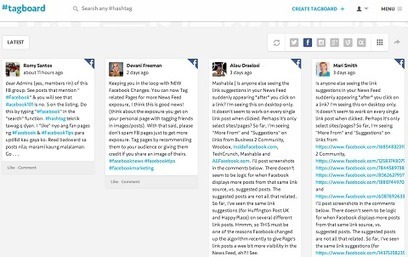
Tagboard is a free tool that lets you do cross-platform hashtag searches. You can search Facebook, Twitter, Instagram, Google+ and Vine to see which hashtags are trending, which overlap and which match your social marketing plan.
#4: Create Engaging Images
Visual content is a huge factor in success on any platform. But if you don’t have an in-house graphic designer or access to Adobe Photoshop, don’t despair. Even if you aren’t a designer, Canva is a free online alternative that helps you create engaging images in no time.
#5: Use a Good Content Curation Tool
You can’t be everywhere at once and you can’t spend all of your time creating new content. If you’re a Facebook page admin, you know the importance of a good content curation tool.
One of my favorites is Swayy. It analyzes the material (and its sources) you share on Facebook, and then recommends content based on related keywords.
If you like something Swayy suggests, you can share it on your connected social accounts (including Facebook) or schedule it to publish later..."
Read full, interesting and original article:
http://www.socialmediaexaminer.com/5-facebook-page-tools/
|
|
Scooped by
Giuseppe Mauriello
April 15, 2014 11:47 AM
|
Excerpt from the useful article by Neil Patel and published on his Quick Sprout Blog:
"Content marketing is more than writing blogs. Way more.
If you’re just getting involved in content marketing, the first thing you need to do is launch your blog and start writing.
Then, when your blog is established and purring along, try throwing in a new type of content.
But before I share the 15 types of content that will drive you more traffic, there are a few things you need to know:
- You don’t need to try all of these examples - different content types suit different brands in different ways.
- Don’t be afraid to try new stuff – I’ve found that some people shy away from new types of content because they think it will take too long, be too hard, or fall flat. I understand your apprehension, but I encourage you to try it anyway.
- Pick one and put it in your schedule – if you use a content marketing schedule, slot one or two of these into the editorial calendar for the next month.
- This list is not exhaustive – I encourage you to think of content not in terms of types but ideas. The form that the content takes is secondary. The idea is primary.
Let's look at these 15 content types (here just is the list):
#1: Infographics
#2: Meme
#3: Videos
#4: Guides
#5: Book reviews
#6: Opinion post (a.k.a. “Rant”)
#7: Product reviews
#8: How-to
#9: Lists
#10: Link pages
#11: Ebook
#12: Case Study
#13: Podcast
#14: Interview
#15: Research and original data
Conclusion:
The more types of content you use, the more powerful your content marketing efforts become. Content, regardless of its form, speaks to an audience. That audience, in turn, listens, shares, learns, and converts.
There’s a wealth of potential here — the kind of potential that your brand needs in order to advance to the next level. Now, you have a plan to get there..."
Each type is analyzed with more information, how to do it, things to keep in mind and useful external links.
Read full, long and interesting article here:
http://www.quicksprout.com/2014/04/14/how-these-15-types-of-content-will-drive-you-more-traffic/
|
|
Scooped by
Giuseppe Mauriello
March 27, 2014 2:15 PM
|
Excerpt from the article by Search Engine Watch:
"You've spent years investing in SEO, and now your company dominates the rankings, but your site is outdated, isn't mobile-friendly, and you know it's time for a redesign. You've heard all the horror stories of how a site redesign can kill rankings, so you've held off as long as you can, but now it's time.
Here are five steps to ensure that you are able to successfully execute your site redesign without compromising months or possibly years of investment in SEO.
Step 1: Evaluate Your SEO Strategy:
A site redesign is the perfect time to evaluate your SEO strategy and figure out which keywords and landing pages are providing the most value, and which ones are providing the least. This will allow you to know which keywords and landing pages to prioritize during the redesign.
Step 2: Keep the Same URL Structure or Implement 301 Redirects:
As it pertains to SEO, it is ideal to maintain the same URL structure when executing a site redesign, but this not always practical. You may be moving the site to a new platform that requires a different URL structure, or you may have reorganized your content, which resulted in changes to the URL structure. In any case where changes to the URL structure are necessary, implementing page level 301 redirects is a necessity.
Step 3: Maintain On-Page Optimization:
Maintaining on-page optimization is an obvious step, but a site redesign can often involve moving, revising, and adding new content, so with all these moving parts it's easy to forget the basics.
Step 4: Create HTML and XML Sitemaps:
Create HTML and XML sitemaps to help search engines discover any new content and existing content that has moved to new URLs.
Step 5: Monitor, Measure, Improve:
A site redesign should not be a once and done project. Just like any other marketing effort, the results of your redesign should be monitored, measured, and improved over time..."
Each step is analyzed with more detailed information. Read full original article here:
http://searchenginewatch.com/article/2336287/5-Steps-to-Execute-a-Site-Redesign-Without-Compromising-SEO
|
|
Scooped by
Giuseppe Mauriello
March 10, 2014 4:44 AM
|
Excerpt from the article by Search Engine Watch:
"Evergreen content is a valuable resource for your website. The term "evergreen content" refers to content that won't quickly become out of date or totally incorrect within a short time period, such as a week or a month. You add updates as needed, linking back to it from new related content, and socialize with each change or whenever the topic again becomes timely.
Let's look at 12 types of evergreen content (here just is the list):
1. Yearly Posts That Can be Updated;
2. Posts That Track Something;
3. Interviews;
4. How-to Posts;
5. Posts About the History of Something;
6. About Us Pages;
7. User Tips;
8. Testimonials;
9. Reviews;
10. Curation Posts;
11. Personal Biographies;
12. Resources.
So when you're struggling to figure out what to write about, consider something evergreen. No one is going to churn out 100 evergreen posts a week, nor should they, but it's good to recognize the power of content that isn't outdated within a few days. People like it. They like sharing it, and that increases the odds that you'll attract links."
Each tip is analyzed with more information and example. Read full original article:
http://searchenginewatch.com/article/2333083/12-Types-of-Evergreen-Content-That-Attract-Valuable-Links
|
|
Scooped by
Giuseppe Mauriello
February 25, 2014 3:02 AM
|
Excerpt from the article published by Social Media Examiner:
"Getting Facebook fans to your website is even more critical with Facebook’s recent announcement of decreased organic reach for pages.
Use these five steps to help you get more traffic Facebook to your website.
#1: Make Sure You Have a Steady Stream of Shareable Content on Your Website
These days, the name of the game is content marketing and you had better figure out how your business can participate.
Posting something new and helpful once a week or even once a month can benefit your website traffic.
Here are some ideas that can help you brainstorm how you can add new content to your website:
- Post a weekly tip about your niche;
- Post a weekly news bite with a photo;
- Curate a list of top 10 helpful articles;
- Interview someone in your office or in your industry.
#2: Make it Easy to Share Your Content to Facebook on Your Website
Once you have fresh content, you need to make it shareable. Your first step is to add a social share plugin and/or Facebook Share buttons.
I like using the Digg Digg plugin because it has all of the buttons I want to display and it floats along the side of the post as the reader scrolls through the article.
Also consider asking for a Facebook share if you feel you have a particularly helpful blog post.
#3: Optimize Your Facebook Posts
here are basically three different ways you can post a link to your website:
- The traditional way to post a link is just to cut and paste the link into the status section and allow the link to pull in the photo and metadata.
- Another way to post a link is to post a photo and then add the link into the status update with a little blurb about the link.
- One technique that has been popular in the past to get greater reach is to post your link in the status section and then “X-out” the link data that is pulled in to change the post to “text only,” even though it has a link in it.
#4: Optimize Other Places on Facebook to Add Links to Your Website
To drive more traffic to your website, make sure you have links in other parts of your Facebook page that people may be visiting.
- Use your About page
- Add links to your milestones
- Add links in your photo descriptions
- Use custom tabs with links to your website
- Optimize your personal profile
#5: Advertise
With Facebook’s recent announcements about decreased organic reach, advertising is going to be even more critical for marketers.
To drive traffic to your website, you can either create an ad from scratch with a link to your website, or boost content that you’ve already posted. When you boost content, remember to post something that doesn’t have a photo that has more than 20% text in it or it won’t get approved by Facebook..."
Each step and tips are analyzed with more information. Read full original article here:
http://www.socialmediaexaminer.com/drive-more-facebook-traffic/
|
|
Scooped by
Giuseppe Mauriello
February 17, 2014 3:14 AM
|
Excerpt form the article by Heidi Cohen from her blog:
Here’s a list of 64 tips to get more love for your blog. Building your audience is an iterative process.
Here are the main sections of the article: - Package your blog posts for success;
- Distribute your blog posts;
- I Want to Hold Your Hand;
- Use social media to increase blog reach;
- Get by with a little help from your friends;
- Utilize your existing business communications and connections to increase blog reach.
Increasing your blog reach takes work. Test different methods to see what works best for your blog. Understand that some recommendations will work better for some types of posts than others..."
Each section is analyzed with detailed tips. Read full original article:
http://heidicohen.com/64-tips-increase-blog-reach/
|
|
Scooped by
Giuseppe Mauriello
November 13, 2013 2:09 AM
|
Excerpt from article on Content Marketing Institute:
"All of this talk about the success of Google+ is cold comfort for marketers who are unsure how to measure their effective content marketing efforts on G+.
For users new to Google+, there are a few key metrics that really matter when it comes to understanding how effective your content marketing presence on G+ is. These metrics include:
- Circle Rank
- Shares
- +1s
- Engagement
- Impressions
- Frequency of posts/content
- Number of followers/growth of followers
- Referral traffic
- Conversion rates
The rest of this post examines tools that will help you understand how your profile is performing in the above areas, so that you can make informed decisions about your Google+ content strategy.
1. All My + Statistics
The All My + Statistics site may just be Google+ Nirvana for marketers who want to understand how their content, as well as that of their competitors, is being received on Google+. It’s a free service that provides you with analytics data for anyone’s public Google+ content and profile.
2. Simply Measured’s Google+ Reports Page
This tool provides a free report on any Google+ brand page. (Note that this service is not available for personal Google+ pages.) It pulls information on engagement rates, comments, keyword analytics, and top users.
3. PlusClout
The PlusClout extension for Google+ measures the influence a given user has on Google+. A user’s Clout score can range from 0 – 100, and is based on a number of attributes, including the number of followers they have and shares they’ve earned.
4. CircleCount
Search your own profile on CircleCount and you will receive a free and simple-to-use report.
An overview screen provides general statistics about your profile that you will find helpful, such as what your overall rank is, what your rank is in your home country, and what your circle rank is.
5. Recommended Users
Recommended Users is to Google+ as Followerwonk is to Twitter. The tool segments Google+ users into categories, such as women in tech, top Googlers, gaming, celebrities, journalists, etc. Each category ranks users according to their level of influence..."
Each tool is analyzed with more information. Read full article here:
http://contentmarketinginstitute.com/2013/11/effective-content-marketing-google-plus-tools-measure
|
|
Scooped by
Giuseppe Mauriello
November 7, 2013 12:43 PM
|
Excerpt from article by Barbara Starr posted Search Engine Land:
"Search is changing. It is now more personal, more engaging, more interactive and more predictive. SERPs no longer display just 10 blue links — they have become more useful and more visually appealing across all device types.
Semantic search is at the forefront of these changes, as evidenced most recently by the launch of Google’s new Hummingbird algorithm. Beginning with user intent and interpretation of the query itself, semantic technology is used to refine the query, extract entities as answers, personalize search results, predict search queries and more — providing a more interactive, conversational or dialogue-based search result.
5 Ways To Unlock The Benefits of Semantic Search
Understanding how semantic search works at a conceptual level — as well as understanding where it is going — is the key to your ability to leverage it. Below are five ways to unlock the benefits of semantic search.
1. Optimize For User Intent
2. Align Your SEO Campaign With Your Social Media Campaign
3. Ensure You Leverage Google+ Appropriately & Fully
4. Mark Up Your Pages With The Appropriate Semantic Markup
5. Use Standard SEO Techniques
Conclusion/Takeaways
Cross pollination is key. As you can see, Social, SEO, SEM, Semantic Web/Semantic Computing need to cooperate and coexist as a synergistic team.
The end of the 10 blue links, and the move to a more media-oriented, interactive type of Semantic Search does not mean there is no more SEO. There are definitely finite mechanisms and steps an SEO team can take to optimize a website in a Semantic Search World..."
Each way is analyzed with detailed information.
Read full article here:
http://searchengineland.com/5-ways-to-unlock-the-benefits-of-semantic-search-hummingbird-175634
|
|
Scooped by
Giuseppe Mauriello
October 13, 2013 7:13 AM
|
Excerpt from article on Social Media Examiner:
"Your Facebook profile and Facebook business page can work together today.
On one hand, it’s important for a company to have a professional Facebook business page that’s in line with the company’s messaging, target audience and branding.
But the way you use your Facebook personal profile can also play a role in the success of social media for your business, and this is often overlooked.
There are many ways you can leverage the activities in your personal profile to benefit your business and build relationships with current and past customers.
Here are 10 ways to leverage your personal Facebook profile for business.
#1: Allow Follows to Your Personal Profile;
#2: Celebrate Moments;
#3: Catch People Doing Something Right;
#4: Use Graph Search to Reach Influencers;
#5: Tell Your Story;
#6: Tag Your Company Photos;
#7: Leave Facebook Voice Messages;
#8: Give a Facebook Gift;
#9: Find More Intel on the People You Want to Work With;
#10: Set Up Facebook Lists;
Start thinking beyond the status update and take advantage of the enormous opportunities to leverage your personal profile for business to build stronger relationships with your professional contacts..."
Each tip is analyzed with detailed information. Read full original article here:
http://www.socialmediaexaminer.com/personal-facebook-profile-for-business
|
|
Scooped by
Giuseppe Mauriello
October 7, 2013 12:44 PM
|
|
|
Scooped by
Giuseppe Mauriello
September 26, 2013 6:03 AM
|
Excerpt from article on Search Engine Watch:
"Dominating your niche on Google can be a very profitable SEO strategy. Ranking well for keywords related to a specific niche helps drive higher quality traffic to your site and differentiates your brand.
Follow these five steps to dominate your niche on Google.
Step 1: Determine Your Niche
If you haven't already, the first step to dominating your niche on Google is determining what it is. The more specific your niche is, the better.
Your business may offer many different products or services, but what is the one product or service your business is known for, or you would like to be known for? That is the niche you should choose to dominate on Google.
Depending on your competition and resources, it can be very difficult and sometimes impossible to dominate for multiple niches on Google. So, it usually makes sense to focus on one niche.
Step 2: Optimize with Niche Specific Keywords
Determining the right keywords to optimize for is crucial. It requires understanding your target audience, and the keywords they use when searching for your product or service. It also requires being specific. You can't dominate a niche by going after generic keywords.
Step 3: Implement Google Authorship
Implementing Google Authorship will enable your face and name to appear next to your website in the search results. This not only allows users to associate a face with your organization, but also promotes your personal brand by allowing you to appear as an authority within your niche.
Step 4: Write Great, Authoritative Content Often
The next step is to write great, authoritative content often, on topics that are relevant to your niche. Writing great, authoritative content serves three purposes. It:
- Shows that you're an expert and a thought leader in your niche.
- Acts as a resource for potential customers, and gives them a reason to come back to your site.
- Provides Google with more quality content to index, which can have a positive impact on rankings.
Step 5: Use Google+ to Promote Your Content
Google+ profiles and posts are included in Google's index, which provides potential customers with an additional avenue to find your content. While we know that +1's don't directly impact rankings, we do know that Google+ does influence search results for signed in Google+ users. So, by building your Google+ network, and engaging your audience with relevant content that encourages +1's, you can actually influence their search results..."
Read full interesting article here:
http://searchenginewatch.com/article/2296382/5-Steps-to-Dominate-Your-Niche-on-Google
|