Streamed live on Jan. 26, 2014

Scriveners' Trappings
111.1K views |
+42 today
Aids and resources for creators and teachers of writing, interactive fiction, digital stories, and transmedia
Curated by
Jim Lerman
 Your new post is loading...
 Scoop.it! 
by KC Kourtz "Digital Learning Day (February 5, 2014) is an annual day designated to highlight the effective use of technology to improve education for all students. Here at Facing History, and in this blog in particular, we are excited to be in conversation with educators about how technology amplifies, as well as complicates, our notions of identity, history, and community. To this end, we are proud to support educators every day in their thoughtful use of technology in the classroom, and Digital Learning Day is a perfect opportunity to highlight this work. "Here on the Interfacing Blog, we’ve highlighted digital tools to combat bullying in schools, a flipped classroom exercise to teach about the Holocaust, ideas for moving beyond the concept of “we and they” to “us,” best practices with multimedia projects, and more. Here are a few more ways you can engage with Facing History themes like memory, legacy, and prejudice while encouraging active learning, independent thinking, and critical reading, writing, and analysis. All of these resources incorporate technology:" 
Scoop.it!

In 1849 a guide for young ladies warned against reading novels, which makes you "weak-headed, nervous and good for nothing" - and has even proved fatal.

Debbie Ruston - The Success Educator's curator insight,
January 31, 2014 7:46 AM
Is it much wonder that people don't realize what they are capable of with this type of brainwashing? 
Shiva Prakash's curator insight,
February 3, 2014 11:23 PM
Technology is changing the shopping habits of buyers. Compete recently conducted a survey that reported a rapid increase in the number of people using their mobile devices for shopping Online shopping which u can buy from home easily with lots of designs of cloths and new technology mobile phones without going out for shopping just click here to go eaZy http://shopdeer.blogspot.in/
Scoop.it!
 Love Pinterest. #pinterest #writing #teach #teachprimary #teachwriting busybees_resources's photo on Instagram Intersting and useful graphic; supplement with this 4-step tool: Someone... Wanted... But... So...
Scoop.it!

Plotagon is a tool that lets anyone create an animated movie directly from a written screenplay. Write your story, choose actors, environments and music. Press play and your movie is done. It's that simple. Nik Peachey's insight: This looks like a fantastic tool to get students writing dialogues and interactions. They can really see their scripts come alive and turn them into movies. The text to speech isn't great, but this still makes for motivating writing tasks for students. Via Nik Peachey

Silvia Gallardo-Martin's curator insight,
November 22, 2013 9:40 AM
This tool is great for task-based tasks as it lets studens work on their writing and speaking skills at the same time. They can see a polished result and do not have to act their script themselves. This is a grown-up version of dom.goanimate. 
Jennifer Cowley's curator insight,
November 25, 2013 11:03 PM
Looks like it has great potential, especially given the death of Xtranormal. 
Guusje Moore's curator insight,
January 20, 2014 7:35 PM
Wonder if this will work as a "next step" afterAnimoto
Scoop.it!

If we sift foreshadowing down to its simplest form, we could say it prepares readers for what will happen later in the story. Via Penelope, Lynnette Van Dyke

Penelope's curator insight,
January 14, 2014 12:35 AM
We hear lots about point of view, plot and climax, but what about foreshadowing? This very important element of a story seems to have been relegated to a back room and stuffed in the closet.
In its simplest form? It prepares readers for what will happen in the story. I'm sure you've read books where at the point of a major plot twist, you shake your head and say, huh? We all have. You feel cheated and want to snap that book shut!
There are two parts:
Part 1: The Plant (Blantant or Subtle Hints) Part 2: The Payoff (Important Scenes Play Out)
Foreshadowing can ease readers into what is going to happen. Sneak it in like pureed veggies, but don't hit readers over the head with it. This way, when you execute your plot twist, your readers will be delighted--not disgusted.
***This review was written by Penelope Silvers for her curated content on "Writing Rightly"***
Link to the original article: http://www.helpingwritersbecomeauthors.com/2013/04/how-to-use-foreshadowing.html
Scoop.it!
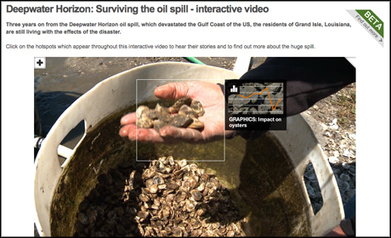
Robin Good's insight: Here is a good collection of nine web tools that allow you to create multimedia-rich, visual story-telling, immersive stories and reports alongside some impressive examples. My comments: Great tools list showcasing a nice array of visual presentation tools that can be effectively for journalistic reporting. Useful. Resourceful. Great examples. 8/10 Original article: http://www.journalism.co.uk/news/9-tools-for-journalists-to-produce-immersive-stories/s2/a554425/ Via Robin Good, Jim Lerman

Moses B. Tambason's curator insight,
November 15, 2013 10:21 PM
Watch this video to help the special needs in Africa this thanks giving holiday http://www.africatube.net/video/932/Neglected-people-of-Africa-need-your-help ; 
Gianfranco Marini's curator insight,
November 17, 2013 1:21 PM
Da http://www.journalism.co.uk 9 strumenti web based per lo storytelling. Si tratta di strumenti che consentono di realizzare storie visuali con elementi multimediali e interattivi.
Utili per la content curation e per realizzare presentazioni.
Possono essere utilizzati senza problemi nelal didattica per realizzare raccolte e/o narrazioni di eventi e/o problemi di carattere disciplinare e interdisciplinare.
Scoop.it!
"Why are my kids (especially my older kids) suddenly so interested in writing, when previously it was all about reading? Maybe it’s that we’re all taking writing seriously. At any rate, here are my top ten ways to get your kids excited about writing."
Scoop.it!

by Reg Swanson "Students love to share how they do things. This is especially true when they are working on iPads. I have started to collect and document some of these workflows to share with other classes and other schools. These are all taken directly from my conversations with Yr 4, 5 and 6 kids. All I have done is to put them in a similar format. What is interesting for me is how reflection of both the process and the product is so important for them. The student's talk about moving full circle so if they are not satisfied with the product they can modify or enhance it further.
Scoop.it!
posted by Michael Gorman from National Council of Teachers of English "Language Arts Teachers have often been aware of the website Read Write Think, but often are note aware of these amazing interactives. Teachers outside of Language Arts see the name of the site and never explore these interactives. They miss out on some of the best tools on the internet. After all, every subject has a need for students to read, write, and think. These interactives can be used in all areas! lets take a look at some of these tools that promote literacy and high order thinking. You will find they will connect with needs of CCSS, Next Generation Science, and any subjects literacy needs. I spent sometime investigating those that I feel could be used in just about any classroom (not just language arts). While these are the ones I highlighted I am sure you can find more that work for you and your students."
Scoop.it!

by Richard Byrne "I'm often asked for advice about picking the best blogging service for classroom use. Every school's and classroom's situation is a little different so it's not easy to make a blanket statement like, "blog service X is best for all teachers." To help teachers decide which blogging platform could be best for them, I created the following chart. The chart compares eight key elements of five common blogging platforms."
Scoop.it!

"When you design a syllabus for any course, you begin with the outcomes that you intend for your students to achieve, and you work backwards from these to particular readings and writing assignments. This method, formalized, is called the method of backward design. Backward design is a useful method for any professor in that it ensures that all assignments, readings, and activities will connect students with the outcomes that the professor deems essential to the course." Jim Lerman's insight: Part of a much larger website dealing with first-year writing at the university level: pedagogies, methods, and design
|
Scoop.it!

Demian Farnworth provides 12 exercises that help you flesh out and sharpen the overriding need your copy must focus on -- without repeating yourself.

Lesley Hussell's curator insight,
February 10, 2014 4:41 AM
Here is a simple, orderly process to get you thinking like your customer and writing persuasive copy that shows how they need your product/service. Good for websites, brochures or sales letters.
Scoop.it!
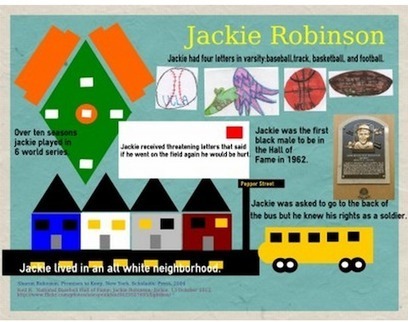
by Susan Lucille Davis summary by EdSurge "Ever thought about using infographics as assessments? Houston middle school teacher Susan Lucille Davis certainly has. In her 5th and 6th grade language arts classrooms, student Design Teams demonstrate their knowledge of nonfiction reading by gathering data and research, working out the visual language on paper and putting together the final product oneasel.ly. (See an example below from GettingSmart!) Read all about her tips and tricks here--you might just be inspired to make an infographic out of her suggestions."
Scoop.it!

"Muvizu has everything you need to tell an animated story from drag and drop customizable characters and pre-built sets, to libraries of animations and automatic lip-synching." Nik Peachey's insight: "This is another great animation software that looks really easy to use. There are some nice examples of animated audio clips. Looks like great fun for students to exercise their creativity and build dialogues." Via Nik Peachey, Jim Lerman

Bibhya Sharma's curator insight,
January 26, 2014 7:44 PM
can make instructions to our students fun and easy to comprehend.
Scoop.it!

The introduction of the Macintosh in 1984 remains one of the most impressive business presentations of our time. Image is of Steve Jobs and John Sculley
Scoop.it!

In the year that I taught language arts before moving into the social studies department one of the challenges that my students faced in writing short stories was coming up with ideas to get starte... Via John Evans

Lori Wilk's curator insight,
January 10, 2014 10:56 AM
Apps to help with idea generation and to start the creative writing process are excellent tools. 
Ali Anani's curator insight,
January 13, 2014 12:09 AM
Ideas for stories- quite interesting applications 
Jan Watts's curator insight,
February 8, 2014 1:53 AM
If you're a teacher who is always looking for useful apps, here's a few you may not have come across yet?
Scoop.it!

"The presentation below is created by Karen Bosh who is a K - 8 Technology Instructor. Karen provided some key ideas and app suggestions for teachers on how to use iPad for digital storytelling. Some of the apps she suggested are not free. She has also corroborated her ideas with a set of students project examples involving the use of iPad for digital storytelling. The presentation is a little bit long ( contains 129 slides) but is really worth your time. Have a look and share with your colleagues." Via John Evans

Bouchut's curator insight,
January 12, 2014 3:19 PM
Plusieurs applications indiquees pour créer des storytelling sur Ipad 
Donna shoesmith's curator insight,
January 16, 2014 3:49 AM
I know many of you are considering how to use tablets within the classroom - some interesting suggestions here - with links to apps, some of which are free. Have a look and see what you think! 
Jonathan Jarc's curator insight,
January 16, 2014 7:29 AM
Fellow ADE Karen Bosch, @KarlyB on Twitter, knows her digital storytelling stuff!
Scoop.it!
Robin Good's insight: MoveNote is an excellent free web and mobile app that allows you to create embeddable video presentations that include your video alongside a set of slides or pictures that you have pre-selected. MoveNote is very easy to use. You first upload your PowerPoint slides or individual images and then you start recording your live video by explaining while you highlight and move through the slides. Once completed you can save the composite recording and share it or embed on any website or blog. MoveNote connects directly to your Dropbox, Google Drive or BOX account as well as with Gmail and Microsoft email clients. Free to use. Try it out now: http://www.movenote.com/ iOS version: https://itunes.apple.com/fi/app/movenote/id535115011?mt=8 Check this video: http://www.youtube.com/watch?v=gZgqdAUYMaA Android version: https://play.google.com/store/apps/details?id=com.movenote&hl=en Video tutorials: http://www.youtube.com/user/Movenote/videos Covered before: https://www.scoop.it/t/presentation-tools/p/637597708/2011/11/07/bring-together-video-and-image-presentations-for-your-online-show-movenote Via Robin Good

Becky Roehrs's curator insight,
August 1, 2014 8:50 AM
You can create videos with your presentations: just add your explanations and/or notes to your slides, generate the video-then share via gmail, drive, dropbox, box, or via your chromebook, or use their iOS or Android app, or share via their Google Chrome app.
Check them out at: http://www.movenote.com/
Tutorials (Movenote lite is free for teachers/classrooms): http://edumovenote.tumblr.com/tutorials
Scoop.it!

Setting is an often underused tool. We all create one, usually more than one, but we don't always take advantage of what the right setting can do for our novels--the setting is just a place where the novel takes place, not something crafted to serve the story. Via mooderino
Scoop.it!

by Wesley Fryer "This evening I shared some ideas about interactive writing in a webinar series on digital writing hosted by Texas technology directors Miguel Guhlin and Diana Benner. These are a few of the links shared by Miguel and Colleen Rose (a participant from Northwestern Ontario) during our session. If you use a free offline web reading service like Pocket (which I love and adore) these are super links to add to your reading queue."
Scoop.it!

by Richard Byrne "Amazon Storybuilder is a new tool designed to help aspiring screenplay writers organize their stories. Storybuilder uses a virtual corkboard interface that will feel familiar to anyone that has ever used Padlet or Lino. On Storybuilder you can write your stories in a series of virtual sticky notes. Your corkboard can be arranged in columns for each act and scene in your story. Of course, if you're writing a book you could arrange your columns as chapters. Each sticky note can have a tag assigned to it to make it easier to locate when you have more notes than can appear on one page at time. You can arrange notes by dragging and dropping them on your Storybuilder board."
Scoop.it!

by Terry Brown "Whatever your interest or experience, you are invited to join me and 50,000+ other students in a massive, open, online course (MOOC) on the future of higher education led by Cathy Davidson, Professor of English at Duke University. Professor Davidson has designed an intriguing course on “The History and Future of (Mostly) Higher Education: Or, How We Can Unlearn Our Old Patterns and Relearn for a Happier, More Productive, Ethical, and Socially-Engaged Future.” "Cathy Davidson is co-founder of the Humanities, Arts, Sciences and Technology Alliance and Collaboratory (HASTAC), “a network of innovators dedicated to new forms of learning for the digital age.” The six-week long course, which begins on January 27, 2014, will use a variety of methods (lecture, discussion and interview) to deliver the course digitally to participants all over the world. The learning objectives are stated clearly and reflect the passion that Professor Davidson has for the subject:
Jim Lerman's insight: Davidson is a great thinker. This MOOC will probably be excellent.
Scoop.it!

"The WAC Clearinghouse provides access to the following books and books series. To date, 53 books are available on this site and additional books are in production. All books are available for free viewing and/or download. To view books, click on book covers, books series titles, or links in the new releases list." Jim Lerman's insight: A rich collection of books on writing process at both the k-12 and university levels, available for free viewing or download.
|